ROBOTICS EDUCATION & COMPETITION FOUNDATION - Mobile Robotics Technology Game Manual Secondary Teams 2019-2020 - SkillsUSA
←
→
Page content transcription
If your browser does not render page correctly, please read the page content below
ROBOTICS EDUCATION &
COMPETITION FOUNDATION
Presents:

Mobile Robotics Technology
Game Manual
Secondary Teams
2019-2020

            Adapted from VEX Robotics Competition
             Tower Takeover Robot Skills Challenge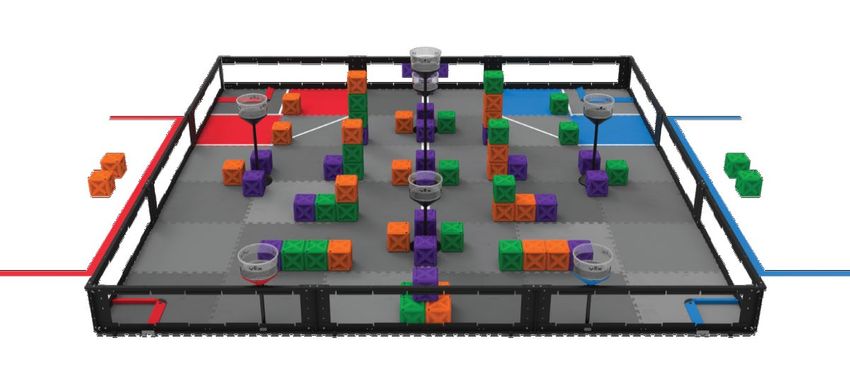
2019-20 Mobile Robotics Game Manual
Table of Contents
Overview ............................................................................................................................................. 3
Eligibility ............................................................................................................................................. 3
Clothing Requirement ...................................................................................................................... 3
The Game............................................................................................................................................ 3
A Primer .................................................................................................................................... 3
Game Definitions...................................................................................................................... 4
Scoring...................................................................................................................................... 9
Safety Rules............................................................................................................................ 10
General Game Rules .............................................................................................................. 10
VRC Turning Point Specific Game Rules ............................................................................. 12
Specific Game Rules for SkillsUSA ...................................................................................... 13
Robot Equipment ............................................................................................................................ 14
Design Process ............................................................................................................................... 19
Engineering Notebooks ......................................................................................................... 19
Design Interview ..................................................................................................................... 20
Programming Interview ......................................................................................................... 20
Safety Points .......................................................................................................................... 20
Team Ranking .................................................................................................................................. 20
Appendix A: Design Rubrics ........................................................................................................ 22
Appendix B: Programming Interview Process .......................................................................... 24
Appendix C: Programming Interview Scorecard ...................................................................... 29
Appendix D: Programming Skills Scorecard ............................................................................ 30
Appendix E: Driving Skills Scorecard ........................................................................................ 31
Appendix F: Overall Scorecard .................................................................................................... 32
Mobile Robotics Game Manual 2 7/31/2019
Secondary Teams REC Foundation 2019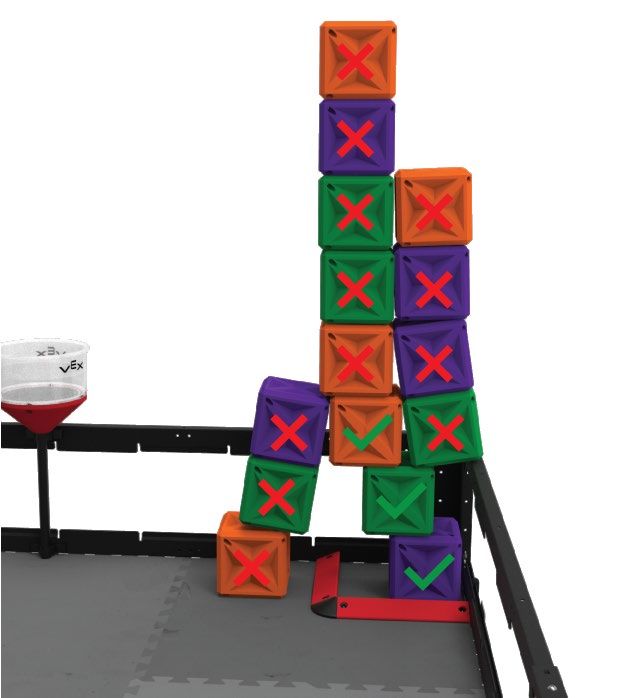
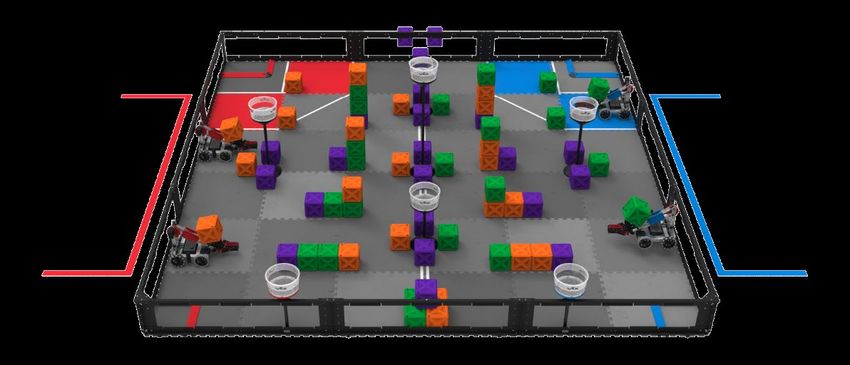
OVERVIEW Students will display their knowledge of the Engineering Process and demonstrate their ability to keep and maintain an engineering notebook as they engage in mobile robotics. Students will be judged on basis of their robot in design, construction, and programming by performing tasks in both autonomous and driver control functions, by the quality of their notebook, and by their ability to communicate their design process to the judges. The game that will be played is an adaptation of the VRC Tower Takeover Robot Skills Challenge. Although the field element positions are the same, many rules about scoring have been changed. ELIGIBILITY Open to a team of two active SkillsUSA members who are enrolled in a coherent sequence of courses or a career major that prepares the student for further education and/or employment related to technology, the health industry, trades or industry. Further, a high-school contestant must be earning credit toward a high-school diploma/certificate or its equivalent during the school year immediately preceding the National Leadership and Skills Conference. CLOTHING REQUIREMENT Class E: Contest specific – Business Casual For men: Official SkillsUSA white polo shirt, black dress slacks, black socks, black leather shoes. For women: Official SkillsUSA white polo shirt with black dress skirt (knee-length) or black slacks; black socks or black or skin-tone seamless hose; black leather dress shoes. These regulations refer to clothing items that are pictured and described at: www.skillsusastore.org. If you have questions about clothing or other logo items, call (800) 401-1560 or (703) 956-3723. Note: Contestants must wear their official contest clothing to the contest orientation meeting. THE GAME A Primer Matches are played on a 12 ft x 12 ft foam-mat, surrounded by a sheet-metal and polycarbonate perimeter. There are sixty-six (66) Cubes; twenty-two (22) of each color (orange, green, and purple). There are seven (7) towers around the field. Cubes are scored into four (4) Goal Zones and two Outer Protection Zones. Cubes can be placed into Towers to gain additional time in the Overtime Period, but be careful, the wrong colored Cube in a Zone or Tower will deduct from your score and any time advantage you may have achieved. Mobile Robotics Game Manual 3 7/31/2019 Secondary Teams REC Foundation 2019
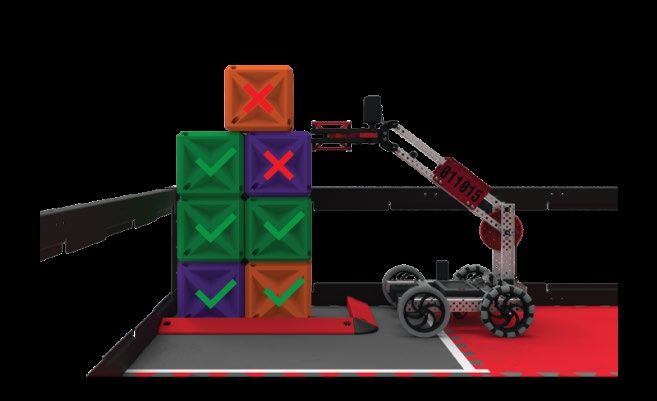
Figure 1: Initial setup configuration. Exact Cube placement on the field will be reveled at the SkillsUSA
NLSC Orientation Meeting.
Game Definitions
Alliance Station – The designated region where the Drive Team Members must remain for the duration
of the Match.
Barrier - The 2” (50.8mm) wide, 1” (25.4mm) tall, wedge-shaped plastic extrusion that borders each
Goal Zone and all supporting materials.
Figure 2: Close-up of a Goal Zone, depicting the Barrier.
Cube - A hollow plastic cube-shaped object, with an overall object width of 5.5” (139.7mm), that can be
Placed in Towers or Scored in Zones.
Figure 3: A Cube.
Mobile Robotics Game Manual 4 7/31/2019
Secondary Teams REC Foundation 2019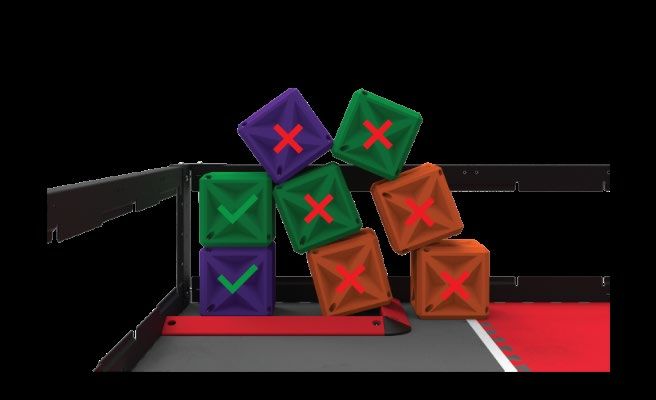
Drive Team Member – Either of the two (2) Students allowed in the Alliance Station during a Match for
each Team. Only Drive Team Members are allowed to touch the controls at any time during the Match
or interact with the Robot as per . Adults and/or Mentors and/or Coaches of the Team are not
allowed to be Drive Team Members.
Driving Skills Match – A Driving Skills Match consists of a sixty-second (1:00) Driver Controlled Period
plus an Overtime Period. There is no Autonomous Period. Teams can elect to end their run early,
however this will count as an official run.
Entanglement – A Robot status. A Robot is Entangled if it has grabbed, hooked, or attached to a Field
Element.
Field Element – The foam field tiles, field perimeter, white tape, Towers, Barriers, and all supporting
structures or accessories (such as driver station posts, field monitors, etc.).
Goal Zone - One of four (4) areas of foam field tiles defined by the inner edges of the Barriers and the
field perimeter in which Robots can Score Cubes. The Barrier and field perimeter are not considered
part of the Goal Zone.
Figure 4: Close-ups of the four (4) Goal Zones.
Match – Either a Driving Skills Match including its Overtime Period or a Programming Skills Match
including its Overtime Period.
Match Affecting – A rule violation status determined by the head referee. A rule violation is Match
Affecting if it changes the score of the match.
Match Load – One of two (2) purple Cubes that may be placed on the field according to .
Outer Protected Zone - The 2-dimensional area of foam tiles bound by the field perimeter and tape
lines where only Base Cubes can be Scored. The tape lines are not part of the Outer Protected Zone.
Figure 5: Close-up of the blue Outer Protected Zone where only Base Cubes can be Scored
Mobile Robotics Game Manual 5 7/31/2019
Secondary Teams REC Foundation 2019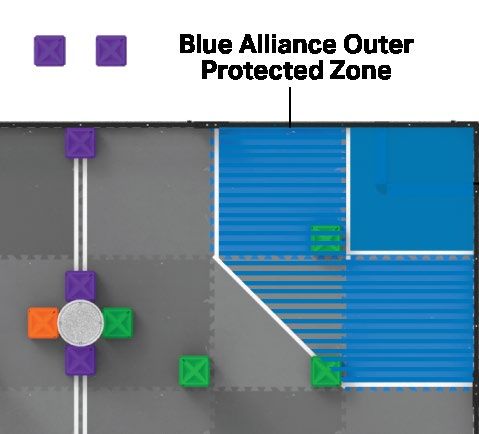
Placed - A purple Cube status. A purple Cube is considered Placed in a Tower at the end of the sixty-
second portion of the match (ie. before the Overtime Period) if any part of it is breaking the plane
defined by a given Tower’s Placing Line. Each Placed Cube gives the team an additional ten seconds
(0:10) of Overtime. Only purple Cubes may be used for Placing.
Note 1: Only one (1) Cube can be Placed in each Tower. If multiple Cubes meet the definition of
Placed for a single Tower, then neither one is considered Placed.
Note 2: If no purple Cubes are Placed, then there is no Overtime Period and the Match will end
at the end of the sixty-seconds.
Note 3: The maximum time of the Overtime Period is seventy seconds (1:10).
Note 4: The Score for the Match will be recorded after the Overtime Period even if the Team’s
overall Score decreases during the Overtime Period.
Note 5: Cubes Placed or removed from Towers during the Overtime Period have no effect on the
duration of the Overtime Period.
Figure 6: A Cube that is Placed. Figure 7: A Cube that is not Placed.
Figure 8: Neither Cube is Placed because they are not purple. Furthermore, the top Cube is not
Placed because it is not below the Placing Line.
Placing Line - The horizontal disc-shaped plane defined by the bottom edge of the textured surface on
a given Tower. This textured surface extends roughly 2” ± 0.25” (50.8 ± 6.3mm) from the top edge of the
Tower.
Mobile Robotics Game Manual 6 7/31/2019
Secondary Teams REC Foundation 2019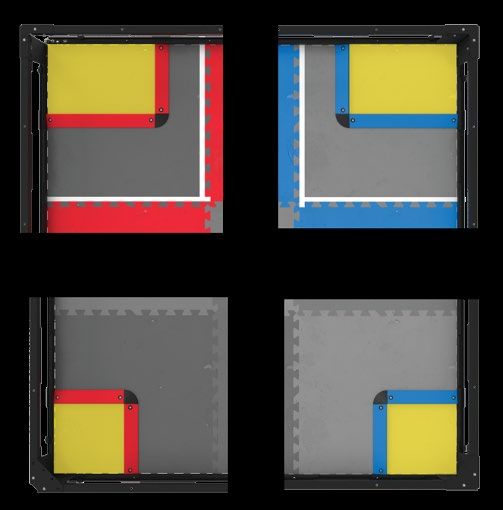
Figure 9: Close-up of a Tower, depicting the Placing Line.
Preload – The Cube, one (1) that must be used in accordance with prior to the start of the
Match. When starting in the red Alliance Station, Teams will use the orange Cubes. When starting in the
blue Alliance Station, Teams will use the green Cubes.
Programming Skills Match – A Programming Skills Match consists of a sixty-second (1:00)
Autonomous Period plus and Overtime Period. There is no Driver Controlled Period. Teams can elect to
end their run early, however this will count as an official run.
Robot – Anything that has passed inspection that a Team places on the field prior to the start of a
Match.
Scored – A Cube status. A Cube is considered Scored in a Goal Zone or Outer Protected Zone if it is
not contacting a Robot and meets the criteria of being either a Base Cube or a Stacked Cube.
• Base Cube – A Cube status. A Cube is considered a Base Cube if it meets the following criteria
at the end of the Match:
1. Contacting the gray foam tile within a Goal Zone or fully within the Outer Protected Zone.
2. Level or “flush” with the foam tile(s).
• Stacked Cube – A Cube status. A Cube is considered a Stacked Cube if it meets the following
criteria at the end of the Match:
1. Contacting the Top Surface of a Base Cube or Stacked Cube within the Goal Zone, ie. a
Cube cannot be a Stacked Cube in the Outer Protected Zone.
2. Not contacting the top of the field perimeter wall.
3. Not contacting the Top Surface of any Cubes which are not Scored.
Figure 10: An example of a Goal Zone with Cubes that are Scored (green checkmark) and not Scored (red “X”). These
Cubes are not Scored because the Robot is making contact with a Cube, and the Cube above is not on a Scored Cube.
Mobile Robotics Game Manual 7 7/31/2019
Secondary Teams REC Foundation 2019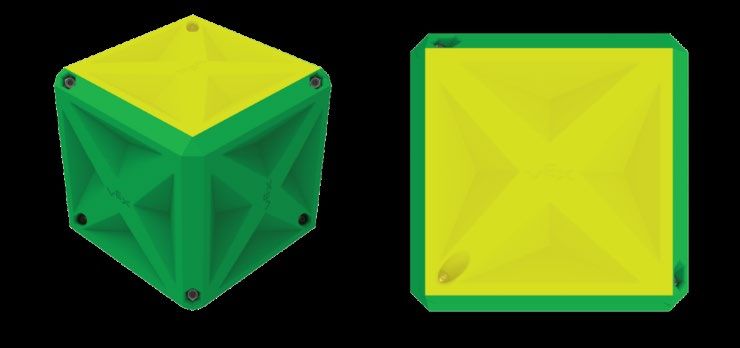
Figure 11: An example of a Goal Zone with Cubes that are Scored (green checkmark) and not Scored (red “X”). These
Cubes are not Scored because they are contacting Top Surfaces of Cubes which are not Scored.
Figure 12: An example of a Goal Zone with Cubes that are Scored (green checkmark) and not Scored (red “X”). These
Cubes are not Scored because they are contacting Top Surfaces of Cubes which are not Scored.
Mobile Robotics Game Manual 8 7/31/2019
Secondary Teams REC Foundation 2019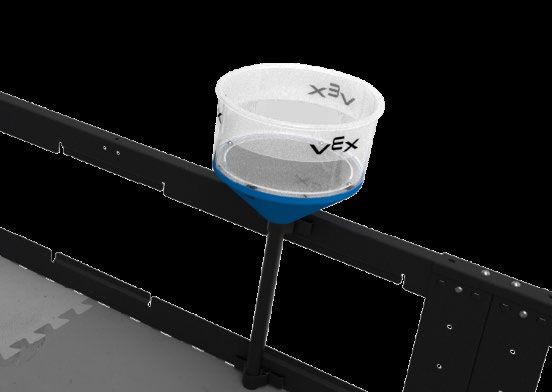
Figure 13: An example of an Outer Protected Zone with a Cube that is Scored (green checkmark) and not Scored (red “X”).
The Cube not Scored is because it is not fully within the Outer Protected Zone because it is touching the tape line.
Top Surface - The side of a Cube that is furthest away from (and roughly parallel to) the gray foam tiles.
The inner indents on that Cube’s side are considered part of its Top Surface; the chamfered edges are
not.
Figure 14: Close-up of a Cube, depicting the Top Surface in yellow.
Tower - One of seven (7) cylindrical field structures that can be used for Placing Cubes. There are three
Tower heights: 18.83” (470.8mm), 24.66” (626.5mm), and 37.91” (963.0mm) from the field tiles to the
top of the Tower
Figure 15: Close-up of a Tower. All Towers are used for the same purpose of Placing Cubes. The color on the base of
the Tower does not have any meaning in this game.
Scoring
Scoring Cubes in red Goal Zones
• Base or Stacked Cubes that are orange or purple are worth five (5) points
• Base or Stacked Cubes that are green are worth negative five (-5) points
Mobile Robotics Game Manual 9 7/31/2019
Secondary Teams REC Foundation 2019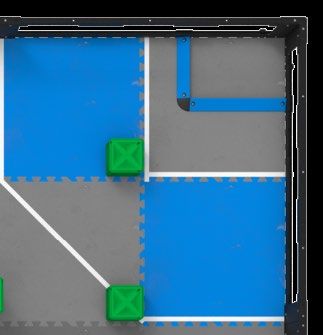
Scoring Cubes in blue Goal Zones • Base or Stacked Cubes that are green or purple are worth five (5) points • Base or Stacked Cubes that are orange are worth negative five (-5) points Scoring Cubes in the red Outer Protected Zone • Base Cubes that are orange or purple are worth two (2) points • Base Cubes that are green are worth negative two (-2) points Scoring Cubes in the blue Outer Protected Zone • Base Cubes that are green or purple are worth two (2) points • Base Cubes that are orange are worth negative two (-2) points Safety Rules Be safe out there. If at any time the Robot operation or Team actions are deemed unsafe or have damaged any Field Elements or Cubes, the offending Team may be Disabled and/or Disqualified at the discretion of the Head Referee. The Robot will require re-inspection before it may again take the field. Stay inside the field. If a Robot is completely out-of-bounds (outside the playing field), it will be Disabled for the remainder of the Match. Note: The intent is NOT to penalize Robots for having mechanisms that inadvertently cross the field perimeter during normal game play. General Game Rules Treat everyone with respect. All Teams are expected to conduct themselves in a respectful and professional manner while competing in VEX Robotics Competition events including Mobile Robotics Technology. If a Team or any of its members (Students or any adults associated with the Team) are disrespectful or uncivil to event staff, volunteers, or fellow competitors, they may be Disqualified from a current or upcoming Match. Team conduct pertaining to may also impact a team’s eligibility for judged awards. Repeated or extreme violations of could result in a Team being Disqualified from an entire event, depending on the severity of the situation. This rule exists alongside the REC Foundation Code of Conduct. Violation of the Code of Conduct can be considered a violation of and can result in Disqualification from a current Match, an upcoming Match, an entire event, or (in extreme cases) an entire competition season. The Code of Conduct can be found at https://www.roboticseducation.org/competition-teams/vex-roboticscompetition/ . VRC is a student-centered program. Adults may assist Students in urgent situations when preparing for events, but adults should never work on or program a Robot without Students on that Team being present and actively participating. Students should be prepared to demonstrate an active understanding of their Robot’s construction and programming to judges or event staff. During the competitive events, Adults may not touch or program the Robot for any reason. Use common sense. When reading and applying the various rules in this document, please remember that common sense always applies in VEX Robotics Competitions including the Mobile Robotics Technology Competition. Mobile Robotics Game Manual 10 7/31/2019 Secondary Teams REC Foundation 2019
Robots begin the Match in the starting cube. At the beginning of a Match, each Robot must be
smaller than a volume of 18” (457.2 mm) long by 18” (457.2 mm) wide by 18” (457.2 mm) tall. Using
Field Elements, such as the field perimeter wall, to maintain starting size is only acceptable if the Robot
would still satisfy the constraints of and pass inspection without the Field Element. Robots in
violation of this limit will be removed from the field prior to the start of the Match, at the Head Referee’s
discretion.
Keep your Robots together. Robots may not intentionally detach parts during the Match or
leave mechanisms on the field.
Minor violations of this rule that do not affect the Match will result in a warning. Match Affecting offenses
will result in a Disqualification. Teams that receive multiple warnings may also receive a Disqualification
at the Head Referee's discretion. Multiple intentional infractions may result in Disqualification for the
entire competition.
Drive your own Robot. Each Team shall include up to two (2) Drive Team Members. No Drive
Team Member may fulfill this role for more than one Team in a given competition season.
Only Drivers, and only in the Alliance Station. During a Match, all Drive Team Members must
remain in their Alliance Station. Drive Team Members are not allowed to use any sort of communication
devices during their Match. Devices with communication features turned off (e.g. a phone in airplane
mode) are allowed.
Note 1: Drive Team Members are the only Team members that are allowed to be in the
Alliance Station during a Match.
Note 2: During a Match, Robots may be operated only by the Drive Team Members
and/or by software running on the Robot’s control system, in accordance with
and .
Note 3: Drivers may choose either Alliance Station in which to start the Match and may
choose again for which Alliance Station to start the Overtime Period. Once the
choice is made and the period has begun, Drivers must stay in their chosen
Alliance Station.
Violations or refusal to comply with this rule could be considered a violation of .
N/A
Hands out of the field. Drive Team Members may only touch the Team’s controls at specified
times during a Match. Drive Team Members are prohibited from making intentional contact with any
Game Object, Field Element, or Robot during a Match.
Drive Team Members are not permitted to break the plane of the field perimeter at any time during the
Match.
Minor violations of these rules that do not affect the Match will result in a warning. Match Affecting
offenses will result in a Disqualification. Teams that receive multiple warnings may also receive a
Disqualification at the Head Referee's discretion.
Autonomous means “no humans”. During the Programming Challenge Match, Drive Team
Members are not permitted to interact with the Robot in any way, directly or indirectly. This could
include, but is not limited to:
• Activating any controls on their VEXnet Joysticks or V5 Controllers.
• Unplugging or disconnecting from the field in any way.
• Triggering sensors (including the Vision Sensor) in any way, even without touching them.
Violations of this rule would result in a Disqualification.
N/A
Mobile Robotics Game Manual 11 7/31/2019
Secondary Teams REC Foundation 2019N/A
N/A
N/A
N/A
Don’t clamp your Robot to the field. Robots may not intentionally grasp, grapple or attach to
any Field Elements. Strategies with mechanisms that react against multiple sides of a Field Element in
an effort to latch or clamp onto said Field Element are prohibited. The intent of this rule is to prevent
Teams from both unintentionally damaging the field and/or from anchoring themselves to the field.
Minor violations of this rule that do not affect the Match will result in a warning. Match Affecting offenses
will result in a Disqualification. Teams that receive multiple warnings may also receive a Disqualification
at the Head Referee’s discretion.
Let go of Game Objects after the Match. Robots must be designed to permit easy removal of
Cubes from any mechanism without requiring the Robot to have power after a Match.
It’s not over until it’s over. Scores will be calculated for all Matches immediately after the
Match, once all Cubes, Field Elements, and Robots on the field come to rest.
Be prepared for minor field variance. Field Element tolerances may vary from nominal by
±1.0”. Cube tolerances may vary from nominal by ±0.10”. Cube placement at the beginning of Matches
may vary from nominal by ±1.5”. Teams are encouraged to design their Robots accordingly.
Note: The field perimeter should always be resting upon the Field Perimeter Rubber
Feet, regardless of whether or not the tabs have been cut from the foam field tiles.
Replays are allowed, but rare. Replays are at the discretion of the Event Partner and Head
Referee and will only be issued in the most extreme circumstances.
N/A
N/A
VRC Tower Takeover Specific Game Rules
Starting a Match. Prior to the start of each Match, the Robot must be placed such that it is:
1. Contacting the field perimeter wall on the side that coincides with their Alliance’s Goal Zone and
Alliance Station.
2. Contacting a foam field tile
3. Not contacting a Tower.
4. Not contacting any Cubes other than the Preload.
5. Contacting a Preload
a. The Preload must be contacting exactly one (1) Robot
b. The Preload must be fully within the field perimeter.
6. Not contacting a Goal Zone or a Barrier.
Mobile Robotics Game Manual 12 7/31/2019
Secondary Teams REC Foundation 2019Figure 15: Four examples of Robots in valid starting positions.
N/A
N/A
N/A
N/A
Keep Cubes in the field. Teams may not intentionally remove Cubes from the field. While
Cubes may accidentally leave the field when attempting to Score, doing so intentionally or repeatedly
would be a violation of this rule. Cubes that leave the field during Match play, intentionally or
unintentionally, will not be returned.
N/A
Rules Specific only to SkillsUSA
This manual will be updated for NLSC. Rules in this manual are subject to change for
NLSC and will be announced when teams arrive at the Championship for the Orientation Meeting.
Teams should be prepared for the following changes which may or may not occur. No other rules will be
changed.
1. Outer Protection Zone location.
2. The starting position of all Cubes.
3. Scoring values of Scored Cubes (including which colors should be scored in each Zone).
4. The amount of additional time given for Placed Cubes.
5. The colors of Placed Cubes changing from purple to orange or green.
Only Placed Cubes are looked at before the Overtime Period. Scores are calculated
at the end of the Match per . However, the amount of Overtime is calculated at the end of the
sixty-second (1:00) period and before Overtime after all Cubes, Field Elements, and Robots come to
rest.
Place your Robot before Overtime. Teams will be given no more than thirty-seconds
(0:30) to pick up their Robot and place it in a legal starting position using an additional Pre-load.
Teams can choose to stay on the same side as they started the Match, or switch sides at this point.
Once ready, the Head Referee will count down and start the Overtime Period. If Teams take longer than
the thirty second (0:30) grace period after the sixty-seconds (1:00), the Head Referee will start the
Mobile Robotics Game Manual 13 7/31/2019
Secondary Teams REC Foundation 2019Overtime Period and the Team will not be permitted to start their Robot until they have their Robot in a
legal starting position .
The Cubes do not get reset before the Overtime Period. After the sixty-second period
(1:00), the Cubes may not be moved from their current locations on the field until the start of the
Overtime Period, ie. do not reset the field. Any Cubes contacting the Robot must be removed from the
Robot and may not be returned to the field, ie. those Cubes are now “out of play.”
The Cubes in the Towers can be used to Score during the Overtime Period. The
Placed Cubes in Towers do not need to stay in the Towers during the Overtime Period. Teams are
permitted to use Robot actions to remove the Cubes from the Towers to Scored locations on the field.
Note: This can be done at any point in the match legally. But teams will want to have Cubes
Placed in Towers at the end of the sixty-seconds, then Scored in Zones at the end of the
Overtime Period.
The Match Loads can be placed anywhere. If the Team has earned an Overtime
Period by Placing Cubes in Towers, the Team will be given two (2) purple Cubes as Match Loads and
can place these before the start of the Overtime Period, anywhere on the field in a non-Scored location
and not touching the Robot.
Work safe. At no time may a team member take off his or her safety glasses while
working on a Robot or in the Alliance Station at the field. This includes all of practice time.
No Power Tools. Teams may not use power tools in the competition or pit areas. Hand
tools are the only acceptable means of cutting and bending materials.
ROBOT EQUIPMENT
Competitors will be required to purchase their own robot kits for competition. All equipment found in the
VEX EDR product line found here is permitted with the following limits.
One Robot per Team. Only one (1) Robot will be allowed to compete per Team. Though it is
expected that Teams will make changes to their Robot at the competition, a Team is limited to only one
(1) Robot. As such, a legal Robot has the following subsystems:
Subsystem 1: Mobile robotic base including wheels, tracks, legs, or any other mechanism that
allows the robot to navigate the majority of the flat playing field surface.
Subsystem 2: Power and control system that includes a legal VEX battery, a legal VEX control
system, and associated motors for the mobile robotic base.
Subsystem 3: Additional mechanisms (and associated motors) that allow manipulation of game
objects or navigation of field obstacles.
Given the above definitions, a minimum Robot for use must consist of 1 and 2 above. Thus, if you are
swapping out an entire subsystem of either item 1 or 2, you have now created a second Robot and are
no longer legal.
1. Teams may not compete with one Robot while a second is being modified or assembled.
2. Teams may not switch back and forth between multiple Robots during a competition. This
includes using different Robots for Driving Skills and Programming Skills.
3. Multiple Teams may not use the same Robot. Once a Robot has competed under a given
team number at an event, it is “their” Robot - no other Teams may compete with it for the
duration of the competition season.
Robots must pass inspection. Every Robot will be required to pass a full inspection before
being cleared to compete. This inspection will ensure that all robot rules and regulations are met. Initial
inspections will take place during the Orientation meeting.
Mobile Robotics Game Manual 14 7/31/2019
Secondary Teams REC Foundation 2019Robots must be safe. Mechanisms and components that could potentially damage playing field
components such as the field perimeter or Field Elements are not permitted.
Robots must fit in a sizing box. At the beginning of any Match, Robots must be smaller than
18” (457.2 mm) long by 18” (457.2 mm) wide by 18” (457.2 mm) tall.
1. Robots may expand beyond their starting size constraints after the start of a Match.
2. Any restraints used to maintain starting size (i.e. zip ties, rubber bands, etc.) MUST remain
attached to the Robot for the duration of the Match.
Robots are built from the VEX EDR system. Robots may be built ONLY using official VEX
EDR components, unless otherwise specifically noted within these rules. Teams are responsible for pro-
viding documentation proving a part’s legality in the event of a question. Examples of documentation
include receipts, part numbers, official VEX websites, or other printed documentation.
VEX products come from VEX Robotics or VEX Robotics Resellers. Official VEX products
are ONLY available from VEX Robotics & official VEX Resellers. To determine whether a product is
“official” or not, consult www.vexrobotics.com. A complete list of authorized VEX Resellers can be found
at www. vexrobotics.com/find-a-reseller.
Certain non-VEX EDR components are allowed. Robots are allowed the following additional
“non-VEX” components:
1. Any material strictly used as a color filter or a color marker for a VEX Light Sensor.
2. Any non-aerosol based grease or lubricating compound, when used in extreme moderation
on surfaces and locations that do NOT contact the playing field walls, foam field surface,
Cubes, or other Robots.
3. Anti-static compound, when used in extreme moderation (i.e. such that it does not leave
residue on playing field walls, the foam field surface, Cubes, or other Robots).
4. Hot glue when used to secure cable connections
5. An unlimited amount of 1/8” (or local metric equivalent), braided, nylon rope
6. Commercially available items used solely for bundling or wrapping of 2-wire, 3-wire, 4-wire,
or V5 Smart Cables, and pneumatic tubing are allowed. These items must solely be used for
the purposes of cable protection, organization, or management. This includes but is not
limited to electrical tape, cable carrier, cable track, etc. It is up to inspectors to determine
whether a component is serving a function beyond protecting and managing cables.
3D Printed Parts. An unlimited amount of plastic 3D printed parts may be used on the Robot
using PLA, PETG and/or ABS. These parts must be documented in the Engineering Notebook and
explained why they are chosen including how they were printed.
Note: Using a 3D printer to make molds for casting or injection molding is not legal and not within the
spirit of this rule.
A limited amount of tape is allowed. Robots may use a small amount of tape when used for
the following purposes:
1. For the sole purpose of securing any connection between the ends of two (2) VEX cables.
2. For labeling wires and motors.
3. For covering the back of License Plates (i.e. the “wrong color”).
4. For the purposes of preventing leaks on the threaded portions of pneumatic fittings. This is
the only acceptable use of Teflon tape.
5. For securing and retaining a VEXnet Key 2.0 to the VEX ARM® Cortex®-based
Microcontroller. Using tape in this manner is highly recommended to ensure a robust
connection.
6. In any other application that would be considered a “non-functional decoration” per .
Mobile Robotics Game Manual 15 7/31/2019
Secondary Teams REC Foundation 2019Certain non-VEX screws, nuts, and washers are allowed. Robots may use any
commercially available #4, #6, #8, M3, M3.5, or M4 screw up to 2” (50.8mm) long (nominal), and any
commercially available nut, washer, and/or spacer (up to 2” / 50.8mm long) to fit these screws.
Robots have one microcontroller. Robots must use ONLY one (1) VEX EDR Microcontroller.
1. Examples of VEX EDR Microcontrollers are the VEX ARM® Cortex®-based Microcontroller
(276- 2194) and the V5 Robot Brain (276-4810).
2. Any other microcontrollers or processing devices are not allowed. This includes
microcontrollers that are part of other VEX product lines, such as VEXpro, VEX RCR, VEX
IQ, or VEX Robotics by HEXBUG; it also includes devices that are unrelated to VEX, such as
Raspberry Pi or Arduino devices.
Robots use VEXnet. Robots must ONLY utilize the VEXnet system for all Robot
communication.
1. VEX 75Mhz Crystal Radios are prohibited.
2. Electronics from the VEXpro, VEX RCR, VEXplorer, VEX IQ, or VEX Robotics by HEXBUG
product line are prohibited.
3. Mixing and matching of VEXnet transmitters and receivers is prohibited. The VEXnet Joystick
may only be used in conjunction with a VEX ARM® Cortex®-based Microcontroller. A
VEXnet upgraded 75MHz Transmitter may only be used in conjunction with a PIC
Microcontroller. A V5 Controller may only be used in conjunction with a V5 Robot Brain.
4. Teams are permitted to use the Bluetooth® capabilities of the V5 Robot Brain and/or V5
Controller in team pits or outside of Matches. However, VEXnet must be used for wireless
communication during Matches.
Robots use one control system. Robots may use either:
Option 1: A VEX ARM® Cortex®-based Microcontroller, up to ten (10) 2-Wire Motors or VEX
Servos (in any combination up to ten) and a legal VRC pneumatic system per .
Option 2: A VEX ARM® Cortex®-based Microcontroller, up to twelve (12) 2-Wire Motors or VEX
Servos (in any combination up to 12) and no pneumatic components, excluding pneumatic tubing.
Option 3: A V5 Robot Brain, up to six (6) V5 Smart Motors, and a legal VRC pneumatic system per
.
Option 4: A V5 Robot Brain, up to eight (8) V5 Smart Motors, and no pneumatic components,
excluding pneumatic tubing.
Table 1: The four combinations of control system, motors and pneumatics that are legal.
One motor or Y cable per motor port. If using a VEX ARM® Cortex®-based Microcontroller,
a maximum of one (1) VEX Y-cable can be used per Motor Port of the Microcontroller or Power
Expander. (You cannot “Y off a Y” to have more than two (2) motors controlled by the same Motor Port.)
Mobile Robotics Game Manual 16 7/31/2019
Secondary Teams REC Foundation 20191. Teams using the VEX ARM® Cortex®-based Microcontroller may only power one (1) 2-wire
Motor per each of the two 2-wire motor ports on the Microcontroller. It is illegal to “Y” off a 2-
wire Motor Port.
2. Teams may not “Y” off of a Motor Controller 29 (276-2193).
Electrical power comes from VEX batteries only. The only allowable source(s) of electrical
power are as follows:
1. If using a VEX ARM® Cortex®-based Microcontroller, Robots may use (1) VEX 7.2V Robot
Battery Pack of any type.
a. Robots utilizing the VEX Power Expander may use a second VEX 7.2V Robot Battery
of any type. Robots are permitted to use a maximum of one (1) VEX Power
Expander.
b. The only legal means for charging a VEX 7.2V Battery Pack is via one of the following
VEX Battery Chargers: Smart Charger (276-1445); Smart Charger v2 (276-2519);
276-2221 (discontinued), 276-2235 (discontinued). All other chargers are strictly
prohibited.
c. Teams must connect a charged 9V backup battery to their VEXnet system using the
VEXnet Backup Battery Holder (276-2243).
d. VEXnet Joysticks must only be powered by AAA batteries.
2. If using a V5 Robot Brain, Robots may use (1) V5 Robot Battery (276-4811).
a. There are no legal power expanders for the V5 Robot Battery.
b. V5 Robot Batteries may only be charged by the V5 Robot Battery Charger (276-
4812).
c. V5 Wireless Controllers may only be powered by their internal rechargeable battery.
Teams are permitted to have an external power source (such as a rechargeable
battery pack) plugged into their V5 Controller during a Match, provided that this power
source is connected safely and does not violate any other rules.
Table 2: The legal sources for electrical power.
One or two controllers per Robot. No more than two (2) VEX wireless remotes may control a
single Robot during the tournament.
1. No modification of these transmitters is allowed of ANY kind.
Mobile Robotics Game Manual 17 7/31/2019
Secondary Teams REC Foundation 20192. No other methods of controlling the Robot (light, sound, etc.) are permissible. i. Using sensor
feedback to augment driver control (such as motor encoders or the Vision Sensor) is
acceptable.
3. Teams may not “mix-and-match” wireless remote types, such as using a VEXnet Joystick
and V5 Wireless Controller at the same time.
No modifications to electronic components are allowed. Motors (including the internal PTC
or Smart Motor firmware), microcontrollers (including V5 Robot Brain firmware), extension cords,
sensors, controllers, battery packs, reservoirs, solenoids, pneumatic cylinders, and any other electrical
component or pneumatics component of the VEX EDR platform may NOT be altered from their original
state in ANY way.
1. External wires on VEX electrical components may be repaired by soldering, using twist/crimp
connectors, electrical tape or shrink tubing such that the original functionality / length is not
modified in any way. Wire used in repairs must be identical to VEX wire. Teams may make
these repairs at their own risk; incorrect wiring may have undesired results.
2. Teams are advised to use the latest official VEXos firmware updates, found at
www.vexedr.com. Custom firmware modifications are not permitted.
3. Teams may change or replace the gears in the “2-Wire 393” or “2-Wire 269” motors with the
corresponding official VEX Replacement Gears
4. Teams may change or replace the gear cartridge in the V5 Smart Motor with other official
replacement gear cartridges
Most modifications and repairs to non-electrical components are allowed. Physical
modifications such as bending or cutting are permitted and may be done to legal VEX Robotics
Competition metal structure or plastic components.
1. Physical modifications to electrical components such as a legal microcontroller or radio is
prohibited unless otherwise explicitly permitted, per .
2. Internal or external mechanical repairs of VEX Limit and Bumper switches are permitted.
Modifying the metal arm on the Limit Switch is permitted. Using components from these
devices in other applications is prohibited.
3. Metallurgical modifications that change fundamental material properties, such as heat
treating, are not permitted.
4. Teams may cut pneumatic tubing to a desired length.
5. Teams are permitted to fuse/melt the end of the 1/8” nylon rope to prevent fraying.
6. Welding, soldering, brazing, gluing, or attaching in any way that is not provided within the
VEX EDR platform is NOT permitted.
7. Mechanical fasteners may be secured using Loctite or a similar thread-locking product. This
may ONLY be used for securing hardware, such as screws and nuts.
Custom V5 Smart Cables are allowed. Teams must use official V5 Smart Cable Stock but
may use commodity 4P4C connectors and 4P4C crimping tools. Teams who create custom cables
acknowledge that incorrect wiring may have undesired results.
Keep the power switch accessible. The Robot on/off switch must be accessible without
moving or lifting the Robot. The microcontroller lights and/or screen should also be visible by
competition personnel to assist in diagnosing Robot problems.
Robots are ready when they are at the field. Teams must bring their Robots to the field
prepared to play. Teams who use VEX pneumatics must have their systems charged before they place
the Robot on the field.
Pneumatics are limited. Pneumatic devices may only be charged to a maximum of 100 psi.
Teams may only use a maximum of two (2) legal VEX pneumatic air reservoirs on a Robot.
Mobile Robotics Game Manual 18 7/31/2019
Secondary Teams REC Foundation 2019Programing using any language. Teams may program the robots in any programming
language that suits their needs. Teams will not be judged on which language is chosen, but rather, will
be judged on how the robot performs. Some programming options can be found here.
DESIGN PROCESS
Judges must use the Design Rubric to evaluate the teams’ design process. A record of all teams
submitting notebooks shall be kept by the Judge Advisor. Notebooks shall be collected during the
orientation meeting and brought to the Judges’ room for evaluation. The Rubric comes in two (2) pages.
The first page is for the Engineering Notebook, and the second page is for the Design Interview.
Engineering Notebooks
The Engineering Notebook is a way for teams to document how the VEX Robotics Competition
experience has helped them to better understand the engineering design process while also practicing a
variety of critical life skills including project management, time management, brainstorming, and
teamwork. Bound notebooks are preferred by Judges and are given a 3-point bonus on the Design
Rubric.
Each notebook is created through a concerted effort by a team to document their design decisions.
Engineering is an iterative process whereby students recognize and define a problem, brainstorm and
work through various stages of the design process, test their designs, continue to improve their designs,
and continue the process until a solution has been identified. During this process, students will come
across obstacles, encounter instances of success and failure, and learn many lessons. It is this iterative
process that students should document in their Engineering Notebook.
The Engineering Notebook is an opportunity to document everything a team does throughout the design
process. Students should include a number of items in their Engineering Notebook including:
• A table of contents
• Team meeting notes as they relate to the design process
• Design concepts, sketches and pictures
• Notes from competitions regarding observations that should be considered in the next iteration of
their design
• Programming improvements or significant modifications
• CAD drawings of their Robot and/or specific elements of their Robot.
• Team members’ observations and thoughts on their design
• Team organization practices as they relate to their design process
• Other documentation that a team finds useful as related to their robot’s design
The team should also document their project management practices including their use of personnel,
financial, and time resources.
A bound quad-ruled notebook is the preferred format. The team number should be on the cover. The
notebook should never be edited. Pages should never be removed from the notebook even if they
contain errors. The notebook should be written in ink with errors crossed out using a single line. Pages
should be numbered, and entries should be dated in chronological order with each page signed or
initialed by the students. Additional materials such as examples of computer code or CAD drawings
should be glued or taped into the notebook.
Mobile Robotics Game Manual 19 7/31/2019
Secondary Teams REC Foundation 2019The question of what is a ‘bound’ Engineering Notebook often arises. To be considered bound, a
notebook must have been bound prior to any entries being made in it.
Judges will not accept electronic notebooks on laptops, thumb drives, or cloud-based servers.
Design Interview
All teams will be interviewed by Judges who will ask them questions about their robot and design
process. Teams should bring their robot with them to the interview. Judges will fill out page 2 of the
Design Rubric and give teams a score based on the responses of the team members. Teams are not to
prepare a slide presentation such as Power Point for this interview and should be prepared to talk about
their robot without any written notes such as cards or written outlines.
Appendix A contains the Design Award Rubric and Design Interview Rubric.
Programming Interview
All teams will be interviewed by Judges who will ask questions about the coding and programming
process. Teams should bring their robot, laptop and programming cable with them to the interview.
Judges will use the following interview process rubric to determine the knowledge of the programmer
and quality of the written code.
Appendix B contains the Programming Interview questions.
Appendix C contains the Programming Interview Scorecard.
Safety Points
All teams are expected to be safe in the competition area. Students will start with 90-points in Safety
and will be deducted 10-points for every instance of a safety violation. The minimum score is zero.
Students will be notified immediately upon each instance of a safety violation. Examples of Safety
violations are as follows.
• General horseplay (running, throwing objects, pushing others)
• Not wearing shoes (except when walking on foam tiles)
• Not wearing safety glasses while working on Robot
• Not wearing safety glasses while standing in the Alliance Station
• Using teeth as a tool (other than eating)
• Leaving equipment in aisles (creating trip hazards)
TEAM RANKING
Teams will be given a total score based on the Professional Development Test, Engineering Notebook
(Page 1 of the Design Rubric), CAD drawings, the Design Interview (Page 2 of the Design Rubric), the
Programming Interview, the team’s highest Programming Skills Score, the team’s highest Driving Skills
Score, and the Team’s Safety Score. Teams are ranked by the sum of their weighted scores in these
categories.
All teams will be given the same number of Robot Skills Matches to be determined by the Competition
Organizer. At SkillsUSA NLSC, each team will get three (3) chances for Programming Skills and three
(3) chances for Driving Skills. Only the highest Programming Skills score and the highest Driving Skills
score will be used to determine rankings.
In the case of ties, the tie will be broken by looking at the following in order.
Mobile Robotics Game Manual 20 7/31/2019
Secondary Teams REC Foundation 20191. Engineering Notebook Score 2. Team’s highest Programming Skills Score 3. Team’s highest Driving Skills Score Appendix F contains the Mobile Robotics Technology Overall Scorecard. Mobile Robotics Game Manual 21 7/31/2019 Secondary Teams REC Foundation 2019
Team Number ___________
CAD Drawings
(Keep separate
from Engineering
Notebook Score)
1 point = Made an
attempt to have a
CAD drawing, but it
is not accurate
2-3 points = Have
basic elements of
CAD drawings
4-5 points = Have
detailed CAD
drawings for entire
Robot including
some early
iterations of design
CAD Score______
Mobile Robotics – Secondary Teams 22 7/31/2019
Appendix A – Design Rubric REC Foundation 2019Team Number ___________
Professional
Dress
(Add this to the
Design Interview
Score)
As the students
walk into the
interview, check to
see if their shirts
are fully tucked in.
Add 5 points if
BOTH students
have their shirts
fully tucked in.
Professional
Total points for Dress Score_____
Design Interview (30 Max):
(5 or 0)
Mobile Robotics – Secondary Teams 23 7/31/2019
Appendix A – Design Rubric REC Foundation 2019Mobile Robotics Programming Interview Process
This interview is comprised of 3 sections. For each section please read all instructions and questions
before assessing the team.
Please pay attention to the students’ Professional Dress as they walk into the interview. There is a point
value evaluation on the Programming Interview Scorecard for this category.
Section 1: General Programming Information (Maximum 15 pts)
For this section you will be asking the team general information about their program. This section will
make sure teams have come prepared for their interview.
1. Did the team bring a laptop with their code?
No (0 pts) Yes (5 pts)
2. Did the team bring their robot?
No (0 pts) Yes (5 pts)
3. Ask the team, what programming software are they using. Does it match the code that
was brought to the interview?
No (0 pts) Yes (5 pts)
Mobile Robotics – Secondary Teams 24 7/31/2019
Appendix B – Programming Interview REC Foundation 2019Section 2: Program Design and Fluency (Maximum 60 pts)
In this section you will ask the team to walk you through their code. Ask the team to start at the very
beginning and explain the program until the robot stops. Read all questions beforehand because you will
need to assess the program after the walk through is complete. The following questions are for the
judge and should not be asked to the team.
4. Did the program include comments?
1 pt 2 pt 5 pt 9 pt 10 pt
Program did not Program contained comments but lacked in depth. The Program
contain comments were only useful for the programmer. contained in
comments. depth comments
for their entire
code base.
Comments were
articulate and
meaningful.
5. Did the program use variables instead of hard coding numbers? (eg. when they set the
speed of the motor, is it a number or a variable)?
1 pt 2 pt 5 pt 9 pt 10 pt
Program did not Program contained a mix of variables and hard coded The program
include any values. Variable may not be organized. used variables
variables. for all or most
opportunities.
Variables were
organized and
named in a
meaningful way.
Mobile Robotics – Secondary Teams 25 7/31/2019
Appendix B – Programming Interview REC Foundation 20196. Did the program contain advanced programing structures like loops and if else
statements?
1 pt 2 pt 5 pt 9 pt 10 pt
Program did not The program only had a few loops or if/else structure. The program
contain any Some parts of the code were reused in loops but others contained many
loops or if else were programed linearly. loops and if/else
statements. structures.
7. Did the program contain functions that were used throughout their code?
1 pt 2 pt 5 pt 9 pt 10 pt
Program did not The program used some functions but missed The program
contain any opportunities to make a function. had multiple
functions. functions and
was used to
reuse code
wherever
possible in their
program.
8. Is the code formatted in an organized manner?
1 pt 2 pt 5 pt 9 pt 10 pt
Program did not Most or some of the code was formatted. There are The entire code
follow any kind areas where code could have been formatted a little base is
of format. Code better. formatted and
was not properly spaced.
indented or
spaced in a neat
fashion.
Mobile Robotics – Secondary Teams 26 7/31/2019
Appendix B – Programming Interview REC Foundation 20199. How did the team conduct the walkthrough of their code?
1 pt 2 pt 5 pt 9 pt 10 pt
The team Team was able to walk you through the program. The team was
showed zero or Students read the comments verbatim and were not able to explain
minimal able to explain more than what was already written in all parts of their
knowledge of the program. The team was unsure about how some of program. The
their program. the code worked in some sections. team used
They were not proper
able to articulate terminology
what their when talking
program does or about their
where it starts. program. The
team was able to
explain their
code without
having to read
the comments
verbatim.
Section 3: Smart Programming (Maximum 15 pts)
In this section you will be asking the team specific questions about their program. The judge will assess
the team on how well they answer each question.
10. Ask the team how many sensors are on their robot that they programed.
1 pt 2 pt 3 pt 4 pt 5 pt
Team uses one The team uses a moderate amount of sensors (2 - 3). Team used a
or less sensors large amount of
on their robot. sensors (4+).
Mobile Robotics – Secondary Teams 27 7/31/2019
Appendix B – Programming Interview REC Foundation 201911. Find a sensor on the team’s robot or one they mentioned in the question above. An
example could be an Encoder in the Smart Motor. Ask the team to show you where in
their code that they use this sensor. Is the team able to explain and show you how they
used the sensor?
1 pt 2 pt 5 pt 9 pt 10 pt
Team did not The team struggled to find where they used the sensor Teams were
use any sensors in their code, and/or was only able to explain how they able to quickly
or could not find used the sensor by reading comments in that section. find the sensor
how they used The team did not fully understand what data was being in their program.
the sensor in collected by the sensor and how it was used by the They were able
their code. program. to explain in
great detail how
the program
uses the data
from the sensor.
Mobile Robotics – Secondary Teams 28 7/31/2019
Appendix B – Programming Interview REC Foundation 2019Programming Interview Team Number ________ Scorecard Total Score ________ _____ 1. Laptop (5) _____ 2. Robot (5) _____ 3. Software Match (5) _____ 4. Comments (10) _____ 5. Variables (10) _____ 6. Programming Structure (10) _____ 7. Functions (10) _____ 8. Format (10) _____ 9. Walkthrough (10) _____ 10. Number of Sensors (5) _____ 11. Code for Sensor (10) _____ Subtotal (90) _____ Professional Dress: 5 points per student if shirt is fully tucked in as they walk into interview. (10) _____ Total Score: Copy this number to the top of sheet (100) Mobile Robotics – Secondary Teams 29 7/31/2019 Appendix C – Programming Interview Scorecard REC Foundation 2019
Programming Skills Matches Team Number _________
(1-minute matches) Highest Score __________
Trial 1
Red Goal Zones Red Outer Protected Zone
Orange or Purple Cubes _____ x 5 = _____ Orange or Purple Cubes _____ x 2 = _____
Green Cubes _____ x −5 = _____ Green Cubes _____ x −2 = _____
Blue Goal Zones Blue Outer Protected Zone
Green or Purple Cubes _____ x 5 = _____ Green or Purple Cubes _____ x 2 = _____
Orange Cubes _____ x −5 = _____ Orange Cubes _____ x −2 = _____
Trial 1 Total Score __________ (maximum of 100 points)
Trial 2
Red Goal Zones Red Outer Protected Zone
Orange or Purple Cubes _____ x 5 = _____ Orange or Purple Cubes _____ x 2 = _____
Green Cubes _____ x −5 = _____ Green Cubes _____ x −2 = _____
Blue Goal Zones Blue Outer Protected Zone
Green or Purple Cubes _____ x 5 = _____ Green or Purple Cubes _____ x 2 = _____
Orange Cubes _____ x −5 = _____ Orange Cubes _____ x −2 = _____
Trial 2 Total Score __________ (maximum of 100 points)
Trial 3
Red Goal Zones Red Outer Protected Zone
Orange or Purple Cubes _____ x 5 = _____ Orange or Purple Cubes _____ x 2 = _____
Green Cubes _____ x −5 = _____ Green Cubes _____ x −2 = _____
Blue Goal Zones Blue Outer Protected Zone
Green or Purple Cubes _____ x 5 = _____ Green or Purple Cubes _____ x 2 = _____
Orange Cubes _____ x −5 = _____ Orange Cubes _____ x −2 = _____
Trial 3 Total Score __________ (maximum of 100 points)
Mobile Robotics – Secondary Teams 30 7/31/2019
Appendix D – Programming Skills Scorecard REC Foundation 2019Driving Skills Matches Team Number _________
(1-minute matches) Highest Score __________
Trial 1
Red Goal Zones Red Outer Protected Zone
Orange or Purple Cubes _____ x 5 = _____ Orange or Purple Cubes _____ x 2 = _____
Green Cubes _____ x −5 = _____ Green Cubes _____ x −2 = _____
Blue Goal Zones Blue Outer Protected Zone
Green or Purple Cubes _____ x 5 = _____ Green or Purple Cubes _____ x 2 = _____
Orange Cubes _____ x −5 = _____ Orange Cubes _____ x −2 = _____
Trial 1 Total Score __________ (maximum of 150 points)
Trial 2
Red Goal Zones Red Outer Protected Zone
Orange or Purple Cubes _____ x 5 = _____ Orange or Purple Cubes _____ x 2 = _____
Green Cubes _____ x −5 = _____ Green Cubes _____ x −2 = _____
Blue Goal Zones Blue Outer Protected Zone
Green or Purple Cubes _____ x 5 = _____ Green or Purple Cubes _____ x 2 = _____
Orange Cubes _____ x −5 = _____ Orange Cubes _____ x −2 = _____
Trial 2 Total Score __________ (maximum of 150 points)
Trial 3
Red Goal Zones Red Outer Protected Zone
Orange or Purple Cubes _____ x 5 = _____ Orange or Purple Cubes _____ x 2 = _____
Green Cubes _____ x −5 = _____ Green Cubes _____ x −2 = _____
Blue Goal Zones Blue Outer Protected Zone
Green or Purple Cubes _____ x 5 = _____ Green or Purple Cubes _____ x 2 = _____
Orange Cubes _____ x −5 = _____ Orange Cubes _____ x −2 = _____
Trial 3 Total Score __________ (maximum of 150 points)
Mobile Robotics – Secondary Teams 31 7/31/2019
Appendix E – Driving Skills Scorecard REC Foundation 2019Team Number ________
Mobile Robotics Technology Overall Scorecard
Max Score Raw Total
Scoring Category Score Weight Score
(Raw x Weight)
Professional Development Test 25 x 1 = 25 1
Engineering Notebook 45 x 4 = 180 4
CAD Drawings 5 x 5 = 25 5
Design Interview 30 x 6 = 180 6
Programming Interview 100 x 2 = 200 2
Highest Programming Skills Score 100 x 1.5 = 150 1.5
Highest Driving Skills Score 150 x 1 = 150 1
Safety Points 90 x 1 = 90 1
Total Points 1000 N/A N/A
Used for tiebreaking purposes only:
_____ Engineering Notebook Score
_____ Team’s highest Programming Skills Score
_____ Team’s highest Driving Skills Score
Mobile Robotics – Secondary Teams 32 7/31/2019
Appendix F – Overall Scorecard REC Foundation 2019You can also read


