Solutions for Education - The most trusted partner in online learning safety & effectiveness
←
→
Page content transcription
If your browser does not render page correctly, please read the page content below

Solutions for
   Education
The most trusted partner in online learning safety & effectiveness

Lightspeed Systems® has been serving schools and keeping students safe online               The enhancements and the investments Lightspeed has put into their products is simply amazing. No
                                                                                             other suite of online student protection comes close to what Lightspeed Systems has to offer. The
since 1999. Our mission—to advance educational effectiveness and safety for                 Lightspeed team has never let me down from sales to technical assistance. They are always there for
every student—serves as the daily roadmap of our commitment.                                me and they truly have a passion for helping me keep my students safe both mentally and physically.

                                                                                                                                                                                                                                                               Contents
                                                                                                                                                                                                                                                               Table of
                                                                                                                        - Ross Randall, Director of Technology, Lamar County School District
We provide the most up-to-date enterprise-class software and support, ensure
the privacy of student data, and zealously protect our customers’ data through
the latest cloud-based systems. And most importantly, we can easily scale to
our customers’ changing requirements, expanding to embrace their entire
networks as the number of schools, devices, and product needs increase.

Lightspeed Systems is recognised as the most effective ensurer of online         Table of Contents
student safety and educational effectiveness globally. We’re a trusted partner
to literally tens of thousands of schools. Let us show you why.                  What Sets Lightspeed Apart? .............................................................................................................. 2
                                                                                 Lightspeed Product Overview ............................................................................................................ 3
                                                                                 The Power of an Integrated Ecosystem .................................................................................... 4
                                                                                 Lightspeed Filter                   TM
                                                                                                                            .............................................................................................................................. 6

                                                                                 Lightspeed Parent PortalTM ................................................................................................................ 9
                                                                                 Lightspeed AlertTM ............................................................................................................................... 11
                                                                                 Lightspeed Mobile Device ManagementTM .............................................................................. 14
                                                                                 Lightspeed AnalyticsTM ...................................................................................................................... 17
                                                                                 Lightspeed Classroom ManagementTM .................................................................................... 21
                                                                                 Efficacy ....................................................................................................................................................... 24
                                                                                 What Our Customers are Saying ............................................................................................... 26
                                                                                 Implementation & Best Practices ................................................................................................ 28
                                                                                 Technical Support ............................................................................................................................. 29
                                                                                 System Specifications & Integrations ........................................................................................... 30
                                                                                 Additional Resources ...................................................................................................................... 31

                                                                                                                                                                                                                                                                  1
What Sets Lightspeed Apart? The Lightspeed Systems® Solution Suite
The most trusted partner worldwide Our patented technology was imagined and designed exclusively for education. With schools
around the world, we’ve innovated continuously to scale student safety from the classroom
Best-in-Class
to the cloud. Every device can be covered with the most effective web filter, student safety
- PROVEN PARTNER
A COMMITTED TO PRIVACY monitor, classroom management software, device management tool, and analytics programme
available. And if you only seek one of these solutions or a smaller combination, Lightspeed can
At Lightspeed Systems®, we are committed to Providing the safest and most effective online deliver a custom configuration to fit your specific needs.
being a proven, trusted partner to our customers. learning experience requires a deep and
For over 20 years, we’ve collaborated with thorough approach to defense. Lightspeed
Protect Students From Harmful Online Content
our client schools, local authorities and trusts Systems delivers enterprise-class software
• Leverage advanced AI to automatically block millions of
to tailor our solutions to the unique and ever- solutions and the safety net—from cloud security, inappropriate, harmful, and unknown sites, images, and videos.
changing landscape of learning technology. As first-rate tech partnerships, and customer
• Maintain e-safety compliance across every device.
education finds itself in the midst of a technology support—to keep students protected and our
• Make YouTube a safe and reliable instructional tool.
revolution, with new systems, devices, and clients successful. Our commitment to student
• Empower caregivers to monitor and control student online
tools being implemented constantly, Lightspeed and school data privacy is unrivaled. Lightspeed
activity to ensure students stay focused on learning.
Systems helps schools ensure that their Systems is one of the only solutions on the
technology is safe, well-managed, and optimally market that boasts a dedicated team of data Prevent Suicides, Bullying, and School Violence
functional. Lightspeed Systems works with tens scientists, database administrators, and a data • Detect imminent threats across all cloud-based productivity apps
of thousands of schools to maximise the safety, privacy team, ensuring optimal student safety including Microsoft® 365, Apple®, and Google® for Education.
mobility, and effectiveness of their students’ and data security from the roots up. We’re early • Analyze alerts in real-time for appropriate intervention with AI
learning experience. signers of the Student Privacy Pledge, we’re technology.
GDPR compliant across solutions and company • Rely on 24/7/365 human review from Lightspeed Safety Specialists,
policies, and our solutions are hosted in the trained by both threat assessment and suicide prevention experts, to
secure AWS® cloud. escalate cases of imminent threat to chosen members of staff and/or
law enforcement.
Scalable and Efficient Learning Device Management
• Control school-issued devices remotely. Push, revoke, move,
manage, and report on all apps across all schools and devices.
• Set hundreds of policies, grant access and restrictions, and
maintain data privacy.
• Easily locate and recover devices that are lost or stolen.
Complete Visibility into Students' Online Learning
• Analyse adoption, pinpoint needs for more effective utilisation,
and eliminate redundancy.
• Inform ROI, track licenses, compare similar applications on
usage, and identify redundant and underutilised apps.
• Assess risk and compliance by surfacing vulnerabilities in
securing student data privacy.
Reimagine the Inspired and Interactive Classroom
• Have complete control of your classroom devices and maintain
educational effectiveness.
• Push classroom content to all devices, block time-wasting
Internet scrolling, and monitor website browsing.
3
• Receive real-time notification when a student is off task.
The Power of an Integrated Ecosystem With the Lightspeed Systems Solutions
Suite, there is only one ...
With Lightspeed Systems®, everything your school, local authority or trust needs to ensure
the safest, most effective online learning experience possible is available in an integrated Vendor Account Manager Invoice
platform. Lightspeed Systems builds an ecosystem of integrated solutions that enable schools
Integration
Contract Budget Implementation
Product
to more effectively and efficiently manage online learning.
Lightspeed MDM™
After all online learning apps are installed
https://sso.readingeggs.com/login?clie from the Lightspeed MDM™ system
self-service library, teachers can push
their selected apps and website URLs to
all student devices simultaneously with
Lightspeed Classroom Management™.
When a student veers off task or needs
help, teachers are given a real-time view
With Lightspeed Mobile Device Management™,
of the student device screen to enable
tech professionals can remotely deploy any
assistance and course correction.
application and set policies for all device features
for every student and staff device. Tech teams can
track and recover any lost or stolen devices.
While Lightspeed Filter maintains safety
during student and staff interaction with
applications authorised by Lightspeed Classroom
Management, Lightspeed Analytics™ compiles
all application and student log-in information into
digestible data, enabling school administrators to +
manage data privacy, inform ROI, and make the
most effective, data-driven decisions.
As students experience online instruction controlled by Lightspeed
Classroom Management, Lightspeed Filter™ agents work behind the
scenes to see and track exactly what the student is viewing, preventing
students from accessing inappropriate content. Parents also receive
And if a student enters any self-harm or violent
phrasing on their device, designated safety
personnel receive immediate notifications from
weekly reports through the Parent Portal, giving them more autonomy
over their child's screen time. 5
Lightspeed Alert™.
Lightspeed blocked over 72 million visits to mature sites between July INTERNET OVERVIEW
• 1-Sept 9, 2020 alone. See all online traffic in the organisation. Enable users to drill down from the trust or LA level, to
the school level, to a specific classroom, to a select group of students, or to an individual student.
In a recent study assessing e-safety compliance, Lightspeed Filter was
• the only solution to successfully block 100% of pornographic content.
The other filters allowed up to 60% of harmful content through.
Lightspeed
Protect students from harmful online content
Filter™
Keep students safe from inappropriate or illicit online content 24/7. Lightspeed Filter™ is the best-in-class
solution that acts as a solid barrier to harmful material to ensure students' online safety.
• Powered by the most comprehensive database in the industry built through 20 years of web
indexing and machine learning.
• Ensure e-safety compliance with the only student online safety solution found to filter 100% of
pornographic content out-of-the-box.
• Use advanced AI technology to block millions of inappropriate, harmful, and unknown sites,
images, and videos. Lightspeed Filter helps technology teams scale student safety with our cloud-
based, device-level protections that work across all devices, operating systems, and learning
environments.
DASHBOARD
Have instant visibility of all student and staff content consumption to and from the Internet. Know
your school’s top blocked sites, top searches, and most and least successful users of online content.
TOP ACTIVITIES
See top websites and apps being
used and identify top users.
COMPREHENSIVE ONLINE ACTIVITY REPORT
The Lightspeed Filter comprehensive Online
Activity Report provides all the data schools and
educators need to make smart decisions and
operate a remote or hybrid educational model
effectively. See individual device activity by time
of day, inactive students, highest and lowest
educational content consumption, and more for
data-driven decisions.
If any school would ask me about a filtering solution I'd recommend Lightspeed Filter
wholeheartedly. It gives you the same level of filtering on-site and remotely; it's been really easy
to set up and configure and it just works.
7
- Dave Munro, Senior Technology Specialist, United Learning Trust
Remember me

Protect Students With the Power of AI
                                   Log in
Education technology exists in a dynamic, constantly changing landscape. At Lightspeed Systems®, our
more than 20 years' experience in ed-tech enables us to meet new challenges whenever they arise. This

                                                                                                                                                                                                            Lightspeed
             Forgot
agility was the     yourfor
                catalyst password?
                            developing and patenting Lightspeed Filter™, Smart Agents™ and Smart Play™.

                                                                                                                                                                                                               Filter™
SMART AGENTS                                          SMART PLAY

Our exclusive Smart Agents filter at the device
level, which means that student and staff online
                                                      An additional component of our Smart Solutions
                                                      is our proprietary Smart Play, a YouTube-            Lightspeed Parent Portal™
usage is 100% filtered on or off the school
network, on every device, app, or browser,
                                                      specific filter that effectively removes or blocks
                                                      the inappropriate portions of YouTube, opening       Empower parents with student activity
ensuring complete e-safety compliance.

Our patented device-level filtration creates
                                                      it as a safe and reliable resource for remote
                                                      learning and instruction.                            insights
more comprehensive cross-device security              Smart Play uses our advanced AI database to          Whether parents are assisting teachers with remote lessons, serving as tech support for their
compared to the web crawlers deployed by              categorise videos, so you can turn on educational    children, or making sure that devices are being used appropriately, their involvement is
competing solutions, and allows for visibility into   videos in a click and immediately block              more important than ever. Lightspeed Parent Portal gives parents greater visibility into their
all online activity, from web searches to activity    inappropriate and distracting content.               children’s internet usage on school-issued devices at home.
in Google docs to web-based email.
                                                      Smart Play also filters video thumbnails and
                                                                                                           •   Issue a Weekly Parent Report email showing number of browsed web pages, student
Smart Agents operate on every OS and provide          comment sections, making it the single most
                                                                                                               time spent daily online, and sites most commonly visited.
SSL decryption without the need to configure          comprehensive YouTube filter available.
proxies, PACs, or trust certificates, putting the                                                          •   Give parents more in-depth time-stamped data of Student Internet Activity with the
power of a filter inside each device.                                                                          online portal.
                                                                                                           •   Allow parents to pause web browsing for one hour, three hours, or overnight to prevent
                                                                                                               time-wasting.

                                                                                                                                                                                                               9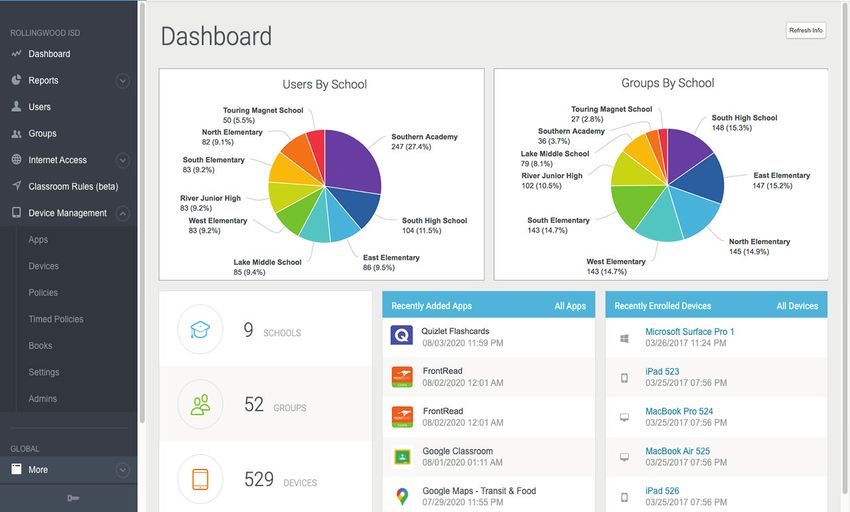
What sets Lightspeed Filter apart?
Comprehensive Filter: From 20 years of web crawling, the most comprehensive and accurate analysis
and reporting on web activity, typed content, and multimedia across the web - including YouTube,
Google search, online docs, and social media.
Adaptive AI Database: The most mature and complete education-focused database in the industry
leveraging human review by data scientists and machine learning to block inappropriate, new, and
unknown sites and allow access to valuable, educational materials.
Easy SSL Decryption: Provide multi-OS SSL decryption without the need to configure proxies, PACs, or
trust certificates. Lightspeed agents put the power of a filter inside each device.
Granular YouTube Controls: SmartPlay takes control of YouTube. Allow educational videos and block
inappropriate content, thumbnails and time-wasters—in just a click.
On and off Site: Flexible policies let you ensure safety, compliance, and policy enforcement on
networked and mobile devices—on and off-site.
Dynamic Reports: Get high-level data on device use or detailed, granular reports on individual students.
Lightspeed offers the most powerful, actionable, and shareable reports.
Powerful Features
BYOD/IoT filtering YouTube Smart Play Device Detective geolocation
After-school controls YouTube reporting Easy device mapping
Flagging and alerts Search reporting
Allow/block lists Google Docs reporting
Lockout controls Social media reporting
Custom block pages Parent reports
Custom white/blacklists Safe search
Social media controls Flagged activity reports
Search controls Audit Log
Data dashboard Automatic Updates
Secure, sharable reports Fast cloud set-up
User-level activity reporting
End-to-end cloud-based filtering
protection, simplified SSL decryption,
easy setup (with no hardware).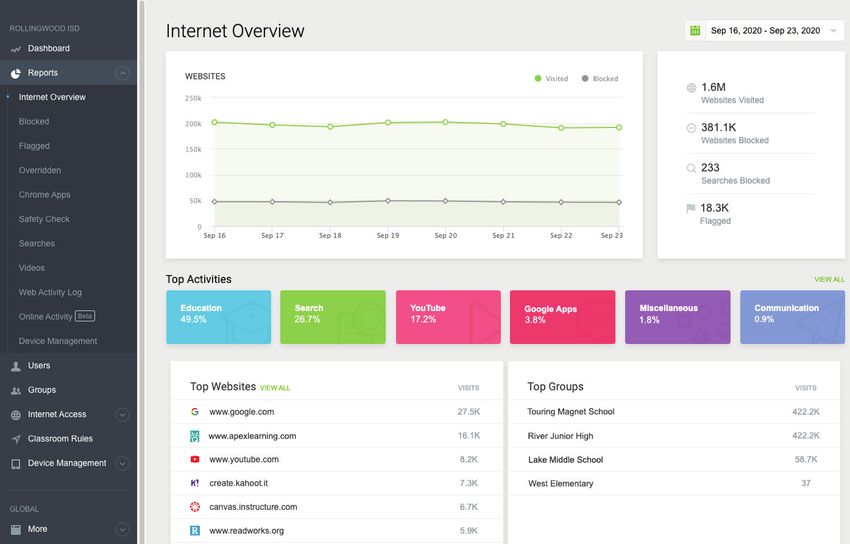
The number of teenage suicides in England and INSTANT, REAL-TIME NOTIFICATIONS
• Wales increased by 67% since 2010 Receive real-time notifications when a potential threat is detected.
Lightspeed
MICROSOFT TEAMS CHAT
Alert™
Prevent suicides, bullying, and violence
Lightspeed Alert™ is an early-warning threat detection solution to help schools prevent suicides, bullying,
and violence.
• Our extended cloud integrations and smart agents scan and detect concerning online indicators and
send detailed reports to designated school staff for timely intervention. Extended cloud integrations
enable schools to detect these threats across Microsoft® 365, Apple®, and Google® for Education
productivity apps.
STUDENT ACTIVITY TIMELINES & TRACKING HUMAN REVIEW SAFEGUARDS
• Our patented AI technology and 24/7/365 human review work seamlessly together to analyse alerts View a historical timeline and full URLs with time-stamped Designate school staff for Lightspeed
and escalate imminent threats in real-time for appropriate intervention. screenshots of past and new flagged behaviours. Safety Specialist case escalation.
• Lightspeed Safety Specialists, with backgrounds in the police, investigation, and mental health, are
further trained by both threat assessment and suicide prevention experts.
How it works Robert Woods
Assistant Superintendent
1 SOPHISTICATED AI SCANS FOR WARNING SIGNS
AI technology scans and flags concerning indicators and sends alerts to
designated school safety staff as well as Lightspeed Safety Specialists.
2 SAFETY SPECIALISTS CONDUCT THREAT ASSESSMENT
Our 24/7/365 in-house team of highly trained safety specialists evaluate
all alerts to identify cases of imminent threats to student safety. CASE MANAGEMENT & LOGS
Keep audit logs of interventions and follow-up.
3 ESCALATION RESPONSE
If a threat is deemed imminent, safety specialists immediately escalate to chosen
members of staff and/or the police, alleviating schools from the need to monitor
alerts 24/7 and enabling intervention before an incident occurs.
12
Spoke with Angie’s mother, Jennifer Gables, to arrange a meeting,
which is scheduled for tomorrow, March 16th.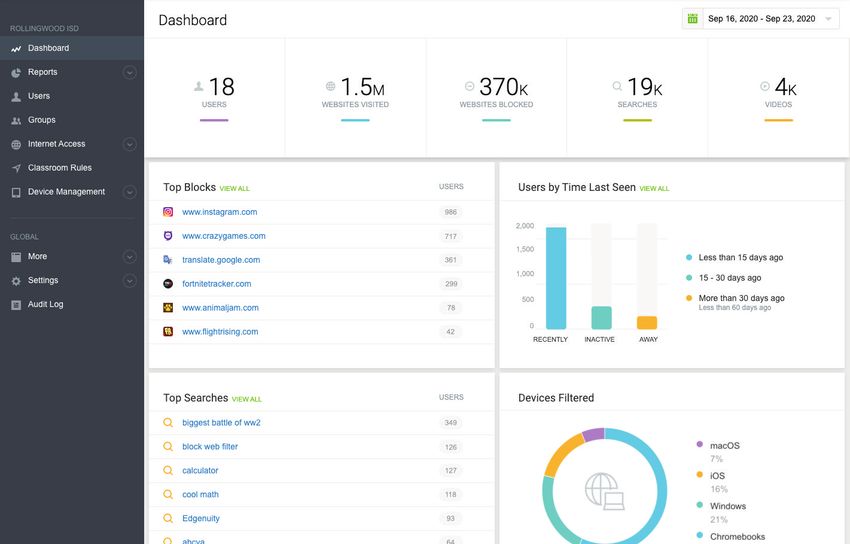
What sets Lightspeed Alert apart?
Comprehensive Protection: Get critical alerts across the internet—social media, online docs, email,
YouTube, apps, browsers, search engines, and more—no matter where devices are used.
Advanced AI: Leverage our advanced filtering AI to get the information you need without false positives
and missed activity common in other solutions.
Lightspeed Safety Specialists: Each Safety Specialist is a full-time Lightspeed employee and receives
comprehensive training in conjunction with threat assessment experts and the American Foundation for
Suicide Prevention.
Expanded Cloud Integrations: Our partnerships with Microsoft® Education, Apple®, and Google® for
Education enable schools to detect imminent threats across virtually all productivity apps.
Powerful Features
Advanced AI monitoring identifies students Real-time alerts with screenshots of students'
at risk online activity
Set custom alert notifications Custom flagged keywords lists
More multi-OS and browser support than any Web, email, chat, search engine, and social
competitor media monitoring
Admin roles for case assignment Historical user reports
Real-time alerts with notification scheduling Powerful trend report dashboards
and screenshots of students' online activity
Human Review with custom escalation list
Custom flagged words list
Lightspeed Filter integration
Web, Email, Chat, Search, and Social Media
monitoring
Microsoft 365 and Google Workspace for
Education monitoring
A holistic approach to student
safety with alerts for self-harm,
bullying, and school violence.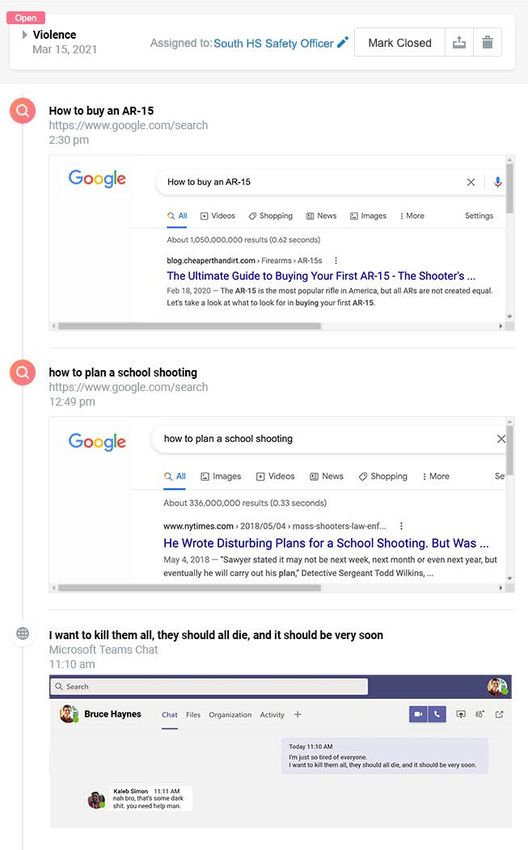
Lightspeed MDM enables straightforward centralised IT control
Lightspeed Mobile for any school's entire fleet of mobile devices.
Device Management™
Lightspeed
MDM™
Scalable & efficient learning device management
With thousands of mobile learning devices coming online to support remote and hybrid instruction, IT
teams are having to grapple with the challenge of managing all these devices remotely. The Lightspeed
Mobile Device Management™ system ensures safe and secure management of student learning
resources with real-time visibility and reporting essential for effective distance learning.
SET POLICIES
• Equip school IT leaders with a centralised, cloud-based solution for infinitely scalable device, Set policy allowances
application, and policy controls. and restrictions across
all devices or a single
device.
• Lessen the workload on the IT team with the Self-Service App Library, where teachers and students
can access and install approved curriculum and learning tools.
• Remotely deploy, change, and revoke hundreds of policies and educational applications without
handling any devices, while reducing typical downtime and costs.
CENTRALIZED DASHBOARDS REMOTE INSTALLATIONS RECOVER LOST DEVICES
Issue, track, manage, and monitor every mobile device from a single set of dashboards Quickly and easily install any app Track, locate, wipe, and recover any lost
at a single central location. across any and all school-issued or stolen school-issued device remotely.
devices with the press of a button.
Lightspeed MDM™
Lightspeed Mobile Device Management allows us to get granular where we need to with individual control,
to apply settings to a large number of students, or whole year group. 15
- Greg Hughes, Assistant Principal – Learning Technologies & Curriculum, The de Ferrers AcademyLightspeed Mobile
Device Management™
What sets Lightspeed Mobile Device Management apart?
Multi-OS: Simplified, multi-OS device management. Comprehensive UI with powerful controls within an
intuitive interface.
App Management: Push apps and manage app inventory from anywhere. Let users access approved
apps. Easily recover and reassign apps.
Policy Restrictions: Remotely set hundreds of policies and restrictions across every device and OS to
control everything including WiFi, cameras and OS updates over the air.
Powerful Integration: Integrate with Apple and Windows programmes: DEP, App Store, Managed
Distribution, Business Store Portal, Defender, Apple Classroom, iBooks, AirPlay, and more.
Self-Service App Portal: Reduce workload of IT staff and allow students and staff to find and download
approved apps. Add apps to the Self-service Portal by group, year, school, and more.
Timed Policies: Start and end policies at specific days and times. Lock devices for a single day, or for
extended periods.
Powerful Features
Manage on and off-site Automatic load-balancing & Integration with Windows
fault tolerance Business Store Portal
iOS, Mac, Win, Android
Battery indicators Single sign-on
Device location
Password clear/reset
Real-time dashboards &
reports Integration with Apple App
Store
User/device reports
Office 365 integration
Single app mode
Policy inheritance
Inventory reports
Windows error reporting
WiFi auto-join
Bluetooth control
Touchless wipe
Device status updates
Remote configuration
Simple, over-the-air device and resource
management for effective distance learning.Lightspeed Analytics can detect all online apps and programmes being used on all school-
• ~67% of all school purchased licenses go unused.
issued devices to help eliminate wasted budget from unused licenses. Lightspeed Analytics
gives school administration exactly the right data to inform ROI, the ability to track licenses,
charts to compare similar applications on usage, and reporting tools that identify redundant
and underutilised apps.
DRIVE APP ADOPTION
Lightspeed
Analytics™
Pinpoint groups or users with
Data visualisation to enable collaborative conversations low adoptions of key resources to
target training and professional
development.
Bringing together curriculum, tech, and administrative perspectives to
optimise learning outcomes
Keep track of the software you’ve invested in and how it's being used. Lightspeed Analytics™ is built to
give schools robust data on the effectiveness of any tools they implement so they can take a strategic
approach to their technology stack and streamline reporting.
• Track education technology adoption and usage trends, eliminate redundancy, and drive
ROI in apps and digital content purchases.
• Monitor app and content consumption to facilitate early adoption and effective
utilisation.
• Assess risk and compliance with visibility into app and content provider student data
privacy and security compliance.
CUSTOMISABLE DATA SETS
Access usage and adoption trend reports to monitor app and digital content consumption and
ensure student engagement across the organisation, by school, year, classroom, and student levels. CHART BUILDER MAINTAIN DATA PRIVACY COMPLIANCE
Compare similar applications on usage and cost Spot out-of-compliance or rogue applications
to inform ROI and identify areas for cost savings. and view their privacy and data security details.
Lightspeed Analytics has also been valuable for us to collect daily statistics on how students are engaging with
our remote learning and evaluate ROI on the digital learning resources we are investing in. 18
- Anthony Padrnos, Director of Technology, Osseo Area SchoolsWhat sets Lightspeed Analytics apart?
Granular Reporting: Drill down details on each individual app, software, or online resource to show
what classes, groups, or schools are utilising it.
Cost and ROI Reports: Analysis of cost and ROI of all software, apps, and paid resources.
Comprehensive Dashboard: Combines all traffic whether it's on network or at home, on an app or a
browser, into a single view.
License Usage Reports: Reporting on used/unused licenses for software, app, and online resources.
Usage Tracking: Adoption and engagement analysis for apps, software, and online resources.
Data Privacy & Security Analysis: Analysis of app, software, and resource compliance with data privacy
and security policies.
Powerful Features
Leverages data from Lightspeed FilterTM to Works across Mac, Chrome, Windows, and iOS
provide powerful insights devices
Lightspeed Analytics sees full URL details not just Shareable via secure link
host/domain like other providers
Shared links can be set to expire
GEOLOCATION MAP See all activity, including activity outside of SSO
View the location of all student devices in one map, with Reports on app usage and adoption
ability to drill down to see specific student devices. Install and set up without end user interaction
Works in every browser
Does not require hardware
Schools should consider using Analytics for three key reasons:
First, to get a data point on the effectiveness of any tools you implement. It tracks adoption and utilisation, and
it allows you to start asking critical questions like: Why are we not seeing the adoption and implementation
that we wanted? Do we need to cut the tool, or focus on professional development? How do we make sure we’re
getting the most ROI for the tool purchased?
Second, it allows you to evaluate those tools over time, so you can measure if this tool is still meeting the needs
of your organisation four to five years after purchase. Schools have a limited budget, so you want to maximise it
where you can.
Finally, it gives insights and awareness into what applications are being used in your system. Analytics provides
an opportunity to understand all the myriad of tools being used in a digital classroom.
- Anthony Padrnos, Director of Technology, Osseo Area Schools
Drive technology ROI, adoption,
compliance, and effectiveness.Lightspeed Classroom Management dashboards let teachers monitor and control student online
I am impressed with this monitoring tool,
which has decreased my frustration with activity in both in-person and remote instructional environments. Block commonly distracting
students wondering off to other sites and web pages and limit access to only the sites that support the lesson with just two clicks.
wasting time not focused on the lesson. I like
Lightspeed Classroom
that I can monitor my students' computer SAVE VALUABLE INSTRUCTION TIME
activities, record, and use as evidence. Instead of sharing your screen and having kids copy URLs into their browsers, simply send links
Management™
directly to all student devices and literally get everyone on the same page simultaneously.
Reimagine the inspired
Students know they are being monitored,
so they are more engaged and on task.
and interactive classroom - George Vega, Teacher, Tulare Joint Union High School
for hybrid learning
With Lightspeed Classroom Management™, teachers can keep their students logged in, participating,
and focused whether in-person or at a distance. Advanced AI technology gives teachers real-time
visibility and control of their students’ digital workspaces and online activity.
• Ensure all students interact with only the right online curriculum — precisely when
they're supposed to use it.
• Push out vetted curriculum links to all students at the same time.
CHECK-IN ON STUDENT PROGRESS
• Block inappropriate or distracting web sites and apps. Educators can keep students connected and engaged by
PROVIDE ASSISTANCE
sending custom messages straight to student screens.
• Help teachers maintain the necessary level of instructional control. REMOTELY
The hand-raiser feature
ensures all students’ ideas are
KEEP STUDENTS FOCUSED represented and each can get
Follow up on real-time alerts of unusual activity by viewing a student’s screen, open tabs, and browsing help when they need it.
history. Need more documentation? It’s as easy as clicking "record" to capture a student's activity.
Angie Gables
MICROSOFT TEAMS INTEGRATION
Educators can launch Lightspeed
Classroom Management directly within
Microsoft Teams, giving them the ability
to deliver synchronous or asynchronous
instruction and materials without
leaving the Teams platform.
22What sets Lightspeed Classroom Management apart?
Screen Views: Keep an eye on class activity and student screens with real-time, easy-to-understand
activity tables and screen views.
Class Controls: Lock devices to get eyes up front, close tabs, or limit student web access for secure
testing or focused learning.
Monitor Individual Students: Zero in on individual students to see what they’re doing, check-in, control
access, and keep them on track.
Integration with Microsoft: Partnered with Microsoft Education, Lightspeed Classroom Management is
able to integrate seamlessly with the Microsoft suite, including Microsoft Teams.
AI Insights: Save time with AI-based insights that surface unusual activity that warrant teachers’
attention.
Sharing: Easily share links, broadcast teacher or student screens, and check in with students with simple
(safe!) messaging.
Automation: Save precious class minutes by employing automation to move students out of restricted
Internet access.
Powerful Features
Screen viewing Custom web access zones
Heatmaps Scheduling
List view of student activity Co-teaching compatible
Sorting and filtering options Enable internet access upon task
completion
Lock devices, remotely
Teacher admin control
Record students' screens
Online help and training
Link sharing
Disable internet access
Track URL history
Boost teacher effectiveness
and student engagement
though connected classrooms.Lightspeed Systems is #1 for a reason
United Learning Trust, UK, 92 Schools
When it came to the ease of deployment • We wanted to find a solution which would
of the Lightspeed Filter on Chrome
have low impact on the IT teams on-site
Efficacy
devices, and how easy it was to manage,
it was the right solution. • It's been really easy to set up and configure
Safety IN
and it just works
- Dave Munro, Senior Technology
Specialist, United Learning Trust • Even though we have the separate schools
tiered, it's all controlled centrally
NUMBERS Caddo Parish Public Schools, Louisiana,
38,000 Students
• Implementation of Alert showed immediate
improvement in student behavior
Lightspeed has been an asset to our
district from day one. It has alerted us to
• Alert has prevented numerous suicides
issues we didn’t know our students had, • Lightspeed Alert is essential for remote
Trusted by more than 28,000 schools world-wide and has made a difference. learning when students are isolated from
- Nicole Allien, Instructional Technologist,
their friends and classmates
Caddo Parish Public Schools • Since the start of COVID, Caddo Parish
staff received 25% more notifications from
Lightspeed Alert
20M 11M 38 • Lightspeed Alert screenshots gave admins a
15-20 minute head-start toward intervention
STUDENTS DEVICES COUNTRIES
Osseo Area Schools, Minnesota,
20,641 Students
The data and analytics that Lightspeed
• Osseo Area Schools saved thousands of
provides has been invaluable.
dollars in unused licenses with Analytics
• Analytics reports have been instrumental in
- Anthony Padrnos, Director of
Lightspeed Systems® has allowed me to better protect my users and network from questionable putting together professional development
Technology, Osseo Public Schools
content on the web. Everything about this software is wonderful. Ease of use, data collection, agendas
reporting, etc. I have used several types of filtering software in my career and this is • Analytics gives insights and awareness into
the best by far. Being able to drill down from a user or from a site is simplistic and insightful. what applications are being used
- Thomas Driver, Technology Coordinator, Port Aransas Independent School District
Read our case studies at
25
www.lightspeedsystems.com/resources/case-studiesWhat our customers are saying
The Customer's Perspective
St Herbert's and Lightspeed Systems®
The Customer's
Using Lightspeed Alert™ if a student searches Lightspeed Mobile Device Management™ allows us to
partner to ensure online safety in a crisis
Perspective
something that is concerning related to self-harm, then get granular where we need to with individual control,
we get flagged centrally and we report that down to the to apply settings to a large number of students, or whole
DSL in the school and can forward all the details. year groups.
St Herbert’s RC Primary School in Oldham wanted to give their students the best - Dave Munro, Senior Technology Specialist, - Greg Hughes, Assistant Principal – Learning
United Learning Trust
opportunities for learning with digital technology, many students began using school- Technologies & Curriculum, The de Ferrers Academy
owned iPad to enhance their learning. Susan Milligan is the Headteacher at the school
and wanted to ensure that all devices were safe when being used in class or for remote
learning. “One of the challenges with our previous filtering system was the lack of With Lightspeed Systems, I have been able to get Support has always been the strongest part
my teachers invested into using Chromebooks in the of Lightspeed and their support on each
monitoring in place” says Susan. “Lightspeed Filter allows us to monitor activity at all classroom and feeling more comfortable with what product has always been top notch.
times and this is particularly important in light of recent circumstances," students are capable of accessing in class. With
Lightspeed Classroom Management™, they now feel - Paul Hancock, Technology Director,
Lanesville Community Schools
After already successfully using Lightspeed MDM to control their devices apps in control of their classrooms again with technology
becoming a key component in education.
and features, they decided to try Lightspeed Filter. They soon discovered that with
Lightspeed Filter they could easily report on all device activity and customise policies - Corey Howard, Technology Systems Specialist,
Greenbrier County School District Lightspeed Analytics™ allows us to pull statistics and
based on time and location, giving students the right level of protection away from
data on usage of digital tools: Are students
school. able to engage with the platforms we've laid out?
Are teachers providing the rich learning
“Lightspeed has provided us with the ability to monitor at such a level that we’ve If you can put a number above 100% valuable, then resources in the digital learning environment?
confidently been able to loan devices out to families for supporting with learning at that’s how valuable it is. The time saved when using this
- Anthony Padrnos, Director of Technology,
feature versus what I used to do is critical in saving a life.
home.” Lightspeed Alert screenshots the information for me, and
Osseo Area Schools
I know immediately what I need to do. I have a 15-20
Susan adds that without Lightspeed Systems, remote minute head-start which is time saved when potentially
saving a life. “Ultimately, we’re now able to protect pupils and staff
learning at St Herbert’s wouldn’t have been possible. no matter where they are when using devices that are
“Ultimately, we’re now able to protect pupils and staff - Nicole Allien, Instructional Technologist, monitored and filtered using Lightspeed Filter.”
Caddo Parish Public Schools,
no matter where they are when using devices that are
- Susan Milligan, Headteacher,
monitored and filtered using Lightspeed Filter.” St Herbert’s Primary School
For anybody who hasn’t seen Lightspeed before
it’s important that they view it in terms of a whole
package of different solutions that integrate well
Lightspeed Alert has allowed us to be proactive
together and that they are very much orientated at
with supporting students’ emotional needs
the education market.
without being intrusive to their work.
- John Devlin, ICT/SEN & E-safety Consultant,
- Joe Kuzo, Director of Technology, Quakertown
Northumberland County Council
Community School District
Lightspeed Analytics™ allows us to pull statistics and
data on usage of digital tools: Are students Lightspeed Mobile Device Management is geared
able to engage with the platforms we've laid out? around education in the way that it has so many
Are teachers providing the rich learning policies and restrictions in place that you can quickly
resources in the digital learning environment? and easily deploy. We also appreciate the relationship
Lightspeed has with Apple and the integration with
- Anthony Padrnos, Director of Technology, their products.
Osseo Area Schools
- Ross Weeks, ICT Manager,
Hove Park School
27Product Implementation & Best Practices Technical Support
Setting you up for success We’re always available to assist you
Implementation
& Support
Online educational effectiveness and safety requires a precise blend of expertise and Lightspeed Systems is renowned for our word-class support. Our team of dedicated
innovation. That’s why Lightspeed Systems® will help you with the best practices and protocols specialists are here to help resolve any problem you may encounter with your Lightspeed
and guide you through implementation from beginning to end. Unlike some providers who install a solution effortlessly and efficiently. We’ve refined our support system over the years to keep
system, perform some checks, and then vanish, Lightspeed Systems will work with you to understand it up to date with the ever-changing world of education technology, making our team the
your specific online delivery needs and security requirements. most advanced support system in the industry.
We individually tailor our onboarding process to make implementation a breeze. Whether via live ISSUE RESOLUTION
training sessions or a comprehensive self-paced course, we'll set your tech staff up for success quickly When our technical support team receives a chat query, we’re proud to say that our average
and easily. For unexpected issues not covered by the courses, our Senior Sales Engineers and world- response time is less than 30 seconds. Our average issue resolution time is less than 48
class support team are standing by to troubleshoot, ready to evaluate and resolve any problems. We hours. Our team is available to assist you via chat, email, phone, or remote assistance, and
stay with you beyond installation so you thoroughly understand every product and feature and achieve we’ll help you get the most from your Lightspeed solution.
success on your terms.
Inquiries are received, diagnosed, and resolved with a Customer Satisfaction (CSAT) score
Here is the complete list of our implementation resources: of 95%. This means that effective online educational delivery never falters and students and
• Expert-led live video trainings. staff remain connected—safely—at all times. Student safety is a team effort, so we will do
• Comprehensive self-paced courses. whatever it takes to make sure your students stay protected online.
• One-on-one troubleshooting with Senior Sales Engineers.
• Access to our world-class support team.
• One-stop-shop customer portal with documentation for every possible problem. Europe: +44 (0) 20 4534 5200 24/7 knowledge base access
United States: 1-877-447-6244 24/7 help bot access
Our implementation program is comprehensive, flexible, and thorough. By the time we finish, each Asia Pacific: +61 2 8310 8686 Live phone chat M-F 8am-12am GMT
of your team members will have a complete understanding of the system and be prepared if any www.lightspeedsystems.com/contact-us Live system status updates
questions should arise. At Lightspeed Systems, our client schools define our success, and we're with
you every step of the way.
What I really appreciate is that Lightspeed is very
responsive to our needs. We’ll put in requests sometimes
at 6, 7 a.m., and someone always gets back to us within
the hour. There’s always somebody there to support us.
- Brian Zimmer, Director of Educational Technology and
Information, Webster Central School District
29System Specifications Stocking Up Your Technology Toolbox
Lightspeed Systems® technical details Additional resources
System Specs
& More
SUPPORTED OPERATING SYSTEMS AND BROWSERS At Lightspeed Systems, we continue to assist educators outside of customer care
and tech support. Over the years, our team has written and built a complete stack
The Lightspeed Systems platform works with the following operating systems and browsers:
of how-to guides, tools, and resources to help you succeed with any configuration,
• Android® OS • Google® Chrome® training, or implementation needs you may have. As a Lightspeed customer, you’ll
• Apple® iOS® • Microsoft® Edge® be a part of a global community of schools using the Lightspeed platform who have
• Chrome® OS • Microsoft® Internet Explorer® access to additional information and resources that can make your experience with
• Mac OS® • Microsoft® Windows® the Lightspeed platform easier. We continually act as a hub for such information and
• Mozilla® Firefox® resources, and we happily encourage you to take advantage of them.
DIRECTORY INTEGRATION AND SYNC THESE RESOURCES INCLUDE:
Multi-OS directory integration. Lightspeed integrates with Google®, Google® Classroom®, Active • Remote Learning Toolkit • Webinars with education Leaders &
Directory®, Microsoft® Azure® AD, and all student information systems. Partners
• White Papers
• Implementation Webinars
• Tech Talks with Lightspeed Experts
• Platform Demo Webinars
• Customer Portal
CLOUD STORAGE AND DATA PROTECTION
All of our solutions are hosted in the secure AWS® cloud, giving us a 99.9% uptime, creating the safest
environment available for student data. Taking our commitment to data privacy and security a step
further, we're early signers of the Student Privacy Pledge, are completely GDPR compliant, and have
achieved the AWS Education Competency Status, an accolade given only to solutions that align with the
AWS architectural best practices. For more information about our data privacy and security practices, Lightspeed Systems has broken school barriers as a filter platform. We no longer have to depend
visit our Trust page at: www.lightspeedsystems.com/about/trust. on anything within the school to provide clean web and video filtering to our student devices. Our
students use their school provided device at school every day and at home every evening.
- Jamie Ramos, IT Director, Carroll Consolidated School Corporation
LANGUAGES AVAILABLE
Lightspeed Systems products support 13 languages.
• British English • German • Portuguese (2)
• American English • Indonesian • Simplified Chinese
• Danish • Italian • Spanish (2)
• French • Malay
©2021 Lightspeed Solutions, LLC. All rights reserved. Lightspeed Systems, Lightspeed, Lightspeed Filter, Lightspeed Alert, Lightspeed Analytics, Lightspeed Mobile Device Management,
31
Lightspeed MDM, and Lightspeed Classroom Management are trademarks of Lightspeed Solutions, LLC. Lightspeed Systems makes or implies no guarantee that the final products will
contain all features described herein, and shall not be liable for errors, omissions, or delays. Patents Pending/Patents Approved. AWS and AWS Cloud are registered trademarks of
Amazon Corporation. Microsoft, Microsoft Windows, Microsoft Edge and Microsoft Active Directory are registered trademarks of Microsoft Corporation. Google, Google Classroom,
Google Chrome, and Android are registered trademarks of Google, LLC. Apple and Mac are registered trademarks of Apple Inc. Mozilla Firefox is a trademark of The Mozilla Corporation.
SSBRUK1001202104Phoenix House www.lightspeedsystems.com
Christopher Martin Rd @lightspeedsys
Basildon lightspeedsystems
SS14 3EZ company/lightspeed-systemsYou can also read


