The New Child Care Package - Provider Information (as at April 2018) - NSW Department of Education
←
→
Page content transcription
If your browser does not render page correctly, please read the page content below

The New Child Care Package
     Provider Information

                            (as at April 2018)
Topics covered today
•   New Child Care Package
•   New IT system
•   Enrolments and payments
•   Transition arrangements
•   Resources

                              2
New Child Care
  Package

                 3
Child Care Subsidy
• Replaces Child Care Benefit and Child Care Rebate
• All families expected to make a co-contribution

      Child Care Benefit
                           Child Care Subsidy
                               2 July 2018
      Child Care Rebate

                                                      4
Additional Child Care Subsidy
• Extra support for:       • Replaces:
   – child wellbeing          – Special Child Care Benefit
   – grandparents             – Grandparent Child Care
   – temporary financial        Benefit
     hardship                 – Jobs, Education and
   – transition to work         Training Child Care Fee
                                Assistance

                                                        5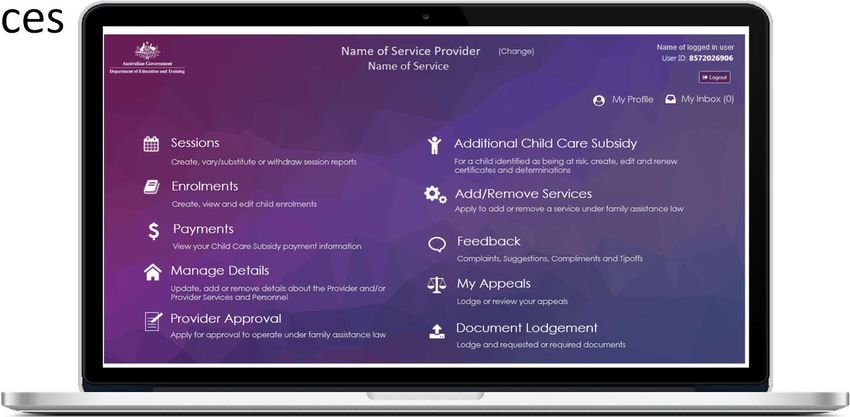
Level of Child Care Subsidy
Three things will determine a family's level of Child Care
Subsidy:

 Family income –           Activity test –         Service type –
 combined family          activity level of      type of child care
    income                  the parent                service
                          undertaking the
                           least activity

                                                                      6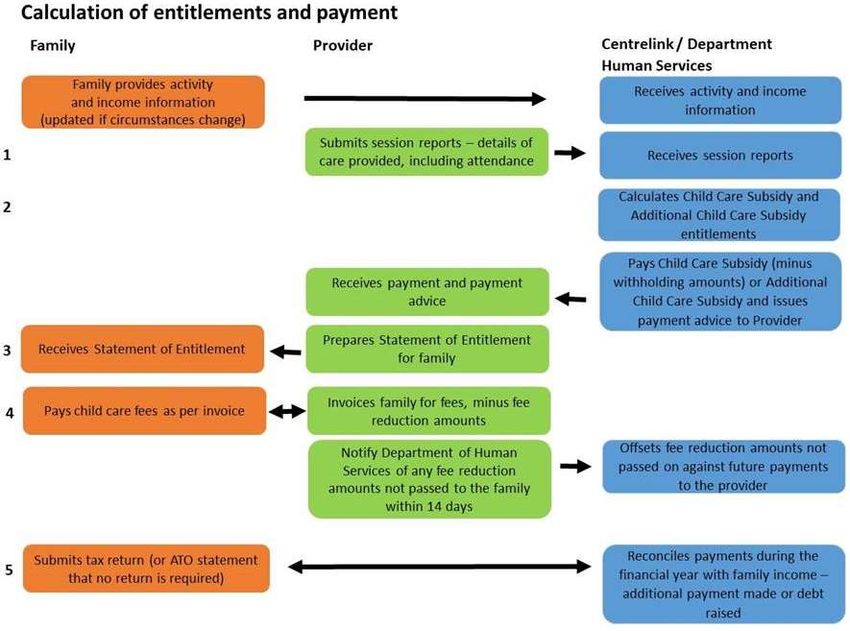
Combined family income 2018-19
               85%
Subsidy rate

               50%

               20%

               0%

                          Combined family income
                                                   7
Activity test
• Amount of work, training, study,
  volunteering or other recognised activity
• Paid and unpaid leave (e.g. parental leave)
• Casual/irregular hours of paid work – can       Higher
  estimate over a three-month period             level of
                                                activity =
• Families can update details in myGov            more
                                                hours of
• Exemptions                                     subsidy

                                                         8
Activity step tests
                                              Maximum number of hours
Step   Hours of activity (per fortnight)
                                              of subsidy (per fortnight)
       Less than 8 hours
                                              24 hours
       (for a family earning up to $66,958)
1      8 hours to 16 hours                    36 hours
2      More than 16 hours to 48 hours         72 hours

3      More than 48 hours                     100 hours

                                                                           9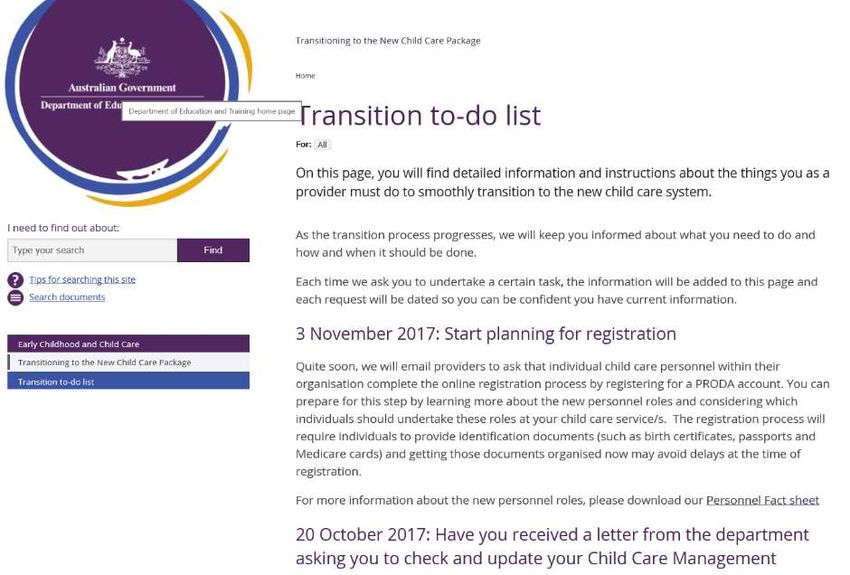
Hourly rate caps
Service type          Maximum hourly rate cap           Maximum hourly rate cap
                    (Children below school age)           (School-aged children)
Centre Based
Day Care                                  $11.77^                          $10.29^
Outside School
Hours Care                                $11.77^                          $10.29^
Family Day
Care                                      $10.90^                          $10.90^
In Home Care
                             $25.48^ (per family)             $25.48^ (per family)
         ^These amounts are correct for 2018/19 and may be subject to adjustment
         through indexation in subsequent years.
                                                                                   10
Example: Hourly rate cap
Centre Based Day Care
$16 Family earning
85% of 85% of 85% of
$14
$66k/year
$9.00 $11.77 $11.77
$12 $5.00 CCS % = 85
$10
$2.00
Parent
$8 $1.35
contribution
$6 Child Care
$10.00 $10.00 Subsidy
$4 $7.65
$2
Hourly rate
cap ($11.77)
$0
$9 per $12 per $15 per
hour hour hour
11Family Assistance Law
• The Family Assistance Law (FAL) is the basis
for Commonwealth child care fee assistance
• Under Family Assistance Law, services are
approved to administer child care fee
assistance on behalf of eligible families
• Many requirements stay the same
• Focus today is on changes
12Key legislative changes
• Hourly rate cap sets a limit on Government subsidy
contribution
• New provider/service approval requirements
• Strengthened activity test
• Strengthened compliance capability
• Changes to minimum operating hours
13Operating requirements
• Removal of minimum hours per day and
days per week a service must operate
• Sessions of care – unchanged:
– up to a maximum of 12 hours
• Services will only be required to operate
for a minimum of 48 weeks per year
– or seven weeks per year for outside
school hours care
14Provider and service approvals
• Family Assistance Law will align with provider and
service approvals issued by your state or territory
regulatory authority
15Provider approval process
• Provider’s approval must contain:
– your provider ID number
– Applicant’s name and contact details (persons with
Management or Control responsibility)
– specific details of each service
• Service Approval Number
• Type of service
• Physical and postal addresses
• Details of persons with day-to-day operational responsibility
16Fit and Proper Evidence Requirements
Checks made of all ASIC Person Bankruptcy / National Working with
persons with: Insolvency Criminal Children Card
History
Management or control of
a provider
Day-to-day Operational
responsibility of a service
Family Day Care Educators
17New IT system – Child Care Subsidy System
18New Child Care Subsidy System
• Replaces CCMS
• Family access through myGov
• Provider access
– Provider Entry Point
– Third Party Software
• System being used for transition
• Guidance materials for services
19Provider Digital Access (PRODA)
• Online authentication system based on a
username, password and verification code
• Personnel in certain child care roles must register
• Create an account and verify identity
• Once registered, they will receive a
Registration Authority number
• Register for a PRODA account now
20Third Party Software
• Provides access to the new Child Care Subsidy
System
• A list of registered Child Care Management
System software is available at:
education.gov.au/new-child-care-it-system
21Provider Entry Point
• Access information
• Apply for approval
• Add or remove a service
Provider Entry Point
• Change in circumstances
• Enrolment notices
• Session reports
22Enrolment Process
23Enrolment process
Complying Written Arrangement
• Must set out the following details:
   –   names and contact details
   –   date the arrangement starts
   –   date of birth of the child (or children)
   –   provision of care – routine, casual or flexible basis
   –   details of fees
   – Child Care Subsidy or Additional Child Care Subsidy can be paid
• Additional information can be included

                                                                25
Enrolment notice
• Submit for each child
• Types of enrolment:
– routine sessions only – casual care is not included
– casual enrolment – no routine sessions are included
– routine sessions, with casual care permitted
• Key information needed:
– Customer Reference Number (CRN) and date of birth of
the parent claiming Child Care Subsidy
– CRN and date of birth of child
26Confirm enrolment by parents
• To increase transparency of payments, parents will:
– confirm enrolment details
– indicate if details are incorrect
– indicate if the child is not enrolled
• Families confirm enrolment:
– Centrelink online account
through myGovUpdating enrolments
• Changes to the arrangement of care must be in writing
• Update an enrolment if:
– individual disagrees with enrolment
– arrangement for care is varied
– information in an enrolment is incorrect
– the arrangement for care ends
• Must be updated within seven days of a change
28Session reports and payments
29Calculation of entitlements and payment
Step 1: Session reports
Issue Details
Type of report Initial report
Variation (change) to a report
Withdrawal of a report
Dates Start and end dates of the week the report covers
Session details Date
Actual fee charged
Session start and finish times
Actual attendance start and finish times (from 14 January 2019)
Absences Notification of absences (if applicable)
Reasons for additional absence/s (where child has used more than 42 absence
days)
Other subsidies Where any subsidies have been received (e.g. state government funding):
Notification of other subsidies – yes/no
Name of other subsidy payer
Other subsidy amount – hourly or session amount
Family Day Care and In Educator – Child Care Personnel ID
Home Care
Preschool session Was the session part of an early educational program?
31Step 2: Calculation of entitlements and
payments
• Entitlements calculated by Department of Human
Services (DHS) using information provided by the:
– provider
– individual who is claiming
• Withholding
– 5% of the Child Care Subsidy is withheld by DHS
• Notification of payment Calculates Child Care Subsidy and
Additional Child Care Subsidy
entitlements
32Step 3: Statement of Entitlement
• Given to each claimant with a Complying Written
Arrangement for each fortnight
• Can only be issued for care already provided
• Parents will have access through the Centrelink Online
Account and receive periodic notifications about their
determination of entitlement
• Includes details about the service, sessions of care and
fees
• From 14 January 2019 – actual attendance
Receives Statement of Entitlement
33Step 4: Invoicing families
• Invoice for fees over and above the Child Care Subsidy
• When and how to invoice families is a business decision for
the provider
• Families can confirm fee reduction amounts through
Centrelink
Invoices family for fees, minus fee
reduction amounts
34Step 5: Reconciliation (income review)
• Actual entitlement worked out by DHS at end of the
financial year reconciliation after tax returns
• What contributes to adjusted taxable income – visit
www.ato.gov.au/individuals/lodging-your-tax-return/in-
detail/what-is-income-/
Reconciles payments during the
financial year with family income –
Submits tax return (or ATO statement additional payment made or debt
that no return is required) raised by DHS
35Transition arrangements
36Provider Transition arrangements
Details the five stages of transition:
1. Check and update CCMS details (completed)
2. Register child care personnel in PRODA(Completed)
3. Complete the online Transition Form (now)
4. Set up your child care software (from April 2018)
5. Link personnel, update details and Check and update
enrolments (from April 2018)
• education.gov.au/transitioning-new-child-care-package
• Also links to the Transition to-do-list page
37Families transition
• Awareness – communications campaign (Phase 2)
– online subsidy estimator
• Call-to-action from Centrelink in April 2018
• Families advised of eligibility and entitlement
– CCS paid directly to providers on behalf of families
38What do families need to do?
• Family Transition fast facts:
https://www.education.gov.au/transitioning-new-child-care-package
• Follow instruction in their Centrelink letter and log into
myGov (April – May 2018)
a) Access Centrelink online account
b) Complete their online assessment by providing required
information such as:
o family income estimate
o activity test
o child school status
o confirm enrolment
39Compliance
40Child Care Provider Handbook
• Will be published online
• DRAFT version up until 2 July but
ongoing development
• Will be printable and searchable
• Don’t rely on a hard copy
41Compliance strategies
• Prevent non-compliance – guidance and information
• Detect non-compliance as early as possible
• Respond to non-compliance and fraud – sanctions or
cancellation of approval
• Deter non-compliance through strong and clear controls
and publishing information about enforcement action
• Compliance analysis and monitoring
• Child Care Financial Integrity Framework
42You must notify certain changes
• Use third party software or Provider Entry Point
• Examples include:
– Operations – fees, hours, contact details, anticipated
vacancies, ceasing to operate (42 days prior)
– Staff – Serious convictions, qualifications, new person,
working with children checks
– Non-compliance – Family Assistance Law or the
National Quality Framework
43Resources
44Payment and Service Finder
• Families can estimate their new subsidy amount using
the Department of Human Services Payment and
Service Finder
humanservices.gov.au/pay
mentfinder
or
education.gov.au/childcare
45Transition page and to-do list • Provides details about what to do and when • Contains videos • Updated regularly education.gov.au/transitioning-new-child-care-package
Frequently asked questions

                        education.gov.au/
                        new-child-care-package-
                        frequently-asked-questions

                                                47
Compliance – Complaints and tip offs
• If you have a complaint or are
concerned about fraud occurring:
– Contact the Child Care Tip Off Line
with details on 1800 664 231 or email
tipoffline@education.gov.au
• You can choose to remain anonymous
48For more information
• Visit the Department website – education.gov.au
– read about transitioning – education.gov.au/
transitioning-new-child-care-package
• Follow us on Facebook –
facebook.com/AusGovEducation/
• Child Care Management System Helpdesk Follow us
facebook.com/
– ccmshelpdesk@education.gov.au AusGovEducation/
• The New Child Care Package
– https://www.education.gov.au/ChildCarePackage
49Questions?
You can also read


