Usability of a Fall Risk mHealth App for People With Multiple Sclerosis: Mixed Methods Study
←
→
Page content transcription
If your browser does not render page correctly, please read the page content below
JMIR HUMAN FACTORS                                                                                                                            Hsieh et al

     Original Paper

     Usability of a Fall Risk mHealth App for People With Multiple
     Sclerosis: Mixed Methods Study

     Katherine Hsieh1,2*, PhD; Jason Fanning3*, PhD; Mikaela Frechette1*, MS; Jacob Sosnoff1,4*, PhD
     1
      Department of Kinesiology and Community Health, University of Illinois at Urbana-Champaign, Urbana, IL, United States
     2
      Department of Internal Medicine, Section on Gerontology and Geriatric Medicine, Wake Forest School of Medicine, Winston-Salem, NC, United
     States
     3
      Department of Health and Exercise Science, Wake Forest University, Winston-Salem, NC, United States
     4
      Department of Physical Therapy and Rehabilitation Sciences, School of Health Professions, University of Kansas Medical Center, Kansas City, KS,
     United States
     *
      all authors contributed equally

     Corresponding Author:
     Katherine Hsieh, PhD
     Department of Kinesiology and Community Health
     University of Illinois at Urbana-Champaign
     906 South Goodwin Ave
     Urbana, IL, 61820
     United States
     Phone: 1 2172447006
     Email: khsieh@wakehealth.edu

     Abstract
     Background: Multiple sclerosis (MS) is a chronic, neurodegenerative disease that causes a range of motor, sensory, and cognitive
     symptoms. Due to these symptoms, people with MS are at a high risk for falls, fall-related injuries, and reductions in quality of
     life. There is no cure for MS, and managing symptoms and disease progression is important to maintain a high quality of life.
     Mobile health (mHealth) apps are commonly used by people with MS to help manage their health. However, there are limited
     health apps for people with MS designed to evaluate fall risk. A fall risk app can increase access to fall risk assessments and
     improve self-management. When designing mHealth apps, a user-centered approach is critical for improving use and adoption.
     Objective: The purpose of this study is to undergo a user-centered approach to test and refine the usability of the app through
     an iterative design process.
     Methods: The fall risk app Steady-MS is an extension of Steady, a fall risk app for older adults. Steady-MS consists of 2
     components: a 25-item questionnaire about demographics and MS symptoms and 5 standing balance tasks. Data from the
     questionnaire and balance tasks were inputted into an algorithm to compute a fall risk score. Two iterations of semistructured
     interviews (n=5 participants per iteration) were performed to evaluate usability. People with MS used Steady-MS on a smartphone,
     thinking out loud. Interviews were recorded, transcribed, and developed into codes and themes. People with MS also completed
     the System Usability Scale.
     Results: A total of 3 themes were identified: intuitive navigation, efficiency of use, and perceived value. Overall, the participants
     found Steady-MS efficient to use and useful to learn their fall risk score. There were challenges related to cognitive overload
     during the balance tasks. Modifications were made, and after the second iteration, people with MS reported that the app was
     intuitive and efficient. Average System Usability Scale scores were 95.5 in both iterations, representing excellent usability.
     Conclusions: Steady-MS is the first mHealth app for people with MS to assess their overall risk of falling and is usable by a
     subset of people with MS. People with MS found Steady-MS to be usable and useful for understanding their risk of falling. When
     developing future mHealth apps for people with MS, it is important to prevent cognitive overload through simple and clear
     instructions and present scores that are understood and interpreted correctly through visuals and text. These findings underscore
     the importance of user-centered design and provide a foundation for the future development of tools to assess and prevent scalable
     falls for people with MS. Future steps include understanding the validity of the fall risk algorithm and evaluating the clinical
     utility of the app.

     (JMIR Hum Factors 2021;8(1):e25604) doi: 10.2196/25604

     https://humanfactors.jmir.org/2021/1/e25604                                                            JMIR Hum Factors 2021 | vol. 8 | iss. 1 | e25604 | p. 1
                                                                                                                      (page number not for citation purposes)
XSL• FO
RenderX
JMIR HUMAN FACTORS                                                                                                                      Hsieh et al

     KEYWORDS
     smartphone; user center design; falls; mobile phone

                                                                            and balance tasks such as the Timed up and Go or Short Physical
     Introduction                                                           Performance Battery or falls self-efficacy and self-confidence
     Multiple sclerosis (MS) is a chronic, neurodegenerative disease        questionnaires [17,18]. A fall risk app incorporating these tasks
     of the central nervous system (CNS) that affects over a million        and measuring multiple risk factors can increase access to fall
     people in the United States [1]. MS may affect the brain, spinal       screening for people with MS and encourage the adoption of
     cord, brainstem, and/or optic nerves and can result in a range         fall prevention strategies before a fall occurs. In addition,
     of sensory (ie, pain and loss of proprioception), motor (ie,           because MS symptoms fluctuate throughout the course of the
     spasticity, muscle weakness, and balance or gait impairments),         disease [4], changes in symptoms lead to changes in fall risk.
     and/or cognitive (ie, slowed processing speed and memory loss)         A fall risk app can help people with MS to measure and track
     symptoms [2,3]. Symptoms vary on an individual basis,                  these changes in their homes.
     depending on which areas of the CNS are affected [2].                  A fall risk mHealth app for people with MS offers access to fall
     Furthermore, new symptoms may arise, or current symptoms               assessment in the home setting, potentially improving fall risk
     may worsen throughout the course of the disease [4]. There is          self-management and reducing fall-related injuries. An mHealth
     currently no cure for MS; however, treatments developed over           app can measure fall risk by leveraging smartphone
     the last two decades have slowed the disease progression and           accelerometry to objectively measure postural control [19] and
     improved symptoms. Disease-modifying treatments, including             assess MS symptoms related to falls through self-reported
     injectable and oral drugs, have shown to be beneficial in              questionnaires. A critical step in the development of an mHealth
     ameliorating damage to the CNS, and trials using monoclonal            app is understanding the usability of the app for its intended
     antibodies and myelin restoration strategies suggest the potential     users [20]. Usability testing ensures that those with MS can
     for novel forms of MS therapy [5]. Although treatments have            easily use and understand an app to improve their overall health.
     helped minimize the disease progression, the heterogeneity of          Moreover, a review of MS health apps indicated that most apps
     MS makes this a complex disease to manage.                             do not meet the needs of those with MS because they are not
     Mobile health (mHealth) apps have rapidly evolved in recent            designed for the intended users, leading to poor adherence and
     years to help individuals track, manage, and treat their health        use [9]. As people with MS have unique symptoms that may
     [6]. Due to the complexity of MS, there is increasing use of           influence their technology use, applying a user-centered
     mHealth apps to support disease monitoring and symptom                 approach in the development of health apps can help improve
     management [7,8]. More than 85% of people with MS own a                their adoption and use [21]. Therefore, the purpose of this study
     mobile device, and 45% of people with MS use an mHealth app            is to develop a fall risk app for people with MS and to test the
     to help manage or treat MS [7]. The most common MS apps                usability of the app through an iterative design process. A
     help with disease management or provide information about              user-centered approach will improve the development of an app
     MS and MS treatment [9]. Other apps allow people with MS to            to facilitate the needs of those with MS to increase fall screening
     connect with one another to share information and socialize,           and ultimately reduce fall-related injuries [22].
     and others allow users to track their symptoms, mood, and
     energy over time [7].                                                  Methods
     Despite the number of MS-related apps, there are limited health        App Development
     apps developed to evaluate fall risk. Falls are a significant health   This app, Steady-MS, was developed in Android Studio 3.1.2
     concern for people with MS, with half of those falling in a            and was developed as an extension of a validated fall risk app
     6-month period and up to 50% of falls resulting in an injury [4].      for older adults, Steady [23]. Modifications were made to the
     Current fall-related apps for aging and chronic disease                questionnaire, balance tasks, and algorithm of Steady to apply
     populations focus on fall detection [10,11], whereas others            specifically to the MS population. Steady-MS consists of 2
     measure movement tasks (ie, walking and sit to stand) as a proxy       components: the first includes 25 questions targeting
     of fall risk [12-14]. Current fall-related apps, however, are not      demographic information and MS symptoms (Multimedia
     designed for people with MS who have unique risk factors and           Appendix 1). These questions include age, sex, past history of
     movement patterns compared with other chronic disease                  falls, type of MS, history of MS, the 12-item Multiple Sclerosis
     populations. In addition, they did not examine the multiple            Walking Scale (MSWS-12) [24], and the short form of the
     factors that cause falls in people with MS [4].                        Activities Balance Confidence Scale (ABC-6; Figure 1) [25].
     Risk factors for falls stem from multiple MS symptoms,                 These questions were specifically chosen because they are
     including impaired walking and balance, cognitive decline, and         associated with falls in people with MS [17,26-28]. The second
     fatigue [15]. Although fall risk assessments can be performed          component, following the 25 questions, is a series of progressive
     clinically, clinicians have time constraints, may not have the         balance tasks, in which the app guides users through 5
     necessary equipment, and commonly only assess a single aspect          progressively difficult standing balance tasks. In the following
     of fall risk, usually asking for previous fall history [16].           order, the tasks are as follows: (1) eyes open, (2) eyes closed,
     Assessing fall risk, however, should include measuring multiple        (3) semitandem, (4) tandem, and (5) single leg. A text
     risk factors. Clinical fall risk assessments can include walking       description and image guide users through each task (Figure 2).

     https://humanfactors.jmir.org/2021/1/e25604                                                      JMIR Hum Factors 2021 | vol. 8 | iss. 1 | e25604 | p. 2
                                                                                                                (page number not for citation purposes)
XSL• FO
RenderX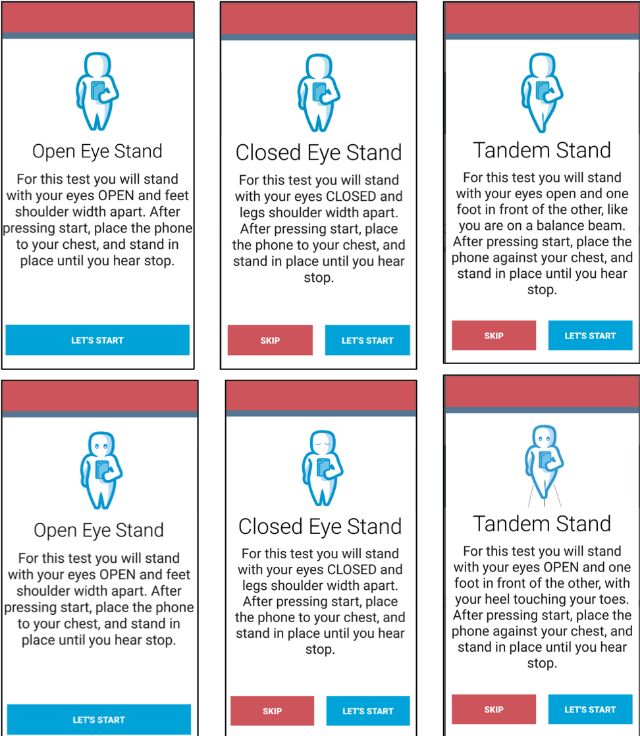
JMIR HUMAN FACTORS                                                                                                                            Hsieh et al

     Each task takes 30 seconds, beginning with a 5-second                      in the mediolateral, anteroposterior, and vertical directions [19].
     countdown and the word start and ending with the word stop.                The Romberg ratio, the ratio between eyes open and closed, of
     The phone also vibrates at the start and end of each task. Users           the root mean square acceleration measured and recorded as the
     were instructed to hold the phone against their chest for the              increased Romberg ratio, is associated with increased fall risk
     duration of the task to measure their postural sway. These tasks           in people with MS [31]. The number of balance tasks completed,
     were chosen because worse performance on these tasks is                    the root mean square Romberg ratio, and the responses to the
     associated with falls in people with MS [29,30]. After each task,          25-item questionnaire were inputted into a weighted algorithm
     users were asked to report if they (1) completed the task, (2)             and converted into a score ranging from 0 to 100, in which
     attempted but did not complete, or (3) did not attempt.                    higher scores represent a higher risk for falls.
     Steady-MS measures postural sway by measuring acceleration
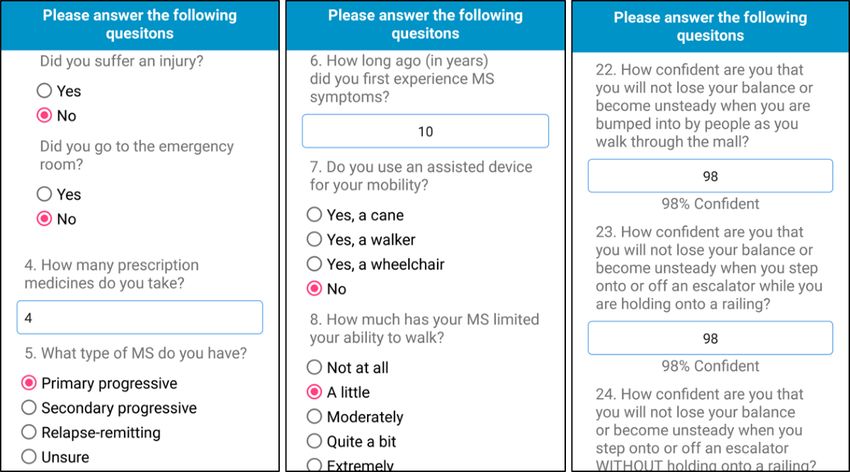
     Figure 1. Screenshots of Steady-MS app asking users to answer 25 questions related to their health, past falls, multiple sclerosis symptoms, and
     perceived balance. MS: multiple sclerosis.

     Figure 2. Screenshots of Steady-MS app guiding users to safely perform 5 standing balance tasks while holding the phone against their chest.

     https://humanfactors.jmir.org/2021/1/e25604                                                            JMIR Hum Factors 2021 | vol. 8 | iss. 1 | e25604 | p. 3
                                                                                                                      (page number not for citation purposes)
XSL• FO
RenderX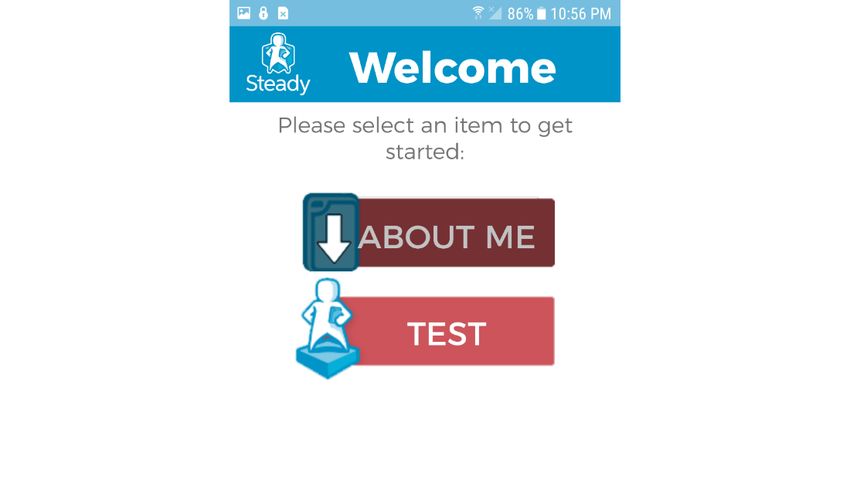
JMIR HUMAN FACTORS                                                                                                                   Hsieh et al

     Steady-MS was also developed considering common MS                   different graphics of how they wanted to receive their score,
     symptoms that may influence usability. For instance, fatigue is      such as on a circular chart or linear scale.
     a common symptom that affects approximately 70% of people
                                                                          Following the semistructured interview, participants completed
     with MS [32]. To prevent fatigue, we limited the total number
                                                                          the Systematic Usability Scale (SUS) to understand the overall
     of questions to 25 questions that were needed for the fall risk
                                                                          usability of the app. The SUS is widely used to quantify the
     algorithm and asked only important additional questions (ie,
                                                                          usability of user-machine interfaces, consisting of 10 standard
     MS duration and type of assisted device) that relate to falls. We
                                                                          questions on a 5-point Likert scale [36]. The SUS ranges from
     also limited the balance tasks to 1 trial of the 5 tasks. Vision
                                                                          0 to 100, with higher scores representing greater usability.
     impairments are also an MS symptom affecting approximately
                                                                          Previous work has indicated that the average technology SUS
     30% of people with MS and may influence reading
                                                                          score is 60, and scores of 80 or above indicate that users are
     questionnaires and instructions [33]. Therefore, the font size
                                                                          more likely to recommend the device to others [37]. Participants
     was at least 14, and we emphasized the high contrast between
                                                                          also completed the Mobile Device Proficiency Questionnaire
     text and background. Cognitive impairment, including reduced
                                                                          (MDPQ) to understand their general proficiency in using mobile
     processing speed and memory decline, affects between 40%
                                                                          devices. The MDPQ ranges from 5 to 40, with higher scores
     and 70% of people with MS [34]. We aimed to prevent cognitive
                                                                          representing greater technological proficiency [38]. Participants
     overload by presenting one set of instructions per screen and
                                                                          then completed the Expanded Disability Status Scale, a
     maintaining consistency throughout the app.
                                                                          self-reported measure of disability that ranges from 0 to 10,
     Participants                                                         with higher scores indicating greater disability [39].
     A total of 10 people with MS participated in 2 usability rounds.     After the first iterative cycle, changes were made to the app
     It has been recommended that small groups (n=5) are suitable         design based on the issues identified from the interviews. The
     for identifying usability issues [35]. People with MS (n=5)          second cycle of semistructured interviews was performed on 5
     interacted with Steady-MS and identified usability issues. Using     new participants with MS. Owing to COVID-19 restrictions on
     their feedback, we improved the design of the app, and then,         in-person research, interviews in the second round were
     another group of people with MS (n=5) interacted with the app        performed remotely. The procedures followed the same format
     to identify any additional usability issues. This iterative design   as the first round; however, participants were delivered a
     approach centered around the user is most effective for              smartphone with Steady-MS installed, and interviews were
     identifying user challenges when developing health apps [21,22].     conducted over a video call. This format allowed us to
     Inclusion criteria for participants included (1) physician           understand how Steady-MS is used in the home environment.
     confirmed diagnosis of MS, (2) age 18 years or older, (3)
     self-reported ability to use a touchscreen device, and (4) ability   Data and Statistical Analysis
     to stand independently for at least 1 minute. Individuals with       All videotapes and field notes taken during the interviews were
     neurological disorders other than MS were excluded from the          transcribed verbatim on a computer. Qualitative data from
     study. All procedures were approved by the Institutional Review      videotapes and field notes were analyzed to develop a coding
     Board, and all participants provided informed consent before         system using MAXQDA (Version 12.3.3). On the basis of their
     participation.                                                       content, data were assigned codes, and codes with similar
                                                                          content were grouped into themes. The codes and themes were
     Procedures                                                           reviewed and discussed by 2 researchers.
     An iterative design evaluation process of videotaped
     semistructured interviews was used to determine the optimal          Results
     usability of Steady-MS. Participants were presented with a
     smartphone (Samsung Galaxy S6) and asked to open the app             Iteration 1
     and follow all instructions as they completed both the in-app
     questionnaires and balance tasks. Participants first completed       Overview
     these steps independently, with as little assistance as possible.    Participant characteristics are displayed in Table 1. From the
     They then completed the in-app tasks a second time, but this         semistructured interviews and coding analysis, 3 main themes
     time thinking aloud and narrating their thoughts. They were          were identified: (1) intuitive navigation, (2) efficiency of use,
     also encouraged to discuss their likes, dislikes, and                and (3) perceived value. Table 2 summarizes the main issues
     recommendations for improvement. After receiving their fall          identified from the interviews and the subsequent changes made
     risk score, participants were also asked to identify and draw        to Steady-MS.

     https://humanfactors.jmir.org/2021/1/e25604                                                   JMIR Hum Factors 2021 | vol. 8 | iss. 1 | e25604 | p. 4
                                                                                                             (page number not for citation purposes)
XSL• FO
RenderX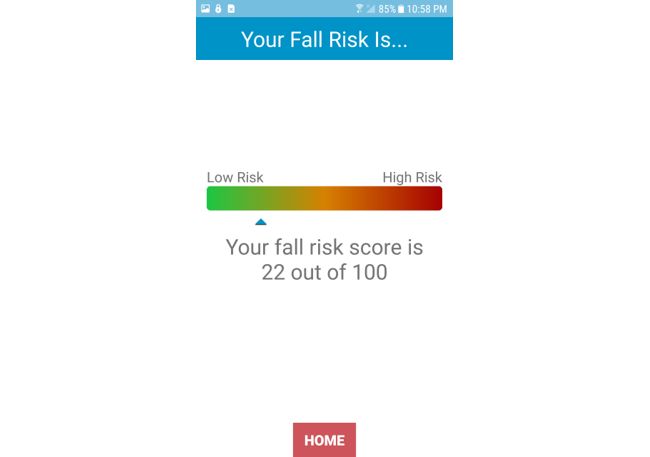
JMIR HUMAN FACTORS                                                                                                                                          Hsieh et al

     Table 1. Demographic information of all participants in the first and second iterations.
         Variables                                                                        Iteration 1                           Iteration 2
         Age (years), mean (SD)                                                           53.2 (13.1)                           54.6 (8.7)
         Gender, n (%)
             Female                                                                       4 (80)                                3 (60)
             Male                                                                         1 (20)                                2 (40)

         EDSSa, median (IQR)                                                              3 (2.5-6)                             2.5 (2.5-6)

         MSb duration (years), mean (SD)                                                  14 (5.9)                              16.2 (9.2)

         MS type, n (%)

             Primary progressive                                                          1 (20)                                0 (0)
             Secondary progressive                                                        0 (0)                                 1 (20)
             Relapse remitting                                                            4 (80)                                4 (80)
         Education, n (%)

             High-school diploma                                                          0 (0)                                 1 (20)
             Associate’s degree                                                           2 (40)                                1 (20)
             Bachelor’s degree                                                            3 (60)                                1 (20)
             Master’s degree                                                              0 (0)                                 2 (40)
         Mobile device use, n (%)
             Owns smartphone                                                              5 (100)                               4 (80)
             Owns tablet                                                                  2 (40)                                3 (60)
         Mobile device proficiency scale, mean (SD)                                       36.8 (3.3)                            38.3 (1.1)

     a
         EDSS: Expanded Disability Status Scale.
     b
         MS: multiple sclerosis.

     Table 2. Summary of the main issues identified in the first round of interviews, sample quotes from each issue, and solutions implemented to improve
     the app.
         Domain and issue                          Sample quotes                                               Solution
         Intuitive navigation
             Unclear if eyes are open or           “I have to keep my eyes closed, don’t I?”                   Added eyes to icons to depict if eyes are open or
             closed for balance tests                                                                          closed.
             Confusion between semitan-            “Maybe a picture or description because the one that said   Modified pictures to clarify semitandem and tandem
             dem and tandem stances                balance beam made more sense”                               stances. Reworded description of each stance.
             Reentering ID before balance “I just hit the Get Started again?”                                  After completing About Me, users are no longer
             tests                                                                                             prompted to reenter their ID.
             Redundant option of complet- “I don’t understand I did not attempt to complete the test The I did not attempt to complete the test option was
             ing test                     because if you didn’t attempt to complete it, why wouldn’t removed, as users are able to skip any balance task.
                                          you just skip it?”
             Assisted device use                   “This was to think about this as if I’m using my crutch,    Added instructions to answer the activities balance
                                                   right?”                                                     confidence scale as if you were to have your assisted
                                                                                                               device.
         Efficiency of use
             Easy to use                           “I find [Steady-MSa] easy to use on my own”                 No solutions were needed.

         Perceived value
             Tracking score over time              If they can learn and improve their score, it would help    No solutions were needed.
                                                   them feel confident.

     a
         MS: multiple sclerosis.

     https://humanfactors.jmir.org/2021/1/e25604                                                                          JMIR Hum Factors 2021 | vol. 8 | iss. 1 | e25604 | p. 5
                                                                                                                                    (page number not for citation purposes)
XSL• FO
RenderX
JMIR HUMAN FACTORS Hsieh et al
Intuitive Navigation for each task (Figure 3). We also eliminated the option “I did
The most common usability issue during the first iteration was not attempt to complete the test.”
related to intuitive navigation. When participants completed For the final fall risk score, participants also reported that they
their self-reported questionnaires and moved onto the balance liked receiving an overall score; however, using a scale to
tasks, they were prompted to reenter their ID, a feature that was present their score would be the most intuitive to improve their
added to assist in testing several individuals simultaneously. Of understanding. A total of 3 participants preferred using a
the 5 participants, 2 had asked for clarification if they had to horizontal or vertical scale, as opposed to a circular chart. They
reenter their ID or if the app was finished. It was not intuitive reported that they understood their score better on a linear scale
for these participants to reenter their ID before moving onto the with low risk on one end and high risk at the opposite end.
balance tasks. To address this issue, participants were no longer Therefore, we added a horizontal scale depicting the user’s final
required to enter their ID to complete the balance tasks. In fall risk score (Figure 4). The score ranges from 0 to 100, with
addition, participants who used an assistive device asked for a green color corresponding to lower fall risk and a red color
clarification whether the questionnaires referred to using their corresponding to higher fall risk:
assistive device or not. Therefore, for questions such as those
from the short form of the ABC, we included instructions I’m a visual person, and when I have to read
regarding assisted device use. something, I will default to looking at the picture. I
mean, I can read an instruction manual all day and,
There was also difficulty in navigating through the 5 balance but if you show me a picture or video on how to do
tests. Two of the participants asked for clarification if their eyes it, I’ll probably pick it up faster. [Participant, male,
were open or closed, whereas 2 different participants performed 36 years old]
the semitandem and tandem conditions incorrectly based on You know, like they do on emojis. You just have those
observation and video recording from the research staff (Table little circles for your eyes if they are closed or open.
3). Although there was a text description instructing each Maybe it’s just me, but it’s reading all these words
balance stance, these participants reported that they preferred or looking at the picture. I could see what I was
to have a clearer image rather than reading text. In addition, supposed to do without reading all that. [Participant,
following each balance task, participants were asked to rate if female, 57 years old]
they completed each test with 1 of the 3 options. Of these
options, participants reported that the last option, “I did not I don’t understand ‘I did not attempt to complete the
attempt to complete the test,” was not intuitive. Participants test’ because if you didn’t attempt to complete it, why
indicated that if they were to select this option, they would have wouldn’t you just skip it? [Participant, female, 46
chosen to skip the test. To address these issues, we modified years old]
the images to indicate that the eyes should be open or closed I enter my ID again and hit the ‘Get Started’?
[Participant, female, 76 years old]
Table 3. Description, order, and number of participants who correctly performed each of the 5 balance tasks in Steady—multiple sclerosis.
Task order 1 2 3 4 5
Visual task Eyes open Eyes closed Eyes open Eyes open Eyes open
Feet position Shoulder width apart Shoulder width apart Semi tandem Tandem Single leg
Iteration 1 correct performance, n (%) 5 (100) 5 (100) 3 (60) 3 (60) 5 (100)
Iteration 2 correct performance, n (%) 5 (100) 5 (100) 4 (80) 5 (100) 5 (100)
https://humanfactors.jmir.org/2021/1/e25604 JMIR Hum Factors 2021 | vol. 8 | iss. 1 | e25604 | p. 6
(page number not for citation purposes)
XSL• FO
RenderXJMIR HUMAN FACTORS Hsieh et al
Figure 3. Screenshots of Steady-MS app guiding users through progressive balance tasks. The top panel of screenshots depict the first iteration of
images and text, and the bottom panel depicts the second iteration of images and text. Images of eyes and rewording of text were edited to improve
clarity and reduce cognitive overload.
https://humanfactors.jmir.org/2021/1/e25604 JMIR Hum Factors 2021 | vol. 8 | iss. 1 | e25604 | p. 7
(page number not for citation purposes)
XSL• FO
RenderXJMIR HUMAN FACTORS Hsieh et al
Figure 4. After completing the balance tests, Steady-MS app outputs an overall fall risk score ranging from 0 to 100, with higher scores representing
a higher risk of fall.
also reported that she sees value in monitoring her fall risk at
Efficiency of Use home rather than having to travel to a clinician.
Overall, all participants found that Steady-MS was efficient and
easy to use. Participants reported that the app walks them Other participants reported that going through the app helped
through each question and balance test and that they could use them realize the factors related to falls. One participant, for
it independently. One participant reported that the MSWS-12 instance, learned the importance of vision for fall risk and could
questionnaire felt redundant; however, none of the participants be more aware of this in the future. Another participant reported
felt that the total number of questions or number of balance that the tandem stance was a balance task that she wanted to
tasks needed to be reduced: improve on:
I mean, it is pretty easy and seems to walk you I guess I didn’t realize the factors if your eyes open
through it, in my opinion. It’s pretty straight forward. or closed or your stance can increase your fall risk.
[Participant, male, 36 years old] I guess I can be more conscious about those types of
things because it seems to me now with that feedback
Everything was quite clear when I was going through about my vision, it plays a pretty important role in
that. [Participant, female, 51 years old] my balance. [Participant, female, 57 years old]
I could do that on my own. [Participant, female, 57 But when I get feeling bad, boy, that number [the fall
years old] risk score] shoots up. You know? It’s not just my
Perceived Value mind, you know, the app kind of confirms it. So maybe
I’ll use a cane instead. [Participant, male, 36 years
The last theme was related to the value of having a fall risk app.
old ]
All participants reported that having an app would be beneficial
for them to understand their risk of falling. Two of the I like to gauge without having to go all the way to the
participants found that having a fall risk score can provide doctor. [Participant, female, 46 years old]
confirmation or reassurance in their perceived changes in Iteration 2
symptoms, especially during a relapse. These participants said
that they would want to use Steady-MS to gauge their changes After the second round of interviews, transcript analysis and
before seeing a physician. Participants with a higher fall risk coding revealed 3 themes related to intuitive navigation,
found value in learning about their scores; however, they also efficiency of use, and perceived value.
wanted exercises or other prevention strategies. One participant
https://humanfactors.jmir.org/2021/1/e25604 JMIR Hum Factors 2021 | vol. 8 | iss. 1 | e25604 | p. 8
(page number not for citation purposes)
XSL• FO
RenderXJMIR HUMAN FACTORS Hsieh et al
Intuitive Navigation we dimmed the About Me section after users finished the
After modifying Steady-MS, participants in the second round questions (Figure 5). Overall, the participants reported that
of interviews reported little difficulty navigating through the Steady-MS was intuitive and easy to navigate:
app. After editing the images and text for the balance tasks, 4 I didn’t know if there was more about me, like if there
of the 5 participants performed all of the balance tasks correctly were more categories within it. So I chose it again
based on observation and video analysis. One participant asked and then I kind of knew enough to be able to scroll
for clarification of the semitandem stance to confirm if she was through and go back. [Participant, female, 56 years
standing correctly. After completing the About Me questions, old]
1 participant returned to the questionnaires again, realized that [Referring to the fall risk scale] The green and the
there were no additional questions, and proceeded to complete red colors [were] pretty self-explanatory to me.
the balance questions. To indicate that this section is completed, [Participant, female, 53 years old]
Figure 5. After completing the "About Me," this section is dimmed and users are prompted to click on the "Test" section.
Efficiency of Use Perceived Value
Similar to the first round of interviews, participants reported All participants reported that Steady-MS can provide many
that Steady-MS was efficient and simple to use. They found benefits. Participants indicated that the most beneficial
that navigating through the questions and balance tasks was component was seeing their fall risk score. For instance, one
straightforward. Participants reported that if there was any participant said that when she sees her neurologist, she may be
confusion on the balance tasks or questionnaires, they asked to perform static balance tasks but does not receive
understood the instructions after rereading a second time. The feedback on her performance. With Steady-MS, she can see a
participants also reported that they could use Steady-MS score that gives her measurable feedback. Another participant
independently without additional guidance: reported that Steady-MS may be useful in understanding her
changes in fall risk with lifestyle changes. Due to COVID-19,
It seems simple enough to use and I’m not tech savvy her yoga classes have been canceled. She can feel changes in
as some are. There wasn’t anything if I read through her balance and walking as a result; however, seeing a score to
it twice I wouldn’t understand. [Participant, male, 61 confirm these changes may motivate her to try online yoga:
years old]
I think it’s neat to gauge your risk. Like when I go to
It’s very easy to read. I liked that part, and the
the neurologist, she’ll have me do stuff, and she’ll
contrast is good too. I’m actually reading without my
say hmm or uh huh. And I don’t know what any of
reading glasses, so that’s a good sign. [Participant,
that means. So it’s kind of nice to have it be like, oh,
female, 53 years old]
your score is this. [Participant, female, 39 years old]
I thought it was pretty good and straightforward.
They’re doing a lot of yoga online and whatnot. But
[Participant, male, 64 years old]
we all know we don’t do those, or I don’t anyway, as
much as I would if I were going to class. So it might
https://humanfactors.jmir.org/2021/1/e25604 JMIR Hum Factors 2021 | vol. 8 | iss. 1 | e25604 | p. 9
(page number not for citation purposes)
XSL• FO
RenderXJMIR HUMAN FACTORS Hsieh et al
be a way for me to say, hey, you need to do a little bit As MS symptoms fluctuate throughout the course of the disease,
more with your yoga because your balances are their risk of falls also changes [4]. Therefore, tracking and
getting a little bit more, you know, unstable, I monitoring fall risk can help people with MS increase their
suppose. [Participant, female, 43 years old] awareness of their fall risk and take part in prevention strategies
You live with yourself all day, every day, and before a fall occurs. Unlike traditional fall risk assessments
sometimes it’s hard to tell if you feel like, you know, performed in clinics or laboratory-based settings, Steady-MS
like I’m not getting around as well. And if you could provides a tool to increase access to fall risk assessments that
look at [the app] and would it show you, oh yeah, it can be performed at home.
does say I have more of a fall risk. [Participant, Lessons Learned
female, 56 years old]
When developing future mHealth apps for people with MS,
System Usability Scale there are important aspects to ensure high usability. First, it is
In the first iteration, the average SUS score was 95.5, with a important to prevent cognitive overload in people with MS, as
standard deviation of 3.3. In the second iteration, the average cognitive impairment is a common symptom of MS [40]. Within
SUS score was 95.5, with a standard deviation of 2.9. Although Steady-MS, cognitive impairment was found when participants
the SUS score did not change between iterations, this is likely were asked to follow 2 separate instructions for a balance task.
because of a ceiling effect with a maximum score of 100. These Using clear visuals and simple text is important to avoid
high scores suggest that participants are likely to recommend cognitive overload. Second, when presenting a score or number
Steady-MS to others [37]. to people with MS, it is important to ensure that the score is
easily understandable. Participants in the study reported that
Discussion they preferred receiving a number because it was measurable,
and they could track improvements over time. However, it is
Principal Findings important that people with MS accurately interpret scores. When
using a scale from 0 to 100, it was important to depict, both
The purpose of this study is to test and refine the usability of a
visually and through text, that 0 represents low risk and 100
fall risk health app for individuals with MS through a
represents high risk. These 2 guidelines can improve the
user-centered design approach. After the first round of usability
development of future health apps to maximize the usability of
testing, participants identified issues navigating through the app
people with MS. Third, using a user-centered, iterative approach
but reported that it was easy to use and found value in
in designing Steady-MS resulted in users effectively and
undergoing a fall risk assessment. We modified the app to
efficiently understanding new instructions. This approach may
improve navigation, and after the second round of testing,
also apply to other clinical populations with physical and
participants reported that the app was easy to navigate and could
cognitive impairments when designing a health app.
use the app on their own. These results, complemented with
high SUS scores, suggest that Steady-MS is a usable health app Limitations
that people with MS can use to self-assess their risk of falling.
This is the first study to develop and test an MS fall risk mHealth
Importantly, our results underscore the need for a user-centered app; however, there are also limitations to this study. The
design during the development of health apps. Indeed, the main participants in this study had high mobile technology use and
issues identified from semistructured interviews were related scored high on the MDPQ. Those with less technology
to intuitive navigation, and a health app with poor navigation experience may have additional usability issues that were not
is unlikely to be used. These issues were related to understanding identified in this study. However, MS commonly affects younger
the entire instructions of a balance task (ie, the position of the adults, and more than 80% of people with MS own a smartphone
feet and if eyes are open or closed). Cognitive impairment is a [7]. Therefore, it is likely that a person with MS will already
common symptom in people with MS [40], and the instructions have mobile device experience. Additionally, while Steady-MS
for each balance task may result in cognitive overload in people measures overall fall risk, it currently does not offer fall
with MS. To reduce cognitive overload, we improved the visuals prevention strategies. Seeking treatment after understanding
and text to depict each balance task. Indeed, during the second individual risk is the next step to prevent falls, and future steps
round of testing, 4 participants completed all balance tasks should aim to include tailored fall prevention strategies and
correctly without asking for clarification. For future understand if people with MS adopt these strategies. Future
developments, it is important to consider the cognitive demands steps should also understand the validity of the algorithm and
of people with MS to prevent cognitive overload. display the results of individual components that contribute to
fall risk. This may help guide people with MS with specific fall
Participants in both rounds of testing reported that they found
prevention strategies. Saving fall risk scores may also help
the app clear, simple to use, and useful in learning their risk of
people with MS monitor their changes over time. In addition,
falling. This suggests that people with MS can independently
future work should aim to understand how fall risk apps such
use carefully designed health apps such as Steady-MS and learn
as Steady-MS can be incorporated into clinical care. Although
about their fall risk. Participants also reported that they value
Steady-MS was designed for use at home, integrating fall risk
receiving a fall risk score because they can identify whether
apps with clinical guidance in a safe manner can increase access
their score improves with exercise or declines with the onset of
to fall prevention strategies. This study of 10 participants is also
symptoms. Steady-MS offers the potential for people with MS
a small sample size, and future steps should include a larger,
to self-assess and self-monitor their fall risk using a smartphone.
https://humanfactors.jmir.org/2021/1/e25604 JMIR Hum Factors 2021 | vol. 8 | iss. 1 | e25604 | p. 10
(page number not for citation purposes)
XSL• FO
RenderXJMIR HUMAN FACTORS Hsieh et al
diverse sample to understand usability needs across the improve users’ intuitive navigation when answering their
heterogeneous MS population. Finally, although participants health-related questionnaires and performing 5 balance tasks.
reported high perceived value in learning about their fall risk After a second round of interviews, users reported that the app
score and offered suggestions to improve how the displaying was straightforward to use and easy to navigate and that they
the score, future interviews, and studies should understand how found value in learning about their fall risk. SUS scores averaged
to present individualized fall risk information to prevent 95.5 after the second round of testing, suggesting high usability.
negative, unintended consequences. These results supported the use of a fall risk app to provide
people with MS a tool to self-assess and self-manage their fall
Conclusions risk. Moreover, these results underscored the importance of
In conclusion, the purpose of this study is to determine the using a user-centered design approach to identify usability
usability of a fall risk health app for people with MS. After one challenges when developing mobile apps for individuals with
round of semistructured interviews, we made modifications to chronic diseases.
Conflicts of Interest
JJS has ownership in Sosnoff Technologies, LLC. Other authors declared no conflicts of interest.
Multimedia Appendix 1
Steady-MS “About Me” questions.
[DOCX File , 15 KB-Multimedia Appendix 1]
References
1. Wallin MT, Culpepper WJ, Campbell JD, Nelson LM, Langer-Gould A, Marrie RA, et al. The prevalence of MS in the
United States. Neurology 2019 Feb 15;92(10):e1029-e1040. [doi: 10.1212/wnl.0000000000007035]
2. Filippi M, Bar-Or A, Piehl F, Preziosa P, Solari A, Vukusic S, et al. Multiple sclerosis. Nat Rev Dis Primers 2018 Nov
08;4(1). [doi: 10.1038/s41572-018-0041-4]
3. Frohman EM, Racke MK, Raine CS. Multiple Sclerosis — The Plaque and Its Pathogenesis. N Engl J Med 2006 Mar
02;354(9):942-955. [doi: 10.1056/nejmra052130]
4. Cameron M, Nilsagard Y. Chapter 15 - Balance, Gait,Falls in Multiple Sclerosis. In Day BL. Lord SR (eds): Handbook of
Clinical Neurology. Elsevier - 2018;237:250. [doi: 10.1016/b978-0-444-63916-5.00015-x]
5. Gholamzad M, Ebtekar M, Ardestani MS, Azimi M, Mahmodi Z, Mousavi MJ, et al. A comprehensive review on the
treatment approaches of multiple sclerosis: currently and in the future. Inflamm. Res 2018 Sep 3;68(1):25-38. [doi:
10.1007/s00011-018-1185-0]
6. Martínez-Pérez B, de la Torre-Díez I, López-Coronado M. Mobile Health Applications for the Most Prevalent Conditions
by the World Health Organization: Review and Analysis. J Med Internet Res 2013 Jun 14;15(6):e120. [doi: 10.2196/jmir.2600]
7. Marrie RA, Leung S, Tyry T, Cutter GR, Fox R, Salter A. Use of eHealth and mHealth technology by persons with multiple
sclerosis. Multiple Sclerosis and Related Disorders 2019 Jan;27:13-19. [doi: 10.1016/j.msard.2018.09.036]
8. Lowe-Strong A, McCullagh PJ. Monitoring of symptoms and interventions associated with multiple sclerosis. Stud Health
Technol Inform 2005;117:223-228. [Medline: 16282674]
9. Giunti G, Guisado Fernández E, Dorronzoro Zubiete E, Rivera Romero O. Supply and Demand in mHealth Apps for Persons
With Multiple Sclerosis: Systematic Search in App Stores and Scoping Literature Review. JMIR Mhealth Uhealth 2018
May 23;6(5):e10512. [doi: 10.2196/10512]
10. Casilari E, Santoyo-Ramón JA, Cano-García JM. Analysis of a Smartphone-Based Architecture with Multiple Mobility
Sensors for Fall Detection. PLoS ONE 2016 Dec 8;11(12):e0168069. [doi: 10.1371/journal.pone.0168069]
11. Ning Y, Hu S, Nie X. Real-time Action Recognition and Fall Detection Based on Smartphone. 2018 Jul 21 Presented at:
Annu Int Conf IEEE Eng Med Biol Soc; 2018; Honolulu, HI p. 4418-4422. [doi: 10.1109/embc.2018.8513314]
12. Cerrito A, Bichsel L, Radlinger L, Schmid S. Reliability and validity of a smartphone-based application for the quantification
of the sit-to-stand movement in healthy seniors. Gait & Posture 2015 Feb;41(2):409-413. [doi: 10.1016/j.gaitpost.2014.11.001]
13. Rasche P, Mertens A, Bröhl C, Theis S, Seinsch T, Wille M, et al. The “Aachen fall prevention App” – a Smartphone
application app for the self-assessment of elderly patients at risk for ground level falls. Patient Saf Surg 2017 May 8;11(1).
[doi: 10.1186/s13037-017-0130-4]
14. Roeing KL, Hsieh KL, Sosnoff JJ. A systematic review of balance and fall risk assessments with mobile phone technology.
Archives of Gerontology and Geriatrics 2017 Nov;73:222-226. [doi: 10.1016/j.archger.2017.08.002]
15. Giannì C, Prosperini L, Jonsdottir J, Cattaneo D. A systematic review of factors associated with accidental falls in people
with multiple sclerosis: a meta-analytic approach. Clin Rehabil 2014 Feb 25;28(7):704-716. [doi: 10.1177/0269215513517575]
16. Rae-Grant A, Bennett A, Sanders AE, Phipps M, Cheng E, Bever C. Quality improvement in neurology: Multiple sclerosis
quality measures: Table. Neurology 2015 Sep 02;85(21):1904-1908. [doi: 10.1212/wnl.0000000000001965]
17. Finlayson ML, Peterson EW, Cho CC. Risk Factors for Falling Among People Aged 45 to 90 Years With Multiple Sclerosis.
Archives of Physical Medicine and Rehabilitation 2006 Sep;87(9):1274-1279. [doi: 10.1016/j.apmr.2006.06.002]
https://humanfactors.jmir.org/2021/1/e25604 JMIR Hum Factors 2021 | vol. 8 | iss. 1 | e25604 | p. 11
(page number not for citation purposes)
XSL• FO
RenderXJMIR HUMAN FACTORS Hsieh et al
18. Gunn HJ, Newell P, Haas B, Marsden JF, Freeman JA. Identification of risk factors for falls in multiple sclerosis: a systematic
review and meta-analysis. Phys Ther 2013 Apr;93(4):504-513. [doi: 10.2522/ptj.20120231] [Medline: 23237970]
19. Hsieh KL, Sosnoff JJ. Smartphone accelerometry to assess postural control in individuals with multiple sclerosis. Gait &
Posture 2021 Feb;84:114-119. [doi: 10.1016/j.gaitpost.2020.11.011]
20. Broekhuis M, van Velsen L, Hermens H. Assessing usability of eHealth technology: A comparison of usability benchmarking
instruments. International Journal of Medical Informatics 2019 Aug;128:24-31. [doi: 10.1016/j.ijmedinf.2019.05.001]
21. McCurdie T, Taneva S, Casselman M, Yeung M, McDaniel C, Ho W, et al. mHealth Consumer Apps: The Case for
User-Centered Design. Biomedical Instrumentation & Technology 2012 Jan 01;46(s2):49-56. [doi:
10.2345/0899-8205-46.s2.49]
22. Schnall R, Rojas M, Bakken S, Brown W, Carballo-Dieguez A, Carry M, et al. A user-centered model for designing
consumer mobile health (mHealth) applications (apps). Journal of Biomedical Informatics 2016 Apr;60:243-251. [doi:
10.1016/j.jbi.2016.02.002]
23. Hsieh KL, Fanning JT, Rogers WA, Wood TA, Sosnoff JJ. A Fall Risk mHealth App for Older Adults: Development and
Usability Study. JMIR Aging 2018 Nov 20;1(2):e11569. [doi: 10.2196/11569]
24. Hobart JC, Riazi A, Lamping DL, Fitzpatrick R, Thompson AJ. Measuring the impact of MS on walking ability: The
12-Item MS Walking Scale (MSWS-12). Neurology 2003 Jan 14;60(1):31-36. [doi: 10.1212/wnl.60.1.31]
25. Wood T, Wajda D, Sosnoff J. Use of a Short Version of the Activities-specific Balance Confidence Scale in Multiple
Sclerosis. International journal of MS care 2019 Jan 01:15-21. [doi: 10.7224/1537-2073.2017-047]
26. Cameron M, Thielman E, Mazumder R, Bourdette D. MS International. Predicting Falls in People with Multiple Sclerosis:
Fall History Is As Accurate As More Complex Measures. Mult Scler Int 2013; 2013:496325.
27. Cattaneo D, De Nuzzo C, Fascia T, Macalli M, Pisoni I, Cardini R. Risks of falls in subjects with multiple sclerosis. Archives
of Physical Medicine and Rehabilitation 2002 Jun;83(6):864-867. [doi: 10.1053/apmr.2002.32825]
28. Nilsagård Y, Gunn H, Freeman J, Hoang P, Lord S, Mazumder R, et al. Falls in people with MS—an individual data
meta-analysis from studies from Australia, Sweden, United Kingdom and the United States. Mult Scler 2014 Jun
16;21(1):92-100. [doi: 10.1177/1352458514538884]
29. Comber L, Sosnoff JJ, Galvin R, Coote S. Postural control deficits in people with Multiple Sclerosis: A systematic review
and meta-analysis. Gait & Posture 2018 Mar;61:445-452. [doi: 10.1016/j.gaitpost.2018.02.018]
30. Prosperini L, Fortuna D, Giannì C, Leonardi L, Pozzilli C. The Diagnostic Accuracy of Static Posturography in Predicting
Accidental Falls in People With Multiple Sclerosis. Neurorehabil Neural Repair 2012 May 15;27(1):45-52. [doi:
10.1177/1545968312445638]
31. Kalron A. The Romberg ratio in people with multiple sclerosis. Gait & Posture 2017 May;54:209-213. [doi:
10.1016/j.gaitpost.2017.03.016]
32. Lerdal A, Celius E, Krupp L, Dahl A. A Prospective Study of Patterns of Fatigue in Multiple Sclerosis. Eur J Neurol
2007;14:1338-1343. [doi: 10.1111/j.1468-1331.2007.01974.x]
33. Balcer LJ, Miller DH, Reingold SC, Cohen JA. Vision and vision-related outcome measures in multiple sclerosis. Brain
2014 Nov 28;138(1):11-27. [doi: 10.1093/brain/awu335]
34. Langdon DW. Cognition in multiple sclerosis. Current Opinion in Neurology 2011;24(3):244-249. [doi:
10.1097/WCO.0b013e328346a43b] [Medline: 21519256]
35. Nielsen J. How many test users in a usability study. Nielsen Norman Group 2012;4.
36. Brooke J. SUS-A Quick and Dirty Usability Scale. In: Usability Evaluation In Industry. Bristol, PA: Taylor & Francis;
1996:189-196.
37. Sauro J. Measuring Usability with the System Usability Scale. 2011. URL: https://measuringu.com/sus/
38. Roque NA, Boot WR. A New Tool for Assessing Mobile Device Proficiency in Older Adults: The Mobile Device Proficiency
Questionnaire. J Appl Gerontol 2016 Apr 11;37(2):131-156. [doi: 10.1177/0733464816642582]
39. Kurtzke JF. Rating neurologic impairment in multiple sclerosis: An expanded disability status scale (EDSS). Neurology
1983 Nov 01;33(11):1444-1444. [doi: 10.1212/wnl.33.11.1444]
40. Sumowski JF, Benedict R, Enzinger C, Filippi M, Geurts JJ, Hamalainen P, et al. Cognition in multiple sclerosis. Neurology
2018 Jan 17;90(6):278-288. [doi: 10.1212/wnl.0000000000004977]
Abbreviations
ABC: Activities Balance Confidence Scale
CNS: central nervous system
MDPQ: Mobile Device Proficiency Questionnaire
mHealth: mobile health
MS: multiple sclerosis
MSWS-12: The 12-item Multiple Sclerosis Walking Scale
SUS: System Usability Scale
https://humanfactors.jmir.org/2021/1/e25604 JMIR Hum Factors 2021 | vol. 8 | iss. 1 | e25604 | p. 12
(page number not for citation purposes)
XSL• FO
RenderXJMIR HUMAN FACTORS Hsieh et al
Edited by A Kushniruk; submitted 08.11.20; peer-reviewed by L Omberg, R Bergquist, C Blair; comments to author 23.12.20; revised
version received 20.01.21; accepted 22.02.21; published 22.03.21
Please cite as:
Hsieh K, Fanning J, Frechette M, Sosnoff J
Usability of a Fall Risk mHealth App for People With Multiple Sclerosis: Mixed Methods Study
JMIR Hum Factors 2021;8(1):e25604
URL: https://humanfactors.jmir.org/2021/1/e25604
doi: 10.2196/25604
PMID: 33749609
©Katherine Hsieh, Jason Fanning, Mikaela Frechette, Jacob Sosnoff. Originally published in JMIR Human Factors
(http://humanfactors.jmir.org), 22.03.2021. This is an open-access article distributed under the terms of the Creative Commons
Attribution License (https://creativecommons.org/licenses/by/4.0/), which permits unrestricted use, distribution, and reproduction
in any medium, provided the original work, first published in JMIR Human Factors, is properly cited. The complete bibliographic
information, a link to the original publication on http://humanfactors.jmir.org, as well as this copyright and license information
must be included.
https://humanfactors.jmir.org/2021/1/e25604 JMIR Hum Factors 2021 | vol. 8 | iss. 1 | e25604 | p. 13
(page number not for citation purposes)
XSL• FO
RenderXYou can also read


