Using mobile devices in the language classroom - Language Research
←
→
Page content transcription
If your browser does not render page correctly, please read the page content below

Using mobile
  devices in
  the language
  classroom
Part of the Cambridge Papers in ELT series
January 2018

  CONTENTS

  2       Why use mobile devices in class?

  4       The teacher’s role

  6       Functions and apps: Ready-made for
          language learning

  8       Getting started

  9       Using mobile devices for language learning

  16      Learner training and teacher training

  18      Conclusion and future directions

  20      Recommendations for further reading

  21      Bibliography
Why use mobile
          devices in class?

Mobile devices, in particular internet-capable smartphones   In this paper we will be looking at how the judicious
and tablets, have become an integral part of everyday        use of mobile devices in the language classroom
life for many people in most parts of the world. This        can, in fact, have a number of positive outcomes
is particularly the case for young people, for whom          for students and teachers. These include:
mobile devices have become an essential means for
                                                               1. integrating into instruction multimodal language-
connecting with the world in general and with their social
                                                                  learning tasks involving use of images, audio and video;
environment in particular. Students at the secondary and
tertiary levels – and increasingly some even younger –         2. enabling collaborative classroom activities using
use their phones to stay in constant contact with friends         mobile devices for group writing, listening or speaking;
and family. Yet when they enter the classroom, there
is more often than not the expectation – or, in fact,          3. enriching classroom activities with authentic
the absolute requirement – that phones be switched                language resources through apps and online sites;
off, or at least not used during class. The sentiment is       4. leveraging individual preferences on mobile devices to
widely shared among educators that mobile devices in              personalize learning and develop learner autonomy;
the classroom function as a serious distraction, taking
student attention away from learning (O’Bannon &               5. enhancing students’ digital literacy and other
Thomas, 2014). The banning of phones in the classroom,            21st-century skills needed for the workplace;
however, has several results that are not beneficial:          6. encouraging out-of-school and lifelong language
  • A good number of students will likely continue                learning.
    to use their phones, but surreptitiously,
    possibly resulting in classroom conflict.                These represent enhanced learning opportunities that
                                                             are difficult, or in some cases impossible, to implement
  • Prohibiting phones leads students to view                without mobile devices. Allowing students to use their
    what happens in their language classroom                 devices in class breaks down the barrier between school
    as separate from their ‘real’ lives.                     and life. Doing so aligns teaching practices with the real
  • Students don’t see their devices as potential            world, in which mobile technology is integrated into
    learning tools, in particular for language study.        most spheres of work and leisure. Today, mobile devices
                                                             are so ubiquitous that students are likely to expect to
  • Classroom instruction does not take advantage            use them in that part of their lives which happens to
    of the wealth of tools and resources available           take place at school (Stephens & Pantoja, 2016).
    for language practice on mobile devices.

   2
Why use mobile devices in class?

If, in fact, mobile devices can offer such benefits, why is               • Is there a school or district policy regarding
it that language teachers are reluctant to introduce their                  student mobile use in class?
use in the classroom? It is not just the distraction factor.
                                                                          • Do all students have access to mobile
We tend to teach the way we were taught, which for the
                                                                            devices? Is pair or group sharing feasible?
current generation of teachers did not include the use of
mobile devices. While teachers are likely themselves to                   • Is internet access readily available in the
use a mobile phone, that does not easily translate into                     classroom? Is the Wi-Fi network reliable?
classroom use. For many teachers, the transition from an
entertainment and socializing device to a learning tool                   • Are curricular or formal testing requirements in place
may be difficult to envision (Kukulska-Hulme, 2009).                        that dictate a particular approach to instruction, with
                                                                            less flexibility for introducing new teaching options?

                                                                      These factors will have an impact on the feasibility (or not)
                                                                      of mobile device use. However, not taking advantage of this
     By enabling greater learner autonomy                             opportunity for enhancing instruction may lead students
     and enhanced opportunities for                                   to look elsewhere for language training. In most parts of
     language practice beyond the                                     the world, English learners in particular will have a variety
                                                                      of options. Brick-and-mortar schools are increasingly being
     classroom, mobile devices can                                    supplemented by opportunities for formal and informal
     supply greater access to second                                  internet-based language learning. Introducing mobile use
     language input than normally is                                  benefits students, but it also benefits teachers. Learning
                                                                      to integrate mobile devices into language instruction adds
     available in traditional instruction.                            another dimension to the teacher’s profile, improving the
                                                                      quality of instruction while enhancing teacher marketability.

Another potential barrier is the very richness of options             It is not just their availability, wide usage and social
available today on mobile devices. While the ever-growing             acceptance that invite use of mobile devices in the
set of tools, services and apps may be empowering to                  classroom, but also the fact that the capabilities they offer
students, it may seem overwhelming to teachers looking                align well with current educational theories and practices,
to start using mobile devices in their classes (Carrier & Nye,        ‘such as improving student retention and achievement,
2017). In addition, it is the case that integration of devices        supporting differentiation of learning needs, and reaching
as powerful and personal as contemporary smartphones                  learners who would not otherwise have the opportunity
into the classroom environment changes the modality                   to participate in education’ (Kukulska-Hulme, 2009: 157).
of instruction, eroding potentially the magisterial role of           Specifically in language learning, mobile devices can
the teacher. Teachers beginning to use mobile devices in              facilitate constructivist / collaborative learning, use of
language learning will need help in changing their attitudes          authentic materials, and real-world integration of language
towards them as well as training. Effective use requires              use, all areas considered important today in communicative
more than just allowing student access, namely thoughtful             language learning (Savignon, 1991). By enabling greater
consideration of when mobile use makes sense and when                 learner autonomy and enhanced opportunities for
it does not. Teacher training is needed to learn best                 language practice beyond the classroom, mobile devices
practices in merging pedagogy and mobile technology.                  can supply greater access to second language input
                                                                      than normally is available in traditional instruction.
Whether the time and effort are worth the investment
will depend on the individual teacher and on the school
context, including the following considerations:

                                                                                                                                3
The teacher’s role

As is true for any teaching tool, mobile devices can           levels and knowledge of affordances develop, new, more
be used in a variety of ways to support instruction.           transformative uses are likely to emerge. This focus on
The SAMR model (Puentedura, 2014) of technology                the teacher’s ability to mould pedagogical content and
integration lays out a spectrum from using technology          technology is at the centre of a framework developed
to do familiar tasks better or easier to, on the upper         specifically for mobile pedagogy for English language
end, redesigning educational approaches, using                 teaching (Kukulska-Hulme, Norris & Donohue, 2015). The
technology to enable activities not previously possible:       importance of ‘teacher wisdom’ in the framework points
                                                               to the key role teachers play in designing activities that
  • Substitution. Technology substitutes for a
                                                               make sense for the technology used, the ability / interest
    traditional approach; for example, a word
                                                               of students, and the kind of learning materials at hand.
    processor replacing writing by hand.

  • Augmentation. Technology acts as a direct                  With mobile devices in the classroom, the teacher plays a
    tool substitute and adds new functionality; for            more active role as compared to the more hands-off model
    example, proofing tools and text-to-speech                 of drill-based, programmed learning, using self-instructional
    are used to improve the writing process.                   tutorials, today often associated with MOOCs – massive
                                                               open online courses (see Hockly & Dudeney, 2017). Pegrum
  • Modification. Technology allows for                        (2014: 207) comments: ‘To be maximally effective, teachers
    significant task redesign; for example, the                need to be more than designers or collectors of material;
    written work is shared on a blog.                          they need to become designers of learning experiences
  • Redefinition. Technology allows for the creation of        for their students’. This involves a shift in the teacher
    new tasks, previously inconceivable; for example,          role: the teacher’s expertise is used not only to transmit
    students combine written text with multimedia,             knowledge, but also to guide students towards the best
    posting the result on a media sharing site.                use of the technology for maximum language acquisition.

Using the audio function of smartphones to play dialogues
in the classroom replicates an activity language learners
did previously with a CD player, demonstrating substitution         The learner should be brought
or augmentation. Having students use their devices to
                                                                    to see the potential of becoming
write comments on the dialogue (in the form of text
messages, blog entries, or contributions to a Google                personally empowered in his or
doc) modifies previous use of the same materials and                her language learning, with the
adds a collaborative and reflective dimension, potentially
                                                                    possibility of becoming part of an
redefining teaching practice. Typically, teachers will start
using mobile devices to do familiar tasks, but as comfort           online community of learners.

   4
The teacher’s role

Even if students are proficient users of personal                 part of an online community of learners. Teachers can
technology, they will likely need help in using online            contribute to achieving this goal in several ways:
learning materials. Although students may be aware of
                                                                      • using classroom time to allow students to discuss
online resources for language learning, studies show
                                                                        or even demonstrate their learning ‘in the wild’;
that without guidance they may struggle to use them
effectively: ‘The studies suggest that learners’ strategies           • enabling students to ask questions that may have
and resource choices are largely determined by what                     developed from language encounters online;
they happen to come across as they browse the web
and online app stores’ (Kukulska-Hulme, 2013: 5). What                • encouraging students to seek out, curate and
this means in practice is that it is important not only for             recommend online resources they find useful.
language teachers to use mobile devices in the classroom
to enhance learning, but also to model their use for              This approach could lead to useful discussions in
learning in general, with the hope that students will use         class on the advantages of different apps or services,
their devices for that purpose outside the classroom.             potentially increasing learner motivation and contributing
                                                                  to the development of the capacity for autonomous
The goal should be a seamless use of technology                   learning (Ciampa, 2014). By the same token, in-class
for learning, no matter in what context it may occur.             activities using mobile devices can include or lead
The learner should be brought to see the potential                to assignments completed at home. These kinds of
of becoming personally empowered in his or her                    ‘extension activities’ contribute to students’ understanding
language learning, with the possibility of becoming               that their devices can in fact be useful learning tools,
                                                                  inside and outside the classroom (Norton, 2014).

                                                                                                                            5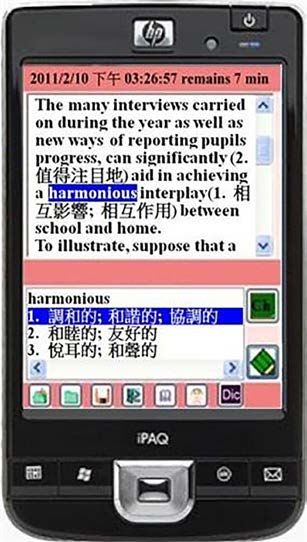
Functions and apps:
           Ready-made for
           language learning

Smartphones and tablets have a variety of built-in functions     server, often called cloud services. This enables sharing of
that support communication and multimedia use. They              created artefacts and thus collaborative opportunities.
offer an efficient way for students to work with language,
whether written or spoken. Because they are networked,           The kinds of apps students are likely to have already
they support peer collaboration and offer the opportunity        on their devices, or that can be installed for free, include
to virtually bring into class individuals from outside the       the following:
classroom, including more proficient speakers. Some of the
                                                                   • mobile versions of social media, such as Facebook
built-in capabilities that support text and media use include:
                                                                     and Twitter;
  • note taking;
                                                                   • video-conferencing services like Skype or
  • photo capture and editing;                                       Google Hangouts;

  • audio and video playback, recording and editing;               • messaging and multimodal texting apps including
                                                                     Snapchat and Instagram;
  • email;
                                                                   • personal journaling apps like Penzu or Journey;
  • text messaging;
                                                                   • video-streaming players such as YouTube or
  • web browsing.
                                                                     VLC media player.

In addition to the default functions and applications present
                                                                 None of these were developed for language learning, but
in phones and tablets today, they also offer access to a
                                                                 all clearly have potential for language practice and socially
large variety of third-party apps, which in fact is a major
                                                                 oriented learning. Apps already used by students offer the
reason for smartphone popularity. Apps were available
                                                                 advantage of familiarity and integration of life and learning.
before the iPhone arrived in 2007, but were of minor
importance and not widely used. Today, the Apple App
                                                                 Even apps and online services that were not developed for
Store (for iOS devices) and Google Play (for Android devices)
                                                                 use by learners can be helpful for both language and culture
offer countless apps that can be easily added to phones
                                                                 learning in a variety of ways. That might include topics
to enhance their functionality. In contrast to traditional
                                                                 such as transportation (in-class groups using an online train
computer software, apps tend to be inexpensive, installed
                                                                 timetable to plan a trip), entertainment (discussing movie
easily, and feature intuitive interfaces requiring minimal
                                                                 or music reviews), shopping (furnishing an apartment), or
instructions for use. Many apps today offer the ability to
                                                                 dining (choosing a restaurant based on online menus). Such
store or sync data from the phone or tablet with an online

   6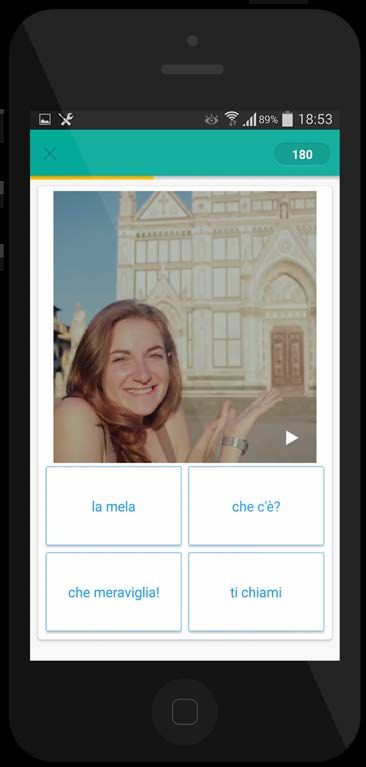
Functions and apps: Ready-made for language learning

activities are well adapted to small group work, with the              concentration style to much more sophisticated. The
added opportunity of sharing created artefacts online.                 latter include innovative place-based games using artificial
                                                                       intelligence or augmented reality (see Godwin-Jones,
In addition to general-purpose apps, there are many                    2014, 2016). Some games (as well as some flash card and
designed specifically for language and culture learning                polling apps) can be set up as competitions that can be
(see the recommended resources at the end of this                      played in class with individual students or with groups.
paper). Many such apps are in the category of phrase
books, vocabulary flash cards, tourist guides, or grammar
tutorials (Chinnery, 2006). Pronunciation apps are also
common, such as Sounds Right (British Council) or Sounds:                     Apps already used by students offer
The Pronunciation App (Macmillan); see Kaiser, 2016 for
reviews of pronunciation apps. These kinds of apps are                        the advantage of familiarity and
designed to be used by individual users, but some could                       integration of life and learning.
be adapted to collaborative use in the classroom. Tuttle
(2013) suggests having students in pairs extract phrases
from a phrase book app and then use them to create a                   One of the cautions in the use of third-party apps in the
dialogue, or as the basis of an in-class skit. Other kinds of          classroom is compatibility. While the most popular apps
single-purpose apps could be used in a similar fashion.                are normally available for both iOS and Android, this is not
                                                                       necessarily the case for all. Another consideration is cost:
Full-featured language-learning apps are available as well,            many apps are free, but some are not. Increasingly, apps
including mobile versions of services such as Duolingo                 are released as ‘freemium’, meaning that some features
or Babbel. Teachers might have students, individually                  or functions are free, but others must be purchased. If
or in small groups, assigned to download, try out, and                 students are using their own devices, one might assign
then report in class on the experience of using such                   installation of the app before the start of class, so that
services. This could also be done with other language-                 class time is not taken up with getting started.
related apps such as games, ranging from very simple

                                                                                                                                7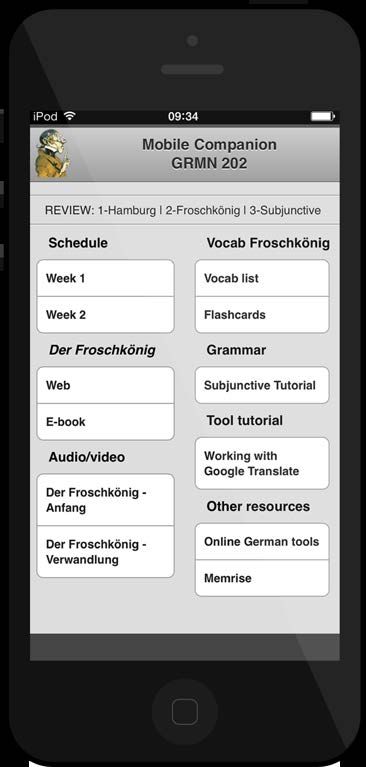
Getting started

Following Crompton (2013), mobile devices here are                • the familiarity of students and teachers
considered to be portable digital screen devices with               with the device / service / app;
instant on/off, i.e. phones and tablets, but not laptops. In
                                                                  • the extent to which the mobile device use can serve
recent years, there have been a number of initiatives in
                                                                    as a springboard for in-class communicative activities.
which mobile devices – especially tablets – were purchased
and made available to students, which specific devices
                                                                The experiences of language teachers who have
are available for use will depend on the context of use.
                                                                used mobile devices in the classroom point to some
Increasingly, however, there has been interest in having
                                                                best practices:
students use their own phones, tablets or laptops in a BYOD
model – ‘bring your own device’ (Rogers, 2016). Having            1. As with any technology used in the classroom,
students use their own devices means they are working                it is important for teachers to do a technology-
in a familiar context and are able to continue to use the            related activity first themselves, so they have a clear
devices outside the classroom. This may be an especially             understanding of its usage. For activities involving
important consideration for students with disabilities who           access to a website, it is good practice to check in
have configured their devices to accommodate visual or               advance to make sure it is up and available. One
hearing issues (Kukulska-Hulme, Norris & Donahue, 2015).             should avoid sites (or apps) with long load times.

Teachers need to be aware of potential disparities in             2. The instant on / off of mobile devices allows them
device ownership among their students which may                      to be used with great flexibility in the classroom. To
affect use in the classroom. In some instances, it may               avoid tempting students to use their devices for other
be necessary for students to share devices. Indeed,                  purposes, the teacher might explicitly call for devices to
having students collaborate is one of the important ways             be taken out, and, at the end of the activity, put away.
in which mobile devices can enhance the classroom                 3. Keep activities with mobile devices short. Tuttle (2013)
learning dynamic. Al Zahrani and Laxman point out                    recommends limiting activities to three to five minutes.
that there may also be cultural factors at play in the               Actual time on the device will likely not be the principal
use of mobile devices in the classroom, finding that                 learning gain, but rather that task will be used to
‘suitable awareness of cultural diversities and the effects          generate active language use in the classroom through
this has on the individual user is vital to the success of           pair / group discussions or other follow-up activities.
e-learning systems’ (Al Zahrani & Laxman, 2015: 85).
                                                                  4. Keeping mobile use short also means that activities
How mobile devices are used for second language learning             should not be overly complex. While the use of mobile
in the classroom will vary based on a variety of factors:            devices for an assigned task might involve several steps
                                                                     or even different apps or websites, the focus should
  • the specific lesson and the teacher’s learning goals;            be on using the devices to generate active language
  • how the work with mobile devices fits in with                    use. More elaborate tasks should be assigned for
    other planned activities for the day;                            homework. Complex assignments may involve more
                                                                     teacher talk, giving directions, than is desirable in
  • the language skills involved and how the features of             a communicative learning environment, even if the
    the device / app facilitate their use and practice;              instructions are provided in the target language.
  • the availability of devices for all students (or the need
    to share) and the reliability of the network, if used;

   8
Using mobile devices
for language learning
Discussion starters and for carrying out the task is useful in itself, but even
more productive for learning can be the group or
warm-up activities class discussions generated by the activity.
Mobile devices can be used to provide a brief interactive One could as well introduce a grammar point by displaying
introduction to a lesson, functioning as a kind of advanced a set of sentences containing the form in use. Students
organizer (Hunsu, Adesope & Bayly, 2016). For this purpose, are asked to read the sentences and see if they detect a
one could use a so-called clicker or polling app such as pattern. If so, they can respond through multiple-choice
Socrative, Kahoot! or GoSoapBox. Such apps enable a or short-answer questions. This kind of guided induction
teacher to ask a question, to which students respond on lends itself well to pair work, allowing students to reflect
their mobile devices. The answers are tabulated and the and discuss (Godwin-Jones, 2017a). For more open-
responses (depending on the app) can be displayed on ended or longer responses, one could use Google Forms,
users’ devices or on the instructor’s console / screen. This which features more question types than clicker apps.
could be used to introduce a new set of vocabulary through
a word-picture matching exercise. Such apps could also be
used as a way to check student knowledge in a particular
area, providing the instructor with a way to gauge the
range of prior knowledge and thus the appropriate starting A good way to get started with
point for introducing a topic. A set of questions in a clicker the use of multiple devices in the
app can also be used for a quick review of prior material. classroom is to explore with the
The feedback students receive on their answers can students the features of the mobile
provide positive reinforcement of their progress, crucial to devices that have the potential
learner motivation. One ESL teacher reported that students to support language learning.
enjoyed the use of the Socrative app on their phones:
Basically it’s a sort of validation, isn’t it, instant One practical issue with the use of Google Forms is
feedback that tells them if they’ve got it right the necessity of supplying a URL (web address) to the
or wrong ... or it feels like a fun game I guess ... students. For clicker apps, a short code is provided once
It’s nice to see as a class and they talk about it the instructor creates an exercise. The instructor displays
before going on to the next one and people can the code on a classroom screen or writes it on the board.
ask why something is wrong, you know it builds One option for providing students with easy access to a
discussion about the language in itself (cited in web address such as is generated by Google Forms is
Kukulska-Hulme, Norris & Donohue, 2015: 6). to create a ‘mobile companion’ page which lists links to
websites and other class resources (Godwin-Jones, 2017b).
As is often the case with the use of mobile devices This could be done using an HTML editor, or more easily
in the language classroom, student use of the device with a sharing service such as Padlet or lino or a
9Using mobile devices for language learning
class management service such as Edmodo or ClassDojo. issues. This ‘contributes to both learning skills and digital
Once such a page (or site) is created, students can save literacies’ (Kukulska-Hulme, Norris & Donohue, 2015: 27).
it as an icon on their devices’ home screen (see Figure 1). Exploring mobile devices for language learning should be
This makes it easy to click on the icon to display the page. a process which continues throughout the semester, as
students are encouraged to try out other apps and online
We know that a good way to get started with the use of services, adding both to individual student skill sets and to
multiple devices in the classroom is to explore with the the class knowledge bank. Another option for sharing this
students the features of the mobile devices that have kind of information-gathering and individual testimonials
the potential to support language learning (see Hockly is to use a class blog or wiki. Free blogs for education can
& Dudeney, 2014 for multiple related activities). For this be created through services such as WordPress, Blogger,
activity, one might assign the students to work in groups, or Edublogs, wikis through Wikispaces or eduhub.
exploring together ways to use the functions and apps
of their phones to support language learning (Kukulska-
Hulme, Norris & Donohue, 2015). Dividing into groups
encourages collaboration but also enables separating
students into groups with the same devices, or at least
with the same operating systems. Each group might have
a designated reporter / scribe jot down the findings,
including the relevant vocabulary in the target language.
This information could be saved in a shared notebook
using an app such as Evernote or Microsoft OneNote or
added to a communal page on Google Docs. Students
in this activity could engage in a variety of tasks which
combine exploration of the devices, target language use,
and students getting to know one another. These include:
• Switch the user interface of the device
to the target language.
• Send each other text messages or emails to
experience familiar apps in the target language.
• Conduct sample searches using a target language
search engine, then share and discuss resources found.
• Compare installed apps which might support
language learning (such as audio / video recording).
• Try out the voice-activated virtual assistants (Siri for iOS
or Google Now for Android) in the target language.
A useful adjunct to this activity is to encourage students
to consult online help and reference sites when they need
assistance or clarification with either technical or language
Figure 1: Example of a mobile companion
10Using mobile devices for language learning
Vocabulary and grammar grammar and vocabulary learning and practice are mobile
friendly. Some have created entertaining game-based
The largest volume of published articles, teacher blog activities, such as Grammaropolis for English grammar
posts, and apps related to mobile language learning or Quizlet for vocabulary exercises. Johnny Grammar’s
target vocabulary acquisition and grammar study (Pegrum, Word Challenge (British Council) incorporates game-
2014). For the most part, mobile activities involving based questions on grammar, vocabulary and spelling
these areas of language learning represent amplifying or for a variety of learning levels. The Phrasalstein app
modifying activities following the SAMR model discussed (Cambridge University Press) reviews the use of phrasal
earlier. They represent more efficient ways for students to verbs through cartoon figures resembling Frankenstein.
advance their skills and knowledge, with usage extending
from the classroom to home use. Most of the sites for Rosell-Aguilar (2017) advocates that teachers demonstrate
the use of recommended apps in the classroom. While
the basic functionality of most apps is readily apparent,
there may well be preferences or advanced features of
which the casual user may be unaware. This is certainly
true of the sophisticated flash card apps available today,
such as Anki or Memrise (see Figure 2), which feature a
multitude of advanced features including spaced repetition,
multimedia glosses, automatic syncing across devices,
and collaborative / gaming functions. Discussing the use
of these features in class can provide valuable insights
into what cognitive psychology and second language
acquisition theory have revealed about how human
memory works and about optimal methods for vocabulary
study. Results from studies on effective language-learning
strategies point to the importance of explicit discussion
with students of optimal strategies, with research showing
‘the most beneficial strategy instruction to be woven into
regular, everyday L2 teaching’ (Oxford, 2003: 12). Periodic
discussion in class of mobile apps and services for language
learning provides an ideal opportunity for doing that.
Students can engage in a constructivist activity with
vocabulary by collaborating to create their own multimedia
glosses (Pollard, 2015). Apps such as yodio and ThingLink
enable audio or video to be added to texts or photos.
Pictures and audio / video clips can be sourced online
or can be taken / recorded with the students’ devices,
done outside of class. Alternatively, the teacher could
supply a set of images for use in class. The multimedia
glosses could be sent to a teacher-designated location (for
example, through text messaging or email), or could be
added to a multimedia sharing site such as Snapguide or
Pinterest or saved to a virtual learning environment (VLE)
Figure 2: Memrise app such as Moodle, if used. In class, the submissions could be
displayed and discussed through the teacher console.
11Using mobile devices for language learning
Pollard (2015) suggests that, where possible, vocabulary or comparisons of word usage. Access is also provided by
sets be coupled with targeted grammatical structures, BYU to the Corpus of Contemporary American English.
such as combining a unit on people’s appearances with English Monstruo (Cambridge University Press) provides
relative pronouns. This provides ‘the opportunity to insights from the Cambridge English Corpus, with
objectively describe the setting, as per the appearance information on frequent errors made by native Spanish
aspect, and also allow the student to speculate on speakers. The app features interactive exercises using
other aspects of the image, such as the possible corpus examples. An alternative is for the instructor to
personality traits of the individuals’ (Pollard, 2015: 29). preselect examples from a corpus and make them available
on a shared class page. In class, groups can be assigned
a certain number of sentences containing a construction,
Studies on effective language- then asked to list usage patterns. Groups can then report
to the class, with the instructor or designated student
learning strategies point to the serving to coalesce the input from the different groups.
importance of explicit discussion
with students of optimal strategies.
Reading and writing
Having students create projects using the lexis and Social media, widely used by students, provides an ideal
structures under study can serve to make them more vehicle for reading and writing in the target language.
aware of language structures in context, leading Social media engages students in real language use
to more ‘noticing’ of forms (Schmidt, 1990): and contributes to their ability to use the language not
only grammatically but in ways that are socially and
Since learners need to consciously notice language pragmatically appropriate. That includes learning about
forms in order to take them in, mobile learning genre conventions, language registers, and cultures of
can assist this process by encouraging learners use for different media and online communities (Thorne,
to pay close attention to how language is used 2003). Knowing how and when shorthand texting language
around them and record their observations in the is used, for example, is an important competency for
real world, subsequently sharing their notes in the English learners today. It is likely that students already
classroom or informally (Kukulska-Hulme, 2013: 5). use available mobile versions of social platforms such
as Facebook. This provides the opportunity to engage
Students could collaboratively use a tool such in class activities which can be extended to homework
as H5P to create their own interactive grammar assignments or used later informally by students.
and vocabulary exercises. That can provide more
insight into language forms, as well as encouraging Mahoney (2014) describes how she uses blogging to
reflection on approaches to language learning. provide reading / writing practice and motivate students
by personalizing the choice of content. She starts by
One of the opportunities to combine lexis and structure showcasing a blog with students in class. She then has
is having students use their devices to consult a target students take out their devices, and asks them to browse
language corpus (i.e. large collection of texts), with the and compare posts from three different blogs. The students
use of concordancing software, which provide examples are then assigned to ‘blog on five separate subject areas
of words, expressions and idioms as used by proficient from a choice of eight subject areas’ (Mahoney, 2014: 36,
speakers. Some such software are available through cited in Richards, 2015: 9–10). Mahoney has found that
the browser on mobile devices, although, depending allowing students to choose their own material and express
on the site, the interface may not display optimally on a their individual point of view in their blogs has a highly
small screen (Godwin-Jones, 2017a). The British National motivating effect. She makes sure as well that as part of
Corpus, for example, can be searched using the BYU the assignment, students read each other’s blog posts
interface for retrieving in-context use of individual words / and write comments. In another kind of shared reading /
phrases, collocations (words frequently found together), writing activity (see Figure 3), students were able to use
12Using mobile devices for language learning
an annotator on their mobile devices to make notes on Cakir (2015) surveyed different uses of SMS for language
readings or to add translations, which were then shared with learning and concluded that ‘the research has shown
other students in the class (Hsu, Hwang & Chang, 2013). that the studies based on the use of mobile SMS for
learning English encouraged classroom interactions,
motivated students to learn English, promoted vocabulary
Social media engages students in real acquisition and tested their progress’. Pollard (2015)
used text messaging to have students exchange both
language use and contributes to their photos and short texts. Reinders (2010: 22) suggests
ability to use the language not only having students engage in circular writing through
grammatically but in ways that are messaging, ‘creating a story together, contributing
one text message at a time’. He also recommends
socially and pragmatically appropriate. experimenting with different genres and writing styles,
including narratives, news reports and instructions.
One of the factors to consider in reading and writing on This kind of activity could be carried out through Twitter
mobile devices is the limited screen size, which may limit as well. Twitter is especially well suited for activities in
functionality in both areas. In fact, mobile users are used which students report on their own daily activities or on
to dealing with short text formats, not long form writing. language encounters (particular idioms encountered
One recent study that compared student writing on mobile in reading, for example). Norton (2014) suggests the
devices with writing on computers or by hand found that following uses of Twitter for English language learning:
writing on mobile devices tended to be more superficial,
less reflective (Heflin, Shewmaker & Nguyen, 2017). In line • Tweet a summary. In pairs or small groups,
with this reality, it comes as no surprise that most reported ask students to summarize a piece of text in
projects focusing on second language writing on mobile 140 characters or less. Provide students with
devices have used text messaging (SMS, WhatsApp a hashtag, so the whole class can follow the
or other messaging platforms) or tweets (Twitter). conversation on Twitter and discuss it at the end.
• What did you do at the weekend? Ask students to
tweet photos of their weekend. Provide a hashtag
for all the tweets. They could include photos of
interesting people they met, a funny sign, or a meal
they enjoyed. This will provide students with plenty
of material for discussion on a Monday morning.
• Describing people. Ask students to describe
someone they are following on Twitter, in English.
What were the reasons for following them? Do
they read their tweets daily? Do they follow
them on other social media channels? Is there
anything in particular they admire about them?
Kukulska-Hulme, Norris and Donohue (2015) suggest
posing a question at the end of a class, to which students
then tweet or message a response from home. Using
a hashtag with Twitter allows students and teachers
to follow the conversation easily. They also suggest
having students in groups summarize a reading in a
tweet or ‘create their own microstories and flash fiction’.
Examples can be seen at sixwordmemoirs.com.
An annotation made by the student
Detailed information of the annotated vocabulary
13Using mobile devices for language learning
Listening and speaking
One of the characteristics of online interactions that has
emerged with the explosive growth of mobile technology
has been the merging of modalities, i.e., text, image and
audio / video, often today converging in texting, blogging,
and in all forms of social media (Goldstein, 2016). This
convergence will necessarily be reflected in the use of
mobile devices in language learning. Tasks – in class and
at home – are likely to combine text with other media.
A recommended activity in Kukulska-Hulme, Norris and
Donohue (2015), for example, has as its final product
a draft letter to accompany a job application. Before
working on the letter in class, students watch an online
job interview video at home, then in class discuss with
other students what they found useful in the interviews.
Thus, the activity involves writing, listening and speaking.
As is the case here, assigned tasks involving mobile use
should ultimately lead to active student language use,
collaborative opportunities, and, whenever possible, a
connection to the ‘real’ world outside the classroom.
One of the ways in which language teachers can bring
the outside world into the classroom – and in the process
authentic linguistic and cultural learning materials – is
through the use of online audio and video. There is now
a wealth of videos of all kinds available on YouTube and
through other online video services. Podcasts are also
widely available and have been used for some time in
language learning as a source of information on current
affairs (Beckmann & Martin, 2013) or in the form of
student- or teacher-created podcasts (Abdous, Camarena Figure 3: Audio News Trainer for English
& Facer, 2009). Some apps feature slowed-down audio
for language learners, or may, as does the Audio News
Watching video clips or listening to podcasts can serve as
Trainer for English (see Figure 4), offer audio recordings
models for students themselves creating multimedia. This
at different levels of difficulty (Read, Bárcena & Kukulska-
is in fact one of the most used features of modern phones,
Hulme, 2016). The great variety of topics available means
to take pictures and record audio / video. The voice-
that teachers are likely to find sample clips to fit any
recording feature can be used to record selected classroom
thematic focus. This provides options as well for students
activities for later study, reflection or transcription. Voice
to find audio / video resources that align with personal
and video recording are ideal vehicles for practising
or academic interests. While language coursebooks try
presentations, assigned dialogues or classroom skits.
to appeal to young learners with, for example, texts of
Final versions can be posted online to a class webpage,
songs from contemporary pop artists, they are likely
a video-sharing service, or to a public folder on a cloud
to be out of date as soon as published (Lieberman,
service such as Dropbox. Students might use their phones
2017). Using online sources keeps content current.
to conduct video interviews with each other, related to
14Using mobile devices for language learning
topics currently being studied. They could use available content and structures studied in class. Posting a
models on YouTube to create how-to tutorials related to a group project as an online artefact can motivate
hobby or particular interest. Hockly and Dudeney (2014) students while at the same time connecting to real-
suggest having students collaborate to create short movie world contexts, contributing to digital literacy.
trailers based on imagined movie plots or favourite books.
2. Inquiry: How does the activity relate to ever-changing
contexts of language use?
Students could use a service such as Voki to create
Multimedia projects mirror how language is in fact
animated characters engaged in dialogue, related to
used today in online communities. Students might
course themes and using studied vocabulary and language
engage in additional ‘mashup’ activities (frequent
structures. Voki supports 25 different languages and
online) such as supplying alternative soundtracks
allows use of voice recordings or text-to-speech to add
for a video, adding subtitles or describing photos
audio to animated stories (Picardo, 2011). In fact, there
(as common in the Flickr photo-sharing service).
are multiple options for multimedia storytelling, which
has shown to be an effective language-learning activity 3. Rehearsal: How does the activity make the most of
(Kukulska-Hulme, Norris & Donohue, 2015). Depending circumstances and resources to enable more practice?
on students’ interest, age and proficiency, they might tell Recording and playback enable multiple practice
stories through creation of comic strips (using, for example, opportunities, encouraging reflection and
the Strip Designer app) or create scenarios involving revision. The digital files can be easily shared
augmented reality with apps like Aurasma or Layar. with others. Feedback from peers and teacher
provides valuable input for repair and iterative
Such collaborative multimedia-integrated projects align improvement. Being online also offers connection
well with the criteria Kukulska-Hulme, Norris and Donohue possibilities to virtual learning communities.
(2015) outline for evaluating use of mobile devices in
language learning. The criteria supply a useful set of 4. Reflection: How does the activity design ensure
questions to ask about any technology-related assignment: reflection on learning?
Teachers play a crucial role here, both in
1. Outcomes: How does the activity lead to improved commenting on student production and creating
language proficiency and other outcomes? space and time for thoughtful re-examination
Creating multimedia projects leads students to and revision by students themselves.
use language in a real-task context, based on
15Learner training and
teacher training
Language teachers are likely to have quite divergent might come during a natural break time or be available
views on the desirability of having students within groups when tasks have been completed.
use mobile devices in their classrooms. One
perspective is expressed by an ESL teacher: One practical option, recommended in Kukulska-Hulme,
Norris and Donohue (2015), is for students to place their
Smartphones are here to stay. For English teachers, phones into ‘flight’ mode during class. There are also ‘do
that means we need to either ban iPhones, Androids, not disturb’ settings, which have the advantage of allowing
Blackberries and whatever next flavor arrives – or emergency contact by designated family members or
– we have to learn how to incorporate the use of friends. Another possible direction is to install classroom
smartphones into our routine. I’ve discovered that just management software such as Netop or the Cambridge
ignoring their use in class doesn’t help. After all, I am ClassServer (Carrier & Nye, 2017). Such systems can limit
an English teacher trying to encourage my students to access to particular functions or apps, such as Facebook
communicate in the English language (Beare, 2017). or email. On the other hand, there is this advantage to full,
unfiltered internet access, that students learn to deal with
Other teachers and school administrators may feel quite digital distractions and moderate compulsive behaviour.
differently, viewing student phone use in the classroom
as harmful to learning, as it distracts the student using In any case, it is advisable to have a clearly set out
the device, as well as possibly those seated nearby. policy for when mobile phones are to be used. Having
The fear is that students will not be using the phones student phones on and available at all times during
in ways that relate to the work being done in class, but the lesson is likely not optimal. As discussed here, best
rather will be texting friends and checking Facebook. practices in mobile use for language learning indicate
This fear is widespread. O’Bannon and Thomas (2014), that they be used in short periods of time, with follow-
in a broad survey of teachers, found that there were up activities built around information generated by the
differences according to teachers’ ages – older teachers mobile use, but no longer needing mobile access.
being strongly against classroom phone use – but that
in none of the age groups did the majority of teachers Teachers may want to follow a pattern in which they
support allowing student use of mobile devices in class. instruct students, ‘Now take out your phones,’ and then
after the activity remind students to put them away. An
Discussing the issue with all stakeholders – teachers, important aspect of using mobile devices in the classroom
students, administrators, families – is a recommended is to share with students their affordances for language
first step (Carrier & Nye, 2017). Studies have shown that learning, but also their problematic side, which includes
students are very much aware of the distraction factor the addictive need to check in continuously with social
and are amenable to finding a workable set of guidelines media. We want to develop in our students good habits for
(Stephens & Pantoja, 2016). One possible procedure is language learning, but also nurture behaviours helpful in
to reserve a specific time for allowing students to check other contexts, such as once they enter the world of work.
phones (Kuznekoff, Munz & Titsworth, 2015). That
16Learner training and teacher training
Students continuously using their phones in class may be involve learning about what technology is available and
a signal to the teacher regarding the class environment: how to use it, and, importantly, how technology use fits
into student learning. Teachers need to adjust to a shift
Whose fault is it if distracting activities are going on in classroom control, as digital learning ‘gives students
in the classroom? What caused the distractions other some element of control over time, place, pathways
than the availability of technology? Will alternative and pace’ (Digital Learning Now, 2014: 5). Technology
distractions occur if the technological tools are integration only works effectively if teachers are actively
removed? Without implying that students are always engaged in thoughtful and critical consideration of what
right, I would say that the issue gives educators a digital tools and services fit instructional goals for their
reason to reflect on their own teaching (Fang, 2009). students. Pegrum (2014: 155) maintains that ‘teachers
may well find themselves increasingly called upon to
In a classroom in which students are fully engaged in the fuse pedagogical and technological understandings and
learning at hand, there are likely to be fewer bored or become designers – of digital learning tasks and activities,
distracted students. In communicative language learning, and potentially of digital learning software itself’.
we expect students to be using the language actively
as much as possible, collaborating and communicating Teachers are well advised to start small, using devices
among themselves, not listening to the teacher lecture. initially for familiar classroom tasks, perhaps using activities
In that sense, introducing mobile devices as a new outlined here and by others (see the recommended
teaching and learning tool follows this instructional resources at the end of this paper). As confidence increases,
pattern, with the teacher as guide and facilitator. teachers will find new ways to use the technology that
fit their own curricular needs and student proficiency /
It is undeniably the case, however, that even language interest levels. Eventually, they may find that mobile
teachers who have accustomed themselves to relegate devices offer an optimal vehicle for bridging the gap
more responsibility and authority to students for learning, between classroom and out-of-school learning. While
may still feel uneasy about introducing mobile devices into teachers may start by doing with mobile technology what
the classroom and relinquishing even more control. Teachers they have always done, they are likely to find many more
should not be expected to integrate mobile devices into opportunities that exist for motivating and empowering
their teaching without sufficient training. This is in fact a student learning, both inside and outside the classroom.
concern in research in this area, that teacher training is an
absolute necessity, ‘in fact, it’s hard to find a point more One of the practical lessons all teachers need to learn is
widely made in the research literature’ (Pegrum, 2014: 188). what to do if technology plans go awry. This can occur
in any number of ways. A school’s Wi-Fi network may go
Teacher training is most effective if it targets the specific down, for example, meaning that planned tasks based
context in which teachers work. How mobiles are going on accessing online sites will not be possible. It is good
to be used most effectively depends on the instructional practice for teachers to cache locally on their devices or
goals, students’ proficiency levels, and the ages of the laptops webpages or other online materials intended for
learners. The local context may provide little individual class use, so that these are available for offline viewing.
leeway for teachers, as there may be curricular mandates
in place or specific classroom guidelines that make mobile When dealing with student devices, there should not be
use problematic. An important starting point is to ensure the expectation that teachers will supply technical support.
that teachers and students understand institutional policies, Of course, basic problems are inevitable, such as rundown
if any, in place regarding mobile use in class. Having a batteries, connection issues, or memory storage problems.
clearly articulated, widely understood, and universally In such cases, peer support is likely to be forthcoming. It is
implemented mobile use policy leads students to anticipate possible as well to designate several students in the class
(and maybe accept) expectations in each of their classes. to be ‘digital leaders’, responsible for finding personal or
This helps both students and teachers, and lessens the online help for technical issues that may arise (Hockly &
probability of classroom clashes over phone use. Dudeney, 2014). Despite all precautions and established
support networks, it is still possible that there could be
Professional networks, local workshops, and online technical problems. If mobile access is an integral part of
resources can all provide opportunities for teachers to learn. the day’s lesson plan, one should always be sure to have
Hands-on training is important, optimally with teachers a Plan B which does not necessitate technology use.
using mobile devices themselves. Effective training will
17Conclusion and
future directions
There is not a great deal of published professional Few focused on collaborative or communicative uses. The
research specifically on the effectiveness of the use of studies generally showed overall positive results. A meta-
mobile devices in the second language classroom. Much analysis by Sung, Chang and Liu (2016) showed a larger
of the research in this area has focused on technology effect on learning with mobile devices than with desktop
rather than pedagogy, exploring how different features technology or without technology at all. Crompton, Burke
of mobile devices have been used, often for out-of- and Gregory’s meta-analysis (2017) of studies in primary
class purposes. Many studies before the advent of the and secondary education found that 70% of the studies
touchscreen smartphone focused on the limited functions done on mobile learning resulted in positive outcomes.
users were able to carry out, with physical constraints such
as small screens, awkward text entry, poor user interface
and slow networking. This all changed with the advent Helping students be aware of their
of the iPhone and Android phones in 2007–8 (Godwin-
Jones, 2017c). Despite these devices including many natural and preferred learning
features which invite collaborative and communicative style is helpful, as is encouraging
uses in language learning, studies have shown that most students to stretch beyond their
projects have been oriented to behaviourist, drill-style
uses, duplicating teaching practices out of step with comfort level, to try out different
communicative language learning, which favors a learner- approaches to learning.
centred, socially oriented approach (Rosell-Aguilar, 2017).
Published research on mobile use in education generally One area in which there has been substantial research on
has indicated that mobile devices are being used the use of mobile technology in the classroom is related to
increasingly in schools and universities. A meta-analysis clickers. Originally, starting in the 1960s, these were small
in 2017 of use in primary and secondary schools showed dedicated devices which were used for polling purposes.
widespread use of mobile devices in a variety of subjects, Increasingly, hardware clickers have given way to software,
with science being most widely targeted, followed by with a large number of available apps. In the comprehensive
literacy and language (Crompton, Burke & Gregory 2017). study of clickers and software clickers in education (Bruff,
Surprisingly perhaps, there were more studies on usage 2009), several reports on their use in language learning are
in primary school than in secondary school. The majority discussed. A Spanish teacher found they were effective
of studies came from Asia, with Taiwan contributing the in use in warm-up activities, as well as in facilitating class
largest number of articles. A meta-analysis by Al Zahrani discussions based on poll results. In a reported use in ESL,
and Laxman (2015) of mobile use in higher education found clickers were used to facilitate group interactions and to
that science, languages and professional training were help shyer students participate more. Bruff highlights in his
most often the subjects of published research. The most study what he terms ‘peer instruction’ through the use of
frequent use of mobile devices was for multimedia access. clickers, namely opportunities for student collaboration.
18Conclusion and future directions
Recent studies have called for research that goes beyond types of learners (Hannaford, 1995). The physical act of
whether mobile devices are useful or not, instead exploring using mobile devices is likely to appeal to students who
how to use them to maximize learning (Stephens & Pantoja, favour kinaesthetic or tactile learning styles (Oxford,
2016). Kuznekoff, Munz and Titsworth (2015) provide an 2003). The more exploratory nature of mobile use can
example of this direction in research as they studied how energize ‘open learners’, who ‘want to stay available for
texting was actually used in class, finding that students continuously new perspectives’ (Oxford, 2003: 6).
text-messaging on topics related to the course content had
higher test scores, with negative results for students texting The variety of activities possible through mobile devices
on topics unrelated to the course content. Such nuanced aligns with the recommendations from Oxford and
and specific studies are helpful, and, given the growth of other researchers to provide a ‘wide range of classroom
mobile devices in all spheres of life, we are likely to see activities that cater to different learning styles’ (Oxford,
more research of this kind, including work addressing case 2003: 7). Helping students be aware of their natural and
studies of mobile use in the second language classroom. preferred learning style is helpful, as is encouraging
students to stretch beyond their comfort level, to
try out different approaches to learning. Viberg and
All four language skills, as well as Grönlund (2012) note that little attention has been paid
to students’ learning styles and strategies in mobile
cultural learning, can be addressed language learning. This is an area ripe for more research.
using different mobile functions,
apps, and web-based resources. The fact that mobile device use can address a variety of
student learning styles points to the flexibility and versatility
in their use in language learning. All four language skills,
Research in the use of mobile language as well as cultural learning, can be addressed using
learning tends to recognize the value of using different mobile functions, apps, and web-based resources.
the device in collaborative activities: Mobile use in the language classroom can serve as a
welcome break, start-up, or concluding activity. Mobile-
Within the classroom, it has been shown that mobile based activities can stimulate rich collaborative work, as
devices, with appropriate software, can be highly students work together to communicate in the target
effective in supporting small group collaborative language, based on what they have heard, watched, read
learning, improving on what was possible to or written through the mobile devices. Teachers are likely
achieve without these tools … The design of the to find that students react quite positively to integration
learning activity is predicated on close interaction, of their devices into classroom instruction. This positive
conversation and decision-making between members experience may well lead students to continue to use their
of a group, which includes some physical movement mobile devices for informal language learning beyond
and can be difficult to achieve with the use of the classroom. A companion paper in this series offers
fixed computers (Kukulska-Hulme, 2009: 160). insights into this personalization of language learning
through mobile technologies.1 The prospect of enabling
Studies in cognitive psychology and educational a seamless learning process in and out of school should
practice have shown that physical movement may have provide a strong incentive to language teachers to consider
a positive effect on some kinds of learning and some seriously introducing mobile devices in their teaching.
1 Personalization of language learning through mobile technologies, by Agnes Kukulska-Hulme. Available at:
www.cambridge.org/elt/blog/wp-content/uploads/2017/06/CambridgePapersinELT_M-learning_2016_ONLINE.pdf
19You can also read


