Using Your NI-488 and NI-488.2 Subroutines for Visual Basic for Windows - February 1994 Edition Part Number 320418-01
←
→
Page content transcription
If your browser does not render page correctly, please read the page content below

Using Your NI-488 ® and NI-488.2 ™
   Subroutines for Visual Basic
          for Windows

             February 1994 Edition
            Part Number 320418-01

© Copyright 1991, 1994 National Instruments Corporation.
                  All Rights Reserved.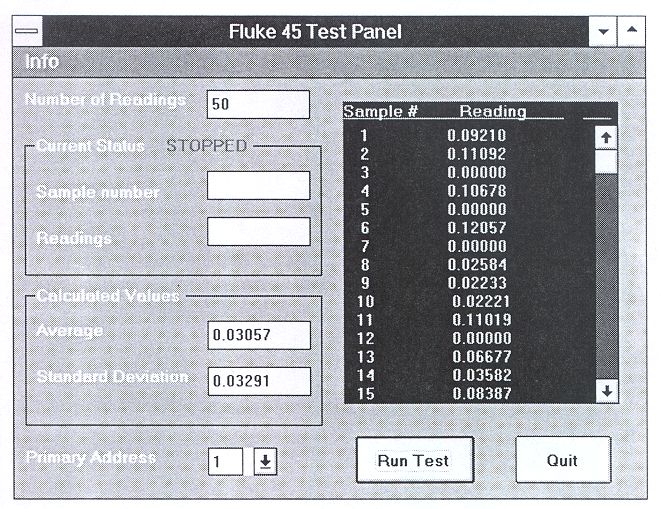
National Instruments Corporate Headquarters
6504 Bridge Point Parkway
Austin, TX 78730-5039
(512) 794-0100
Technical support fax: (800) 328-2203
                       (512) 794-5678

Branch Offices:
Australia (03) 879 9422, Austria (0662) 435986, Belgium 02/757.00.20,
Canada (Ontario) (519) 622-9310, Canada (Québec) (514) 694-8521,
Denmark 45 76 26 00, Finland (90) 527 2321, France (1) 48 14 24 24,
Germany 089/741 31 30, Italy 02/48301892, Japan (03) 3788-1921,
Netherlands 03480-33466, Norway 32-848400, Spain (91) 640 0085,
Sweden 08-730 49 70, Switzerland 056/27 00 20, U.K. 0635 523545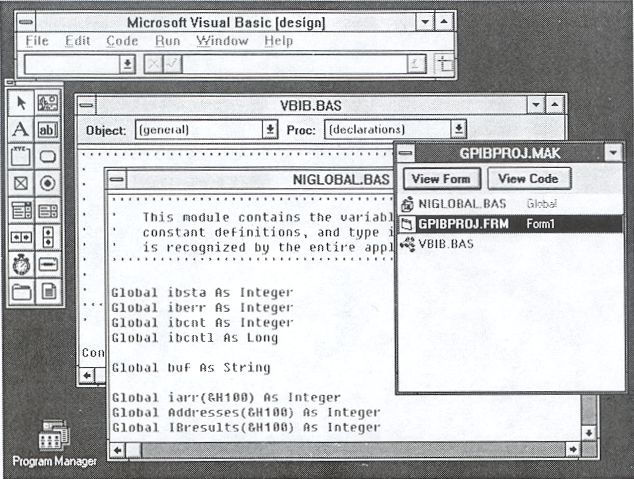
Limited Warranty
The media on which you receive National Instruments software are
warranted not to fail to execute programming instructions, due to defects in
materials and workmanship, for a period of 90 days from date of shipment,
as evidenced by receipts or other documentation. National Instruments will,
at its option, repair or replace software media that do not execute
programming instructions if National Instruments receives notice of such
defects during the warranty period. National Instruments does not warrant
that the operation of the software shall be uninterrupted or error free.

A Return Material Authorization (RMA) number must be obtained from the
factory and clearly marked on the outside of the package before any
equipment will be accepted for warranty work. National Instruments will
pay the shipping costs of returning to the owner parts which are covered by
warranty.

National Instruments believes that the information in this manual is
accurate. The document has been carefully reviewed for technical accuracy.
In the event that technical or typographical errors exist, National
Instruments reserves the right to make changes to subsequent editions of
this document without prior notice to holders of this edition. The reader
should consult National Instruments if errors are suspected. In no event
shall National Instruments be liable for any damages arising out of or
related to this document or the information contained in it.

EXCEPT AS SPECIFIED HEREIN, NATIONAL INSTRUMENTS MAKES NO
WARRANTIES , EXPRESS OR IMPLIED , AND SPECIFICALLY DISCLAIMS
ANY WARRANTY OF MERCHANTABILITY OR FITNESS FOR A
PARTICULAR PURPOSE. CUSTOMER 'S RIGHT TO RECOVER DAMAGES
CAUSED BY FAULT OR NEGLIGENCE ON THE PART OF NATIONAL
INSTRUMENTS SHALL BE LIMITED TO THE AMOUNT THERETOFORE
PAID BY THE CUSTOMER . N ATIONAL INSTRUMENTS WILL NOT BE
LIABLE FOR DAMAGES RESULTING FROM LOSS OF DATA , PROFITS,
USE OF PRODUCTS, OR INCIDENTAL OR CONSEQUENTIAL DAMAGES ,
EVEN IF ADVISED OF THE POSSIBILITY THEREOF. This limitation of the
liability of National Instruments will apply regardless of the form of action,
whether in contract or tort, including negligence. Any action against
National Instruments must be brought within one year after the cause of
action accrues. National Instruments shall not be liable for any delay in
performance due to causes beyond its reasonable control. The warranty
provided herein does not cover damages, defects, malfunctions, or service
failures caused by owner's failure to follow the National Instruments
installation, operation, or maintenance instructions; owner's modification of
the product; owner's abuse, misuse, or negligent acts; and power failure or
surges, fire, flood, accident, actions of third parties, or other events outside
reasonable control.

                                Copyright
Under the copyright laws, this publication may not be reproduced or
transmitted in any form, electronic or mechanical, including photocopying,
recording, storing in an information retrieval system, or translating, in
whole or in part, without the prior written consent of National Instruments
Corporation.

                              Trademarks
NI-488 ® and NI-488.2™ are trademarks of National Instruments
Corporation.

Product and company names listed are trademarks or trade names of their
respective companies.

    Warning Regarding Medical and Clinical Use
         of National Instruments Products
National Instruments products are not designed with components and testing
intended to ensure a level of reliability suitable for use in treatment and
diagnosis of humans. Applications of National Instruments products
involving medical or clinical treatment can create a potential for accidental
injury caused by product failure, or by errors on the part of the user or
application designer. Any use or application of National Instruments
products for or involving medical or clinical treatment must be performed by
properly trained and qualified medical personnel, and all traditional medical
safeguards, equipment, and procedures that are appropriate in the particular
situation to prevent serious injury or death should always continue to be
used when National Instruments products are being used. National
Instruments products are NOT intended to be a substitute for any form of
established process, procedure, or equipment used to monitor or safeguard
human health and safety in medical or clinical treatment.
Contents
About This Manual .......................................................................... vii
Organization of This Manual...................................................... vii
Conventions Used in This Manual ............................................. viii
Related Documentation ..............................................................ix
Customer Communication .......................................................... ix
Chapter 1
General Information ........................................................................1-1
Visual Basic Files ....................................................................... 1-1
Programming Preparations ......................................................... 1-2
Visual Basic NI-488 I/O Calls and Functions ............................1-3
NI-488 IL Functions..................................................... 1-6
Dynamic Reconfiguration of Board and
Device Characteristics ................................... 1-8
Using the NI-488.2 Routine Examples ..........1-9
Chapter 2
Programming Examples ................................................................. 2-1
Visual Basic NI-488.2 Programming Example ..........................2-1
Visual Basic Example Program–NI-488.2
Routines ....................................................................... 2-4
GPIB Programming Examples ................................................... 2-12
Visual Basic Example Program–Device Functions ..... 2-14
Visual Basic Example Program–Board Functions....... 2-18
Appendix A
Multiline Interface Messages ....................................................... A-1
Appendix B
Customer Communication ............................................................B-1
Glossary................................................................................................. G-1
© National Instruments Corp. v Visual BasicContents
Figures
Figure 1-1. GPIBPROJ.MAK ................................................................... 1-3
Figure 2-1. VB488_2.MAK ......................................................................2-3
Figure 2-2. VBDEVICE.MAK ................................................................. 2-13
Tables
Table 1-1. Visual Basic NI-488 Calls ...................................................... 1-4
Table 1-2. Functions That Alter Default Characteristics ......................... 1-8
Table 1-3. Visual Basic NI-488.2 Routines ............................................. 1-9
Visual Basic vi © National Instruments Corp.About This Manual
This manual contains information for programming the NI-488.2 routines
and the NI-488 functions in Visual Basic. The term Visual Basic as used in
this manual refers to Microsoft Visual Basic for Windows.
This manual assumes that the driver is installed and that you are familiar
with the driver operation and programming in Visual Basic.
Organization of This Manual
This manual is organized as follows.
• Chapter 1, General Information, contains information you need to
prepare for programming the NI-488.2 driver in Visual Basic.
• Chapter 2, Programming Examples, contains programming examples
for the NI-488.2 routines and NI-488 functions.
• Appendix A, Multiline Interface Messages, contains an interface
message reference list, which describes the mnemonics and messages
that correspond to the interface functions.
• Appendix B, Customer Communication, contains forms you can
use to request help from National Instruments or to comment on
our products and manuals.
• The Glossary contains an alphabetical list and description of terms
used in this manual, including abbreviations, acronyms, metric
prefixes, mnemonics, and symbols.
© National Instruments Corp. vii Visual BasicAbout This Manual
Conventions Used in This Manual
The following conventions are used in this manual:
italic Italic text denotes emphasis, a cross
reference, or an introduction to a key
concept.
bold italic Bold italic text denotes a note, caution, or
warning.
monospace Lowercase text in this font denotes text or
characters that are to be literally input from
the keyboard, sections of code,
programming examples, and syntax
examples. This font is also used for the
proper names of disk drives, paths,
directories, programs, subprograms,
subroutines, device names, functions,
variables, filenames, and extensions, and
for statements and comments taken from
program code.
bold monospace Lowercase text in this font is used to highlight
the location and usage of NI-488.2 routines and
NI-488 functions on sample programs
Angle brackets enclose the name of a key on the
keyboard–for example, .
Key names are capitalized.
IEEE 488 IEEE 488 and IEEE 488.2 are used throughout
IEEE 488.2 this manual to refer to the ANSI/IEEE Standard
488.1-1987 and the ANSI/IEEE Standard
488.2-1987, respectively, which define the
GPIB.
NI-488.2 NI-488.2 is used throughout this manual to refer
to the NI-488.2 software unless otherwise noted.
Visual Basic viii © National Instruments Corp.About This Manual
Visual Basic Visual Basic is used throughout this manual to
refer to Visual Basic for Windows unless
otherwise noted.
Abbreviations, acronyms, metric prefixes, mnemonics, symbols, and terms
are listed in the Glossary.
Related Documentation
The following documents contain information that you may find helpful as
you read this manual:
• NI-488.2 Software Reference Manual for MS-DOS, (part
number 320282-01)
• ANSI/IEEE Standard 488.1-1987, IEEE Standard Digital Interface for
Programmable Instrumentation
• ANSI/IEEE Standard 488.2-1987, IEEE Standard Codes, Formats,
Protocols, and Common Commands
• Microsoft Visual Basic Programmer's Guide
Customer Communication
National Instruments wants to receive your comments on our products and
manuals. We are interested in the applications you develop with our
products, and we want to help if you have problems with them. To make it
easy for you to contact us, this manual contains comment and configuration
forms for you to complete. These forms are in Appendix B, Customer
Communication, at the end of this manual.
© National Instruments Corp. ix Visual BasicChapter 1
General Information
This chapter contains information you need to prepare for programming the
NI-488.2 driver in Visual Basic.
Visual Basic Files
The NI-488.2 forWindows Language Interface for Microsoft Visual Basic
diskette contains the following files which are relevant to programming in
Visual Basic.
The following are Microsoft Visual Basic language interface files.
VBIB.BAS Visual Basic source file with NI-488 functions
and NI-488.2 routines that call the GPIB.DLL.
NIGLOBAL.BAS Visual Basic global module, includes certain
predefined constant declarations.
The following is a skeleton for creating a new Visual Basic application
project.
GPIBPROJ.MAK skeleton's project file
GPIBPROJ.FRM skeleton's form file
The following is a sample project that uses NI-488 board-level functions.
VBBOARD.MAK sample's project file
VBBOARD.FRM sample's form file
VBBOARD.EXE sample made into an executable file
The following is a sample project that uses NI-488 device-level functions.
VBDEVICE.MAK sample's project file
VBDEVICE.FRM sample's form file
VBDEVICE.EXE sample made into an executable file
© National Instruments Corp. 1-1 Visual BasicGeneral Information Chapter 1
The following is a sample project that uses NI-488.2 routines.
VB488_2.MAK sample's project file
VB488_2.FRM sample's form file
VB488_2.EXE sample made into an executable file
Copy the Visual Basic distribution files to your work area and store the
original diskettes in a safe place.
Programming Preparations
Both the NIGLOBAL.BAS and VBIB.BAS files must be included as part
of your application project. The NIGLOBAL.BAS file contains all the
GPIB -related variable declarations and constant definitions. Any global
constants or type declarations that are part of your application should be
included in this file. The VBIB.BAS file provides the interface to the
NI-488 and NI-488.2 function calls in the GPIB.DLL.
An application project template, GPIBPROJ.MAK, is provided to make it
easy to create a new Visual Basic GPIB application project. Open the
project GPIBPROJ.MAK, add the code and forms necessary for your GPIB
application, and save it as YOURPROJ.MAK. The GPIBPROJ.MAK file
already includes NIGLOBAL.BAS and VBIB.BAS.
If you are using Microsoft Visual Basic 1.0, you must edit
NIGLOBAL.BAS to define the constants TRUE and FALSE as follows:
Global Const True = -1
Global Const False = 0
In Microsoft Visual Basic 2.0 and higher, TRUE and FALSE are reserved
words, therefore these constants are no longer defined in NIGLOBAL.BAS.
Visual Basic 1-2 © National Instruments Corp.Chapter 1 General Information
Figure 1-1. GPIBPROJ.MAK
For more details on creating new Visual Basic projects, forms, and controls,
see the Microsoft Visual Basic Programmer's Guide.
Visual Basic NI-488 I/O Calls and Functions
The most commonly used I/O calls are ibrd and ibwrt. In Visual Basic,
these functions read and write from a character string that can be
approximately 65,535 bytes in length.
In addition, integer I/O calls ( ibrdi and ibwrti ) are provided for users
who need to perform arithmetic operations on the data and want to avoid the
overhead of converting to the character strings required by ibrd and
ibwrt and back into the integer format for the arithmetic operations.
ibrdi and ibwrti are passed data in the form of an integer array, instead
of a character string. Using these functions, you can access the data
directly as integers instead of defining them as characters and then
converting each pair of characters to an integer. Internally, the ibwrti
function sends each integer to the GPIB in low-byte, high-byte order. The
© National Instruments Corp. 1-3 Visual BasicGeneral Information Chapter 1
ibrdi function reads a series of data bytes from the GPIB and stores them
into the integer array in low-byte, high-byte order.
In addition to ibrdi and ibwrti , the asynchronous functions ibrdia
and ibwrtia are provided to perform asynchronous integer reads and
writes.
Table 1-1 contains a summary of the Visual Basic NI-488 calls. These calls
have the same syntax as the QuickBASIC/BASIC NI-488 functions. For a
more detailed description, see the NI-488.2 Software Reference Manual for
MS-DOS.
The first argument of all function calls except ibfind and ibdev is the
integer variable ud, which serves as a unit descriptor. Refer to the IBFIND
and IBDEV function descriptions in Chapter 5, NI-488 Software
Characteristics and Functions, of the NI-488.2 Software Reference Manual
for MS-DOS, to determine the type of unit descriptor to use.
Table 1-1. Visual Basic NI-488 Calls
Call Syntax Description
ibask (ud%,option%,value%) Return information about
software configuration
parameters
ibbna (ud%,bname$) Change board of device
ibcac (ud%,v%) Become Active Controller
ibclr (ud%) Clear specified device
ibcmd (ud%,cmd$) Send commands from string
ibcmda (ud%,cmd$) Send commands asynchronously
from string
ibconfig (ud%,option%,value%) Configure the driver
ibdev (board.index%,pad%,sad%, Open and initialize an unused
tmo%,eot%,eos%,ud%) device when the device name is
unknown
(continues)
Visual Basic 1-4 © National Instruments Corp.Chapter 1 General Information
Table 1-1. Visual Basic NI-488 Calls (continued)
Call Syntax Description
ibdma (ud%,v%) Enable/disable DMA
ibeos (ud%,v%) Change/disable EOS mode
ibeot (ud%,v%) Enable/disable END message
ibevent (ud%,event%) Return the next event
ibfind (brdname$,ud%) Open device and return unit
descriptor
ibgts (ud%,v%) Go from Active Controller to
standby
ibist (ud%,v%) Set/clear ist
iblines (board.index%,lines%) Get status of GPIB lines
ibln (ud%,pad%,sad%,listen%) Check for presence of device on
bus.
ibloc (ud%) Go to local
ibonl (ud%,v%) Place device online/offline
ibpad (ud%,v%) Change primary address
ibpct (ud%) Pass control
ibppc (ud%,v%) Parallel poll configure
ibrd (ud%,rd$) Read data to string
ibrda (ud%,rd$) Read data asynchronously to
string
ibrdf (ud%,flname$) Read data to file
ibrdkey † (ud%,rd$) Read data from a hardware key
ibrpp (ud%,ppr%) Conduct a parallel poll
ibrsc (ud%,v%) Request/release system control
ibrsp (ud%,spr%) Return serial poll byte
ibrsv (ud%,v%) Request service
(continues)
© National Instruments Corp. 1-5 Visual BasicGeneral Information Chapter 1
Table 1-1. Visual Basic NI-488 Calls (continued)
Call Syntax Description
ibsad (ud%,v%) Change secondary address
ibsic (ud%) Send interface clear
ibsre (ud%,v%) Set/clear remote enable line
ibstop (ud%) Abort asynchronous
operation
ibtmo (ud%,v%) Change/disable time limit
ibtrg (ud%) Trigger selected device
ibwait (ud%,mask% ) Wait for selected event
ibwrt (ud%,wrt$) Write data from string
ibwrta (ud%,wrt$) Write data asynchronously
from string
ibwrtf (ud%,flname$) Write data from file
ibwrtkey† (ud%,wrt$) Write data to a hardware
key
† ibrdkey and ibwrtkey are OEM functions. Refer to NI-488 Hardware
Key Functions Reference Guide , for a detailed description of these functions.
NI-488 IL Functions
Visual Basic, like QuickBASIC (versions 4.0 and later) and BASIC
(version 7.0), supports both function and subroutine calls. The NI-488
routines are all Visual Basic subroutines. This interface has been expanded
so that the NI-488 routines can be accessed as Visual Basic functions.
Refer to NI-488 IL Functions in Chapter 5, NI-488 Software Characteristics
and Functions, of the NI-488.2 Software Reference Manual for MS-DOS.
• All NI-488 subroutines (ibrd, ibwrt, …) are available via the Call
statement.
• The names of the new functions are identical to the existing subroutine
names, except that the second letter of each name has been changed
from b to l. For example, the subroutine ibsic is also available as
the function ilsic.
Visual Basic 1-6 © National Instruments Corp.Chapter 1 General Information
• GPIB subroutine and function calls may be freely mixed throughout a
Visual Basic project.
• The GPIB Visual Basic language interface file, VBIB.BAS, contains a
complete list of all the subroutine and function declarations. The
NIGLOBAL.BAS file contains the declaration of the global variables
ibsta, iberr, ibcnt, and ibcntl. These two files must both be
part of any GPIB Visual Basic application project.
• In general, the functions behave identically to the subroutines with the
few exceptions noted in the following paragraph. The description of
each subroutine found in this manual can be applied to the functions,
except for the syntax-specific information.
Here are the differences between the existing subroutines and the il-
functions.
• ilfind returns a descriptor associated with the specified board or
device. Use this value in all subsequent functions that access that
device. Normal usage would resemble the following.
ud% = ilfind ("GPIB0")
• ildev opens and initializes an unused device when the device name is
unknown. Normal usage would resemble the following.
ud% = ildev (0, 6, &H67, 13, 7, 0)
• ilcmd , ilcmda, ilrd, ilrda, ilwrt, and ilwrta require a third
parameter which specifies the number of bytes to transfer. The
function syntax is as follows.
sta% = ilcmd (ud%, cmd$, cnt%)
sta% = ilcmda (ud%, cmd$, cnt%)
sta% = ilrd (ud%, rd$, cnt%)
sta% = ilrda (ud%, rd$, cnt%)
sta% = ilwrt (ud%, wrt$, cnt%)
sta% = ilwrta (ud%, wrt$, cnt%)
• All functions, except ilfind and ildev, return the value of
ibsta, permitting the following construct.
If (ilrd (ud%, rd%, cnt%) < 0) Then call GPIBERROR
© National Instruments Corp. 1-7 Visual BasicGeneral Information Chapter 1
Dynamic Reconfiguration of Board and Device Characteristics
Some functions can be called during the execution of an application
program to dynamically change some of the configured values. These
functions are shown in Table 1-2.
Table 1-2. Functions That Alter Default Characteristics
Characteristic Dynamically Changed by
Primary GPIB address ibpad
Secondary GPIB address ibsad
End-of-string (EOS) byte ibeos
7- or 8-bit compare on EOS ibeos
Set EOI with EOS on Write ibeos
Terminate a Read on EOS ibeos
Set EOI w/last byte of Write ibeot
Change board assignment ibbna
Enable or disable DMA ibdma
Change or disable time limit ibtmo
Request/release system control ibrsc
Set/clear individual status bit ibist
Set/change serial poll status byte ibrsv
Set/clear Remote Enable line ibsre
Most of the above and more ibconfig
Visual Basic 1-8 © National Instruments Corp.Chapter 1 General Information
Using the NI-488.2 Routine Examples
Table 1-3 lists the call syntax for each NI-488.2 routine and a brief
description of what each does in your Visual Basic application project.
These calls have the same syntax as the QuickBASIC/BASIC NI-488
functions. For a more detailed description, see Chapter 4, NI-488.2
Software Characteristics and Routines, in the NI-488.2 Software Reference
Manual for MS-DOS.
Table 1-3. Visual Basic NI-488.2 Routines
Call Syntax Description
AllSpoll (board%,addresslist%(), Serial poll all devices
resultlist%())
DevClear (board%,address%) Clear a single device
DevClearList (board%, Clear multiple devices
addresslist%())
EnableLocal Enable operations from the
(board%,addresslist%()) front of a device
EnableRemote (board%, Enable remote GPIB
addresslist%()) programming of devices
FindLstn (board%,addresslist%(), Find all Listeners
resultlist%(),limit%)
FindRQS (board%,addresslist%(), Determine which device is
result%) requesting service
PassControl (board%,address%) Pass control to another
device with Controller
capability
PPoll (board%,result%) Perform a parallel poll
PPollConfig (board%,address%, Configure a device for
dataline%,sense%) parallel polls
PPollUnconfig (board%, Unconfigure devices for
addresslist%()) parallel polls
RcvRespMsg (board%,data$, Read data bytes from
termination%) already addressed device
ReadStatusByte (board%,address%, Serial poll a single device
result%) to get its status byte
(continues)
© National Instruments Corp. 1-9 Visual BasicGeneral Information Chapter 1
Table 1-3. Visual Basic NI-488.2 Routines (continued)
Call Syntax Description
Receive (board%,address%,data$, Read data bytes from a
termination%) GPIB device
ReceiveSetup (board%,address%) Prepare a particular device
to send data bytes and
prepare the board to read
them
ResetSys (board%,addresslist%()) Initialize a GPIB system
on three levels
Send (board%,address%,data$, Send data bytes to a single
eotmode%) GPIB device
SendCmds (board%,commands$) Send GPIB command
bytes
SendDataBytes (board%,data$, Send data bytes to already
eotmode%) addressed devices
SendIFC (board%) Clear the GPIB interface
functions with IFC
SendList (board%,addresslist%(), Send data bytes to multiple
data$,eotmode%) GPIB devices
SendLLO (board%) Send the local lockout
message to all devices
SendSetUp (board%,addresslist%()) Prepare particular devices
to receive data bytes
SetRWLS (board%,addresslist%) Place particular devices in
the Remote with Lockout
state
TestSRQ (board%,result%) Determine the current state
of the SRQ line
TestSys (board%,addresslist%, Cause devices to conduct
resultlist%()) self-tests
Trigger (board%,address%) Trigger a single device
TriggerList Trigger multiple devices
(board%,addresslist%())
WaitSRQ (board%,result%) Wait until a device asserts
Service Request
Visual Basic 1-10 © National Instruments Corp.Chapter 2
Programming Examples
This chapter contains programming examples for the NI-488.2 routines and
NI-488 functions. A detailed description of both the routines and functions
can be found in the NI-488.2 Software Reference Manual for MS-DOS.
Visual Basic NI-488.2 Programming Example
You can take full advantage of the IEEE 488.2-1987 standard by using the
NI-488.2 routines. These routines are completely compatible with the
controller commands and protocols defined in IEEE 488.2.
The NI-488.2 routines are easy to learn and use. Only a few routines are
needed for most application programs.
This example illustrates the programming steps that you can use to program
a representative IEEE 488.2 instrument from your personal computer using
the NI-488.2 routines. The NI-488.2 routines and subroutines are in bold
text to highlight their location and usage within the program. The
applications are written in Visual Basic. The target instrument is a Fluke
45. The purpose here is to explain how to use the driver to execute
NI-488.2 programming and control sequences and not how to determine
those sequences.
Note: For a more detailed description of each step, refer to Chapter 3,
Writing an Advanced Program Using NI-488.2 Routines, in the
getting started manual that you received with your interface
board.
1. Load in the definitions of the NI-488.2 routines from a file that is on
your distribution diskette.
2. Initialize the IEEE 488 bus and the interface board Controller circuitry
so that the IEEE 488 interface for each device is quiescent, and so that
the interface board is Controller-In-Charge and is in the Active
Controller State (CACS).
© National Instruments Corp. 2-1 Visual BasicProgramming Examples Chapter 2
3. Find all of the following Listeners.
a. Find all of the instruments attached to the IEEE 488 bus.
b. Create an array that contains all of the IEEE 488 primary addresses
that could possibly be connected to the IEEE 488 bus.
c. Find out which, if any, device or devices are connected.
4. Send an identification query to each device for identification.
5. Initialize the instrument as follows.
a. Clear the multimeter.
b. Send the IEEE 488.2 Reset command to the meter.
6. Instruct the meter to measure volts alternating current (VAC) using
auto-ranging (AUTO), to wait for a trigger from the Controller before
starting a measurement (TRIGGER 2), and to assert the IEEE 488
Service Request signal line, SRQ, when the measurement has been
completed and the meter is ready to send the result (*SRE 16).
7. Perform the following steps for each measurement.
a. Send the TRIGGER command to the multimeter. The command
"VAL1?" instructs the meter to send the next triggered reading to
its IEEE 488.2 output buffer.
b. Wait until the Fluke 45 asserts Service Request (SRQ) to indicate
that the measurement is ready to be read.
c. Read the status byte to determine if the measured data is valid or if
a fault condition exists. You can find out by checking the message
available (MAV) bit, bit 4 in the status byte.
d. If the data is valid, read 10 bytes from the Fluke 45.
8. End the session.
Visual Basic 2-2 © National Instruments Corp.Chapter 2 Programming Examples
Figure 2-1 shows the Visual Basic environment with VB488_2.MAK
loaded. You can enter the Number of Readings used by your Fluke 45.
Clicking on Run Test runs the test program and clicking on Quit exits the
test program.
Figure 2-1. VB488_2.MAK
© National Instruments Corp. 2-3 Visual BasicProgramming Examples Chapter 2
Visual Basic Example Program–NI-488.2 Routines
'
' This function is the test program.
'
Sub RunTest ()
Static ReadingsArray#(100)
' Clear status and calculated data displays.
CurrentSample.Text = ""
CurrentReading.Text = ""
AvgVal.Text = ""
StdDevVal.Text = ""
Call ClearReadingsList
' Disable user inputs during test.
QuitButton.Enabled = 0
' The number of readings must be less than 101.
NumberOfReadings% = Val(NumReadings.Text)
If NumberOfReadings% > 100 Then
NumberOfReadings% = 50
End If
NumReadings.Text = Format$(NumberOfReadings%, "#")
Status.Caption = " FINDING "
Status.Refresh
Do
tmp% = Meter_Init()
Loop Until tmp% = 1
AvgValue# = 0#
Status.Caption = " RUNNING "
Status.Refresh
' Collect the readings.
For i% = 1 To NumberOfReadings%
Do
tmp% = Meter_Get_Reading(ReadingsArray#(i%))
Loop Until tmp% = 1
CurrentSample.Text = Str$(i%)
Visual Basic 2-4 © National Instruments Corp.Chapter 2 Programming Examples
CurrentReading.Text = FormatReading$
(ReadingsArray#(i%))
AvgValue# = AvgValue# + ReadingsArray#(i%)
Next i%
' Display the list of readings.
For i% = 1 To NumberOfReadings%
If i% < 10 Then
DispStr$ = Format$(i%, " #") + Space$(16) +
FormatReading$(ReadingsArray#(i%))
Else
DispStr$ = Format$(i%, " #") + Space$(16) +
FormatReading$(ReadingsArray#(i%))
End If
ReadingsList.AddItem DispStr$
Next i%
' Put the board off-line
If ( ilonl (0, 0) < 0) Then
Call ErrMsg("Error putting board off-line. ")
End If
' Calculate the average and standard deviation values.
AvgValue# = AvgValue# / NumberOfReadings%
AvgVal.Text = Format$(AvgValue#, "0.00000")
StdDev# = 0#
For i% = 1 To NumberOfReadings%
StdDev# = StdDev# +
(ReadingsArray#(i%) - AvgValue#) ^ 2
Next i%
StdDev# = Sqr(StdDev# / NumberOfReadings%)
StdDevVal.Text = Format$(StdDev#, "0.00000")
' Enable user inputs.
QuitButton.Enabled = 1
CurrentSample.Text = ""
CurrentReading.Text = ""
Status.Caption = " STOPPED "
End Sub
' This function initialized the meter by calling ibfind
' to open the DLL, ibpad to set the correct address of
© National Instruments Corp. 2-5 Visual BasicProgramming Examples Chapter 2
' the meter, and ibclr to clear the instrument to a
' known default state.
Function Meter_Init () As Integer
ReDim result%(30)
ReDim instruments%(31) ' array of primary addresses
Fluke% = -1
' Our board needs to be the Controller-In-Charge in
' order to find all listeners on the GPIB.
' To accomplish this, the subroutine SendIFC is
' called. If the error bit EERR is set in IBSTA%,
' call GPIBERR with an error message.
Call SendIFC (0)
If ibsta% And EERR Then
Call ErrMsg("Error sending IFC.")
Meter_Init = 0
Exit Function
End If
' Create an array containing all valid GPIB primary
' addresses. This array (INSTRUMENTS%) will be given
' to the subroutine FindLstn to find all listeners.
' The constant NOADDR, defined in NIGLOBAL.BAS,
' signifies the end of the array.
For k% = 0 To 30
instruments%(k%) = k%
Next k%
instruments%(31) = NOADDR
' Print "Finding all listeners on the bus..."
Call FindLstn(0, instruments%(), result%(), 31)
If ibsta% And EERR Then
Call ErrMsg("Error finding all listeners.")
Meter_Init = 0
Exit Function
End If
' Assign the value of IBCNT% to the variable
' NUM_LISTENERS%. The GPIB board is detected
' as a listener on the bus; however, it is
' not included in the final count of the
' number of listeners. Print the number of
' listeners found.
Visual Basic 2-6 © National Instruments Corp.Chapter 2 Programming Examples
num_listeners% = ibcnt% - 1
' Send the *IDN? command to each device that was
' found. Your GPIB board is at address 0 by
' default. The board does not respond to *IDN?,
' so skip it.
' Establish a For loop to determine if the Fluke
' 45 is a listener on the GPIB. The variable k%
' will serve as a counter for the For loop and as
' the index to the array RESULT%.
For k% = 1 To num_listeners%
' Send the identification query to each listen
' address in the array RESULT%. The constant
' NLend, defined in NIGLOBAL.BAS, instructs the
' subroutine Send to append a linefeed character
' with EOI asserted to the end of the message.
' If the err or bit EERR is set in IBSTA%,
' call GPIBERR with an error message.
Call Send (0, result%(k%), "*IDN?", NLend)
If ibsta% And EERR Then
Call ErrMsg("Error sending '*IDN?'. ")
Meter_Init = 0
Exit Function
End If
' Read the name identification response
' returned from each device. Store the response
' in string READING$. The constant STOPend,
' defined in NIGLOBAL.BAS, instructs the
' subroutine Receive to terminate the read when
' END is detected. If the error bit EERR is
' se t in IBSTA%, call GPIBERR with an error message.
Reading$ = Space$(&H32)
Call Receive (0, result%(k%), Reading$, STOPend)
If ibsta% And EERR Then
Call ErrMsg("Error in receiving response
to '*IDN?'. ")
Meter_Init = 0
Exit Function
End If
© National Instruments Corp. 2-7 Visual BasicProgramming Examples Chapter 2
' The low byte of the listen address is the primary
' address. Assign the variable PAD% the primary
' address of the device.
pad% = result%(k%) And &HFF
' Determine if the name identification is the
' Fluke 45. If it is the Fluke 45, assign PAD%
' to FLUKE%, print message that the Fluke 45 has
' been found, call the subroutine FOUND, branch
' to the label PROGEND.
If Left$(Reading$, 9) = "Fluke, 45" Then
Fluke% = pad%
Exit For
End If
Next k% ' End of For loop
If (Fluke% -1) Then
tmp$ = "Found the Fluke 45 at primary address " +
Str$(Fluke%)
MsgBox tmp$, 0
Else
Call ErrMsg("Did not find Fluke 45. Check your
GPIB cables and try again.")
Meter_Init = 0
Exit Function
End If
' DevClear will send the GPIB Selected Device Clear
' (SDC) command message to the Fluke 45. If the
' error bit EERR is set in IBSTA%, call GPIBERR
' with an error message.
Call DevClear(0, Fluke%)
If ibsta% And EERR Then
Call ErrMsg("Error in clearing the Fluke 45. ")
Meter_Init = 0
Exit Function
End If
Visual Basic 2-8 © National Instruments Corp.Chapter 2 Programming Examples
' Reset the Fluke 45 (*RST). Program the Fluke 45 to
' measure using volts alternating current (VAC) using
' autoranging (AUTO), to wait for a trigger from the
' board (TRIGGER 2), and th en assert the IEEE 488
' Service Request, SRQ. When the measurement
' has been completed and the Fluke 45 is ready to send
' the result (*SRE 16).
Call Send (0, Fluke%, "*RST; VAC; AUTO; TRIGGER 2;
*SRE 16", NLend)
If ibsta% And EERR Then
Call ErrMsg("Error in writing commands to
Fluke 45. ")
Meter_Init = 0
Exit Function
End If
Meter_Init = 1
End Function
Function Meter_Get_Reading (reading_val#) As Integer
' Trigger the Fluke 45 by sending the trigger
' command (*TRG) and request a measurement by
' sending the command "VAL1?". If the error bit
' EERR is set in IBSTA%, call GPIBERR with an
' error message.
Static Status As Integer
Call Send (0, Fluke%, "*TRG; VAL1?", NLend)
If ibsta% And EERR Then
Call ErrMsg("Error sending trigger. ")
Meter_Get_Reading = 0
Exit Function
End If
' Wait for the Fluke 45 to assert SRQ. This means it is
' ready to send a measurement. If SRQ is not
' asserted within the timeout period, call GPIBERR
' with an error message. T he timeout period by
' default is 10 seconds.
Call WaitSRQ (0, SRQasserted%)
If SRQasserted% = 0 Then
Call ErrMsg("Error: Fluke 45 did not assert SRQ. ")
© National Instruments Corp. 2-9 Visual BasicProgramming Examples Chapter 2
Meter_Get_Reading = 0
Exit Function
End If
' Read the serial poll status byte of the Fluke 45.
' If the error bit EERR is set in IBSTA%, call
' GPIBERR with an error message.
Call ReadStatusByte (0, Fluke%, Status%)
If ibsta% And EERR Then
Call ErrMsg("Error: could not read status byte from
Fluke 45. ")
Meter_Get_Reading = 0
Exit Function
End If
' Check to see if the Message Available Bit (bit 4)
' of the return status byte is set. If this bit is
' not set, print the status byte and call GPIBERR
' with an error message.
If (Status% And &H10) &H10 Then
Call ErrMsg("Error: status byte does not have
MAV bit (&H10) set. ")
Meter_Get_Reading = 0
Exit Function
End If
' Read the Fluke 45 measurement. Store the
' measurement in string READING$. The constant
' STOPend, defined in NIGLOBAL.BAS, instructs the
' subroutine Receive to terminate the read when
' END is detected. If the error bit EERR is set
' in IBSTA%, call GPIBERR with an error
' message.
Reading$ = Space$(20)
Call Receive (0, Fluke%, Reading$, STOPend)
If ibsta% And EERR Then
Call ErrMsg("Error getting reading from Fluke 45. ")
Meter_Get_Reading = 0
Exit Function
End If
Visual Basic 2-10 © National Instruments Corp.Chapter 2 Programming Examples ' The intent of this next line is to tack a ';' onto ' the end of the Reading$. This is so the subsequent ' call to Val works properly. Reading$ = Mid$(Reading$, 1, ibcnt%) + ";" reading_val# = Val(Reading$) Meter_Get_Reading = 1 End Function © National Instruments Corp. 2-11 Visual Basic
Programming Examples                                                    Chapter 2

GPIB Programming Examples
The sample project that follows illustrates the programming steps that you
can use to program a representative IEEE 488 instrument from your
personal computer using the NI-488 functions. The NI-488 functions and
subroutines are in bold text to highlight their location and usage within the
program. The target instrument is a Fluke 45 dual display multimeter. The
purpose of this example is to illustrate both how you can use the NI-488
functions to program an IEEE 488 instrument and how you can use Visual
Basic to create a user-friendly graphical environment in which to run your
application.

The following sequence of actions is necessary to program the Fluke 45 to
make and return measurements of a high frequency AC voltage signal in the
autoranging mode.

1.   Initialize the GPIB interface and Fluke 45.

2.   Instruct the Fluke 45 to measure volts alternating current (VAC) using
     autoranging (AUTO), to wait for a trigger from the Controller before
     starting a measurement (TRIGGER 2), and to assert the IEEE 488
     Service Request signal line, SRQ, when the measurement has been
     completed and the meter is ready to send the result (*SRE 16).

3.   Complete the following steps for each measurement.

     a.   Trigger the Fluke 45 and then write "VAL1?" to the Fluke 45 to
          tell it to send the next reading to its IEEE 488 output buffer.

     b.   Wait for the Fluke 45 to assert SRQ to indicate that the next
          measurement is ready.

     c.   Serial poll the Fluke 45 to determine whether the measured data is
          valid or if a fault condition exists. The measured data is valid if the
          MAV (message available) bit (bit 4) is set in the status byte
          returned from the serial poll.

     d.   If the data is valid, then read 10 bytes from the Fluke 45.

Visual Basic                          2-12       © National Instruments Corp.
Chapter 2 Programming Examples
Figure 2-2 shows the graphical user interface window which is opened
when you run one of the GPIB sample projects. You can enter the Number
of Readings and the Primary Address used by your Fluke 45. Clicking on
Run Test runs the test program and clicking on Quit exits the test program.
Figure 2-2. VBDEVICE.MAK
© National Instruments Corp. 2-13 Visual BasicProgramming Examples Chapter 2
Visual Basic Example Program–Device Functions
Sub RunTest ()
Static ReadingsArray#(100)
' Clear status and calculated data displays.
CurrentSample.Text = ""
CurrentReading.Text = ""
AvgVal.Text = ""
StdDevVal.Text = ""
Call ClearReadingsList
' Disable the user inputs during test.
QuitButton.Enabled = 0
' The number of readings must be less than 101.
NumberOfReadings% = Val(NumReadings.Text)
If NumberOfReadings% > 100 Then
NumberOfReadings% = 50
End If
NumReadings.Text = Format$(NumberOfReadings%, "#")
Do
tmp% = Meter_Init(Val(addr.Text))
Loop Until tmp% = 1
AvgValue# = 0#
status.Caption = " RUNNING "
status.Refresh
' Collect the readings.
For i% = 1 To NumberOfReadings%
Do
tmp% = Meter_Get_Reading(ReadingsArray#(i%))
Loop Until tmp% = 1
CurrentSample.Text = Str$(i%)
CurrentReading.Text = FormatReading$
(ReadingsArray#(i%))
AvgValue# = AvgValue# + ReadingsArray#(i%)
Next i%
Visual Basic 2-14 © National Instruments Corp.Chapter 2 Programming Examples
' Display the list of readings.
For i% = 1 To NumberOfReadings%
If i% < 10 Then
DispStr$ = Format$(i%, " #") + Space$(16) +
FormatReading$(ReadingsArray#(i%))
Else
DispStr$ = Format$(i%, " #") + Space$(16) +
FormatReading$(ReadingsArray#(i%))
End If
ReadingsList.AddItem DispStr$
Next i%
' Put the device off-line.
If ( ilonl (Dev%, 0) < 0) Then
Call ErrMsg("Error putting device off-line.")
End If
' Calculate the average and standard deviation values.
AvgValue# = AvgValue# / NumberOfReadings%
AvgVal.Text = Format$(AvgValue#, "0.00000")
StdDev# = 0#
For i% = 1 To NumberOfReadings%
StdDev# = StdDev# +
(ReadingsArray#(i%) - AvgValue#) ^ 2
Next i%
StdDev# = Sqr(StdDev# / NumberOfReadings%)
StdDevVal.Text = Format$(StdDev#, "0.00000")
' Enable the user inputs.
QuitButton.Enabled = 1
CurrentSample.Text = ""
CurrentReading.Text = ""
status.Caption = " STOPPED "
End Sub
Function Meter_Get_Reading (reading_val#) As Integer
' Trigger the Fluke 45.
© National Instruments Corp. 2-15 Visual BasicProgramming Examples Chapter 2
If ( iltrg (Dev%) < 0) Then
Call ErrMsg("Error triggering device.")
Meter_Get_Reading = 0
Exit Function
End If
' Request the triggered measurement by sending
' VAL1?
wrtbuf$ = "VAL1?"
If ( ilwrt (Dev%, wrtbuf$, Len(wrtbuf$)) < 0) Then
Call ErrMsg("Error writing to device.")
Meter_Get_Reading = 0
Exit Function
End If
' Wait for the Fluke 45 to request service (RQS)
' or timeout.
If ( ilwait(Dev%, &H4800) < 0) Then
Call ErrMsg("Error waiting for RQS or TIMO.")
Meter_Get_Reading = 0
Exit Function
End If
If (ibsta And &H4000) Then
Call ErrMsg("Wait for RQS timed out.")
Meter_Get_Reading = 0
Exit Function
End If
' If the returned status byte is &H50, then the
' Fluke 45 has valid data to send.
If ( ilrsp (Dev%, SPollByte%) < 0) Then
Call ErrMsg("Error serial polling the device.")
Meter_Get_Reading = 0
Exit Function
End If
If (SPollByte% &H50) Then
Call ErrMsg("Serial poll byte is NOT &H50.")
Meter_Get_Reading = 0
Exit Function
End If
' Read the Fluke 45 measurement.
Visual Basic 2-16 © National Instruments Corp.Chapter 2 Programming Examples
rdbuf$ = Space$(10)
If ( ilrd (Dev%, rdbuf$, Len(rdbuf$)) < 0) Then
Call ErrMsg("Error reading from device.")
Meter_Get_Reading = 0
Exit Function
End If
reading_val# = Val(rdbuf$)
Meter_Get_Reading = 1
End Function
Function Meter_Init (addr%) As Integer
Dev% = ilfind("DEV1")
If Dev% < 0 Then
MsgBox "Error opening device. I'm quitting!", 16
End
End If
If ( ilpad (Dev%, addr%) < 0) Then
Call ErrMsg("Error device's address.")
Meter_Init = 0
Exit Function
End If
If ( ilclr (Dev%) < 0) Then
Call ErrMsg("Error clearing device.")
Meter_Init = 0
Exit Function
End If
' Reset the Fluke 45 (*RST), program the Fluke 45
' to measure using volts alternating current (VAC)
' using autoranging (AUTO), to wait for a trigger
' from the board (TRIGGER 2), and
' then assert the IEEE 488 Service Request, SRQ,
' when the measurement has been completed and the
' Fluke 45 is ready to send the result (*SRE 16).
wrtbuf$ = "*RST; VAC; AUTO; TRIGGER 2; *SRE 16"
If ( ilwrt (Dev%, wrtbuf$, Len(wrtbuf$)) < 0) Then
Call ErrMsg("Error initializing device.")
Meter_Init = 0
Exit Function
End If
Meter_Init = 1
End Function
© National Instruments Corp. 2-17 Visual BasicProgramming Examples Chapter 2
Visual Basic Example Program–Board Functions
' This function is the test program.
Sub RunTest ()
Static ReadingsArray#(100)
' Clear status and calculated data displays.
CurrentSample.Text = ""
CurrentReading.Text = ""
AvgVal.Text = ""
StdDevVal.Text = ""
Call ClearReadingsList
' Disable the user inputs during test.
QuitButton.Enabled = 0
' The number of readings must be less than 101.
NumberOfReadings% = Val(NumReadings.Text)
If NumberOfReadings% > 100 Then
NumberOfReadings% = 50
End If
NumReadings.Text = Format$(NumberOfReadings%, "#")
Do
tmp% = Meter_Init(Val(addr.Text))
Loop Until tmp% = 1
AvgValue# = 0#
status.Caption = " RUNNING "
status.Refresh
' Collect the readings.
For i% = 1 To NumberOfReadings%
Do
tmp% = Meter_Get_Reading(ReadingsArray#(i%))
Loop Until tmp% = 1
CurrentSample. Text = Str$(i%)
CurrentReading.Text = FormatReading$
(ReadingsArray#(i%))
AvgValue# = AvgValue# + ReadingsArray#(i%)
Next i%
Visual Basic 2-18 © National Instruments Corp.Chapter 2 Programming Examples
' Display the list of readings.
For i% = 1 To NumberOfReadings%
If i% < 10 Then
DispStr$ = Format$(i%, " #") + Space$(16) +
FormatReading$(ReadingsArray#(i%))
Else
DispStr$ = Format$(i%, " #") + Space$(16) +
FormatReading$(ReadingsArray#(i%))
End If
ReadingsList.AddItem DispStr$
Next i%
' Put the board off-line.
If ( ilonl (Bd%, 0) < 0) Then
Call ErrMsg("Error putting board off-line. Press
OK to ignore or Cancel to quit.")
End If
' Calculate the average and standard deviation values.
AvgValue# = AvgValue# / NumberOfReadings%
AvgVal.Text = Format$(AvgValue#, "0.00000")
StdDev# = 0#
For i% = 1 To NumberOfReadings%
StdDev# = StdDev# +
(ReadingsArray#(i%) - AvgValue#) ^ 2
Next i%
StdDev# = Sqr(StdDev# / NumberOfReadings%)
StdDevVal.Text = Format$(StdDev#, "0.00000")
' Enable user inputs.
QuitButton.Enabled = 1
CurrentSample.Text = ""
CurrentReading.Text = ""
status.Caption = " STOPPED "
End Sub
' This function reads from the instrument a string
' containing a reading in ASCII format. The value
' in the string is converted and returned to you
' as a real number so you can use the value for
' other calculations and decision making.
© National Instruments Corp. 2-19 Visual BasicProgramming Examples Chapter 2
Function Meter_Get_Reading (reading_val#) As Integer
' Trigger the Fluke 45.
trg$ = "?_" + Chr$(&H20 + (Val(addr.Text))) +
"@" + Chr$(&H8)
If ( ilcmd (Bd%, trg$, 5) < 0) Then
Call ErrMsg("Error triggering device.")
Meter_Get_Reading = 0
Exit Function
End If
' Request the triggered measurement by sending VAL1?
wrtbuf$ = "VAL1?"
If ( ilwrt (Bd%, "VAL1?", 5) < 0) Then
Call ErrMsg("Error writing to device.")
Meter_Get_Reading = 0
Exit Function
End If
' Wait for the Fluke 45 to request service (SRQI) or
' timeout (TIMO).
If ( ilwait(Bd%, &H5000) < 0) Then
Call ErrMsg("Error waiting for SRQI or TIMO.")
Meter_Get_Reading = 0
Exit Function
End If
If (ibsta And &H4000) Then
Call ErrMsg("Wait for SRQI timed out.")
Meter_Get_Reading = 0
Exit Function
End If
' Conduct a serial poll by doing the following:
' 1. send UNT UNL SPE fluke-talk-address board-
listen-address
' 2. read the 1 byte serial poll response
' 3. send SPD
' UNT is untalk (&H5F = '_'), UNL is unlisten
' (&H3F = '?'), SPE is serial poll enable (&H18),
' fluke-talk-address is (pad + &H40), board-listen-
' address is (0 + &H20 = ' '), and SPD is serial
' poll disable (&H19). See Appendix A of the
' Software Reference Manual for a complete
' description of the GPIB command bytes.
Visual Basic 2-20 © National Instruments Corp.Chapter 2 Programming Examples
cmd$ = "_?" + Chr$(&H18) + Chr$(&H40 +
(Val(addr.Text))) + " "
If ( ilcmd (Bd%, cmd$, Len(cmd$)) < 0) Then
Call ErrMsg("Error sending UNT UNL SPE MTA MLA
to device.")
End If
rdbuf$ = Space$(1)
If ( ilrd (Bd%, rdbuf$, 1) < 0) Then
Call ErrMsg("Error reading response from device.")
Meter_Get_Reading = 0
Exit Function
End If
If (Asc(rdbuf$) &H50) Then
Call ErrMsg("Serial poll byte is NOT &H50.")
Meter_Get_Reading = 0
Exit Function
End If
cmd$ = Chr$(&H19)
If ( ilcmd (Bd%, cmd$, 1) < 0) Then
Call ErrMsg("Error sending SPD to device.")
Meter_Get_Reading = 0
Exit Function
End If
' Read the Fluke 45 measurement.
rdbuf$ = Space$(10)
If ( ilrd (Bd%, rdbuf$, Len(rdbuf$)) < 0) Then
Call ErrMsg("Error reading from device.")
Meter_Get_Reading = 0
Exit Function
End If
reading_val# = Val(rdbuf$)
Meter_Get_Reading = 1
End Function
' This function initializes the meter by calling ibfind
' to open the DLL, ibpad to set the correct address of
' the meter, and ibclr to clear the instrument to a
' known default state.
© National Instruments Corp. 2-21 Visual BasicProgramming Examples Chapter 2
Function Meter_Init (addr%) As Integer
Bd% = ilfind("GPIB0")
If Bd% < 0 Then
MsgBox "Error finding board. I'm quitting!", 16
End
End If
' Send interface clear (IFC) to all devices.
If ( ilsic (Bd%) < 0) Then
Call ErrMsg("Error with send IFC.")
Meter_Init = 0
Exit Function
End If
' Turn on the Remote Enable (REN) signal.
If ( ilsre (Bd%, 1) < 0) Then
Call ErrMsg("Error with send IFC.")
Meter_Init = 0
Exit Function
End If
' Inhibit front panel control with the Local Lockout
' (LLO) command (&H11). Place the Fluke 45 in remote
' mode by addressing it to listen. The listen address
' is the primary address plus &H20. Send the Device
' Clear (DCL) message (&H14) to clear internal device
' functions. Finally, address the GPIB interface
' board to talk by sending its talk address (0 + &H40).
cmd$ = Chr$(&H11) + Chr$(&H20 + addr%) +
Chr$( &H14) + Chr$(&H40)
If ( ilcmd (Bd%, cmd$, 4) < 0) Then
Call ErrMsg("Error with sending command bytes.")
Meter_Init = 0
Exit Function
End If
' Reset the Fluke 45 (*RST), program the Fluke 45 to
' measure using volts alternating current (VAC) using
' autoranging (AUTO), to wait for a trigger from the
' board (TRIGGER 2), and then assert the
' IEEE 488 Service Request, SRQ, when the measurement
' has been completed and the Fluke 45 is ready to send
' the result (*SRE 16).
Visual Basic 2-22 © National Instruments Corp.Chapter 2 Programming Examples
wrtbuf$ = "*RST; VAC; AUTO; T RIGGER 2; *SRE 16"
If ( ilwrt (Bd%, wrtbuf$, Len(wrtbuf$)) < 0) Then
Call ErrMsg("Error writing commands to Fluke 45.")
Meter_Init = 0
Exit Function
End If
Meter_Init = 1
End Function
© National Instruments Corp. 2-23 Visual BasicAppendix A Multiline Interface Messages This appendix contains an interface message reference list, which describes the mnemonics and messages that correspond to the interface functions. These multiline interface messages are sent and received with ATN TRUE. For more information on these messages, refer to the ANSI/IEEE Standard 488.1-1987, IEEE Standard Digital Interface for Programmable Instrumentation. © National Instruments Corp. A-1 Visual Basic
Multiline Interface Messages                                       Appendix A

                           Multiline Interface Messages

Hex   Oct   Dec ASCII         Msg       Hex   Oct Dec ASCII       Msg

00    000      0      NUL               20    040   32     SP     MLA0
01    001      1      SOH     GTL       21    041   33     !      MLA1
02    002      2      STX               22    042   34     "      MLA2
03    003      3      ETX               23    043   35     #      MLA3
04    004      4      EOT     SDC       24    044   36     $      MLA4
05    005      5      ENQ     PPC       25    045   37     %      MLA5
06    006      6      ACK               26    046   38     &      MLA6
07    007      7      BEL               27    047   39     '      MLA7

08    010       8     BS      GET       28    050   40     (      MLA8
09    011       9     HT      TCT       29    051   41     )      MLA9
0A    012      10     LF                2A    052   42     *      MLA10
0B    013      11     VT                2B    053   43     +      MLA11
0C    014      12     FF                2C    054   44     ,      MLA12
0D    015      13     CR                2D    055   45     -      MLA13
0E    016      14     SO                2E    056   46     .      MLA14
0F    017      15     SI                2F    057   47     /      MLA15

10    020      16     DLE               30    060   48     0      MLA16
11    021      17     DC1     LLO       31    061   49     1      MLA17
12    022      18     DC2               32    062   50     2      MLA18
13    023      19     DC3               33    063   51     3      MLA19
14    024      20     DC4     DCL       34    064   52     4      MLA20
15    025      21     NAK     PPU       35    065   53     5      MLA21
16    026      22     SYN               36    066   54     6      MLA22
17    027      23     ETB               37    067   55     7      MLA23

18    030      24     CAN     SPE       38    070   56     8      MLA24
19    031      25     EM      SPD       39    071   57     9      MLA25
1A    032      26     SUB               3A    072   58     :      MLA26
1B    033      27     ESC               3B    073   59     ;      MLA27
1C    034      28     FS                3C    074   60     <      MLA28
1D    035      29     GS                3D    075   61     =      MLA29
1E    036      30     RS                3E    076   62     >      MLA30
1F    037      31     US                3F    077   63     ?      UNL

Message Definitions

DCL     Device Clear                          MSA    My Secondary Address
GET     Group Execute Trigger                 MTA    My Talk Address
GTL     Go To Local                           PPC    Parallel Poll Configure
LLO     Local Lockout                         PPD    Parallel Poll Disable
MLA     My Listen Address

Visual Basic                           A-2      © National Instruments Corp.
Appendix A Multiline Interface Messages
Multiline Interface Messages
Hex Oct Dec ASCII Msg Hex Oct Dec ASCII Msg
40 100 64 @ MTA0 60 140 96 ` MSA0,PPE
41 101 65 A MTA1 61 141 97 a MSA1,PPE
42 102 66 B MTA2 62 142 98 b MSA2,PPE
43 103 67 C MTA3 63 143 99 c MSA3,PPE
44 104 68 D MTA4 64 144 100 d MSA4,PPE
45 105 69 E MTA5 65 145 101 e MSA5,PPE
46 106 70 F MTA6 66 146 102 f MSA6,PPE
47 107 71 G MTA7 67 147 103 g MSA7,PPE
48 110 72 H MTA8 68 150 104 h MSA8,PPE
49 111 73 I MTA9 69 151 105 i MSA9,PPE
4A 112 74 J MTA10 6A 152 106 j MSA10,PPE
4B 113 75 K MTA11 6B 153 107 k MSA11,PPE
4C 114 76 L MTA12 6C 154 108 l MSA12,PPE
4D 115 77 M MTA13 6D 155 109 m MSA13,PPE
4E 116 78 N MTA14 6E 156 110 n MSA14,PPE
4F 117 79 O MTA15 6F 157 111 o MSA15,PPE
50 120 80 P MTA16 70 160 112 p MSA16,PPD
51 121 81 Q MTA17 71 161 113 q MSA17,PPD
52 122 82 R MTA18 72 162 114 r MSA18,PPD
53 123 83 S MTA19 73 163 115 s MSA19,PPD
54 124 84 T MTA20 74 164 116 t MSA20,PPD
55 125 85 U MTA21 75 165 117 u MSA21,PPD
56 126 86 V MTA22 76 166 118 v MSA22,PPD
57 127 87 W MTA23 77 167 119 w MSA23,PPD
58 130 88 X MTA24 78 170 120 x MSA24,PPD
59 131 89 Y MTA25 79 171 121 y MSA25,PPD
5A 132 90 Z MTA26 7A 172 122 z MSA26,PPD
5B 133 91 [ MTA27 7B 173 123 { MSA27,PPD
5C 134 92 \ MTA28 7C 174 124 | MSA28,PPD
5D 135 93 ] MTA29 7D 175 125 } MSA29,PPD
5E 136 94 ^ MTA30 7E 176 126 ~ MSA30,PPD
5F 137 95 _ UNT 7F 177 127 DEL
PPE Parallel Poll Enable SPE Serial Poll Enable
PPU Parallel Poll Unconfigure TCT Take Control
SDC Selected Device Clear UNL Unlisten
SPD Serial Poll Disable UNT Untalk
© National Instruments Corp. A-3 Visual BasicAppendix B
Customer Communication
For your convenience, this appendix contains forms to help you gather the
information necessary to help us solve technical problems you might have
as well as a form you can use to comment on the product documentation.
Filling out a copy of the Technical Support Form before contacting
National Instruments helps us help you better and faster.
National Instruments provides comprehensive technical assistance around
the world. In the U.S. and Canada, applications engineers are available
Monday through Friday from 8:00 a.m. to 6:00 p.m. (central time). In other
countries, contact the nearest branch office. You may fax questions to us at
any time.
Corporate Headquarters
(512) 795-8248
Technical support fax: (800) 328-2203
(512) 794-5678
Branch Offices Phone Number Fax Number
Australia 03 879 9422 03 879 9179
Austria 0662 435986 0662 437010 19
Belgium 02 757 00 20 02 757 03 11
Denmark 45 76 26 00 45 76 71 11
Finland 90 527 2321 90 502 2930
France 1 48 65 33 00 1 48 65 19 07
Germany 089 7 14 50 93 089 7 14 60 35
Italy 02 48301892 02 48301915
Japan 03 3788 1921 03 3788 1923
Netherlands 01720 45761 01720 42140
Norway 03 846866 03 846860
Spain 91 640 0085 91 640 0533
Sweden 08 730 49 70 08 730 43 70
Switzerland 056 27 00 20 056 27 00 25
U.K. 0635 523545 0635 523154
or 0800 289877 (in U.K. only)
© National Instruments Corp. B-1 Visual BasicYou can also read


