Your step-by-step guide for COVID-19 self-testing - Gov.uk
←
→
Page content transcription
If your browser does not render page correctly, please read the page content below
Your step-by-step
guide for COVID-19
self-testing
Lateral Flow Test Kits

This guide explains how to test yourself using LFD and self-report results to the NHS.

It is specifically for Care Home staff and Care Home managers who are self-testing at home.

Get more help at www.gov.uk/covid19-self-test-help including demonstration
videos and instructions in alternative languages.

Read this whole guide carefully before you start the test.

                                                             Based on Clinical SOP version 1.7 — Updated 3 February 2021
                                                                                                                           1
About this test
Many people with COVID-19 have mild, or even no symptoms, but can still
spread the virus. With regular self- testing we can slow the spread and
help protect the most vulnerable in our families and communities.

This ‘COVID-19 self-test kit’ is a swab test (nose and throat)
to check if you have coronavirus (COVID-19).

You can use this self-test kit if you are asymptomatic (you do not have symptoms).

What your results mean
If you test positive you should comply with current national and local guidance for reporting and
self-isolation. If you test positive you should notify your Care Home manager of your positive result
immediately. You will also need to complete a confirmatory PCR test after receiving a positive LFD test
result. Positive results indicate the presence of viral antigens. Antigens are specific proteins found on
the surface of the virus. Positive results for COVID-19 do not rule out other bacterial or viral infections.

Negative results do not rule out COVID-19 infection, particularly in the early stages of
infection when viral loads are lower. It is important to consider any possible recent exposure to
potentially infected individuals plus the presence of any symptoms consistent with COVID-19.
Anyone with a negative test but with symptoms of concern should seek medical advice.

                                    Report your result to find out more about it and get
                                    the guidance you need to follow (see page 13)

Covid-19 Guidance
If you have COVID-19 symptoms or have contracted COVID-19, visit:
www.nhs.uk/conditions/coronavirus-COVID-19

If your symptoms get worse

If an adult or child has symptoms of COVID-19 and the condition gets worse, or does not
get better after 7 days, visit NHS online at: www.111.nhs.uk or call 111.

In case of a medical emergency

If you have a medical emergency, or if a baby or child seems very unwell, or
you think there is something seriously wrong, call 999.

Do not delay getting help if you are worried. Trust your instincts.

                                                                                                               2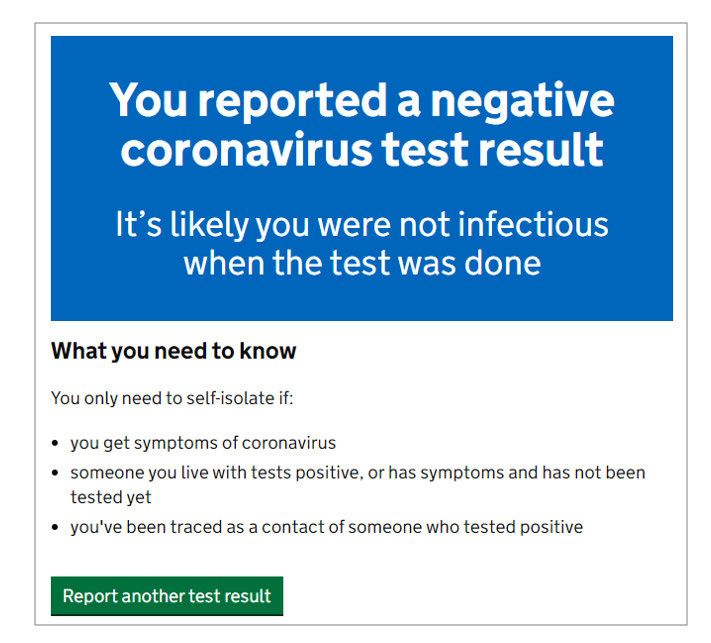
Testing schedules for care home staff

Below is the regular testing cadence for care home staff. This self-test is an LFD test (shown in blue on cadence).
In addition to the weekly PCR test, care home staff should self-test using this LFD test two times per week. In the
case of a positive result found with either LFD or PCR, there will be an additional 7 days of daily LFD testing for
staff required. Your care home will be able to provide more information in the case of a positive result.
In the case of a suspected or confirmed outbreak, your care home will work with your local HPT. Together they
will provide you with more information on additional testing and isolation requirements.

The regular testing cadence
Key:       P    PCR test          L   LFD test

Week              1                        2              3             4                   5+

Staff             P                         P             P              P                   P
                                                                                                               Repeat
                  L               L         L         L   L      L       L          L        L          L
                                                                                                               testing cycle
                                                                                                               for staff

Where there is a positive case found with LFD or PCR
        7 days of daily LFD testing for staff,                Confirmatory P PCR test
        in addition to regular testing
                                                          +   if there are any additional
                                                              positives from L LFD testing
        Positive P or         L
        result reported               L L L L L L L
        (staff or resident)

                                                                                                                               3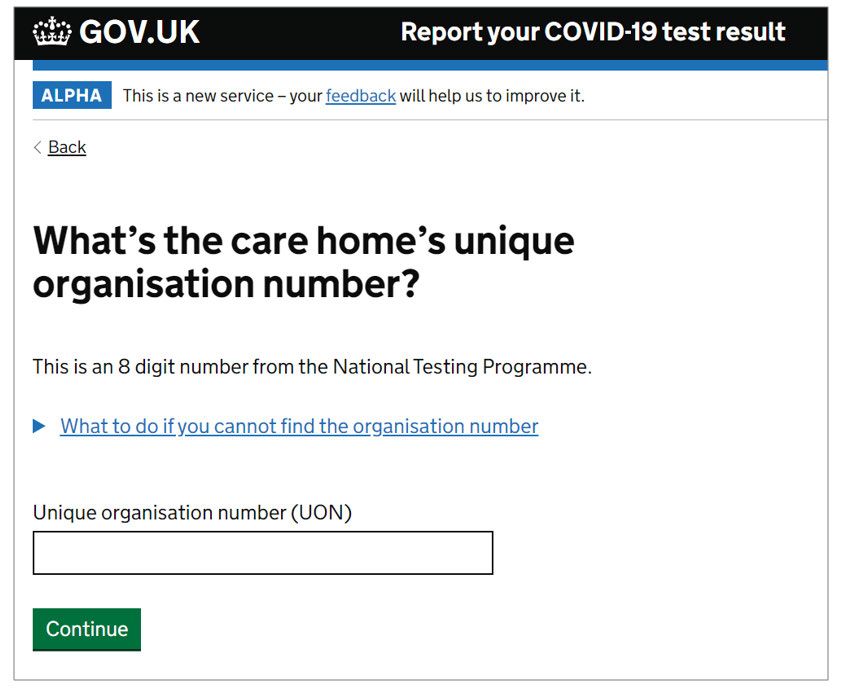
Before you start testing

Before you complete your first LFD self-test at home, you must make sure you are ready to test:

    1      Complete your LFD Training
           There is an NHS training portal which is available for all staff who will be carrying out LFD testing. This must
           be completed and the short competency assessment must be passed before you begin LFD self-testing within
           your care home

                Some of the information and links in the training are more generalised for all users of LFD tests in
                different setting so please keep reading this step-by-step guide to follow the Care Home staff-specific
                guidance carefully.

                If you have already completed the LFD Process Training module, you do not need to complete it again.
                Please make sure you have shared your results with your Care Home manager.

               1      Visit the NHS training portal: https://go.tessello.co.uk/TestDeviceTraining/

               2      Set up an account or login
                               A) If you already have an account, login.
                               B) If you do not have an account, click on “Need to register?”.
                           When prompted enter the token: 3wkcVi4UTX.
                           Enter your email address to set up an account. If you do not have your own email address, ask
                           your Care Home if they can provide you with an email address you can use.

                                                                                                                              4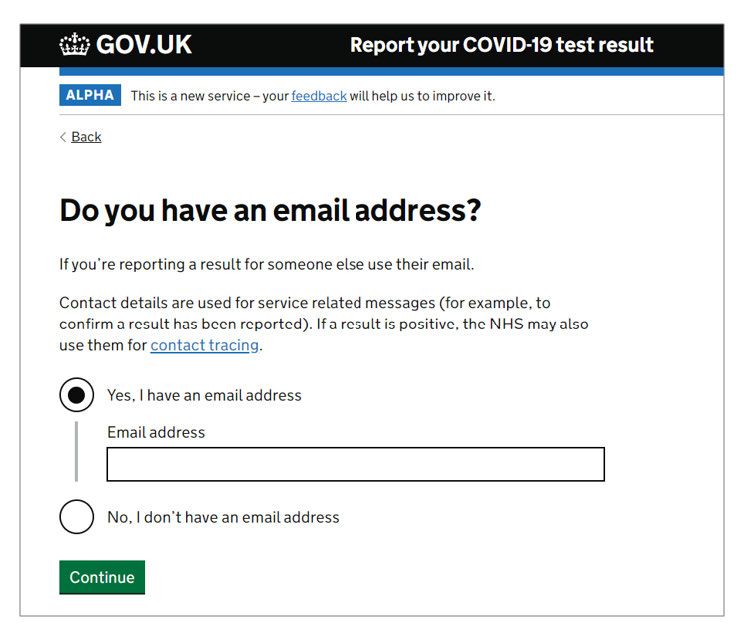
3     Select Test Operative from the menu

        4     Select LFD Process Training. You will need to
              complete both the training and the assessment.

              Take a screenshot or picture of the completed
        5     assessment screen. Send this to your Care Home
              manager so that they can keep a record of who has
              completed the training

                                                                   For Care Home Managers: You will need
        You do not need to complete any of the
                                                                   to set up a system to track LFD training
        other LFD trainings on the portal at this time.
                                                                   completion. See Additional Guidance on
                                                                   page 23 for further information.

2   Make sure you have your LFD test kits
    Your Care Home will provide you with a box of 25 LFD tests. These tests are for your own use only.
    When you have used most of the 25 LFD tests provided, ask your Care Home for more tests.

        For Care Home Managers: You will need to set up
        a system to track which kits are distributed to which
        staff members. See Additional Guidance on page 23
        for further information.

                                                                                                              5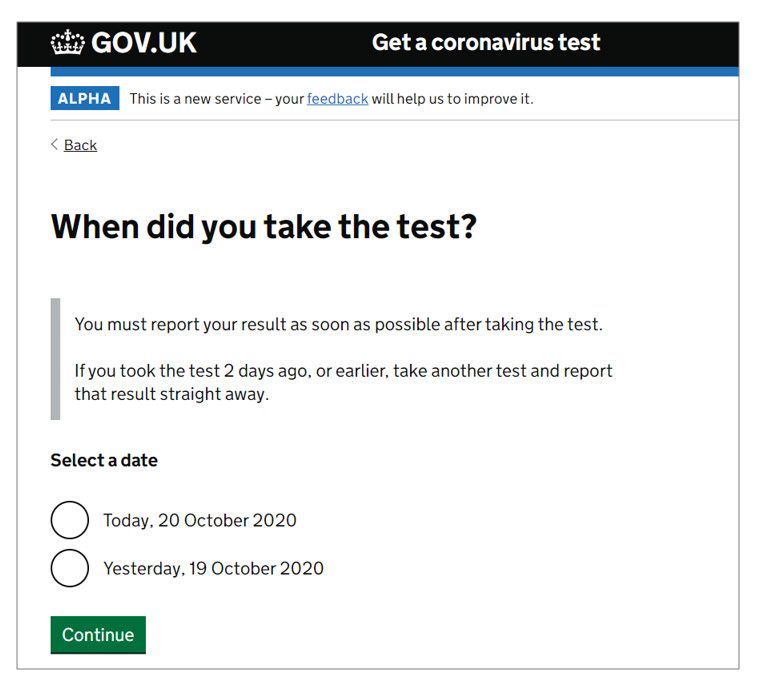
What you need to do

It’s very important you read the instructions and follow the
steps in the correct order. Each test will take about 15 minutes
to set up and results will be ready after a further 30 minutes.

1      Prepare your test area and check your test kit contents           Page 8

2      Set up your test                                                 Page 10

3      Take your swab sample                                            Page 11

4      Process the swab sample                                          Page 12

5      Read your result                                                 Page 13

6      Report your result                                               Page 15

7      Safely dispose of your test kit                                  Page 21

    Store the test kit at room temperature or in a cool dry place (2°C to 30°C). Do not leave in
    direct sunlight and do not store in a fridge or freezer.

    The kit should be used at room temperature (15°C to 30°C). If the kit has been stored in a cool area
    (less than 15°C), leave it at normal room temperature for 30 minutes before using.

    Keep the test kit away from children.

                                                                                                           6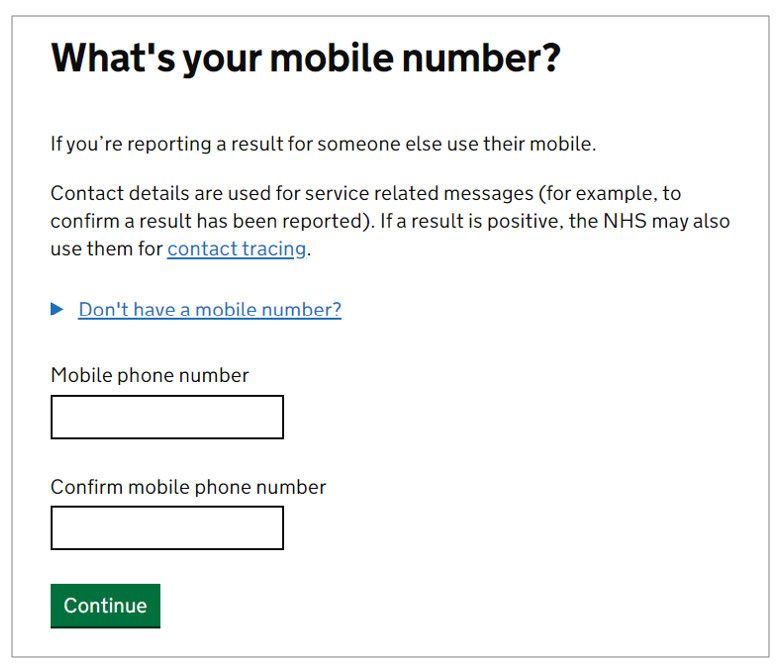
General guidance and warnings
 • Use a separate test kit for each test. All items in the test kit can only be used once. Do
   not re-use them. You will need to report your result each time you take a test.
 • If you have problems with your hands or vision, you may need someone
   to assist you with the swabbing and testing process.
 • If you have a nose piercing swab the other nostril. If pierced on both
   sides remove the piercing on one side before swabbing.
 • If you have had a nosebleed within the last 24 hours, swab the other nostril or wait 24 hours.
 • Avoid eating or drinking for at least 30 minutes before doing the test to reduce the risk of spoiling the test.
 • These kits are only designed for human use.
 • Failure to follow the instructions in this booklet may affect the
   performance of the test and invalidate the test results.

                                                                                                                     7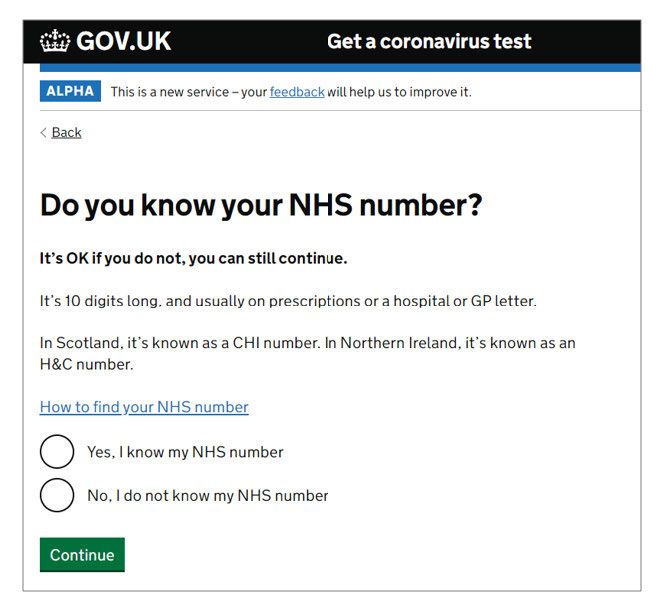
1       Prepare your test area and check
            your test kit contents

        Do not eat or drink for at least 30 minutes before doing the test to reduce
        the risk of spoiling the test.

        You'll need: a watch (or a clock), tissues, a mirror, a clean cup to prop up the
        extraction tube and either hand sanitiser or soap and warm water.

                           Read this instruction guide carefully.
1
                           See how to take the swab test by watching an online video at:
                           www.gov.uk/covid19-self-test-help

                           Clear, clean and dry a flat surface immediately before starting the test.
2

                           Wash your hands thoroughly for 20 seconds, using soap
3
                           and warm water, or hand sanitiser. This is so that you do not
                           contaminate the test kit. Now dry your hands.

                                                                                                       8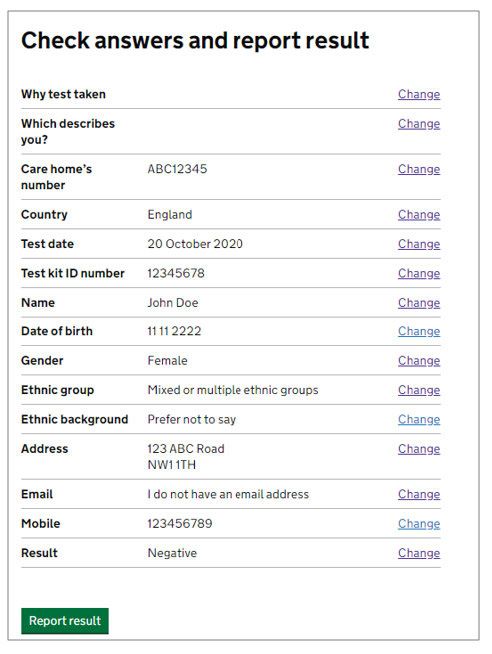
4    Check the test kit contents. Make sure that nothing is damaged or broken.

                             Test strip                                      Swab inside
                             in sealed                                       sealed
                             packaging                                       wrapper

                             Extraction                                      Extraction
                             buffer bottle                                   tube

        Do not use the LFD cartridge if the sealed packaging is damaged.

    Something damaged, broken or missing? If you notice anything damaged, broken, missing or
    difficult to use in the kit, do not use it. You must also call the customer contact centre immediately
    to report the damaged, broken or missing contents. Lines open every day, 7am to 11pm.

    • England, Wales, Northern Ireland: 119 (free from mobiles and landlines)
    • Scotland: 0300 303 2713 (charged at your standard network rate)

    If you've been harmed or had a reaction using this kit, report it on the Coronavirus Yellow Card
    Reporting Site: https://coronavirus-yellowcard.mhra.gov.uk

                                                                                                             9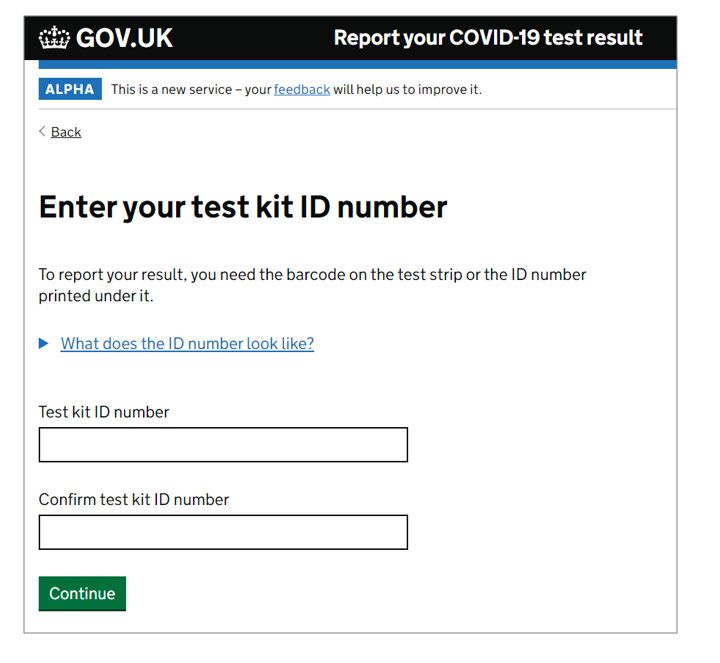
2         Set up your test

                            Take the test strip out of the sealed packaging and place it onto the
5
                            cleaned flat surface. Once opened, start the test within 30 minutes.

        Safely throw away the packaging in your household waste.

6                           Place the extraction tube into a small cup

7

                            Put 6 drops of the extraction solution into the tube
                            (without touching the edge of the tube).

8                           Gently blow your nose into a tissue and throw the tissue away in a closed bin.

                            Wash your hands thoroughly again for 20 seconds using soap and
9
                            warm water (or use sanitiser).

                                                                                                             10
Soft tip
Find the swab in the sealed wrapper in front of you.
10
Identify the soft, fabric tip of the swab.
Handle
Peel open the swab packaging only when you are ready to use and
11
gently take out the swab. You'll use this for both throat and nose.
Never touch the soft, fabric tip of the swab with your hands.
3 Take your swab sample
Do not touch the tongue, teeth, cheeks, gums, or any other surfaces with the
fabric tip of the swab. If it touches anything else, it may spoil your sample.
Never touch the fabric strip with your hands.
Swabbing may feel uncomfortable, do not insert swab any deeper if there is strong
resistance or pain.
12 x4
Holding the swab between your fingers, open your mouth wide
and rub the fabric tip of the swab over both tonsils (or where
they would have been). Do this with firm contact 4 times on each
side (use a torch or a mirror to help you do this). Carefully remove the
swab from the back of your throat.
Put the same swab gently into 1 nostril until you feel a slight resistance
13 x10
(about 2.5cm up your nose).
Roll the swab firmly around the inside of the nostril, making 10
complete circles.
114 Process the swab sample
Pick up the extraction tube and place the fabric tip of the swab into the
14 10
secs extraction tube so it is in the liquid.
Press the tip against the edge of the extraction tube with force, while
rotating it around the extraction tube for 15 seconds. This is to transfer
your sample into the liquid.
Pinch the extraction tube against the swab as you remove it. Make sure
15
you remove all liquid from the soft tip of the swab.
Place the swab in the plastic waste bag provided.
16 Press the cap tightly on to the extraction tube to avoid any leaks.
17
Gently squeeze the extraction tube to place 2 drops of the liquid onto
2
drops the specimen well (S) on the test strip. Make sure that you are dropping
liquid and not an air bubble.
Put the extraction tube in the plastic waste bag along with the swab.
Check the time and set a timer if you have one. Wait exactly 30
minutes before you read your result.
18
Waiting the full 30-minute development time before you read your result
is very important. A positive result can appear at any time after 20 minutes,
however you must wait for the full 30 minutes to record a negative result as the
test line (T) may take this long to appear. If a positive signal appears after 30
minutes, it should not be reported as positive.
Find out how to read and report your result on the next page.
Make sure you place the test strip on a flat and level surface.
Do not move the strip during the test.
125 Read your result
You will see the control line (C) begin to appear after about 4 minutes. You must wait 30
minutes before your result is ready.
Do not leave the test to develop for longer than 30 minutes as this will make the result void.
You must report all results to the NHS.
Negative result
One line next to C shows the test is negative. If you get a negative result, it is
Control (C) likely that you were not infectious at the time the test was taken. A negative
test result, however, is not a guarantee that you do not have coronavirus.
Test (T)
If you test negative, you must continue to follow national and local rules and
guidelines including regular handwashing, social distancing and wearing face
coverings, where required.
If you test negative, you must continue to wear appropriate PPE, including a
face mask, gloves and apron, and continue to follow IPC measures in line with
your care home’s policy and in line with national policy. IPC measures remain
important because the test is not 100% sensitive.
Void result
No lines or one line next to T means the test is void. If you receive a void
result, you should continue to work as normal and undertake another LFD
test on the next day.
13Positive result
Two lines, one next to C and one next to T, even faint lines, shows the test is
positive. If you get a positive result, it means you are currently infected with
coronavirus and risk infecting others. You must report this test result to the NHS,
please see page 12 for guidance on how to do this. When you report your result,
you will be provided with further information on the next steps to take.
Please note, your results will be identified as an LFD (Lateral Flow Device) result
on the test message you will receive.
You must also report this test result immediately to your care home.
If your test result is positive, you and your household must
self-isolate following Government guidelines. You must not
proceed with work.
In the case of a positive LFD result, you will need to complete a PCR test to
confirm the positive result. You must self-isolate while awaiting the results of
this confirmatory PCR test. Your Care Home may have provided you with a PCR
test to use in case of a positive result. Alternatively, you can order a PCR test
via https://www.gov.uk/get-coronavirus-test
Report your results to get the guidance you need to follow (see page 15).
146 Process and record results
You must report your results to the NHS.
Report your result so the NHS can monitor the spread of the virus, support communities across the UK,
combat the virus and save lives. You can also find out more about the result and what you need to do.
QR code You need the QR code, or the ID number under it,
on the test strip to report your result.
Report online (fastest)
Visit: www.gov.uk/report-covid19-result
Or report by telephone
Lines are open every day, 7am to 11pm.
England, Wales and Northern Ireland: 119
(free from mobiles and landlines)
Scotland: 0300 303 2713
(charged at your standard network rate)
For Care Home Managers: You will need to set up a system for staff to share their results
with you on a regular basis. See Additional Guidance on page 23 for further information.
15Using the online form
The online form links your LFD ID number and test result to you. The form will ask for your personal
details, ID number of the LFD, and whether the result was positive, negative or void.
When using the online form, you have the option to create a user account. When you create a user account, you
link your email address to your personal details. After you register your first LFD test using your user account, your
personal details will be saved, and you will not have to re-enter them when you register in future. Creating an
account should take about 2 minutes and will save about 5 minutes each time you register a test in the future.
Whether you create a user account or not, notifications of your result will be sent to you via SMS or e-mail. Your
Care Home manager may ask to see your SMS or e-mail results as part of their Care Home tracking system.
Complete registration as soon as the test result is determined.
You need the ID number on the test strip to register the result.
1 Navigate to the online form
Navigate to https://www.gov.uk/report-covid19-result
Tap Start Now to enter into the form.
Enter who you are reporting for
2 Select “myself” then select continue.
You will only be given the option to create an
account if you’re reporting a result for yourself
Select whether you would like to sign in or create
an account or continue without an account
3
You can create an account using your email address
and mobile phone number. Once you have an
account, it will remember your personal details and
save time when it comes to each test result.
If you want to create an account, continue to step 4.
If you want to continue without an
account, continue to step 11.
16Create your NHS account:
Please note: you will only to follow this process once to create a user account.
For future registrations, you can enter the email you used to create your user
account to login and save time.
4 Enter your email
Enter your email address.
This email will be used to set up your account, and your
personal details will be linked to this email address.
This email must be your own individual email, and you will
need to be able to access the email listed to confirm your
user account set up. This email can be your own work email
or a personal email address. It cannot be your care home
manager’s email or a shared general care home email.
If you do not have your own email address, you
cannot create an account at this time.
Create a password
5
Create a password for your account. It must have at
least 8 characters and have 1 or more capital letters.
Enter your password again to confirm your
password then select continue.
6 Check your email
In a new browser window, navigate to your email inbox.
Open the email from noreply@login.nhs.uk
and select confirm email address.
Return to the NHS login screen.
Select “I have confirmed my email”.
Enter your mobile number
7
Enter your mobile number then select continue.
A security code will be sent to this number so you must be
able to receive messages on the mobile number you enter.
17Check your mobile phone
8
Enter the 6 digit security code sent to your
mobile phone then select continue.
Agree to share your NHS login information
9
To create your account, you will need to agree to share your
NHS login information (your email address and mobile number)
with GOV.UK. To learn more about how your information is
used, click on “privacy notice” and “terms and conditions.”
To agree, select continue.
Using your account: Report a COVID-19 test result
10
You have now successfully created your individual account.
To enter a test result, select “Report a COVID-19 test result”
Main registration flow
Enter why you took the test
11
Select “Testing for a care home” then select Continue.
Enter your role
12
Select “I work at a care home” then tap Continue.
18Enter your UON
13
Enter your UON then select Continue. Your Care Home
manager will be able to provide this number to you.
For Care Home Managers: You will need
to share your UON with all staff members
testing at home. See Additional Guidance
on page 23 for further information.
14 Select your country location
Select the appropriate country for the care home.
15 Enter date of the test
Enter today’s date (unless you are completing
the form after the testing day).
16
Enter the test kit ID number
Enter and re-enter the test kit ID number. The ID number
can be found via the QR code on the lateral flow device.
1917 Enter your personal details*
You will need to enter your
personal details including:
• Full name
• Date of birth
• Gender
• Ethnic group
• Home address
Enter your contact details*
18 *If you have
Enter your following contact details: created an account,
this information
• Email address (if you have one)
will be saved for
• Mobile number future use and
you will not need
If you do not have a mobile number, to enter these
you can enter a relative’s number. details for future
If you do not have a relative’s registrations.
number to add, you should contact
119 to complete the form.
19 Enter NHS number (if available)*
The form will ask if you know
your NHS number. If applicable,
select “Yes, I know my NHS
Number” and enter it.
Otherwise, select “No, I do not know
my NHS Number” and tap Continue.
20 Enter test results
Select the result of the test, and tap “Continue.”
2021 Review and submit result
Check the answers you have provided and change them
if needed. Click “Report Result” when you confirm
all your responses are correct. The results page will
appear. You will receive your result by SMS or e-mail.
If you have created an account, you can still review
and change any saved details on this screen.
22 Control (C)
Share result with Care Home
Test (T) Your Care Home will need to know the result of
your test. They may ask to see your SMS or e-mail
confirmation or they may use a different tracking
system. Follow the instructions provided by your
Care Home on how to share your result.
7 Safely dispose of your test kit
Once your test is complete, put all of the used test kit
contents in your general household waste.
21Make a note of your test results
After reporting your test result (see page 15 for information),
make a note of your test results. This is for your own records
and also for your care home.
Test Kit ID number Date Test result
22Additional guidance for Care Home Managers
Care Home Managers are responsible for making sure that all their Care Home staff
are following the guidance in this step-by-step guide for self-testing.
Before you distribute any self-test LFD kits to staff
Read this guidance in its entirety. Make sure you understand what is expected of staff with regard to self-testing
Make sure you have set up systems to share your unique UON with staff,
track kit distribution, staff training, and staff results
1 Share your unique UON with staff
Staff will need the UON of their Care Home in order to register their LFD tests.
Make sure you share this information with staff so that they have it available to them.
They will need to re-enter their UON each time they complete an LFD test.
2 Tracking Kit Distribution
You will need to ensure that each staff member receives (1) a box of 25 LFD kits and (2) a single
confirmatory PCR test. This PCR test should be used if the staff member gets a positive result
on an LFD test so that they can immediately complete a confirmatory test at home.
Note down the following info when handing out kits to your staff:
• Names of staff members who received kit
• Date and time of kit distribution to staff
• How many boxes of LFDs were given to each staff member
• Lot number of the LFD box(es) given to each staff member.
The lot number is found on the side of each box of 25. It is
8 characters long: one letter followed by 7 numbers.
• How many confirmatory PCR test kits were
given to each staff member
• Barcode of the PCR test given to each staff member
The boxes of 25 LFD kits should not be split up. Each staff should be given a complete box.
233 Tracking Staff Training
All care home staff will need to complete the required LFD training before starting
LFD self-testing. Make sure you have requested competency assessment results
from all staff and keep a record of who has completed the training.
Some staff may have already completed LFD training to support with visitor LFD
testing. These staff do not need to complete the training again.
4 Tracking Staff Results
When staff complete LFD self-tests, Care Homes will NOT automatically receive a copy of staff
results by email or text. Care Homes must request this information from their staff directly.
Make sure you have set up a system for staff to share their test results with you.
Once you have set up a system for results to be shared, make sure all staff are aware of
the expectations for sharing their results before the first day of self-testing.
Any staff member who reports a positive LFD result should self-isolate immediately and complete a PCR
test to confirm the positive result. Staff with a positive result should not come in to the Care Home.
You should distribute a confirmatory PCR test to staff with their LFD boxes. If they do not have a PCR
test available at home, they should request one at https://www.gov.uk/get-coronavirus-test
24Customer contact centre Get help if you’re worried about
Lines are open 7am to 11pm every day.
an urgent medical problem
Visit NHS 111 online www.111.nhs.uk or call 111 if:
England, Wales and Northern Ireland: call 119
(free from mobiles and landlines) • You, or someone you live with, gets worse over the
next few days or your symptoms do not get better after
Scotland: call 0300 303 2713 7 days.
(charged at your standard network rate) • You’re worried about a baby or child who is ill.
Call 999 in a medical emergency, if you think there’s
something seriously wrong.
Do not delay getting help if you’re worried. Trust your
instincts.
Visit www.111.nhs.uk/service/COVID-19 to check if you
have coronavirus symptoms and find out what to do next.
Thank you for supporting us.
25You can also read


