All About M.2 SSDs PRESENTATION TITLE GOES HERE - SATA-IO
←
→
Page content transcription
If your browser does not render page correctly, please read the page content below
All About M.2 SSDs PRESENTATION TITLE GOES HERE
Webcast Moderator

                       Tom Coughlin, President, Coughlin Associates is a widely respected
                       storage analyst and consultant. He has over 30 years in the data
                       storage industry with multiple engineering and management
                       positions at high profile companies.

                       Dr. Coughlin has many publications and six patents to his credit.
                       Coughlin Associates provides market and technology analysis as
                       well as Data Storage Technical Consulting services. Tom publishes
                       the Digital Storage Technology Newsletter, the Media and
      Tom Coughlin,    Entertainment Storage Report, and other industry reports.
           President
 Coughlin Associates
www.tomcoughlin.com    Tom is active with SMPTE, SNIA, the IEEE (he is Director Elect for
                       IEEE Region 6 and active in the Consumer Electronics Society) and
                       other professional organizations. Tom is the founder and organizer
                       of      the       Annual      Storage      Visions     Conference
                       (www.storagevisions.com), a partner to the International Consumer
                       Electronics Show, as well as the Creative Storage Conference
                       (www.creativestorage.org). He is the general chairman of the annual
                       Flash Memory Summit. For more information on Tom Coughlin and
                       his publications. go to www.tomcoughlin.com.
                                                                                    2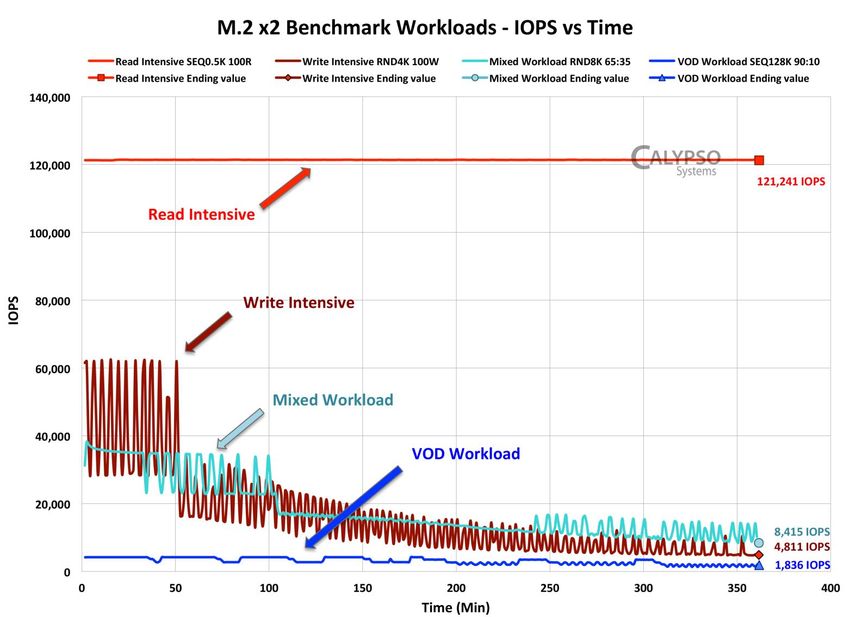
Agenda

 M.2 Market Overview – Jim Handy, Objective Analysis
 M.2 Cards – Jon Tanguy, Micron
 M.2 Connection Schemes – Jaren May, TE Connectivity
 NVM Express – David Akerson, Intel
 M.2 Performance – Eden Kim, Calypso
 Wrap-up – Tom Coughlin, Coughlin Associates
 Q&A

                                                       3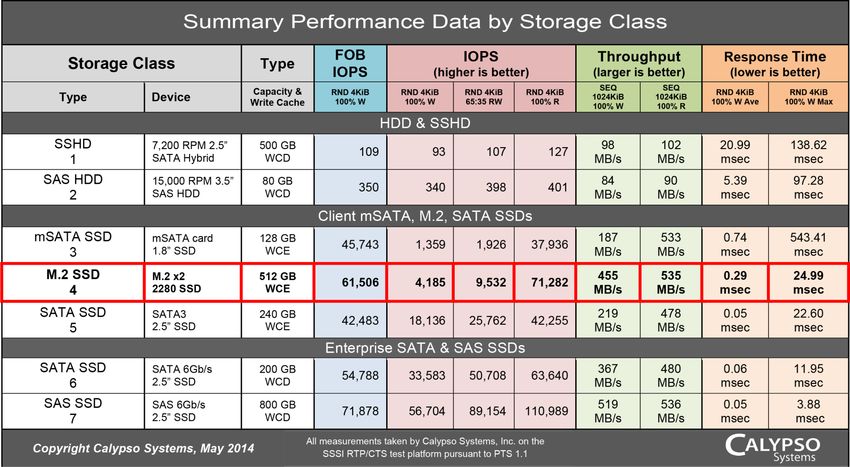
M.2 SSDs’ Bright
                               Future

PRESENTATION TITLE GOES HERE

                               Presented by:
                                   Jim Handy
                           Objective Analysis.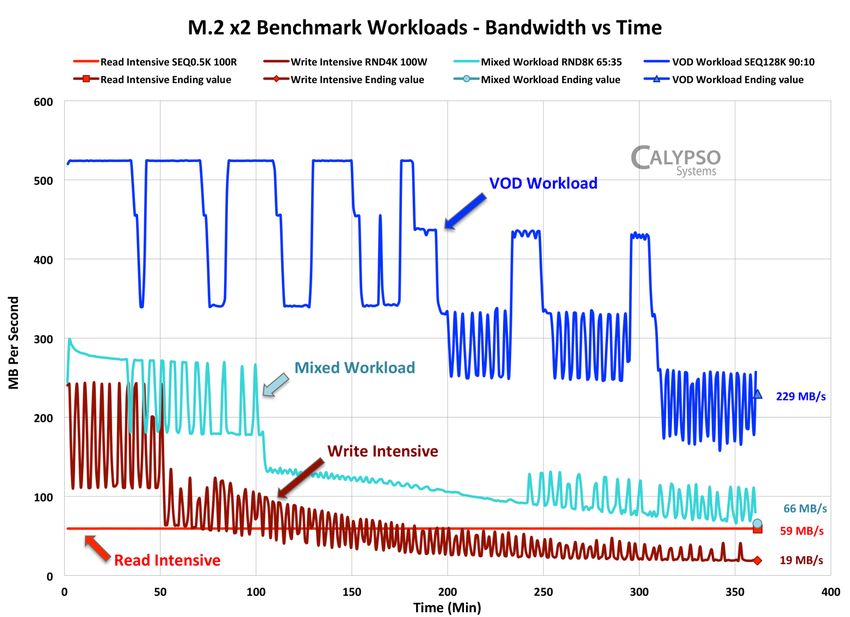
Webcast Presenter

                          Jim Handy of Objective Analysis has over 35 years in the electronics
                          industry including 20 years as a leading semiconductor and SSD
                          industry analyst. Early in his career he held marketing and design
                          positions at leading semiconductor suppliers including Intel, National
                          Semiconductor, and Infineon. A frequent presenter at trade shows,
                          Mr. Handy is known for his technical depth, accurate forecasts,
   Jim Handy, Director    widespread industry presence and volume of publication. He has
    Objective Analysis
  Los Gatos, California   written hundreds of market reports, articles for trade journals, and
Objective-Analysis.com
                          white papers, and is frequently interviewed and quoted in the
                          electronics trade press and other media. He writes the Chip Talk
                          blog for Forbes, TheMemoryGuy.com, and TheSSDguy.com.

                                                                                          5
Who Can Use M.2?

Both major SSD markets can use this format:
  Enterprise
     PCIe – Up to 4 lanes
           Preferred interface in the enterprise
           High bandwidth
           Mounts flush with motherboard, good for blades
     Can be used as SATA boot disk
  Client
     Small form factor, thin
     Upgrade path from SATA to PCIe for speed

                                                            6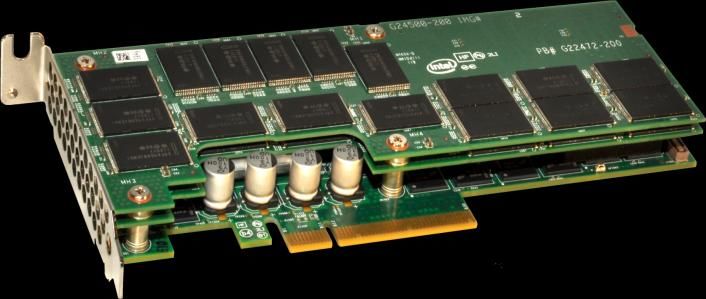
Where M.2 Doesn’t Fit

  Hot Swap
     Doesn’t support standard HDD model of front-panel
     replacement
     An undesirable approach in these environments
  Legacy systems
     Older designs with IDE but not SATA or PCIe interfaces
     Slow to move to new form factors
     Many still use IDE/PATA DOM

Both of these are shrinking in importance

                                                              7
SSD Unit Shipment Outlook

                             200
                                      Mobile Computing
                                      SAN/NAS
Unit Shipments in Millions

                                      Mil/Aero
                             150      Servers
                                      Financial & POS
                                      Base Stations
                                      Desktop PC

                             100      Set Top Box
                                      Test & Measurement
                                      Process Control

                              50

                               0
                               2009   2010            2011   2012   2013   2014   2015    2016      2017     2018
                                                                                                                      8
                                                                                    Source: Objective Analysis 2014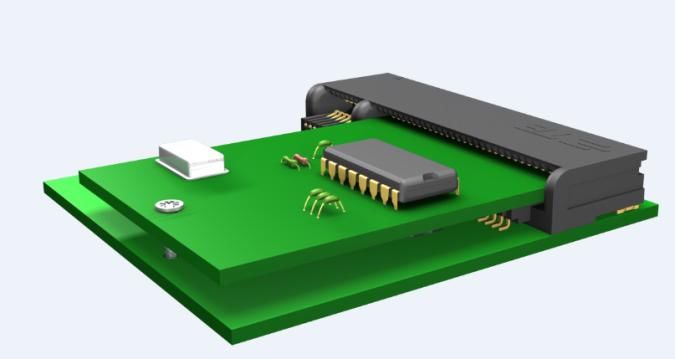
Plenty of Room to Grow

  M.2 will have broad market appeal
  SSD growth strong in both markets
    Enterprise – Approaching 7M units by 2018
    Client – 115M units by 2018
    Embedded/Other – Over 50M units by 2018

  Good growth + broad appeal = bright outlook!

                                                 9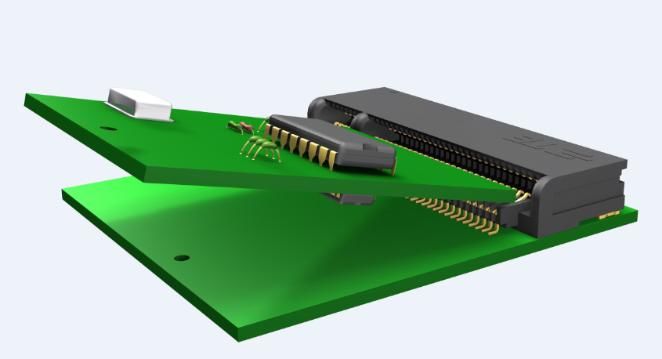
M.2 SSD for Mobile
                           Computing

PRESENTATION TITLE GOES HERE

                                Presented by:
                                  Jon Tanguy
                       Micron Technology, Inc.
Webcast Presenter
Jon is a Sr. Technical Marketing Engineer in Micron’s Storage
Business Unit, which includes SSD and NAND Flash organizations,
serving in this capacity for the past five years. Jon facilitates new
product integration and customer qualifications for notebook and
desktop applications, as well as SSD in the data center.. Jon plays
a key role in product planning and development, with an eye toward
Jon Tanguy market requirements.
Sr. Technical
Marketing Engineer
Jon has more than 20 years of experience in the data storage
Micron Technology, Inc.
Boise, Idaho industry, working with both magnetic media and solid state
www.micron.com technologies.
Jon earned his Bachelor of Science degree in Electrical and
Computer Engineering from the University of Colorado at Boulder.
11Overview of M.2
Initially Introduced as “NGFF” for Next Generation Form Factor,
soon became “M.2”; initial proposal in SATA-IO and PCI-SIG.
Detailed M.2 specifications are included in the PCI-SIG M.2 spec;
the SATA version of M.2 is described in the SATA v3.2 spec.
Intended to resolve the extensibility issues with mSATA SSD.
Brings superior throughput capability to “Ultra thin and light”
computing, by leaping past the plateau of 6.0 Gbps SATA.
Enables 2- or 4-lane transfer speeds ~ 900 MB/s (read) & 800 MB/s
(write) for first generation drives. Significantly faster in the x4
options to come!
mSATA evolves to
M.2 PCIe Gen2 x2
12M.2 Performance Specifications
An M.2 SSD supports up to 4 lanes of PCIe
2 lanes PCIe 2.0 = 1GB/s
2 lanes PCIe 3.0 = 2GB/s
4 lanes PCIe 3.0 = 4GB/s
Actual performance will be less
13M.2 Capability
Legacy SATA/AHCI. Allows form factor transition; no driver change
for SATA 6 Gbps hosts.
PCIe/AHCI. Allows backwards compatibility, but can’t reach full
performance potential.
PCIe/NVMe. Allows full access to PCI Express lanes, with an
interface designed to work most efficiently with new, faster storage
technologies, e.g. Flash. Takes advantage of the ability of SSD to
execute data transfers in parallel. Requires driver updates.
Greater flexibility than mSATA in physical dimension.
Like mSATA, low insertion rating; not intended for hot-plug!
14M.2 Form Factor Options
Denoted by a “Type.”
Specifically: 2280, 2260, 2242, 2230. Also, 3030, 3042, 1630, etc.!
“Type” designates X-Y dimension: e.g. 2280 = 22mm x 80mm
Above is shown an M.2 SATA option.
Interface is keyed to denote interface and device type!
Described as a “Socket”, Socket 2 configuration is for SATA or PCIe x2
Socket 3 configuration is for PCIe in a x4 configuration
15M.2 Form Factor Options
Height in Z-dimension also has options
S = single-sided; D = double-sided, as below:
Designator Top side (mm) Bottom side (mm)
S1 1.2
S2 1.35
S3 1.5
D1 1.2 1.35
D2 1.35 1.35
D3 1.5 1.35
16M.2 Form Factor Options:
Connector Keys
M.2 provides great flexibility for system designers by providing key options
to determine device types; storage, WiFi, WiGig, Bluetooth, et. al.
Card specification can be very specific.
E.G.: “TYPE 2242-D2-B-M”
This indicates a 22x42mm card, double-sided, with keys in the B and M positions (can fit B or
M connector!).
Key ID Pin Location Interface
A 8-15 2x PCIe x1 / USB 2.0 / I2C / DP x4
B 12-19 PCIe x2/SATA/USB 2.0/USB 3.0/HSIC/SSIC/Audio/UIM/I2C
C 16-23 Reserved for Future Use
D 20-27 Reserved for Future Use
E 24-31 2x PCIe x1 / USB 2.0 / I2C / SDIO / UART / PCM
F 28-35 Future Memory Interface (FMI)
G 39-46 Not Used for M.2; for Custom/Non-Standard Apps
H 43-50 Reserved for Future Use
J 47-54 Reserved for Future Use
K 51-58 Reserved for Future Use
L 55-62 Reserved for Future Use
M 59-66 PCIe x4 / SATA
Source: PCI Express M.2 Specification. 17M.2 Connection
Schemes
PRESENTATION TITLE GOES HERE
Presented by:
Jaren May
TE ConnectivityWebcast Presenters
Jaren May is the Global Product Manager of Internal Interconnects
including the M.2 connector family. Jaren has worked in the
electronic components industry for 5 years. He is currently based in
Taipei, Taiwan to enhance his knowledge of the Asian business
Jaren May,
Global Product Manager
culture while studying Chinese. During his time outside the office
TE Connectivity you can find him exploring Asia, most recently trekking to Mt.
Taipei, Taiwan
www.te.com Everest base camp in Nepal.
19Connector Overview
A natural transition from the Mini Card and Half Mini Card to a smaller form factor.
M.2 supports wireless and SSD module cards.
Stack Card Centerline to Length Width Volume
Height PCB (x) (y) (xyz)
(z)
Mini Card 4.0 2.1 9.09 29.9 1087
M.2 2.25 1.08 8.7 21.9 426
(NGFF)
Savings 1.75 1.02 0.39 8.0 659
Features Benefits Wireless Applications
• Available in various heights • Wide product offering to meet • Wi-Fi
• 0.5mm pitch with 67 customers design needs • WWAN (2G, 3G, 4G)
positions • Save more than 20% PCB real • Bluetooth (BT)
• Designed for both single and estate compared to PCIe Minicard • WiGig
double-sided modules • Reduces connector height by 15% • GPS
• Available in various keying • Ensures proper mating with • Global Navigation Satellite
options for module cards various modules Systems (GNSS)
• Support PCI Express 3.0, • Supports higher data rates • Near Field Communication (NFC)
USB 3.0 and SATA 3.0 • Hybrid Digital Radio (HDR)
20Module Card Nomenclature
Note: M.2 Connectors have only one key even though module cards
could have two keys
21Key to Application Use
Key Intended Use Host Interfaces Applications Module Card Type
Wireless Connectivity
Connectivity Version 2x PCIe x1/USB devices including
A 1630, 2230, 3030
1-DP 2.0/12C/ DP x4 combinations of Wi-Fi, BT,
HFC, and/or WiGig.
PCIe x2/SATA/USB
WWAN/SSD/ Others 2.0/ USB 3.0/ 3042, 2230, 2242, 2260,
B WWAN+GNSS, or SSD
Primary Key HSIC/SSIC / 2280, 22110
Audio/UIM/ I2C
Wireless Connectivity
Connectivity Version 2x PCIe x1/USB 2.0/ devices including
E 1630, 2230, 3030
1-SD IC2/SDIO/UART/PCM combinations of Wi-Fi, BT,
NFC, and/ or GNSS.
SSD devices and Host I/Fs
2242, 2260, 2280, 22110
M SSD 4 Lane PCIe PCIe x4/ SATA supported are PCIe with up
to four lanes or SATA.
22Single vs. Double Sided
Modules
The difference between single and dual sided modules is functionality. All soldered down type
module cards are single sided and do not have a pin layout. Single sided modules are intended to
be used in low profile applications.
There are two types of module cards, soldered down and connectorized
23Module Insertion
Step 1: Move the module against the housing’s chamber
Step 2: Rotate the module to 25 degrees and insert it until the bottom of the module
surface reaches the ramp
Step 3: Rotate the module to horizontal position by hand
Step 4: Fix the module with a PCB screw to secure the module
Please refer to the application specification for a complete description of both the insertion and
removal method for modules.
24Standard Products
Gold Plating
Max. Nominal Double Sided
Base PN Dim. B Dim. C Key Gold
Height Height Dim. A Modules 15u" 30u"
Flash
A -7 -8 -9
B -1 -3 -5
2199125-x 2.25 2.15 1.08 0.63 No
E -2 -4 -6
M -13 -14 -15
A -7 -8 -9
B -1 -3 -5
2199119-x 3.2 3.1 1.94 1.48 Yes
E -2 -4 -6
M -13 -15 -16
A -7 -8 -9
B -1 -3 -5
2199230-x 4.2 4.1 2.94 2.48 Yes
E -2 -4 -6
M -13 -15 -16
A -7 -8 -9
2199133-x B -1 -3 -5
1.85 1.75 1.09 0.63 Yes
Midplane Max. Nominal
E -2 -4 -6
Double Sided
Gold Plating
Base PN Dim. B Dim. C Key Gold
M -10 -11 -12
Height Height Dim. A Modules 15u" 30u"
Flash
A -7 -8 -9
B -1 -3 -5
2199125-x 2.25 2.15 1.08 0.63 No
E -2 -4 -6
M -13 -14 -15
A -7 -8 -9
B -1 -3 -5
2199119-x 3.2 3.1 1.94 1.48 Yes
E -2 -4 -6
M -13 -15 -16
A -7 -8 -9
B -1 -3 -5
2199230-x 4.2 4.1 2.94 2.48 Yes
E -2 -4 -6
M -13 -15 -16
A -7 -8 -9
2199133-x B -1 -3 -5
1.85 1.75 1.09 0.63 Yes
Midplane E -2 -4 -6
M -10 -11 -12
All Dimensions in mm 25NVM Express
PRESENTATION TITLE GOES HERE
Presented by:
David Akerson
Intel CorporationWebcast Presenter
David Akerson has worked in high tech for 20 years for such notable
companies as Intel, Tektronix and Sequent Computer Systems.
David has extensive experience in Hardware and Software Product
David Akerson, Management and Marketing.
Strategic Marketing In addition to his position at Intel, David works closely with NVM
Engineer
Intel Corporation Express.
www.intel.com
27What is NVM Express™?
NVM Express (NVMe™) is a
standardized high performance host Motherboard
controller interface for PCIe* Storage,
Software
SAS/
such as M.2 PCIe SSDs SATA*
Standardizes register set, feature
Driver
set, and command set
Architected from the ground up for
NAND and next generation NVM
The specification was developed by an open industry consortium
for Client and Enterprise platforms
28
*Other names and brands may be claimed as the property of others.Why NVM Express™?
High Performance
Low latency (no HBA overhead or
protocol translation)…6x latency M.2
2.5”
reduction enables path to next
generation NVM
Full duplex, multiple outstanding
requests, out of order processing
Low System Cost
Direct attach to CPU subsystem
eliminates HBA cost
Add-In Card
Power Efficient
Direct attach to CPU subsystem
eliminates HBA power
Link power management (dynamic
link width/speed)
29Why NVM Express?
Performance Leadership
4K Random Workloads, QD = 128
500000
NVM Express delivers versus
leadership SAS/SATA products 400000
QD32
300000
Random Workloads
IOPS
200000
> 2X performance of SAS 12Gbps
100000
4-6X performance of SATA 6Gbps
0
100% Read 70% Read 0% Read
PCIe/NVMe 12Gb/s SAS 6Gb/s SATA
Sequential Workloads, QD = 128
PCIe/NVMe @ QD 32/128 ; SAS/SATA @ QD32
3000
2500
QD32
For sequential workloads, realize
2000
close to 3 GB/s reads
MBPs
1500
1000
Sequential Workloads
500 > 2X performance of SAS 12Gbps
0 > 4X performance of SATA 6Gbps
100% Read 0% Read
PCIe/NVMe 12Gb/s SAS 6Gb/s SATA
PCIe/NVMe 128K @ QD 32/128 ; SATA 128K @ QD32; SAS 64K @QD32
Note: PCIe/NVMe Measurements made on Intel® Core™ i7-3770S system @ 3.1GHz and 4GB Mem running Windows Server 2012 Standard O/S, Intel PCIe/NVMe SSDs. SATA Measurements made on Intel ® Core™
i7-3770S system @ 3.5GHz and 8GB Memory running Windows* Server 2012 Standard O/S, 6Gb/s SATA SSD. Data collected by IOmeter* tool. PCIe/NVMe SSD is under development. Measurements from 12Gb/s SAS
Solid State Drive Specification.
30Driver Development on Major OS’
• Windows* 8.1 and Windows* Server 2012 R2 include inbox
Windows* driver
• Open source driver in collaboration with OFA
Linux* • Native OS driver since Linux* 3.3 (Jan 2012)
Unix • FreeBSD driver released
• Delivered to S12 and S11 Update2
Solaris* • Compliant with 1.0e
VMware* • vmklinux driver targeted for Q2 ‘14 release
UEFI • Open source driver available on SourceForge
Native OS drivers already available, with more coming!
*Other names and brands may be claimed as the property of othersNVM Express™: Unlock the
Potential
Cloud & Big Data Financial Analysis
Computing
Performance for Client,
Enterprise and Data Center
Datacenter Refresh applications Digital Content
Web 2.0 Energy Exploration
Gaming
For more information, visit www.NVMExpress.org 32M.2 Performance
PRESENTATION TITLE GOES HERE
Presented by:
Eden Kim
Calypso SystemsWebcast Presenter
Eden, CEO of Calypso Systems, Inc., is Chair of the SNIA Solid
State Storage Technical Working Group (SSS TWG) which has
published the industry standard solid state storage Performance
Test Specification (PTS) for both client and enterprise SSD
performance testing. The PTS sets forth standardized test
methodologies for drive preparation, test and reporting.
Eden Kim,
CEO Eden is also Chair of the SNIA SSSI PCIe SSD and TechDev
Calypso Systems, Inc. Committees and is a member of the SNIA SSSI Governing Board.
www.calypsotesters.com
Eden has authored several white papers and presented talks at
industry events on the PTS, SSD test methodologies, PCIe solid
state storage, SSD Performance evaluation and Enterprise
Synthetic Workload testing.
Calypso Systems is an SSD test house that provide test equipment
and test services for SSD Performance testing. Calypso is also the
developer and manufacturer of the SNIA PTS Reference Test
Platform SSD tester.
34Summary Performance Data
By Storage Class
35M.2 Benchmark Workloads
IOPS versus Time
36M.2 Benchmark Workloads
Bandwidth versus Time
37M.2 Throughput
2 Lanes versus 4 Lanes
Throughput (Bandwidth) shown for M.2 x2 vs M.2 x4 devices
Bandwidth is in MB/s - shown is 100% Writes and 100% Reads
M.2 x4 shows higher bandwidth, taking advantage of additional lanes
38Key Points
Performance Comparison by Storage Class Chart
SSDs clearly have higher IOPS & Throughput and lower
Response Times than HDDs and SSHDs
Different classes of SSDs have different performance ranges
SSDs can be designed and optimized for different workloads -
hence one or more metrics may be enhanced or emphasized
Performance & cost generally increase as you go down the chart
M.2 Performance - IOPS v Time
WSAT tests are a corner case test where a continuous workload
is applied to the drive after a device PURGE
There is no workload independent pre-conditioning
The test workload itself is the pre-conditioning (i.e. workload
dependent pre-conditioning)
4 Corner case workloads are Write Intensive, Read Intensive,
Mixed and Video-On-Demand workloads 39Key Points
M.2 Performance - Bandwidth v Time
Bandwidth measures the transfer rate of each workload in
MB/sec
Larger block size workloads generally show larger Bandwidth
measurements
Smaller block size workloads generally show smaller Bandwidth
measurements
Bandwidth often saturates the cache, resulting in dips in
performance
Mixed workloads can show oscillating performance depending
on the access being performed
40Wrap-up
PRESENTATION TITLE GOES HERE
Presented by:
Tom Coughlin
Coughlin AssociatesM.2 to Benefit from SSD’s Bright Future
Enterprise, Client, and Embedded/Other SSDs approaching 7
M, 115 M and over 50 M units respectively by 2018
M.2 Cards
NGFF renamed M.2 by PCI-SIG
Allows extension beyond SATA 6 Gb/s and limits of mSATA
Supports up to 4 lanes of PCIe at up to 1 GB/s per lane
NVMe enables maximum PCIe performance
Various card lengths from 30 to 110 mm, one-sided z-height
of 1.2 to 1.5 mm
42M.2 Connection
M.2 supports a variety of functions including wireless and SSD cards
with SATA & PCIe
Single and double-sided modules (soldered down and connectorized)
NVM Express
A standardized high performance host controller interface for PCIe
storage (SAS, SATA, and PCIe)
NVM Express was designed to support this and next generation Non-
Volatile Memory in a multiple form factors such as M.2, 2.5” and Add-
in Cards
Faster random and sequential workloads possible with NVM Express
Drivers available for major operating systems and client, enterprise
and data center applications
43M.2 Performance
Detailed summary performance shown for HDD, Hybrid HDDs
and SSDs (client and enterprise)
Most SSDs faster than HDDs, even hybrid HDDs
Most SSDs better on throughput and latency than HDDs
M.2 cards should provide better performance characteristics than
mSATA cards
Storage performance depends upon workloads
44Questions?
To replay this webcast, go to
www.snia.org/forums/sssi/knowledge/education
Scroll down to Webcasts
45You can also read


