E-ENROLMENT e-GUIDE 2018/2019 - POLYTECHNIC FOUNDATION PROGRAMME - Singapore Polytechnic
←
→
Page content transcription
If your browser does not render page correctly, please read the page content below
e-ENROLMENT e-GUIDE
POLYTECHNIC FOUNDATION PROGRAMME
           2018/2019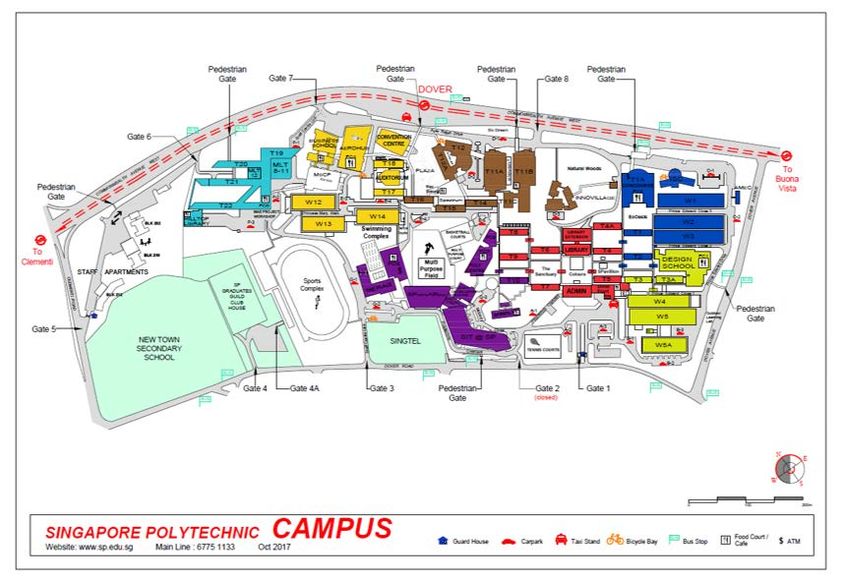
ACADEMIC CALENDAR FOR AY 2018/2019
  Orientation Week (for first-year         9 Apr - 13 Apr 2018         1 week
  students only)

  SEMESTER I

  Term 1                                   16 Apr - 1 Jun 2018         7 weeks

  (Mid-Semester Test)                      28 May - 1 Jun 2018*        1 week

  Vacation                                 2 Jun - 24 Jun 2018         3 weeks

  Term 2                                   25 Jun - 17 Aug 2018        8 weeks

  Exam Week                                20 Aug - 31 Aug 2018**      2 weeks

  Vacation                                 1 Sep - 14 Oct 2018         6 weeks

  SEMESTER II

  Term 3                                   15 Oct - 7 Dec 2018         8 weeks

  (Mid-Semester Test)                      3 Dec - 7 Dec 2018          1 week

  Vacation                                 8 Dec - 1 Jan 2019+         3 weeks

  Term 4                                   2 Jan - 15 Feb 2019         7 weeks

  Exam Week                                18 Feb - 1 Mar 2019         2 weeks

  Vacation                                 2 Mar - 14 Apr 2019         6 weeks

  * Vesak Day (29 May 2018)

  ** Hari Raya Haji (22 August 2018)

  + New Year's Day (1 January 2019)

  Vacation - Subject to any polytechnic activities, e.g. internship

                               Enrolment Hotline: 6775-1133
Monday to Friday: 8.30am to 5.30pm (Excluding Saturdays, Sundays & Public Holidays)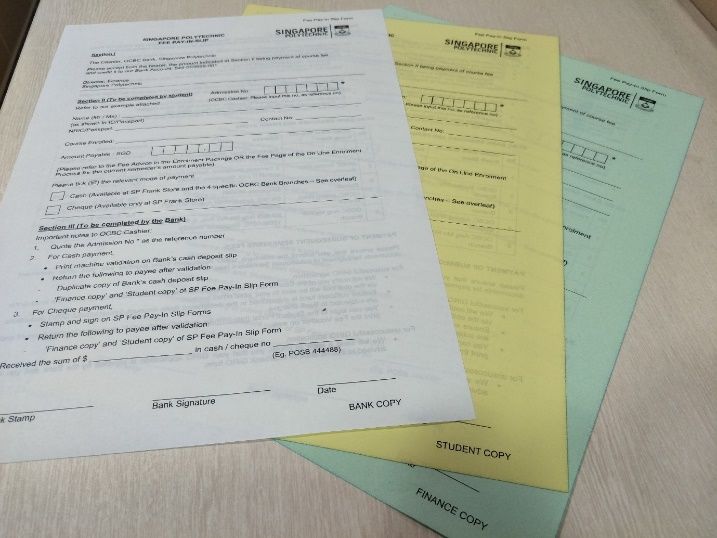
Congratulations!
 You have been offered a place to study in Singapore Polytechnic.
   To accept this offer, you are required to complete the tasks
                   indicated in your Offer Letter

    Please follow this guide to complete your enrolment. This book consists of 2 sections:

          •     Step by step to complete enrolment tasks will guide you to complete the
                enrolment tasks. You need to read this book together with the Offer Letter
                for the DATES to complete the tasks.

          •     Enrolment Information provides the detailed enrolment information that
                you may refer to from time to time when necessary.

Information in this book is correct at the time of printing. SP reserves the right
to discontinue any class, to alter courses, to amend the scale of fees, or to
amend any other information without prior notice. Admission is based on
merit.

                                                2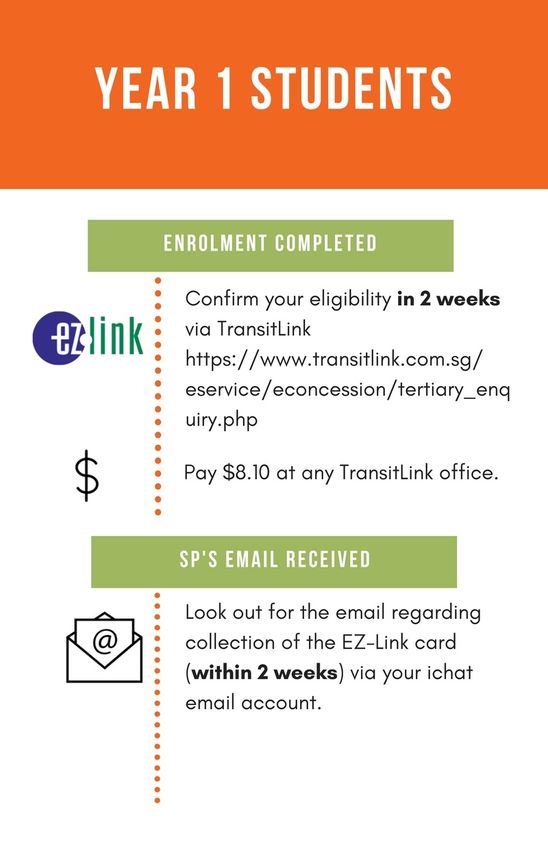
Contents
Step by step to complete enrolment tasks ............................................................................................................. 5
   Enrolment Flowchart .......................................................................................................................................... 5
Task 1       Acceptance of Offer .................................................................................................................................. 6
   Step 1            Verify / Provide Your Particulars ....................................................................................................... 6
   Step 2            Create Computer Accounts ............................................................................................................... 7
   Step 3            Pay Course Fees ................................................................................................................................ 8
        Financial Schemes (FS) .................................................................................................................................... 8
   Step 3            Pay Course Fees ................................................................................................................................ 9
        Online Process ................................................................................................................................................ 9
   Step 3            Pay Course Fees .............................................................................................................................. 10
        Modes of Payment ....................................................................................................................................... 10
Task 2       Go for Colour Vision Test / Medical Examination ................................................................................... 11
Task 3       Submit Documents ................................................................................................................................. 12
   Finance Documents .......................................................................................................................................... 12
Task 3       Submit Documents ................................................................................................................................. 13
   Admissions Documents .................................................................................................................................... 13
Enquiry on Enrolment Status ................................................................................................................................ 14
Student Pass Application for International Students ........................................................................................... 15
What’s Next .......................................................................................................................................................... 16
Conditions of Admission ....................................................................................................................................... 18
   1.        The Offer of Admission is Conditional upon the Candidates: ................................................................. 18
   2.        Declaration of Undertaking by Student .................................................................................................. 18
   3.        Declaration of Undertaking by Parent .................................................................................................... 19
   4.        Medical Report / Colour Vision Test Report (Where is applicable, as indicated in the Offer Letter) ..... 20
   5.        National Service ...................................................................................................................................... 21
   6.        Rules and Regulations ............................................................................................................................ 21
Financial Matters and Scheme for Polytechnic Foundation Programme ............................................................. 22
   1.        How much is the Course Fees? ............................................................................................................... 22
   2.        What is the available Financial Scheme? ................................................................................................ 23
   3.        How to Apply? ........................................................................................................................................ 23
        Post-Secondary Education Account (PSEA) .................................................................................................. 23
Interbank GIRO ..................................................................................................................................................... 24
Financial Assistance @ SP ..................................................................................................................................... 25
   1.        Financial Aid for Fees & Living Expenses ................................................................................................ 25

                                                                                   3
2.       Financial Aid for Notebook PC ................................................................................................................ 25
SP Notebook PC Scheme ...................................................................................................................................... 26
Overview of the Notebook Configuration Process ............................................................................................... 27
Allocated Dates of Notebook PC Sales by Courses ............................................................................................... 28
Application for Diploma Student Concession Card ............................................................................................... 29
Withdrawal from Course and Course Transfer ..................................................................................................... 30
   1.       Withdrawal from Course ........................................................................................................................ 30
   2.       Course Transfer ...................................................................................................................................... 30
School/Department Directory .............................................................................................................................. 31
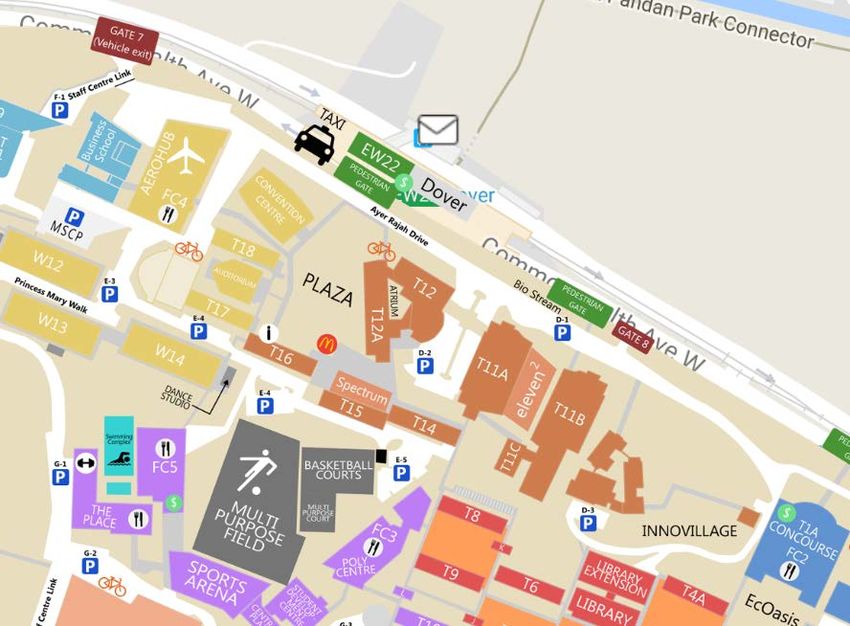
SP Map .…………………………………………………………………………………………………………………………………………………………..32
Student Service Centre T16 Level 1 ...................................................................................................................... 33

                                                                                4
Step by step to complete enrolment tasks
              Enrolment Flowchart

                                                Acceptance of Offer
                                       Complete all 3 steps on the online
1                                  enrolment (http://enrolment.sp.edu.sg)
                                            Step 1 Verify / Provide Your Particulars
                                            Step 2 Create Computer Accounts
                                            Step 3 Pay Course Fees

                          Go for Colour Vision Test or Medical
                                     Examination
                                This is not required for every student.                2
                                  Please refer to your Offer Letter.

                                      Finance Documents       Admissions Documents

          Submit Documents
3

      What’s Next - 1                   Optional
                                        •   Make new friends! Sign up for the
      All Students                          Freshmen Camp 2018
      •   Check Enrolment status            http://focamp.sp.edu.sg by 2/3/2018
      •   Buy notebook and install
          software
                                        • Apply for Financial Assistance Schemes       4
                                            www.sp.edu.sg/financialassistance
      •   Apply for Diploma Student     International Students Only
          Concession (EZ-Link) Card
                                        • Apply for ICA Student’s Pass

                            What’s Next - 2
                            All Students
                            •     Attend Freshmen Orientation Programme
5                           •
                                  http://fop.sp.edu.sg
                                  Check class timetable
                            International Student & Singapore Permanent Resident
                            •     Attend Tuition Grant briefing

                                            5
Task 1 Acceptance of Offer
 Step 1 Verify / Provide Your Particulars

                       Visit SP Online Enrolment -
                       http://enrolment.sp.edu.sg, enter your
                       Admission No., NRIC / Passport No. and
                       Birth Date to login

   Select Step 1: Acceptance of Offer

                 Please verify the information on the displayed
                 Name, Citizenship, NRIC / Passport and indicate
                 your changes, if any, in the “Admissions
                 Documents Checklist” (to detach from your Offer
                 Letter).

Follow the instructions on the screen and enter
the following information: Personal Data,
Household details, Contact information,
Parents’ particulars, Emergency contact,
Medical conditions and Offences committed
(please declare, if any).
Step 2 Create Computer Accounts

             Visit SP Online Enrolment - http://enrolment.sp.edu.sg,
             Select Step 2: Create Computer Accounts

This step requires you to:
   1. Create iChat email address
   2. Create the password for your SPICE account
   3. Set a 6-digit Library Pin

                                                           is an account provided by
                                           Microsoft for SP students. All official emails
                                           from SP will be sent to your iChat account. It is
                                           also used to access e-learning system and
                                           PolyMall.

                                                          is a SP computer account that
                                           enables you to access SPICE services provided
                                           by SP.      These services include wireless
                                           network, library, computer labs, etc.

                                                         is required to borrow physical
                                           materials from the Library using the self-check
                                           machine and self-pickup locker. Set your 6-
                                           digit PIN (numbers only) during your SPICE
                                           account creation.

                                       7
Step 3 Pay Course Fees
           Financial Schemes (FS)
    POLYTECHNIC FOUNDATION PROGRAMME STUDENT

                             Citizenship

                        Singapore Permanent
 Singapore Citizen                                International Student
                              Resident

You can apply for the
                            You are not eligible to apply for any FS.
    following FS:

   Post-Secondary
  Education Account
       (PSEA)

      Amount ($) will be displayed on the Online Enrolment screen

                                  8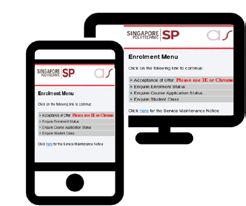
Step 3 Pay Course Fees
Online Process
Visit SP Online Enrolment - http://enrolment.sp.edu.sg
Select Step 3: Pay Course Fees
At [Application of Financial Scheme] for Singapore Citizen
Select [FS] [Post-Secondary Education Account (MOE-PSEA)]
The amount payable will be displayed and you can pay by
Option 1: e-Payment
Option 2: AXS 1
Option 3: Cheque / Cash
1 AXS Station - one-stop multi-application and interactive self-service terminal
AXS e-Station - payment over the internet
AXS m-Station - payment on mobile and tablet devices
9Step 3 Pay Course Fees
Modes of Payment
• For E-Nets Debit, you need to have Internet
Banking from Citibank, DBS, OCBC, POSB, or UOB.
Option 1 • For E-Nets Credit, you can use Visa or Master
• Follow the instructions on the screen to make
payment.
• Print payment acknowledgement slip
o Submit 1 copy to SP
o Keep 1 copy for your own record (optional)
• Choose “Education” (AXS Station) or “eServices”
Option 2
(AXS e-Station and m-Station), then “Singapore
Polytechnic”.
• Follow the instructions on the screen to make
payment.
• Print receipt
o Submit 1 copy to SP
o Keep 1 copy for your own record (optional)
Option 3 • Complete ‘Fee Pay-In Slip’ form and
pay at selected branches
(see reverse side of the slip)
• Collect 2 copies of ‘Fee Pay-In Slip’
from the Bank
o Submit the Green copy
(endorsed by bank) to SP
o Keep the Yellow copy for your
own record
10Task 2 Go for Colour Vision Test / Medical Examination
(only required for selected Groups of students)
Singapore Citizen &
Singapore Permanent Resident International Student
Complete Part A of the following form and go for
Complete Part A of the following form and medical examination:
go for Colour Vision Test, if applicable: • SP Medical Examination Form
• SP Colour Vision Test Form (Note 1) • ICA Medical Examination Report Form (Note 2)
Option 1 Option 2
Visit one of the clinics listed on the SP Colour Vision Test Form Visit any Medical Practitioner registered in Singapore
/ SP Medical Examination Form
You are required to submit the completed SP Colour Vision
Clinic will send the completed SP Colour Vision Test Form / SP Test Form / SP Medical Examination report to Student
Medical Examination Form to SP Admissions Office (note 3) Service Centre @ SP Block T16 Level 1 or mail to SP
Admissions Office (Note 3)
Should you have any Colour Vision Deficiency or Medical
Conditions / Special Needs that prohibits you from pursuing
the offered course, please email to contactus@sp.edu.sg
IMMEDIATELY so that SP may try to arrange for a course
transfer.
Email Subject: Colour Vision Deficiency Email Subject: Medical Conditions / Special Needs
Provide: 1. Your Full Name Provide: 1. Your Full Name
2. SP Admission Number 2. SP Admission Number
3. Name of the course offered 3. Name of the course offered
4. Indicate “Partial Colour Vision Deficiency” 4. Give details of your medical conditions /
OR “Complete Colour Vision Deficiency” special needs
Note 1 Students from the following courses are required to undergo a Colour Vision Test.
- Aeronautical Engineering - Common Engineering Programme
- Aerospace Electronics - Electrical & Electronic Engineering
- Applied Chemistry - Energy Systems and Management
- Biomedical Science - Engineering Systems
- Biotechnology - Food Science & Technology
- Chemical Engineering - Marine Engineering
Note 2 International Student
International student must collect the ICA Medical Examination Report from the clinic and submit it to
ICA when you collect your Student’s Pass.
Note 3 Mailing Address for SP Admissions Office:
Admissions Office, Singapore Polytechnic, 500 Dover Road, Singapore 139651
11Task 3 Submit Documents
Finance Documents
Please complete and submit the following documents (where applicable) in the Brown envelope and send it to SP.
Forms can be found in Finance Forms Folder
Finance Documents Checklist (Detach from the Offer Letter)
MOE - PSEA Standing Order Form ( for Singapore Citizen)
Interbank GIRO Form
[must be signed, or thumb-printed by account holder(s) & endorsed by the Bank]
e-Payment Acknowledgement Page & indicate Admission Number
(payment at Online Enrolment screen)
AXS Receipt / Acknowledgement Page & indicate Admission Number
(payment at AXS Station, e-Station or m- Station1)
Fee Pay-In Slip (Green)- endorsed by OCBC Bank
(Cheque or cash payment at selected OCBC Banks)
____________________________________________________________________
1 AXS Station - one-stop multi-application and interactive self-service terminal
AXS e-Station - payment over the internet
AXS m-Station - payment on mobile and tablet devices
12Task 3 Submit Documents
Admissions Documents
Please complete and submit the following documents (where applicable) in the White envelope and send
it to SP. The documents should be arranged in the following order:
Forms can be found in Admissions Forms Folder
Admissions Documents Checklist (Detach from the Offer Letter)
Photo Form
Student’s Declaration Form
Parent’s Declaration Form (for student below the age of 21)
Supporting Documents from you
Photocopy of NRIC / IC - front & back (for Singapore Citizen, Singapore Permanent Resident & Malaysian)
Photocopy of Passport (for International Student)
Photocopy of Birth Certificate
Photocopy of Deed Poll for change of name, if any
Completed SP Colour Vision Test Form
(for Singapore Citizen and Singapore Permanent Resident offered selected diploma courses ), if available
Completed SP Medical Examination Form (for all International Students), if available
13Enquiry on Enrolment Status
2 weeks after you have completed Task 1 – Acceptance
of Offer, you may visit SP Online Enrolment
(http://enrolment.sp.edu.sg) > [Enquire Enrolment
Status] to check your enrolment status.
Once you have successfully enrolled into your course,
you Admission Card will be posted to your mailing
address by the 1st week of April 2018.
Please login to http://bit.ly/AcceptAdmissionCard
to acknowledge Receipt of Admission Card after you
have received.
Adm No. Expiry Course
XXXXXXX XX/XX/XXXX DXXXX
Xxx Xxx Xxx
14Student Pass Application for International Students
• All International Students must have a valid pass to study in SP.
• Even if your old Student’s Pass for your secondary school has not expired, you are still required to apply for
a new Student’s Pass.
SP will send an email notification and SMS (if you have
provided your local contact number)
NO
Received email/SMS? Check your email regularly
YES
Go to ICA –SOLAR website and Click on “Student” button Information Required
to start the application
Login to SOLAR by keying the following:
SOLAR Application Number^:
Name:
Login to SOLAR Nationality:
Date of Birth:
Sex:
^ Your SOLAR Application Number is
Submit eForm16 and print a copy after submitting
PS-2018-xxxxxxx00000000
Where xxxxxxx is your SP Admission Number.
e.g.: if your Admission Number is 1801882,
Check your application status at SOLAR 5 to 10 days later Your SOLAR Application Number will be
PS-2018-180188200000000
Approved
NO
YES Upon receipt of your Student’s Pass, you should pay your
course fees at one of the following options:
Collect the In-Principle Approval (IPA) letter from SP
Student Service Centre @ Block T16 Level 1 after 5 • AXS Station via NETS (machines located island-wide),
working days (from the day you see the approved status) • AXS e-Station (Internet) and
• AXS m-Station (mobile/tablet devices) via Credit Card
(MASTER)
Complete the Student’s Pass Formalities with ICA#: • Selected OCBC Bank Branches via Cheque or Cash - refer
• Book an e-appointment with ICA to Fee Pay-In slip for details
• Go to ICA Building on the scheduled appointment • Finance Counter located at Administration Block Level 2
date and time to complete the formalities and collect via NETS, Credit Card (VISA OR MASTER), Cheque or Cash
your Student’s Pass.
Subsequently, submit the following at Student Service
Centre within one week of issuance of Student’s Pass*.
* It is important to submit a copy of your Student’s Pass
to SP to notify us that you have a valid pass to remain • Photocopy of your newly issued Student’s Pass, and
in Singapore. • A copy of receipt (if paid via AXS or Finance Counter), or
• Fee Pay-In Slip form – Green copy (if paid via Cheque or
Failure to submit will result in the delay of processing Cash at OCBC)
the Tuition grant and Diploma Student Concession
Card.
# Refer to www.sp.edu.sg/enrolment > What’s Next > Student’s Pass Application Process for more details.
15What’s Next
TIMELINE FOR NEXT ACTIVITIES
01 15 to 19 March 2018
(excluding Sunday)
Notebook PC Roadshow
• Please refer to SP Notebook PC Scheme, or visit
http://www.sp.edu.sg/notebook for details.
04 From 9 April 2018
onwards
• For enquiry, please call 6775-1133, or
email: contactus@sp.edu.sg
Class Timetable Search for
“SP Mobile”
Download the SP Mobile
app to access the class
time table
02
From 15 March 2018
(excluding weekends
& Public Holidays
Notebook Software Installation
• Please refer to SP Notebook PC Scheme, or visit
http://www.sp.edu.sg/notebook for details.
• For enquiry, please call 6772-1260, or
email: ServiceDeskMail@sp.edu.sg 05 9 to 13 April 2018
Freshmen Orientation Programme (FOP)
• You can check the details of your Freshmen
Orientation Programme at http://fop.sp.edu.sg
03
before the FOP period.
• A Freshmen Orientation pack specially prepared
From end March 2018 by the Singapore Polytechnic Students’ Union
(SPSU) will be given out during your school’s
Welcome / Mass briefing session. If you miss the
Diploma Student Concession (EZ-Link)
collection, you may collect it from your school’s
Card office after the FOP. Please refer to the last page
• If you wish to apply for the EZ-Link Card, please of this book for your school’s office location.
pay $8.10 at any Transitlink Ticket Office within 2
working days after you received a SMS from SP.
• Please refer to Application for Diploma Student
Concession Card for details.
16Enrolment Information
Conditions of Admission
Financial Matters
Financial Assistance
SP Notebook
Student Concession (EZ-LINK) Card
Withdrawal from Course and Course Transfer
School / Department Directory
17Conditions of Admission
1. The Offer of Admission is Conditional upon the Candidates:
• Having applied for admission through the proper application procedures
• Having provided the Singapore Polytechnic (SP) with true and accurate information in the
Application / Enrolment Forms
• Submitting to SP the required supporting documents during enrolment
• Not being a student in any other Full-Time or Part-Time course when the semester
commences
• Being physically and medically fit to pursue the course
2. Declaration of Undertaking by Student
All students enrolled into the Singapore Polytechnic have signed a declaration of undertaking in
the enrolment form, as shown below:
2.1 I affirm that all the statements given in this enrolment form are true and accurate to
the best of my knowledge. I have not deliberately omitted any relevant fact. Should I
be admitted to the Singapore Polytechnic (SP) on the basis of the information given
which may turn out to be false or inaccurate, I understand that I will render myself liable
to appropriate action, including civil action, dismissal from course, forfeiture of fees, fine,
and other disciplinary action.
2.2 If accepted, I agree to abide by any / all Polytechnic rules and regulations (available in the
SP Website: http://www.sp.edu.sg/handbook) that are enforced from time to time,
affecting my conduct and study. I am fully aware that failure to do so may result in my
dismissal. If admitted I will behave honourably and endeavour to maintain and raise the
good name of the Polytechnic.
2.3 I understand that my enrolment is subject to my being declared physically / mentally fit
to pursue the course.
2.4 I undertake to absolve SP, its servant and / or agents from any claims arising out of any
injury, loss or damage caused to myself during the period of any training and activity in
the course of my study at SP. I further undertake to indemnify SP against all claims which
may be made against it by reason or in connection with:
(i) Any damage to property whether of the company, an employee of the company,
the student or a third party.
(ii) Any damage, injury, illness, or accident (whether fatal or otherwise) caused
to any person, whether an employee of the company, the student or a third party,
being damage to property, injury, illness, or accident (whether fatal or otherwise)
occurring to any person which is caused by the student or is the direct
consequence of the provision of such facilities mentioned above.
182.5 (For male Singaporean & Permanent Residents who are 19 years old & above as of 01
Jan 2017). I declare that I have checked with the Deferment Office, CMPB, and that I am
eligible to pursue a course in the 2017/2018 academic session. If I am not eligible for
deferment, I will inform Admissions Office (in writing) of my status.
2.6 I understand that any personal data that I provide to SP or that arises or is collected by
SP during my course of study will be treated as Confidential but may be used or disclosed
for the purposes set out below. Such data may include personal particulars, family data,
assessment records, special needs and medical information, sound, video or CCTV
recordings etc. The data could be used or disclosed for the following purposes:
(i) To facilitate the execution of activities by the Polytechnic as an academic institution
in support of my learning journey and will include, but is not limited to, release of
information for the securing of internship / Industrial Training Programme
placements.
(ii) To facilitate the execution of activities by the Polytechnic in dispensing its duties to
ensure the safety and welfare of its staff / students and will include, but is not
limited to, judicious release of information to personal tutors who are charged with
monitoring and caring for students with special needs and / or medical conditions.
(iii) Monitoring of premises and / or persons within premises for security reasons and/
or to regulate student discipline or behaviour.
(iv) For publication in areas that is customary by educational institutions, including but
not limited to awards of prizes, medals, scholarships, and other marks of distinction,
and student or graduation status.
(v) For prescribed evaluative purpose that may include, but is not limited to, evaluation
for admission to institutions of higher learning (e.g. the autonomous universities),
for scholarships / bursaries / loans and other support schemes.
(vi) Shared with government ministries, statutory boards and agencies or external
parties where SP is required to do so by law or in order to fulfil a statutory obligation
or for the purposes of Education and Career Guidance (ECG).
3. Declaration of Undertaking by Parent
A parent of student under 21 years of age has also signed a declaration of undertaking in the
enrolment form, as shown below:
3.1 I have no objection to my child being admitted to the course conducted by SP.
3.2 I undertake to absolve SP, its servant and / or agents from any claims arising out of any
injury, loss or damage caused to my child during the period of any training and activity
in the course of his / her study at SP.
I further undertake to indemnify SP against all claims which may be made against it by
reason or in connection with:
19(i) Any damage to property whether of the company, an employee of the company,
the student or a third party.
(ii) Any damage, injury, illness, or accident (whether fatal or otherwise) caused to any
person, whether an employee of the company, the student or a third party, being
damage to property, injury, illness, or accident (whether fatal or otherwise)
occurring to any person which is caused by the student or is the direct consequence
of the provision of such facilities mentioned above.
3.3 I understand that any personal data that my child provides to SP or that arises or is
collected by SP during his / her course of study will be treated as Confidential but
may be used or disclosed for the purposes set out below. Such data may include
personal particulars, family data, assessment records, special needs and medical
information, sound, video or CCTV recordings etc. The data could be used or
disclosed for the following purposes:
(i) To facilitate the execution of activities by the Polytechnic as an academic institution
in support of his / her learning journey and will include, but is not limited to, release
of information for the securing of internship / Industrial Training Programme
placements.
(ii) To facilitate the execution of activities by the Polytechnic in dispensing its duties to
ensure the safety and welfare of its staff / students and will include, but is not
limited to, judicious release of information to personal tutors who are charged with
monitoring and caring for students with special needs and / or medical conditions.
(iii) Monitoring of premises and / or persons within premises for security reasons and /
or to regulate student discipline or behaviour.
(iv) For publication in areas that is customary by educational institutions, including but
not limited to awards of prizes, medals, scholarships, and other marks of distinction,
and student or graduation status.
(v) For prescribed evaluative purpose that may include, but is not limited to, evaluation
for admission to institutions of higher learning (e.g. the autonomous universities),
for scholarships / bursaries / loans and other support schemes.
(vi) Shared with government ministries, statutory boards and agencies or external
parties where SP is required to do so by law or in order to fulfil a statutory obligation
or for the purpose of Education and Career Guidance (ECG).
4. Medical Report / Colour Vision Test Report (Where is applicable, as indicated
in the Offer Letter)
Completed form must be received by SP before the commencement of the new academic
session.
Failure to submit your medical report and x-ray result / colour vision test report will result in you
being de-registered from the course.
205. National Service
National Service liable persons are required to apply for deferment from full-time National
Service. Those who are 19 years old and above as at 1 January of the year are to seek deferment
from Deferment Office, Central Manpower Base before they enrol for the course. They must
obtain approval from Deferment Office, Central Manpower Base if they intend to:
• Change the course of study
• Change the institution
6. Rules and Regulations
You are strongly advised to familiarise yourself with the rules and regulations in the student
handbook that is available in the SP website http://www.sp.edu.sg/handbook. When one is
found flouting the rules, ignorance will not be accepted.
21Financial Matters and Scheme for Polytechnic Foundation Programme
1. How much is the Course Fees?
You must state your citizenship status correctly during enrolment as this will determine the course
fees that you have to pay.
Students who inform of their change of citizenship to Singapore Citizenship or Singapore
Permanent Resident (PR) status after the commencement of a semester, will pay the fees for
Singaporean or Singapore Permanent Resident with effect from the next semester.
The Tables below show the Course Fees for Polytechnic Foundation Programme for Academic
Year 2018/2019.
Table 1: Course Fees (inclusive of GST)
Annual Course Fees Singapore Citizen Singapore PR International
Student
Tuition Fee $ 363.80 $ 2,407.50 $ 9,600.00
Other Fees (refer to Table 2) : $ 90.55 $ 122.65 $ 156.65
MOE Subsidy for GST on Tuition Fee $ (23.80) $ (157.50) NA
Total $ 430.55 $ 2,372.65 $ 9,756.65
Amount to pay before Enrolment for $ 260.55 $ 1,247.65 $ 4,956.65
Semester 1 *
Amount to pay in Semester 2 # $ 170.00 $ 1,125.00 $ 4,800.00
Table 2: Breakdown of Other Fees
Breakdown of Other Fees Singapore Citizen Singapore PR International
Student
Examination @ NA $ 32.10 $ 32.10
Sports $ 25.68 $ 25.68 $ 25.68
Insurance $ 3.40 $ 3.40 $ 3.40
Group Hospitalisation & Surgical
NA NA $ 34.00
Insurance (GHSI)
Miscellaneous $ 14.98 $ 14.98 $ 14.98
Statutory License (CLASS) $ 7.49 $ 7.49 $ 7.49
Students Union (not subjected to GST):
Entrance $ 5.00 $ 5.00 $ 5.00
Subscription $ 18.00 $ 18.00 $ 18.00
Freshmen Orientation Packet $ 16.00 $ 16.00 $ 16.00
Total $ 90.55 $ 122.65 $ 156.65
* Semester 1 fees include Tuition Fee and Other Fees
# Semester 2 fees include Tuition Fee only
@ Examination Fee for Singapore Citizen is waived by MOE with effect from Academic Year
2015/2016
222. What is the available Financial Scheme?
You can apply for Post-Secondary Education Account (PSEA). Upon approval from MOE, the approved
amount will be used to pay for your course fees (includes Tuition Fee and Other Fees).
We will bill you for the remaining amount after the semester has commenced if:
• your application for PSEA is not approved; or
• the approved amount is insufficient to settle the course fee
3. How to Apply?
Post-Secondary Education Account (PSEA)
The PSEA scheme is administered by MOE. If a Singaporean has an Edusave account, the balance
amount will be transferred to PSEA when he is 16 years old or when he leaves Secondary School
/ Junior College / Centralised Institute or Vocational Training Center, whichever occurs later.
Eligibility
• Singapore Citizen
Application
• Complete the “Standing Order for Use of the Post-Secondary Education Account” form.
• Submit the completed form to SP Finance Department.
• SP will forward your application to MOE (PSEA) for their approval
• Once approved, MOE (PSEA) will pay the approved amount directly to SP.
• The closing date for application is 30 April 2018.
Contact
To find out your PSEA balance, you can:
• call MOE Customer Service at Tel: 6260-0777
• email to contact@moe.gov.sg
• visit website at http://www.moe.gov.sg/
To print the Standing Order form, go to PSEA website at
http://www.moe.gov.sg/initiatives/post-secondary-education-account/
23Interbank GIRO
a) Payment of subsequent semesters’ course fees
All students are to participate in the Interbank GIRO Scheme which is an easy and convenient way
to pay their subsequent semesters’ fees. For students without a valid Bank account, the alternate
payment modes are:
• E-Payment
• AXS
• Selected OCBC branches
• Student Service Counter
• Finance Counter
b) Refund/Payment due to you
The same GIRO account will be used for crediting any refund or payment due to you, which
effectively reduces the inconvenience of collecting and depositing cheques. Refund or payment
can be for any of the following matters:
• Excess payment of fees made by you;
• Scholarships and Bursaries awarded; and
• Any other payment due to you.
Application
• Complete Part I of the “Interbank GIRO Application Form”. You may use your own / parent’s /
guardian’s bank account for the above-mentioned.
• Ensure the signature(s) / thumbprint(s) on the Application Form are the same as in the bank
records. For account operated using thumbprint, you have to go to the bank with your
identification to have your thumbprint verified.
• Submit the completed form to Student Service Centre or SP Finance Department.
• SP will forward your application to your designated bank for approval.
Approval Status
• For successful GIRO application,
We will notify you of the Course fee to be deducted and the deduction date at least one week
in advance via the ebill that will be sent to your ichat email account.
Ensure sufficient fund is maintained in the designated Bank Account. Unsuccessful GIRO
deductions are subjected to Bank charges.
You can login to the Student Portal (https://mike-student.sp.edu.sg) to view your Student
Account and print the Fee Voucher on web till 31 March 2018 and via “SP Mobile” App from
April 2018 onwards.
• For unsuccessful GIRO application,
We will send a letter to inform you that your GIRO application is rejected by Bank and you are
advised to submit another interbank GIRO form.
24Financial Assistance @ SP
1. Financial Aid for Fees & Living Expenses
Which one to apply?
Eligibility Criteria
Award Application
Schemes
Per Capita Gross Monthly Amount Period
Nationality
Income (PCI)* Income (GHI)
MOE Bursary Singaporean < $625 OR < $2,500 $970 Jun – Sep 2018
2. Financial Aid for Notebook PC
Which one to apply?
Eligibility Criteria
Award Application
Schemes
Per Capita Gross Monthly Amount Period
Nationality
Income (PCI)* Income (GHI)
Receive
Notebook Subsidy Singaporean ≤ $1,000 OR ≤ $4,000 up to Jun – Sep 2018
$800
Total Gross Monthly Household Income (GHI)
*Monthly Per Capita Income (PCI) =
No. of People Living in Applicant's Household
For details, please refer to SP website (www.sp.edu.sg/financialassistance), scan the QR code,
email the Student Service Centre at contactus@sp.edu.sg or call 6775-1133.
25SP Notebook PC Scheme
You will be using notebook PC during your study at SP, e.g writing reports, researching assignments,
class presentations, project discussions, e-learning, etc.
We have arranged for selected PC vendors to put on a roadshow in SP during 15 - 19 Mar 2018
from 9 am to 6 pm (excluding Sunday).
If you do not have a notebook PC, visit the roadshow to check out the models at very attractive
prices.
Information on recommended notebook PCs are given in Notebook PC Corner
(http://www.sp.edu.sg/notebook). There you will also find more information for the promotions,
financial assistance scheme and insurance.
You can configure and install software for your notebook PC from home after you have completed
your online enrolment. Please refer to Notebook PC Corner at http://www.sp.edu.sg/notebook for
more details.
26Overview of the Notebook Configuration Process
Useful Information: Important Dates:
Notebook PC Roadshow
SP Notebook PC Corner
Date: 15 – 19 Mar 2018 (excluding Sunday)
• http://www.sp.edu.sg/notebook Time: 9:00am to 6:00pm
Venue: SP Convention Centre, Level 1 #
SP Notebook PC Scheme (Roadshow and Financial
Assistance) #Tentative
• Hotline: 6775-1133
Notebook Software Installation
Notebook Hardware and Software Support Available online from 15 Mar 2018
http://www.sp.edu.sg/notebook > under
• Email: ServiceDeskMail@sp.edu.sg Software tab
• Hotline: 6772-1260
Academic Year 2018 (AY2018) starts on 16
Apr 2018. Please ensure that your notebook
is ready before AY2018.
SPICE Training
To help you to get familiar with SPICE
(Singapore Polytechnic Intelligent Computing
Environment), it is recommended that you
also learn from the videos in
http://www.sp.edu.sg/notebook > under
SPICE Training tab before AY2018.
27Allocated Dates of Notebook PC Sales by Courses
Please remember to bring your Admission Card/NRIC and SP offer letter for purchase of Notebook PC
Notebook Road Show Dates Courses
15 March 2018 (Thursday) Accountancy
Architecture
Banking and Finance
Business Administration
Business Information Technology
Creative Writing for Television and New Media
Financial Informatics
Human Resource Management with Psychology
Infocomm Security Management
Information Technology
Landscape Architecture
Music & Audio Technology
Polytechnic Foundation Programme
Tourism and Resort Management
16 March 2018 (Friday) Aeronautical Engineering
Aerospace Electronics Bioengineering
Common Engineering Programme
Computer Engineering
Electrical & Electronic Engineering
Energy Systems and Management
Engineering Systems
Food Science & Technology
Games Design & Development
Marine Engineering
Mechanical Engineering
Nautical Studies
Visual Communication and Media Design
17 March 2018 (Saturday) For students who are not able to come on the scheduled dates, and
for students whose courses are not listed.
19 March 2018 (Monday) Applied Chemistry
Applied Drama and Psychology
Biomedical Science
Biotechnology
Chemical Engineering
Civil Engineering with Business
Digital Animation
Engineering with Business
Experience and Product Design
Facilities Management
Integrated Events & Project Management
Interior Design
Maritime Business
Mechatronics and Robotics
Media and Communication
Nutrition, Health & Wellness
Optometry
Perfumery and Cosmetic Science
Visual Effects and Motion Graphics
28Application for Diploma Student Concession Card
Link to TransitLink's website, Eligibility Check (For Full-time Diploma students ONLY)
https://www.transitlink.com.sg/eservice/econcession/tertiary_enquiry.php
29Withdrawal from Course and Course Transfer
1. Withdrawal from Course
Procedures
• Students who intend to discontinue with their studies must inform the Admissions Office by
submitting “Notification of Withdrawal from Course” form. This form is available at the
Student Service Centre (SSC), respective academic school office and on the Internet at
http://www.sp.edu.sg/SSC. Students should also read the section on “Charging of Fees” for
information regarding their course fees.
• Students under 21 are to obtain their parent’s / guardian’s signature. For withdrawal after the
academic semester has commenced, new full-time students are also to see their Course Chair
and obtain their Director’s signature. All students must then proceed to the Library for
clearance and submit the form to Student Service Centre personally or mail the form to
Admissions Office.
• Students must return all property belonging to SP and settle all outstanding bills prior to the
submission of the form. Students who have been paying their fees by GIRO should submit their
Bank’s relevant ‘termination form’ to their Bank to cancel their GIRO payment order.
Regulations
• Charging of Fees -Students withdrawing from SP are liable to pay fees. For withdrawals received:
a) Before the commencement of semester, students may obtain a full refund of tuition
fees for that semester. New students will have to pay an administrative fee of $50.
b) Within the 1st week of semester, students are liable for 25% of the tuition fees for
that semester.
c) After the 1st week of semester, students are liable for 100% of the tuition fees.
There is no refund on Students’ Union fees, Insurance fee, Freshmen Orientation Package fee,
Statutory License fee and Registration fee regardless of the time of withdrawal.
Any non-payment of fees will be noted.
• Students are not allowed to withdraw during the official examination period. For any
withdrawals received upon the start of and during the conduct of the semestral exams, the
student will be considered to have sat for the exam and may be removed. If the student is not
removed, the withdrawal date will be post-dated to the day the semestral results are released.
• SP reserves the right to take any appropriate action it deems necessary where a student fails
to comply with withdrawal procedures & regulations.
2. Course Transfer
New students who wish to transfer to another course may submit a SP e-Appeal via
http://courseapplication.sp.edu.sg Submit an Appeal for Full-time Diploma course. Such
appeals may be considered subject to individual merit and vacancies.
30School/Department Directory
Academic Schools
School
School Name Location Telephone/Email
Code
School of Architecture and the Built
ABE T3A Level 4 Room T3A412
Environment
Business School
SB SP Business School (next to Aero Hub) Level
7 Room SB711
School of Chemical and Life T11A Level 6 Room
CLS
Sciences T11A601
School of Communication, Arts and
CASS T19 Level 2 Room T19210
Social Sciences
Design School
SD SP Design School (next to Blk T3A)
6775-1133
Level 1 Room 106
contactus@sp.edu.sg
School of Digital Media and
DMIT T19 Level 4 Room T1949
Infocomm Technology
School of Electrical and Electronic
EEE T14 Level 7 Room T1472
Engineering
School of Mechanical and
MAE T16 Level 7 Room T1671
Aeronautical Engineering
MS School of Mathematics and Science T7 Level 4 Room T741
SMA Singapore Maritime Academy T1A Level 7 Room T1A711
Student Service Support Contact No. Email Visit Us
Enrolment Matters 6775-1133 contactus@sp.edu.sg T16 Level 1
SPICE Service Desk 6772-1260 ServiceDeskMail@sp.edu.sg T17 Level 1 Room 1
Singapore Polytechnic
500 Dover Road Singapore 139651
Enquiries: contactus@sp.edu.sg
Website: www.sp.edu.sg
Operating Hours: Monday to Friday, 8.30 am to 5.30pm
(Closed on Saturdays, Sunday and Public Holidays)
31SP Map 32
Student Service Centre T16 Level 1

                33
You can also read


