JIRA Administration Best Practices - Darren Bowles, Clearvison
←
→
Page content transcription
If your browser does not render page correctly, please read the page content below
JIRA Administration Best
                        Practices

                                  Darren Bowles, Clearvison
Copyright © 2013 Clearvision-CM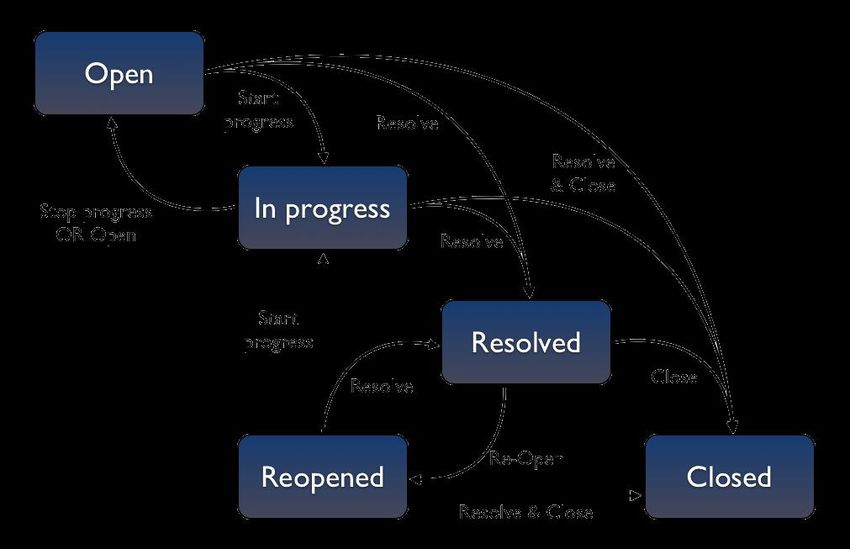
Assumptions
• Working knowledge of JIRA
• Understanding of JIRA administration tasks
• Working to JIRA v6 or later.

Copyright © 2013 Clearvision-CM

Copyright © 2013 Clearvision-CM

1. Workflows
                                  2. Scaling
                                  3. Searching/Reporting
                                  4. Troubleshooting

Copyright © 2013 Clearvision-CM
Workflows - Agenda
                                    More hands on time

     • Workflow Design
     • Workflow Sharing
     • Simplifying Workflows (Activity)

Copyright © 2013 Clearvision-CM
JIRA 6.1 – Default Behaviour
     • “Out of the Box” experience simplified
         • New default workflow…

             • Anyone can transition issues

             • whoever does a transition will be the new assignee

         • Create Issue now leaves the issue unassigned by default

Copyright © 2013 Clearvision-CM
Workflow Design
     • First Steps
         • Visualize

         • Identify

         • Plan

Copyright © 2013 Clearvision-CM
JIRA Workflows - Workflow Design
• Design & document
• Keep a permanent record
• Diagram!
• Represent what you do
• People not process
• Use the Guidebook
• https://confluence.atlassian.com/display/JIRA/
Workflows+Guidebook
• Keep it simple!
Copyright © 2013 Clearvision-CMJIRA Workflows - Considerations
• Audit trails
• Push vs Pull processes
• Open vs Restricted
• ‘Re-use what you can’ vs ‘Start again’
• Workflow sharing – new in JIRA 6.0
• Export / import workflows
Copyright © 2013 Clearvision-CMWorkflow Design
Modify the Default if: Start from Scratch if:
• Simple tweaks • Pull processes
• Push processes • Avoiding default
• Built in notifications dependencies
• Default permissions • Fewer Steps
• Many steps (10+)
Copyright © 2013 Clearvision-CMWorkflows - Case Study • Clearvision Gaming Inc. has implemented a workflow for the Grand Theft Scooter project based on the input from various departments. • As the project lead, you need to verify this implementation and look for improvements. • Study this workflow in your environment • Are there any ways it could be improved? Copyright © 2013 Clearvision-CM
Workflows - Activity
            Study the workflow in place. Are there any ways
            it could be improved?
            Design a workflow by diagramming the proposed
            changes – Gliffy is installed in JIRA if you would
            like to use it.
            Implement these changes in the Grand Theft
            Scooter project

Copyright © 2013 Clearvision-CM
1. Workflows
2. Scaling
3. Searching/Reporting
4. Troubleshooting
Copyright © 2013 Clearvision-CMScaling - Agenda • JIRA Security • Custom Fields • Scaling JIRA • Extending JIRA • Integrations & Add-ons • Upgrading JIRA Copyright © 2013 Clearvision-CM
JIRA Permissions

                                                  Global
                                     Groups
                                                Permissions
                                                  Project
                Users                           Permissions
                                     Roles    Issue Permissions
                                                Custom Field
                                                Permissions
Copyright © 2013 Clearvision-CM
Security - Tips
Use permission checks sparingly
Replace “JIRA-users” with “anyone”
Comment visibility
Restrictions trump permissions
Copyright © 2013 Clearvision-CMJIRA Scaling - Custom Fields
• Custom field types
• Custom field context
• JavaScript in custom fields
• Do you need a custom field?
• Re-indexing takes time!
Copyright © 2013 Clearvision-CMJIRA 6.1 – Custom Fields
• Split into Standard & Advanced fields
• ‘Standard’ fields show a preview as they are created
• ‘On the Fly’ Creation
• Administrators can create and configure new Custom Fields from
the Issue view screen
• Field is placed on ‘View’, ‘Edit’ and ‘Create’ screens – i.e. use
immediately
Copyright © 2013 Clearvision-CMScaling JIRA - Performance Factors
• Data • Key Factors
• Usage (users) • Issues
• Configuration (Plugins)
• Custom Fields
• Java Virtual Machine
• Permissions
• Hardware/Operating
System • Concurrent Operations
• Virtualized
Copyright © 2013 Clearvision-CMScaling JIRA
Recent Performance Improvements
• New Features • Recent Performance
• JIRA mobile
Improvements
• Faster searches (40%)
• Global workflow schemes
• Removed page loads
• Background Indexing
(pop-ups)
• Project Templates
Copyright © 2013 Clearvision-CMScaling JIRA - Capacity • Determine your server limits and timescale • Setup test environment • Generate test data • Check your performance Copyright © 2013 Clearvision-CM
Scaling JIRA - Archiving
     • Online archiving              • New JIRA Archiver
         • “Hiding” a project          • http://atlss.in/archiverbeta
         • Making a project “read-
           only”
                                     • Clearvision Affinity Bridging
                                       • http://www.clearvision-
     • Offline archiving                 cm.com/products/affinity/
         • XML Backup / delete

Copyright © 2013 Clearvision-CM
Scaling JIRA - Tips
Select appropriate web browser (chrome)
Reuse configurations where possible (schemes / workflows)
Delete anything that’s no longer needed
Limit Bulk Editing – perform out of hours
Replace JIRA-users with the 'Anyone' permission
JIRA Federation
Monitor your logs – even if nothing appears to be wrong
Check your database regularly
Tune the JVM!
Copyright © 2013 Clearvision-CMExtending JIRA
• IT Infrastructure Library (ITIL) • Project Management
• Agile Development • Requirements Management
• Knowledge Base • Resource or Portfolio Mgt
• Change Management • System Administration
• Customer Relationship Mgt • Test Case Management
(CRM) • Others?
• Helpdesk or Support
Copyright © 2013 Clearvision-CMIntegrations & Add-ons
Atlassian 3rd Party
• JIRA Agile • Stash • Subversion • JIRA Client
(GreenHopper) • Bitbucket • DVCS • JIRA Command
• Zendesk Line
• JIRA Collect • Fisheye
• IDE connectors • AgileSCM
(Bonfire) • Crucible • Salesforce • TortoiseSVN
• Confluence • Bamboo • Bugzilla Plugin
• Team • Clover • Gliffy
Calendars • Balsamiq
• Hipchat • Lucid Chart
Copyright © 2013 Clearvision-CMUpgrading JIRA
• Check add-ons
• Check integrations
• Customizations?
• Check the upgrade guide!
Copyright © 2013 Clearvision-CMStrategic Thinking – Case Study
• The Clearvision Gaming Inc. directors are looking to reduce development costs
and leverage JIRA for additional uses.
• As JIRA is embedded into the process, the directors are looking to you for
recommendations as to other areas of the business JIRA could be used for or
integrated with.
Copyright © 2013 Clearvision-CMStrategic Thinking - Activity
Using your own organization, think about ways that
you could leverage JIRA for additional uses.
Consider the impact these changes may have on
your server.
Using your understanding of JIRA extensions,
make a personal recommendation to the board of
directors based on the provided information.
Copyright © 2013 Clearvision-CM1. Workflows
2. Scaling
3. Searching & Reporting
4. Troubleshooting
Copyright © 2013 Clearvision-CMSearching/Reporting - Agenda
• Searching • Reporting
• Default Reports
• Searching & Filters
• Reporting Integrations
• Advanced Searching –
JQL • Reporting Add-ons
• Searching Tips • Custom Reports & API
• Reporting Tips
Copyright © 2013 Clearvision-CMSearching & Filters
• JIRA Searching • Filters
• Quick Search • Unique ID
• Basic Search • Report Access
• Advanced Search
Using JIRA 6.0 – 6.0.6? Upgrade now to 6.0.7 or later!
This point release corrects several performance challenges discovered in
earlier point versions of JIRA 6.
Copyright © 2013 Clearvision-CMSearching - Tips
You cannot compare the values of two different fields
Nested Queries: You can reference the results of saved
queries (filters) within other JQL queries
If you want to search a string, use the ‘text’ operator
rather than naming multiple search fields
Copyright © 2013 Clearvision-CMDefault Reports
• Workload pie chart • Created vs resolved issue
• User workload report report*
• Version workload report • Resolution time report
• Version time tracking • Pie chart report*
report • Avg age report *
• Single level group by • Recently created issues report*
report • Time since issued report
Copyright © 2013 Clearvision-CMReporting Integrations
• Confluence
• Excel
• REST API
• Wallboards
Copyright © 2013 Clearvision-CMReporting Add-ons
Common 3rd Party Add-on Categories
• Display reports
• Project management reports
• Time tracking reports
• Risk management reports
• Additional charting tools
• Version control
• Gantt Chart
Copyright © 2013 Clearvision-CMCustom Reports – Using the API
• Custom Add-ons
• REST API
• Developer Guide
Copyright © 2013 Clearvision-CMReporting Tips
Limit the data your filter returns
Include only relevant columns
Avoid search-intensive gadgets
Limit the number of gadget refreshes
Plan subscriptions for out of hours.
Copyright © 2013 Clearvision-CMCase Study – Searching/Reporting • John Spencer, the VP of Gaming at Clearvision Gaming Inc. Entertainment has heard of a competitor to Grand Theft Scooter in development at a rival company. • He requires a number of reports to gain an overview of the project In order to have a visual reference of the health of the project so that appropriate measures can be taken to speed up development. • You need to generate these reports and use an appropriate method of visualizing them. Copyright © 2013 Clearvision-CM
Case Study – Searching/Reporting
1) The amount of time remaining on the estimates for version 1.0 of Grand Theft
Scooter.

2) The amount of time spent in total on issues within the Grand Theft Scooter
project.

3) Open issues in the Grand Theft Scooter project which have never been
assigned in descending priority order.

Copyright © 2013 Clearvision-CM
Activity – Searching/Reporting
            Use what you know about JQL to generate searches
            and save them as filters for each of the above reports
            https://confluence.atlassian.com/display/JIRA/Advanced+Searching

            Configure a dashboard to display the required data
            in the format you think fits best.
            Remember to share the generated filters
            and dashboard so John has access
Copyright © 2013 Clearvision-CM
1. Workflows
2. Scaling
3. Searching/Reporting
4. Troubleshooting
Copyright © 2013 Clearvision-CMTroubleshooting - Agenda
• Introduction to • Performance issues
troubleshooting
• Email Failures
• Crashes
• Email loops
• JIRA log files
• Atlassian resources
• Common causes
Copyright © 2013 Clearvision-CMTroubleshooting
JIRA Home
JIRA database
JIRA install
Copyright © 2013 Clearvision-CMCrashes
• Consider your server environment
• Antivirus
• Network outage
• Virtual environment
• JIRA log location
• Default location
• Application server logs
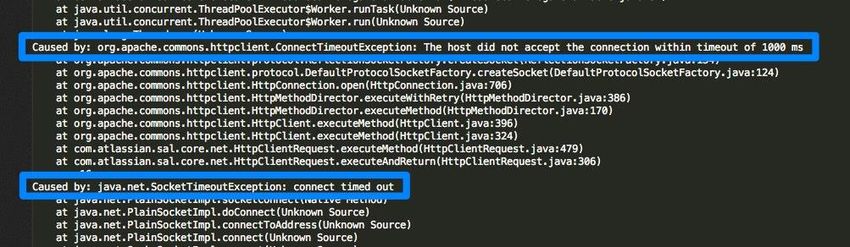
Copyright © 2013 Clearvision-CMJIRA Log Files Copyright © 2013 Clearvision-CM
Common Causes
     • Java Seg Faults
     • Out of Memory: Permgen space
         • java.lang.OutOfMemoryError: PermGen space

     • Out of Memory: Heap space
         • java.lang.OutOfMemoryError: Java heap space

Copyright © 2013 Clearvision-CM
Performance Issues
Key sources:
1. Memory
2. Disk access
3. Database access
4. Untuned JVM
Copyright © 2013 Clearvision-CMEmail Failures
Check the following :
• JIRA’s SMTP Server
• Heap Space Errors
• The Mail Queue
• User Settings
• Transition Notifications
• Email Content
• JIRA Logging
Copyright © 2013 Clearvision-CMEmail Loops Email loops can cause : • Out of memory errors • JIRA crashes • Poor performance https://confluence.atlassian.com/display/JIRA/Creating+Issues+and+Comments+from+Email Copyright © 2013 Clearvision-CM
Atlassian Resources

Copyright © 2013 Clearvision-CM
Troubleshooting - Case Study

     • On the 1st October, at around 3:15 Clearvision Gaming
       Inc.’s JIRA crashed.
     • Log files are available.
     • Can you find and correct the cause of this?

Copyright © 2013 Clearvision-CM
Troubleshooting - Activity
Analyse the provided log file.
It is available on your desktop in your training environment
Using your own experience, and the resources available
on the internet, identify the cause and a solution for this
problem.
Implement the solution in your JIRA.
Copyright © 2013 Clearvision-CMThank you!
Your Feedback is vital to us! Please spend
five minutes completing this survey:
https://www.surveymonkey.com/s/cvjira
Darren Bowles, Clearvison
dbowles@clearvision-cm.com
Copyright © 2013 Clearvision-CMQuestions? Copyright © 2013 Clearvision-CM
Resources

      JIRA documentation          https://confluence.atlassian.com/display/JIRA/JIRA+Document
                                  ation
      Atlassian Answers           https://answers.atlassian.com
      Atlassian Support           https://support.atlassian.com/secure/Dashboard.jspa
      portal
      Little JIRA Tricks          http://www.j-tricks.com/
      Atlassian Marketplace https://marketplace.atlassian.com
      Latest Atlassian Blogs http://blogs.atlassian.com/

Copyright © 2013 Clearvision-CM
You can also read


