MEET MATHSPACE THE WORLD'S SMARTEST ADAPTIVE MATH PROGRAM - Backbone Communications
←
→
Page content transcription
If your browser does not render page correctly, please read the page content below

MEET MATHSPACE
    THE WORLD'S SMARTEST ADAPTIVE MATH PROGRAM
                                                     FEEDBACK AT EACH STEP – NO
                                                       MORE MULTIPLE CHOICE
                                               Mathspace provides all students with immediate
                                               feedback at every step of a math problem – not
                                               just at the end. By flagging incorrect steps and
                                               providing hints, videos and guidance, Mathspace
                                               is just like a teacher sitting next to every student.

   PERSONALIZED LEARNING FOR
        EVERY STUDENT
Each step a student takes guides the next hint,
the next question, and the next topic, for a truly
personalized learning journey. Teachers can see
how students are thinking about each problem.

                                                 A COMPREHENSIVE CURRICULUM
                                                    AVAILABLE ON ALL DEVICES
                                               A fully digital textbook, with 20,000 questions,
                                               more than 5,000 instructional videos, hundreds
                                               of virtual manipulatives, all fully aligned to
                                               curricula for grades 3 to Pre-Calculus, including
                                               the Common Core, TEKS - and accessible from
                                               any laptop, Chromebook, iPad, or smartphone!

    DATA-DRIVEN INSTRUCTION FOR
        ENHANCED TEACHING
 Track student progress with more data than any
 other math program! Identify where your class is
 struggling with a concept, or where an individual
 student needs help, with real-time data on
 intuitive teacher dashboards.
PATENTED ADAPTIVE LEARNING ENGINE
                     TRUE ADAPTIVITY ON THREE LEVELS
   Mathspace’s unrivaled adaptive learning technology analyzes real-time data from thousands of
questions at the step-level to automatically select the most appropriate learning trajectory for each
  student. Mathspace is the world's only program that collects granular data at every step of every
 question and feeds it into an engine to determine not only the correct path for a student within a
problem, but the best next question, next subtopic, and next topic. In short, Mathspace most closely
mirrors the best practice design for adaptive learning as researched by Professor Kurt Van Lehn from
                                     the University of Pittsburgh.

                              LEVEL 1: ADAPTIVE STEP BY STEP
 Part of what makes Mathspace highly unique and beneficial for learners is the step-by-step feedback
 students receive. No other program provides this level of feedback: at every step of every question,
    and according to each student’s problem-solving strategy. Unlike multiple-choice or final-input
  programs, Mathspace provides students with feedback and resources during the problem solving
process. Data is collected as students progress through each question, and intervention is automatic if
                                   students struggle or make errors.

                                 Correct     Correct                               Correct
                    Problem                              Misstep      Hint
                                  Step        Step                                 Answer

                              Mathspace collects dataFee
                                                      at every step of a problem

                   LEVEL 2: ADAPTIVE QUESTION TO QUESTION
  As students work through a concept, Mathspace uses the collected data to create individualized
  learning paths for every student, tailoring the subsequent questions according to demonstrated
understanding from previous questions. No other math program collects data at intermediate steps of
 math questions, so Mathspace can most accurately evaluate a student's math ability based on more
 than just a student’s final answer. This empowers Mathspace to choose the most appropriate next
question for every student, based on the steps taken, errors made, and supports needed on previous
                                               questions.

                      Full        Partial      No        Partial      Full          Full
                     credit       Credit      Credit     Credit      Credit        Credit

                      Scaffolding occurs after each problem to guide toward mastery
PATENTED ADAPTIVE LEARNING ENGINE

                          LEVEL 3: ADAPTIVE CONCEPT TO CONCEPT
  At Mathspace, our curriculum specialists have analyzed every single mathematical topic and sub-
    topic to identify their direct prerequisites. Based on this analysis, we have built a proprietary
  Knowledge Graph to link our entire suite of problem sets. This is a mapping of all concepts within
   mathematics, linking concepts to each other depending on and considering what knowledge is
                                          required to advance.

  For example, we know that, before learning “Adding and Subtracting Mixed Numbers”, a student
     must first learn “Adding Fractions,” and so on. Our adaptive exercises are powered by the
    Knowledge Graph to recognize and address learning gaps, and to provide a clear and logical
                                progression through each curriculum.

    *THE PORTION OF THE KNOWLEDGE GRAPH BELOW DISPLAYS THE INTERCONNECTIVITY OF
             CONCEPTS WITHIN FRACTIONS, EARLY DECIMALS, AND PERCENTAGES

Fraction as percentages

Addition with decimals

                                                      Adding and subtracting
                                                         mixed numbers

                                  www.mathspace.co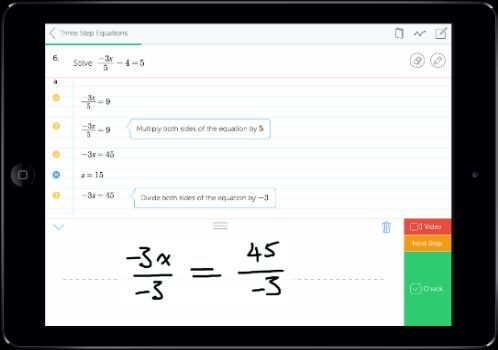
PEDAGOGY & RESEARCH

                                                    FORMATIVE, STEP-BY-STEP FEEDBACK
                                                          Mathspace provides students with immediate corrective or
                                                         supportive feedback at every step of a math problem. Unlike
                                                        programs that present students with a series of multiple choice
                                                      problems, Mathspace can evaluate student work at a step-by-step
                                                    level. By indicating correct steps, Mathspace encourages students to
                                                    continue working through a problem at their own speed. By flagging
                                                    incorrect steps and providing scaffolded hints, videos, and guidance,
                                                      Mathspace encourages growth mindset and supports students to
                                                     expand their skills and understanding of a concept. Butler, Godbole
                                                    and Marsh’s feedback study shows that feedback accompanied by an
                                                       explanation is more effective than feedback that only indicates a
                                                                          correct or incorrect answer.

 METHODOLOGY SUPPORTED BY
  BLOOM’S 2-SIGMA PROBLEM
   In Benjamin S. Bloom’s 2-Sigma Problem, students who
received individualized one-on-one instruction in conjunction
 with feedback-corrective procedures performed about two
  full standard deviations higher than students in a control
      group. In other words, the average tutored student
   performed better than 98% of students receiving solely
  whole-group instruction. Furthermore, 90% of students in
   the tutored group performed at the level of summative
   achievement attained by only 20% of the control group.

                                                            HANDWRITING-RECOGNITION
                                                                 TECHNOLOGY
                                                          Students’ written answers are instantly digitized and graded
                                                        when students use Mathspace on a touchscreen mobile device.
                                                         Research from the University of Florida’s Dr. Lisa Anthony has
                                                         shown that writing by hand engages the brain in learning, and
                                                         Mathspace is one of few math programs to offer handwriting-
                                                         recognition technology. Furthermore, research from Carnegie
                                                        Mellon University shows that students given the opportunity to
                                                         view worked examples and receive step-targeted feedback in
                                                        addition to utilizing handwriting input technologies experienced
                                                           even higher learning gains than students who did not use
                                                                      handwriting-recognition technology.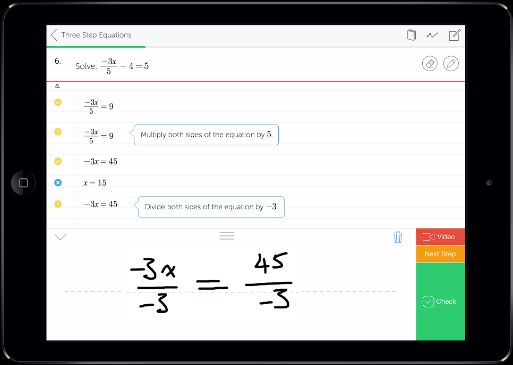
PEDAGOGY & RESEARCH
                                                          TM
                                    STEPSMART ADAPTIVITY
Mathspace’s unrivaled adaptive learning technology analyzes real-time data from thousands of questions at the step-
level to automatically select the most appropriate problems for students. Mathspace is the world's only program that
collects granular data at every step of every question. This data is fed into a complex engine to determine not only the
 correct path for a student within each problem, but the best next question, next subtopic, and next topic to lead to
 mastery. Mathspace most closely mirrors the best practice design for adaptive learning, as researched by Professor
                                    Kurt Van Lehn from the University of Pittsburgh.

                                INNER LOOP
  While working on each question, students get feedback at every step. No
other program provides the level of feedback that Mathspace does - at every
  step of every question, and according to each student’s problem-solving
 strategy. Data is collected as students progress through each question and
                       utilize hints, videos, and supports.

                                OUTER LOOP
Mathspace uses the collected data to create individualized learning paths for
every student, tailoring the subsequent questions according to demonstrated
understanding from previous questions. No other math program collects data
 at intermediate steps of math questions, so Mathspace knows more about a
   student's math ability, and chooses the best next question for students.

                                SILICON VALLEY STUDY RESULTS
                  Class One: Proficiency                                   Class Two: Proficiency
                                                                                            97%
                                     77%
                      52%                                                  48%

                     Pre-test      Post-test                              Pre-test       Post-test

         In a two month study using Mathspace, middle school student mastery
                significantly increased in standards-aligned assessments

                                           www.mathspace.co
Possible Lesson Plan Structures:

Instruction Type                        Possible Uses                                       Helpdesk Links
                    Use the fast-track task type to create pre-
                                                                               https://help.mathspace.co/tasks/fast-track-
Pre-Assess Students assessments to help determine prior knowledge of
                                                                                     tasks-what-is-it-how-can-i-use-it
                    students.
                    Create a short custom task of a prerequisite skill that    https://help.mathspace.co/tasks/creating-a-
    Warm Up
                    students can work on during class warm up time.                            custom-task
                    Use the eBook to present a lesson to students.
                    Model examples of process and problem solving                 https://help.mathspace.co/plans-and-
   Direct Teach
                    using resources within the eBook such as widgets,           pricing/introducing-the-mathspace-ebook
                    videos and example problems.
                    Create and assign a task for students to complete
   Small Group                                                           https://help.mathspace.co/tasks/custom-tasks-
                    during small group instruction. This could be custom
    Instruction                                                                            for-groups
                    or adaptive.
                    Use the self-analysis tool after a unit assessment to
                    create a group of students to provide support prior to
    Gaps and        reassessment.                                               https://help.mathspace.co/assessment-
 Misconceptions     Assign a custom task to individual students to              tools/understanding-the-mastery-page
                    address the gaps determined from the Mastery
                    page.
                    After the teacher has delivered the content of the
                    lesson, provide students an opportunity to practice
                    by assigning a task. Allow students to work in
     Practice       groups; a custom task will by default have different            https://help.mathspace.co/tasks
                    numbers for the problems. Adaptive tasks work well
                    for this, as they allow the student to practice a set of
                    skills until they've achieved mastery.
                    Assign a task to practice skills learned in class or
                    within a unit of study. Assign an "investigation" to        https://help.mathspace.co/tasks/how-to-
    Homework
                    encourage dialogue before class begins the                            assign-investigations
                    following day.
                    Create a short custom task that students can work
                                                                                https://help.mathspace.co/assessment-
                    on as an exit card. Uncheck the option for hints and
    Exit Ticket                                                                 tools/summative-assessment/score-on-
                    videos to get a quick assessment of what students
                                                                                              custom-tasks
                    retained from the lesson.
                    Use the fast-track and resulting "playlist" to direct
                    students toward appropriate practice learning
                    checks. Create a task to use as a review for
                    assessment - clone that task to rearrange question         https://help.mathspace.co/tasks/fast-track-
 Assess Students
                    types and numbers within the problems, turn off the                       adaptive-task
                    help and hints and assign as a post-assessment.
                    Use investigations that are project-based learning
                    activities to assess students in real-world problems.
                    Create and assign tasks to groups of students based
  Differentiation   on their individual needs; use information from
                                                                        https://help.mathspace.co/tasks/clone-a-task-
  (Remediation/     Mastery tab to determine those needs. Clone tasks
                                                                                   and-reassign-to-students
   Enrichment)      you have already assigned and reassigned to
                    provide more practice where necessary.
                    Create and assign tasks for students to complete for
 Comeback Class / these special courses. These could be for the
                                                                         https://help.mathspace.co/tasks/custom-tasks-
Math Intervention / purpose of filling in gaps, pre-assessing, or
                                                                                           for-groups
 Enrichment Block enrichment activities for students who are doing well
                    on the topic at hand.

                                 Contact: Brian Snyder           |    cell: 602-501-9198
You can also read


