Motor Vehicle Fleet Services - 1 July 2018 to 30 June 2021 - Department of Finance
←
→
Page content transcription
If your browser does not render page correctly, please read the page content below

Contract Number: CUA 06916
                                Last Updated: 14th September 2018
                                    Document number: 02934653

Motor Vehicle Fleet Services
1 July 2018 to 30 June 2021

• About the contract
• How do I use this contract?
• What’s on offer?
• Who are the contractors?
• Buying Rules?
• Need more information?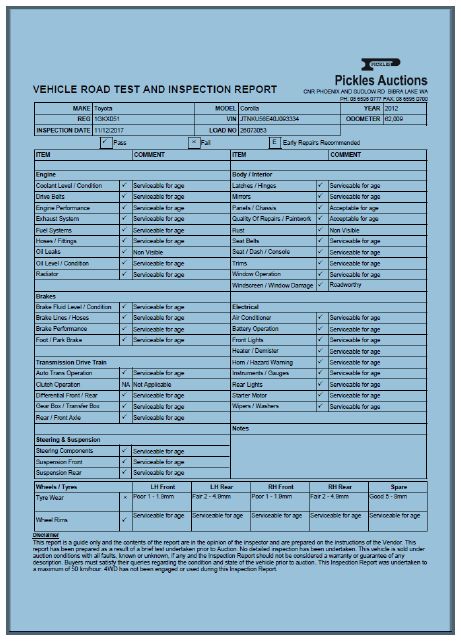
Buyers Guide – Motor Vehicle Fleet Services: CUA06916

About the Contract
 Contract Number       CUA06916

 Contract Term         From 1 July 2018 to 30 June 2021
                       Plus three (3) two-year extension options.

 Status                Categories 1 to 5 are mandatory State-wide for State Fleet
                       clients. The contractors appointed under category 7 are preferred
                       suppliers.

 Categories                 Category                        Service
                               1       Fleet Management Services
                               2       Motor Vehicle Inspection Services
                               3       Motor Vehicle Disposal Services
                               4       Telematics (In-Vehicle Monitoring Systems)
                               5       Vehicle Booking System
                               7       Aftermarket Vehicle Accessories

 Key Features           •    Comprehensive range of services on offer;
 and Benefits
                        •    Competitive pricing across all categories;
                        •    Access to discounted       prices   for   aftermarket   vehicle
                             accessories;
                        •    Pick and buy purchasing.

Contract Manager
A dedicated contract manager is available to help you to understand and get the most
out of this contract. If you have any queries about this contract or this publication, please
contact:
 Contract Manager                                   Government Procurement – State Fleet
 Max Cummock                                        Department of Finance
 Phone: (08) 6551 1449                              Optima Centre, 16 Parkland Road
 Email: max.cummock@finance.wa.gov.au               OSBORNE PARK WA 6017
                                                    Government Procurement
                                                    Postal Address:
                                                    Department of Finance
                                                    Locked Bag 11, Cloisters Square
                                                    PERTH WA 6850

Department of Finance                                                                Page 2
Buyers Guide – Motor Vehicle Fleet Services: CUA06916

How do I use this contract?
Step 1              What’s on offer?
                    Choose products/services that best meet your needs.

Step 2              Who are the contractors?
                    A list of the qualified contractors.

Step 3              Buy it!
                    Liaise directly with contractors or through your Fleet Management
                    Organisation (FMO).

Department of Finance                                                         Page 3
Buyers Guide – Motor Vehicle Fleet Services: CUA06916
What’s on offer?
Category 1 – Fleet Management Services
Mandatory for those vehicles leased through State Fleet, and available to other vehicles
and entities.
Services include:
• Vehicle replacement
• Fuel management
• Vehicle registration
• Data Management and Reporting
• Crash Management
• Roadside assist
• Management of infringements
• Routine fleet management and strategic advisory services
• FBT management
Category 2 – Motor Vehicle Inspection Services
This category includes the objective assessment of the condition of a vehicle for sale.
Services include:
• Inspection of vehicle for mechanical and body damage
• Determination of warranty, insurance or refurbishment repairs
• Provision of indicative costs for repairs
• Re-inspection and certification of vehicles upon completion of repairs
Mandatory for those vehicles leased through State Fleet. State Government entities
seeking vehicle inspection services must also utilise this category.
Category 3 – Motor Vehicle Disposal Services
This category includes the sale of passenger and light commercial vehicles (excludes
write-off vehicles) through various auction methods.
Services include:
• Sale of vehicles through auction methods including on-line bidding, public auction
and fixed price
• Comprehensive vehicle detailing
• Remittance of proceeds and furnishing of sale reports
• Managing post-sale warranty provisions
Department of Finance Page 4Buyers Guide – Motor Vehicle Fleet Services: CUA06916
• Strategic advice to Government
Mandatory for those vehicles leased through State Fleet. State Government entities
seeking these vehicle disposal services must also utilise this category.
Category 4 – Telematics (In - Vehicle Monitoring
Systems)
The focus of telematics is to deliver benefits to government in safety, optimisation,
utilisation, FBT compliance, data management and visibility of the fleet.
The functionality of a telematics system might include:
• Driver identification (with capability to identify multiple drivers per vehicle)
• Customisable settings such as trip journey status/purposes and driver alerts
• Vehicle route tracking and live location
• Vehicle and driver-level monitoring
• Vehicle/Fleet utilisation (start time/finish time, travel/stop duration, location details)
• Collect usage – business/private kilometres both detailed and summary level (to
meet ATO FBT compliance requirements.
State Government entities seeking a telematics solution must utilise this category.
Category 5 – Vehicle Booking System
Services and products under this category include a single online multi-customer booking
system for vehicles to enable internal and inter-agency car-pooling and the allocation of
expenses based on vehicle usage.
System functionalities and features include but are not limited to:
• Car search results in real time with filters to enable search by vehicle types and
specialised options;
• Ability to integrate with other stakeholder systems;
• Calculate fees for vehicle hire charges;
• Accommodate car pools in many locations across the State;
• Encourage ride sharing by prompting use of the same vehicle for similar routes.
State Government entities seeking a vehicle booking system must utilise this category.
Category 6 – Tyre Supply and Fitting Services
Services and products under this category include the supply and fitment of automotive
tyres and associated services for State Fleet vehicles, including but not limited to:
• Passenger vehicles – large, small, medium and large cars, and people movers; and
light commercial vehicles; and
• Light commercials – vans, pick-ups, cab chassis, SUVs and small buses.
Services include:
Department of Finance Page 5Buyers Guide – Motor Vehicle Fleet Services: CUA06916
• Supply and fitment of tyres to vehicles in available locations state wide;
• Tyre inspection (tread depth, condition and expiry dates);
• Mobile servicing capabilities in major urban and regional locations; and
• Advice on best tyre solutions for fleet.
Preferred suppliers
Category 7 – Aftermarket Vehicle Accessories
Motor Vehicle Accessories Contractors will supply and fit aftermarket products including
but not limited to:
• Alloy or steel Bullbars (including Smartbars, Nudgebars and Roobars);
• Towbars;
• Roof racks;
• Side steps;
• Winches and recovery equipment;
• Seat covers;
• Suspension/GVM upgrades;
• Cargo barriers;
• Spotlights, light bars and beacons; and
• Mudflaps.
The contractors appointed under category 7 are preferred suppliers.
Department of Finance Page 6Buyers Guide–Motor Vehicle Fleet Service: CUA06916
Who are the contractors?
The matrix below lists all contractors on the CUA and the goods/services they have
been contracted to provide. Please refer to the previous section ‘What’s on Offer?’ for
categories.
Category 1
Category 2
Category 3
Category 4
Category 5
Category 6
Category 7
Contractor
Fleetcare
Pickles Auctions
Ezy2c
Pinpoint
Communications
PoolCar
Goodyear and
Dunlop Tyres
Australia
Bridgestone
Australia
ARB
TJM Products
Department of Finance Page 7Buyers Guide–Motor Vehicle Fleet Service: CUA06916
Category 1 – Fleet Management Services
Dan Hawkins
T: 1300 655 170 Ext 818 M : 0419 991 645
E: dan.hawkins@fleetcare.com.au
ABN No: 34 009 243 627
Website: www.fleetcare.com.au
Postal Address:
57 Buckingham Drive, Wangara WA 6065
PO Box 1109, Wangara WA 6947
Key features or benefits
• Has an in depth knowledge of the unique Motor Vehicle Fleet Management requirements
of the WA Government which has been gained over many years of working within and
helping to develop the fleet policies and guidelines.
• Have been working seamlessly for many years with a number of WA Government and
Agency appointed suppliers and commit to continue to improving the ease of transacting
with different suppliers to deliver best practice fleet operations and to continue to find
savings on an ongoing basis; from development of fit-outs to purchasing, maintenance,
registration renewal all the way to vehicle disposal at lease end.
• Continue to drive costs down and make managing fleets easier.
Categories 2 and 3 – Vehicle Inspection and Disposal
Services
Veronica Lydon
T: (08) 6595 0751 M: 0434 180 962
ABN No: 32 003 417 650 E: veronica.lydon@pickles.com.au
Website: www.pickles.com.au
Postal Address:
Phoenix Rd and Sudlow Rd, Bibra Lake WA 6163
Key features or benefits
• Pickles have vast experience in vehicle inspections.
• Largest inspector of Government vehicles in Australia.
• Six full-time vehicle inspectors in Perth, Western Australia.
Department of Finance Page 8Buyers Guide–Motor Vehicle Fleet Service: CUA06916
• Pickles utilise a world class Vehicle Inspection App known as AutoCheck. This innovative
software, designed by NetResult and exclusive to Pickles, has been designed to be
compatible with all Apple and Android devices and is currently being used at all Pickles
facilities.
• Inspection report/checklist being used for WA Government vehicles by Pickles
inspectors.
• Disposal methods:
- Public Auction (hammer) including Pickles Live (on-line Simulcast).
- Fixed Price including Fixed Price 24/7 (PicklesGO) where vehicles can be
purchased online and transported to the buyer.
- Upstream selling – online purchasing system allowing vehicles to be sold prior to
or at lease end, reducing the need for the vehicle to be returned to the
auctioneer’s premises.
- CarZapp – a full featured B2B mobile first trading platform.
Category 4 – Telematics (In-vehicle Monitoring
Systems) Panel
Dan Hawkins
T: 1300 655 170 Ext 818 M : 0419 991 645
E: dan.hawkins@fleetcare.com.au
ABN No: 34 009 243 627 Website: www.fleetcare.com.au
Postal Address:
57 Buckingham Drive, Wangara WA 6065
PO Box 1109, Wangara WA 6947
Key features or benefits
• Access real-time data directly from the vehicles within the fleet including vehicle location,
speed, driver behaviour and vehicle health.
• Understanding the movement of the fleet as it operates on a day-to-day basis and what
cost saving methodologies can be applied to the fleet.
• Three primary hardware models on offer; Track Dynamics On Board Diagnostic, Track
Dynamics Hardwired and Track Dynamics Hybrid (Satellite).
• Provides vehicle/fleet utilisation (start time/finish time, travel/stop duration, location
details, distances driven and time on site) in real time via the live tracking portal.
• Records all usage to meet ATO compliant FBT reporting requirements. Users can pre-set
personal and business points of interest for frequently visited locations, or use rule sets to
define personal usage.
Department of Finance Page 9Buyers Guide–Motor Vehicle Fleet Service: CUA06916
• Driver identification details can be customised via the telematics portal or the fleet
manager portal. In the case of shared vehicles; there is the option of implementing a Driver
ID hardware solution inside the vehicle.
• Trip journey status and purpose of the trip are fully customisable either via the portal,
driver LCD hardware, the driver app, or logbook email.
• Masks private trip details, when the trip type has been determined as Private.
• Full real time access to vehicles telemetry data, including vehicle location, speed, altitude,
fuel tank level, rpm, battery voltage, VIN, odometer and DTC/engine light warning
systems. This data is transmitted in real time back to the data centre via the Telstra NextG
mobile network.
• Vehicle and driver-level monitoring and management. The driver behaviour dashboard
monitors and ranks drivers’ behaviour.
• Geo-fences can be defined via the online portal and be reported on for various purposes
including driver behaviour, safety compliance and fleet utilisation. Points of interest are
known locations that are entered into the system.
Craig Dommisse
M: 0478 200 108
E: craig.dommisse@ezy2c.com
ABN No: 44 110 455 591 Website: www.ezy2c.com
Postal Address:
72 Pound Street, Grafton NSW 2460
Key features or benefits
• Web-based dashboard customisable on a per user basis to include or restrict access by
vehicle, group of vehicles, type of report or feature.
• The solution includes, but is not limited to, a map-based dashboard using Google Map
technology to show vehicles ‘live’ on the map, routes taken, a full suite of reports and a
flexible geo-fencing module for creating unlimited polygon geo-fences.
• Z-1 OBD II Next G plug in device plugs into the OBD II port in any passenger or light
commercial vehicle and uses the Telstra Next G Network for communication. When out of
mobile coverage this unit will store its data and transmit when back in range.
• Z-4 Next G hardwired device is hardwired for any 12/24v vehicle, truck, plant or
equipment. It uses the Telstra Next G Network for communication and when out of mobile
coverage will store its data and transmit when back in range. It has ability to add additional
features/options including digital inputs, SOS duress and driver ID.
• EZ 273H Next G/Satellite Hybrid device is a hardwired unit for any 12/24v vehicle, truck,
plant or equipment. It uses the Telstra Next G Network for communication and when out
of mobile coverage will automatically switch to send data over the Iridium Satellite
Network. It has ability to add additional features and options including in cabin Driver
Console Unit (DCU) screen, digital inputs, SOS duress and driver ID.
Department of Finance Page 10Buyers Guide–Motor Vehicle Fleet Service: CUA06916
• Provides vehicle/fleet utilisation (start time/finish time, travel/stop duration, location
details, distances driven and time on site).
• Collect business/private kilometres both detailed and summary level to meet ATO FBT
compliance requirements.
• Multiple driver per vehicle identification using a driver ID fob system which may be added
to any of the Ezy2c hardwired devices.
• Customisable settings such as trip journey status/purposes are available and a fully
customisable alerts dashboard is also available for driver alerts.
• Mask private trip details.
• Vehicle route tracking and live location.
• Vehicle and driver-level monitoring and management.
• Geo-fencing and/or Point of Interest functionalities.
Richard Smith
T: 0437 959 843 F: (02) 9804 1754
ABN No: 30 091 898 547 E: Richards@pinpointcomms.com.au
Website: www.pinpointcomms.com.au/
Postal Address:
PO Box 76, Ermington NSW 2115
Key features or benefits
• Manufacturers of both hardware and software to provide a range of vehicle telematics
solutions to ensure compliance with safety, OHS and FBT requirements that covers all
aspects of telematics technologies within the vehicle including satellite navigation, GPS
and mobile data. Devices use GSM and Iridium communications.
• Provides vehicle/fleet utilisation (start time/finish time, travel/stop duration, location
details) through the vehicle service summary report.
• All relevant data to support the FBT requirements are available through the FBT log book
report.
• Driver identification can be achieved via these options:
- The driver is assigned to the vehicle on a permanent basis through the AVM
management interface
- The vehicle is equipped with either a card reader or a key FOB.
- The vehicle is equipped with an in vehicle intelligent terminal.
• A number of functions relating to journey management, fatigue alert, vehicle alerts.
• Business/private switch located on the vehicle that enables the driver to mask visibility of
a private trip.
• All vehicle locations are available on the main screen of the AVM management interface.
Department of Finance Page 11Buyers Guide–Motor Vehicle Fleet Service: CUA06916
• Features include:
- Logging-time
- Speed
- Direction
- GPS latitude and longitude
- Connection to external devices such as in-vehicle displays
- Real time tracking
- Emergency alarms enablers through on dash button
- Vehicle and I/O alerts
- Independent programming of inputs and outputs to monitor vehicle sensors.
• Individual or group alerts set per vehicle and reporting on driver behaviour generated
through the exceptions reports.
• Geo-fences and points of interest can be created or imported.
• The TRK130, TRK130TT, TRK604, TR604P, TRK604T, and TRK2004 are in-vehicle GPS
telematics units and THE TRK-STRK application for tablet/mobile devices with GPS and
GSM functionality.
• SPOT devices use the Global star satellite network.
• Crash and rollover detection with 2-minute crash buffer.
• Odometer readings and engine hours.
Category 5 – Vehicle Booking System
Saki Polychronopoulos
T: (03) 5906 5251 M: 0403 613 749
E: sales@poolcar.com
ABN No: 86 063 650 751 Website: www.poolcar.com/
Postal Address:
5/35 Progress Street, Mornington VIC 3931
Key features or benefits
• Australian owned company which designs and develops car sharing technology solutions,
from an advanced online pool vehicle booking capability to electronic key cabinets and a
vehicle keyless entry capability.
• Users can search for specific vehicles in real-time. Vehicles can be filtered by fields such
as a time, body type, fuel type, transmission type.
• Record each vehicle’s base location and the pool in which the vehicle resides.
Department of Finance Page 12Buyers Guide–Motor Vehicle Fleet Service: CUA06916
• Integrate with GPS telematics.
• Efficiently book and manage pool vehicles and other fleet assets.
• Bookings can be made from various devices.
• Book vehicles out for maintenance or other reasons.
• Check Out/In records when the keys have been collected to commence the journey/event
and when keys are returned.
• The Check Out functionality allows users to start using the booked vehicle and alerts the
system that the vehicle is now in use.
• The Booking Calendar is able to be colour coded.
• Configure to automatically cancel bookings that are not Checked Out within a certain time
frame freeing up the vehicle for other staff to use.
• Bookings which are running late and not yet checked in can generate alerts to prevent
disruption to the next booking.
• The Check In can be used to capture data from the driver, such as where the car is parked,
the fuel level left by the previous driver, FBT private use, or damage/incidents which may
render the vehicle unsafe for normal use and require repair.
• Rank vehicles automatically and list from lowest utilisation to highest thus encouraging
users to book the first vehicle listed.
• Enter a range of pre-determined fees that allows vehicles to be charged to driver cost
centres and/or agencies. These fees range from fixed daily fees to hourly rates and excess
kilometre charges.
• Book any asset type such as plant and equipment, trailers, SmartRider cards, Satellite
Navigation devices, generators etc.
• Administrators are able to define the asset type and record all relevant information for that
asset.
• The Journey Planner enables users to enter their route/destination and be advised by the
system what the most efficient method of completing their journey.
• PoolCar has designed and developed its own electronic Key Cabinets which are made
locally and assembled in the PoolCar factory.
Department of Finance Page 13Buyers Guide–Motor Vehicle Fleet Service: CUA06916
Category 6 – Tyre Supply and Fitting Services
David Pfeiffer (Commercial vehicles)
M: 0417 924 371
ABN No: 86 004 098 346 E: david_pfeiffer@goodyear.com
David Hunter (Passenger vehicles)
M: 0438 253 311
E: david_hunter@goodyear.com
Website: www.goodyear.com.au
Postal Address:
116 Kewdale Road, Kewdale WA 6105
Key features or benefits
• Premium and high performance budget tyres;
• WA’s largest dealership network;
• Advice on best tyre solutions.
Aidan O’Sullivan
ABN No: 65 007 516 841 T: (03) 5906 5251 M: 0403 613 749
E: aosullivan@bridgestone.com.au
Website: www.bridgestonetyres.com.au
Postal Address: 196 Greenhill Road, Eastwood, SA 5063
Key features or benefits
• Comprehensive tyre range;
• Large warehouse located in Kewdale;
• State wide support network through company owned and franchised stores;
Department of Finance Page 14Buyers Guide–Motor Vehicle Fleet Service: CUA06916
Category 7– Aftermarket Vehicle Accessories Panel
Matthew Edgar
T: (08) 6254 2367 F: (08) 6254 2213
E: medgar@arb.com.au
Website: www.arb.com.au
Postal Address:
ABN No: 31 006 706 756 36 Gauge Circuit, Canning Vale WA 6530
Key features or benefits
• Extensive product range.
• Backup after sales service available.
• Single contact point in Canning Vale to co-ordinate all work state-wide.
Keith Pennicuik
M: 0490 431 995
F: (08) 64542230
E: Keith.pennicuik@tjmkewdale.com.au
Website: www.tjm.com.au
ABN No: 56 009 887 325 Postal Address:
521 Abernethy Rd, Kewdale WA jo6105
Key features or benefits
• State wide product support network.
• Warranty support/Customer product support.
• Fitting services all available through its distribution network.
• Product built and tested to comply to the highest Australian standards/ADR compliant.
Department of Finance Page 15Buyers Guide–Motor Vehicle Fleet Service: CUA06916
Buying rules
Buying Direct
Western Australian Public Authorities who lease their vehicles from State Fleet are required to
engage the services of the Fleet Management Organisation in category 1.
The Fleet Manager will act on behalf of Customers for State Fleet vehicles and will be
responsible for liaising with the contractors under Categories 2, 3, and 7.
Buyers may engage contractors under Categories 4 and 5 directly. The Contract Manager is
available to assist.
Pricing
The cost will vary depending on the combination of categories and/or services. Contact the
Contract Manager for further information.
Other policy requirements
Buyers should be aware of the following requirements under State Supply Commission
policies and Treasurer’s Instruction 820, and whether or not they are applicable to purchases
from this CUA.
Requirement Applicable to purchases made under this CUA?
Buyers must publish details of their No, not required for purchases made under this
purchase, or any variation to any CUA.
purchase under this CUA, on
TendersWA.
Buyers must record the purchase on No, not required for purchases made under this
the agency’s contract register, as CUA.
instructed within the buying agency’s
financial management manual.
Buyers must submit a procurement No, not required for purchases made under this
plan, an evaluation report, a contract CUA.
management plan or any variation to
the State Tender Review Committee.
Buyers must involve the Department No, buyers do not need to involve the Department
of Finance. of Finance when purchasing from this CUA.
Buyers must obtain approval from an Yes, at all values.
authorised officer of the Department
Please note that public authorities are not required
of Finance to purchase through an
to request advice or approval from the Department
alternative arrangement to this
of Finance, regardless of value, when seeking an
mandatory CUA.
exemption from the minimum requirements of the
Open and Effective Competition Policy and the use
Department of Finance Page 16Buyers Guide–Motor Vehicle Fleet Service: CUA06916
of mandatory Common Use Arrangements for a
purchase from an ADE or an Aboriginal Business.
Exemption from using this CUA
Government Procurement is responsible for processing and approving all requests from public
authorities seeking exemption from using a mandatory CUA. Requests for an exemption are
considered on a case-by-case basis, and a requesting agency must be able to demonstrate
that a business need cannot be adequately met by the relevant CUA.
Exemption requests should be directed to the Contract Manager in the first instance.
Requests for exemption may be received by email and provide sufficient explanation and
background to enable the request to be considered. The requesting officer should be the
Accountable Authority or delegate of the agency.
For guidelines on what to include in an exemption request, please refer to the Procurement
Practice Guide appendix on Exemptions.
Complimentary Feedback and Complaints Resolution
Government Procurement aims to continuously improve the services it provides to customers
and welcomes feedback on the level of satisfaction experienced under this contract or with the
contractor(s) performance. If you are dissatisfied with the goods and/or service provided by
the contractor or have any specific concerns, these should be discussed in the first instance
directly with the contractor.
If the problem or issue is not resolved to your satisfaction, please log your complaints via
Finance’s online complaints handling facility.
The online form provides for both complimentary feedback and complaint resolution
considerations.
Department of Finance Page 17Buyers Guide–Motor Vehicle Fleet Service: CUA06916 Need more information? Appendices Appendix 1: Accessing CUA information online Appendix 2: Price Schedule for Categories 1 to 3 Appendix 3: Price Schedule for Category 4 – Telematics (In - Vehicle Monitoring Systems) Appendix 4: Price Schedule for Categories 5 to 7 Forms and tools Contractors Details Pickles Road Test and Inspection Report Links to CUA information Government Contracts Directory Still need more information? Contact the Contract Manager Department of Finance Page 18
Buyers Guide–Motor Vehicle Fleet Service: CUA06916

Appendix 2: Price Schedule for
Categories 1 to 3
Category 1: Motor Vehicle Fleet Management Services
                             Contract Price
  Contractor
                             (per Vehicle per Month)

  Fleetcare                  $12.10
Note: Pricing applies to State Fleet leased vehicles. Alternative pricing may be negotiated for
non-standard vehicles and/or levels of service. The figure stated above is inclusive of GST.
Payment Terms
Customers (WA Government agencies and entities) will pay accounts within 30 days of receipt
of a tax invoice from the Contractor (Fleet Manager). Any dispute arising from late payment of
accounts must be brought to the attention of the Contract Manager.

Categories 2 and 3: Motor Vehicle Disposal and
Inspection Services
                                                                    Fee for Subsequent
    Contractor        Disposal Fee       First Inspection Fee
                                                                    Inspections

    Pickles
                      $189.20            $49.50                     n/a
    Auctions

All figures stated above are inclusive of GST.
Payment Terms
Customers (WA Government agencies and entities) will pay accounts within 30 days of receipt
of a tax invoice from the Contractor (Fleet Manager). Any dispute arising from late payment of
accounts must be brought to the attention of the Contract Manager.

Department of Finance                                                                   Page 19
Buyers Guide–Motor Vehicle Fleet Service: CUA06916
Appendix 3: Price Schedule for
Category 4 – Telematics (In -
Vehicle Monitoring Systems)
Fleetcare Pricing
Cellular Cellular Satellite
Telematics System Pricing Enabled Enabled Enabled
(Installed) Plugin Hardwired Hardwired
Solution Solution Solution
Hardware rental per month (based on
a 60 month term) per vehicle – no $5.69 $5.48 $18.55
upfront hardware costs
Hardware up-front purchase –
$270 $260 $880
alternative to leasing option
System (dashboard) subscription per
$8.20 $8.20 $8.20
month per vehicle
Data charges per month per vehicle $0 $0 $0
Installation (metro) – Retro fit only $70 $110 $110
Installation (regional) – Retro fit only $80 $120 $120
De-installation (metro) – Retro fit only $50 $60 $60
De-installation (regional) – Retro fit
$60 $70 $70
only
Hardware support (metro) per hour $80 $80 $80
Hardware support (regional) per hour $90 $90 $90
Driver identification system N/A $40 $120
In vehicle LCD N/A $275 $275
In vehicle keypad for driver IP/trip ID N/A $55 $55
NB: Installation costs only required for retro fit units to existing vehicles. All new vehicles will
have units fitted by dealers as part of vehicle pre-delivery costs.
Department of Finance Page 20Buyers Guide–Motor Vehicle Fleet Service: CUA06916
EZY2C Pricing
Cellular Cellular Satellite
Telematics System Pricing Enabled Enabled Enabled
(Installed) Plugin Hardwired Hardwired
Solution Solution Solution
$2.99 (not $2.99 (not $19.96 (not
Hardware rental per month (based on
including including including
a 60 month term) per vehicle
installation) installation) installation)
Hardware up-front purchase $149 $149 $1098.90
System (dashboard) subscription per
$9.90 $9.90 $9.90
month per vehicle
$32.94
Data charges per month per vehicle $4.40 $4.40 (includes
satellite plan)
Installation (metro) – Retro fit only Self-install $165 $275
Installation (regional) – Retro fit only Self-install $165 $275
De-installation (metro) – Retro fit only Self-install $110 $110
De-installation (regional) – Retro fit
Self-install $110 $110
only
Hardware support (metro) per hour $110 $110 $110
Hardware support (regional) per hour $132 $132 $132
Optional extras Basis Cost
Driver ID kit including 2 driver ID fobs
Per kit $60
– compatible with all hardwired units
Dash mounted SOS button –
Per button $40
compatible with all hardwired units
Pendant SOS kit 50 metre range –
Per kit $153
compatible with all hardwired units
Per camera
Dash cam – VT1000-64 (not including $548.90
installation)
Per screen (not
M8 DCU screen including navigation
including $1208.90
– compatible with EZ273 hardware
installation)
Department of Finance Page 21Buyers Guide–Motor Vehicle Fleet Service: CUA06916
Pinpoint Pricing
TRK130 low cost plug in or hardwired
Cellular Cellular
Telematics System Pricing Enabled Enabled
(Installed) Plugin Hardwired
Solution Solution
Hardware rental per month (based on
$5.20 $4.90
a 60 month term) per vehicle
Hardware up-front purchase $240 $210
System (dashboard) subscription
unlimited web AVM users with full
$15 $15
access to all AVM features per month
per vehicle
System subscription alternative
• Scheduled reports only for end
customer $11.50 $11.50
• Integration third party
• Full access WA Fleet
Data charges per month per vehicle $3 $3
Installation (metro) – Retro fit only $110 $132
Installation (regional) – Retro fit only $220 $275
De-installation (metro) – Retro fit only $55 $110
De-installation (regional) – Retro fit
$100 $132
only
Hardware support (metro) per month $2.20 $2
Hardware support (regional) per
$3 $3
month
Regional travel per km $1.21 $1.21
Regional travel per hour $132 $132
Department of Finance Page 22Buyers Guide–Motor Vehicle Fleet Service: CUA06916
TRK130TT trailer tracker hard wired
Cellular
Telematics System Pricing Enabled
(Installed) Hardwired
Solution
Hardware rental per month (based on
$5.20
a 60 month term) per vehicle
Hardware up-front purchase $269.50
System (dashboard) subscription
unlimited web AVM users with full
$15
access to all AVM features per month
per vehicle
System subscription alternative
• Scheduled reports only for end
customer $11.50
• Integration third party
• Full access WA Fleet
Data charges per month per vehicle $3
Installation (metro) – Retro fit only $132
Installation (regional) – Retro fit only $275
De-installation (metro) – Retro fit only $110
De-installation (regional) – Retro fit
$132
only
Hardware support (metro) per month $2
Hardware support (regional) per
$3
month
Regional travel per km $1.21
Regional travel per hour $132
Department of Finance Page 23Buyers Guide–Motor Vehicle Fleet Service: CUA06916
TRKOBD low cost plug in OBD
Cellular
Telematics System Pricing Enabled
(Installed) Plugin
Solution
Hardware rental per month (based on
$5.30
a 60 month term) per vehicle
Hardware up-front purchase $275
System (dashboard) subscription
unlimited web AVM users with full
$15
access to all AVM features per month
per vehicle
System subscription alternative
• Scheduled reports only for end
customer $11.50
• Integration third party
• Full access WA Fleet
Data charges per month per vehicle $3
Installation (metro) – Retro fit only $110
Installation (regional) – Retro fit only $220
De-installation (metro) – Retro fit only $55
De-installation (regional) – Retro fit
$100
only
Hardware support (metro) per month $2.20
Hardware support (regional) per
$3.20
month
Regional travel per km $1.21
Regional travel per hour $132
Department of Finance Page 24Buyers Guide–Motor Vehicle Fleet Service: CUA06916
TRK538 low cost mini GPS telematics
Cellular Cellular
Telematics System Pricing Enabled Enabled
(Installed) Plugin Hardwired
Solution Solution
Hardware rental per month (based on
$5.20 $5.20
a 60 month term) per vehicle
Hardware up-front purchase $269.50 $269.50
System (dashboard) subscription
unlimited web AVM users with full
$15 $15
access to all AVM features per month
per vehicle
System subscription alternative
• Scheduled reports only for end
customer $11.50 $11.50
• Integration third party
• Full access WA Fleet
Data charges per month per vehicle $3 $3
Installation (metro) – Retro fit only $132 $132
Installation (regional) – Retro fit only $275 $275
De-installation (metro) – Retro fit only $110 $110
De-installation (regional) – Retro fit
$132 $132
only
Hardware support (metro) per month $2 $2
Hardware support (regional) per
$3 $3
month
Regional travel per km $1.21 $1.21
Regional travel per hour $132 $132
Department of Finance Page 25Buyers Guide–Motor Vehicle Fleet Service: CUA06916
TRK604 mid-tier 3G GPS telematics
Cellular
Telematics System Pricing Enabled
(Installed) Hardwired
Solution
Hardware rental per month (based on
$8.50
a 60 month term) per vehicle
Hardware up-front purchase $434.50
System (dashboard) subscription
unlimited web AVM users with full
$15
access to all AVM features per month
per vehicle
System subscription alternative
• Scheduled reports only for end
customer $11.50
• Integration third party
• Full access WA Fleet
Data charges per month per vehicle $3
Installation (metro) – Retro fit only $132
Installation (regional) – Retro fit only $275
De-installation (metro) – Retro fit only $110
De-installation (regional) – Retro fit
$132
only
Hardware support (metro) per month $3.30
Hardware support (regional) per
$5
month
Regional travel per km $1.21
Regional travel per hour $132
Department of Finance Page 26Buyers Guide–Motor Vehicle Fleet Service: CUA06916
TRK2004G high-tier 4G GPS telematics
Cellular Satellite
Telematics System Pricing Enabled Enabled
(Installed) Hardwired Hardwired
Solution Solution
Hardware rental per month (based on
a 60 month term) per vehicle
TKR2004G $13.64 $24.39
TRK2004G – Wifi Bluetooth $17.58 $28.72
Hardware up-front purchase option
TKR2004G $711.70 $1272.70
TRK2004G – Wifi Bluetooth $917.40 $1498.20
System (dashboard) subscription
unlimited web AVM users with full
$15
access to all AVM features per month
per vehicle
System subscription alternative
• Scheduled reports only for end
customer $11.50
• Integration third party
• Full access WA Fleet
Data charges per month per vehicle $3 $15
Installation (metro) – Retro fit only $198 $220
Installation (regional) – Retro fit only $319 $319
De-installation (metro) – Retro fit only $110 $110
De-installation (regional) – Retro fit
$132 $132
only
Hardware support (metro) per month
TKR2004G $5.39 $9.64
TRK2004G – Wifi Bluetooth $6.95 $11.35
Hardware support (regional) per
month
TKR2004G $8.09 $14.46
TRK2004G – Wifi Bluetooth $10.43 $17.03
Department of Finance Page 27Buyers Guide–Motor Vehicle Fleet Service: CUA06916
Regional travel per km $1.21
Regional travel per hour $132
Alternative Telematics Basis
Pinpoint offer 36 months and 48
months hardware rental option
Pinpoint offer a number of
Cost structure ancillary items subject to
customers’ requirements that can
be offered in a separate price
book
Department of Finance Page 28Buyers Guide–Motor Vehicle Fleet Service: CUA06916 Appendix 4: Price Schedule for Categories 5 to 7 Approved CUA users can log into an eDecision Aid (eDA) to access pricing information about these products on contract. State Fleet Vehicle Selection eDA Vehicle Acquisition eDA for Local Government and other approved buyers If you do not have access, register by going to the appropriate link below and complete the form. NB: If your agency is not included in the Organisation list use “Other Agency”. For buyers which lease vehicles through State Fleet For other buyers Department of Finance Page 29
Buyers Guide–Motor Vehicle Fleet Service: CUA06916

Pickles Road Test and Inspection
Report

Department of Finance                                            Page 30
You can also read


