Network Tuning in AIX - Jaqui Lynch Network Tuning in AIX Presentation replay and link will be
←
→
Page content transcription
If your browser does not render page correctly, please read the page content below

Network Tuning in AIX
        Jaqui Lynch
        Network Tuning in AIX
        lynchj@forsythe.com

        Presentation replay and link will be at:
        http://www.circle4.com/movies/

                                                   1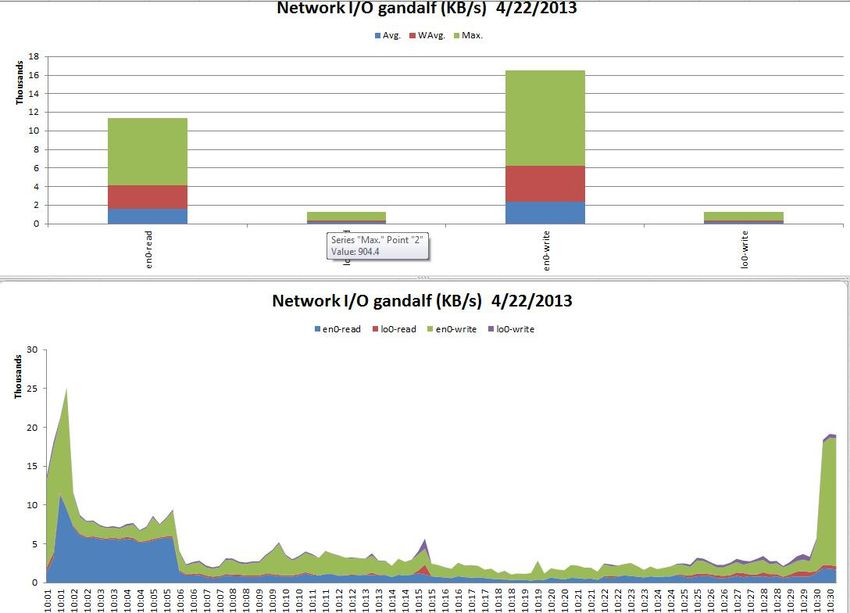
NETWORK TUNING in AIX
    See article at:
    http://www.ibmsystemsmag.com/aix/administrator/networks/network_tuning/

2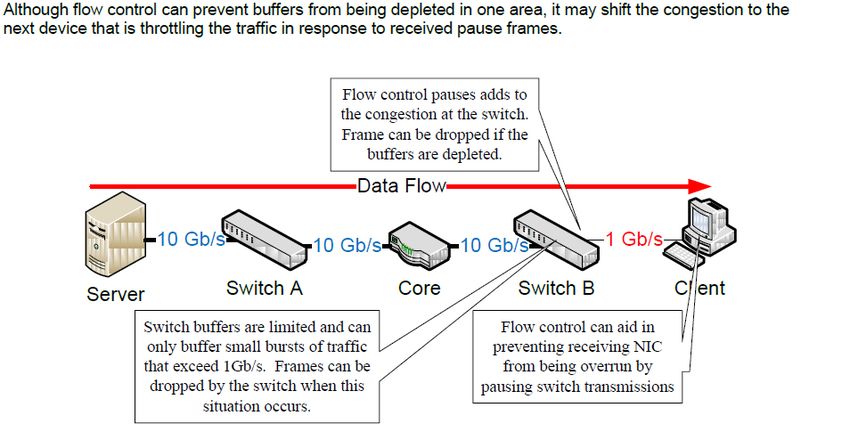
Tunables
• The tcp_recvspace tunable
  • The tcp_recvspace tunable specifies how many bytes of data the receiving
    system can buffer in the kernel on the receiving sockets queue.
• The tcp_sendspace tunable
  • The tcp_sendspace tunable specifies how much data the sending application
    can buffer in the kernel before the application is blocked on a send call.
• The rfc1323 tunable
  • The rfc1323 tunable enables the TCP window scaling option.
  • By default TCP has a 16 bit limit to use for window size which limits it to
    65536 bytes. Setting this to 1 allows for much larger sizes (max is 4GB)
• The sb_max tunable
  • The sb_max tunable sets an upper limit on the number of socket buffers
    queued to an individual socket, which controls how much buffer space is
    consumed by buffers that are queued to a sender's socket or to a receiver's
    socket.
  3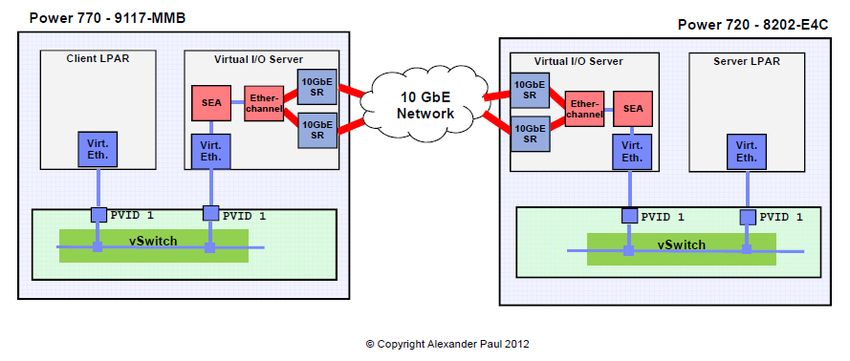
UDP Send and Receive
    udp_sendspace
    Set this parameter to 65536, which is large enough to handle the largest possible
    UDP packet. There is no advantage to setting this value larger

    udp_recvspace
    Controls the amount of space for incoming data that is queued on
    each UDP socket. Once the udp_recvspace limit is reached for a socket, incoming
    packets are discarded.

    Set this value high as multiple UDP datagrams could arrive and have to wait on a socket
    for the application to read them. If too low packets are discarded and sender has to
    retransmit.

    Suggested starting value for udp_recvspace is 10 times the value of udp_sendspace,
    because UDP may not be able to pass a packet to the application before another one
    arrives.

4
Starter set of tunables 3
Typically we set the following for both versions:
NETWORK
no -p -o rfc1323=1
no -p -o tcp_sendspace=262144
no -p -o tcp_recvspace=262144
no -p -o udp_sendspace=65536
no -p -o udp_recvspace=655360
Also check the actual NIC interfaces and make sure they are set to at least these values
You can’t set udp_sendspace > 65536 as IP has an upper limit of 65536 bytes per packet
Check sb_max is at least 1040000 – increase as needed
5ifconfig
ifconfig -a output
en0:
flags=1e080863,480
inet 10.2.0.37 netmask 0xfffffe00 broadcast 10.2.1.255
tcp_sendspace 65536 tcp_recvspace 65536 rfc1323 0
lo0: flags=e08084b
inet 127.0.0.1 netmask 0xff000000 broadcast 127.255.255.255
inet6 ::1/0
tcp_sendspace 131072 tcp_recvspace 131072 rfc1323 1
These override no, so they will need to be set at the adapter.
Additionally you will want to ensure you set the adapter to the correct setting if it runs at less than GB, rather than allowing
auto-negotiate
Stop inetd and use chdev to reset adapter (i.e. en0)
Or use chdev with the –P and the changes will come in at the next reboot
chdev -l en0 -a tcp_recvspace=262144 –a tcp_sendspace=262144 –a rfc1323=1 –P
On a VIO server I normally bump the transmit queues on the real (underlying adapters) for the aggregate/SEA
Example for a 1Gbe adapter:
chdev -l ent? -a txdesc_que_sz=1024 -a tx_que_sz=16384 -P
6My VIO Server SEA
# ifconfig -a
en6:
flags=1e080863,580
inet 192.168.2.5 netmask 0xffffff00 broadcast 192.168.2.255
tcp_sendspace 262144 tcp_recvspace 262144 rfc1323 1
lo0:
flags=e08084b,1c0
inet 127.0.0.1 netmask 0xff000000 broadcast 127.255.255.255
inet6 ::1%1/0
tcp_sendspace 131072 tcp_recvspace 131072 rfc1323 1
7Network Interface Speed MTU tcp_sendspace tcp_recvspace rfc1323 lo0 N/A 16896 131072 131072 1 Ethernet 10/100 mb Ethernet 1000 (Gb) 1500 131072 165536 1 Ethernet 1000 (Gb) 9000 262144 131072 1 Ethernet 1000 (Gb) 1500 262144 262144 1 Ethernet 1000 (Gb) 9000 262144 262144 1 Virtual Ethernet N/A any 262144 262144 1 InfiniBand N/A 2044 131072 131072 1 Above taken from Page 247 SC23-4905-04 November 2007 edition Check up to date information at: http://publib.boulder.ibm.com/infocenter/pseries/v5r3/topic/com.ibm.aix.prftungd/doc/prftungd/prftungd.pdf AIX v6.1 http://publib.boulder.ibm.com/infocenter/aix/v6r1/topic/com.ibm.aix.prftungd/doc/prftungd/prftungd_pdf.pdf 8
ipqmaxlen
Default is 100
Only tunable parameter for IP
Controls the length of the IP input queue
netstat –p ip
Look for ipintrq overflows

Default of 100 allows up to 100 packets to be queued up

If increase it there could be an increase in CPU used in the off-level interrupt handler
Tradeoff is reduced packet dropping versus CPU availability for other processing

  9
10Gbe Ethernet Adapters

10
Valid Adapters for P7 and P7+
• 770
    • Multifunction Cards – up to one per CEC
          • 1768 Integrated Multifunction Card with Copper SFP+ - Dual 10Gb copper and dual 10/100/1000MB copper ethernet
          • 1769 Integrated Multifunction Card with SR Optical - Dual 10Gb optical and dual 10/100/1000MB copper ethernet
• PCIE Adapters
    •   5284/5287 PCIE2 – 2 port 10GbE SR (5284 is low profile)
    •   5286/5288 PCIE2 – 2 port 10GbE SFP+ Copper (5286 is low profile)
    •   5769 PCIE1.1 – 1 port 10GbE SR
    •   5772 PCIE1.1 – 1 port 10GbE LR
    •   EC27/EC28 PCIE2 – 2 port 10GbE RoCE SFP+ (EC27 is low profile)
    •   EC29/EC30 PCIE2 – 2 port 10Gbe RoCE SR (EC29 is low profile)
    •   5708 PCIE – 2 port 10Gb FCoE converged network adapter
• Basically SR is fibre and SFP+ is copper twinax
• If using SFP+ IBM only supports their own cables – they come in 1m, 3m and 5m and are 10GbE SFP+
  active twinax cables
• Use the PCIE2 cards wherever possible
• RoCE – Supports the InfiniBand trade association (IBTA) standard for remote direct memory access
  (RDMA) over converged Ethernet (RoCE)
• More information on adapters at:
http://pic.dhe.ibm.com/infocenter/powersys/v3r1m5/topic/p7hcd/pcibyfeature_77x_78x.htm                                      11
Network Performance and Throughput
• Depends on:
• Available CPU power
• MTU size
• Distance between receiver and sender
• Offloading features
• Coalescing and aggregation features
• TCP configuration
• Firmware on adapters and server
• Ensuring all known efixes are on for 10GbE issues
12Notes on 10GbE
• Using jumbo frames better allows you to use the full bandwidth – coordinate with
network team first
• Jumbo frames means an MTU size of 9000
• Reduces CPU time needed to forward packets larger than 1500 bytes
• Has no impact on packets smaller than 1500 bytes
• Must be implemented end to end including virtual Ethernet, SEAs, etherchannels, physical adapters, switches,
core switches and routers and even firewalls or you will find they fragment your packets
• Throughput can improve by as much as 3X on a virtual ethernet
• Manage expectations
• Going from 1GbE to 10GbE does not mean 10x performance
• You will need new cables
• You will use more CPU and memory
• Network traffic gets buffered
• This applies to the SEA in the VIOS
• Check that the switch can handle all the ports running at 10Gb
• Make sure the server actually has enough gas to deliver the data to the network at
10Gb
1310GbE Tips
• Use flow control everywhere – this stops the need for retransmissions
• Need to turn it on at the network switch,
• Turn it on for the adapter in the server
• chdev –l ent? –a flow_cntrl=yes
• If you need significant bandwidth then dedicate the adapter to the LPAR
• There are ways to still make LPM work using scripts to temporarily remove the adapter
• TCP Offload settings – largesend and large_receive
• These improve throughput through the TCP stack
• Set largesend on (TCP segmentation offload) – should be enabled by default on a 10GbE SR adapter
• AIX - chdev –l en? –a largesend=on
• On vio – chdev –dev ent? –attr largesend=1
• With AIX v7 tl1 or v6 tl7 – chdev –l en? –l mtu_bypass=on
• Try setting large_receive on as well (TCP segment aggregation)
• AIX - chdev –l en? –a large_receive=on
• VIO – chdev –dev ent? –attr large_receive=1
• If you set large_receive on the SEA the AIX LPARs will inherit the setting
• Consider increasing the MTU size (talk to the network team first) – this increases the size of the actual
packets
• chdev –l en? mtu=65535 (9000 is what we refer to as jumbo frames)
• This reduces traffic and CPU overhead
• If you use ifconfig to make the changes it does not update ODM so the change does not survive a
14
reboot10GbE Tips
• Low CPU entitlement or too few VPs will impact network performance
• It takes CPU to build those packets
• Consider using netperf to test
• Network speed between two LPARs on the same box is limited to the virtual Ethernet Speed which is
about 0.5 to 1.5 Gb/s
• The speed between two LPARs where on is on the SEA and the other is external is the lower of the
virtual Ethernet speed above or the speed of the physical network
• But all VMs on a server can be sending and receiving at the virtual ethernet speed concurrently
• If 10Gb network check out Gareth’s Webinar
• https://www.ibm.com/developerworks/wikis/download/attachments/153124943/7_PowerVM_10Gbit_Ethernet.pdf?versio
n=1
15Speed Bottlenecks
From Nathan Flowers – Performance Issues with 10Gb Ethernet v1.0.0.
http://www-03.ibm.com/support/techdocs/atsmastr.nsf/WebIndex/WP101954
16Demystifying 10GbE Performance
• Excellent presentation by Alexander Paul from IBM
• Benchmarked measuring performance throughout the stack for 10GbE
17Demystifying 10GbE Performance
• Points out that FTP is single threaded so not good for testing throughput
• Used iperf to test bandwidth
• Useful for TCP and UDP benchmarks
• Multithreaded
• Can be run in client or server mode
• On server run iperf –s
• On client run something like iperf –c servername –t 60 –P 8
• Has a GUI java frontend called jperf which allows you to change many settings
• Can also use netperf to test
• Has TCP_STREAM and TCP_RR benchmarks built in
18Looking at Performance 19
Network Commands
     • entstat –d or netstat –v (also –m and –I)
     • netpmon
     • iptrace (traces) and ipreport (formats trace)
     • tcpdump
     • traceroute
     • chdev, lsattr
     • no
     • ifconfig
     • ping and netperf or iperf
     • ftp
          • Can use ftp to measure network throughput BUT is single threaded
          • ftp to target
          • ftp> put “| dd if=/dev/zero bs=32k count=100” /dev/null
          • Compare to bandwidth (For 1Gbit - 948 Mb/s if simplex and 1470 if duplex )
          • 1Gbit = 0.125 GB = 1000 Mb = 100 MB) but that is 100%

20
Net tab in nmon analyser 21
Other Network
     • netstat –v
        • Look for overflows and memory allocation failures
           Max Packets on S/W Transmit Queue: 884
           S/W Transmit Queue Overflow: 9522
        • “Software Xmit Q overflows” or “packets dropped due to memory allocation
          failure”
           • Increase adapter xmit queue
           • Use lsattr –EL ent? To see setting
        • Look for receive errors or transmit errors
        • dma underruns or overruns
        • mbuf errors

22
Other Network
• tcp_nodelayack
• Disabled by default
• 200millisec delay by default as it waits to piggy back TCP acks onto response packets
• Tradeoff is more traffic versus faster response
• The tcp_nodelayack option prompts TCP to send an immediate acknowledgement,
rather than the usual 200 ms delay. Sending an immediate acknowledgement might
add a little more overhead, but in some cases, greatly improves performance.
• lparstat 2
• High vcsw (virtual context switch) rates can indicate that your LPAR or VIO server does
not have enough entitlement
• ipqmaxlen
• netstat –s and look for ipintrq overflows
• ipqmaxlen is the only tunable parameter for the IP layer
• It controls the length of the IP input queue – default is 100
• Tradeoff is reduced packet dropping versus CPU availability for other processing
• Also check errpt – people often forget this
23TCP Analysis
netstat –p tcp
tcp:
1629703864 packets sent
684667762 data packets (1336132639 bytes)
117291 data packets (274445260 bytes) retransmitted
955002144 packets received
1791682 completely duplicate packets (2687306247 bytes)
0 discarded due to listener's queue full
4650 retransmit timeouts
0 packets dropped due to memory allocation failure
1. Compare packets sent to packets retransmitted – retransmits should beIP Stack
ip:
955048238 total packets received
0 bad header checksums
0 fragments received
0 fragments dropped (dup or out of space)
0 fragments dropped after timeout
1. If bad header checksum or fragments dropped due to dup or out of space
1. Network is corrupting packets or device driver receive queues are too small
2. If fragments dropped after timeout >0
1. Look at ipfragttl as this means the time to life counter for the ip fragments expired before all
the fragments of the datagram arrived. Could be due to busy network or lack of mbufs.
3. Review ratio of packets received to fragments received
1. For small MTU if >10% packets getting fragmented then someone is passing
packets greater than the MTU size
25netstat -v
ETHERNET STATISTICS (ent18) :
Device Type: Shared Ethernet Adapter
Elapsed Time: 44 days 4 hours 21 minutes 3 seconds
Transmit Statistics: Receive Statistics:
-------------------- -------------------
Packets: 94747296468 Packets: 94747124969
Bytes: 99551035538979 Bytes: 99550991883196
Interrupts: 0 Interrupts: 22738616174
Transmit Errors: 0 Receive Errors: 0
Packets Dropped: 0 Packets Dropped: 286155
Bad Packets: 0
Max Packets on S/W Transmit Queue: 712
S/W Transmit Queue Overflow: 0
Current S/W+H/W Transmit Queue Length: 50
Elapsed Time: 0 days 0 hours 0 minutes 0 seconds
Broadcast Packets: 3227715 Broadcast Packets: 3221586
Multicast Packets: 3394222 Multicast Packets: 3903090
No Carrier Sense: 0 CRC Errors: 0
DMA Underrun: 0 DMA Overrun: 0
Lost CTS Errors: 0 Alignment Errors: 0
Max Collision Errors: 0 No Resource Errors: 286155 check those tiny, etc Buffers
Late Collision Errors: 0 Receive Collision Errors: 0
Deferred: 0 Packet Too Short Errors: 0
SQE Test: 0 Packet Too Long Errors: 0
Timeout Errors: 0 Packets Discarded by Adapter: 0
Single Collision Count: 0 Receiver Start Count: 0
Multiple Collision Count: 0
Current HW Transmit Queue Length: 50
26netstat –v vio
SEA
Transmit Statistics: Receive Statistics:
-------------------- -------------------
Packets: 83329901816 Packets: 83491933633
Bytes: 87482716994025 Bytes: 87620268594031
Interrupts: 0 Interrupts: 18848013287
Transmit Errors: 0 Receive Errors: 0
Packets Dropped: 0 Packets Dropped: 67836309
Bad Packets: 0
Max Packets on S/W Transmit Queue: 374
S/W Transmit Queue Overflow: 0
Current S/W+H/W Transmit Queue Length: 0
Elapsed Time: 0 days 0 hours 0 minutes 0 seconds
Broadcast Packets: 1077222 Broadcast Packets: 1075746
Multicast Packets: 3194318 Multicast Packets: 3194313
No Carrier Sense: 0 CRC Errors: 0
DMA Underrun: 0 DMA Overrun: 0
Lost CTS Errors: 0 Alignment Errors: 0
Max Collision Errors: 0 No Resource Errors: 67836309
Virtual I/O Ethernet Adapter (l-lan) Specific Statistics:
---------------------------------------------------------
Hypervisor Send Failures: 4043136
Receiver Failures: 4043136 “No Resource Errors” can occur when the appropriate amount of
Send Errors: 0 memory can not be added quickly to vent buffer space for a
Hypervisor Receive Failures: 67836309 workload situation.
27
27Buffers
Virtual Trunk Statistics
Receive Information
Receive Buffers
Buffer Type Tiny Small Medium Large Huge
Min Buffers 512 512 128 24 24
Max Buffers 2048 2048 256 64 64
Allocated 513 2042 128 24 24
Registered 511 506 128 24 24
History
Max Allocated 532 2048 128 24 24
Lowest Registered 502 354 128 24 24
“Max Allocated” represents the maximum number of buffers ever allocated
“Min Buffers” is number of pre-allocated buffers
“Max Buffers” is an absolute threshhold for how many buffers can be allocated
chdev –l -a max_buf_small=4096 –P
chdev –l -a min_buf_small=2048 –P
Above increases min and max small buffers for the virtual ethernet adapter configured for the SEA above
Needs a reboot
Max buffers is an absolute threshold for how many buffers can be allocated
Use entstat –d (-all on vio) or netstat –v to get this information
28nmon Monitoring
• nmon -ft –AOPV^dMLW -s 15 -c 120
• Grabs a 30 minute nmon snapshot
• A is async IO
• M is mempages
• t is top processes
• L is large pages
• O is SEA on the VIO
• P is paging space
• V is disk volume group
• d is disk service times
• ^ is fibre adapter stats
• W is workload manager statistics if you have WLM enabled
If you want a 24 hour nmon use:
nmon -ft –AOPV^dMLW -s 150 -c 576
May need to enable accounting on the SEA first – this is done on the VIO
chdev –dev ent* -attr accounting=enabled
Can use entstat/seastat or topas/nmon to monitor – this is done on the vios
topas –E
nmon -O
VIOS performance advisor also reports on the SEAs
29UDP Analysis
netstat –p udp
udp:
42963 datagrams received
0 incomplete headers
0 bad data length fields
0 bad checksums
41 dropped due to no socket
9831 broadcast/multicast datagrams dropped due to no socket
0 socket buffer overflows
33091 delivered
27625 datagrams output
1. Look for bad checksums (hardware or cable issues)
2. Socket buffer overflows
1. Could be out of CPU or I/O bandwidth
2. Could be insufficient UDP transmit or receive sockets, too few nfsd daemons or too small nfs_socketsize or
udp_recvspace
30Detecting UDP Packet losses
• Run netstat –s or netstat –p udp
• Look under the ip: section for fragments dropped (dup or out of space)
• Increase udp_sendspace
• Look under the udp: section for socket buffer overflows
• These mean you need to increase udp_recvspace
• UDP packets tend to arrive in bursts so we typically set UDP receive to 10x
UDP send. This provides staging to allow packets to be passed through.
• If a UDP packet arrives for a socket with a full buffer then it is discarded by
the kernel
• Unlike TCP, UDP senders do not monitor the receiver to see if they have
exhausted buffer space
31Network Speed Conversion
power of 2 bits =1
2^10 1024 = kilobyte
2^20 1048576 = megabyte
2^30 1073741824 = gigabyte
2^40 1.09951E+12 = terabyte
2^50 1.1259E+15 = petabyte
2^60 1.15292E+18 = exabyte
2^70 1.18059E+21 = zettabyte
2^80 1.20893E+24 = yottabyte
2^90 1.23794E+27 = lottabyte
To Convert: See Tab
bits or Bytes B
Kbits or KBytes K
Mbits or Mbytes M
Gbits or Gbytes G
Try converter at: http://www.speedguide.net/conversion.php
32Network Speed Conversion
Converts Gigabits or Gigabytes
1 Kilobyte = 1024 bytes 1 Megabyte = 1048576 bytes 1 gigabyte = 1073741824 bytes
Enter number bytes/sec (Bps) bytes/min (Bpm) Kbytes/sec Kbytes/min Mbytes/sec Mbytes/min Gbytes/sec Gbytes/min
Gbps: (KBps) (KBpm) (MBps) (MBpm) (GBps) (GBpm)
1 134217728 8053063680 131072 7864320 128 7680 0.125 7.5
Kbits/sec Kbits/min Mbits/sec Mbits/min Gbits/sec Gbits/min
bits/sec (bps) bits/min (bpm) (Kbps) (Kbpm) (Mbps) (Mbpm) (Gbps) (Gbpm)
1073741824 64424509440 1048576 62914560 1024 61440 1 60
Enter number bytes/sec (Bps) bytes/min (Bpm) Kbytes/sec Kbytes/min Mbytes/sec Mbytes/min Gbytes/sec Gbytes/min
GBps: (KBps) (KBpm) (MBps) (MBpm) (GBps) (GBpm)
0.125 134217728 8053063680 131072 7864320 128 7680 0.125 7.5
Kbits/sec Kbits/min Mbits/sec Mbits/min Gbits/sec Gbits/min
bits/sec (bps) bits/min (bpm) (Kbps) (Kbpm) (Mbps) (Mbpm) (Gbps) (Gbpm)
1073741824 64424509440 1048576 62914560 1024 61440 1 60
33Useful Links
• Charlie Cler Articles
• http://www.ibmsystemsmag.com/authors/Charlie-Cler/
• Andrew Goade Articles
• http://www.ibmsystemsmag.com/authors/Andrew-Goade/
• Jaqui Lynch Articles
• http://www.ibmsystemsmag.com/authors/Jaqui-Lynch/
• Jay Kruemke Twitter – chromeaix
• https://twitter.com/chromeaix
• Nigel Griffiths Twitter – mr_nmon
• https://twitter.com/mr_nmon
• Gareth Coates Twitter – power_gaz
• https://twitter.com/power_gaz
• Jaqui’s Upcoming Talks and Movies
• Upcoming Talks
• http://www.circle4.com/forsythetalks.html
• Movie replays
• http://www.circle4.com/movies
34Useful Links
• Nigel Griffiths
• AIXpert Blog
• https://www.ibm.com/developerworks/mydeveloperworks/blogs/aixpert/?lang=en
• 10 Golden rules for rPerf Sizing
• https://www.ibm.com/developerworks/mydeveloperworks/blogs/aixpert/entry/size_with_rperf_if_you_
must_but_don_t_forget_the_assumptions98?lang=en
• Youtube channel
• http://www.youtube.com/user/nigelargriffiths
• AIX Wiki
• https://www.ibm.com/developerworks/wikis/display/WikiPtype/AIX
• HMC Scanner
• http://www.ibm.com/developerworks/wikis/display/WikiPtype/HMC+Scanner
• Workload Estimator
• http://ibm.com/systems/support/tools/estimator
• Performance Tools Wiki
• http://www.ibm.com/developerworks/wikis/display/WikiPtype/Performance+Monitoring+Tools
• Performance Monitoring
• https://www.ibm.com/developerworks/wikis/display/WikiPtype/Performance+Monitoring+Documentation
• Other Performance Tools
• https://www.ibm.com/developerworks/wikis/display/WikiPtype/Other+Performance+Tools
• Includes new advisors for Java, VIOS, Virtualization
• VIOS Advisor
• https://www.ibm.com/developerworks/wikis/display/WikiPtype/Other+Performance+Tools#OtherPerformance
Tools-VIOSPA
35References
• Simultaneous Multi-Threading on POWER7 Processors by Mark Funk
• http://www.ibm.com/systems/resources/pwrsysperf_SMT4OnP7.pdf
• Processor Utilization in AIX by Saravanan Devendran
• https://www.ibm.com/developerworks/mydeveloperworks/wikis/home?lang=en#/wiki/Power%20Systems/p
age/Understanding%20CPU%20utilization%20on%20AIX
• Gareth Coates – Tricks of the POWER Masters
• http://public.dhe.ibm.com/systems/power/community/aix/PowerVM_webinars/30_Tricks_of_the_Power_Masters.pdf
• Nigel – PowerVM User Group
• https://www.ibm.com/developerworks/mydeveloperworks/wikis/home?lang=en#/wiki/Power%20Systems/page/PowerVM%20techn
ical%20webinar%20series%20on%20Power%20Systems%20Virtualization%20from%20IBM%20web
• SG24-7940 - PowerVM Virtualization - Introduction and Configuration
• http://www.redbooks.ibm.com/redbooks/pdfs/sg247940.pdf
• SG24-7590 – PowerVM Virtualization – Managing and Monitoring
• http://www.redbooks.ibm.com/redbooks/pdfs/sg247590.pdf
• SG24-8080 – Power Systems Performance Guide – Implementing and Optimizing
• http://www.redbooks.ibm.com/redbooks/pdfs/sg248080.pdf
• SG24-8079 – Power 7 and 7+ Optimization and Tuning Guide
• http://www.redbooks.ibm.com/redbooks/pdfs/sg248079.pdf
• Redbook Tip on Maximizing the Value of P7 and P7+ through Tuning and Optimization
• http://www.redbooks.ibm.com/technotes/tips0956.pdf
36Thank you for your time
If you have questions please email me at:
lynchj@forsythe.com
Presentation replay and link will be at:
http://www.circle4.com/movies/
Download latest presentations at the AIX Virtual User Group site:
http://www.tinyurl.com/ibmaixvug
Also check out the UK PowerVM User group at:
http://tinyurl.com/PowerSystemsTechnicalWebinars
37Definitions – tcp_recvspace
tcp_recvspace specifies the system default socket buffer size for receiving data. This affects the window size used by
TCP. Setting the socket buffer size to 16KB (16,384) improves performance over Standard Ethernet and token-ring
networks. The default is a value of 4096; however, a value of 16,384 is set automatically by the rc.net file or the
rc.bsdnet file (if Berkeley-style configuration is issued).
Lower bandwidth networks, such as Serial Line Internet Protocol (SLIP), or higher bandwidth networks, such as Serial
Optical Link, should have different optimum buffer sizes. The optimum buffer size is the product of the media
bandwidth and the average round-trip time of a packet. tcp_recvspace network option can also be set on a per
interface basis via the chdev command.
Optimum_window = bandwidth * average_round_trip_time
The tcp_recvspace attribute must specify a socket buffer size less than or equal to the setting of the sb_max attribute
Settings above 65536 require that rfc1323=1 (default is 0)
38Definitions – tcp_sendspace
tcp_sendspace Specifies the system default socket buffer size for sending data. This affects the window size used by
TCP. Setting the socket buffer size to 16KB (16,384) improves performance over Standard Ethernet and Token-Ring
networks. The default is a value of 4096; however, a value of 16,384 is set automatically by the rc.net file or the
rc.bsdnet file (if Berkeley-style configuration is issued).
Lower bandwidth networks, such as Serial Line Internet Protocol (SLIP), or higher bandwidth networks, such as Serial
Optical Link, should have different optimum buffer sizes. The optimum buffer size is the product of the media
bandwidth and the average round-trip time of a packet. tcp_sendspace network option can also be set on a per
interface basis via the chdev command.
Optimum_window = bandwidth * average_round_trip_time
The tcp_sendspace attribute must specify a socket buffer size less than or equal to the setting of the sb_max attribute
Settings above 65536 require that rfc1323=1 (default is 0)
39Definitions – netstat -i
netstat -i shows the network interfaces along with input and output packets and errors. It also gives the number of
collisions. The Mtu field shows the maximum ip packet size (transfer unit) and should be the same on all systems. In
AIX it defaults to 1500.
Both Oerrs (number of output errors since boot) and Ierrs (Input errors since boot) should be < 0.025. If Oerrs>0.025
then it is worth increasing the send queue size. Ierrs includes checksum errors and can also be an indicator of a
hardware error such as a bad connector or terminator.
The Collis field shows the number of collisions since boot and can be as high as 10%. If it is greater then it is necessary
to reorganize the network as the network is obviously overloaded on that segment.
# netstat -i
Name Mtu Network Address Ipkts Ierrs Opkts Oerrs Coll
en6 1500 10.250.134 b740vio1 4510939 0 535626 0 0
40Definitions – netstat -m
netstat -m s used to analyze the use of mbufs in order to determine whether these are the bottleneck. The no -a
command is used to see what the current values are. Values of interest are thewall, lowclust, lowmbuf and dogticks.
An mbuf is a kernel buffer that uses pinned memory and is used to service network communications. Mbufs come in
two sizes - 256 bytes and 4096 bytes (clusters of 256 bytes).
Thewall is the maximum memory that can be taken up for mbufs. Lowmbuf is the minimum number of mbufs to be
kept free while lowclust is the minimum number of clusters to be kept free. Mb_cl_hiwat is the maximum number of
free buffers to be kept in the free buffer pool and should be set to at least twice the value of lowclust to avoid
thrashing.
NB by default AIX sets thewall to half of memory which should be plenty. It is now a restricted tunable.
# no -a -F | grep thewall
thewall = 1572864
# vmstat 1 1
System configuration: lcpu=4 mem=3072MB ent=0.50
41Definitions – netstat -v
netstat -v is used to look at queues and other information. If Max packets on S/W transmit queue is >0 and is equal to
current HW transmit queue length then the send queue size should be increased. If the No mbuf errors is large then
the receive queue size needs to be increased.
# netstat -v | grep Queue
Max Packets on S/W Transmit Queue: 0
S/W Transmit Queue Overflow: 0
Current S/W+H/W Transmit Queue Length: 0
Current HW Transmit Queue Length: 0
# netstat -v | grep mbuf
No mbuf Errors: 0
42You can also read


