Performance Evaluation of a Multi-User Virtual Reality Platform
←
→
Page content transcription
If your browser does not render page correctly, please read the page content below
Performance Evaluation of a Multi-User Virtual
                   Reality Platform
  Venkatakrishnan Parthasarathy∗ , Anderson Augusto Simiscuka† , Noel O’Connor‡ and Gabriel-Miro Muntean§
                              School of Electronic Engineering, Dublin City University, Dublin
      E-mails: ∗ venkatakrishnan.parthasarathy2@mail.dcu.ie, † anderson.simiscuka2@mail.dcu.ie, ‡ noel.oconnor@dcu.ie,
                                                  § gabriel.muntean@dcu.ie

   Abstract—Virtual Reality (VR) popularity is increasing as it is
becoming more affordable for end users. Available VR hardware
includes low-end inexpensive devices like Google Cardboard
and high-end ones like HTC Vive or Oculus Rift, which are
more expensive headsets. Using VR as a platform for content
delivery allows better user engagement than other traditional
methods, as VR headsets remove external distractions. Multi-
user VR applications provide shared experiences where users can
communicate and interact in the same virtual space. This shared
environment, however, introduces challenges regarding network
performance, quality of service (QoS) and sessions privacy. This
paper presents a multi-user VR application and aims to evaluate
network behaviour in a number of scenarios, including real VR                      Fig. 1. VR environment with video player
headsets (i.e. Oculus Rift), as well as simulated ones. This QoS     shared whiteboard available in the virtual environment, and
analysis is important for the understanding of how many VR
users can be simultaneously connected with high image quality.       also share files within the application. The application also
   Index Terms—Virtual Reality, Multi-User, Network Perfor-          allows simulated users to be added into the virtual space,
mance, Quality of Service.                                           allowing several scenarios with different numbers of users
                                                                     to be analysed. This quality of service (QoS) analysis is
                      I. I NTRODUCTION
                                                                     important for the understanding of how many VR users can
   Virtual Reality (VR) environments are the combination of          be simultaneously connected with high image quality.
3D spaces with a virtual representation of a user [1]. VR users         This paper is organised as follows. In section II, related
interact with polygonal 3D objects, created with 3D computer         works are presented and section III details the design and
graphics software like Blender [2]. VR applications primary          implementation of the testbed. Section IV presents testing and
goal is to create a very immersive experience.                       results. Section V finalises the paper indicating the conclusions
   Many VR applications are focused on single-user experi-           and future work directions.
ences, such as educational and medical applications, physio-
                                                                                          II. R ELATED W ORKS
therapy software, prototyping programs for the car industry,
museum tours, etc. [3], [4], [5]. Multi-user VR applications         A. VR Development
are designed for more than one user to be present in the                Current VR devices are head-mounted [11] and display the
virtual space at the same time. There are various parameters         virtual environment to the users. Some headsets contain audio
to be considered when developing such an application, as             outputs, which might have a surround sound audio delivery
multi-user applications introduce challenges related to network      system, like the Oculus Rift [12]. Oculus Rift and HTC
performance, synchronisation among users and security to the         Vive [13] are two of the major VR hardware manufacturers.
system [6], [7], [8], [9].                                           Windows Mixed Reality is another major player in the industry
   Regarding connectivity in multi-user VR applications, tra-        with multiple manufacturers producing VR hardware under the
ditional game server architecture can be employed. This ar-          same software platform. There are also platform specific VR
chitecture normally consists of a session server, which would        hardware devices like PSVR which is specifically designed
have a list of all the users in a database. A game server            for Sony’s PlayStation platform [14]. Smartphones can also
is responsible for creating instances of the VR game and             be used as VR devices when inserted into VR headsets (e.g.
providing access to the users in the session server [10].            Google Cardboard) [15].
   Based on these concepts, this paper introduces a VR ap-              In order to support software development for VR, many
plication where multiple remote users interact in a virtual          software manufacturers are working on the development of
space, using the Oculus Rift. Fig.1 illustrates the application,     Software Development Kits (SDKs), as presented in Table I.
which allows users to use the tablet component in the virtual           OpenVR [16] is a hardware independent VR runtime and
room to select multimedia content to be played in the white          API developed by Valve Corporation while SteamVR is an
screen. In addition, users can draw and communicate in a             OpenVR-based SDK that supports multiple platforms [17].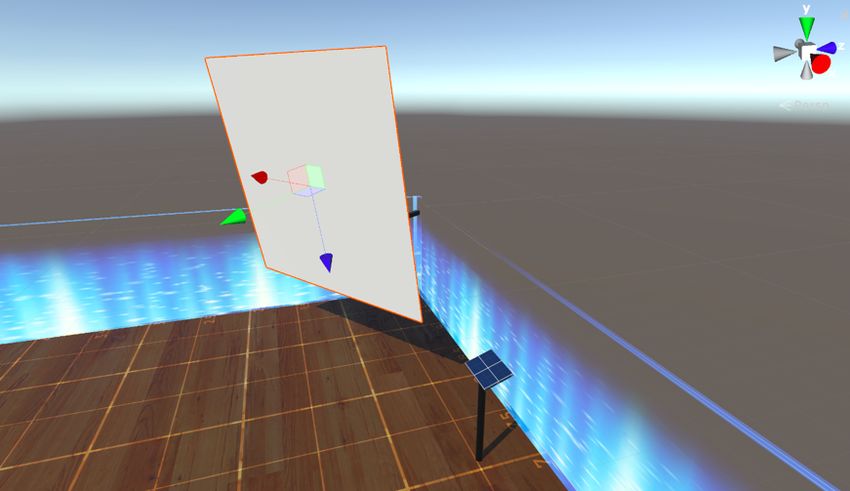
Fig. 2. Solution architecture

                             TABLE I                                 be created by the use of sessions and authorisation. In terms of
   S UPPORT OF S OFTWARE D EVELOPMENT K ITS BY D IFFERENT VR         privacy regarding personal information, such as user location,
                           P LATFORMS
                                                                     encryption is required and must not be accessible to the other
  Software             Oculus    HTC       Windows   Google          users. All the non-sensitive information like player movement
  Development Kits     Rift      Vive      Mixed     Card-           data and drawings/text in the shared whiteboard are sent to the
                                           Reality   board           clients in the system. User privacy is employed in the game
  OpenVR               Yes       Yes       No        No
  SteamVR              Yes       Yes       Yes       No              session management and authentication of users is handled
  MRTK                 No        No        Yes       No              in game server instances. Users are authenticated with OAuth
  VRTK                 Yes       Yes       Yes       Yes             2.0, an authentication protocol that retrieves login details from
  Google VR SDK        No        No        No        Yes
                                                                     platforms such as Facebook and Twitter, registering users with
MRTK or Mixed Reality Toolkit [18] was developed by                  their shared public details [22].
Microsoft for developing VR applications for its Windows                User interfaces in the application employ Electron, which
Mixed Reality Headsets. VRTK (Virtual Reality ToolKit) [19]          uses standard web elements and can also be compiled across
is a tool that allows development of VR applications in an           multiple platforms. The user interface contains the list of users
integrated environment with support to OpenVR, SteamVR,              and options to select the users who can access the game
Unity and others. Google has its own SDKs [20] for Android           sessions [23].
and iOS Cardboard applications and the Daydream platform.               The performance evaluation of network QoS parameters
   Multiple Game Development Environments (GDE) are cur-             such as throughput and round-trip time (RTT) is needed to
rently available for developers. Deciding on which GDE               determine the robustness and usability of the application. Other
should be using when building an application depends on the          non-network parameters such as the number of frames per
supported headsets, documentation, licensing, tools, compat-         second can be evaluated to check if the minimum requirements
ibility with other components such as the computer graphics          of the application are met [24], [25].
formats, etc. The GDE considered for the application presented          The work presented in this paper evolves the state-of-the-
in this paper is Unity [21], which fully supports the Oculus         art presented in this section by introducing multiple simulated
Rift. Unity also allows the game instance to run in a headless       users to a Unity-made VR application. This paper also presents
mode, where the graphic assets are not loaded in the server.         an analysis of the effects of the increased number of users
This reduces the memory footprint on the server and allows a         on network performance, considering throughput, tick rate
greater number of instances to run on the same computer.             and RTT as the metrics for the evaluation of the multi-user
                                                                     approach. The works presented in this section focused either
B. Multi-User VR Application Design                                  on privacy or network performance, while this paper evaluate
   Privacy is an important aspect to be considered in a multi-       the novel VR user-simulation algorithm in an application that
user application. Privacy can refer to private sessions, as well     considers both privacy and multiple scenarios with different
as the access to private information. Private virtual rooms can      number of users and network parameters.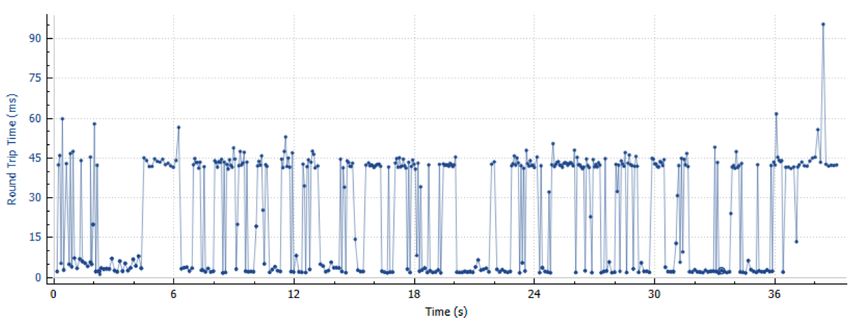
III. D ESIGN AND I MPLEMENTATION                                                     TABLE II
                                                                                     N ETWORK S TATUS – T ICK R ATE TABLE
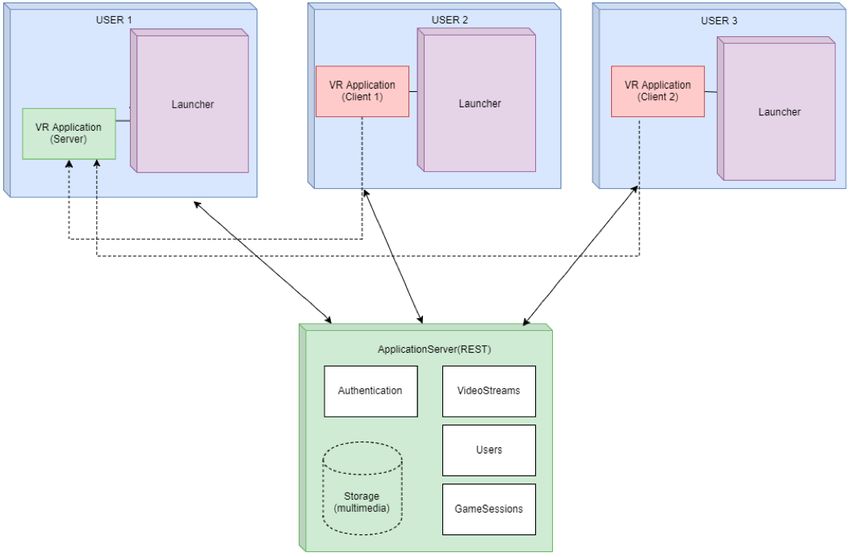
   The solution architecture is illustrated in Fig. 2. Design
and implementation details are presented in this section. The                     Network    Time Taken for     Tick Rate
implementation of the application allows for the testing of                       Status     First Connection
the proposed architecture and performance analysis of the                         1          >30 seconds        15 Hz
                                                                                  2          10 - 30 seconds    30 Hz
solution.                                                                         3          4 - 10 seconds     60 Hz
   The overall solution of this project consists of three com-                    4          1 - 4 seconds      80 Hz
ponents: application server, client launcher and the VR Ap-                       5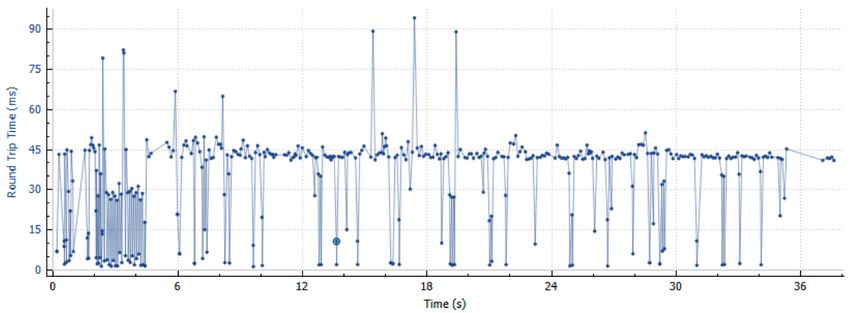
Algorithm 1 Simulated VR Users Mobility
NumberOfVRClients := e.g. 10
NumberOfMovement Loops := e.g. 10
NumberOfMovementSteps := e.g. 2
StepDuration := e.g. 150
Movement Directions := w,a,s,d keys
while (NumberOfVRClients client windows not spawned) do
    Spawn VR clientwindow and connect to test server
end
while (NumberOfMovementLoops > 0) do
    while (Not all client windows covered) do
       Activate client window
       Generate random movement direction
       Move in the direction for stepDuration
    end                                                                              Fig. 3. Real and simulated users
end

               IV. R ESULTS AND D ISCUSSION
   For testing purposes, multiple users scenarios were created
with simulated users following various mobility patterns. This
required the development of an automated VR user simulation
mobility algorithm, presented in Algorithm 1. The simulation
algorithm was developed using the AutoHotKey (AHK) tool,
which simulates keyboard keys being pressed, moving the
simulated users. The algorithm also needs the number of
simulated clients, number of movement loops (the number of                   Fig. 4. Throughput for 2 users with video stream
times a movement needs to be done in each client window),
movement steps (the number of times the player object should
move in each iteration) and movement duration (indicating for
how long the movement key must be pressed), as configurable
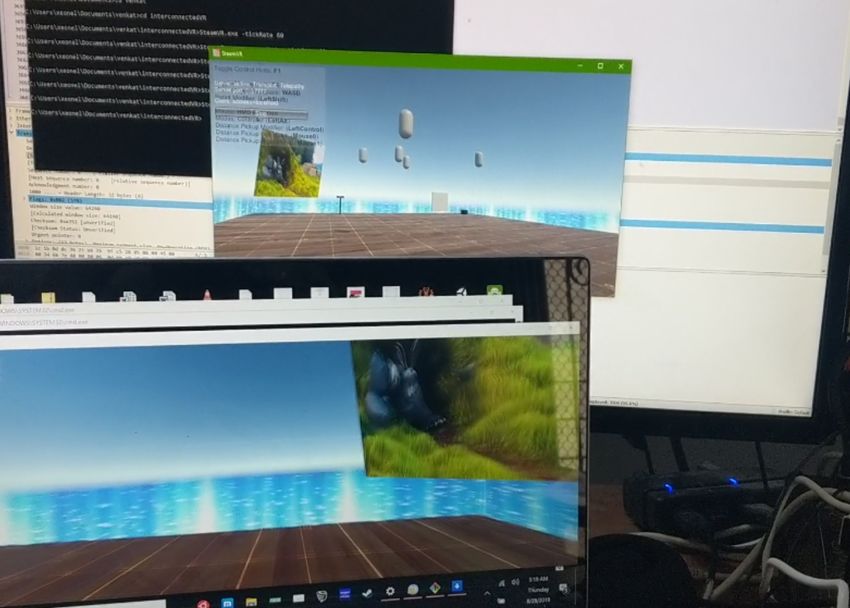
parameters. Fig. 3 presents the ability of the application
to support multiple clients. A real user is viewing content
from a VR headset in a computer (the content seen in the
headset is mirrored on the bottom monitor of Fig. 3) and the
other computer generates simulated clients, such as the one
presented on the top screen.
   Important QoS metrics were considered for testing.
                                                                             Fig. 5. Throughput for 5 users with video stream
Throughput was analysed in three scenarios with 2, 5 and 10
VR users, with video content. In each scenario, one of these
users is the server user, and the remaining ones are clients.
   An extra scenario with 6 VR users was analysed in terms
of tick rate (15Hz, 60Hz and 120Hz), and its impact on
throughput and RTT.
   The Windows 10 computer used in the tests has an Intel 8th
generation i7 8200u processor with 16GB LPDDR3 of RAM.
Wireshark was used for network analysis.

A. Throughput Analysis
   For the throughput analysis, multimedia content is displayed
in the virtual monitor in the application for all users. Mobil-             Fig. 6. Throughput for 10 users with video stream
ity is also introduced for the simulated users, according to
Algorithm 1, for a realistic throughput analysis.                  in the graph, when the client connects. From 16s to 20s,
   The first scenario consists of two users (i.e. one server and   (~12kbps) there was no user mobility. During the seconds
a client). Fig. 4 contains a plot with the throughput of this      20s and 26s (~24kbps) the video stream and the mobility
scenario. The first peak (~28kbps) happens at the 15s mark         algorithm start, and a peak during seconds 29s-32s indicates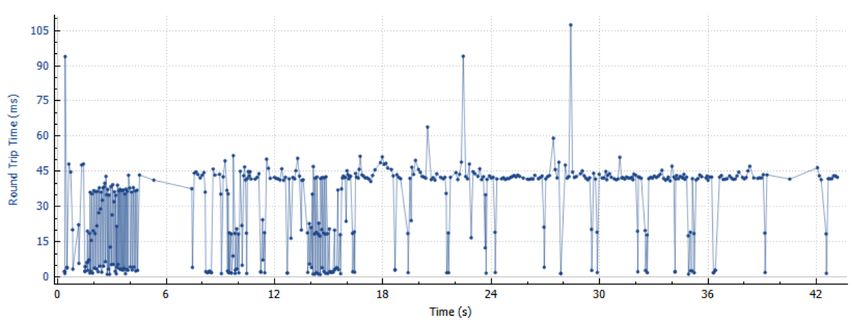
Fig. 7. Throughput for 15Hz Tick Rate
                                                                                      Fig. 10. RTT for 60Hz Tick Rate

                  Fig. 8. RTT for 15Hz Tick Rate                                   Fig. 11. Throughput for 120Hz Tick Rate

                                                                                      Fig. 12. RTT for 120Hz Tick Rate
               Fig. 9. Throughput for 60Hz Tick Rate

                                                                     this type of scenarios, a computer with higher specifications
video buffering.                                                     is required.
   The second scenario contains five users (i.e. one server and
four clients). Fig. 5 illustrates the throughput of this scenario.   B. Tick Rate Analysis
The first peak (~120kbps) observed at the 13s mark indicates            The tick rate metric refers to the number of times the server
the clients being connected. From 16s to 20s (~110kbps),             synchronises the states with clients. For the analysis of the
video buffering initiated. During the seconds 20s and 39s            effect of different tick rates in throughput and RTT, which
(~57kbps) the video stream and the mobility algorithm are            indicate network performance, three rates were selected: 15Hz,
running without any lags or decrease in quality.                     60Hz and 120Hz. The scenarios contain six users: one server
   The third scenario increases the number of users to ten (i.e.     and five clients.
one server and nine clients). This scenario requires substan-           The first scenario consists of users with a tick rate of
tial processing power, as all users (i.e. virtual environments       15 times per second. The average throughput is ~4kbps,
and mobility algorithm) are executed in the same computer,           as illustrated in Fig. 7, with the minimum and maximum
through simulation. Fig. 6 illustrates the throughput of this        throughput ranging from ~1.5kbps to 9kbps. A peak of 9kbps
scenario. The first peak (~350kbps) observed at the 25s mark         is reached when the clients first connect to the server. From
indicates the clients first connection. The mobility algorithm       seconds 7s to 37s, the simulation algorithm is active. The RTT
started at 45s and from 28s to 32s video content started             for this scenario (Fig. 8) varies from 5ms to 45ms for most
playing. Three of the clients were able to play the video,           of the execution time.
while the others were buffering content. At the 77s mark, the           The second scenario increases the tick rate to 60 times per
platform became unstable with slowdowns until the 100s mark,         second. The average throughput is ~3kbps, as illustrated in Fig.
and additional slowdowns at the 140s mark.                           9, with the minimum and maximum throughput ranging from
   These experiments demonstrate that in scenarios with 10 or        ~0.5kbps to 9kbps. This scenario also has a peak of 9kbps
more simulated users, there is a decrease in quality, with long      when the clients first connect to the server. From seconds 8s
video buffering and slowdowns in the VR application. For             to 40s, the simulation algorithm is active. The RTT for this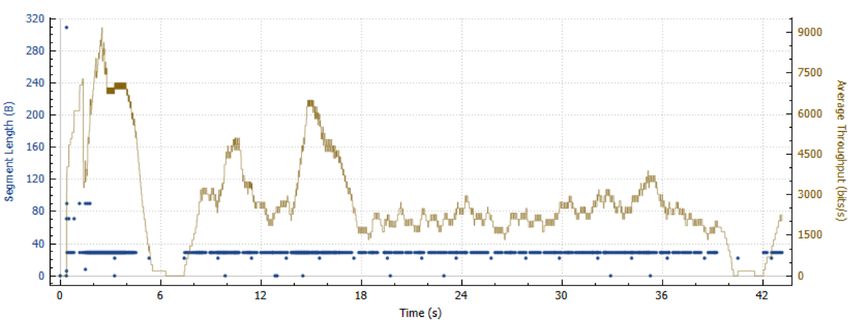
scenario (Fig. 10) is more stable at 45ms with occasional 5ms                  [4] J. W. Park, F. S. Nahm, J. H. Kim, Y. T. Jeon, J. H. Ryu, and S. H.
bursts.                                                                            Han, “The Effect of Mirroring Display of Virtual Reality Tour of the
                                                                                   Operating Theatre on Preoperative Anxiety: A Randomized Controlled
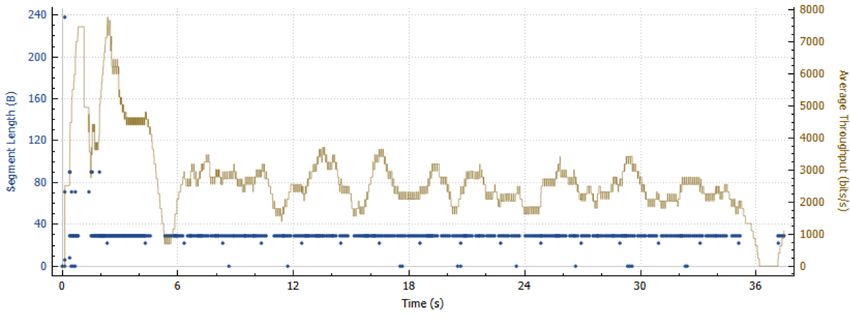
   The third scenario increases the tick rate to 120 times per                     Trial,” IEEE Journal of Biomedical and Health Informatics, vol. 23,
second, which is network-intensive. The average throughput                         no. 6, pp. 2655–2660, nov 2019.
is ~2.5kbps, as illustrated in Fig. 11, with the minimum and                   [5] C. H. Muntean, D. Bogusevschi, and G.-M. Muntean, Innovative
                                                                                   Technology-based Solutions for Primary, Secondary and Tertiary STEM
maximum throughput ranging from ~1kbps to 8kbps. This                              Education. Paragon Publishing, 2019.
scenario has a peak of 8kbps is reached when the clients first                 [6] S. Abbas, A. A. Simiscuka, and G. M. Muntean, “A Platform Agnostic
connect to the server. From seconds 5s to 36s, the simulation                      Solution for Inter-Communication between Virtual Reality Devices,” in
                                                                                   IEEE 5th World Forum on Internet of Things, WF-IoT 2019 - Conference
algorithm is active. The RTT for this scenario (Fig. 12) is                        Proceedings. Institute of Electrical and Electronics Engineers Inc., apr
mostly at 45ms with occasional 5ms bursts.                                         2019, pp. 189–194.
                                                                               [7] H. Lee, G. Ha, S. Lee, and S. Kim, “A mixed reality tele-presence
   These three scenarios demonstrate that the increase of the                      platform to exchange emotion and sensory information based on MPEG-
tick rate impact throughput and RTT. It is clear that the plots                    V standard,” in Proceedings - IEEE Virtual Reality. IEEE Computer
from Figs. 7 and 8 (15Hz) are more stable than the plots in                        Society, apr 2017, pp. 349–350.
                                                                               [8] S. Gunkel, M. Prins, H. Stokking, and O. Niamut, “WebVR meets
Figs. 9-12 (60Hz and 120Hz), which represent a decrease in                         WebRTC: Towards 360-degree social VR experiences,” in Proceedings -
throughput stability and network performance.                                      IEEE Virtual Reality. IEEE Computer Society, apr 2017, pp. 457–458.
                                                                               [9] F. Silva, D. Bogusevschi, and G. Muntean, “Innovative algorithms for
                                                                                   prioritised ar/vr content delivery,” in IEEE International Symposium on
           V. C ONCLUSIONS AND F UTURE W ORK                                       Broadband Multimedia Systems and Broadcasting (BMSB), 2018, pp.
                                                                                   1–5.
   This paper presented the design, implementation and anal-                  [10] D. Polancec and I. Mekterovic, “Developing MOBA games using the
ysis of a multi-user VR application in a variety of scenarios.                     Unity game engine,” in 2017 40th International Convention on Informa-
The application allows users to share multimedia content such                      tion and Communication Technology, Electronics and Microelectronics,
                                                                                   MIPRO 2017 - Proceedings. Institute of Electrical and Electronics
as videos and presentations and interact with each other.                          Engineers Inc., jul 2017, pp. 1510–1515.
   The application allows real and simulated VR users to be                   [11] N. Singh and S. Singh, “Virtual reality: A brief survey,” in 2017
included in the scenarios, so the performance can be evaluated.                    International Conference on Information Communication and Embedded
                                                                                   Systems, ICICES 2017. Institute of Electrical and Electronics Engineers
An algorithm for VR user mobility was also introduced.                             Inc., oct 2017.
   Tests indicated that in the computer used for the experi-                  [12] “Oculus Rift: VR Headset for VR Ready PCs | Oculus.” [Online].
ments, when the number of users is equal or greater than 10                        Available: https://www.oculus.com/rift/#oui-csl-rift-games=robo-recall
                                                                              [13] “VIVE | Discover Virtual Reality Beyond Imagination.” [Online].
simultaneous users, the performance is affected with longer                        Available: https://www.vive.com/eu/
buffering times and overall slowdowns. High tick rates, which                 [14] “PlayStation VR | The VR gaming system for PS4 |
are related to the smoothness of video, also affect throughput                     PlayStation.” [Online]. Available: https://www.playstation.com/en-
                                                                                   ie/explore/playstation-vr/
and RTT.                                                                      [15] J. Tham, A. H. Duin, L. Gee, N. Ernst, B. Abdelqader, and M. McGrath,
   Overall, a multi-user application with real and simulated                       “Understanding Virtual Reality: Presence, Embodiment, and Profes-
users is useful for performance testing, and it was possible to                    sional Practice,” IEEE Transactions on Professional Communication,
                                                                                   vol. 61, no. 2, pp. 178–195, jun 2018.
observe the scenarios that performed the best in a computer                   [16] “Unity       -       Manual:      OpenVR.”        [Online].    Available:
with the given specifications.                                                     https://docs.unity3d.com/Manual/VRDevices-OpenVR.html
                                                                              [17] “SteamVR.” [Online]. Available: https://www.steamvr.com/
   Future work includes the addition of other types of rich                   [18] “What       is      the    Mixed       Reality     Toolkit   |    Mixed
media content to be shared among users, and user prioritisation                    Reality       Toolkit      Documentation.”        [Online].    Available:
with different quality levels.                                                     https://microsoft.github.io/MixedRealityToolkit-Unity/README.html
                                                                              [19] “VRTK - Virtual Reality Toolkit.” [Online]. Available:
                                                                                   https://vrtoolkit.readme.io/
                      ACKNOWLEDGEMENT                                         [20] “Quickstart for Google VR SDK for Unity with Android.”
                                                                                   [Online]. Available: https://developers.google.com/vr/develop/unity/get-
  This work was supported by the European Union’s Hori-                            started-android
zon 2020 Research and Innovation programme under Grant                        [21] “Unity Real-Time Development Platform | 3D, 2D VR & AR
                                                                                   Visualizations.” [Online]. Available: https://unity.com/
Agreement no. 870610 for the TRACTION project. The                            [22] N. Hossain, M. A. Hossain, M. Z. Hossain, M. H. I. Sohag, and S. Rah-
support of the Science Foundation Ireland (SFI) Research                           man, “OAuth-SSO: A Framework to Secure the OAuth-Based SSO
Centres Programme Grant Numbers 12/RC/2289_P2 (Insight)                            Service for Packaged Web Applications,” in Proceedings - 17th IEEE
                                                                                   International Conference on Trust, Security and Privacy in Computing
and 16/SP/3804 (ENABLE) is gratefully acknowledged.                                and Communications and 12th IEEE International Conference on Big
                                                                                   Data Science and Engineering, Trustcom/BigDataSE 2018, sep 2018,
                            R EFERENCES                                            pp. 1575–1578.
                                                                              [23] “Electron | Build cross platform desktop apps with JavaScript, HTML,
[1] A. A. Simiscuka, T. M. Markande, and G.-M. Muntean, “Real-Virtual              and CSS.” [Online]. Available: https://electronjs.org/
    World Device Synchronisation in a Cloud-enabled Social Virtual Reality    [24] T. Kushida and Y. Shibata, “Framework of end-to-end performance
    IoT Network,” IEEE Access, vol. 7, pp. 106 588–106 599, 2019.                  measurement and analysis system for Internet applications,” in Interna-
[2] “Blender.org - Home of the Blender project - Free and Open 3D                  tional Conference on Information Networking, vol. 2001-January. IEEE
    Creation Software,” 2020. [Online]. Available: https://www.blender.org/        Computer Society, 2001, pp. 674–679.
[3] T. I. Chowdhury, “Towards Reverse Disability Simulation in a Virtual      [25] A. A. Simiscuka and G.-M. Muntean, “Synchronisation between Real
    Environment,” in 25th IEEE Conference on Virtual Reality and 3D                and Virtual-World Devices in a VR-IoT Environment,” in Proc. of
    User Interfaces, VR 2018 - Proceedings. Institute of Electrical and            the IEEE International Symposium on Broadband Multimedia Systems,
    Electronics Engineers Inc., aug 2018, pp. 803–804.                             2018, pp. 1–6.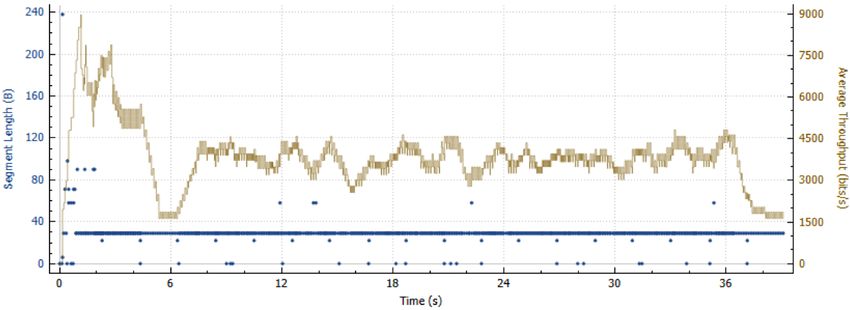
You can also read


