TECHNICAL SPECIFICATIONS - www.holzmann-medien.demedia-sales/digital - Holzmann Medien
←
→
Page content transcription
If your browser does not render page correctly, please read the page content below
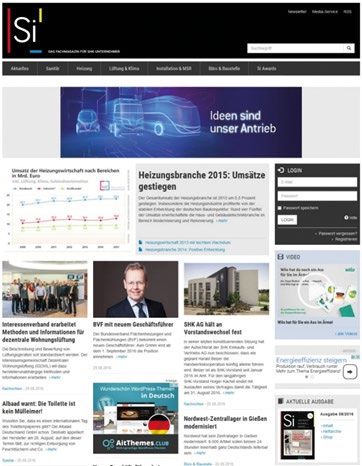
TECHNICAL SPECIFICATIONS

                                                                   © peterschreiber.media – stock.adobe.com
                      www.holzmann-medien.de/media-sales/digital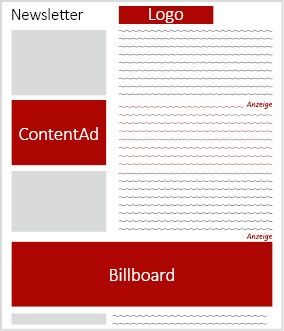
CONTENT

DATA DELIVERY                              NATIVE

General		                     Page     3   Advertorial		                                           Page      14
Image		                       Page     3   Whitepaper		                                            Page      15
HTML5                         Page     3   NativeAd In – Teaser		                                  Page      16
HTML5 ClickTag		              Page     4   NativeAd In – Content		                                 Page      17
Rich Media		                  Page   5-6   NativeAd Out – Teaser		                                 Page      18
CPU usage		                   Page     7   NativeAd Out – Content		                                Page      18
SSL		                         Page     7
                                           VIDEO
DISPLAY ADVERTISING FORMATS
                                           InPage – VideoAd		                                      Page      19
Medium Rectangle		            Page    8
HalfpageAd		                  Page    8
Rectangle		                   Page    8    NEWSLETTER – CONSTRUCTION | CLEANING | MEAT INDUSTRY | CRAFT |
Overlay		                     Page    8                 HEALTH&CARE
Superbanner		                 Page    9
XXL Superbanner		             Page    9    ContentAd		                                             Page      20
Skyscraper		                  Page    9    Medium Rectangle		                                      Page      20
Dynamic Sitebar		             Page    9    FullAd		                                                Page      20
XXL Skyscraper		              Page   10    Billboard		                                             Page      20
Billboard		                   Page   10
BanderoleAd		                 Page   10    NEWSLETTER – HOTEL INDUSTRY
TandemAd		                    Page   10
AdBundle		                    Page   11    ContentAd		                                             Page      21
Wallpaper		                   Page   11    Medium Rectangle		                                      Page      21
FireplaceAd		                 Page   11    FullAd		                                                Page      21
Homepage Takeover		           Page   11    Billboard		                                             Page      21

MOBILE ADVERTISING FORMATS
                                           NEWSLETTER – Specials
MMA Banner		                  Page   12
                                           Exclusive sponsorship		                                 Page      22
MMA Banner Sticky		           Page   12
                                           Standalone		                                            Page      22
Mobile HalfpageAd		           Page   12
Mobile Overlay		              Page   13
Mobile Interscroller		        Page   13    CONTACT		                                               Page      23
                                                                                                                  -2-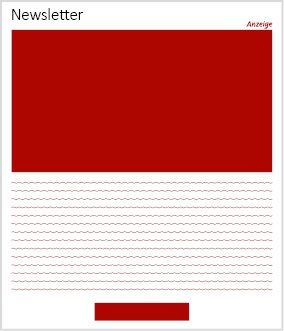
DATA DELIVERY

General                                                                                   HTML5
Information on the assignment of the advertising medium                                   Data delivery:          • Zip file (The zip file must contain an index.html file as a starting
• Customer name                                                                                                      point an all ancluded scripts as well as all elements contained in
• Campaign name                                                                                                      the zip file musst be relatively linked)
                                                                                                                  • Target URL
• Advertising format
                                                                                                                  • 3 business days before campaign launch
• Booking period
                                                                                          Please note:
Image                                                                                     To make HTML5 ad media as simple and compatible as possible, it is recommended that you
It is a common image file, which is displayed by any computer without special programs.   adhere to the following implementation recommendations:
Delivery is guaranteed.                                                                                           • Only one HTML file with the name index.html per ad media
Data delivery:           •Static JPG, GIF, PNG or animated GIF                                                   • All files must be located in a common path per ad media.
                         • Target URL                                                                             • All files must be included relatively (e.g. src=“js/scripts.js“).
                         • 3 business days before campaign launch                                                    The only exception are external resources such as frameworks,
                                                                                                                     these must be included absolutely with the complete domain
                                                                                                                  • For click tracking, a ClickTag must be integrated
Delivery adress
• admanagement@holzmann-medien.de
• Please note the respective deadlines for data delivery.

                                                                                                                                                                                      -3-
DATA DELIVERY
HTML5 – ClickTag
The notation for ClickTags is: clicktag Example HTML and assignment of links:
The notation for Multi-ClickTags is: clicktag, clicktag1, clicktag2 2 HTML links without assigned links:
The following lines of code are to be included in the HTML5 ad to pass the ClickTags. The
function returns all GET parameters passed to the file:
Option 1 Option 2
document.getElementById('clicktag').setAttribute('href',
function mytag() document.getElementById('clicktag1').setAttribute('href', click-
window.open(clicktag,"_blank")
document. These Javascript lines can then be used to assign the ClickTag to the HTML elements:
{
window.open(clicktag,"_blank")
Please note
If you define the banner or the ClickTag via a tool, the appropriate settings must be made
here; adding a click tag manually has no effect.
-4-DATA DELIVERY
RichMedia
The following requirements must be met for the correct inclusion or click counting of Example:
RichMedia .
Delivery: The RichMedia to be deposited always consists of
an independent HMTL which is delivered basically
without header .
Additionally, any number of files can be uploaded. These are
referenced via a placeholder %file:FILENAME% in the RichMedia
code (the placeholder is automatically replaced by the URL to the
or with multiple target URLs:
file on delivery).
Example:
File name: grafik.jpg!
Referencing: %file:grafik.jpg%!
Click count: Fixed, absolute URLs are automatically recognized and provided
with the click count.
The following placeholders are also available for click counting:
a.) %clickurl:e% for the ADITION click URL encoded
b.) %clickurl% for the ADITION click URL not encoded Notice:
c.) %clickurl:u% for the ADITION click URL not encoded Links that are addressed through Javascript should be stored
in a variable at the beginning of the block, and
The URL of the landing page is the URL specified in the ‚ClickURL‘ subsequently only addressed through it. The entire ad should
field in the ad media form. In case multiple target URLs are used, be enclosed in a element whose height and width are
they can be appended directly after the placeholders correctly fixed to the size of the ad.
encoded.
-5-DATA DELIVERY
Aditional paceholders: Additional placeholders are available through direct access in the Javascript variables: The following names must not be used for javascript variables:
RichMedia ad. These are inserted by clicking on the respective
parameter at the position where the cursor is located. a.) 'ad_hidelayer'
b.) 'ad_count'
c.) 'ad_wid'
Notes on forms
Form elements: Generally, ‚GET‘ should be used as the form method. However, if
it is mandatory to use ‚POST‘ as the method, please note that click
counting is not possible in this case
Form fields: The following names must not be used for form fields:
a.) 'lid'
b.) 'clickurl'
c.) 'url'
%width% Width of the ad medium
%height% Height of the ad medium
%keyword% Passed keyword
%contentunit% ID of the ad medium unit on which the ad
medium is delivered
%timestamp% Unique ID per call
-6-DATA DELIVERY
CPU utilization: Elaborate animations in the ad media lead to increased CPU usa- SSL encryption: • We would like to point out that from now on all components of
ge, which results in the website being limited and slow. The CPU a campaign (script, iFrame, redirect tags, agency counting pixels
usage for ad media should not exceed 25%. and other externally hosted resources) must be delivered as
HTTPS-compatible components in order to be able to exclude
display and measurement errors with regard to violations of
security settings of the different browsers across websites.
• For this purpose, it must be ensured that all resources are
hosted on SSL-certified servers. Please therefore check whether
the systems you use for hosting the ad media provide this opti-
on as standard.
-7-DISPLAY Advertising formats
Medium Rectangle HalfpageAd
Prominent placement in the content of the website, By integrating it into the content area of the site,
central and in the user‘s field of vision. the user's eye falls on this striking advertising format.
Dimension: 300 x 250 pixel Dimension: 300 x 600 pixel
File formats: gif, jpg, png, HTML5 File formats: gif, jpg, png, HTML5
File size: 120 kB per file; HTML5: 150 kB per element File size: 120 kB per file; HTML5: 150 kB per element
3rd Party AdTag: JavaScript / Iframe / SSL encrypted 3rd Party AdTag: JavaScript / Iframe / SSL encrypted
Delivery: cross-device (all devices) Delivery: cross-device (all devices)
Data delivery: 3 business days before campaign Data delivery: 3 business days before campaign
launch launch
Rectangle Overlay
Placement in the content area of the website. An overlay is a large-scale advertising format and has
unlimited scope for design. The overlay is displayed
Dimension: 300 x 100 pixel directly above the content when a user visits the
File formats: gif, jpg, png, HTML5 website. The advertising format can be closed by the
File size: 120 kB per file; HTML5: 150 kB per Element user. The mobile overlay is the ideal addition.
3rd Party AdTag: JavaScript / Iframe / SSL encrypted
Delivery: cross-device (all devices) Dimension: 300-550 x 250-400 pixel
Data delivery: 3 business days before campaign File formats: gif, jpg, png, HTML5
launch File size: 120 kB per file; HTML5: 150 kB per element
Delivery: desktop + tablet
Data delivery: 3 business days before campaign
launch
-8-DISPLAY Advertising formats
Superbanner/ Sticky Superbanner XXL Superbanner
Superbanner: Attention-grabbing ad medium with pre- Superbanner variant in oversize.
sence in the banner bar. Placed in the immediately visible
area with creative design freedom. Dimension: 728 x 250 pixel
Sticky Superbanner: Ad medium is placed at the footer File formats: gif, jpg, png, HTML5
of the website and remains stuck in the visible area of the File size: 120 kB per file; HTML5: 150 kB per element
website when scrolling. The ad medium can be closed by 3rd Party AdTag: JavaScript / Iframe / SSL encrypted
the user. Delivery: desktop + tablet
Data delivery: 3 business days before campaign launch
Dimension: 728 x 90 pixel
File formats: gif, jpg, png, HTML5
File size: 120 kB per file; HTML5: 150 kB per element
3rd Party AdTag: JavaScript / Iframe / SSL encrypted
Delivery: desktop + tablet
Data delivery: 3 business days before campaign launch
Skyscraper
Dynamic Sitebar
Placement on the right or left screen; remains in the
The Dynamic Sitebar runs on the right skyscraper space user‘s field of vision when scrolling.
in the always visible area. When scrolling, the Dynamic
Sitebar runs automatically (sticky). The advertising format Dimension: 120-160 x 600 pixel
adapts to the respective screen size and thus dynamically File formats: gif, jpg, png, HTML5
uses the maximum available space to the right of the File size: 120 kB per file; HTML5: 150 kB per element
website. 3rd Party AdTag: JavaScript / Iframe / SSL encrypted
Delivery: desktop
Dimension: 300 x 600 pixel scalable Data delivery: 3 business days before campaign
File formats: Physical or redirect (iframe) - Prefers redirect; launch
GIF / JPEG as fallback (300x600), size 100% dynamic, max.
kB initial load 150 KB, max. kB downstream load 2 MB;
HTML5 (only for physical delivery): 150 kB per element.
3rd Party AdTag: JavaScript / Iframe / SSL-encrypted
Delivery: desktop
Data delivery: 5 business days before campaign launch
-9-DISPLAY Advertising formats
XXL Skyscraper Billboard
Skyscraper option in oversize. Large format, positioned between navigation
and content with plenty of space for design and
Dimension: 300 x 600 pixel information – a prominent stage for your advertising
File formats: gif, jpg, png, HTML5 message.
File size: 120 kB per file; HTML5: 150 kB per element
3rd Party AdTag: JavaScript / Iframe / SSL encrypted Dimension: 940 x 250 pixels
Delivery: desktop File formats: gif, jpg, png, HTML5
Data delivery: 3 business days before campaign File size: 120 kB per file; HTML5: 150 kB per element
launch 3rd Party AdTag: JavaScript / Iframe / SSL encrypted
Delivery: desktop
Data delivery: 3 business days before campaign
launch
BanderoleAd TandemAd
The ad medium is located in the directly visible area A TandemAd refers to the simultaneous playout of two
and lays itself across the homepage like a stripe for advertising formats within the same page impression,
a certain time. The BanderoleAd is effective and whereby both advertising media can interact with each
extremely attention-grabbing. The advertisement other graphically and textually, thus offering a wide range
can be closed by the user. of design options.
Dimension: 770 x 250 pixel Dimension: see single formats
File formats: gif, jpg, png File formats: gif, jpg, png, HTML5
File size: 120 kB per file File size: 120 kB per file; HTML5: 150 kB per element
Delivery: desktop 3rd Party AdTag: JavaScript / Iframe / SSL-encrypted
Data delivery: 5 business days before campaign Delivery: desktop
launch Data delivery: 5 business days before campaign launch
- 10 -DISPLAY Advertising formats
AdBundle Wallpaper
The AdBundle refers to the (joint) delivery of three diffe- Combination of Superbanner and Skyscraper. The format
rent classic ad media and serves an extremely strong per- frames the website on the top and right side. Wallpapers
ception. The deliveries of ad media of an AdBundle do not usually color the side margin of the website. An attention-
have to be seen within the same PageImpression, but are grabbing ad medium that greatly increases recognition
from the same advertiser and share a common volume. value.
Dimension: see single formats Dimension: Superbanner: 728 x 90 pixel
File formats: gif, jpg, png, HTML5 Skyscraper: 120-160 x 600 pixel
File size: 120 kB per file; HTML5: 150 kB per element File formats: gif, jpg, png, HTML5
3rd Party AdTag: JavaScript / Iframe / SSL-encrypted File size: 120 kB per file; HTML5: 150 kB per element
Delivery: desktop Background color: Yes – a hex code can be supplied for the
Data delivery: 5 business days before campaign launch background
Clickable Background: Yes – a separate ClickCommand
can be supplied for the background
3rd Party AdTag: JavaScript / Iframe / SSL-encrypted
Delivery: desktop
Data delivery: 5 business days before campaign launch
FireplaceAd Homepage Takeover
Placement frames the content from three sides. The Fire- Attention-grabbing combination of FireplaceAd and
placeAd is a generous format that stays in the user‘s field Billboard.
of vision for a long time and increases attention to the
advertising message. It´s an ideal addition to the Billboard. Dimension: Superbanner: 1282 x 90 pixel
Skyscraper: 120-160 x 600 pixel
Dimension: Superbanner: 1282 x 90 pixel Billboard: 940 x 250 pixel
Skyscraper: 120-160 x 600 pixel File formats: gif, jpg, png, HTML5
File formats: gif, jpg, png, HTML5 File size: 120 kB per file; HTML5: 150 kB per element
File size: 120 kB per file; HTML5: 150 kB per element Background color: A hex code for the background color
Background color: Yes – a hex code can be supplied for can be supplied
the background Clickable background: A separate ClickCommand for the
Clickable Background: Yes – a separate ClickCommand background can be supplied
can be supplied for the background 3rd Party AdTag: JavaScript / Iframe / SSL-encrypted
3rd Party AdTag: JavaScript / Iframe / SSL-encrypted Delivery: desktop
Delivery: desktop Data delivery: 5 business days before campaign launch
Data delivery: 5 business days before campaign launch
- 11 -MOBILE Advertising formats
Mobile MMA Banner Mobile HalfpageAd
Mobile banner that guarantees high attention in the Attention-grabbing ad medium in the content area of
visible area. the site. The user‘s gaze falls on the strikingly large
advertising format.
MMA 6:1: 300-320 x 50 pixel
MMA 4:1: 300-320 x 75 pixel Dimension: 300 x 600 pixel
MMA 2:1: 300-320 x 150 pixel File format: jpg, gif, HTML5
MMA 1:1: 300-320 x 250 pixel (Medium Rectangle) 3rd Party AdTag: JavaScript/Iframe/SSL encrypted
File format: jpg, gif, HTML5 File size: 40 kB per file; HTML5: 150 kB per element
3rd Party AdTag: JavaScript/Iframe/SSL-encrypted Data delivery: 3 business days before campaign
File size: 40 kB per file; HTML5: 150 kB per element launch
Data delivery: 3 business days before campaign launch
Mobile MMA Banner sticky
Attention-grabbing ad medium that is fixed on the screen
in the user‘s field of vision and does not leave the screen
even when scrolling. The ad medium can be closed by
the user.
MMA 6:1 sticky: 300-320 x 50 pixel
MMA 4:1 sticky: 300-320 x 75 pixel
File format: jpg, gif, HTML5
3rd Party AdTag: JavaScript/Iframe/SSL-encrypted
File size: 40 kB per file; HTML5: 150 kB per element
Data delivery: 3 business days before campaign launch
- 12 -MOBILE Advertising formats
Mobile Overlay Mobile Interscroller
The overlay is displayed directly above the content Particularly attention-grabbing form of advertising. Ad
when the website is called up and can be closed by media lies behind the content and is displayed by scrolling
the user. It´s an ideal addition to the Overlay. in the viewing window of the advertising placement and
is fully exposed in the process. Not only communicates
Dimension: 300 x 250-300 pixel an advertising message, but also guarantees high brand
File format: jpg, gif, HTML5 awareness. Ensures full user attention for a few seconds.
3rd Party AdTag: JavaScript/Iframe/SSL encrypted
File size: 40 kB per file; HTML5: 150 kB per element Dimension: 300 x 600 pixel
Data delivery: 3 business days before campaign File formats: jpg, gif, HTML5
launch 3rd Party AdTag: JavaScript/Iframe/SSL-encrypted
File size: 40 kB per file; HTML5: 150 kB per element
Data delivery: 3 business days before campaign launch
- 13 -NATIVE Online-Advertorial
We build an exclusive microsite (= content page) for you with the look & feel of the website.
The microsite will be designed according to your wishes – you can integrate numerous infor-
mation and content such as images, files, videos and links.
The microsite will be available on the chosen website for a minimum period of 4 weeks.
The advertorial is flanked by numerous traffic push measures to redirect our users to the
microsite.
You will find your individual Traffic Push in the order confirmation.
The following Traffic Push elements can be included:
• Fixed TeaserBox (ROS)
• Display Advertising
• Mobile Advertising
• Newsletter ConentAds
• Social media posts
Logo: Place your company logo as branding in the upper part of the microsite in jpg or png
Data delivery format
Content: The text material can be delivered as a Word document or as a txt file. The overall Links: URL to landing page
layout must be recognizable. The text length is basically not limited. However, for optimal A ClickCommand can be supplied for tracking purposes
performance, a too long scrolling distance for the user should be avoided. If necessary, we
solve this by means of one or more subsites. Links and the positioning of image material General: No redirects can be used
must be marked accordingly in advance. Please do not deliver pdf documents.
Data delivery: 14 days before campaign launch
Images: Images can be delivered in jpg or png format. A file size of 25-50 kB per file should
not be exceeded. Large files worsen the loading time of the page and harm the perfor- Documentation:
mance. After the end of the runtime you will receive a detailed documentation about:
Video material: MP4 or YouTube link • PageImpressions of the microsite
• Clicks on images and links
• Traffic push analysis of the accompanying measures
- 14 -NATIVE Whitepaper
We build an exclusive microsite (content page) for the whitepaper. Here you can insert
images, files, videos, links and of course the whitepaper. The collected leads will be passed
on to you at the end of the term.
You will find your individual Traffic Push in the order confirmation.
The following Traffic Push elements can lead to the whitepaper:
• TeaserBox (ROS)
• Newsletter ContentAds
Data delivery General: No redirects can be used
Content: The text material can be delivered as a Word document or as a txt file. The text Documentation:
length is basically not limited, but we recommend as little text as possible to keep the user‘s At the end of the runtime, you will receive detailed documentation about:
scrolling distance low. • PageImpressions of the microsite
• Clicks on images and links
File format for download: pdf • Traffic push analysis of the flanking measures
Image: 580 x 360 pixel Leads: You will receive the leads from us automatically after the end of the runtime
Logo: max. 150 pixel high Data delivery: 14 days before campaign launch
File format images: gif, jpg, png - no animated graphics
File size: max. 120 kB
Links: URL to landing page
For tracking purposes, a ClickCommand can be supplied
- 15 -NATIVE Native Ad In-Teaser
Image-text ad designed in the look and feel of an editorial article and marked as an ad. The placement is in the
sidebar (teaser column). The NativeAd In links to a microsite (content page) where you can embed text, images,
videos and links.
Data delivery - Teaser:
Headline: max. 40 characters (including spaces)
Teaser image: 300 x 200 pixel
Text: max. 150 characters as continuous text (including spaces)
Linking: URL to landing page
Data delivery - Microsite:
Content: The text material can be delivered as a Word document or as a txt file. The overall layout must be
recognizable. The text length is basically not limited. However, for optimal performance, too long a scrolling
distance for the user should be avoided.
Links and the positioning of image material must be marked accordingly in advance. Please do not deliver pdf
formats.
Images: Images can be delivered in jpg or png format.
A file size of 25-40 kB per file should not be exceeded. Large files worsen the loading time of the page and harm
the performance.
Video material: MP4 or YouTube link
Logo: Place your company logo as branding at the top of the microsite in jpg or png format
Links: URL to landing page
A ClickCommand can be supplied for tracking purposes
General: No redirects can be used
Data delivery: 14 days before campaign launch
- 16 -NATIVE Native Ad In-Content
Image-text ad designed in the look and feel of an editorial article and marked as an ad. The placement takes
place within the content. The NativeAd In links to a microsite (content page) where you can embed text, ima-
ges, videos and links.
Data delivery - Teaser:
Headline: max. 40 characters (including spaces)
Text: max. 120 characters as continuous text (including spaces)
Linking: URL to the landing page
Data delivery - Microsite:
Content: The text material can be delivered as a Word document or as a txt file. The overall layout must be re-
cognizable. The text length is basically not limited. However, for optimal performance, a long scrolling distance
for the user should be avoided.
Links and the positioning of image material must be marked accordingly in advance. Please do not deliver pdf
formats.
Images: Images can be delivered in jpg or png format.
A file size of 25-40 kB per file should not be exceeded. Large files worsen the loading time of the page and harm
the performance.
Video material: MP4 or YouTube link
Logo: Place your company logo as branding at the top of the microsite in jpg or png format.
Links: URL to landing page
A ClickCommand can be supplied for tracking purposes
General: No redirects can be used
Data delivery: 14 days before campaign launch
- 17 -NATIVE Native Ad Out
NativeAd Out – Teaser
Image-text ad designed in the look and feel of an editorial article and marked as an ad.
The placement is within the sidebar. The NativeAd Out links to an external landing page
(e.g. company website).
Data delivery Teaser:
Headline: max. 40 characters (including spaces)
Teaser image: 300 x 200 pixel
Text: max. 150 characters as continuous text (including spaces)
Linking: URL to landing page
ClickCommands can be integrated
Data delivery: 5 business days before campaign launch
NativeAd Out – Content
Image-text ad designed in the look and feel of an editorial article and marked as an ad.
The placement takes place within the content. The NativeAd Out links to an external
landing page (e.g. company website).
Data delivery Teaser:
Headline: max. 40 characters (including spaces)
Text: max. 120 characters as continuous text (including spaces)
Linking: URL to landing page
ClickCommands can be integrated
Data delivery: 5 business days before campaign launch
- 18 -VIDEO VideoAd
We integrate your video into the look & feel of the website. To draw users‘ attention to the
VideoAd, we place a teaser on the homepage and subpages of the website. You choose the
duration of the campaign.
General: Format: MP4 (You Tube integration possible, but cannot be tra-
cked. Codec: H.264)
Quality: PAL, 720x405, 25 [fps], Progressive
Audio: AAC, 160 [kbit/s], 48 kHz, Stereo
Bitrate: VBR, 2-pass, target 1.50, max. 2.00 [Mbit/s].
Length: 30 seconds (recommended)
Headline: 35 characters
Text: 120 characters
Linking: URL to landing page (click commands can be integrated, no tra-
cking pixels).
Graphic: Teaser image 720 pixel in 16:9 format - jpg, png or gif
Info: no 3rd party tags/redirect possible
Data delivery: 5 business days before campaign launch
- 19 -Placement
NEWSLETTER CONSTRUCTION | CLEANING | MEAT INDUSTRY | CRAFT | HEALTH&CARE
ContentAd Medium Rectangle
Attention-grabbing ad with graphics in the content area of the Placement in the editorial environment of the newsletter.
newsletter. Here you have the possibility to place a picture or
logo. In addition, you have a short description of the content Graphic: 300 x 250 pixel
and a link. Link: URL to landing page
Placement: Newsletter
Text: 350 characters as continuous text (incl. spaces) • DHZ Newsletter
Headline: max. 50 characters (incl. spaces) • handwerk magazin-Unternehmertipp spezial
Graphic: • handwerk magazin-Unternehmertipp, handwerk • handwerk magazin-Steuern&Recht
magazin-Unternehmertipp spezial, handwerk File formats: gif, png, jpg - no animated graphics
magazin-Steuern&Recht: 240 x 190 pixel File size: 40 kB
• Newsletter bwd report, GFF Report, Additional info: no 3rd party tags/redirect
sicht+sonnenschutz aktuell, rationell reinigen-
no tracking pixels
Newsletter, R+WTextilservice aktuell, Die Fleischerei
ClickCommands can be integrated
aktuell, Newsletter HCM aktuell: 190 x 150 pixel
Please note that you will not automatically
• DHZ Newsletter, Newsletter Si aktuell: 600 x 403 pixel
receive a preview link, but only upon
Linking: URL to landing page
File formats: gif, png, jpg - no animated graphics request.
File size: 40 kB Data delivery: 3 business days before campaign launch
Additional info: no 3rd party tags/redirect
no tracking pixels
ClickCommands can be integrated
Please note that you will not automatically
receive a preview link, but only upon request
Data delivery: 3 business days before campaign launch
FullAd Billboard
Image ad surrounded by editorial content. Large and prominent format with plenty of space for design
and information surrounded by editorial content. This pro-
Graphic: 468 x 60 pixel minent format is exclusive, i.e. can be found only once in the
Linking: URL to landing page newsletter.
File formats: gif, png, jpg - no animated graphics
File size: 40 kB Graphic: 600 x 240 pixel
Additional info: no 3rd party tags/redirect Link: URL to landing page
no tracking pixels File formats: gif, png, jpg - no animated graphics
ClickCommands can be integrated File size: 40 kB
Please note that you will not automatically Additional info: no 3rd party tags/redirect
receive a preview link, but only upon no tracking pixels Click
request. Commands can be integrated
Data delivery: 3 business days before campaign launch Please note that you will not automatically
receive a preview link, but only upon
request.
Data delivery: 3 business days before campaign launch
- 20 -Placement
NEWSLETTER HOTEL INDUSTRY
ContentAd Medium Rectangle
Attention-grabbing ad with graphics in the content area Placement in the editorial environment of the newsletter.
of the newsletter. Here you have the possibility to place
a picture or logo. In addition, a short description of the Graphic: 300 x 250 pixel
content and a link are available. Link: URL to landing page
Placement: Newsletter
Text: 350 characters as continuous text (incl. spaces) • DHZ Newsletter
Headline: max. 100 characters (incl. spaces) • handwerk magazin-Unternehmertipp
Graphic: 580 x 360 pixel spezial
Linking: URL to the landing page • handwerk magazin-Steuern&Recht
File formats: gif, png, jpg - no animated graphics File formats: gif, png, jpg - no animated graphics
File size: 40 kB File size: 40 kB
Additional info: no 3rd party tags/redirect Additional info: no 3rd party tags/redirect
no tracking pixel no tracking pixels
ClickCommands can be integrated ClickCommands can be integrated
Please note that you will not automa- Please note that you will not automa-
tically receive a preview link, but only tically receive a preview link, but only
upon request. upon request.
Data delivery: 3 business days before campaign launch Data delivery: 3 business days before campaign launch
FullAd Billboard
Image ad, in the middle of the editorial content. Large and prominent format with plenty of space for
design and information surrounded by editorial content.
Graphic: 580 x 60 pixel This prominent format is exclusive, i.e. can only be found
Linking: URL to landing page once in the newsletter.
File formats: gif, png, jpg - no animated graphics
File size: 40 kB Graphic: 580 x 240 pixel
Additional info: no 3rd party tags/redirect Link: URL to landing page
no tracking pixels File formats: gif, png, jpg - no animated graphics
ClickCommands can be integrated File size: 40 kB
Please note that you will not automa- Additional info: no 3rd party tags/redirect
tically receive a preview link, but only no tracking pixel
upon request. ClickCommands can be integrated
Data delivery: 3 business days before campaign launch Please note that you will not automa-
tically receive a preview link, but only
upon request.
Data delivery: 3 business days before campaign launch
- 21 -NEWSLETTER Specials
Exclusive sponsorship StandAlone Newsletter
Exclusive sponsorship of a newsletter. Branding with company logo and placement of a Exclusive address of our subscribers in the look & feel of the newsletter. Your advertising
maximum of two ads (ContentAd, FullAd, Medium Rectangle or Billboard). message alone is the focus. The dispatch date is agreed individually. Particularly suitable for
Logo in header: max. 150 pixel high advertising messages that cannot be explained in 350 characters.
The newsletter is marked as an advertisement.
Ad: ContentAd, Medium Rectangle, FullAd or Billboard
Specifications see individual formats Teaser image: 600 x 400 pixel
File formats: gif, jpg, png - no animated graphics File formats: gif, jpg, png - no animated graphics
File size: 40 kB File size: 40 kB
Additional info: no 3rd party tags/redirect Text: max. 1.500 characters
no tracking pixels Additional info: no 3rd party tags/redirect
ClickCommands can be integrated no tracking pixel
Data delivery: 3 business days before campaign launch ClickCommands can be integrated
Data delivery: 5 business days before campaign launch
- 22 -CONTACT
Barbara Hahn Alina Hasenack
Campaign Manager Digital Junior Campaign Manager
Phone +49 8247 354-247 Digital
barbara.hahn Phone +49 8247 354-223
@holzmann-medien.de alina.hasenack
@holzmann-medien.de
Our general terms and conditions apply
- 23 -You can also read


