A quantitative approach to architecting all-flash Lustre file systems - Glenn K. Lockwood - HPS
←
→
Page content transcription
If your browser does not render page correctly, please read the page content below
A quantitative
approach to
architecting all-flash
Lustre file systems

                          Glenn K. Lockwood
                          et al.
                          June 20, 2019

                    -1-
NERSC's mission and workload mix
•   NERSC is the mission HPC computing
    center for the DOE Office of Science
     – HPC and data systems for the broad Office of      Simulations at scale
       Science community
     – 7,000 Users, 870 Projects, 700 Codes
     – >2,000 publications per year
•   2015 Nobel prize in physics supported by               Experimental &
    NERSC systems and data archive                    Observational Data Analysis
•   Diverse workload type and size:                            at Scale
     – Biology, Environment, Materials, Chemistry,           Photo Credit: CAMERA
       Geophysics, Nuclear Physics, Fusion Energy,
       Plasma Physics, Computing Research
     – New experimental and AI-driven workloads

                                          -2-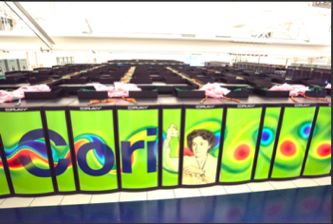
NERSC’s 2020 System: Perlmutter

• Designed for large-scale simulation                                                          High-memory
                                               CPU-only nodes
  and large-scale data analysis

                                                                    “Slingshot” Interconnect
                                                AMD Epyc™                                        workflow

                                                                      Ethernet Compatible
• 3x-4x capability of current system             Milan CPUs                                       nodes
• Include both NVIDIA GPU-                      CPU-GPU nodes
  accelerated and AMD CPU-only                Future NVIDIA GPUs                               Login nodes
  nodes                                          Tensor Cores
• 200 Gb/s Cray Slingshot interconnect                                                         External file
                                               All-flash platform
• Single tier, all-flash Lustre file system   integrated storage
                                                                                                systems &
                                                                                                networks

                                        -3-
Designing an all-flash parallel file system
• In 2020, all-flash makes good
  sense for the performance tier
• With a fixed budget, how much
  should we spend on…
    – OST capacity?
    – NVMe endurance?
    – MDT capacity for inodes and Lustre
      DOM?
• Performance not discussed here

                                   -4-
NERSC’s quantitative approach to design
• Inputs:
   1. Workload data from a reference system
   2. Performance specs of future compute subsystem
   3. Operational policies of future system
• Outputs:
   – Range of minimum required OST capacity
   – Range of minimum required SSD endurance
   – Range of minimum required MDT capacity for DOM

                            -5-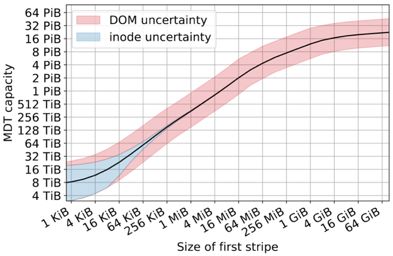
Reference system: NERSC Cori
Compute
•   9,688 Intel KNL nodes
•   2,388 Intel Haswell nodes
Storage
•   30 PB, 700 GB/s scratch
     – Lustre (Cray ClusterStor)
     – 248 OSSes x 41 HDDs x 4 TB
     – 8+2 RAID6 declustered parity
•   1.8 PB, 1.5 TB/s burst buffer
     – Cray DataWarp
     – 288 BBNs x4 SSDs x 1.6 TB
     – RAID0

                                      -6-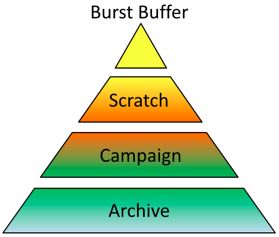
NERSC workload data sources
                                                                     •   smartmon tools
                                                        on                – Per-device metrics vs time
                                                 Sm artM
                                        f   er /
                                  t B uf                                  – Write amplification factor
                           Burs
                                                                          – Total bytes written
                              Lustre / LMT / pytokio                 •   Lustre Monitoring Tools (LMT)
Performance

                                                                          – Per-OST measurements vs time
                                       Lustre /                           – Bytes written to OSTs
                                                      lfs df
                                   Lus                               •   Lustre "lfs df“ & cron
                                         tre
                                               / Ro
                                                      b i nh              – Per-OST fullness vs time
                                                               ood        – LMT also has this information
                                                                     •   Robinhood
                                                                          – Snapshot of entire namespace &
                                                                            POSIX metadata
                                                                          – File size distribution
                                                                          – Non-file inode sizes
                Capacity
                                                         -7-
Minimum required file system
capacity
-8-How much flash capacity do we need?
Intuitively, we need to
balance…
1. How quickly users fill
the file system
2. How frequently the
facility drains the file Cori Lustre capacity used over time
system
-9-File system capacity model
“time between purge cycles” or Daily file
“time after which files are eligible for purge” system
growth of
Minimum capacity of
Cori
Perlmutter scratch
Sustained System Purge Fraction – fraction
Improvement of fs capacity to reclaim
- 10 -Calculating Cnew for Perlmutter
Mean daily growth for Cori
is 133 TB/day
Data retention policy for
Perlmutter:
● Purge/migrate after 28 days
● Remove/migrate 50% of
total capacity
Perlmutter will be 3x to 4x “faster”
than reference system
Minimum capacity is between 22 PB and 30 PB
- 11 -Do we need [to pay for] high-
endurance SSDs?
- 12 -How many drive writes per day do we need?
Intuitively, required drive writes per day depends on…
1. How much data users write to the file system daily
2. How much extra RAID parity is written
3. How much hidden “stuff” is written
1. Read-modify-write write amplification
2. Superblock updates
4. How big a "drive write" actually is
- 13 -Calculating drive endurance requirements
Drive Writes Per File System Writes
Per Day on Cori Total drive RAID code
Day required for rates
counts
Perlmutter
Write
Amplification Lustre
Sustained System formatting Per-drive
Factor caused
Improvement efficiency capacities
by other “stuff”
- 14 -Cori’s FSWPD over two years
N ot
t
as fi he same
le sy
grow stem
From LMT/pytokio th!
• 1 FSWPD = 30.5 PB
• Mean FSWPD 0.024
(~700 TB/day)
- 15 -Estimating WAF in production
• Not internal SSD WAF
• Difference between
what Lustre writes and
what disks write
– Can use OST-level
writes (LMT) and
SMART data
– Had to use DataWarp
SSD WAFs here
• Median WAF: 2.68
• 95th percentile: 3.17
- 16 -So how much endurance do we need?
0.96 to 1.0
0.195 to assume 1.0
0.024 (cnew from 8+2 to 10+2)
0.320
2.68 to 3.17 assume 1.0
(WAF is between
3.0 to 4.0 WAF50 and WAF95) 0.95
(actually
closer to 0.97)
- 17 -So how much endurance do we need?
Buyi 0.96 to 1.0
0.195 to n
SSD assumeg en 1.0
0.024 terp (cnew from 8+2 to 10+2)
0.320 s (>
not e 1.0 DW rise
ffect PD)
ive u is
€€€! se o
f
2.68 to 3.17 assume 1.0
(WAF is between
3.0 to 4.0 WAF50 and WAF95) 0.95
(actually
closer to 0.97)
- 18 -How much MDT capacity is
needed for DOM?
- 19 -Lustre Data-on-MDT (DOM)
• Store first S0 bytes of a file
directly on Lustre MDT
• Reduces number of RPCs,
small-file interference, etc
• But HPC facilities now have
to define:
– How big should S0 be?
– How much MDT capacity is
required to store all files’ DOM
components?
– How much MDT capacity is
required to store inode data?
- 20 -How much MDT capacity do we need?
Intuitively, MDT capacity depends on…
1. How much capacity we need to store inodes (files,
directories, symlinks, …)
2. How many files we have with size smaller than S0
3. How many files we have with size larger than S0
4. Our choice of S0
- 21 -MDT capacity required for inodes
• 1 inode = 4 KiB
• ...but big dirs need
more MDT capacity!
• Assume size dist is
constant for any Cnew
• Then estimate the
For inodes 4 KiB:
size dist for our Cnew # inodes * 4 KiB Just add up size of
all directories
- 22 -MDT capacity required for DOM
For files S0:
Just add up size of all S0 ⨉ (# files < S0)
files S0
- 23 -Total MDT capacity required vs. S0
• Uncertainty from
scaling distributions
between Cori and
Perlmutter
• Extreme values of S0
uninteresting
– Tiny S0 = nothing fits in
DOM
– Huge S0 = everything
fits in MDT (and I/O is
no longer parallel)
- 24 -Cost-performance tradeoff of DOM
Cost—MDTs are
usually RAID10,
not RAID6
(R=0.5 vs. R=0.8)
Performance—better
small-file IOPS and less
large-file interference
- 25 -Conclusions
• We have defined models to quantify relationships between
– Workload (I/O and growth rates, file size distributions)
– Policies (purge/data migration policy)
– File system design parameters
• File system capacity
• SSD endurance
• MDT capacity and DOM configuration
• Imperfect models, but still
– identify key workload parameters
– bound on design requirements based on facts, not instincts
– serve as a starting point for sensible system design
All code and workload data available online!*
https://doi.org/10.5281/zenodo.3244453
- 26 -Thank you!
(and we’re hiring!)
- 27 -You can also read


