BHD3F HARLEY DAVIDSON FRONT SYSTEM - FITS SELECT 1998+ HARLEY DAVIDSON ROAD GLIDE AND STREET GLIDE MOTORCYCLES - Boss Audio
←
→
Page content transcription
If your browser does not render page correctly, please read the page content below
BHD3F   HARLEY DAVIDSON FRONT SYSTEM
               FITS SELECT 1998+ HARLEY DAVIDSON
               ROAD GLIDE AND STREET GLIDE
               MOTORCYCLES

0121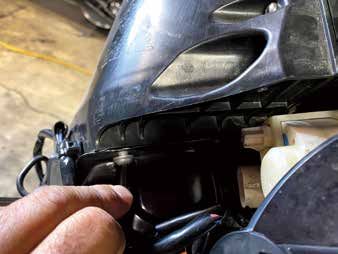
BHD3F
                                                                                                                                                                                                Harley Davidson Front System

                                                                                                                        What is included?
                                                                                                                        Before you begin installation please check that your system
BHD3F                                                                                                                   contains the following contents:
                                         The BHD3F is the first of its kind to fit 1998 to present Harley Davidson
Harley Davidson
Front System                             Road Glide and Street Glide models all in one package. This simple to          Speaker install kit contents:
                                         install Plug-n-Play solution is an all inclusive package that features a NEW
Congratulations on
                                         compact high power Four-channel Class D Amplifier, a pair of 6.5” 2-Way
your purchase of a
                                         Weatherproof Loudspeakers as well as all of the mounts, hardware and
POWERSPORTS Speaker System.
                                         connections to make the installation seamless. The BHD3F delivers the
It has been engineered to bring you      outstanding sound and performance everyone wants at a price you can
the highest level of performance.        afford.
Its quality will afford you years of
listening pleasure.
                                         Dimensions:
Thank you for making   your                                                                                                          (1)                                 (2)                              (3)
choice for POWERSPORTS                   Speaker
entertainment!                                           90°

                                                   45°
                                                                         Ø157mm

Mid Bass Driver:
6.5” (165mm)
poly injection cone                                                        2.6”
                                                                         (66mm)
rubber surround                                                                 2.3”
                                                                             (59.5mm)

Tweeter:
1” (25mm) Polymer dome tweeter
                                                                                                 5.5”
                                                                                                                                     (4)                                 (5)                        (6)
Crossover network:                                                                             (140mm)

                                                                                                                                                      1PC
                                                                                                 6.6”
Built-in                                                                                       (167mm)

Impedance:
4 Ohms                                   Amplifier                                                                                                        4x25mm
                                                                                                                                                8PC                                          5x25mm
Power Handling:                                                                                                                                           8PC                                3PC
                                                                 8.3”
150W MAX                                                       (212mm)
                                                                                                                                                       (7)                             (8)
Frequency Response:                                                                             4.3”
105Hz - 20kHz                                                                                 (108mm)
                                                                                                                        (1) HD Street Glide Grills (x2)              (5) Speaker adapters (x2)
Sensitivity:                               4.3”                                                                 1.6”    (2) HD Tour Pak Grills (x2)                  (6) EVA for speaker adapter (x2)
91dB (1 watt/1 meter)                    (108mm)                                                              (40mm)
                                                                                                                        (3) HD Road Glide Grills (x2)                (7) Screw bag for speaker
Dimensions:
6-9/16” (W) x 2-5/8” (H) x 6-9/16” (D)                                                                                  (4) Boss Audio 6.5” Speakers (x2)            (8) Screw bag for speaker adapters (5x25mm 3PC)
(167 (W) x 66 (H) x 167 (D) mm)
                                                                                                                        Important: Over-tightening mounting fasteners may result in damage to your
Amplifier:                                                                                                              motorcycle. Please refer to your service manual for proper procedures and
4 Channel class D Amplifier
                                                                                                                        torque specifications. Boss Audio is not responsible for damage resulting
8-3/8” (W) x 1-5/8” (H) x 4-1/4” (D)
(212 (W) x 40 (H) x 108 (D) mm)                                                                                         from improper installation techniques. This kit may not be compatible with
                                                                                                                        some aftermarket head units.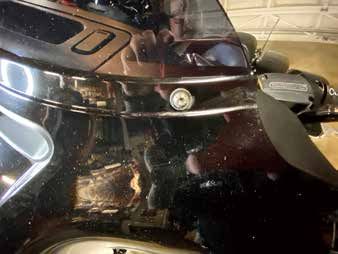
BHD3F                                                                                                         BHD3F
                                                                      Harley Davidson Front System                                                                                 Harley Davidson Front System

GETTING STARTED                                                                                      3. Remove (2) T-27 Torx bolts from outer edges of inner fairing near the fork tubes (facing forward)
1. Protect all painted surfaces.                                                                     4. Remove (3) T-27 Torx bolts from bottom edge of windshield.

                                                                                                     Note: Windshield and fairing will be loose once these screws are removed. Use extreme caution not
                                                                                                          to damage fairing or windshield. Lift away and unplug headlight to remove outer fairing.

2. Remove seat and disconnect negative battery terminal.
3. On 2009 and later models, it will help to remove the two T40 bolts, the ECM and tray

HD Front Speaker installation
1998 – 2013 Street Glide /Batwing models:
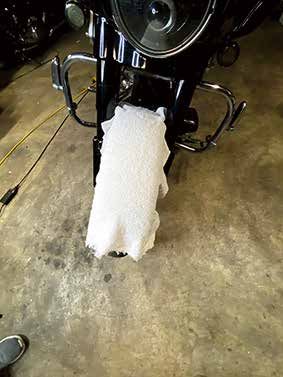
1. Cover the front fender.
2. Remove (2) T-27 Torx bolts from inner fairing (under mirrors)

                                                                                                     5. Remove windshield taking caution that the outer fairing is loose.
                                                                                                     6. Lift away and unplug headlight to remove outer fairing.
                                                                                                     7. Remove the remaining speaker screws and the speaker. Continue to kit assembly Loosen (6) T-25
                                                                                                        Torx bolts from bottom, middle and top of left and right sides of the inner fairing.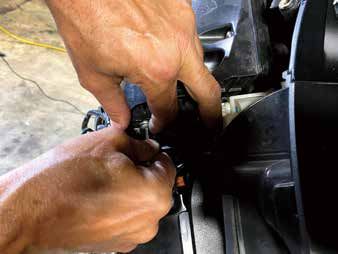
BHD3F                                                                                                            BHD3F
                                                                   Harley Davidson Front System                                                                                   Harley Davidson Front System

2014 – 2020 Street Glide / Batwing models:                                                        Note: Windshield and fairing will be loose once these screws are removed. Use extreme caution not to
1. Cover the front fender.                                                                              damage fairing or windshield. Lift away and unplug headlight to remove outer fairing.
2. Remove (2) T-27 Torx bolts from inner fairing (under mirrors)

                                                                                                  5. Remove windshield taking caution that the outer fairing is loose.
                                                                                                  6. Lift away and unplug headlight to remove outer fairing.
1. Cover the front fender.
                                                                                                  7. Remove the remaining speaker screws and the speaker. Continue to kit assembly Loosen (6) T-25
2. Remove (2) T-27 Torx bolts from inner fairing (under mirrors)
                                                                                                     Torx bolts from bottom, middle and top of left and right sides of the inner fairing.

                                                                                                  1998 – 2013 Road glide / Shark nose models:
                                                                                                  1. Loosen (6) T-25 Torx bolts from bottom, middle and top of left and right sides of the inner fairing.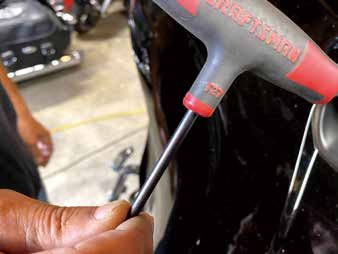
BHD3F                                                                                                           BHD3F
                                                                            Harley Davidson Front System                                                                                     Harley Davidson Front System

2. Lift away the fairing, unplug the headlights and remove.
4. Remove the speaker screws and the speaker.

                                                                                                                                                                                    (10)
                                                                                                                    (8)                                (9)

                                                                                                                                                                                                  (13)

                                                                                                                       (11)                                     (12)

2014 + Street and Road Glide                                                                                                                                                          (16)
1. Using 3 of the screws in the provided hardware, mount the speaker adapter to the inner fairing. The                                        (15)
   4th inner bottom screw locations are not used on FLH/ batwing models. For Road Glide models,                   (14)
   rotate the adapter until the notches in the adapter do not hit the factory mounting posts, and make     (1) Ultra Classic Street Glide and Tri Glide bracket (x1)      (9) Output from Amplifier front (x1)
   sure the flat spots on the outside of the adapter are toward the outer edge of the fairing.             (2) Road Glide mounting bracket (x1)                           (10) Remote wire and pin (x1)
2. Mount the new speaker with the hardware provided with the speakers. Do not re-use the factory           (3) Road Glide mounting bracket (x1)                           (11) Power/Ground harness (x1)
   screws. (Figure B) Note: For the Roadglide and Sharknose models, the longer screw may be needed         (4) Universal Amp mounting plate (x1)                          (12) Rear speaker input/output harness (x1)
   in the lower mounting hole depending on the new speaker.                                                (5) Road Glide Amp mounting bracket (x1)                       (13) Rear speaker connector (x2)
                                                                                                           (6) Front speaker input for the Amplifier (White/Black) (x1)   (14) Screw Bag (x1)
Amplifier and Amp plate Installation                                                                       (7) Front speaker input for the Amplifier (Gray/Black) (x1)    (15) Nylon spacers (x4) + Double sides tape (x4)
1998 – 2013 FLH/Batwing models:                                                                            (8) Input from Amplifier front (x1)                            (16) Wire Zip Tie Wraps (x8)

BHD34 Amplifier Mounting Plate Kit Contents                                                                BPS400.4 4 Channel Class D Amplifier Contents

                                                                                                                                                      (2)

                                                                                                                                                      (3)

               (1)                                                                                                                                    (4)
                                               (2)                                                                            (1)
                                                                               (3)                                                                    (5)
                                                                                                           (1) Amplifier (x1)
                                                                                                           (2) Remote wire (x1)
                                                                                                                                                      (6)
                                                                                        (6)                (3) Front output harness (x1)
                                                                                                           (4) Rear output harness (x1)
                                                                                                           (5) Front input harness (x1)               (7)
                      (4)                                                                                  (6) Rear input harness (x1)
                                                     (5)                              (7)
                                                                                                           (7) Wrench (x1)

                                                     7                                                                                                           8
BHD3F BHD3F
Harley Davidson Front System Harley Davidson Front System
Step 1 - Mounting Plate and Bracket Mounting HD Street Glide 98 – 13
With the front faring removed. Using the Type(4) bracket, align bracket on the bottom side of the mounting Step 2 - Mounting Plate and Bracket Mounting
plate using the bracket type indicators. On the top edge, you will screw in the two threaded pins into the Using the Type(1) and Type(4) brackets, align bracket on the bottom side of the mounting plate using
mounting plate. These are used to align the mounting plate with the rubber bushings on top of the the bracket type indicators. On the top edge, you will screw in the two threaded pins into the mounting
factory radio. plate. These are used to align the mounting plate with the rubber bushings on top of the factory radio.
2014 & Up - Street Glide 1998 & 2013 - Street Glide
Screws
Threaded Rod
Aluminum
Heat Sink
Aluminum Bracket
Heat Sink
Double sides Screws
tape
Step 3 - Amplifier Mounting
Nylon Spacers Mount amplifier upside down with the supplied screws to the mounting plate. Align the amplifier
to the appropriate holes on the plate.
HD Road Glide 98 – 13
2015 & Up - Road Glide Step 2 - Mounting Plate and Bracket Mounting
Using the Type(2),Type(3) and Type(4) brackets, align bracket on the bottom side of the mounting
plate using the bracket type indicators. After you have the bracket attached to the mounting plate,
remove the clutch side fairing bulkhead nuts. Place the bracket over the studs pushing the bracket
Screws
upwards while tightening down using the factory hardware.
1998 & 2013 - Road Glide
Aluminum
Bracket Heat Sink
(Type 5)
Aluminum
Heat Sink
Screws
Brackets
9 10BHD3F BHD3F
Harley Davidson Front System Harley Davidson Front System
Step 3 - Amplifier Mounting Step 6 - Rear Speaker Installation
Mount amplifier upside down with the supplied screws to the mounting plate. Align the amplifier to the With the seat already removed, route the Rear Speaker Harness toward the rear of the motorcycle over
appropriate holes on the plate. the fender along the brake side of the motorcycle. Unplug factory speaker wires from the speaker and
plug them directly into the Rear Speaker Input / Output Harness. These are labeled clutch and brake side.
Amplifier Wiring
Amplifier and Amp plate Installation 2014 – Newer
Street Glide FLHT/Batwing models:
AMP INSTALLATION
*NOTE* after installation this vehicles head unit must be flashed to get
proper sound from the upgraded system. Please see the following link
to find a recommended HD shop that can flash the stock system.
https://technoresearch.info/tuning-centers-map/
If you have a 2020 Street or Tri Glide, the following steps must be completed before amplifier installation:
Remove four screws from the HD Connect Module. Remove Module from Bracket.
Relocate Module to the clutch side of the radio and secure with two 8” zip ties included.
NOTE: There may be some connectors that will need to be relocated off the radio
chassis for the amp bracket to fit.
1. Fasten the amplifier to the bracket with the supplied hardware.
Insert the bolts through the bottom of the bracket and install the locknuts to the amplifier.
2. After finishing System Setup, use the supplied hardware and fasten the amp/bracket assembly
to the radio chassis with the 10-pin connector and power connector facing the throttle side.
Once the amplifier is mounted, you can now begin plugging in the wiring harness in their appropriate HARNESS INSTALLATION
sockets. Plug the switched power harness into the 2-pin amp connector on the throttle side of the fairing. 3. Plug the harness into the amplifier and route the speaker wires to their respective locations.
Note: Be careful when plugging in the harnesses to the appropriate socket. The 4-pin Molex plugs for the Separate the speaker connectors and plug in the amplifier harness to each speaker.
Input / Output Harnesses fit in both sides of the amplifier. 4. Plug the 4-pin male, rear audio connector into the 4-pin female rear audio signal connector
coming from the radio harness.
Step 4 - Fairing Speaker Wiring 5. Plug the switched power harness into the 2-pin amp connector on the throttle side of the fairing.
Unplug the factory speaker wires from the speaker and plug them directly into the Front Speaker Input 6. Plug the Supplied blue wire on the Boss Audio Amplifier kit into the switched power harness lead
Harness. These are labeled clutch and brake side. Now you can plug the new Front Speaker Output with one wire. This allows for an accessory 12V port to remain available.
Harness onto your new speaker terminals. Route power / ground through fairing. Including installing 7. Route the power leads along the clutch side of the frame neck, in the electrical caddy to the seat area.
rear speaker wires, feed the Rear Speaker Input / Output Harness through fairing towards the rear of 8. Reconnect the battery terminals and pull the excess harness slack back into the fairing. Create a slack
the speaker. loop with excess harness slack.
5 - Routing Power Harness / Rear Speaker Harness 9. Plug the radio in and set the gain.
Pass the Power / Ground Harness and Rear Speaker Harness through the fairing and route next to the 10. Test component function and set the gain to optimize system performance.
factory wiring harness. Routing the new wire harnesses along with the factory harness is recommended. 11. Carefully reassemble the motorcycle and enjoy your new audio kit
Be sure to zip tie the harnesses together for a clean, tight fit. Due to the size wire for the Power / Ground
Harness and Rear Speaker Harness, it is recommended to route the wiring under the gas tank along the
top of the frame on the motorcycle.
Note: Refer to the motorcycle manufacturer owner’s manual for bike. instructions regarding
gas tank removal.
11 12BHD3F BHD3F
Harley Davidson Front System Harley Davidson Front System
Amplifier and Amp plate Installation 2014 – Newer This kit comes ready to plug directly into 2014 & Up Harley-Davidson Motorcycles using the factory style
Road Glide FLTR 2015 – Newer: connectors. If you are installing on a 1998-2013 motorctcle, you will need to use the wire connector
adapters to connect to the factory wire harness and new speakers.
*NOTE* after installation this vehicles head unit must be flashed to
get proper sound from the upgraded system. Please see the following NOTE: This wiring diagram is for a standard 4-Channel amplifier installation. If you are using a 2-Channel
amplifier, DO NOT use the Rear Input / Output Harness.
link to find a recommended HD shop that can flash the stock system.
https://technoresearch.info/tuning-centers-map/ FRONT
1. Remove the radio. Clutch Side Brake Side
Unplug the four connectors on the back of the radio. Front Speaker Front Speaker
(Connect to factory speaker wire) (Connect to factory speaker wire)
Remove the four Allen head bolts holding the radio to the chassis.
Front Speaker Input Harness
Gently remove the radio from the chassis.
(98-13 Adapter) (98-13 Adapter)
2. Install the Boss Audio amplifier onto bracket Type(4) with supplied hardware. Front Speaker Output Harness
Slide the end of the amplifier with the power connector port into the bracket and fasten with (98-13 Adapter) (98-13 Adapter)
supplied hardware. Install the bolts from the bottom and fasten the locknuts onto the amplifier.
3. Carefully install bracket/amplifier assembly onto radio chassis by installing the assembly
through the radio face port in the fairing and sliding the tabs of the bracket over the chassis.
The amp bracket assembly mounts under the radio. Front Speaker Front Speaker
(Connect to speaker) (Connect to speaker)
HARNESS INSTALLATION Rear Speaker Input Harness
4. Plug the harness into the amplifier and route speaker wires to their respective connectors.
Separate the speaker connectors and plug in the amplifier harness to each speaker.
Important: Over-tightening mounting fasteners may result in damage to your motorcycle. Please refer Rear Speaker
Speaker Input / Output Harness (Rear)
to your service manual for proper procedures and torque specifications. Boss Audio is not responsible Output Harness
for damage resulting from improper installation techniques.
5. Plug the switched power harness into the 2-pin amp connector on the throttle side.
Power Harness
6. Plug the blue wire on the Boss Audio harness into the switched power harness lead with one wire. REM (Blue)
This allows for an accessory 12V port to remain available. 2014 & Up Remote Wire
7. Route both power leads along the clutch side of the neck and through the electrical caddy to the
seat area.
8. Reconnect the battery terminals.
9. Plug the radio in, but do not reinstall it until the gain has been set.
10. Test component function and set the gain to optimize system performance.
11. Carefully reassemble the motorcycle and enjoy your new audio system!
Input Harness - Clutch Input Harness - Brake
(Connect to factory speaker wire) (Connect to factory speaker wire)
Output Harness - Clutch Output Harness - Brake
Rear Speaker Rear Speaker
(Connect to speaker) (Connect to speaker)
REAR
13 14You can also read


