Continuous Teamwork Anytime, Anywhere
←
→
Page content transcription
If your browser does not render page correctly, please read the page content below

Solution overview
Cisco public

                                        Continuous Teamwork Anytime,
                                        Anywhere
                                        Webex Teams is an all-in-one solution for messaging, file sharing, white boarding, video meetings, calling, and more.
                                        It keeps teams connected anytime, anywhere, and moves work forward faster.

       © 2018 Cisco and/or its affiliates. All rights reserved.
Solution overview
Cisco public

Benefits                                                   Overview
                     Drive productivity in your teams,     Never before have we seen business innovation this rapid, and competition this intense. Businesses
                     and accelerate access to experts      will rise and fall by the strength of the teams that fuel their agility. Teams that include not only internal
                     with feature-rich and easy-to-        colleagues but ecosystems of external experts and partners as well. To support your teams, you need
                     use team collaboration tools          tools that bring people together easily and enable them to work together productively. At the same
                                                           time, you need to meet increasing security and compliance requirements, which are key to keeping
                                                           your information safe and secure. It’s time for you to look at the new team collaboration experience
                     Enhance business outcomes and         enabled by Cisco Webex®.
                     increase employee satisfaction
                     with meetings built for teams         Cisco Webex Teams is a solution to keep you connected to your teams anytime, anywhere. Get work
                                                           done faster whether you’re sending messages from the train, having a video meeting at your desk,
                                                           or brainstorming together in a conference room.
                     Use a single app, with                The Webex Teams app keeps you connected to colleagues, partners, and experts in secure work
                     more content and                      spaces. Send messages and share files. Seamlessly use high-quality video meetings and make calls.
                     information in one place              Express your ideas on whiteboards that others can add to. Even keep up to date with what’s happening
                                                           in other apps.

                     Keep work moving in meeting                                                When teamwork flows into physical rooms, bring the Webex Teams
                     rooms with fully integrated                                                experience with you. Simply pair the app to a Webex device to join
                     Cisco Webex devices                                                        your meetings, share your screen, capture life-sized whiteboard
                                                                                                drawings, and more. That’s Webex Teams. Moving work forward for
                                                                                                all your teamwork. Are you in?
                     Keep your important information
                     safe and secure with advanced
                     security and compliance support
                                                           Trends and challenges
                                                           A new era of working in teams
“Agility is the new currency                               Gartner’s work stream and conferencing revenue forecasts for 2021 are $4.93B and $7.06B,
of business”.                                              respectively. And 72 percent of leaders globally say “effective team communication” has become
                                                           more important (1).
                                                           And teams now span ever broader ecosystems that include colleagues, partners, customers, advisors,
                                                           and even competitors. 68 percent of business leaders are now looking to extend their collaboration
                                                           with external parties (2). Within these diverse teams, many employees are working remotely from their
                                                           own offices, with 67 percent of managers reporting an increase in remote employee productivity (3).
                                                           1. Forecast: Audioconferencing, Worldwide, 2016-2022 (Gartner #G00342004, October, 2017)
                                                           2. Cisco-sponsored HBR study available at cisco.com/go/betterteams
© 2018 Cisco and/or its affiliates. All rights reserved.   3. SurePayroll: Productivity Prohibitors: How to Stop Them in Their Tracks
Solution overview
Cisco public

People love working together. But working together is becoming more           • Meetings built for teams: Add rich meeting experiences to your Webex
complex.                                                                        Teams solution. Seamlessly use high-quality video, screen sharing, and
This complexity arises as people use different products and services to         collaborative white boarding from any device to improve creativity and
collaborate, with one app for messaging and perhaps a separate service          decision making. Any member of a Webex Teams space can schedule a time
for meetings, yet others for email, calendaring, and file sharing. Meeting      to meet in advance or tap to start instantly. Democratized in-meeting tools,
room devices often sit on an island, unused or completely disconnected          such as the ability to mute others, add guests, and turn on recording, help to
from other tools. These siloed experiences can greatly hamper productivity      improve everyone’s effectiveness in the meeting. And all of the chats, files,
and performance.                                                                and whiteboards shared during meetings can be easily reviewed later by any
                                                                                             team member—whether or not they were participating live.
IT managers face the challenge of keeping track
of every device and app in use, and ensuring that                                           • Interoperability for speed and convenience: In addition to
all shared information is secure and meets their                                            the immersive experience delivered by the Webex Teams app,
compliance requirements.                                                                    meeting participants can join Webex team meetings from a
                                                                                            standards-based video device, right from their phone using a
The result: User workflows get broken up and IT faces
                                                                                            call-in number, or even from Microsoft Skype for Business. But
several challenges from lowered return on investment
                                                                                            you also have other meetings. And that’s no problem. Join or
to potential security breaches.
                                                                                            host Personal Room or standard Webex Meetings appointments
The solution: For teams to maximize their productivity,                                     right from the Webex Teams app. As well as any standards-
effective team collaboration is critical. Having the                                        based Session Initiation Protocol (SIP)-compliant meeting.
right tools available for effective teamwork is hugely                                      Because doing more from one place means you can be more
important.                                                                                  productive.
                                                                                             • Best meeting experiences with Webex devices: The
How it works: key features and                                                               Webex Teams app works great with Webex devices to give you
components                                                                                   the best possible video meeting and teamwork experiences
                                                                               in the office. Instantly pair with any cloud-registered Webex device to
• Create spaces to keep work moving anytime: Bring everyone together           start meetings, share your screen, even take the call with you if you need
  easily and quickly in Webex Teams spaces. Enable everyone to see and         to change locations. Further, when paired to the Webex Board you can
  share all the information they need to work together productively. Send      instantly save whiteboard drawings created on the touch screen to share
  messages, share files, and create or edit whiteboards, securely, with one    with others no matter where they are.
  person or a group of people. Add people to your shared spaces easily
  from your company directory. Or simply enter an email address and start     • Calling: Webex Teams includes native in-app voice and video calling
  teaming with customers, partners, or anyone else you need to work with.       capabilities to reach other Webex Teams and standards-based SIP
                                                                                endpoint users. These can be enhanced with comprehensive PBX calling
• Enterprise-grade security: With end-to-end encryption, messages, files,       features and Cisco IP phones when combined with one of our calling
  and whiteboard drawings are protected from your device to theirs, and         solutions - Cisco Webex Calling, Cisco BroadCloud, Cisco Hosted
  everywhere in between. For added control, manage your own encryption          Collaboration Solution (HCS) or Cisco Unified Communications Manager.
  keys on-premises. And we’ve taken the risk out of working with other
  companies. Your policies are in force even when your employees are           Note: Webex Hybrid Call Service is required for integration of Cisco
  collaborating with others outside your company.                              Unified Communications Manager or Cisco HCS with the Webex
                                                                               Teams app.

© 2018 Cisco and/or its affiliates. All rights reserved.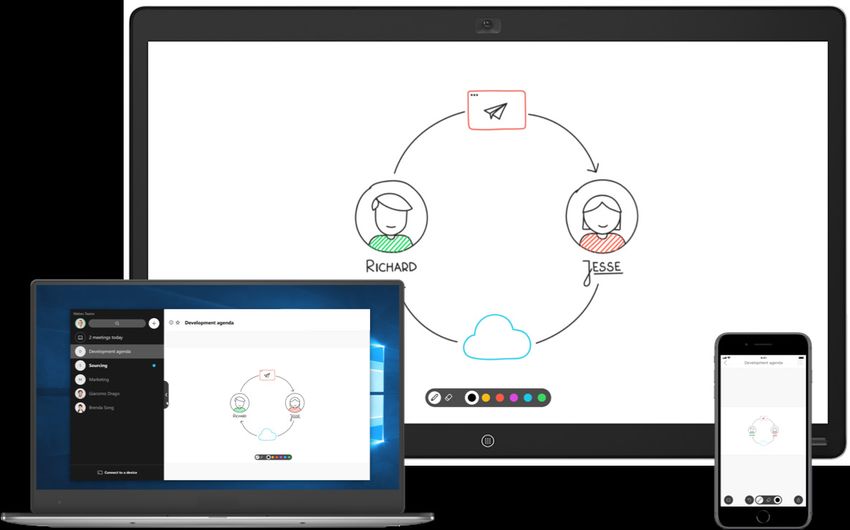
Solution overview
Cisco public

Benefits                                                   • Open integration: Take advantage of Cisco Webex within your own applications. Webex SDKs and
                                                             widgets provide an easy way to embed high-quality audio-video calling and messaging into any web
                                                             or native application. And anyone can visit the Webex App Hub to instantly connect Webex Teams
                                                             spaces with popular third-party tools using a growing catalog of integrations and bots.
                                                           • Hybrid Services: Extend the value of existing investments and improve the user experience by adding
                                                             the capabilities of your on-premises and partner-managed services to the Webex Teams solution.

                                                           Use cases
                                                             Use case                                            Description

Epic film producer collaborates using Cisco                Sales                                                 •   Bring your teams together and address new
Webex Meetings and Cisco Webex Teams.                      Your relationships with customers can be only as          opportunities
                                                           good as your communication tools allow.               •   Get answers fast with direct, private access
Jerry Bruckheimer uses                                                                                               to experts
                                                                                                                 •   Share key documents with your customer
Cisco Webex to enable his                                                                                            without delay to progress your deals
teams to work together                                     Marketing                                             •   Plan your campaigns and assess progress at a
more intuitively.                                          Bring people together instantly and effortlessly.         glance
Learn more                                                 Protect your brand.                                   •   Manage your internal creative teams, external
                                                                                                                     agencies, and experts in a single place
                                                                                                                 •   Track deadlines and accomplishments, and call
                                                                                                                     teammates on the fly

                                                           Finance                                               • Share budgets quickly to keep projects on track
                                                           Unite stakeholders, and connect everyone to           • Track spending and communicate with your
                                                           share reports and manage budgets.                       stakeholders in real time
                                                                                                                 • See everyone’s calendars, meet at the touch of
                                                                                                                   a button, and distribute data securely

© 2018 Cisco and/or its affiliates. All rights reserved.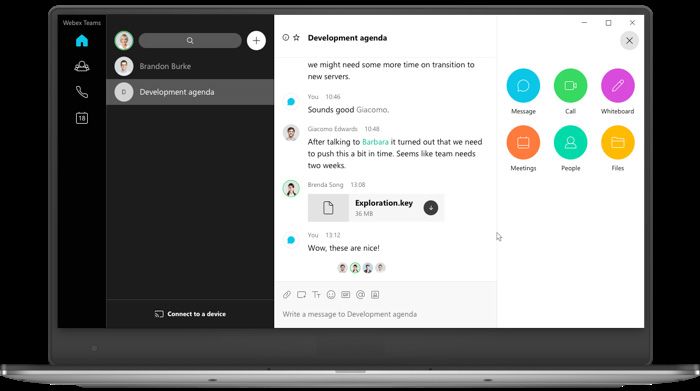
Solution overview
Cisco public

See how Webex Teams stacks up against competitors to help you increase productivity while staying safe

  Webex Teams                                                                        Microsoft Teams                        Slack

               Increase productivity by keeping all your spaces in a single view –
                                                                                      Requires account switching, which      Must manually create shared
               whether created by you or someone outside your company – with
                                                                                     takes time and increases distraction     workspaces or switch tabs
               the ability to easily search all spaces at any time
               Join Webex Meetings and standards-based SIP-compliant meetings
               by simply clicking on a green Join button to get more done from a
               single place
               Stay safe with end-to-end encryption that protects messages, files,
               and whiteboard drawings from your device to theirs and everywhere
               in between

               Native white board experience anytime using the Webex Teams
               app and/or Webex Board. Broaden support to the Webex DX80 and
               Room Series devices during meetings

Click here to see the complete comparison chart.

© 2018 Cisco and/or its affiliates. All rights reserved.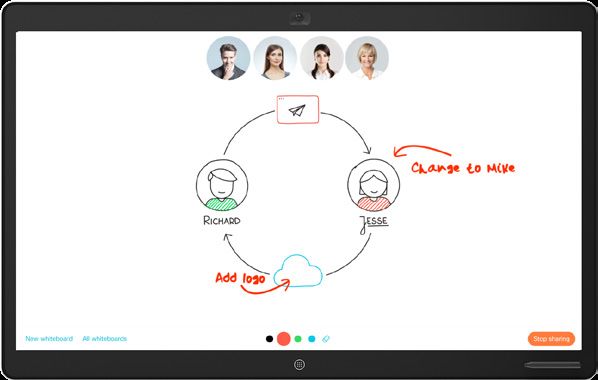
Solution overview
Cisco public

                                               Cisco Capital
                                               Financing to help you achieve your objectives
                                               Cisco Capital® can help you acquire the technology you need to achieve your objectives and stay
Buying is simple                               competitive. We can help you reduce CapEx. Accelerate your growth. Optimize your investment dollars
                                               and ROI. Cisco Capital financing gives you flexibility in acquiring hardware, software, services, and
With a single Cisco® Collaboration Flex Plan   complementary third-party equipment. And there’s just one predictable payment. Cisco Capital is
subscription, enable people to use Cisco’s     available in more than 100 countries. Learn more.
industry-leading meetings and calling
capabilities, combined with the enhanced       The Cisco advantage
messaging of Webex Teams. Then, everyone
                                               Cisco is recognized as a leader in video and web
gets all-in-one team collaboration.
                                               conferencing and unified communications, as
Learn more
                                               well as security and networking. This leadership,
                                               combined with a full portfolio of Cisco Webex
                                               devices, gives you the best possible calling,
                                               meeting, and team collaboration experiences.

                                               Cisco powers the world’s Internet experiences.
                                               We securely connect people, processes, data,
                                               and things to enable innovation that benefits
                                               business and society. For more information visit
                                               The Network.

                                               Call to action
                                               Tear down communication barriers, ditch formality,
                                               and work securely with anyone, anywhere.
                                               Get Webex Teams.

                                               Learn more about everything that Cisco Webex has to offer:

                                               • Cisco Webex Meetings, Calling and Team Collaboration
                                               • Cisco Webex Devices
                                               • Cisco Collaboration Flex Plan
                                               For the latest information and help resources visit the Cisco Collaboration Help site.

                                               © 2018 Cisco and/or its affiliates. All rights reserved. Cisco and the Cisco logo are trademarks or registered trademarks of Cisco and/or its affiliates in the U.S. and other
                                               countries. To view a list of Cisco trademarks, go to this URL: https://www.cisco.com/go/trademarks. Third-party trademarks mentioned are the property of their respective
                                               owners. The use of the word partner does not imply a partnership relationship between Cisco and any other company. (1110R)                          C22-740764-02 11/18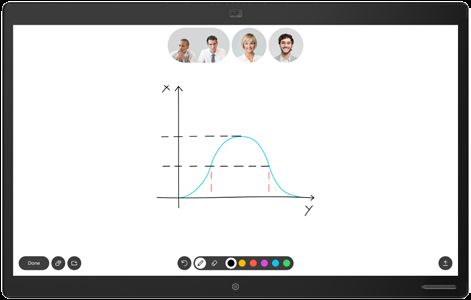
You can also read


