Covid-19 Patient Notification System (CPNS) User Guide - NHS England
←
→
Page content transcription
If your browser does not render page correctly, please read the page content below

Covid-19 Patient
 Notification System
 (CPNS) User Guide
First published March 2020, updated in August 2020 and February
2021. The February 2021 updates are highlighted in yellow
Contents
Page   Item

 3     Pre-requisites

 4     Reporting a COVID death

 7     Registration

 9     Provider Users: Home Page

 10    Provider Users: Adding a Deceased Notification

 13    Provider Users: Updating Patient Information

 14    Regional ICC Users: Home Page

 15    Regional ICC Users: Validate Patient

 16    Regional ICC Users: Edit Un-Validated Patient Records

 17    Regional ICC Users: View Validated Patients

 18    Regional ICC Users: Edit Regionally Validated Patient Records

 19    National ICC Users: Home Page

 20    National ICC Users: Validate Patient

 21    National ICC Users: View Validated Patients

 22    National ICC Users: Edit Records

 23    Authorised National ICC Users: Remove Validated Patient Records

 24    Auto Switch Records

 25    CPNS Definitions including mental health beds

 30    Contact Us

                                                                         2
             CPNS User Guide
           NHS Arden & GEM CSU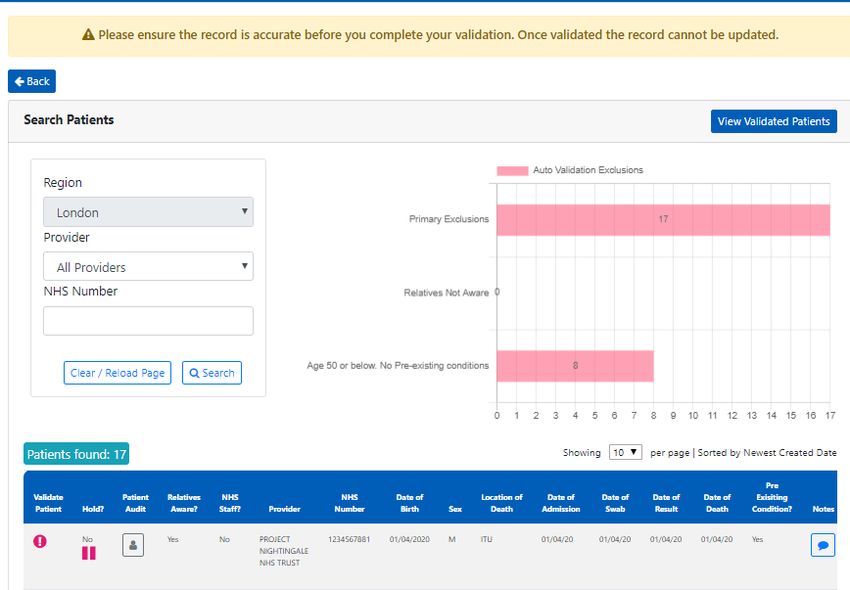
Pre-Requisites
The Covid-19 Patient Notification System is accessible via Google Chrome using
the following web address - https://cpns.ardengemcsu.nhs.uk/

In order to use the system the minimum specification recommended is:

      ▪ nhs.net or nhs.uk email address*
      ▪ Google Chrome. The system can also be accessed via Microsoft Edge
        and Safari

      *for Independent Sector hospital sites, use of a business email address is accepted but private
      accounts e.g. Gmail, Hotmail will not be accepted

                                                                                                        3
                 CPNS User Guide
               NHS Arden & GEM CSU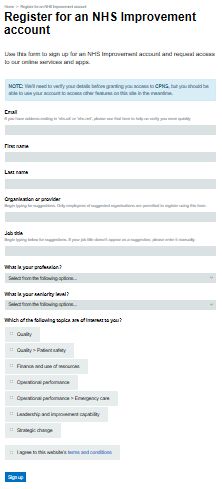
Covid-19 Patient Reporting - Standard
      Operating Protocols for reporting onto
                      CPNS
The Covid-19 remains a Level 4 Incident; this requires NHS England National Command and
Control to support the NHS response. As such, NHS England coordinates the NHS response in
collaboration with regional and local teams at the tactical level.
In completing national returns, including records input onto the Covid-19 Patient Notification
System (CPNS) and issuing press releases, all relevant traffic should come through the Incident
Coordination Centre (ICC) and be approved by the Trust Accountable Emergency Officer (AEO).

Reporting a COVID death
The COVID-19 Patient Notification system (CPNS) was set up in March 2020 to capture COVID-19
related deaths in hospitals in England and is the process for reporting all hospital based COVID-19
related deaths. It is also the process by which NHS hospital and community staff deaths are
reported. The CPNS collection of data provides a rich source of information which will ultimately
inform a wider understanding of COVID-19

Definition of a COVID-19 death for the purposes of CPNS reporting
Please report deaths which occur within hospital premises where there is either a positive
COVID-19 test result or where COVID-19 is cited on either part one or part two of the death
certificate.
This applies to deaths which occur in hospital and includes deaths which occur within the
emergency department.

Which deaths should I report on CPNS?
Please include records where the patient's death has occurred with either:

A positive COVID-19 Test result or
Cited on either Part 1 or Part 2 of the death certificate

For the purposes of CPNS reporting, there is a time limit of 28 days by which the positive COVID-
19 test result should be documented onto CPNS. In instances where a patient has had a positive
test result >28 days prior to death (or where there is a negative test, no test or result unknown),
this death would not be reportable onto CPNS unless COVID-19 is cited in part 1 or part 2 of the
death certificate.

This is a change to reporting in order to make the criteria clearer. This change does not impact on
previous records.

                                                                                                 4
                   CPNS User Guide
                 NHS Arden & GEM CSU
Covid-19 Patient Reporting - Standard
Operating Protocols for reporting onto
CPNS
How quickly do I need to report a COVID death onto CPNS?
Where there is a positive COVID-19 test result, the death should be reported within 24 hours.
In instances, where COVID-19 is cited on the death certificate, this should be reported as soon as
this is known. There should be no delay in entering the record onto CPNS. The time between
date of death and recording onto CPNS is measured. The reason for any delays in reporting
should be mentioned in the notes.
How do I report an NHS staff death onto CPNS?
If you become aware that the patient record you are inputting relates to a recent NHS staff
member, please indicate this on the CPNS fields. You will need to know their staff group, role
and their last place of work. There is space to add any additional notes. Please also inform your
AEO if you are aware of the death of an NHS staff member. Your AEO will make the Human
Resources Director aware. Guidance was issued by the People's Team at the end of August and is
available from england.incident44@nhs.net
Reporting a COVID death of NHS Staff in the community
Whilst hospital based deaths will be reported directly by the Trust in question through CPNS,
community deaths are outside the parameters for inclusion on this system therefore notification
of staff deaths occurring in the community will need to be reported via local ICCs who will notify
the national Patient Notification (PN) team for manual inclusion in their reporting.
Once notified, Employers should contact their regional ICC and Covid-19 Patient Notification team
via their Regional Directors of Workforce & OD and provide the Patient Notification team with the
completed Minimum Data Set available on request from your regional CPNS lead.
Once reviewed, regional Patient Notification (PN) teams will provide this to national PN team for
inclusion.
5
CPNS User Guide
NHS Arden & GEM CSUCovid-19 Patient Reporting - Standard
Operating Protocols for reporting onto
CPNS
What happens to the data once it is input into CPNS and how is it used?
Once the record is input onto CPNS, the record becomes visible to your regional CPNS lead.
The regional lead will validate the record and may contact you for additional information.
Once the record is validated regionally, the record becomes visible to the national Patient
Notification team who submit it to the national report.
It is important that the information you enter into the system is accurate. Once the
information is submitted and announced, it cannot be removed.
The National Report is published onto the Statistics area of the NHS England and NHS
Improvement website, within a special area containing data regarding COVID-19 deaths. The
data is updated daily and can be accessed here. It is publicly accessible and receives a lot of
attention.
The data is also shared with Department of Health and Social Care and Public Health England.
The Office for National Statistics (ONS) also collates our information in order to support the
weekly report: Deaths in England and Wales, which indicates the impact of the pandemic by
measuring Covid-19 related deaths against the expected national average for any one week.
It is therefore essential to have accurate and timely reporting of COVID-19 related deaths. The
information is a rich set of data which provides insight and learning about the national impact
of the pandemic and informs short- and long-term policy and important guidance.
A press release is issued daily with a regional breakdown of deaths, the age range of those
people who have died and the number of patients who have died with a pre-existing
condition.
Reporting the data on a daily basis to media and supporting journalists with their
understanding of the data is of the utmost importance; doing so enables NHS England and
NHS Improvement to offer open and transparent information to the public. Ultimately, the
information you provide supports vital public health messaging regarding the containment of
the virus.
Your continued support and vigilance to this process is therefore appreciated and essential.
6
CPNS User Guide
NHS Arden & GEM CSURegistration - if you do not have an Insights
Account, Login & Forgotten Password
To access the Covid-19 Patient Notification
System you will need to register for an Insights
account, as access to the system is based on
OKTA authentication.
Please follow this link:
https://apps.model.nhs.uk/register?app=0oa3qn
qnsysTfdclU0i7
Complete the registration form, using your
individual email address and click Sign up.
Shared email addresses will not be accepted.
You will receive email confirmation that your
Insights account has been approved and will be
asked to create a password and set up security
questions. Please only attempt to access the
system once you have received confirmation that
you have CPNS access.
Once this is complete,
please log in at:
https://cpns.ardenge
mcsu.nhs.uk/
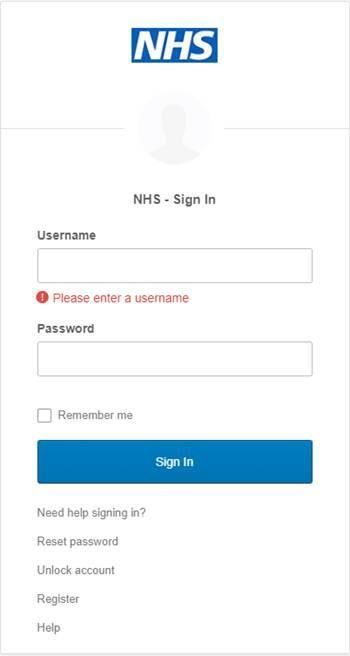
Enter your username
and password, and
select Sign In.
In the event of a
forgotten password,
you can reset your
password from the
login screen. Select
Need help signing in?
and then Reset
password.
7
CPNS User Guide
NHS Arden & GEM CSURegistration - if you have an existing NHS
Improvement Account, Login & Forgotten
Password
To access the Covid-19 Patient Notification System you will need to contact the Arden
& GEM Systems & Reporting Helpdesk (agem.apps@nhs.net) informing them you
have an existing Insights account and require CPNS access adding to it. Once you have
received confirmation that the additional access has been granted, please log in at:
https://cpns.ardengemcsu.nhs.uk/
Enter your username and password, and select Sign In.
In the event of a forgotten password, you can reset your password from the login
screen. Select Need help signing in? and then Reset password.
8
CPNS User Guide
NHS Arden & GEM CSUProvider Users: Home Page
As a Provider User of CPNS you will see the below home page when you have logged in. If you do not
see this screen, please click the NHS or CPNS logo from the menu bar across the top of the page, which
will take you to the home page.
Select the Deceased Notification tab to submit the notification form for a deceased patient or the
Updating of Patient Info tab to amend or add information to submissions that have not yet been
validated.
The home page will display a chart that contains information regarding your provider's submissions and
the status of those submissions, whether they are not validated, validated by the Regional ICC or
validated by the National ICC. You can use the calendar icon to alter the dates displayed. Select Search
once you have selected a date.
Under the chart area there is a
Search Records option. You can
enter a NHS Number and dates
within a 7 day range to view
historical records.
9
CPNS User Guide
NHS Arden & GEM CSUProvider Users: Adding a Deceased Notification
1 5
6
2
7
3 8
9
4
10
11
12
13
10
CPNS User Guide
NHS Arden & GEM CSUProvider Users: Adding a Deceased Notification
1. General Information
Your organisation and region will automatically be displayed on the form.
Please complete all fields marked with a red line on the left hand side, using the drop down menus or
calendar functionality for dates.
2: NHS Number
Enter the patient's NHS Number and select Search. If you do not have the NHS Number, tick the No NHS
Number box. This will display a message asking you to 'Please contact your Regional Incident
Coordination Centre ' and will provide the relevant number to call. When you receive the unique
number generated by your Regional Team this will need to be entered with the 'No NHS Number' box
ticked for the system to accept it. The system will reject a NHS number that has previously been entered
and a NHS Number that is less than 10 digits. This will automatically populate the 'Sex' and 'Date of
Birth' fields. If the 'Date of Birth' field does not pre-fill, please enter it manually, using the calendar
functionality. Clicking on the year will display year options, and once you have selected a year, the view
will change to months and then days.
3: Is Homeless?
If you select 'Yes' for the 'Is Homeless?' field, some additional fields to complete will appear.
4: Is a Current NHS Staff?
If you select 'Yes' for the 'NHS Staff' field, some additional fields to complete will appear including their
role and the last trust they worked at. Please ensure the patient was a current NHS staff member
5: Date of Admission
The Date of Admission cannot be after Date of Death. The date range is limited to later than 1/1/2000.
Please contact your region to edit if this is before that date
6: Test Result
If the Test Result is positive, the question regarding whether Covid has been recorded on the death
certificate will be greyed out. If the Test Result is positive but over 28 days before date of death;
negative; no test has been carried out etc. the death certificate question will be mandatory to complete.
If Covid has not been recorded on the death certificate you will not be able to submit the deceased
notification. The Test Result field also affects whether the Date of Swabbed or Date of Result are
mandatory fields. The date range is limited to no earlier than 01/01/2020
7: Date of Death
Once the Date of Death information is entered, the 'Age' field will automatically populate. If the 'Date of
Death' is before the 'Date of Admission' an error message will appear, and you will be unable to proceed
with the submission until this has been rectified. The date is limited to no earlier than 01/01/2020
8: Relatives Aware?
The field asking whether relatives are aware, refers to whether relatives are aware of the patient's Covid-
19 status.
11
CPNS User Guide
NHS Arden & GEM CSUProvider Users: Adding a Deceased Notification
9: Is Pre-Existing Conditions?
If you indicate that the patient had pre-existing conditions, the 'Pre-Existing' conditions drop down field
will become mandatory, and you can add additional notes in the free text box. If you select 'Other' the
notes box will become mandatory. Please select "Severe mental health problems" for patient with
schizophrenia/psychosis, bipolar disorder, personality disorder or eating disorders. If you select 'No' for
pre-existing conditions, this section of the form will be greyed out.
10: Learning Disability and/or Autism?
If you select 'Yes' for Learning Disability/Autism, additional fields to complete will appear.
The field regarding whether the patient received treatment for a mental health condition refers to this
admission.
11: Received Treatment for a Mental Health Condition?
If you select 'Yes' to answer the question regarding 'Received treatment for a Mental Health Condition?'
two additional questions appear.
• Detained under the Mental Health Act: select yes if the patient's legal status recorded in their patient
record states "detained". "Yes" is to be selected for all patients detained under any section of the Act,
including those treated in the community but subject to recall to hospital under a Community
Treatment Order and patients under Short term Detention Orders for a mental health disorders by the
police and taken to a place of safety for further assessment by a mental health professional.
• Has the patient been transferred from a Mental Health Setting? Select "Yes" if the patient was
received by the notifying provider from a Mental Health inpatient setting, including acute adult beds,
acute older adult (organic and functional) beds, psychiatric intensive care unit beds, specialised
commissioning mental health beds (all ages), and learning disability beds. Please do not include
patients that have had previous admissions to mental health beds but did not transfer directly from a
mental health setting to the notifying provider.
Locations definitions for Mental Health beds can be found on p.22.
12: Notes
The Notes section has a character limit of 1000 characters.
13: Submit
When complete, click Submit. A box will appear asking you to confirm your submission. Once you have
clicked Yes a green banner will display a message at the top of the screen informing you that the data has
been captured successfully. You can then begin to complete the form again for another patient.
12
CPNS User Guide
NHS Arden & GEM CSUProvider Users: Updating Patient Information
If you need to update the patient information that has been submitted, select Updating of Patient
Info from the home page. You can only do this for records that have not been validated either
Regionally or Nationally or both. The below search screen will appear. You can search patients using
their 'NHS Number'. Click Search. A summary of the record will be displayed. Notes and NHS
Employee information can be viewed by hovering over the i icon or the comment icon. Hovering over
the person icon will display audit information.
The graph at the top of the screen shows the number of submissions that are available to edit based
on the auto switch records (please see p.24) and you can click on the bars to filter the list of records.
Once you have located the record that requires updating, select the edit icon in the column on the left
hand side named Edit.
The record will display on the screen and you can make the
necessary updates. Select Submit once complete, and Yes in
the box that appears asking if you are sure you want to
update the patient information.
13
CPNS User Guide
NHS Arden & GEM CSURegional ICC Users: Home Page
As a Regional ICC User of CPNS you will see the below home page when you have logged in. If you do not
see this screen, please click the NHS or CPNS logo from the menu bar across the top of the page, which
will take you to the home page. Select the Regional Validation tab to validate patients at a Regional level.
The home page will display a chart that contains information regarding your Region's submissions and
the status of those submissions, whether they are not validated, validated by the Regional ICC or
validated by the National ICC. Totals are displayed at the top of the graph.
You can use the calendar icon to alter the dates displayed. Select Search once you have selected a
date. You can also filter the chart to view submissions for individual providers using the drop down
menu.
14
CPNS User Guide
NHS Arden & GEM CSURegional ICC Users: Validate Patient
Once you have selected the Regional Validation tab
from the home page, a search screen will appear.
The Region drop down menu will default to your
region. You can choose to view submissions from
individual providers or search for a specific NHS
Number. Select Search to view results. Select Clear
to begin a new search. The graph at the top of the
screen shows the number of submissions that are
available to edit based on the auto switch records
(see p.24) and you can click on the bars to filter the
list of records. It is possible to sort records by
created date, region, validated at region, validated
at national. Simply click the arrows either side of the
column heading.
A summary of the submission will display and Notes and NHS Employee information can be viewed by
hovering over the i icon or the comment icon. Hovering over the person icon will display audit
information. The age is displayed under the date of birth and will be highlighted in red if the patient is
aged 18 or under. There is also a lag calculator; under the date of death, the number of days between the
date of death and the date of the record being submitted will display.
Validate a submission by selecting the ! Icon in the column on the left hand side of the page, and then
select Validate in the pop up box that appears. If a submission requires investigation, you can 'Hold' the
submission by selecting the pause icon and then Hold Patient's Record in the pop up box that appears.
When the submission is ready to validate, select the green arrow that has replaced the pause icon, and
then Un-Hold Patient's Record. Hovering over the person icon under the arrow will inform you which
user held the record and when.
15
CPNS User Guide
NHS Arden & GEM CSURegional ICC Users: Edit Un-Validated
Patient Records
If you need to update the information on a submission, select the pencil edit icon from the column on
the left hand side, titled 'Edit'.
The below screen will appear. Edit the necessary information and then select 'Submit'. You will be asked
to confirm that the patient information should be updated. Select 'Yes' to proceed.
16
CPNS User Guide
NHS Arden & GEM CSURegional ICC Users: View Validated Patients
Once you have selected the Regional Validation tab from the home page, a search screen will
appear. Select the blue View Validated Patients box. This will take you to an alternative search
area.
The Region field will automatically default to your region. You can then filter on 'Provider', 'NHS Number'
and validated dates. You can view all records submitted by a specific provider without entering a date
range. From the 'Patient Validation' drop down menu there are two options: 'Validated' and 'Auto
Validated'. Select Search. You can switch back to the validate patient records by selecting the blue View
Un-Validated Patients box.
17
CPNS User Guide
NHS Arden & GEM CSURegional ICC Users: Edit Validated Records
As outlined on the previous page, first select 'View Validated Patients.' If you need to update the
information on a submission, select the pencil edit icon from the column on the left hand side, titled
'Edit'.
The below screen will appear. Edit the necessary information and then select 'Submit'. You will be asked
to confirm that the patient information should be updated. Select 'Yes' to proceed.
18
CPNS User Guide
NHS Arden & GEM CSUNational ICC Users: Home Page
As a National ICC User of CPNS you will see the below home page when you have logged in. If you do not
see this screen, please click the NHS or CPNS logo from the menu bar across the top of the page, which
will take you to the home page. Select the National Validation tab to validate patients at a National level.
The home page will display a chart that contains information regarding national submissions and the
status of those submissions, whether they are not validated, validated by the Regional ICC or validated
by the National ICC. Totals are displayed at the top of the graph.
You can use the calendar icon to alter the dates displayed. Select Search once you have selected a
date. You can also filter the chart to view submissions for individual regions and providers using the
drop down menu.
19
CPNS User Guide
NHS Arden & GEM CSUNational ICC Users: Validate Patient
Once you have selected the National Validation tab
from the home page, a search screen will appear.
You can choose to view submissions from individual
regions and providers or search for a specific NHS
Number. Select Search to view results. Select Clear
to begin a new search. The graph at the top of the
screen shows the number of submissions that are
available to edit based on the auto switch records
(see p.24) and you can click on the bars to filter the
list of records. It is possible to sort records by
created date, region, validated at region, validated
at national. Simply click the arrows either side of the
column heading.
A summary of the submission will display and Notes and NHS Employee information can be viewed by
hovering over the i icon or the comment icon. Hovering over the person icon will display audit
information. The age is displayed under the date of birth and will be highlighted in red if the patient is
aged 18 or under. There is also a lag calculator; under the date of death, the number of days between the
date of death and the date of the record being submitted will display.
Validate a submission by selecting the ! Icon in the column on the left hand side of the page, and then
select Validate in the pop up box that appears. If a submission requires investigation, you can 'Hold' the
submission by selecting the pause icon and then Hold Patient's Record in the pop up box that appears.
When the submission is ready to validate, select the green arrow that has replaced the pause icon, and
then Un-Hold Patient's Record. Hovering over the person icon under the arrow will inform you which
user held the record and when.
20
CPNS User Guide
NHS Arden & GEM CSUNational ICC Users: View Validated Patients
Once you have selected the National Validation tab from the home page, a search screen will
appear. Select the blue View Validated Patients box. This will take you to an alternative search
area.
You can then filter on 'Region', 'Provider', 'NHS Number' and validated dates. From the 'Patient Validation'
drop down menu there are two options: 'Validated' and 'Auto Validated'. Select Search. The 'Validated'
option will include records that were automatically validated. For guidance on submissions that will not
be auto validated please see p.21. You can switch back to the validate patient records by selecting the
blue View Un-Validated Patients box.
21
CPNS User Guide
NHS Arden & GEM CSUNational ICC Users: Edit Records
As outlined on the previous page, first select 'View Validated Patients.' If you need to update the
information on a submission, select the pencil edit icon from the column on the left hand side, titled
'Edit'.
The below screen will appear. Edit the necessary information and then select 'Submit'. You will be asked
to confirm that the patient information should be updated. Select 'Yes' to proceed.
Additional permissions may also be applied to specific, authorised National ICC users to edit validated
records.
22
CPNS User Guide
NHS Arden & GEM CSUAuthorised National ICC Users: Remove
Validated Patient Records
Additional permissions may be applied to specific, authorised National ICC users to remove
records that have been submitted in error.
Use the various fields at the top of the screen to search for the validated record you need to delete. The
date range entered can be no more than 7 days.
In the column on the far left, titled 'Edit', select the red delete icon to remove the record.
If you delete a record, you will
need to complete this box with
a reason for removing the
record. Deleting a submission
will remove it from the record
and all reporting. Select 'Delete'
once the reason has been
entered.
23
CPNS User Guide
NHS Arden & GEM CSU'Auto switch' records
Primary Rules
Submissions are highlighted for additional enquiry where:
• The patient is under 18 or over 109 years of age
• The Date of Death is before the Date of Admission
• The patient has been identified as a Staff Member
• There is not a NHS Number (please ensure you gain a temporary number allocated by
the Regional CPNS team - do not enter a dummy number of your own)
• The swab date and date of result is greater than 5 days
• The Location of Death is Emergency Department and the Length of Stay is greater than
1 day
24 Hour Rules
Submissions will not be available for validating for 24 hours where:
• The Relatives Aware field is 'No' or 'No NOK' (no Next of Kin)
After 24 hours, the 'Relatives Aware' field will automatically update to 'Yes' will be assumed
correct and available for validation.
24
CPNS User Guide
NHS Arden & GEM CSUCovid-19 Patient Notification System
(CPNS) Definitions
Criteria for inclusion in CPNS
CPNS is for the reporting of COVID-19 related hospital deaths.
That is a hospital death which has occurred where a person has either a positive test result
for COVID-19 (Maximum of 28 days between the positive test result and date of death) or
where COVID-19 is stated within either part 1 or part 2 of the death certificate.
CPNS Field Definition
Region and Your region and organisation will automatically be populated on the front
Organisation screen as this is assigned when you register as a user of the system
NHS Staff
• Health Care Workers who die in their employing NHS trust or NHS
organisation including Community, Mental Health, Ambulance Services
and Ministry of Justice establishment
• Subcontracted staff working in Health Care Worker roles in their host
organisation
• Volunteers working under a permissive contracted arrangement in an
NHS organisation who were working during the Covid-19 phase.
• Health Care workers who die in another NHS trust but were declared as a
Health Care Worker
• Health Care Workers in the four pillars of primary care including clinical
and admin staff
• Employees of NHS England and NHS Improvement, CCGs, CSUs and
associated ALBs and Executive Agencies.
A Health Care Worker is considered to be an individual who delivers care and
services to the sick and ailing either directly as doctors, nurses and other
health professionals or indirectly as aides, helpers, laboratory staff or waste
handlers. This includes admin and clerical staff. The worker must have been
providing duties recently in their capacity.
Staff Group Did the person work in a Clinical or non-clinical role? There is an option to
choose Not Known
25
CPNS User Guide
NHS Arden & GEM CSUCovid-19 Patient Notification System
(CPNS) Definitions
Staff Role Please select the professional group for the deceased person:
• Additional Clinical Services
• Additional Professional Scientific and technical
• Admin and Clerical
• AHP
• Ambulance
• Estates and Ancillary
• Health care scientists
• Medical and Dental
• Nursing and Midwifery
• Students
• Not known
Last Trust of work Please select from the drop down list the persons last place of work. All
healthcare providers are listed. There is an option to choose not known or
Other
Staff Job title (if Please input the title which the person would have identified with e.g.
known) health care assistant, Ward manager, physiotherapist or Staff nurse etc
Staff Specialty (if If it is known what specialty the person worked in, for example: Emergency
known) medicine or paediatrics
Any Relevant Info If there is any other information about the person relating to their NHS
worker status.
Date of Admission The date the patient was admitted to hospital. In the case of a patient
whose death occurred in the Emergency Department, although the patient
was not admitted, this is still a hospital death and should be input. Please
use the date of presentation to the Emergency Department as date of
admission in such cases.
Test Result Please select whether the COVID 19 test result was positive, negative, Not
known or Not carried out.
Has Covid been If the test result is positive but >28 days before death; negative; Not known
recorded on Part 1 or Not Carried out, please indicate if COVID-19 is cited on the death
or 2 of the Death certificate in either part 1 or 2. If COVID -19 has not been recorded on the
Certificate notice? death certificate in these cases, you will not be able to submit the deceased
notification
26
CPNS User Guide
NHS Arden & GEM CSUCovid-19 Patient Notification System
(CPNS) Definitions
Date of These are mandatory fields if there is a positive test result. Please indicate the date
Swabbed the test was carried out
Date of Please input the date of the test result
Result
Date of Please input the date the person died. This cannot be before the admission date.
Death
Relatives Are the relatives aware of the patients COVID-19 status?
Aware
Is Pre- Did the patient have any pre-existing conditions Yes or No? If you select No, this
existing section of the form will be greyed out.
Conditions
Pre- The drop-down box allows you to choose which pre-existing conditions apply. This
existing includes Severe mental health problems. Please select this for patients with
conditions schizophrenia / psychosis, bipolar disorder, personality disorder or eating disorders.
Pre- This is a free text box where additional pre-existing conditions can be added
existing
conditions
Notes
Learning Did the person have a learning disability and / or autism. If you select Yes,
Disability additional fields will appear
and / or
Autism?
Received Was the person being treated for a mental health condition? If yes, additional fields
treatment will appear
for a
mental
health
condition?
Detained Select Yes if the patients legal status recorded in their patient record states
under the 'detained' This relates to any section of the Act including those treated in the
mental community but subject to recall to hospital under a Community Treatment Order
health act? and patients under Short Term Detention Orders for mental health disorders by the
police and taken to a place of safety for further assessment by a metal health
professional
27
CPNS User Guide
NHS Arden & GEM CSUCovid-19 Patient Notification System
(CPNS) Definitions
Has the Select Yes if the patient was received by the notifying provider from a mental
patient been health in patient setting. This includes acute adult beds, acute older adult
transferred (organic and functional) beds, psychiatric intensive care unit beds (all ages) and
from a learning disability beds. Please do not include patients who have had previous
mental admissions to mental health beds but did not transfer directly from a mental
health health setting to the notifying provider
setting?
This is defined as
• Acute adult mental health care beds wards where adults who are suffering
from acute mental illness are admitted
• Acute older adult mental health care (organic and functional) beds wards
where older adults and/or frail patients with functional mental illness are
admitted or where patients with dementia are admitted
• Psychiatric Intensive Care Unit (acute mental health care) beds wards where
adults experiencing acute mental illness and whose level of risk requires a
locked environment/more intensive care than acute services can provide are
admitted
• Specialised commissioning mental health beds (all ages) inpatient services
commissioned by NHS England Specialised Commissioning in line with the
Manual for prescribed specialised services Service areas include adult high,
medium and low secure services, all CAMHS Tier 4 inpatient services, adult
eating disorder inpatient services, mother and baby units, specialist inpatient
OCD, BDD, and Tier 4 personality disorder
• Learning disability beds normally designated for the treatment/care of people
with a learning disability and/or autism, including the following where
designated for LD&A acute admission beds within specialised learning
disability units, forensic rehabilitation beds or 'locked rehab' beds, complex
continuing care and rehabilitation beds, other beds including those for
specialised neuropsychiatric conditions, any other beds designated for the
treatment/care of people with a learning disability and/or autism, any other
beds designated for the treatment/care of people with a learning disability
and/or autism
28
CPNS User Guide
NHS Arden & GEM CSUCovid-19 Patient Notification System
(CPNS) Definitions
Homeless Select yes if you are aware that the person was homeless. There is an option to
specify if they were a rough sleeper or if they used a hostel
Recent Select Yes if you are aware that the person had recently relocated to UK from
Migrant another country within the last 12 months. This would include known legal or
illegal migrants from any country including EEA nationals, asylum seeker, failed
asylum seeker or refugee. This does not relate to a person visiting or studying in
the UK.
Travel Has the patient been overseas within the last two weeks? Yes, No or Not known
history
Notes Please add any additional notes about the patient or for the national team
29
CPNS User Guide
NHS Arden & GEM CSUContact Us
Website: https://cpns.ardengemcsu.nhs.uk/
For any application queries, please contact the Systems & Reporting Help Desk -
E-mail support: agem.apps@nhs.net
Telephone: 0121 611 0011
For any process queries, please contact your Regional Team -
East Of England 0113 824 8805 england.eastofengland-covid19@nhs.net
London 07534 432 468 england.london-covid19dn@nhs.net
Midlands 07391 967 510 england.mids-incident@nhs.net
england.midlands-cpns@nhs.net
North East and Yorkshire 0113 825 3155 england.eprrney@nhs.net
North West 07724 426305 england.eprrnw@nhs.net
england.covid-19nwcpns@nhs.net
South East 030 3033 8844 england.se-incident@nhs.net
South West 030 3033 9980 england.sw-incident1@nhs.net
scwcsu.covid19records@nhs.net
Version Version Date Author Approver Name Description
1 20.03.2020 Rebecca Atkins Initial Version
2 23.03.2020 Mark Chapman Revision to Changes
Elizabeth Rushton
3 21.04.2020 Rebecca Atkins Updated
4 24.04.2020 Rebecca Atkins Updated
5 07.05.2020 Rebecca Atkins Updated
6 20.05.2020 Rebecca Atkins MH Definitions
7 15.06.2020 Rebecca Atkins Updated
8 24.07.2020 Kate Buckley-Coole Community staff deaths
9 18.08.2020 Philip Calvert 28 day positive test results
10 31.08.2020 Phillip Calvert Corrections to contacts and 28 day rule
Addition of under 18 flag, lag calculation, sort and edit functionality
11 09.02.2021 Chris Ashdown/Arden & GEM
and calendar restrictions
30
CPNS User Guide
NHS Arden & GEM CSUYou can also read


