ELECTRONIC RE-ENROLLMENT - 2020 PROVIDER GUIDE - Instructions for completing the Vaccines for Children Provider Agreement in ASIIS
←
→
Page content transcription
If your browser does not render page correctly, please read the page content below
ELECTRONIC           Instructions for
                         completing the
                         Vaccines for

RE-ENROLLMENT            Children Provider
                         Agreement in ASIIS

   2020 PROVIDER GUIDE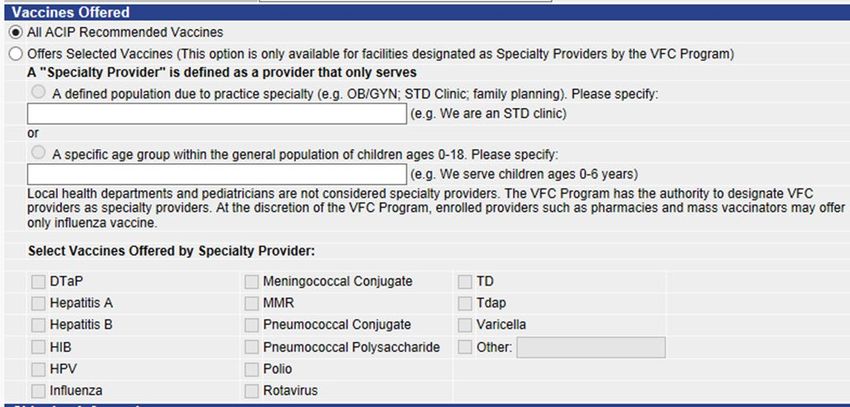
Table of Contents

Instructions for Completing the Vaccines for Children (VFC) Provider Agreement in ASIIS .............................. - 2 -

Completing the Provider Agreement ................................................................................................................. - 4 -

   How to Access the Provider Agreement in ASIIS: ........................................................................................... - 4 -

   How to Create a New Provider Agreement: ................................................................................................... - 4 -

   Screen 1: How to Add Provider Contact Details: ............................................................................................ - 5 -

   Screen 1: How to Add Provider Contact Details (continued): ........................................................................ - 6 -

   Screen 1: How to Select Vaccines Offered: .................................................................................................... - 6 -

   Screen 1: How to Add Shipping Information: ................................................................................................. - 7 -

   Screen 2: How to Add Authorized Providers: ................................................................................................. - 8 -

   Screen 3: How to Enter the Provider/Practice Profile: ................................................................................... - 9 -

   Screen 4: How to Certify Frozen Vaccine and Add Storage Units: ............................................................... - 10 -

   Screen 4: How to Sign and Submit the Provider Agreement: ...................................................................... - 11 -

   Provider Agreement Status: ......................................................................................................................... - 12 -

Electronic Re-enrollment Provider Checklist:................................................................................................... - 14 -

                                                                                                                                                                 -1-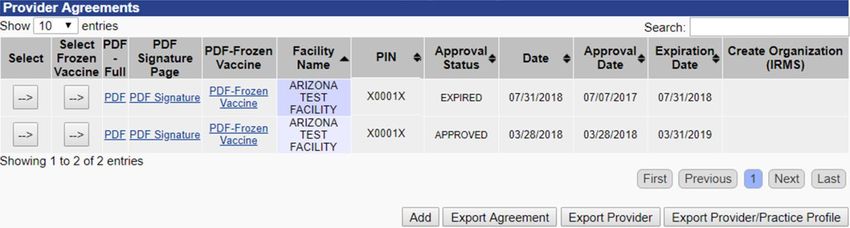
Instructions for Completing the Vaccines for Children (VFC) Provider Agreement in ASIIS

This guide includes important information and detailed instructions with screenshots to help you complete your
Provider Agreement. Use the guide to help you work through the four screens needed to complete the agreement.
Use the checklist on the last page of the guide to track your progress.

Most of the information you will need to complete your Provider Agreement is prepopulated in ASIIS. You will see
it when you create the new agreement this year. Please review the information and make sure it is correct. Update
everything that has changed.

Completing the re-enrollment process could take 20 minutes or longer depending on what you need to report.
You must complete all required fields in each section of the agreement to proceed to the next screen. The
information you enter will be saved as you complete each screen. If you need to stop before you have completed
the agreement, be sure to save the screen you are on so you can come back later and complete the process. You
must complete all four screens of the online agreement before you submit it to the state.

All parts of the agreement must be signed by the person within your practice that is licensed in the State of
Arizona to prescribe vaccines (M.D., D.O., NP or FNP) and who has primary responsibility for making decisions
about your practice and its operations.

Keep the original signature document(s).

After completing the Provider Agreement in ASIIS, use this website to upload ALL required re-enrollment
documents (follow the link below):
        https://redcapaipo.azdhs.gov/surveys/?s=PEWDA4F9TC

The required documents are: signed VFC Provider Agreement Signature Page, all 5 pages of the completed and
signed Vaccine Accountability and Management Plan, certificates for completed annual training for the primary
and backup coordinators, signed Refrigerator and Freezer Verification Form and the valid data logger calibration
certificates for all units storing VFC vaccines and the back-up data logger.

The Provider Agreement is the official form approved by the CDC. No changes can be made to the provider
enrollment requirements without prior approval from the CDC. Do not modify, remove, or add any requirements
or information to the Provider Agreement form.

The 2020 re-enrollment starts March 1st, 2020. You will then be able to add a new Provider Agreement, prepare
it and submit it for review. The re-enrollment process will close June 30th, 2020. If a location fails to re-enroll by
June 30th, that location may be inactivated from the VFC program for non-compliance. The provider may be
permitted to return to the VFC program by submitting a new enrollment, no earlier than one (1) year after the
Notice of Action.

The Arizona Immunization Program Office cannot approve your Provider Agreement until it is completed in ASIIS
and all required documents are uploaded to the upload website.

Please be aware that if your 2019 Provider Agreement expires, you will not be able to order VFC vaccines until
your 2020 re-enrollment is submitted and approved.

Ensure your vaccine ordering is not disrupted.
Do not wait until the last minute to complete your online re-enrollment!

                                                                                                                 -2-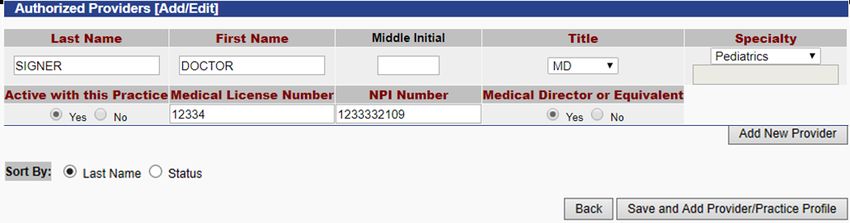
Information Needed to Complete the Provider Agreement
You will need to gather some information for verification before starting the online re-enrollment. Gathering the
information ahead of time will save time and help the process go smoothly.
Practice Details – This information will be prepopulated in ASIIS
• Facility Details – verify that the physical address where the vaccines are administered is the same
as the vaccine delivery address. Verify the mailing address for your practice.
• Contact Details – verify the names, email addresses, telephone and fax numbers for the facility
contacts. Contact details for primary vaccine coordinator, backup vaccine coordinators and either
signatory physician or office manager are required. Add any contact details that is missing. Make
sure emails are correct. Include phone and fax numbers for all contacts even if they are the same.
• Shipping Days and Times – verify the days of the week and core business hours that staff is
available to receive vaccine shipments. There must be staff on site to receive vaccines at least four
(4) days of the week and four (4) consecutive hours a day.
Authorized Providers – Prescribing Physician Details – This information will be prepopulated in ASIIS –
verify the name, specialty, Arizona State Medical License Number and National Provider ID (NPI) for each
physician prescribing vaccines in your practice.
• Here is a link to help you locate Medical License Numbers:
http://www.azmd.gov/glsuiteweb/clients/azbom/public/WebVerificationSearch.aspx
• Link for Board of Nursing website: https://www.nursys.com/LQC/LQCTerms.aspx
• The National Provider ID (NPI) is required for each physician/vaccinator in your practice. Here is
a link to help you locate NPI numbers: https://npiregistry.cms.hhs.gov/
Practice/Provider Profile – information about the number of children who received immunizations at your
practice during the previous calendar year (January 1, 2019 – December 31, 2019), by age group, insurance
type and demographics. Please allow extra time to gather this information. You will need to update this
information in ASIIS to complete your agreement.
• If you captured VFC patient eligibility in ASIIS in 2019, this information will be prepopulated in ASIIS,
and you can verify and adjust the data if necessary.
• If you have not captured VFC patient eligibility in ASIIS, your billing staff may be the best source for
this information. *Please note that VFC eligibility must be documented for every visit.
Cold Storage Unit Details – This information will be prepopulated in ASIIS – verify the information about
the storage units used to store VFC vaccines and the data loggers you use to monitor temperatures in
those storage units. If you have been approved and want to recertify for frozen vaccine, you need to
verify the information about the freezer used to store VFC vaccines. The required information is: unit
name, manufacturer and model number; thermometer type, temperature scale and date of last
calibration of the data logger.
*Please note that data loggers are required and are the ONLY acceptable temperature monitoring devices
for all units storing VFC vaccines, including the backup device.
Vaccine Accountability and Management Plan – completed and signed
Certificates for Completed Annual Training for the primary and backup vaccine coordinators. Annual
training is a VFC requirement which can be fulfilled by passing one of the available training options and
sending the certificate to AIPO with the re-enrollment:
• CDC “You Call the Shots” (YCTS) Vaccines for Children (VFC) Jan 2020 - OR -
• CDC “You Call the Shots” (YCTS) Vaccine Storage and Handling Jan 2020 - OR -
• AIPO Train - Arizona Vaccines for Children Training - OR -
• Certificate of Completion from AIPO Train: Keeping on track with ASIIS and Vaccine Storage and
Handling
Valid data logger calibration certificates for all units storing VFC vaccines and the back-up data logger.
-3-Completing the Provider Agreement
How to Access the Provider Agreement in ASIIS:
Go to https://asiis.azdhs.gov/
1) Log in with your username and password
2) Click on Orders/Transfers in the left sidebar menu to expand the menu
3) Click on Provider Agreement (Viewable only by a Primary or Backup
Vaccine Coordinator – users with Lot Number Manager permission)
How to Create a New Provider Agreement:
4) Click the Add button to create a
new Provider Agreement
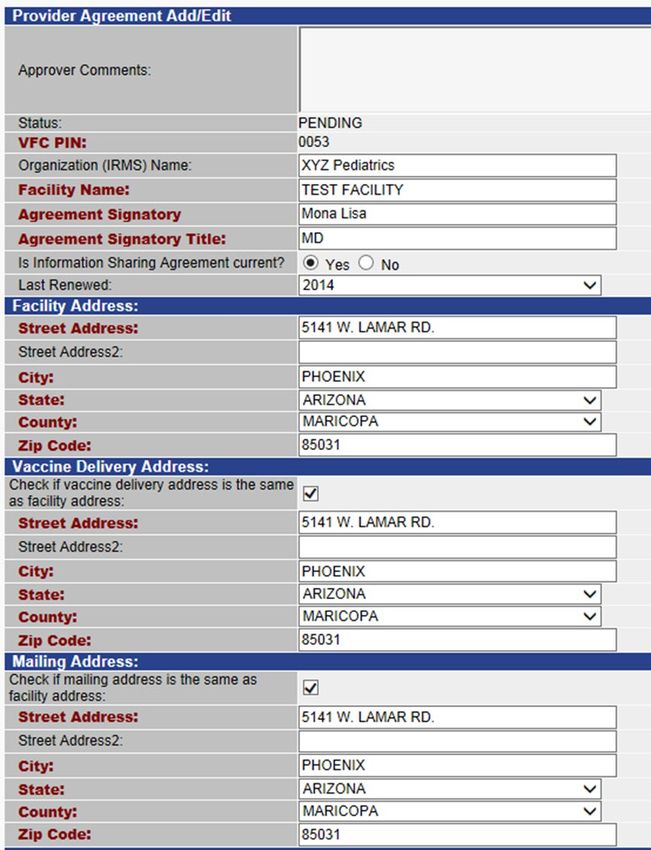
-4-5) IRMS and Facility
Screen 1: How to Add Provider Contact Details: Name: Do not
change these two
fields. The IRMS is
assigned to you by
ASIIS and the facility
name is the name of
your specific site.
Providers that don’t
have a Facility
should use the
displayed IRMS
Name as the Facility
Name
6) Agreement
Signatory: Enter the
name of the
provider signing the
agreement
7) Agreement
Signatory Title:
Enter the title of the
provider signing the
agreement (either
M.D., D.O., NP or
FNP)
8) Last Renewed:
Click on the down
arrow and select the
year of your last
active enrollment
9) Facility Address:
The physical address
of your facility
10) Vaccine Delivery Address: The address where your facility will receive vaccine deliveries
* The Vaccine Delivery address must be the same as where the vaccines will be administered
11) If the address you would like vaccines delivered to is the same as your street address, check the box under
Vaccine Delivery Address
12) Mailing Address: The mailing address of your facility - i.e. PO Box
13) If the mailing address is the same as the facility address, check the box under Mailing Address
-5-Screen 1: How to Add Provider Contact Details (continued):
14) Contact
Details: Contact
information for
Primary Vaccine
Coordinator,
Backup Vaccine
Coordinator,
Signatory
Physician and
Office Manager is
required.
15) Fill out name,
phone, fax, and
email for each
contact
16) Fill out date
(Completed
Annual Training
Requirements)
and method of
training
Screen 1: How to Select Vaccines Offered:
17) Vaccines
Offered: All VFC
providers should
offer all ACIP
recommended
vaccines.
Specialty
providers are
birthing hospitals,
OB/GYN clinics,
etc. or providers
serving specific
populations
-6-Screen 1: How to Add Shipping Information:
18) Shipping Information: Use military time/24 hour clock. Select the drop down times for each day that
deliveries could occur and choose the hours that you can receive shipments (before and after lunch). You
can choose both morning and afternoon hours to reflect a lunch hour. For example, if your office is open
8-5 and closed 12-1pm for lunch, select 8:00 and 12:00 in the first set of fields and 13:00 and 17:00 in the
second set of fields. Locations must be open and there must be staff on site to receive vaccines at least
four (4) days of the week and four (4) consecutive hours a day
19) Facility Type: Click the drop down arrow to select facility type
20) Save and Add Provider: Click here to save your work and move on to the next page
-7-Screen 2: How to Add Authorized Providers:
Listed are all providers prescribing vaccines that your practice reported in the previous Provider Agreement.
Listed are Name, Title, Specialty, Active status, Medical License Number and NPI number for each provider.
Verify if the listed providers are active with the practice and select “Yes” for the Active with this Practice
status indicator. If the provider is not active select “No”
A valid Medical License Number and NPI Number are required for each provider
At least one provider must be listed
Signatory provider must be listed and designated as medical director or equivalent
21) Adding New Provider: Click “Add New Provider” to add additional providers to your list
22) After you have entered all of your providers, click Save and Add Provider/Practice Profile to save
your work and continue
-8-Screen 3: How to Enter the Provider/Practice Profile:
It is required to report the number of children who receive VFC vaccines in your practice each year.
If you captured VFC patient eligibility in ASIIS in 2019, the profile will display the data according
to the reported immunizations. You can adjust the data if necessary.
If you have not captured VFC patient eligibility in ASIIS, your billing staff may be the best source
for this information. *Please note that VFC eligibility must be documented for every visit.
VFC Vaccine Eligibility Categories: Reflects the number of VFC patients in each category that your
facility administered vaccine to in the previous year, according to ASIIS. Please verify the accuracy by
reviewing the data from your EHR/EMR or billing records
Non-VFC Vaccine Eligibility Categories: Reflects the number of privately insured patients that your
facility administered vaccine to in the previous year, according to ASIIS. Please verify the accuracy of the
data from your EHR/EMR or billing records
23) Review the numbers in each category for accuracy, or if necessary, fill in the numbers in each
category
24) Choose what data source (or type of data) was used to obtain the numbers in each category
25) Click Save and Certify Frozen Vaccine, to move to the next page
-9-Screen 4: How to Certify Frozen Vaccine and Add Storage Units:
26) Do you want
to be certified: If
All providers who want to receive frozen VFC vaccines (M-M-R®II, ProQuad® and Varivax®)
your facility
must have their freezer approved by the AIPO. If you click no, you will not be able to order
wants to receive
frozen vaccines.
frozen vaccine
(M-M-R®II,
ProQuad® and
Varivax®) answer
yes. If you
answer no, you
will only enter
the information
for your
refrigerator(s)
27) Freezer 1: Fill
in the required
fields for each
freezer unit
28) Refrigerator
1: Fill in the
required fields
for each
refrigerator unit
29)
Thermometer:
Fill in the data
logger details
* Data loggers
are required and
the ONLY
acceptable
temperature
monitoring
30) Add: Click Add to enter additional cold storage units devices on all
units storing VFC
31) If you need to exit the Provider Agreement before completion, you can save it and
vaccines,
return to it later but you must complete the page you are working on before the system will
including the
allow you to save your work. Click Save for Later if you don’t want to submit the Provider
backup device.
Agreement at this time
32) Submit to State: Click here only if the Provider Agreement is complete and you are ready to submit for
approval
- 10 -Screen 4: How to Sign and Submit the Provider Agreement:
Check the box and type in the name of the authorized signer (agreement signatory). If you’re ready to submit your
agreement for approval, click the Submit to State button. After you submit the online agreement you must print
and sign the signature page.
33) Click on the PDF link to print the full Provider Agreement for your records. Keep the
original signature document(s)
34) Click on the PDF Signature Page link to print the agreement signature page
35) The Refrigerator and Freezer Verification form will be generated in the full PDF or
can be opened from the Orders/Transfers menu -> Provider Agreement -> PDF –
Frozen Vaccine
All parts of the Agreement must be signed by the person within your practice that
is licensed in the state of Arizona to prescribe vaccines (M.D., D.O., NP or FNP)
and who has primary responsibility for making decisions about your practice and
its operations
After completing the Provider Agreement in ASIIS, use this website to upload ALL
required re-enrollment documents:
https://redcapaipo.azdhs.gov/surveys/?s=PEWDA4F9TC
The required documents are: signed VFC Provider Agreement Signature Page, all 5
pages of the completed and signed Vaccine Accountability and Management Plan,
certificates for completed annual training for the primary and backup coordinators,
signed Refrigerator and Freezer Verification Form and the valid data logger
calibration certificates for all units storing VFC vaccines and the back-up data
logger.
- 11 -Provider Agreement Status:
36) Check the status of your Provider Agreement at any time. Look at Approval Status:
Pending: The Provider Agreement is saved and is not complete. You can open and
continue working
Submitted: The Provider Agreement was submitted and is waiting for the Arizona
Immunization Program Office to review and approve
Returned: You need to make corrections within the Provider Agreement. Click on the
Select arrow to view comments made by the Arizona Immunization Program Office staff.
Make the requested corrections and re-submit the Provider Agreement
Approved: The Arizona Immunization Program Office staff has approved the Provider
Agreement
** Only when the Provider Agreement shows an Approved status is your facility officially
enrolled in the program and able to place vaccine orders.**
37) To continue working on a saved Provider Agreement: Login to ASIIS, Click Provider
Agreement under Orders/Transfers and click the arrow under Select
- 12 -If you have questions regarding the re-enrollment process or the online forms, please contact the Arizona
Immunization Program Office, at (602) 364-3642 and (602) 364-3899 or e-mail us at: ArizonaVFC@azdhs.gov or
ASIISHelpDesk@azdhs.gov or contact your Immunization Program Specialist directly.
For new VFC providers: Contact the Arizona Immunization Program Office at (602)364-3642.
- 13 -Electronic Re-enrollment Provider Checklist:
Status Provider Agreement Item
Practice details
Facility details – will be prepopulated in ASIIS
Facility address
Vaccine delivery address
Mailing address
Contact details – will be prepopulated in ASIIS
Primary vaccine coordinator
Backup vaccine coordinator(s)
Signatory Physician
Office Manager
Vaccine Receiving details (days and hours)
Physician/Vaccinator details – will be prepopulated in ASIIS from last Provider Agreement
Medical License Numbers
National Provider IDs (NPI)
Practice/Provider Profile
Cold Storage Unit details
Refrigerators - Name; Manufacturer; Model Number
Data loggers for refrigerators –
Thermometer Serial Number; Thermometer Type; Temperature Scale; Date of Last
Calibration; Valid data logger calibration certificate
Freezers - Name; Manufacturer; Model Number
Data logger for Freezers –
Thermometer Serial Number; Thermometer Type; Temperature Scale; Date of
Last Calibration; Valid data logger calibration certificate
Backup data logger –
Thermometer Serial Number; Thermometer Type; Temperature Scale; Date of
Last Calibration; Valid data logger calibration certificate
Upload ALL required re-enrollment documents to this website:
https://redcapaipo.azdhs.gov/surveys/?s=PEWDA4F9TC
Signed VFC Provider Agreement Signature Page (signed by M.D., D.O., NP or FNP)
Completed and signed Vaccine Accountability and Management Plan
- 14 -Certificates for completed annual training for Vaccine Coordinators
Primary vaccine coordinator
Backup vaccine coordinators
All vaccine staff (strongly recommended)
Refrigerator and Freezer Verification Form signed (by M.D., D.O., NP or FNP)
Valid data logger calibration certificates for all units storing VFC vaccines
Valid data logger calibration certificates for the backup data logger
- 15 -You can also read


