Enrolment Handbook Spring 2021 - UOWD - Your Australian University in Dubai - University of Wollongong in Dubai
←
→
Page content transcription
If your browser does not render page correctly, please read the page content below
Enrolment Handbook
       Spring 2021

UOWD – Your Australian University in Dubai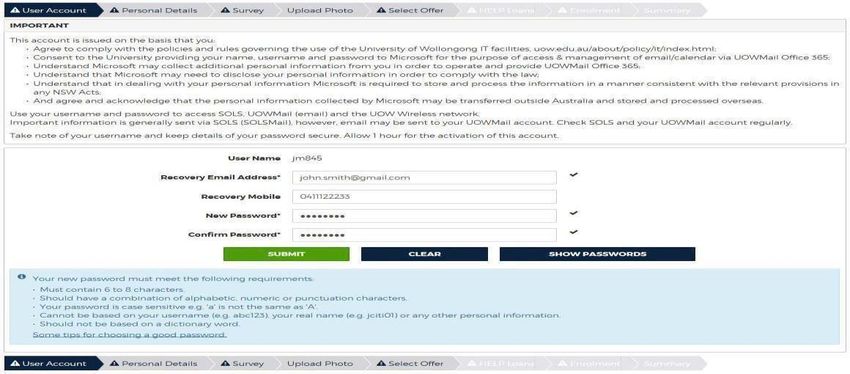
Contents
CHECKLIST ........................................................................................................................ 2
1     INTRODUCTION .......................................................................................................... 3
3     ENROMENT PROCESS FOR SPRING 2021............................................................... 4
4     STAGE 1 – OFFER LETTER ....................................................................................... 5
6     STAGE 3 - TUITION FEE PAYMENT ......................................................................... 10
7     STAGE 4 - ONLINE ENROLMENT ............................................................................ 10
8     STAGE 5 – TUTORIAL ENROLMENTS (Undergraduate Students Only) ................... 15
9     ACCESSING SOLS AND MYUOWD ACCOUNT ....................................................... 15
10       SERVICES AND FACILITIES AVAILABLE.............................................................. 17
12       YOUR FINANCIAL RESPONSIBILITIES ................................................................ 17
13       PERSONAL DATA INFORMATION ........................................................................ 19
14       USEFUL CONTACTS ............................................................................................. 19
15       DISCLAIMER .......................................................................................................... 20

        Please note that there will be an orientation and induction schedule sent in due course to help
        students gain a better understanding of the services and facilities available and to ‘virtually’
        meet academic and support staff

                                                                                                                                   1
CHECKLIST

As students read this guide, they will see that there is a list of actions that need to be completed, to
enable students to enrol with the University. For the student’s benefit, the list below has been
prepared to assist them with the actions.

Please refer to specific sections of this guide for further information.

  SECTION       ACTIVITY                                                                   Tick   if
                                                                                           complete

  5.1           Accept offer of a place to      Complete the ‘Acceptance Agreement’
                study at UOWD                   in the offer letter.

  5.2           Clear any outstanding           Check the Offer letter
                Conditions
                                                All conditions must be cleared before
                                                student can enrol. Submit documents
                                                via email to
                                                admissions@uowdubai.ac.ae

  6.1, 6.2 or   Select the Subjects to Study This will enable students to enrol
  6.3
  6.2.1         Register and pay for            Only applicable to Undergraduate
                Challenge Test (if required)    Students in specific programs

  6.2.2         Register and pay for            Only applicable to Bachelor of
                Placement Test (if required)    Engineering students

  6.3.1         Register and pay for            Only applicable to Postgraduate
                Graduate Foundation             Students and only if mentioned in Offer
                Course (if required)            letter

  7             Pay Tuition Fees                Students can pay fees online or via
                                                bank transfer.

  8             Complete Online Enrolment       Enrol with the University

  9             Register for lecture and        Only applicable      to    Undergraduate
                tutorial sessions               Students

  12            Submit Medical Form             Completion of this form will enable us
                                                to inform the appropriate medical
                                                practitioner in the event of an
                                                emergency or to support student
                                                during studies/exams.

                                                                                                           2
1   INTRODUCTION

    Firstly, congratulations on being offered a place of study at the University of Wollongong in Dubai
    (UOWD)!

    An online Orientation and Induction event will be organised for students in April to introduce them
    to the University, meet academic and administrative staff and interact with fellow students. In the
    meantime, this guide has been developed to help students enrol with the University in a specific
    program and subjects.

    Do not hesitate to contact the Registrar’s Office for any questions in relation to the information
    provided within this handbook. Further contact details can be found in Section 14 of this guide.

    I look forward to ‘virtually’ meeting students at our Orientation and Induction event and of course
    in-person when students join us in our brand-new Campus!

    Sheelagh Wallace
    Director, Student Services and Academic Registrar
    University of Wollongong in Dubai

2   ACADEMIC CALENDAR – Spring Semester Only

       Spring 2021 Semester                                       Undergraduate and Postgraduate

      Orientation and Induction Event                           14th – 22nd April 2021

      Lectures commence                                         18th April 2021

      Last Day for Transfer of Fees (Last Day for
                                                                 24th April 2021
      withdrawal of subjects with Transfer of Fees*)
      Transfer of fees 100% or Refunds – less 75%
      tuition fees
      Last day to enrol in subjects (Last Day for
                                                                1st May 2021
      withdrawal of subjects with Transfer of Fees*)
      Transfer of fees 100% or Refunds – less 50%
      tuition fees
      Last day to withdraw from Subject(s) without               29th May 2021
      Academic Penalty *
      (No fee refund or transfer to future Semester, if
      withdrawal after 1st May)
      Examinations                                               4th – 10th July 2021

      Results Released                                           21st July 2021

    Please note that all these dates were current at time of print however may be subject to change.

    * Student MUST withdraw from the subjects via SOLS. For further information on refunds and transfers, please refer
    to section 12 of this guide.

                                                                                                                     3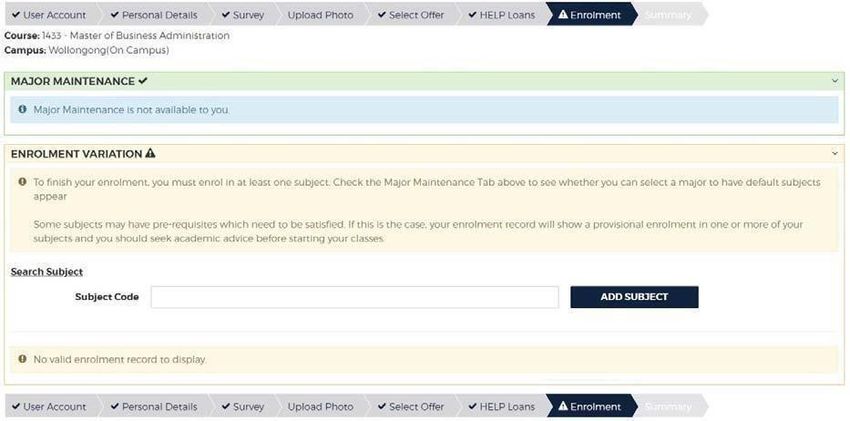
3   ENROMENT PROCESS FOR SPRING 2021

    All students are required to enrol with the University. This section is designed to help students
    find their way around the enrolment process.

     The Registrar’s Office has responsibility for the enrolment of students. Please refer to
     the contacts details in Section 14 of this guide.

    3.1     What is Enrolment?

            Enrolment is the process through which students must:

            •   agree to become a student of the University
            •   formally sign up in confirmation of their agreement to abide by the University’s
                Policies, Rules and Procedures, and to become liable for fee payments
            •   Check, update and confirm as correct, key personal information in their student
                record.
            •   select and enrol in academic subjects

    3.2     There are up to five stages to the enrolment process for new students:

            •   Stage 1 - Check all requirements in connection with the Offer Letter
            •   Stage 2 - Select the subjects to study
            •   Stage 3 - Pay Tuition Fees
            •   Stage 4 - Complete Online Enrolment
            •   Stage 5 - Register for Lectures and Tutorials (UG students only)

            The following information will take students through each step of the process to
            ensure that they have been enrolled with the University.

                                                                                                   4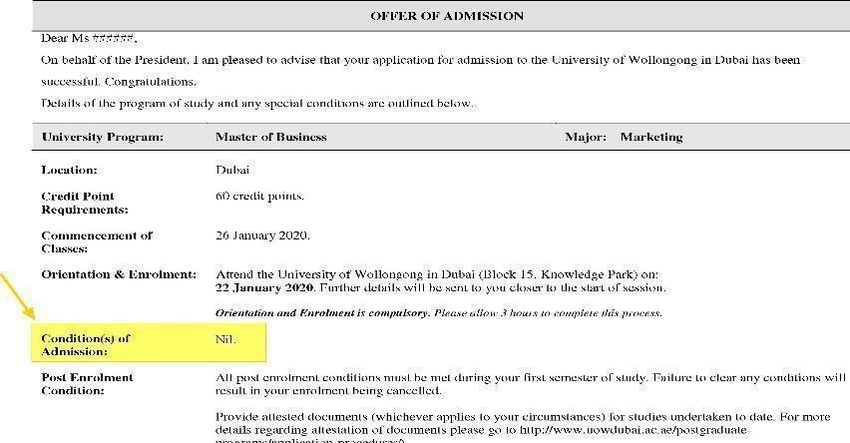
4   STAGE 1 – OFFER LETTER

    In order for students to enrol with the University, the following steps must be completed.

    4.1   Check the Offer Letter

          The University will issue the student with an Offer Letter. To secure a place, the student
          must complete the ‘Acceptance Agreement’ in the Offer letter given. This should be carried
          out as soon as possible after receiving the ‘Offer of Admission’ letter.

    4.2   Students must read through the Offer Letter carefully. Under ‘Condition(s) of
          Admissions’, if the Offer Letter states ‘Nil’, as detailed below, students can move to
          STAGE 2 of this guide.

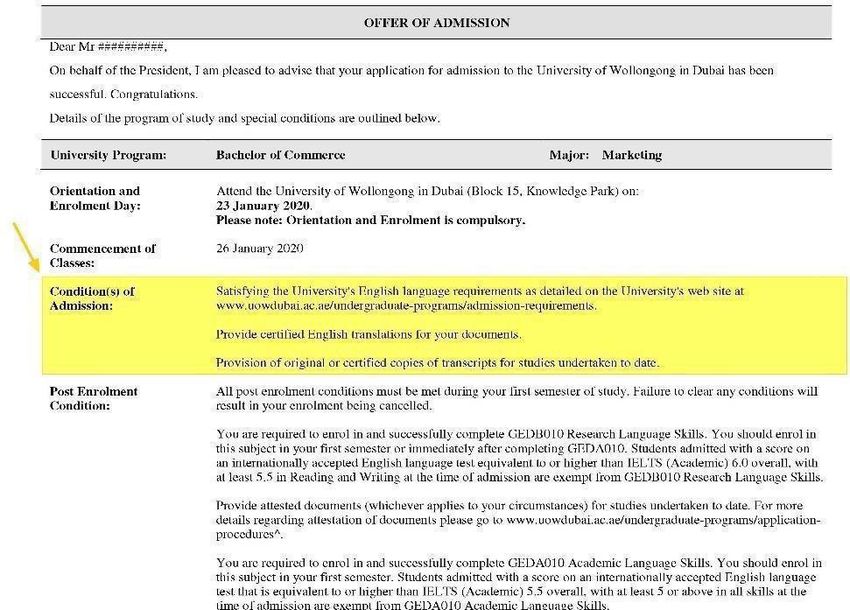
    4.3   Under ‘Condition(s) of Admissions’, if the Offer Letter has one or more conditions,
          students may be required to clear the condition(s) before they can enrol as a student
          of the University. Students must refer to 5.4 below on the next steps.

                                                                                                   5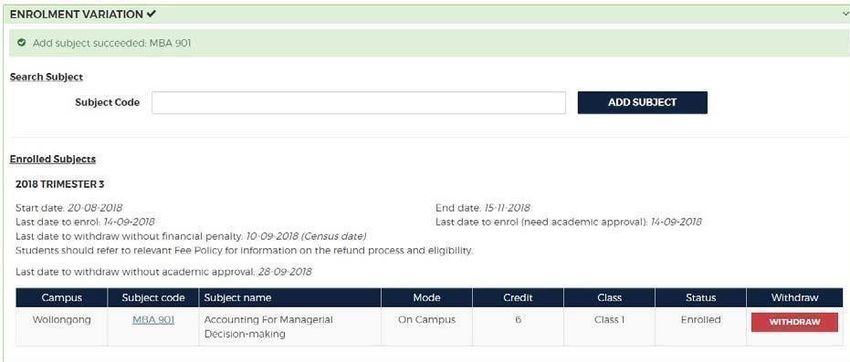
4.4       Clearing Outstanding Conditions

               To clear conditions, students must first understand the conditions that are present on the
               Offer Letter. A few examples are given below:

                 Condition as detailed on Offer Letter              Next Steps
                 Provide attested documents (whichever              Please send to the Student
                 applies to your circumstances) for studies         Recruitment and Admissions Office
                 undertaken to date.                                via admissions@uowdubai.ac.ae
                 Satisfy English language requirements *            If completed, send results to
                                                                    admissions@uowdubai.ac.ae.
                 Students are required to enrol in and              It is mandatory that students enrol in
                 successfully complete GEDA010 Academic             GEDA010 in Spring 2021.
                 Language Skills. *
                 Students are required to enrol in and              It is mandatory that students enrol in
                 successfully complete GEDB010 Research             GEDB010 in Spring 2021
                 Language Skills. *
                 Successfully completing and achieving the          Enrol and pass in the GFC subjects
                 required score in Graduate Foundation              listed in the offer letter. Must
                 Courses.                                           complete it in the first semester
                 Provision of original or certified copies of       Submit to the Student Recruitment
                 transcripts for studies undertaken to date *       and Admissions Office when
                                                                    permitted back onto Campus.
                 Provision of certified documentary evidence of     Submit to the Student Recruitment
                 UAE residency *                                    and Admissions Office when
                                                                    permitted back onto Campus.

               Once students have cleared the relevant condition(s), they will be ready to proceed to
               the next stage of the enrolment process.

               Please note:

           * If students have not cleared the conditions mentioned above which have a * next to it,
            then they may be given it as a ‘Post Enrolment Condition’ (PEC). They can then
            proceed with their enrolment however will need to ensure that the condition/s are
            cleared by the end of their first semester. Please refer to Section 8.10 for further
            information.

               In order to clear any conditions or get clarification on how to clear these conditions,
               please contact the case officer or email the Student Recruitment and Admissions
               Office on admissions@uowdubai.ac.ae

5    STAGE 2 – SELECT SUBJECTS FOR STUDY

     Students must decide which subjects they wish to study during the Spring Semester.
     The timetable for each program is mentioned below.

    5.1        Subject Selection

               A few important points to consider when selecting subjects:

           -       Refer to the Offer Letter for any exemptions e.g. GEDA010 and/or
                   GEDB010 exemptions for Undergraduate Students and 800 level subjects
                   for Postgraduate Students, etc.
           -       800 subject exemptions are applicable for Master of Business and Master of
                   Science (Logistics and Supply Chain Management) students. Students are given
                   the exemptions based on completion of certain courses in their Undergraduate
                   program. Please refer to the Offer Letter for more details on this (if applicable)
           -       Students must refer to the timetable (below) to avoid enrolling in subjects that hold

                                                                                                           6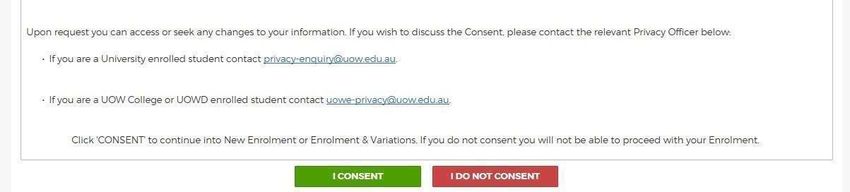
lectures or tutorials at the same time

         -         Students must not enrol for subjects other than those mentioned in the
                   timetable. For further advice, contact facultyoffice@uowdubai.ac.ae

5.2          Undergraduate Students and Foundation Studies Students

             Select the relevant program to view the timetable:

             -      Bachelor of Commerce (all majors)
             -      Bachelor of Business Administration
             -      Bachelor of Nursing (Bridging)
             -      Bachelor of Computer Science (all majors)
             -      Bachelor of Business Information Systems
             -      Bachelor of Communication and Media (all majors)
             -      Bachelor of Engineering (all majors)
             -      Foundation Studies Program

6.2.1        Challenge Tests – relevant for Programs in the Faculty of Business, Faculty of
             Engineering and Information Sciences and School of Humanities, Social
             Science and Health

             Challenge Tests can be taken in the first semester of study to allow eligible students to
             gain exemption from certain foundation level subjects associated with their program.

             The Challenge tests are available for the following subjects and will be held as per the given
             schedule:

                  Subject                       Applicable     to    Students      Date           Time
                                                Studying in these Programs
                  ARA 101/ ARA 102              Bachelor of Business Administration 17/04/2021    3pm-5pm
                  Arabic for Beginners 1A/      Bachelor of Commerce                24/04/2021
                  Arabic for Elementary level   Bachelor of Computer Science
                  users                         Bachelor of Business Information
                                                Systems

             An Arabic subject is a requirement for all students. In order to determine which Arabic subject you
             should take, you need to sit a Placement Test (PT). A mark of 58 or above will entitle students to an
             exemption from the Arabic subject.

             Students exempted from the Placement Test will be charged AED 210,
             withdrawn from the subject and will be asked to enroll in an alternate subject
             after consulting with an academic advisor.

             More details on this will be sent to the student following the Challenge test

6.2.2.           Placement Tests – applicable to only Bachelor of Engineering students

                 All Bachelor of Engineering students should complete two engineering placement
                 tests, one in Physics and one in Mathematics/Statistics. By passing these, a student
                 will not be required to take the corresponding remedial subject

                                                                                                    7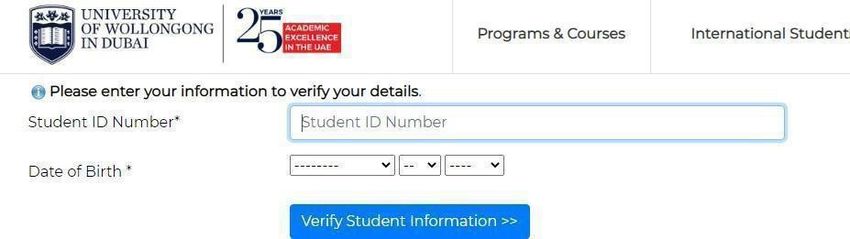
The Placement tests will be held as per the schedule given below:

             Subject                               Date                       Time

             MATHS Engineering                     17/04/2021                 9am-11am
             Placement Test

             PHYSICS Engineering                   17/04/2021                 12pm-2pm
             Placement Test

            Students who fail the placement test will be required to take remedial courses in
            Spring 2021. Students will be advised further on these remedial courses by the
            Faculty office.

            Details regarding student’s eligibility to sit the Challenge /Placement test would
            have already been sent to students by the Student Recruitment and Admissions
            Office.

5.3     Postgraduate Students

        Select the relevant program to view the timetable:

        -      Master of Business Administration
        -      Master of Business (all majors)
        -      Master of Business Analytics
        -      Master of Science (Logistics and Supply Chain Management)
        -      Master of Applied Finance (all majors)
        -      Master of Engineering Management
        -      Master of Information Technology and Management
        -      Graduate Certificate in Engineering Asset Management
        -      Graduate Certificate in Business
        -      Graduate Certificate in Human Resource Management
        -      Graduate Certificate in Marketing
        -      Master of Educational Studies
        -      Master of Nursing
        -      Master of Media and Communications
        -      Master of International Relations

6.3.1   Graduate Foundation Course (GFC)

        If students hold an undergraduate degree from a non-business discipline, students may
        be required to undertake a Graduate Foundation Course (GFC) with one or more
        subjects. The course must be successfully completed in the first semester. Refer
        to offer letter for subjects to be completed

        Graduate Foundation Course* (GFC) enrolments can only be processed by the
        Registrar’s department. If a student is required to enrol in any of the above subjects they
        must email the Registrar’s department on Registrar@uowdubai.ac.ae

        However, if you are eligible to sit for a Challenge Test (CT) for one or more of the
        GFC subject/s mentioned in your offer letter, please refer to the CT schedule below:

                                                                                                 8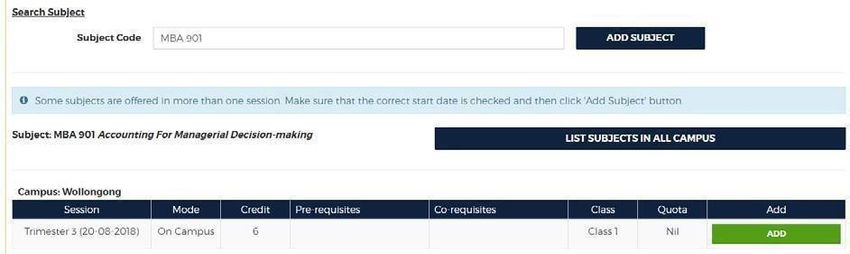
Subject Name                               Date                      Time
                GFC Accounting FND 111                     28th March 2021           730pm-9pm
                                                           11th April 2021

                GFC Finance FND 112                        29th March 2021           730pm-9pm
                                                           12th April 2021

                GFC Marketing FND 113                      30th March 2021           730pm-9pm
                                                           13th April 2021

                GFC Statistics FND 114            31st March 2021                    730pm-9pm
                                                  14th April 2021
                GFC Operations Management FND 115 15th April 2021                    730pm-9pm

            Each Challenge Tests costs AED 420 (VAT inclusive) to attempt. Students will be
            enrolled in the registered subject until receiving the test results. Based on the results
            (Pass or Fail) students will either be withdrawn from the subject or asked to continue.
            To register for a Challenge Test, please contact the Admissions Officer.

            Practice test material is available here.

    6.3.2   Credit for Prior Learning

            In some cases, students may be exempt from completing specific subjects at UOWD on
            the basis of subjects students have already completed at another recognized institution
            or if the student has completed a Bachelor degree in a relevant subject area from an
            accredited institution.

            If students already have a Graduate Certificate in Business from UOWD, students
            may have received credit in the following programs:

            -   Master of Business
            -   Master of Science (Logistics and Supply Chain Management)
1

            Student’s eligibility for Credit for Prior Learning will be decided in consultation with the
            relevant Faculty prior to the commencement on the program.

    6.3.3   English Language Requirements

            -   Students who have achieved an overall Academic IELTS score of 6, but with a
                minimum of 5 in reading and writing for their relevant program, must repeat the
                IELTS exam and email the required results to admissions@uowdubai.ac.ae
                before the start of the semester.
            -   Master of Media and Communications and Master of International
                Relations students only: Students with a score of IELTS 6.5, with a minimum
                of 6 in each band at the time on entry are exempt from enrolling in ENG 900
                (Writing for Communication). Students who do not meet the required IELTS
                score mentioned above, will be required to enrol in the subject in Spring 2021.

            ENG 900 enrolments can only be processed by the Registrar’s department. If a
            student is required to enrol in any of the above subjects please

                                                                                                      9
email the Registrar’s department on Registrar@uowdubai.ac.ae
For any further clarification on the Language requirements for the program of study
please contact the Student Recruitment and Admissions Office (contact details available
in section 14 of this guide)
Each Faculty will be available to answer any questions students may have in relation to the
subjects. To contact them, please refer to the contact numbers in Section 14 of this guide.
Alternatively, please email and request a call back. Please mention your Student ID and
contact details in your email.
6 STAGE 3 - TUITION FEE PAYMENT
All students are charged tuition fees, which may be paid by a sponsor or by personal contribution.
It is the student’s responsibility to ensure that the required financial documentation etc. is in place
prior to proceeding to online enrolment.
Tuition fees must be paid before the start of each session according to the number of subjects
taken. Tuition fees are charged according to their credit point weighting and the session in which
the student is enrolled. For example, if students are enrolling in 18 credit points, they are required
to pay for 18 credit points prior to completing online enrolment. The amount of fees to be paid
depends on the fee payment plan selected.
Students can pay fees online via our payment portal at: https://www.uowdubai.ac.ae/online-
payment, alternatively, by bank transfer:
Account name: University of Wollongong in Dubai
IBAN: AE910440000001311574702
Standard Chartered Bank,
Swift # SCBLAEADXXX
Bur Dubai Branch, Dubai, U.A.E.
Note: As per the University’s payment policy, a cash or cheque deposit to the bank account is
not accepted. To ensure there are no delays, please send the payee advice copy after bank
transfer payment to: fees@uowdubai.ac.ae
Cash payment through Al Ansari Exchange Centre: Students also have the option to deposit
fees in cash at any Al Ansari Exchange branch across the United Arab Emirates. Please note
that a student ID number is required and a transaction charge applies.
Please note that late payments may be subject to financial penalties.
Textbooks, photocopying, personal stationery items and other incidental costs are not included
in the tuition fees. It is the responsibility of the student to pay fees on time.
For further information on our financial requirements, please go to section 12 of this guide.
7 STAGE 4 - ONLINE ENROLMENT
All students are required to enrol with the University through our online enrolment system. Below
is a step-by-step guide on how to complete online enrolment.
It is envisaged that the online enrolment process will take approximately 20 minutes to complete.
107.1 Click here to open our online enrolment system.
Log-in using the Student Number (found on the offer letter) and date of birth.
If the student receives an error message logging in such as ‘invalid offer’ or ‘student type
does not match’ they must contact Student Recruitment Office on
admissions@uowdubai.ac.ae
7.2 Students must read and agree to the general consent and disclosure statement.
Please note that if students do not consent, they will not be able to proceed with the
enrolment.
7.3 Students are now required to work their way through the screens. Students will see
that there are tabs (as detailed below). As they progress, from left to right, the
following needs to be noted:
• The tab student is currently on will be highlighted.
• When a tab has been completed a tick will appear.
• Any incomplete tab will have a warning symbol.
Students will not be able to complete the enrolment until all the required tabs have been
completed.
7.4 It is important to note that students will use the UOW username (which will be
generated in the first step) throughout the time at UOWD and will be used to access
our IT systems (SOLS, Moodle etc.). Students need to note this down e.g., sh904.
A personal email must be entered for password recovery and resets. Student
password must meet the requirements as shown in the blue text box below.
Please take note of the UOW chosen password. Please also note that if students
do not enrol in any subjects, the password will expire after 15 days.
11If successful, students will receive the following acknowledgement.
7.5 Next, Click on the ‘Personal Details’ tab.
There are multiple sections that will need to be completed on this tab. Students
must ensure that they complete all sections. When they have completed the
required fields, they will need to click on the CONFIRM button. They will see a
green tick if successful.
Next, they must add at least one emergency contact. They must input details
including address and phone numbers. Once completed students must click the
SUBMIT button.
These details can be updated any time via SOLS and should be kept up to date at
all times.
For information, the ‘session’ address is where students will be living whilst studying and
12this will become the ‘current’ address once they enrol. Student’s ‘permanent/home’
address is where they are living prior to commencing the program of study with the
University.
Students must select the preferred contact number via a dropdown menu in both tabs.
7.6 Next, student must click on the ‘Survey’ tab.
This tab involves a mandatory survey for student data collection. Students are
required to only answer questions marked ‘required’ in the survey
7.7 Student can skip the next tab ‘Upload Photo’ and move onto ‘Select Offer’.
They must click on the ‘Select Offer’ tab.
This page will display the offers that the University has given students. They
must ensure to click the correct program (Course) and start date to
commence the enrolment process.
If they have more than one offer showing under this section (for example,
Graduate Foundation, English writing course), they must ensure that they select
ONLY the Master’s offer and not any other offer to enrol in the subjects.
7.8 Next click on ‘HELP LOAN’. No action is required on this section. Once students have
clicked on this, it will activate the next step ‘Enrolment’
Next, students must click on the ‘Enrolment’ tab.
Now it is time to enrol in the subjects that students will be studying during Spring
2021 Semester. They can refer to the steps below to assist with the subject
enrolment.
Students may now begin enrolment in subjects!
13Students will need to enter each subject code individually.
Click the ADD button to enrol in the subjects. Once enrolled, a confirmation will
appear at the top of the page. Once all subjects have been enrolled, click on the
Summary tab.
7.9 Read through the Summary and correct any details required, followed by clicking the
Email Summary button.
Once students have completed the subject enrolment, they will receive the
enrolment confirmation, to their personal email address.
YOU ARE NOW ENROLLED!
Please note that the students will be required to complete an identity verification check and
collect their Student ID Card, however this will be carried out when we are able to permit
students back on-campus.
7.10 Post Enrolment Conditions
In some cases, enrolled students have a ‘post enrolment’ condition added to their record.
14Please be aware that these conditions must be cleared within the FIRST semester of
study. Failure to do this will result in the termination of enrolment from the University.
7.11 Student and Library Card
All new students will be issued a Student and Library Card for the duration of their
study. This card will be issued to students when they are back on-campus with us.
8 STAGE 5 – TUTORIAL ENROLMENTS (Undergraduate Students Only)
Although students are now enrolled with the University and in the subjects, Undergraduate
students are also required to select lecture and tutorial timings. This can be done by watching
this tutorial. Please use the SOLS login details to login to SOLS and select the timings.
Enrolment for Online Tutorial enrolments will open in Week 0. Students should check their
SOLS for the exact date/time of when the tutorials are open. Students are however advised to
check their SOLS Tutorial enrolment section for the date/time. Please note that tutorials/labs will
start from Week 1
9 ACCESSING SOLS AND MYUOWD ACCOUNT
SOLS/MOODLE
Once students have successfully completed their enrolment in subjects, they must click here
to log into SOLS and view subjects enrolled.
Once on the link they will see the page below. Students must CLICK on SOLS as shown in
the screenshot below. They will then be asked to enter their username and password to
login.
Once students log in to SOLS, they will be able to see the subjects enrolled.
On the main landing page students will also see a TAB for ‘E-LEARNING’. They can
access their MOODLE account by clicking on this TAB or by clicking here. Once they click
on this, students will be asked to enter their username and password again as seen in the
screenshot below. This is the same as their SOLS login credentials.
15To learn more about the MOODLE access please click here
Students can refer to the below links to learn more about the Learning Platform Management System –
Moodle:
https://www.uow.edu.au/about/learning-teaching/analytics/student-
dashboard/
https://www.uow.edu.au/student/learning-co-op/technology-and-
software/moodle/
Students will find their subject link to access the online classes in their MOODLE account.
The subject folders for the subject/s they have enrolled in will be available once they log
in. Students must click on the subject folder to view details and see the subject class link.
(note: it may take around 24 hours after students complete the enrolment process for the
MOODLE account to sync with the SOLS account and for the subject folder to show).
If students are unable to find their subject link in their MOODLE account they can
contact their lecturer / faculty office. Contacts details are provided on page 20.
MYUOWD ACCOUNT
In order to access their MYUOWD account, students will first need to activate it. Students
must note that it takes 24 hours after they complete their subject enrolment for the
MYUOWD account to activate. After 24 hours they can click here to activate the account.
Student must click on MYUOWD as shown below. They will need to use the option
‘ACTIVATE MYUOWD ACCOUNT’ to activate their account and create their MYUOWD
password.
Students can see in the second screenshot below, that they will need to enter their ‘Student
Number’ and ‘Date of Birth’ to verify the information first. They will then be asked to create
their password in the next page
16The MYUOWD account can be used to view the complete semester timetable, any notices
put up by the University, policies, forms etc.
10 SERVICES AND FACILITIES AVAILABLE
For information about all the services and facilities, including access to the University Library and
IT systems available to students, students will need to refer to the Student Handbook that will be
sent to them in due course.
Guide to using WebEx for online classes:
Student WebEx Guide: Click here
WebEx in Moodle for Students – Guidelines: Click here
11 COMPLETE AND RETURN FORMS
Students will be required to complete a Medical Form which they should fill in and return to the
University as soon as possible. They can email it to the Student Services department to
counsellor@uowdubai.ac.ae Completion of this form will enable us to inform the appropriate
medical practitioner / counselor in the event of an emergency or to provide student support
throughout the studies and exams. If students have already provided this information, there is
no need to submit this form.
12 YOUR FINANCIAL RESPONSIBILITIES
The following section of this guide will explain, in detail, student financial responsibilities while
they are studying at the University. Any questions relating to the information detailed below
about financial matters should be directed to Finance Office. Contact details are given below:
00 971 4 278 1830, Fees@uowdubai.ac.ae.
We must emphasize that there are serious consequences for non-payment of fees,
including penalty charges, the withdrawal of facilities and withdrawal as a UOWD student
1712.1 Refunds and Transfers
UOWD has developed specific Fee and Refund Policies that it applies to all students.
The relevant policies are available from the Finance Office or MyUOWD account.
12.2 Transfer of Fees to Next Session
Fees transfer is an automatic process based on the date when the student withdraws
from the subject(s) via SOLS. In normal cases, there is no need to submit a fee transfer
request form.
There is no refund on transferred fees. Transferred fees must be used within the
following two semesters from the date of withdrawal. In case of fee increases in
subsequent semesters, students will be required to pay the applicable fees.
12.3 Refund of Fees
If a student believes he or she is eligible for a refund or partial refund of fees, (in
accordance with the Fees policy), then the student must complete the relevant form and
submit it to the Fees Office (Email: fees@uowdubai.ac.ae). The student will be required to
attach a printout of their academic record, clearly indicating the withdrawal dates of
relevant subjects. Refunds will be made by bank transfer to the student and the transfer will
be processed within 21 days from the day of approval of fee refund request. Any
outstanding fees and charges shall be deducted from the fee refund.
If a student feels there are genuine reasons for a refund or fees transfer after the normal
deadline, the student may submit a written request to the Director, Corporate Services,
outlining in full the reasons for the refund or transfer request. The Director, Corporate
Services will review each request on a case-by-case basis.
12.4 Important Deadline Dates for Refunds/Transfers (Spring 2021)
15th April 2021 Tuition Fees Due
Last Date for 100% Tuition Fees Refund
24th April 2021 100% Tuition Fees Transfer Permitted
Last Date for 75% Tuition Fees Refund (25% financial penalty per
subject)
1st May 2021 Last Date for 100% Tuition Fees Transfer
Last Date for 50% Tuition Fees Refund (50% financial penalty per
subject)
2nd May No Transfer or Refund Permitted (100% financial penalty)
onwards
12.5 Student Fees and Charges (Spring 2021 only)
Along with the University’s tuition fees, there may be additional charges for other
services we provide. Please see list of charges below:
SERVICE COST in AED
(including
VAT)
Official letter (English or Arabic) 26.25
Official Academic Transcript 26.25
True copy attestation (per document) 26.25
18Replacement Card (Student and Library or Health Insurance) 52.50
Courier Charges Local 30
International 131.25
Printing Charge (Minimum) 21.00
Challenge Test Fee (per subject) UG 210.00
PG 420.00
Supplementary Exam Fees (per subject) 210.00
Re-evaluation Fees (per subject) 210.00
Remarking Fees (per subject) 210.00
Bounced Cheque or not authorized Debit Order Penalty 525.00
Progress Payment Plan Charge Cash Payment 420.00
PDC/Debit Order 210.00
Late Payment of Tuition Fees (per subject per week) 52.50
Reinstatement Fees 210.00
Replacement Degree Certificate (Testamur) 341.25
UOW Attestation fees UG 1,338.75
PG 892.50
Charges are correct at time of going to print and may be subject to change in exceptional
circumstances
13 PERSONAL DATA INFORMATION
The University of Wollongong in Dubai collects and manages personal information about all of
its students, and has a range of legislative and ethical responsibilities in regard to maintaining
the confidentiality of students’ personal information. These include, but are not limited to,
responsibilities and/or requirements under United Arab Emirates (UAE) law, with the Ministry of
Education–Higher Education Affairs and the University of Wollongong in Australia.
The privacy of this information is a critical component of the University’s relationship with its
students, and the University recognizes its responsibility to collect, manage, use, store and
disclose personal data in adherence with legislative and other requirements.
For further details, the Registrar’s Office can provide students with a copy of our Privacy
and Confidentiality of Students Personal Information Policy.
14 USEFUL CONTACTS
The University’s contact details are:
University of Wollongong in Dubai FZ-LLC UOWD Building,
Dubai Knowledge Park Dubai,
United Arab Emirates
P.O. Box 20183
Telephone: 00 971 4 278 1800 (800 UOWD)
Fax: 00 971 4 278 1801
Web: www.uowdubai.ac.ae
Email: info@uowdubai.ac.ae
19Office/Department Telephone Number Email Address
Registrar’s Office 00 971 (0) 4 278 1731 Registrar@uowdubai.ac.ae
Finance 00 971 (0) 4 278 1830 Fees@uowdubai.ac.ae
IT Helpdesk 00 971 (0) 4 278 1880 TechnicalSupport@uowdubai.ac
.ae
Library 00 971 (0) 4 278 1766 Library@uowdubai.ac.ae
Student Recruitment 800 UOWD (8693) - admissions@uowdubai.ac.ae
and Admissions inside UAE
00 971 4 278 1800 -
outside UAE
Transport 00 971 (0) 4 278 1758 Transportation@uowdubai.ac.ae
Visa 00 971 (0) 4 278 1731 Registrar@uowdubai.ac.ae
UOWD College 00 971 (0) 4 278 1779 UOWDCollegeAdmin@uowdubai.ac.ae
Faculty of Business 00971 (0) 4 278 1907 / 1908
Facultyoffice@uowdubai.ac.ae
Faculty of Engineering and 00971 (0) 4 278 1909 FEISAdminTeam@uowdubai.ac.ae
Information
Sciences
School of Humanities 00971 (0) 4 278 1797/ 278
1983 ShsshAdminTeam@uowdubai.ac.ae
Social Science and
Health
15 DISCLAIMER
Whilst every effort has been taken to ensure the accuracy of the information in this guide at the
time of going to press, the University wishes to emphasize that the program, facilities and other
arrangements for students described in this publication are regularly reviewed and are naturally
subject to change from time to time.
The University accordingly reserves the right without notice to vary the content of the programs
and fees previously announced and to modify as seems appropriate the facilities and
arrangements for students.
Any changes will be incorporated in subsequent editions of this book and applicants and
students should enquire as to the up-to-date position when they need to know this.
The University also gives notice that it will not accept liability for any loss or injury sustained by
a student whether in connection with their studies or not.
March 2021
Thank you to all staff who contributed to this guide.
20You can also read


