Faculty of Science Gatton campus - First Year Guide 2020 - Faculty of Science Study ...
←
→
Page content transcription
If your browser does not render page correctly, please read the page content below

Faculty of Science
Gatton campus
First Year Guide 2020

The Central Walkway at the Gatton campus.

Welcome
to the Faculty of Science at The University of Queensland (UQ).
We are delighted that you have decided to           We’ve laid out the essential tasks you need to
study science at UQ. Attending university is an     complete, and inside you will find the people,
opportunity for you to expand your horizons         resources, and services that will help you
and to develop skills and friendships which will    succeed at UQ.
benefit you throughout your life. We encourage
you to take advantage of all that is offered        This guide is designed to help you navigate your
though UQ’s vibrant community of academics,         way through the transition to university life.
students and support staff.                         We are also available to help you in person, by
                                                    phone or by email. You can find contact details
Starting at university might seem overwhelming      at science.uq.edu.au.
at first when you’re not sure where to begin.
This book will help guide you through the initial
steps of your journey.

Join us for Orientation Week: 17 - 21 February
Join us for O-Week, the official start for commencing undergraduate students with everything you
need to get ready to study!

Packed with information sessions, skills workshops, social events and tours, O-week is your chance
to explore the Gatton campus and find out what to expect as a UQ student. It’s also a chance to
make friends, speak with your lecturers, sign up for clubs and activities, and immerse yourself in
university life. During the week there will be free food, music, campus and library tours, helpful
student volunteers and loads more!

We look forward to seeing you!

To plan your week, please visit: orientation.uq.edu.au.

2   Faculty of Science First Year Guide 2020
What do I need to do?

            Here’s a checklist for you to complete prior to the start of semester!

                                                                                                       PAGE

         Head to                                            Access your study planner
         my.uq.edu.au/starting-at-uq                        Choose your courses and enrol                     4

         Select yor preferred class times and get
         your timetable                                                                                       5

         Attend Orientation Week events                                                                  6-7

                                                            Register for the Q fever program
         Check your immunisation status
                                                            (if applicable)                                   8

         Read ‘FAQs for First Year Students’
                                                                                                         8-9

                                                            Personal and Academic Help
         Check out ‘Where to go for help’                                                                10-11
                                                            Terminology Explained

         Read 'Life at UQ Gatton'                                                                         12

First year students in science laboratories at UQ Gatton.

                                                                   Faculty of Science First Year Guide 2020       3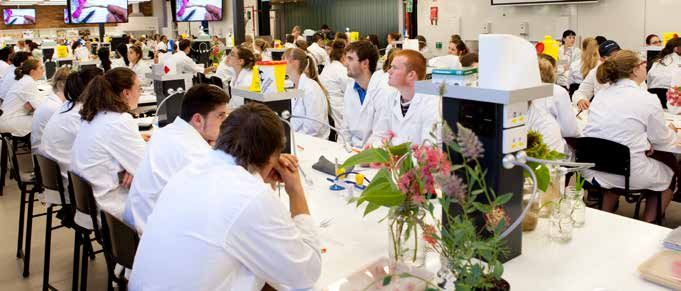
Access your study planner,
                       choose your courses and enrol
Visit my.uq.edu.au/starting-at-uq to access study planners, choose your courses
and enrol. Below you’ll find some information to keep in mind.

1.   Go to my.uq.edu.au/starting-at-uq and log in to see
                                                                   •   WARNING: Choosing courses requires careful
     your program rules, course list and other helpful
                                                                       planning.
     information.
                                                                   •   Make sure you choose prerequisites for
2.   Go to planner.science.uq.edu.au to find a study                   courses you want to do in future.
     planner for your program. Click on your program and,          •   Keep your options open in case you change
     if applicable, major, and go to the ‘Year 1’ tab. This will       your study plans.
     show you courses that you need to take (compulsory)
     and those that you should take (prerequisite) in order        •   Some courses are only offered in one
     to enrol in more advanced courses later to complete               semester.
     your major.                                                   •   If you are planning on going on exchange
                                                                       during your studies, you may not want to
     Recognising course codes: Courses are coded with
                                                                       take any of your electives in first year.
     four letters followed by four numbers. The letters
     stand for a discipline, while the first number in the         •   DUAL DEGREES can be even trickier!
     sequence stands for the year level of the course.                 We recommend you seek enrolment and
     Courses with the code ‘1’ as the first number are first           timetabling assistance, see page 7.
     level courses, so they are generally taken in first year,
     e.g. AGRC1020. Similarly, codes which begin with 2            Enrolment due dates
     and 3 reflect the year in which they are normally taken.      •   Domestic students: 31/01/2020
                                                                   •   International students: 21/02/2020
     Record your semester 1 course codes here:

       1.                                                          How many courses should I choose?
                                                                   •   A standard full-time load is equal to 4
       2.                                                              courses (8 units / #8) per semester
                                                                   •   International students are expected to
       3.                                                              maintain a full enrolment of 4 courses (#8)
                                                                       per semester and must seek academic
                                                                       advice before reducing their enrolment load.
       4.
                                                                   •   Most domestic students do not need to
                                                                       maintain a full enrolment of 4 courses
                                                                       (#8) and in certain situations, e.g. working,
3.   Log in to sinet.uq.edu.au (mySI-net) with your student
                                                                       or returning to studies, it might be more
     username and password to enrol. Follow the Task
                                                                       prudent to study part-time. There may be
     Wizard steps. You must enrol in at least one course by
                                                                       different requirements for some students
     the due date (see purple text box above).
                                                                       (e.g. scholarship holders or Centrelink
                                                                       recipients). Please check your eligibility
                                                                       carefully.

 Where to seek help:

 If you are still unsure about which courses to enrol in, you can drop in for enrolment and timetabling assistance
 during Orientation Week, details page 7.
 The Student Centre can assist with queries: enquire@science.uq.edu.au or (07) 5460 1276.
 View these useful videos to get you started: bit.ly/plan-your-study

4    Faculty of Science First Year Guide 2020
Select yor preferred class times
                      and get your timetable
Now that you are enrolled in your courses, you need to be allocated to particular
lectures, tutorials and practicals.
 After you enrol, you’ll need to select your preferred class times through         Need assistance with timetabling
 MyTimetable - our class allocation system. You'll then be allocated to            or enrolment?
 classes based on these preferences.
                                                                                   •    Drop in to the Student
 Class allocation has 2 stages:                                                         Centre on campus for
 •   Class preferencing                                                                 assistance
 •   Class adjustment                                                              •    Contact the Student Centre
                                                                                        via email enquire@science.
                                                                                        uq.edu.au or phone (07)
 Class Preferencing                                                                     5460 1276.
 During the class preferencing stage you will select your preferred class          •    Visit my.uq.edu.au/starting-
 times for each of your courses.                                                        at-uq/enrol/class-sign-on
 You don't have to rush to select your preferences – the system only
 begins allocating students to classes once the preferencing window has
 closed.
                                                                               Contact hours
 Class preferencing opens on 20 January and closes on 3 February 2020.
                                                                               Contact hours are the number
                                                                               of hours per week of attendance
                                                                               required in a course. The course
                                                                               timetable shows contact hours as a
 Once class preferencing closes, My Timetable will generate you a              combination of letters and numbers:
 clash-free timetable based on your preferences. Your timetable will be
 released on 10 February 2020.                                                 e.g., BIOL1020 2L 1T 3P
                                                                               = 2hr of lectures + 1hr tutorial + 3hr
                                                                               of practical per week.

                                                                               WARNING: Not all classes are held
 Class Adjustment
                                                                               every week. For example, some
 You can make changes to your timetable via My Timetable during the            practical classes are scheduled only
 class adjustment stage. During this stage you can:                            every second week, so be sure to
                                                                               check the dates!
 •   review your allocated timetable
 •   swap class times if there's a space available
                                                                               Sessions
 •   add your name to a waitlist to swap
                                                                               With over 1000 new students in
 •   allocate yourself to classes you missed during the class preferencing     science, we offer some classes more
     stage.                                                                    than once. In these cases, you need
                                                                               to choose:
 Try to review your timetable as soon as you can. The earlier you swap or
 waitlist, the better chance you have of getting the timetable you want.       •       One stream of lectures (L01 or
                                                                                       L02 or L03 etc);
 You can make changes between 10 February to 6 March 2020.
                                                                               •       One tutorial group (T01, T02 or
                                                                                       T03 etc); and
                                                                               •       If applicable, one laboratory or
                                                                                       practical group (P01, P02, or
                                                                                       P03 etc).
                                                                               For example, for BIOL1020 you
                                                                               could choose:
                                                                               •       L02 (Lecture stream 2)
                                                                               •       P07 (Practical session 7)
                                                                               •       T15 (Tutorial 15)

Bachelor of Veterinary Science students with a calf.

                                                                   Faculty of Science First Year Guide 2020               5
O-WEEK
Gatton: 17-21 Feb
orientation.uq.edu.au
MONDAY 17 FEBRUARY
8.30am-1pm ID card pick up (no Halls of Residence students) Library
8.30am-4.30pm Timetabling & enrolment assistance Student Centre
9.30-11am O-Week Campus Challenge Central Walkway
11am-12.30pm Welcome BBQ Central Walkway
12.30-4.15pm Program induction activities Central Walkway
4.30-6.30pm Pool Party & free BBQ (all students welcome) UQ Sport Fitness & Aquatic Centre
6.45pm Bus back to St Lucia (R) Gatton Bus stops
TUESDAY 18 FEBRUARY
8.30am-4.30pm Timetabling & enrolment assistance Student Centre
9.30am-2.30pm ID card pick up (all students welcome) Library
9-10am Health and Safety (compulsory for international students) Animal Studies Building, 8150-153
10-11am Seminar for international students with family dependants Animal Studies Building, 8150-153
11am-12pm Global Experience Opportunities (student exchange) Management Studies Building,
8117-116
11am-12pm Working While on a Student Visa Animal Studies Building, 8150-153
1.30-2.30pm Getting Started (new domestic & international students) Animal Studies Building, 8150-153
2.30-3pm Student charter seminar (new students) Animal Studies Building, 8150-153
3-3.30pm Student Employability Centre: Maximise Your Experience Animal Studies Building, 8150-153
3.30-4pm Scholarships & prizes information session Animal Studies Building, 8150-153
4.30-6.30pm Gatton Market Day (Twilight Markets) Central Walkway
5-6.30pm Cohort Dinner Central Walkway
6.45pm Bus back to St Lucia (R) Gatton bus stops
WEDNESDAY 19 FEBRUARY
8.30am-4.30pm Timetabling & enrolment assistance Student Centre
8.30am-2pm Jump Start Academic Preparation Program (JSAPP) Management Studies Building,
Undergraduate students (R) 8117-106
11am-3pm ID card pick up (all students welcome) Library
6.30-8.30pm Movie Night (Aladdin, 2019) Central Walkway
THURSDAY 20 FEBRUARY
8.30am-4.30pm Timetabling, enrolment assistance & ID card pick up Student Centre
8.45am-12.30pm Jump Start Academic Preparation Program (JSAPP) Management Studies Building,
Undergraduate students (R) 8117-106
1.30-4.30pm Gatton Student Association (GSA) Surprise activity Central Walkway
FRIDAY 21 FEBRUARY
8.30am-4.30pm Timetabling, enrolment assistance & ID card pick up Student Centre
9am-9.45am School of Agriculture & Food Science (postgrad welcome) Management Studies Building, 8117
10am-11.30am School of Agriculture & Food Science Plant Industries Building, 8111
(Postgrad laboratory introduction & skills session)
11.45am-4.30pm Jump Start Academic Preparation Program (JSAPP) Animal Industries Building, 8103-132
Mature age and Postgraduate students
4.30-6.30pm Postgraduate Mixer (R) Outside Walkway Cafe
(new & returning postgrad students)
66.45pm Bus back
Faculty of Science First to St Lucia
Year Guide(R)
2020 Gatton bus stops
R = Registration requiredWELCOME BBQ Monday 17 Feb, 11am-12.30pm Central Walkway Welcome to Country & free BBQ Lunch POOL PARTY Monday 17 Feb, 4.30-6.30pm UQ Sport Fitness & Aquatic Centre Pool party, DJ & free BBQ! MOVIE NIGHT Wednesday 19 Feb, 6.30-8.30pm Central Walkway Free outdoor movie (Aladdin, 2019) FREE COME & TRY 24 Feb - 8 March, All Day UQ Sport Fitness & Aquatic Centre Access sport facilities & group fitness for free for two weeks! Faculty of Science First Year Guide 2020 7
Immunisations
Students who will be working with animals or in              UQ Health Care runs a Q fever program at the
agricultural environments as part of their program are       commencement of Semester 1. Registration is essential.
at risk of exposure to tetanus and Q fever, and should
                                                             The program consists of two visits one week apart.
be tested/vaccinated to reduce the risk of contracting
                                                             •   First visit - a detailed history, skin test and blood
these diseases. If you have any questions or concerns,
                                                                 test are performed
please discuss these with your general practitioner.
                                                             •   Second visit one week later - tests are read and Q
                                                                 fever vaccine is given if tests show no immunity to
Tetanus is caused by a bacterium found in soil which
                                                                 Q fever
can enter wounds and cause severe illness. Tetanus
vaccination is available from your general practitioner.
                                                             For more information and to download the Q fever
                                                             program registration forms, visit:
Q fever is a zoonotic infection transmitted by the
bacterial microorganism Coxiella burnetii, usually via       bit.ly/UQimmunisations2020
dust and aerosols from infected animals.

                    FAQs for First Year Students
Student email               Check your official student email daily to ensure you are up to date. UQ will only
                            send emails to your official student email address. Always use your student email,
                            not a personal email address, when contacting course coordinators, and include your
                            student ID number. If you don’t know how to log into your student email account, visit:
                            my.uq.edu.au/starting-at-uq/prepare-for-semester/information-technology
Blackboard                  Visit Blackboard (Learn.UQ) regularly to check for course related updates: learn.
                            uq.edu.au. Your lecturers will use this to make announcements and post important
                            information on assessment, and other course-related matters. Also referred to as
                            eLearning, this is the course website.
Electronic Course Profile Every course on offer at UQ has an ECP. The ECP contains important information
(ECP)                     about course requirements, and must be read carefully. THIS IS VERY IMPORTANT.
                          You can access the full version of your course-specific ECP via Blackboard course
                          sites. You can also view a short version through my.uq.edu.au/programs-courses, by
                          entering a specific course code into the search feature and following the links.

                            The left hand menu of the ECP details the aims and objectives of the course, learning
                            resources and activities and detailed information on assessment. For example, there
                            may be ‘hurdle requirements’ as part of the assessment which must be met in order to
                            pass the course.
What learning resources     •    ECP under ‘Learning Resources’
are available?              •    Academic advisors at the Science Student Enquiries Office
                            •    Course tutors
                            •    For finding information, borrowing, research help, student IT help and general
                                 enquiries, visit AskUs Library help: web.library.uq.edu.au/contact-us
                            •    Learning workshops on how to get the most of your studies, tackle assignments and
                                 prepare for exams: uq.edu.au/student-services/learning

I am taking a               You will need to do 32 units (#32) from each of the 2 programs involved, which
dual degree with            means there is a little less flexibility with courses. Use the dual degree study planners,
Agribusiness. Is there      accessed through my.uq.edu.au/programs-courses (planners on left hand menu of
anything in particular I    chosen program) or directly at
need to know?               planner.science.uq.edu.au to work out which courses you need to do, and when you
                            need to do them.

8   Faculty of Science First Year Guide 2020
Where do I hand in my Some submissions will be to the tutor, some online and some will need a cover sheet
assignments? for submission. This will be specified on the ECP.
How can I contact the Check the ECP or Blackboard for the most appropriate method of communication.
course coordinator? Different courses use different methods — some courses have specific course email
addresses, while other courses use discussion boards.
What if my assignment Please refer to the ECP for individual course procedures. There are different procedures
is late? for different courses and schools.
Do I need to have my Students in the Bachelor of Veterinary Science program are required to have their own
own laptop? laptop for their studies. For all other programs it is very helpful to have your own laptop
or other mobile device. The library also has a bank of computers which you can access
when on campus.
What calculator can I For many science courses, you will need an approved non-programmable calculator for
use? use in exams. For more details on approved calculator models: my.q.edu.au/approved-
calculators
Do I have time for paid We recommend less than 10h/wk paid work for full-time students. Although some
work? students are able to balance moderate work schedules with study, many students
struggle to keep up with their studies, especially in their first year. You should plan on
each course taking up about 10 hours of time per week.
What happens if I don’t You will need to catch up — talk to your peers and look on Blackboard for what you’ve
turn up? missed. You can lose marks or even fail the course for not participating in compulsory
activities. Contact your course coordinator for assistance.
• Blackboard – learn.uq.edu.au
• Contacts – uq.edu.au/contacts
What happens if I miss If you get too far behind with your work, you might think about withdrawing. Be aware
critical assessment in of important census dates (see below).
my course and too many
lectures?
What is the difference The Student Centre (NW Briton Administration Annexe, 8101A) handles all student
between the Student administration and general enquiries relating to the university. Student Services
Centre and Student (Morrison Hall, Building 8123) provides help with learning, disability and counselling
Services? support, and personal and academic welfare.
I’m concerned about Visit Student Services online or in Morrison Hall, Building 8123. They will be able to give
managing my workload you information and guides on how to manage your time effectively, as well as discuss
— who can I talk to? your concerns.
I’m worried that I might Student Services run online and on-campus workshops on ‘Preparing for Success at
not have the skills to University’, ‘Tertiary Writing Skills’, ‘Assignment Writing’ and more. Sign up at uq.edu.
succeed. How can I au/student-services.
improve my skills?
You can also prepare yourself for your first semester by completing the ‘CLIPS -
Communication Learning In Practice for Scientists’ course. This free online course has
been designed by UQ academics especially for science students. You can find the
course on learn.uq.edu.au or on clips.edu.au.
Semester 1 critical dates
24 February Classes commence
6 March Last day to add or substitute courses
31 March Last day to drop courses without financial liability (Semester 1 census date)
30 April Last day to drop courses without academic penalty
Save your money and don’t carry on with courses you have ‘given up on’.
You must formally withdraw:
• By the end of March so you aren’t charged for the course
• By the end of April so you don’t lower your Grade Point Average (GPA).
Faculty of Science First Year Guide 2020 9Where to go for help
Personal
UQ Health Care
NW Briton Administration Annexe (8101A)
(07) 5460 1396
uq.edu.au/healthservice
Student Services
Morrison Hall (8123)
(07) 5460 1046
uq.edu.au/student-services
Student Advocacy and Support
Room 223, Morrison Hall (8123)
(07) 5460 1791
uqu.com.au/supporting-u
Academic
Course assistance Details:
• Lecturer
• Electronic Course Profile (ECP)
• Course Blackboard
• Course Coordinator
Assessment:
• ECP - my.uq.edu.au/programs-courses
• Blackboard - learn.uq.edu.au
Timetabling issues:
• Drop in to the Student Centre (NW Briton Administration Annexe) to
chat with staff about timetabling issues.
• Email enquire@science.uq.edu.au
• Email your course coordinator using the link on the timetable page
(SI-net)
General advice Science Student enquiries including First Year Academic Advisor
appointments:
• Student Centre, located on the ground floor of the NW Briton
Administration Annexe (8101A)
• Email - enquire@science.uq.edu.au
Program specific advice School of Agriculture and Food Science:
safs@enquire.uq.edu.au
School of Veterinary Science:
vetenquiries@uq.edu.au
Student ID cards You have two options for your new student ID:
• upload your photo online. Once approved, your ID card will be ready to
pick up at the Student Centre
• get your photo taken at the Student Centre (or library, see page 6 for
library times). Make sure to bring photo ID and your letter of offer.
For more information, visit: my.uq.edu.au/starting-at-uq/prepare-for-
semester/student-id-cards
Fee queries and calculator approval Visit the Student Centre, located on the ground floor of the NW Briton
Administration Annexe (8101A)
Library and IT services Visit web.library.uq.edu.au/library-services
10 Faculty of Science First Year Guide 2020Terminology explained
Watch a video that explains Uni 101: bit.ly/uquni101
Academic Record There are two types of academic records: official and unofficial. The official academic
record, called a “transcript”, is produced by the University’s Student Centre for a fee
(a complimentary copy is provided to graduating students). The unofficial academic
record, known as a “studies report”, can be printed from mySI-net.
Blackboard UQ’s learning management system, also known as Learn.UQ.
Access via learn.uq.edu.au, or via my.UQ.edu.au under eLearning. Contains
assessment information, announcements, updates, some assignment marks and
discussion boards for each of your courses.
Compulsory course Course that you must take (e.g. CHEM1004 for the BAgri Sci).
Course Subject or class (e.g. AGRC1020 or VETS1060).
Course list The courses you have to pass in order to receive your degree. The Course list
specifies compulsory and elective courses – my.uq.edu.au/programs-courses
Discipline Field of study or specialisation within your program.
Electronic Course Profile Also referred to as the Course Profile, the ECP contains information about individual
(ECP) courses including assessment requirements, contact hours, course coordinators and
general information. See page 8 for further details.
Major An area of specialised study within a program. A major may be referred to as a
specialisation, discipline or plan. See my.uq.edu.au/programs-courses for further
details of majors in science programs.
mySI-net UQ’s online student enrolment system – sinet.uq.edu.au. Enrol in courses and access
your studies report.
My Timetable My Timetable is the class allocation system at UQ. Go to page 5 to read more about
the class allocation process.
Prerequisite A level of knowledge and skill you must have before participating in a course (e.g. you
must have MATH1050 or Maths C before you do MATH1051).
Program Your program is the degree you are taking e.g. BVetTech - Bachelor of Veterinary
Technology.
SAFS School of Agriculture and Food Sciences.
SVS School of Veterinary Science.
Units Most courses are 2 units. A full time study load for a semester is 6 units or more,
so that’s 3 or more courses. Most students do 4 courses, 8 units in each semester.
International students must do 4 courses, 8 units. To complete a 3 year program
within the 3 years, students are required to do 4 courses per semester unless they
opt into summer electives.
Faculty of Science First Year Guide 2020 11Life at UQ Gatton
Tips from our
students
Parking at the Gatton The library has 24 Carefully read the program rules
campus is free! hour access which is for your particular program when
great for studying! you are putting together your
study plan!
Each course is about 10 hours
of work each week — for four
courses, that’s a full-time job
equivalent to 40 hours!
Read dates carefully — pracs can
sometimes be fortnightly, not
weekly.
University is a The FREE You have a lot more freedom than
great networking intercampus bus is at school.
opportunity for now so handy to travel Ask for help if needed, no
and your future between St Lucia and question is too silly. There are
career. Make the most Gatton. always people wanting to help.
of it!
Exams are pretty serious business
— it’s almost impossible to cram
everything into the night before
an exam and still do fine (trust me,
I’ve tried).
There are microwaves on campus!
No-one is going to chase you up
to do your assignment — you have
to find the motivation yourself.
Be professional when Study abroad!
emailing. Always Start planning now, Join a student club or society.
include your full save some of your Student Societies include, GSA
name, Student ID, electives! (Gatton Student Association)
UQVSA (Vet Student Association)
program, and and other discipline-related
contact number. clubs including Equine, Wildlife,
Agribusiness, Plants and Vet Tech.
If you discover you don’t like
the program you’ve enrolled in,
changing degree programs once
you’ve started is not a big deal.
Check your student emails every
day!
There are lots of Attend all your Time management is
opportunities to classes. You have a an art! Put together a semester
volunteer on campus much better chance and weekly schedule to help
— working at events, of success if you do. manage your time.
with animals or on the
If you have timetable clashes,
farm. don’t stress. It can usually be
sorted fairly easily.
12 Faculty of Science First Year Guide 2020Equity and Diversity
Equity and Diversity
Student Services Grievance Resolution
Student Services provides help in the following areas: The Student Grievance Resolution Policy, Procedures
• Disability Services and Guidelines outline procedures for resolving a
• Learning Advisors range of issues.
• Counselling
my.uq.edu.au/information-and-services/manage-
• Making new friends and settling in to university
my-program/complaints-and-academic-appeals/
• Faith and spirituality
grievance-resolution-process
• International student support
• Accommodation If you feel that you would like further support, the UQ
Union (Student Union) is also available to assist and
Visit Student Services at Gatton, Monday – Friday,
advocate on your behalf.
8.30am – 4.30pm in Morrison Hall, Building 8123.
uqu.com.au/student-support
uq.edu.au/student-services
Discrimination and Harassment
UQ Ally Network
If you have a grievance or enquiry relating to
The UQ Ally Network is an award-winning program
discrimination, harassment or bullying, you can
that provides a visible network of well-informed staff
contact a Discrimination and Harassment Contact
who create a safe, welcoming and inclusive space
Officer (DHCO), who can provide information about
for LGBTIAQ+ students at UQ and in the broader
UQ policies and procedures and support services
community.
available to students.
To find a UQ Ally, or to find out more about the
staff.uq.edu.au/information-and-services/human-
program, look for staff with the rainbow badge,
resources/conduct-ethics/discrimination/contact-
rainbow posters around all UQ campuses or visit the
officers
UQ Ally Network website.
staff.uq.edu.au/information-and-services/human-
resources/diversity/sexuality/ally-network The Student Charter
The Student Charter sets out the expectations you
can hold for your education and outlines what is
Inclusive Language
expected of you while studying.
The UQ Guide to Inclusive Language provides All students and staff are entitled to work and study in
information on how to apply inclusive language in an equitable environment, free of discrimination and
the study environment. Students can access the UQ harassment.
Guide to Inclusive Language on the inclusive language
website. my.uq.edu.au/information-and-services/manage-my-
program/student-integrity-and-conduct
staff.uq.edu.au/information-and-services/human-
resources/diversity/commitment/inclusive-language
Faculty of Science First Year Guide 2020 13Faculty of Science Gatton Student Centre, NW Briton Administration Annexe (8101A) Phone: +61 7 5460 1276 Email: enquire@science.uq.edu.au Web: science.uq.edu.au CRICOS Provider Number 00025B
You can also read


