High Performance Computing - What is it used for and why? - Archer
←
→
Page content transcription
If your browser does not render page correctly, please read the page content below

High Performance
   Computing
  What is it used for and why?
Reusing this material

 This work is licensed under a Creative Commons Attribution-
     NonCommercial-ShareAlike 4.0 International License.
http://creativecommons.org/licenses/by-nc-sa/4.0/deed.en_US

  This means you are free to copy and redistribute the material and adapt and build on the
  material under the following terms: You must give appropriate credit, provide a link to the
 license and indicate if changes were made. If you adapt or build on the material you must
                distribute your work under the same license as the original.

Acknowledge EPCC as follows: “© EPCC, The University of Edinburgh, www.epcc.ed.ac.uk”

Note that this presentation contains images owned by others. Please seek their permission
                               before reusing these images.

                                               2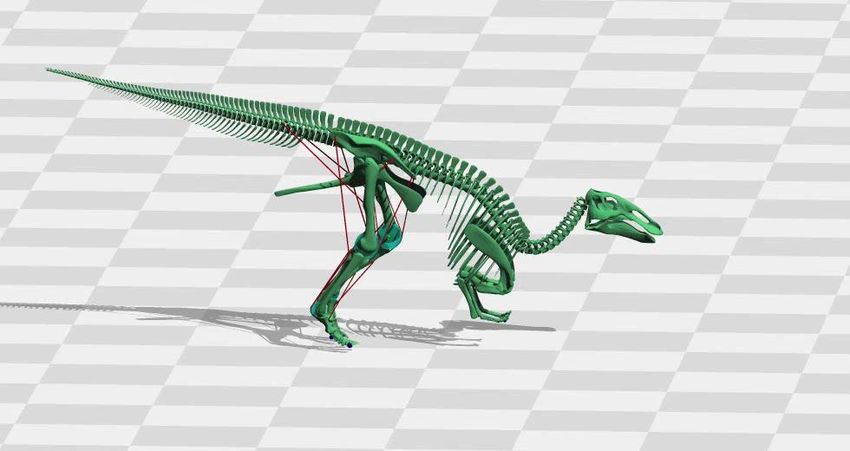
Overview
• What is it used for?
  - Drivers for HPC
  - Examples of usage
• Why do you need to learn the basics?
  - Hardware layout and structure matters
  - Serial computing is required for parallel computing
  - Appreciation of fundamentals will help you get more from HPC and
    scientific computing
• Give you an introduction to modern HPC machines
  - On overview of how we interact with supercomputers

                                  3
What is HPC used for?
Drivers and examples

                       4
Why HPC?
• Scientific simulation and modelling drive the need for
  greater computing power.
• Single-core processors can not be made that have
  enough resource for the simulations needed.
  - Making processors with faster clock speeds is difficult due to cost
    and power/heat limitations
  - Expensive to put huge memory on a single processor

• Solution: parallel computing – divide up the work among
 numerous linked systems.

                                    5
Generic Parallel Machine
• Good conceptual model is collection of multicore laptops
- come back to what “multicore” actually means later on …
• Connected together by a network
• Each laptop is called
laptop1 a compute node
laptop2 • each has its own
operating system and
network connection
laptop3
• Suppose each node
laptop4 is a quadcore laptop
• total system has 20
laptop5
processor-cores
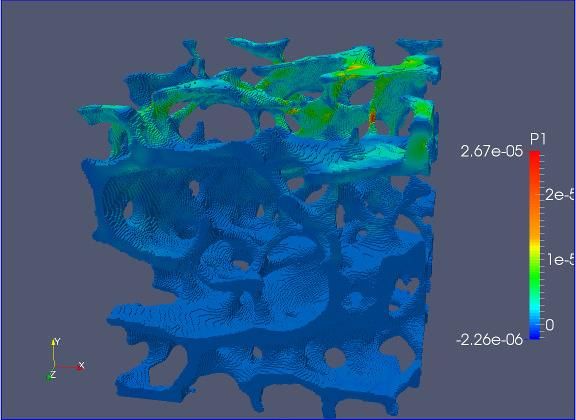
6Bone modelling
Prof Michael Fagan, University of Hull
Modelling dinosaur gaits
Dr Bill Sellers, University of Manchester
Community Earth
System Model
7Usage statistics on UK national service
8The Fundamentals
Why do I need to know this?
9Parallel Computing
• Parallel computing and HPC are intimately related
- higher performance requires more processor-cores
• Understanding the different parallel programming models
allows you to understand how to use HPC resources
effectively
10Hardware Layout
• Understanding the different types of HPC hardware allows
you to understand why some things are better on one
resource than another
• Allows you to choose the appropriate resource for your
application
• Allows you to understand the ways to parallelise your
serial application
• Gives you an appreciation of the parts that are important
for performance
11Serial Computing
• Without an understanding of how serial computing
operates it is difficult to understand parallel computing
- What are the factors that matter for serial computation
- How does the compiler produce executable code?
- Which bits are automatic and which parts do I have to worry about
- What can or can’t the operating system do for me?
12What do we mean by “performance”?
• For scientific and technical programming use FLOPS
- Floating Point OPerations per Second
- 1.324398404 + 3.6287414 = ?
- 2.365873534 * 2443.3147 = ?
- Modern supercomputers measured in PFLOPS (PetaFLOPS)
- Kilo, Mega, Giga, Tera, Peta, Exa = 103, 106, 109, 1012, 1015
• Runtime is often used for specific code runs
• Other disciplines have their own performance measures
- frames per second, database accesses per second, …
13HPC Layout and Use
Starting concepts
1415 Differences from Desktop Computing • Do not log on to compute nodes directly - submit jobs via a batch scheduling system • Not a GUI-based environment • Share the system with many users • Resources more tightly monitored and controlled - disk quotas - CPU usage
Typical HPC system layout

       SSH                     Batch
     Terminal                 System
                Login Nodes               Compute Nodes
    Upload /
    Download
      Data

                                   Disk

                              16
Typical Software Usage Flow
On Login On Login On Compute On Login/Compute
Nodes or Nodes Nodes Nodes or
Elsewhere Elsewhere
Batch
Write Compile System Execute Analyse
Code Code App. Results
Bugs/New
Features
17Summary
18Summary
• High Performance Computing = parallel computing
• Run on multiple processor-cores at the same time
• Typically use fairly standard processors
- but many thousands of them
• Fast network for inter-processor communications
19You can also read


