MBA Online Program Online chat schedule and registration information
←
→
Page content transcription
If your browser does not render page correctly, please read the page content below
MBA Online Program
Online chat schedule and registration information

                                             | Chat schedule and registration   1
Priority registration
Priority registration is a time designated by Suffolk University to allow students the opportunity to register for courses without making
an initial deposit. Once the period is over, the Student Accounts/Bursar's Office will mail out tuition bills to students.
The Online Program has reserved 2 weeks prior to the University priority registration exclusively for online students to register for
online courses.
What does this mean to you?
It means that you can register for an online course without the worry or concern of a course filling up. It is highly recommended that
you use the exclusive priority period for online students and register for course(s).
After the first two weeks, online courses will open to the rest of the campus community with the exception of MBA 600, MBA 780
and MBA 800. You may continue to register for online course, however, please note that online courses are popular among campus
students and they may fill up quickly.
Fully Online Student Priority Registration Period for Spring and Summer 2014
October 21 – November 3 Only fully online students can register for Spring and
Summer 2014 online courses
Suffolk University Priority Registration Period for Spring and Summer 2014
November 4 Spring and Summer 2014 online courses available to campus
students (with the exception of MBA 600, 780, 800).
Registration Exceptions (online students):
The following courses are available online ONLY to fully Online MBA students. (*Can be taken online with special permission from
Assistant Dean, Heather Hewitt)
1. MBA 600W
2. MBA 780W*
3. MBA 800W*
New Student Orientation (NSO):
If this is the first MBA Online course you are taking, you must register for MBA 001 -NSO First-Time Online Users with the
Registrar's Office. This is a 0-credit, 0-fee introductory course.
The NSO is offered 2 times the week prior to the semester start date. Below are the dates for Spring and Summer 2014. Please note
that you only attend one session.
Spring 2014
MBA 001 W1 MBA 001 W2
Tuesday, January 7, 2014 Thursday, January 9, 2014
6:00-7:00PM (EST) 7:00 – 8:00PM (EST)
Summer 2014
MBA 001 W1 MBA 001 W2
Tuesday, May 27, 2014 Thursday, May 29, 2014
6:00-7:00PM (EST) 7 -8:00PM (EST)
| Chat schedule and registration 2Closed course:
When a course reaches its cap (capacity), it will be closed for enrollments. We advise students to get on the waitlist for the closed
course. Once a spot becomes available, the first student on the waitlist will be notified by the Registrar’s automated system. Please
be sure to have access to your Suffolk email account.
Do not contact faculty directly. Students cannot be added to a closed online course by a faculty member. The Online
Program adheres to the waitlist process in assisting students enroll in courses.
Registration information:
For step-by-step instructions on how to register and the waitlist process visit: http://www.suffolk.edu/offices/5768.html#anchor5856
| Chat schedule and registration 3Spring 2014
Start Date: January 13, 2014
End Date: April 24, 2014
SPRING 2014 MBA Online Chat Schedule
Finals Week: April 28 – May 3
SPRING BREAK: March 9 - 16
Course section Course Title Chat day Chat time Instructor
New Student Orientation
MBA-001-W1 NSO First-Time Online Users Tuesday, January 7 06:00PM 07:00PM Potvin, M
MBA-001-W2 NSO First-Time Online Users Thursday, January 9 07:00PM 08:00PM Potvin, M
Core and Required
**MBA-600-W1 Effective Career Planning Monday 06:50PM 08:20PM Detjen, J
MBA-610-W1 Organizational Behavior Monday 08:30PM 10:00PM Detjen, J
MBA-622-W1 Operations & Data Analysis Thursday 06:50PM 08:20PM Marcus, B
MBA-640-W1 Corp Financial Reporting & Ctr Tuesday 06:50PM 08:20PM Markelevich, A
MBA-650-W1 Value Based Financial Mgmt Thursday 06:50PM 08:20PM Han, K
MBA-660-W1 Mkting: Challenge of Mging Val Wednesday 08:30PM 10:00PM Curran-Kelly, C
MBA-670-W1 Info Mgt for Compet Advantage Tuesday 06:50PM 08:20PM Kamis, A
MBA-780-W1 Managing in Global Environment Tuesday 06:50PM 08:20PM Arce, P
MBA-800-W1 Strategic Management Wednesday 06:50PM 08:20PM DeFillippi, R
Accounting
ACCT-801-W1 Grad Financial Accounting I Thursday 08:30PM 10:00PM Potvin, M
ACCT-802-W1 Grad Financial Accounting II Thursday 06:50PM 08:20PM Potvin, M
ACCT-804-W1 Cost Info, Decision & Control Tuesday 08:30PM 10:00PM Rahman, M
ACCT-805-W1 Auditing and Assurance Srvcs Wednesday 06:50PM 08:20PM Fuerman, R
ACCT-825-W1 Corp Fin Planning & Control Monday 06:50PM 08:20PM Petacchi, P
ACCT-865-W1 Technology & Fin Info Systems Monday 08:30PM 10:00PM Gomaa, M
TAX-801-W1 Issues in Federal Taxation Monday 06:50PM 08:20PM Angelini, J
TAX-879-W1 Personal Financial Planning Monday 08:30PM 10:00PM Matheson, T
Business Law
BLLS-830-W1 Manage in Intrnl Legal Environ Tuesday 08:30PM 10:00PM McCoy, J
Finance
FIN-801-W1 Money & Capital Markets Monday 08:30PM 10:00PM Atherton, C
FIN-810-W1 Investment Analysis Monday 06:50PM 08:20PM Atherton, C
MGT: Organizational Behavior/Entrepreneurship
MGES-800-W1 Business Startups Monday 06:50PM 08:20PM Golden, S
MGES-842-W1 Glob Innov & New Prod Vir Team Wednesday 08:30PM 10:00PM Bhatia, S
MGOB-820-W1 Career Strategy Wednesday 06:50PM 08:20PM Arthur, M
MGT: Strategic/International Business
MGIB-835-W1 International Strategy Saturday 09:00AM 10:30AM DeFillippi, R
MGSM-834-W1 Mergers and Acquisitions Wednesday 08:30PM 10:00PM Belousova, S
Marketing
MKT-820-W1 Sales Management Tuesday 06:50PM 08:20PM Twomey, S
**MBA 600 Meeting tim: (must attend all 4 sessions
January 13, January 27; February 3, February 10
| Chat schedule and registration 4Summer 2014 (Module 3)
Start Date: June 2, 2014
End Date August 7, 2014 SUMMER 2014 MBA Online Chat Schedule
10 week session
Course section Course Title Chat day Chat time Instructor Module
New Student Orientation
MBA-001-W1 NSO First-Time Online Users Tuesday, May 27 06:00PM 07:00PM Potvin, M N/A
MBA-001-W2 NSO First-Time Online Users Thursday, May 29 07:00PM 08:00PM Potvin, M N/A
Core and Required
MBA-610-W1 Organizational Behavior Monday 08:30PM 10:00PM Detjen, J Module 3
MBA-630-W1 Economic Analysis for Managers Tuesday 06:50PM 08:20PM Staff, F Module 3
MBA-640-W1 Corp Financial Reporting & Ctr Monday 08:30PM 10:00PM Markelevich, A Module 3
MBA-650-W1 Value Based Financial Mgmt Thursday 08:30PM 10:00PM Staff, F Module 3
MBA-660-W1 Mkting: Challenge of Mging Val Thursday 08:30PM 10:00PM Curran-Kelly, C Module 3
MBA-680-W1 Managing in Ethical & Lgl Envt Wednesday 08:30PM 10:00PM McCoy, J Module 3
MBA-780-W1 Managing in Global Environment Monday 06:50PM 08:20PM Sheehan, M Module 3
MBA-800-W1 Strategic Management Wednesday 06:50PM 08:20PM Aylward, T Module 3
Accounting
ACCT-804-W1 Cost Info, Decision & Control Tuesday 06:50PM 08:20PM Rahman, M Module 3
ACCT-805-W1 Auditing and Assurance Srvcs Wednesday 08:30PM 10:00PM Fuerman, R Module 3
Finance
FIN-801-W1 Money & Capital Markets Monday 08:30PM 10:00PM Staff, F Module 3
MGT: Organizational Behavior/Entrepreneurship
MGES-802-W1 Corporate Entrepreneurship Monday 06:50PM 08:20PM Staff, M Module 3
MGES-848-W1 Green and Sustainable Business Wednesday 06:50PM 08:20PM Bean, W Module 3
MGT: Strategy/International Business
MGSM-833-W1 Corporate Innovation Tuesday 06:50PM 08:20PM DeFillippi, R Module 3
Marketing
MKIB-817-W1 International Marketing Tuesday 08:30PM 10:00PM Curran-Kelly, C Module 3
EXCEPTION: Tax 801W and ACCT 825W will meet on Summer Module 1: May 19 – July 3.
Sectio Section Titl Module 1 Dates Chat days Chat Time Instructor
TAX-801-W1 Issues in Federal Taxatio May 19- July 3 Monday/Wednesday 06:50PM - 08:20PM Angelini, J
Corp Fin Planning &
ACCT-825-W1 May 19- July 3 Tuesday/Thursday 06:50PM - 08:20PM Petacchi, P
Control
NOTE: This course meets twice a week; for 7 weeks.
| Chat schedule and registration 5APPENDIX
Following is a copy and paste registration instruction information from the Office of the Registrar’s.
To access the registration information directly from the web, visit: http://www.suffolk.edu/offices/5768.html
| Chat schedule and registration 6Registration Instructions
Following is a copy and paste instructions from the Registrar’s Office, you may get this information by logging on to:
http://www.suffolk.edu/offices/5768.html
Logging in
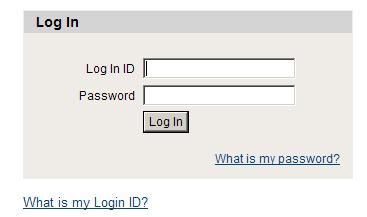
• Access the Registration Login page at: http://www.suffolk.edu/mysuffolk.
2
1
• Enter User ID and Password (If you are new and do not know this information, click on “What’s my
Login ID?” or contact Suffolk University Help Desk at 617-573-8000 x2002, between the hours
8:30AM to 8:00PM EST).
• Forgot your password? Click “What’s My Password” and a new one will be emailed to your SU
email.
• Once successfully, logged in: Click “Classes & Registration” tab (top of the screen).
Registering
Registering for courses is as easy as 1‐2‐3.
• First, you must create a “wishlist” that includes the courses you intend to take for the appropriate
semester.You may search for courses using the “Check Course Offerings” subtab.
• Second, during your assigned registration time, select the action you would like to take from the
dropdown menu. You may add or remove courses until your intended schedule has been selected.
• Once you have your classes finalized, click submit and your registration is complete.
Please note that if you have any holds, need advising, or are registering for a course that requires faculty
approval, you may not be eligible until those issues have been addressed.
Contact the Office of the Registrar at 617.573.8430 or stu.info@suffolk.edu should you encounter any of
these situations.Creating a Wishlist
In order to register for courses, each student must first create a “wishlist” of classes for the semester in
which they are registering.
Please note: Selecting courses for your wishlist does not guarantee that you will be able to register for the
course(s). Be sure to verify that you have completed the prerequisites before you begin the registration
process.
• Enter the subject, course number, section (CAPS only), and term for the course(s) you would like to add
• Click Submit
• A new screen will display your preferred sections (wishlist) and your current semester courses
• To register for courses from your wishlist:
• Select an action for all of your preferred sections from the drop‐down menu , or
• Individually select registration options for each course (Please note: If you wish to take a course as Pass/Fail or
Audit, consult the Academic Catalog for policy information before choosing either of these options.)
• You may remove sections from your wishlist at anytime from this screen
• If you receive an error message at the top of the page stating "You are not eligible for registration at this
time," please contact the Office of the Registrar at 617.573.8430 or stu.info@suffolk.edu
• Please print a copy for your records
Wait List
Certain courses fill quickly resulting in a waitlist (closed section). Should any of your preferred courses reach
their capacity before you register, you may include them on your waitlist.
Please note: Only closed courses can be waitlisted. You may not be on a waitlist for a course if you are
currently registered for another section of the same course. You must meet all student and course eligibility
rules in order to be placed on a waitlist.
• Select the WL – Waitlist action from the drop-down menu next to the course
• The course will appear under the Waitlist section of the Registration Results screen
• View the number of students on the waitlist by selecting Mange My Waitlist from the Registration
Options
• Should the course have an opening, you will receive an email indicating that you have two days to
register for the course
o It is extremely important that you check your Suffolk email for these notifications
o If you miss the two day window, the opening will be offered to the next student on the
waitlist
o If you do not plan on registering for the course, please remove yourself from the waitlist
so the next student on the list can be notified
• To register for waitlisted course sections, select Manage My Waitlist from the Registration Options
menu. Choose RG – Register from the Action column nextto the course. You can also remove
yourself from the waitlist for a course from this screen by selecting an Action or RM - Remove.
• Results screen appearsDrop Class
• Use if you want to drop classes from your current schedule.
• Your preferred sections and your current registrations will appear.
• Check the box in the DROP column.
• Click Submit. Your results screen will appear.
• Please print a copy for your records.
Confirmation
• Confirmation is obtained by clicking on "My Class Schedule" and choosing the appropriate term.
• Use your browser's print function to print a hard copy confirmation of your course schedule by
term.
• An email confirmation of registration activity is also sent to your Suffolk email account.
• For information regarding your Suffolk email account please visit www.suffolk.edu/emailYou can also read


