Overview of SAT, Access, Portals, and Systems - Spring 2019 Implementation Supporting Schools and Students to Achieve - Idaho.gov
←
→
Page content transcription
If your browser does not render page correctly, please read the page content below

Overview of SAT,
Access, Portals, and
Systems
Spring 2019 Implementation

Supporting Schools and Students to Achieve
SHERRI YBARRA, SUPERINTENDENT OF PUBLIC SCHOOLS

Session Goals
 Today we will provide an overview of SAT School Day focused tips and best practices in the areas of :

 • Accessing College Board tools
 • Room Planning
 • Test Day Planning
 • Returning Materials

 Watch for the “best practices” logo

                                                                                                2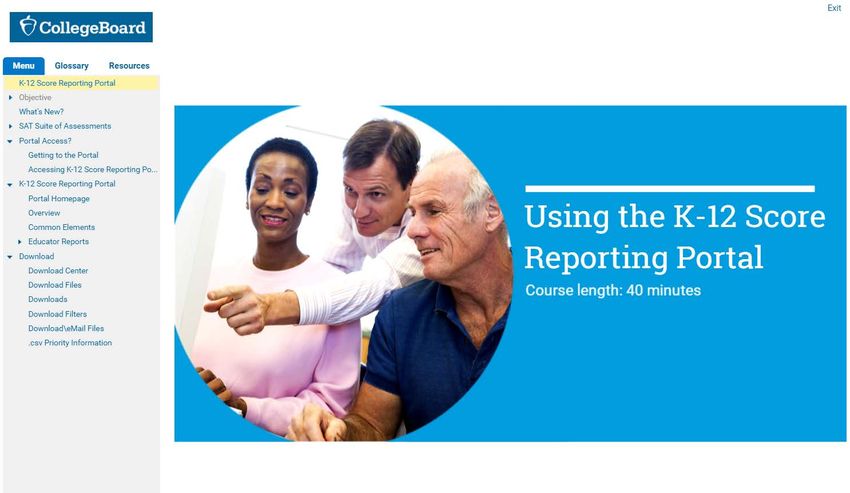
Accessing College Board
Tools

                          |3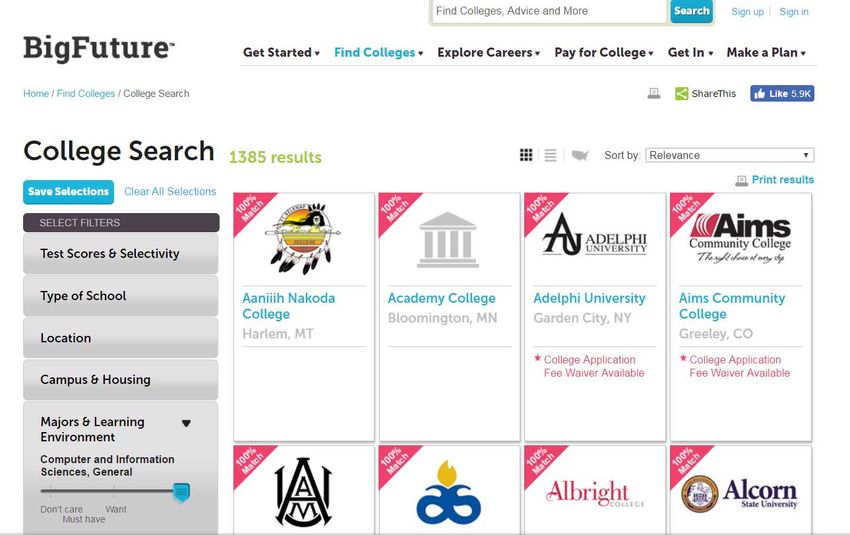
Accessing College Board Tools
 • A College Board Professional Account is
   required for all system access.
 • Each user creates his or her own account to
   allow for a single sign-on to the following
   features:
      • SSD Online System
      • College Board Online Test Day Training
      • College Board Reporting Portal
      • Test Ordering System (PSAT only)
 • Create your account at collegeboard.org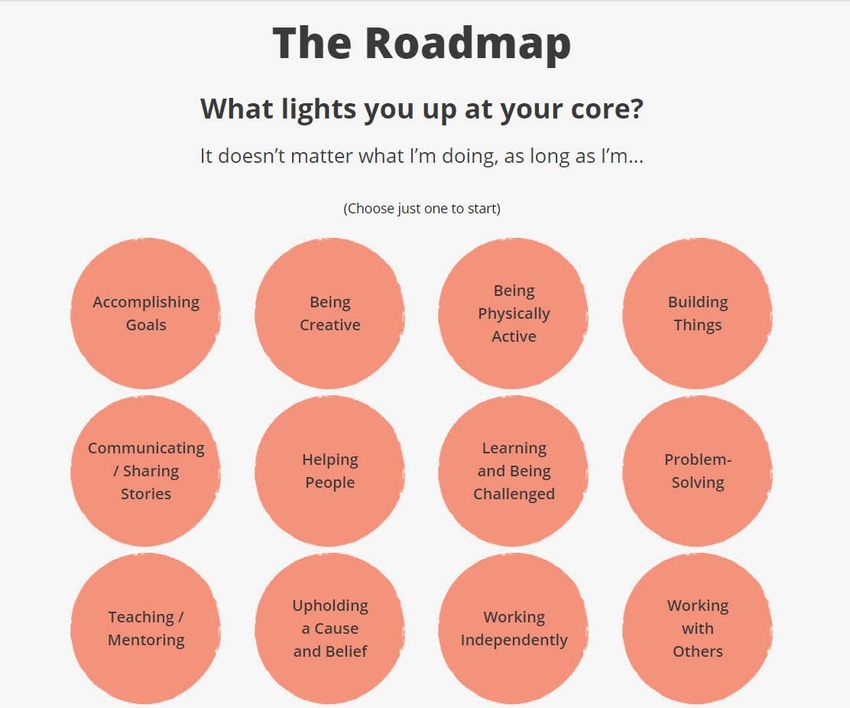
College Board Account
 • Once logged into your professional account,
   you can access the dashboard.
 • While College Board typically provides a URL
   shortcut to each system, the dashboard will
   also provide access to all College Board
   systems linked to your account.

                                                  |5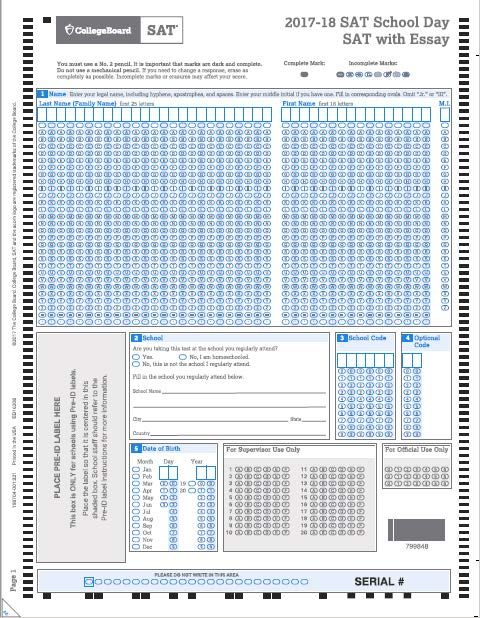
Key System: SSD Online
 • SSD coordinators use SSD Online to submit requests for accommodations and the EL 50% support
   on the behalf of students.
     • College Board will determine non-standard material orders to be shipped to schools for test
       day.
 • Schools can have multiple SSD coordinators, but only one should be listed as the primary
   coordinator who will receive communications from the College Board.
 • To access the system using your College Board account, complete the SSD Coordinator Form, found
   on collegeboard.org/ssd.
     • Within a couple of days, an access code will be sent to allow access.
     • SSD online access remains active year to year.

                                                                                                     |6
Key System: Test Admin Training
 • Test Coordinators will receive an email providing a link to the test day online training approximately
   six weeks prior to test day.
 • Training is required for all test coordinators.
 • To access, you will login to the system using your College Board Professional Account.
 • Training may also be shared with other test day staff.

                                                                                                            |7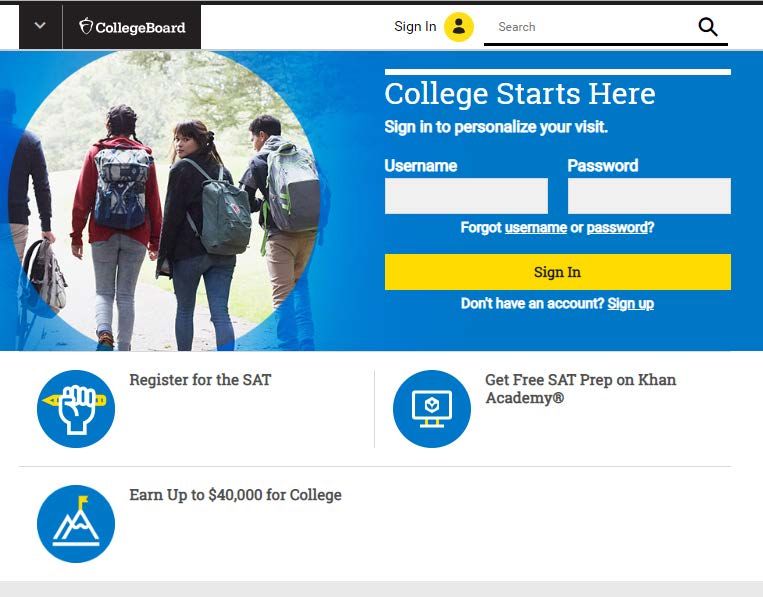
Key System: K12 Reporting Portal
 • The reporting portal provides test coordinators
     • Access to student results for all SAT Suite of Assessment administrations
     • Ability to monitor student registrations for the optional essay
     • Ability to monitor national test administration dates.
 • To access, test coordinators should speak with the school principal to determine who is the schools’
   designated access manager.
     • Each school has an access manager who will provide access to school staff.
     • Prior to each score release, the College Board will provide an email with access codes and
       instructions.

                                                                                                          |8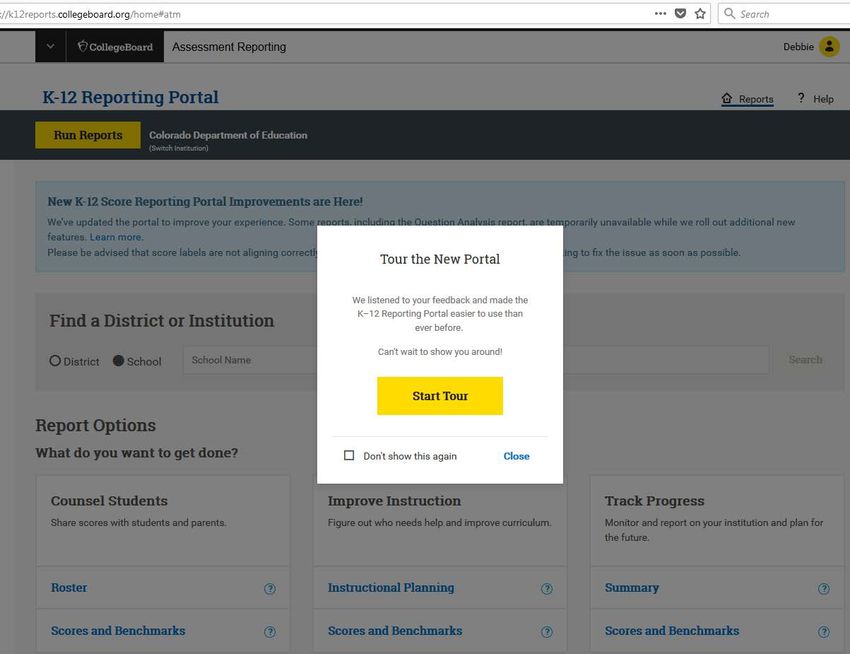
SAT Suite of Assessments Knowledge Center

 • Learn more about SAT and the tools used in support of administrations
   https://satsuiteofassessments.articulate-online.com/2983192836

                                                                           |9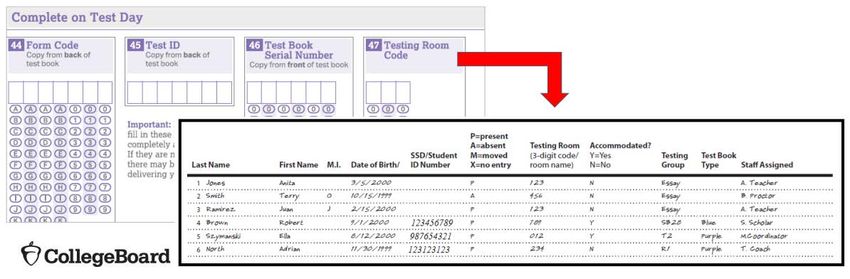
Schedule Overview

                    |10
Implementation Key Dates
Activities Date
Off-site Request Deadline December 15, 2018 (complete)
AI Code Confirmation December 19, 2018 (complete)
Request Accommodations Now – February 19, 2019
Bulk Registration Window January 7 – January 16, 2019 (complete)
Student Essay Opt-in Window January 28 – February 4, 2019 (complete)
Receive Coordinator Planning Kits February 19—21, 2019
Test Coordinator Online Test Day Training February 26 – April 8, 2019
Preadministration Materials Arrive in Schools March 1 – March 8, 2019
Conduct Preadministration Session March 9 – April 8, 2019
Nonstandard Administration Report (NAR) Week of March 18, 2019
Available
|11Implementation Key Dates
Activities Date
Test Materials Arrive in Schools March 19-21, 2019
April 2-4, 2019 for spring breaks
Test Administration April 9, 2019
Accommodated Testing Window April 9 – April 22, 2019
Request Makeup Materials April 9 – April 11, 2019
Makeup Materials Arrive in Schools April 16 – April 19, 2019
Makeup Test Administration April 23, 2019
Final Date to Return Materials for Scoring April 26, 2019
Score Release May 2019
|12New in 2019 – EL Supports
English Learner Supports
 • English learners will be able to utilize EL supports for the spring 2019 SAT School Day
   administration. These supports include:
     • Use of an approved word-to-word bilingual glossary
     • Use of translated test directions, and
     • 50% extended time
 • Students can use one or any of these supports in combination. Students will receive
   college/scholarship reportable scores when any of these supports are used.
English Learner Supports
Advance Request Not Required
The following supports do not require an advance request:
• Translated Test Directions
• Directions will be available in Albanian, Arabic, Bengali, Chinese (Mandarin), Gujarati, Haitian
Creole, Hindi, Polish, Portuguese, Russian, Spanish, Urdu, and Vietnamese. The College Board
will also support "on the fly" translations of directions by district-approved translators.
• Translations will be available in February 2019 to print. (Materials will not be shipped).
• Word-to-Word Glossaries
• Additional word-to-word glossaries have been approved.
• A full list of glossaries will be available on the SDE website.
|15English Learner Supports
Advance Request Required
SSD Coordinators must submit a request in SSD Online, by the deadline, for EL students to use 50%
Extended Time:
• EL students may use the 50% extended time support for SAT. Offered as an option for EL
students who receive extended time as an instructional support.
• Scores will be scholarship and/or college reportable.
• Advance request is required through SSD Online – information was provided in the
accommodations webinar for SSD Coordinators.
• Students will receive 50% extended time on each section of the SAT. Students must sit for the
entire time allotted and cannot go ahead in the test even if they are the only one testing.
• Schools can request 50% extended time for EL students (dashboard link opened in SSD Online
on January 15, 2019). Students will be automatically approved and no supporting
documentation is required.
• EL students using 50% extended time can be tested with other students with accommodations
testing with the same timing and test materials.
|16Requesting the 50% Extended Time
Support for EL Students
• Work with SSD Coordinator to identify EL
students who may require this
accommodation.
• Use the English Learner Support
Dashboard to request the support.
• Dashboard link opened on
January 15, 2019 Go to English Learner Support Dashboard >
|17Requesting the 50% Extended Time
Support for EL Students
• Enter basic student information including
name, home address, date of birth, and
graduation date.
• Review accuracy and click “save & continue”
|18Preadministration Planning
What is a Preadministration Session?
• The preadministration session allows students to complete the following activities directly on their
answer sheet, saving time on test day:
• Fill out personal information fields
• Complete optional student questionnaire
• Opt into Student Search Service
• Select up to four colleges or scholarship programs to send their SAT scores
• Estimated time:
• 45-60 minutes if the optional questionnaire are completed
• 20-30 minutes if only the required fields and score sends are completedWhy should I conduct a
Preadministration Session?
• Saves time on test day.
• Allows for administering the SAT and SAT with Essay in the same room if needed.
• Students can take advantage of their four free score sends.
• The optional questionnaires allow students to opt into
Student Search Service and provide information about
themselves to help connect them with colleges and
scholarship programs based on their interests.
• Nearly 1,700 colleges use Student Search Service® to look for students who match a range of
factors—such as the area where they live or go to school, their interests, and what they plan to
study in college.
• Only eligible colleges and scholarship and educational organizations can participate. They most
often search on expected high school graduation date, cumulative grade point average (GPA),
and intended college major.
• Students can choose which optional questions they complete. If students already completed
the questionnaire as a part of PSAT/NMSQT testing they do not have to recomplete, unless they
wish to update their answers.
|21Plan the Preadministration Session
• Each school will receive a shipment of preadministration materials in early March. This shipment
will include:
• Coordinator testing manuals
• Answer sheets and Student Answer Sheet Instructions
• Pre-ID labels for students who were bulk registered (shipped separately but arriving at the same
time)
• SAT School Day Student Guides
• Schedule a session ahead of test day to allow your students to fill in student background
information and request their four free scores sends.
• Distribute the SAT School Day Student Guides to students. It contains information about Student
Search Service and sample test questions, so they can discuss with their family and know what to
expect on test day.Plan the Preadministration Session
• Affix pre-ID label to front of student answer sheets
before the session.
• With the label, students are required to bubble in at
least their name, date of birth, and state student ID
number for data verification purposes. Though
recommended, the remaining required fields may be
left blank unless the student does not have a label.
(note: if gridding is missing but the label is on the
answer sheet, the test will be processed)
• Students will use their Idaho assigned student ID
(EDUID) as their Student ID number on the answer
Place Pre-ID Label Here
sheet.
|23Room Planning & Rosters
Room Planning & Rosters
 • Test coordinators will need to develop a Master Student List, or roster of test takers for SAT School
   Day.
     • Each associate coordinator will need a roster for his/her room.
     • Test coordinators will need to return either the Master Student List or the individual room
        rosters in their used answer sheet shipment.
     • Test coordinators should make a copy and save the list in a safe location for six months after test
        day.
 • In the event of an irregularity or discrepancy, test coordinators may need the list to respond to
   inquiries from ETS or the College Board during an investigation.

                                                                                                 Presentation Title |25
Create a Master Student List
• Pull the list of eligible students from your school student information system or work with your
district assessment coordinator to obtain the list of students to be tested.
• After the Essay opt-in window closes on February 4, 2019 (now closed), use the College Board K12
Reporting Portal to access the Roster Report – Registration Summary. Use this to determine the
number of students who will be taking the essay and the number of rooms needed.
• We recommend providing separate rooms for students testing with and without essay.
However, you may test students in the same room, if necessary, due to room or staffing
constraints and if a Preadministration session was conducted in advance of test day. Refer to
the SAT Test Coordinator Manual for more information.
• Ask your SSD coordinator to print a copy of the NAR from College Board’s SSD Online system. Use
the NAR to identify the number of rooms that will be needed to administer the SAT to students
testing with accommodations.
• Add room and staff assignments to the Master Student List.
Presentation Title |26Create a Master Student List
• Create your Master Student List in Excel or Word format.
• Review the “Build Your Master Student List for Testing” section in the coordinator's manual for
more information.
• The following is an example, but schools may choose to include other information as they
deem appropriate.
• It will be important to track attendance so you know what make up materials to request.
Presentation Title |27Room Rosters
• Once you have your room assignments for staff, you need to create a roster for each testing room
that each associate coordinator can use to record attendance on test day.
• Divide your Master Student List into individual room rosters for students testing in standard
test rooms.
• You have the option to build room rosters for accommodated testing rooms or use copies of
the NAR.
• As test day approaches, continue to account for additional students who may be eligible for
testing (e.g., students who recently transferred to your school).
• In addition, work with your SSD coordinator to identify students who may have recently been
approved for accommodations.
• Continue to update your Master Student List and room rosters.
Presentation Title |28Optional Testing Room Codes
• Use of testing room codes is optional for SAT School Day.
• Assigning a unique code to each testing room allows you to organize answer sheets for
preadministration sessions and for distribution on test day.
• If a group irregularity occurs, the code can help you pinpoint who may have been affected and
which staff member(s) can offer information for quicker resolution and release of scores.
|29Nonstandard Administration Report (NAR)
• The SSD Coordinator will generate the NAR
from the SSD Online Dashboard.
• The NAR is available approximately 30 days
before test day.
Step 1: SSD Coordinators will see the list of Step 2: Select additional students that will
students that were matched to their registration be testing. Select “Create SAT Nonstandard
Administration Report” to generate the NAR.
|30Staffing and Training Needs
Online Coordinator’s Test Administration
Training
 • Test Coordinators will receive an email with a link to access the mandatory Online Coordinator’s Test
   Administration Training in February. Once accessed, the training will be available through your
   College Board Professional Account.
 • The content is divided into modules including activities for before, during, and after test day and
   includes details on both standard and accommodated testing rooms.
 • Plan for approximately 45-60 minutes to complete all modules.
 • Training is mandatory for all SAT Test Coordinators.
 • SAT Test Coordinators are required to train all test day staff.

                                                                                                 32
Training Your Staff
• Use the Online Test Administration Training
• Share the link with staff so they may complete the Proctor training on their own.
• Share copies of the testing room manuals with staff for their review before test day. Ensure they bring
copies back for test day.
• Conduct a group training session
• Review the following:
• maintaining security in the testing room • using the correct testing materials
• procedures for collecting personal belongings • equipping the testing room
• seating policies • timing of the test and breaks
• calculator policies • testing room forms and reports
• general responsibilities of each position • signaling plan for test day
• About two weeks before the test, schedule a session with your staff to:
• review procedures, handling irregularities, forms, and timing
• announce staff assignments
• distribute manuals
• answer questions
33Test Day Planning
Prepare Testing Room Kits
 • Testing room kits will make distributing materials to Proctors on test day much easier.
 • We recommend using bins and pre-sorting materials, one for each testing room.
 • Use the following items to create your testing room packets:
     • Testing room cover sheet
     • Testing Room Materials Report form (you’ll finish filling this out on test day)
     • A copy of the room roster you created or NAR showing students assigned to the testing room
     • Answer sheets (for the students assigned to each testing room):
          • Prelabeled answer sheets and/or answer sheets used in a preadministration session
          • Blank answer sheets
     • Mobile Opt-In Policies documents.
     • Irregularity Report (IR) forms.
     • SAT School Day Request to Cancel Test Scores forms
     • The 2 testing room flyers (No Electronic Devices and Quiet, Please)
     • The SAT School Day Standard Testing Manual or School Day Accommodated Testing Manual
     • If applicable, EL supports (translated directions and/or word-to-word glossaries) for students who
        need them
     • Clear plastic bags for storage
     • On test day, break the shrinkwrap and add the appropriate number of test books in serial number
        order
Planning the Test Day Schedule
• School schedules may require some adjustments
• Lunch Periods
• Testing cannot be interrupted for lunch
• Lunches must take place after testing is complete
• Students may eat snacks during breaks
• Bell Schedules
• Bells must be silenced during test administration
• Public Address System Announcements
• There should be no PA announcements during test administration
36Reporting Test Administration Irregularities
• Use the Irregularity Report (IR) to record an irregularity, including:
• Security incidents
• Misconduct
• Test question errors or ambiguities
• Other incidents or disturbances
• Student complaints
• Make sure reports are complete and explicit. Fill out just one form for each issue, even if it affects
more than one student (such as mistiming).
• Irregularities filed by Proctors must be countersigned by the Test Coordinator, who should add any
information that might be useful.
• Keep a copy of any IRs submitted should College Board require additional information during their
review.
• They will also be useful when completing your makeup materials requests.After the Test
Coordinator’s Report Form (CRF)
 • CRFs will be returned for each assessment and test date.
 • The Test Coordinator is responsible for completing the CRF.
 • When testing has concluded, the Test Coordinator is
   required to count the number of answer sheets and
   record the number on the CRF.
 • This form is scanned and must be completed using a
   No. 2 pencil. You cannot make copies of this form.
 • Careful attention should be given to entering the correct
   dates in fields 2 and 3.
     • Administration Date
     • Days used during Accommodated Window
 • A sample form is included in the Coordinator Manual.
Returning Test Materials
• You will receive three return kits
• Two kits are sent with the initial test shipment
• One for all tests, including accommodated tests, completed on the primary administration
day
• One for students testing in the accommodated window
• All test materials can be returned together.
• The third test return kit will be sent with the makeup materials.Packing Answer Sheets
• Packing Answer Sheets UPS Pearson
• Answer sheet return bags/boxes will have Label Label
two labels pre-applied.
• Refer to your Coordinator Manual for
detailed directions on returning answer
sheets.
• Used answer sheets and other materials
needed for scoring from the primary School
Day test date must be returned the day after
the test.
• Used answer sheets for students testing in
the accommodated testing window must be
returned as soon as all accommodated
testing is complete.
• Schools need to return answer documents and
test books separately for each assessment.
Image of white box for
returning answer sheetsPacking Test Books
• Packing Test Books Image of loose UPS label that needs to be
• Reuse the boxes your test materials affixed to outside of box
arrived in to return test books TB Returns
• Loose UPS labels will be included in the
shipment with the header “TB Returns”
• Apply one label of each type to each box
• Be sure to look for these labels when receiving
your materials. They may shift to the bottom
of the box during shipment.Test Materials Packing Diagrams
43Test Materials Pickup
• The pre-arranged UPS delivery to pick up test materials will be arranged for the day after testing to
allow for more time to organize and package testing materials after testing has completed.
• If you have students testing in the accommodated window and ALL students have finished testing
before the window ends:
• Give shipments to UPS during one of your school’s regular pickups (if you have one).
• Call UPS to reschedule the pickup following the instructions in the pickup email.
• Wait until the next scheduled pickup for the makeup materials.
• For schools administering at an offsite location, UPS pickups will occur in the afternoon on test day
to accommodate those locations where the coordinator will no longer be on-site the following day.SAT Makeup
• Students, not testing in the accommodated window, who miss the primary test date will test on
4/23/19.
• Students who have an irregularity during testing may be eligible for makeup. For example, a student
who gets sick during testing can participate in the makeup administration.
• Refer to the Irregularity Chart provided in the manual for details.
• Further details around the process for ordering makeup materials will be provided closer to test
day.
• New SAT test books will be sent for all students testing on the makeup test date.
• Use the pre-labeled answer sheets, from the primary test date, for the makeup test date for
students who were absent.
45Resources
• Implementation Handbook for Test Coordinators – coordinators received via email.
Contact IdahoSDSupport@collegeboard.org if you did not receive a copy.
• SDE Website: http://sde.idaho.gov/assessment/college/
This site will provide Idaho specific information regarding the SAT School Day administration such as
key dates, policies, webinars, etc.
• SAT Practice Resources: https://collegereadiness.collegeboard.org/sat/practice
Access student practice resources including SAT Practice on Khan Academy, sample questions and
tests and other resources.
• K12 Reporting Portal: https://collegereadiness.collegeboard.org/educators/k-12/score-resources
Information about how to access and use the K12 Reporting Portal.
|46Questions
|47Thank You!
• Melanie Jones, Idaho SDE: mjones@sde.idaho.gov
• Idaho Field Team at: IdahoSDSupport@collegeboard.org
• Stephen McCue at: smccue@collegeboard.org
• Eddie Pawlawski at: cpawlawski@collegeboard.org
|48SAT Resources and Next Steps – Score Retrieval Spring 2019 Implementation Supporting Schools and Students to Achieve SHERRI YBARRA, SUPERINTENDENT OF PUBLIC SCHOOLS
Session Goals
 Today we will provide an overview of SAT benefits, resources, and the Score Portal.

 • Benefits of SAT
 • College Board Opportunity Scholarships
 • Official SAT Practice
 • Roadmap to Careers & Big Future
 • K12 Score Reporting Portal

 Watch for the “best practices” logo

                                                                                       50
SAT School Day
Student Benefits
51Benefits of the SAT
Benefits of the
SAT
The SAT is accepted at all U.S. colleges. Students may send
scores to four colleges for free.
The SAT tests what students are already learning in class and
what students will actually use in college. Using Khan Academy,
an individualized study plan is created based on results from
the PSAT 8/9 and PSAT 10.
By opting in to Student Search Service, students get connected
to colleges and scholarship programs looking for students just
like them.
Fee waivers are available for low-income students that allow
them to take the SAT and apply to college for free.
Access to Roadmap to Careers, the College Board and Roadtrip
Nation’s career exploration tool.
Presentation Title |52SAT Fee Waiver Benefits
• Eligible students will be able to use fee waivers for:
• Free Tests and Free Feedback
• 2 free SATs, with or without the essay (Grades 11-12)
• 6 free SAT Subject Tests (Grades 9-12)
• Up to three tests in two administrations
• 2 free Question-and-Answer Service (QAS) or Student Answer Service (SAS) reports
• College Application Benefits
• Unlimited score reports to send to colleges
• Waived application fee at participating colleges
• Free CSS Profile applications to apply for financial aid from participating colleges
• Other Benefits
• Fee reductions for score verification reports
• No non-U.S. regional fees for free tests (U.S. student testing abroad)
• No late registration fees for free tests (in the U.S. or U.S. territories)
• Fee Waiver codes for SAT School Day participants will be delivered to schools in March/April 2019
for distribution to eligible students
|53College Board
Opportunity Scholarships
54College Board Opportunity Scholarships
• The College Board Opportunity Scholarships
are open to all class of 2020 students who
attend high school in the United States, Puerto
Rico, and other U.S. territories. There is no
citizenship requirement.
• The first scholarship drawings will take place at
the end of January. The program will remain
open to the Class of 2020 through February
2020.
• Students in the class of 2021 will be eligible
beginning in late 2019.
• Visit the website for more information:
https://opportunity.collegeboard.org/
|55College Board Opportunity Scholarships
• The more effort students put in, the more opportunities
they have.
• Scholarships can be used for any Title IV accredited
institution of higher education, including accredited two-
year, four-year and for-profit.
• College Board will disburse the money directly to the
institution that the student ends up attending.
• College Board will be instructing institutions that the
scholarships should be applied to tuition, fees, books, and
other relevant educational expenses.
• Once a student claims their scholarship (which must
happen within 60 calendar days of being notified that they
were selected for a scholarship per the Official Rules, they
must keep the College Board updated on their college
plans.
• If students enroll immediately after graduating high
school, they must tell the College Board where they
will be attending so that the funds can be disbursed.
• If a student will be taking a gap year, they will be
able to wait one year before using their scholarship
at the institution that they enroll in.
|56College Board Opportunity Scholarships
Scholarship Scholarship Scholarship Last Scholarship Eligibility Award
Opening Date Closing Date Drawing Date
Build December 10, 2018 June 30, 2019 July 1, 2019 Sign in to your College Board account and The College Board will award 100 Build
build a college list on BigFuture™ with at least scholarships every month from January
six colleges to earn one entry in the monthly through June 2019.
drawing.
As you research, update your list of six or
more colleges in later months to earn another
entry.
Practice December 10, 2018 October 31, 2019 November 1, Practice for six hours on Khan Academy® to The College Board will award 150
2019 qualify and earn one entry in the monthly Practice scholarships every month from
drawing. Earn one entry for each additional January through October 2019.
hour you practice, up to a total of 20 hours.
Improve April 1, 2019 December 31, 2019 January 1, 2020 Students who practice for the SAT for 12 The College Board will award 50 Improve
hours using Official SAT Practice on Khan scholarships after every SAT.
Academy® and improve their score by 100+
points—either from their PSAT/NMSQT to SAT
or SAT to SAT—will earn a chance at a $2,000
scholarship.
|57College Board Opportunity Scholarships
Scholarship Scholarship Scholarship Last Scholarship Eligibility Award
Opening Date Closing Date Drawing Date
Strengthen July 1, 2019 October 31, 2019 November 1, 2019 Students who update their college list on The College Board will award 100
BigFuture™ to have a mix of academic Strengthen scholarships every month from
safety, fit, and reach schools will earn a July through October 2019.
chance at a $500 scholarship.
Complete October 1, 2019 February 29, 2020 March 1, 2020 Students who fill out the Free Application The College Board will award 200 Complete
for Federal Student Aid (FAFSA) will earn the FAFSA scholarships every month from
a chance at a $1,000 scholarship. October through December 2019 and 100
scholarships every month from January
through February 2020.
Apply October 1, 2019 February 29, 2020 March 1, 2020 Students who apply to two or more The College Board will award 500 Apply
colleges will earn a chance at a $1,000 scholarships in February 2020.
scholarship.
Complete December 10, 2018 February 29, 2020 March 1, 2020 Students who complete all six actions The College Board will award 25 Complete
Your Journey (Build, Practice, Improve, Strengthen, Your Journey scholarships in February 2020.
Complete, and Apply) will earn a chance
at a $40,000 scholarship.
|58Official SAT Practice & Khan
Academy
59Official SAT Practice
Free practice at satpractice.org
|60Official SAT Practice
|61Implementation Options
• There are three main approaches to supporting students using Official SAT Practice
• Independent Practice: Students practice individually or in study groups at home. Parent
involvement is essential to encouraging independent practice.
• Extracurricular Practice: Students practice in study hall, after-school sessions, or with a
community-based organization.
• Teacher-Guided Practice: Students practice in class, using Official SAT Practice as a learning
tool. Teachers incorporate independent practice into the class period and answer student
questions.
• Review materials and resources here.
|62Implementation Resources and Tips
• Ideas and approaches to implement SAT Practice in the classroom:
• Create a Khan Academy account at satpractice.org to get familiar with the resources students
will use.
• Download a copy of our Teacher/Coach Implementation Guide.
• Make practice fun and rewarding by hosting SAT study groups, hosting a competition, or
offering incentives for practice.
• Enable the SAT Coach Tools to see which SAT skills your class needs the most help with and
track individual student progress.
• Collaborate with other teachers to share strategies and troubleshoot problems together.
• Develop a school action plan with measurable goals and track those goals.
• Access resources for schools including posters, flyers, website banners at satpractice.org/k12
to build awareness.
|63Roadmap to Careers and
Big Future
64Roadmap to Careers
Visit: collegeboard.roadtripnation.com
|65Roadmap to Careers
Motivate Prepare Expose
Inspire college readiness Ensure prerequisite Open students’ eyes to
for students courses are completed new opportunities
Presentation Title |66Student Interests
•Students choose their core interests
Presentation Title |67Student Roadmap
• Students will receive a personalized roadmap
• The roadmap will provide a look at
• Careers that may be of interest
• Leaders with similar interests
• Majors that align to their interests
• Actionable feedback
|68Student Action Plan
|69Big Future
• Connect To Big Future to See Which
Colleges Offer Certain Majors
|70K-12 Score Reporting Portal
71Score Reporting
• All answer sheets must be returned immediately after testing
• Answer sheets shipped after April 26 may not be scored if received late.
• Student Reporting Portal - centralized portal for students to access their SAT® score reports.
• K-12 Educator Reporting Portal - centralized portal for schools, districts, states
• Report Center: Reporting tools allow educators to configure and run online reports, apply
filters for data analysis, and print student reports
• Download Center: Data files available to manage electronic score downloads — manual and
automatic
• For more information about accessing and using the K-12 Educator Reporting Portal view eModules
at https://satsuiteofassessments.articulate-online.com
72K-12 Reporting Portal
• The K-12 Assessment Reporting Portal has been updated in response to educator feedback.
• Updates include:
• Quick search
• All reports accessed on the homepage
• Quick and guided report selection
• Report history to allow users to quickly
re-run a report
• https://k12reports.collegeboard.org
|73K-12 Reporting Portal
• Interactive features
• Search Functionality
• Enhanced data and drill-down capabilities
• Compare scores (district, state)
• Identify students in each performance band
• Read questions and answers students missed most
• Group students for additional support
|74Using the K-12 Score Reporting Portal
•Use Reports for
Review Student Intervention Review the reports
Instructional to identify students for school
Planning and with large gaps in improvement
Question Analysis performance and to planning to
reports to identify develop a plan for identify gaps
improvement in among
strengths and classroom
areas for demographic
instruction, groups and to
improvement in intervention groups,
curriculum and develop goals and
and using Official SAT
instruction Practice on Khan plans for reducing
Academy the gaps
75Best Practice
|76K-12 Score Reporting Portal
77Homepage
• Quick search for districts, schools, or
students (user specific)
• All reports provided on the homepage
• Grouped by task
• Report descriptions provided
• Quick and Guided report selection
• Report history to allow users to quickly
re-run a report
78Homepage – Guided Report Selection
79Report Enhancements
Deliver complementary reports together
Three Tab Design
Institutional Reports:
• Scores by Institution
• Benchmarks by Institution
• Essay Scores by Institution (where applicable)
Demographic Reports:
• Scores by Demographics
• Benchmarks by Demographics
• Essay Scores by Demographics (where applicable)
80What Questions Arise From the Data?
How do with your
with other
these with past school
assessment
results years? improvement
data?
compare: plans?
81Best Practice
|82Develop an Improvement Plan
How will your students develop necessary skills to improve their college and career readiness?
a) Record baseline data.
1) SAT data
2) Local assessment data
b) Set a goal for improvement
c) Determine what strategies you (your team) will implement. Identify:
1) Steps for improvement
• instructional strategies
• lesson plans with skill practice
• Official SAT Practice
2) Who will implement
3) Timeframe for implementation
d) Set a schedule for progress checks.
1) Keep track of steps that were implemented
2) Record successes and challenges
3) Update the improvement plan as needed
e) Measure success!
83
1) Check student progress on upcoming assessmentsLearn More About the K-12 Score Reporting Portal
Walk through a • https://satsuiteofassessments.articulate-online.com/p/2983158838
personalized explanation of • https://collegereadiness.collegeboard.org/educators/k-12/reporting-
the K-12 Score Reporting portal-help
Portal
84Questions
|85Thank You!
• Melanie Jones, Idaho SDE: mjones@sde.idaho.gov
• Idaho Field Team at: IdahoSDSupport@collegeboard.org
• Stephen McCue at: smccue@collegeboard.org
• Eddie Pawlawski at: cpawlawski@collegeboard.org
|86You can also read


