PRISM Comprehensive tool set for Operations and Engineering
←
→
Page content transcription
If your browser does not render page correctly, please read the page content below
PRISM
Comprehensive tool set for Operations and Engineering
4K • HDR • WCG • IP • SDI

PRISM is an ideal solution for monitoring SDI/IP hybrid environments             Specifically designed for IP (ST 2110 and ST 2022-6) and SD/HD/3G/
including master control rooms, production studios, OB trucks, and signal        6G/12G SDI environments. Connect any signal in the facility and lock
contribution/distribution centers. The base unit comes with a broad range of     to PTP or Black Burst references for Timing analysis
connectivity solutions. It is enabled for both SDI and multiple IP standards
                                                                                 Comprehensive support for 4K/HDR/WCG production through software
to address the needs of production and editing. It is also easy to scale it up
                                                                                 upgrades and simple upgrades to 25G in IP environments when
to address high-end technical QC and engineering. PRISM is designed to
                                                                                 needed
be future proof and provide investment protection for end users.
                                                                                 A base unit with features to meet the operational needs of live
PRISM - One tool with a common platform, a common UI, and a scalable
                                                                                 production and broadcast editing, plus a full set of software options that
feature set that removes the need for compromise, eases facility design,
                                                                                 allow the instrument to scale to high-end engineering requirements
and reduces staff training and interchange.
                                                                                 A full API, NMOS/SDP support, a variety of form factors, extended
                                                                                 display options, and a high-quality speaker option means that PRISM
                                                                                 can be easily integrated into any operational or engineering
                                                                                 environment

                                                                                                                                         www.tek.com 1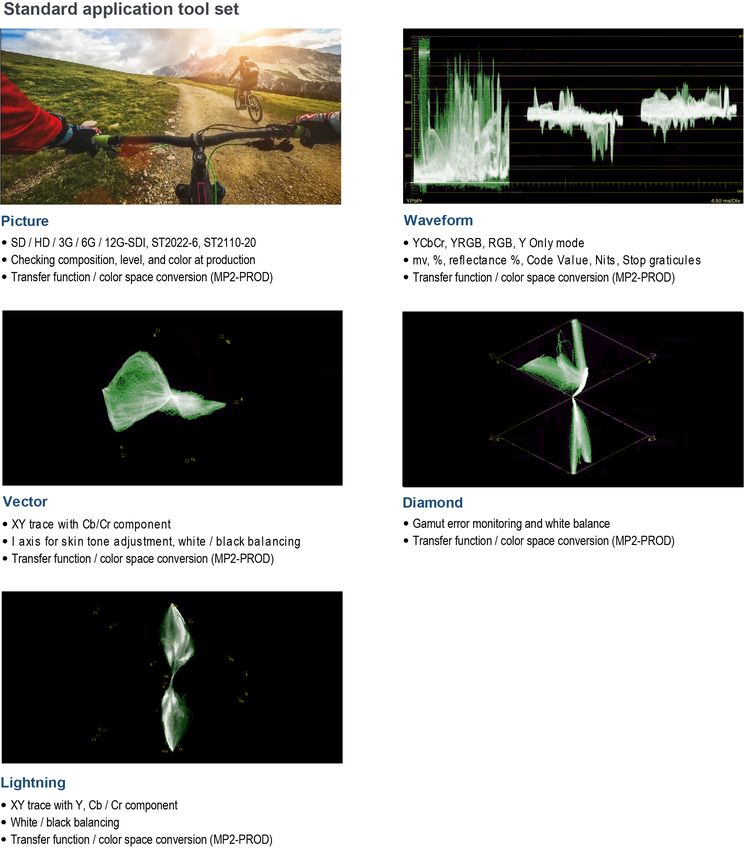
PRISM Datasheet

Using PRISM in your workflow

Production
A tool for making quick and accurate decisions on set
Modern productions enhanced with High Dynamic Range (HDR) and Wide
Color Gamut (WCG) technologies mean there are less opportunities to fix
content in Post. Production teams must get it right at acquisition to avoid a
costly reshoot. Lighting engineers, cinematographers, and directors need
tools that enable quick scene creation, camera setup, and editing decisions
to minimize the time on set. PRISM is equipped for the job with patented
STOP displays to setup cameras and show highlights, CIE Charts, and
automated transfer functions/color space conversion to measure and adjust
HDR and WCG quickly and easily. Tools that help you get it right first time
lead to quick decisions and clean and objective communication across the
whole creative team.

Live production
A tool for ensuring the content that leaves the truck is high quality
regardless of format
Live production is all about one shot to get live action, high value content
captured and delivered in the highest possible quality, in multiple formats
for delivery to viewers in multiple ways. Increasingly, live production teams
are required to deliver both 4K/HDR/WCG and HD/SDR/BT.709 content
simultaneously. Ensuring that both feeds have a consistent look and are
high quality is a real challenge.
PRISM provides the tools required to handle live production. For traditional
productions there are expected tools including waveform, vector and
diamond displays. For 4K/HDR/WCG, PRISM introduces new and
innovative displays like the decade nits scale in the STOP display. STOP
display makes setting the black, white, and gray levels and controlling the
specular highlights easy. PRISM also provides CIE charts and vector with
automatic color space adjustment for color management.

2 www.tek.com
PRISM Datasheet

Post production
A tool for objective quality assessment, enabling consistent and efficient
workflows
Post production workflows are challenged with creating great looking and
sounding content as quickly and efficiently as possible. Increasingly,
creatives are required to master content for multiple end points, ranging
from SD/SDR/709 for DVD to 4K/HDR/2020 for VOD, while maintaining
artistic integrity and a consistent look.
PRISM can simplify the work to create, grade, and QC the content in a
single workflow regardless of the mastering format. There is support for a
wide range of HDR standards, 4K formats, and tools allowing objective
ways to measure and manage composition, luminance, color, audio and
standards. PRISM is equipped with Waveform, Vector, and Diamond
displays and with the addition of integrated transfer/color space conversion,
editors can extend the use of these familiar tools for HDR/WCG editing.
PRISM also specifically supports an innovative tool set for the unique
challenges in multiple formats like STOP display and CIE chart, which
maximize the degree of creativity.

Broadcast engineering and R&D
A tool with trusted Tektronix measurements for both SDI and IP technology
Broadcast and R&D engineers are faced with a level of change and
technology transition never seen before. They need tools that enable them
to see and solve network or design issues quickly and effectively, whether
they are working in an SDI or IP environment. As standards change
engineers require tools that will evolve as the standards evolve, a range of
options that allow them to configure the instrument to meet their needs, and
a comprehensive set of tests and measurements they can trust.
PRISM connects to almost any signal in the facility or laboratory such as;
SD/HD/3G/6G/12G-SDI, ST 2110-20/30/40, ST 2022-6, ST2022-7, ST
2059 (PTP), and NMOS IS-04 and IS-05. Coupled with the connectivity is a
comprehensive set of displays and measurements that are designed to
provide information they need to find and solve problems. The instrument
provides IP Statistics, PTP Timing analysis, Video and Audio session
displays, Black Burst to SDI timing, and 12G-SDI Eye pattern
measurement. PRISM also provides specialized measurements such as ST
2110-21 buffer analysis to understand what happens to the system under
different traffic flow situations. Generator functionality provides a series of
known good test patterns for testing in ST 2110 or SDI formats. A full API
allows PRISM to be connected to control systems for remote monitoring
applications.

                                                                                     www.tek.com 3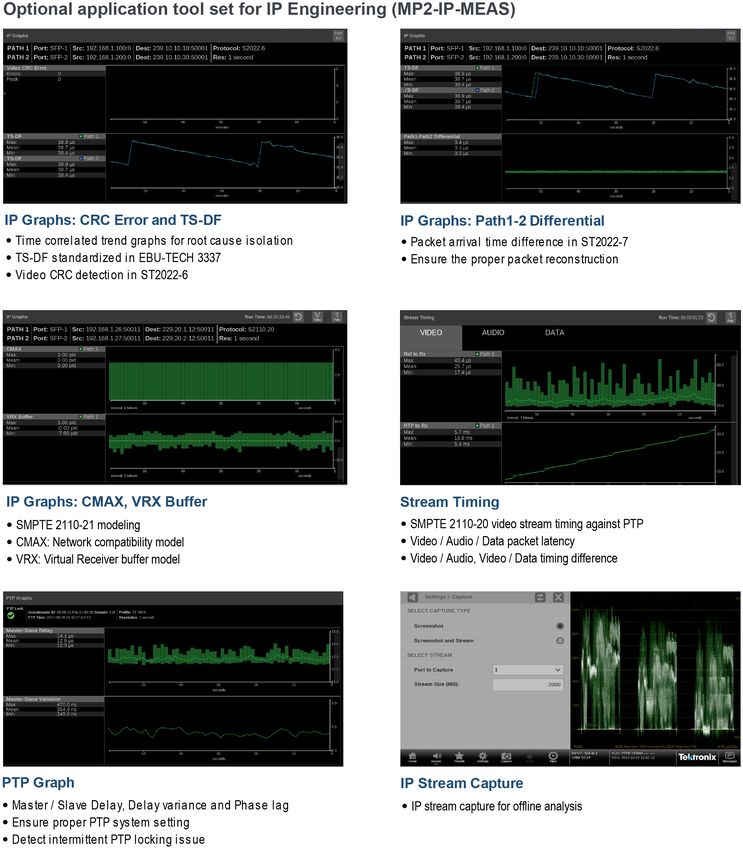
PRISM Datasheet

Innovative feature set for HDR/WCG content
creation
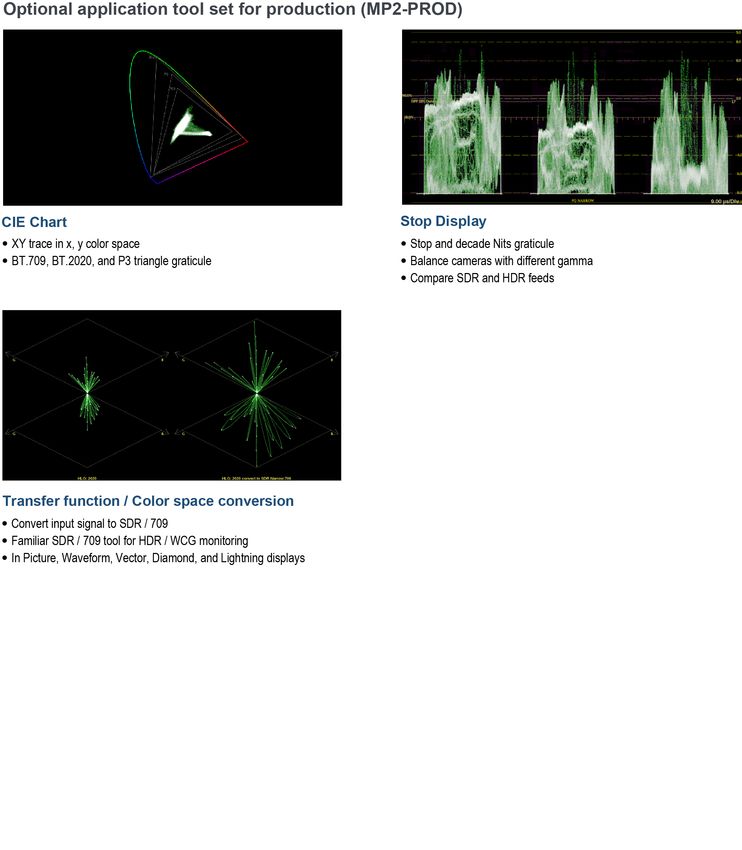
    CIE chart display
    Stop display (stop, nits)
    Transfer function / color space conversion
    Diamond / Lightning display

Adjust color in consistent way
The Vector display has been used to adjust picture color since the analog
composite era. However, using Vector displays where there are multiple
formats with different RGB/YCbCr matrices, different color primaries, and/or
different gamma curve requires a lot of subjective interpretations. This
problem affects operators who need to master a program in a variety of
formats.
The CIE display provides a trace based on x, y color coordinates, so that a
single color is always placed on the correct location regardless of video
format. This means operators can create/evaluate color in consistent and
objective ways regardless of the video format they are working with. This
also means that color monitoring for SD/SDR/709 mastering for DVD and
4K/HDR/2020 mastering for VOD can be done using the same workflow.

Vector and CIE chart display

Simplify camera setup in complex HDR productions
One of the challenges in creating HDR content is the need to understand
the new reference white/grey levels required for each transfer function used
in HDR content acquisition. This requires the camera operator to adjust the
camera exposure accordingly for the specific OETF.
The Tektronix patented Stop Display application allows operators to adjust
camera exposure in a consistent manner without worrying about the
transfer function (OETF) of a camera. The Stop Display reverses the OETF
to convert the video signal from the camera to linear scene light using an
internal integrated look up table and then represents the light level as a
log2 (stops) waveform with over 16 stops of range in one display.
The vertical axis on the Stop Display can be in either "Stops" referring to
scene light or "Nits" referring to display light. The reference levels in the
graticule are consistent regardless of which transfer function is selected.

4 www.tek.com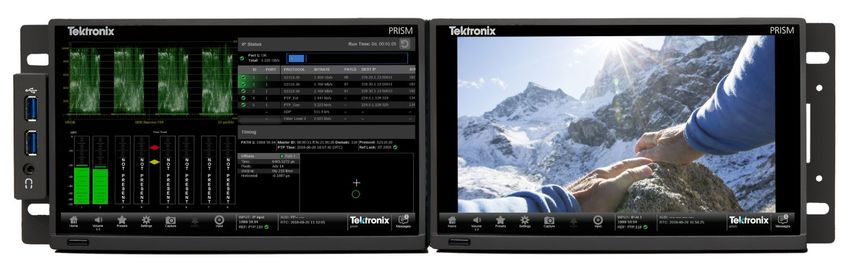
PRISM Datasheet

Balance colors in HDR/WCG without changing your                                       Simplify gamut monitoring and camera setup with
workflow                                                                              Tektronix-patented displays
ITU-R BT.2020 color and many custom camera color primaries have a                     The Tektronix-patented Diamond and Split Diamond displays simplify the
wider color coverage than the traditional ITU-R BT.709 color gamut.                   process of identifying and correcting RGB gamut errors in digital video
Because of differences in both color primaries and gamma, the trace                   signals. Since the Diamond display has the traces on G/R and G/B planes,
presentation in a typical color difference vector display is different from the       the trace position moves linearly as a response to RGB adjustment by the
familiar BT.709 vector display, which forces the camera operators to                  color editor. This allows editors to quickly identify and correct gamut issues.
interpret the colors differently depending on the color format used.                  With the integrated transfer function/color space converter, the operator
                                                                                      can check 709 color gamut error of WCG signals. During camera setup, the
The integrated transfer function/color space converter converts a HDR/
                                                                                      operator can quickly adjust BW balance by monitoring linearity in the center
WCG signal to an SDR/709 gamut signal. This allows camera operators to
                                                                                      of the display.
confidently monitor the color of the scene they are shooting and allows
colorists to use familiar displays to check mid tones in HDR/WCG content
creation. It also ensures a consistent look between content in simultaneous
SDR/HDR content creation. This feature is available in the Waveform,
Vector, Diamond, and Picture applications.

                                                                                      Left: Macbeth chart in HLG/RP2020; Diamond display without conversion. Right:
                                                                                      Macbeth chart in HLG/RP2020; Diamond display with conversion.

                                                                                      Customize your display to quickly see exactly what
Macbeth chart in HLG/RP2020; Picture display and Vector display with no conversion
                                                                                      you want
applied.                                                                              A combination of Full/Quad/Vertical extended tile configuration provides
                                                                                      more flexibility in how an operator views the application displays. As a
                                                                                      vertical extended tile, the 9 inch, 16:9 display panel can show the Vector
                                                                                      display in an equivalent size to a 6.5 inch, 4:3 display panel. This provides
                                                                                      a practical single-box solution with the Waveform and Vector displays
                                                                                      shown side-by-side for camera shading applications.

Macbeth chart in HLG/RP2020; Picture display and Vector display with the conversion
applied.

                                                                                      CIE Chart and Stop Display in vertical extended tiles.

                                                                                                                                                        www.tek.com 5
PRISM Datasheet

Rich feature sets for IP Engineering                                          An engineer can determine the number of streams available on the link as
     IP Status                                                                well as the quality level of each stream. The selected stream can be
                                                                              decoded to the Picture and Audio applications to let the engineer verify the
     IP Session / Graphs                                                      content in the stream. The selected ST2022- 6 or ST 2110-20/30 stream
     PTP Session / Graphs                                                     can also be output through the AUX output with IP/SDI conversion for an
                                                                              extensive monitoring solution.
     SMPTE2110-21 buffer modeling
     PTP Timing, Stream timing
     PIT Histogram
     Event log
     SMPTE2022-7 monitoring
     IP Generator
     IP Capture

Identify the streams in a 10G Ethernet link to set up
the system properly
                                                                              IP Session application showing the RTP header information in an
Engineers designing and evaluating a hybrid IP/SDI broadcast system face
                                                                              ST2022-7 configuration.
challenges in determining the status of the system they are building. While
an SDI coax system typically carries one signal, a 10G Ethernet link can
carry multiple streams and it can be difficult to determine what content is   Monitor and verify PTP system setup to ensure
carried on each of the streams within a IP based broadcast system.            genlock of equipment in the facility
PRISM offers a range of tools to quickly identify the streams in the          In a hybrid IP/SDI broadcast system, a variety of reference signals may be
10G Ethernet link and the content in each stream. The IP Status application   used to synchronize equipment within the facility. Traditionally, black burst
shows the protocol, source IP address and port number, destination IP         (BB) or tri-level sync (TLS) references have been used for this purpose. For
address and port number, Source MAC, Destination MAC, PTP Domain,             IP networks, PTP (IEEE1588/SMPTE ST 2059) is used for system
RTP Seq Error, RTP Clock Freq, and RTP Marker Freq of all streams             synchronization.
available in an incoming 10G Ethernet link.                                   PTP uses a series of protocols and message interchanges to create
                                                                              accurate synchronization, higher system robustness and further flexibility in
                                                                              the system integration. For example, the Best Master Clock Algorithm
                                                                              (BMCA) is used to determine the Grandmaster. Another example is the
                                                                              communication model to choose the message transport model to convey
                                                                              the time stamps. However, those mechanisms work as designed only when
                                                                              engineers have set up the system correctly.

IP Status application showing all streams in a 10G Ethernet link.

An engineer can view further details using the Video/Audio/Data tabs in the
IP Session application, which shows the RTP header information in the
selected ST2022-6 or ST2110-20/30/40 streams, including High Bit Rate
Media header information for ST2022-6 stream with Green/Red LED error
status. The status LED on an application tab indicates the aggregated error
status for the monitored items under that tab.

6 www.tek.com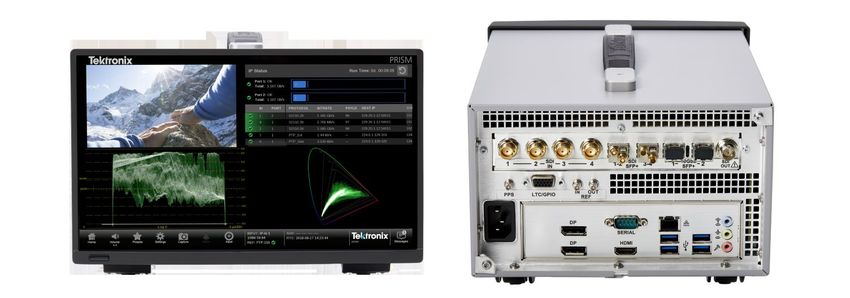
PRISM Datasheet

In the IP Status application, PRISM displays the PTP traffic with Domain        The PTP graphs allow the detection of adverse network conditions, such as
information available in the 10G Ethernet link to let users quickly check for   too much traffic on the PTP ports.
the presence of PTP messages. The PTP tab in the IP Session application
provides the lock status, including the phase lag to the Grandmaster, and
interpretation of the PTP metadata within the Announce Message. The PTP
metadata includes the Master ID, PTP time in UTC and master
characteristics (clock quality, priority, etc.) to let engineers ensure the
settings of the PTP system are correct.

                                                                                Master-Slave Delay and Master-Slave Variation graphs.

                                                                                Use ST2110-21 Buffer modeling to ensure standards
                                                                                compliance in senders
                                                                                ST2110-21 specifies a timing model for ST2110-20 video RTP streams with
IP Session application showing the PTP lock status and PTP information.         the following parametric models:
In the PTP Graphs application, PRISM plots the network delay, network               A network compatibility model to regulate the burst characteristics of
delay variation, and Master/Slave phase lag. The network delay and                  senders, which promotes the compatibility with the switches
network delay variation plots are available for both signal directions on the
                                                                                    A virtual receiver buffer model to ensure there is no buffer overflow/
network, Master to Slave (Tms) and Slave to Master (Tsm). The network
                                                                                    underflow in the receiver that could cause the packet loss and picture
delay values are calculated directly from the PTP message time stamps,
                                                                                    quality degradation
while the variation numbers are calculated from the delay as per RFC1889.
The phase lag is the filtered difference Tsm-Tms, and is used to adjust the     The IP Graphs display provides a trend graph with both types of modeling
local PTP clock. Therefore, as PRISM locks to the PTP master unit, it will      to help engineers properly setup the packet delivery timing in the RTP
adjust to minimize the phase lag and make Tsm and Tms equal.                    packet sender.
The PTP graphs show the effects of both network delay and adjustments to
the slave unit timing. However, since the contribution from the adjustment is
low after establishing a lock to the PTP master unit, the PTP network delay
becomes dominant in the graphs.
In the ideal PTP system, Tms/Tsm network delay should be constant and
identical. The variations in real applications, however, may impact the PTP
lock process in the slave unit and could cause a PTP unlock situation if
they are excessive.

                                                                                CMAX / VRX Buffer trend graph

                                                                                                                                           www.tek.com 7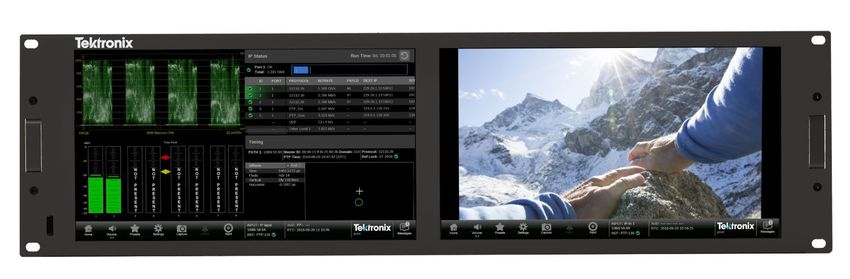
PRISM Datasheet

Validate system timing in IP and SDI
The importance of timing adjustment in an IP broadcast facility is
unchanged. As the alignment mechanism uses the timestamp in the
streams, correct time stamping at the source device is important. The
variance of transmission time at the mixing point, such as a production
switcher, needs to be less than the buffer size chosen for the minimum
latency.
The Tektronix-patented Timing application makes facility timing easy
through a simple graphical representation, which shows the relative timing
of the SMPTE 2022-6 stream and the PTP reference on an X-Y axis and
visualizes the one-dimensional time delay in terms of the picture
parameters. This allows timing adjustment in units of lines and
microseconds.
                                                                                ST2110-20 timing against PTP and packet latency trend graph.

                                                                                In a hybrid SDI/IP broadcast facility, there are instruments that accept
                                                                                either analog reference signal or PTP. Therefore, the system must prepare
                                                                                both analog signal and PTP as reference system, and it is important for
                                                                                engineers to ensure that they are locked. The Timing application in PRISM
                                                                                offers relative timing measurement of BB/TLS or input SDI signal against
                                                                                PTP reference and helps engineers to quickly setup a robust reference
                                                                                system required in a hybrid broadcast facility.

                                                                                Monitor the service quality of the network to ensure
                                                                                robust performance
                                                                                The asynchronous nature of an IP system can produce a wide variety of
                                                                                bandwidth usage; in extreme cases this can result in the loss of packets.
ST2110-20 timing against the PTP reference.                                     Therefore, it is important to be able to monitor the network traffic and
Since ST 2022-6 streams are complete SDI signals encapsulated in IP, the        engineers need tools to evaluate packet loss.
timing measurement treats these IP signals as if they were SDI. Therefore,      PRISM provides a Packet Interval Time (PIT) histogram and trend graph for
the timing system detects the start of the IP frame, and then extrapolates to   ST2110 and ST2022-6 streams. It also provides the trend graph of Time
the 0h point of the encapsulated SDI. Then using PTP as the reference, the      Stamped Delay Factor (TS-DF) standardized in EBU-TECH 3337 for the
ideal alignment point for that frame rate is calculated based on the PTP        ST2022-6 stream to help engineers determine how the packet interarrival
epoch. Finally, the offset between the ST 2022-6 signal and the ideal           time from a sender is affected in the system. These measurements can
alignment is displayed. The display shows both the absolute time and the        help engineers determine the root cause when packet loss has occurred.
time parsed into lines or horizontal delay as time and pixels.
One use for the Timing application is to measure the delay in a gateway
and network. If a properly timed SDI signal is applied to a gateway, then the
timing measurement on the resulting IP flow will display the combined
latency in the gateway and the network. Another use is to measure multiple
signals and compare the relative timing.
In the ST2110 system, the timing of received packets of each element is
critical because they have to be presented to the viewers in a time-aligned
manner based on the time stamp. The Timing application displays the
timing of the Video stream against PTP and the Stream Timing application
shows the timing of the Video, Audio and Data as it was received relative to
the embedded RTP time stamps. It also shows the relative delay between
Audio/Video and the Data/Video, which is the amount of delay needed to
re-align the two essence types. Video engineers use this information to         PIT Histogram application for monitoring the range of PIT variance.
make sure the packets of all the elements are received within the tolerance
of the receiving buffer. They can then align the timing of each stream based
on the time stamp in RTP packet header.

8 www.tek.com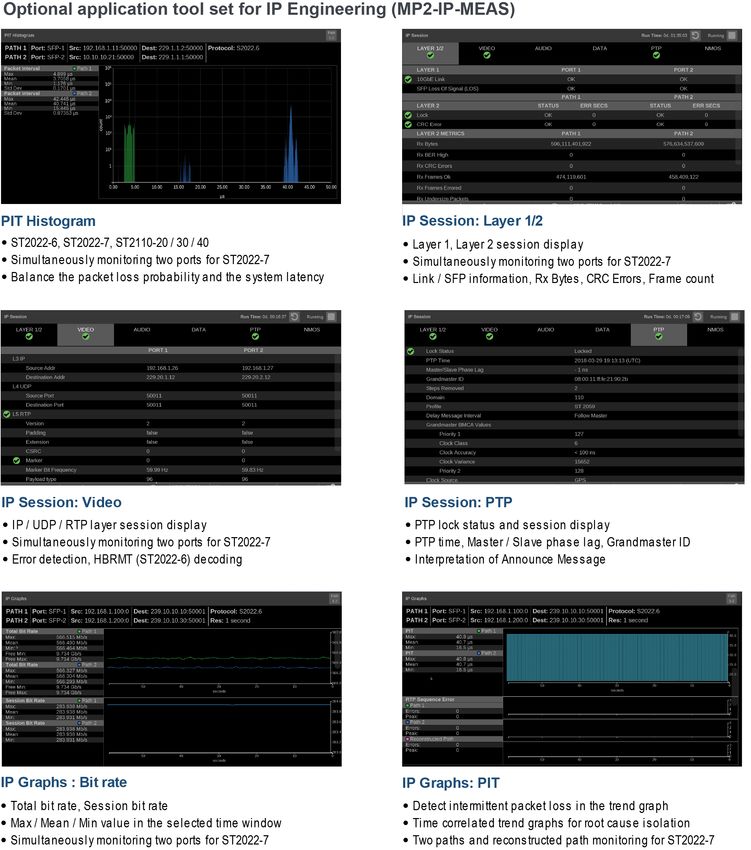
PRISM Datasheet

                                                                                     The graphical displays show the error trend correlated to historical data. In
                                                                                     these displays, the errors detected in both IP and content layers are time
                                                                                     correlated, which allows the engineer to verify the error is in the IP or
                                                                                     content layer. For example, if an error is detected in the content layer but
                                                                                     not in the IP layer, then the error may have happened before the content
                                                                                     was wrapped by the IP headers.

PIT trend graph for monitoring the trend of PIT variance over time.

                                                                                     RTP Sequence Error incident graph for monitoring the errors detected over time.

TS-DF trend graph for monitoring the trend of TS-DF variance over time (ST2022-6).

Debug a hybrid IP/SDI broadcast system to isolate the
root cause
Engineers debugging a hybrid IP/SDI system first need to isolate the root
cause of the error to find whether the error is in the IP layer or in the
content layer. Details of the error can then be determined by examining the
identified layer. PRISM offers error detection feature sets in both the IP and       Event Log application for checking the details of error events.
content layers using the Event Log application.

                                                                                                                                                          www.tek.com 9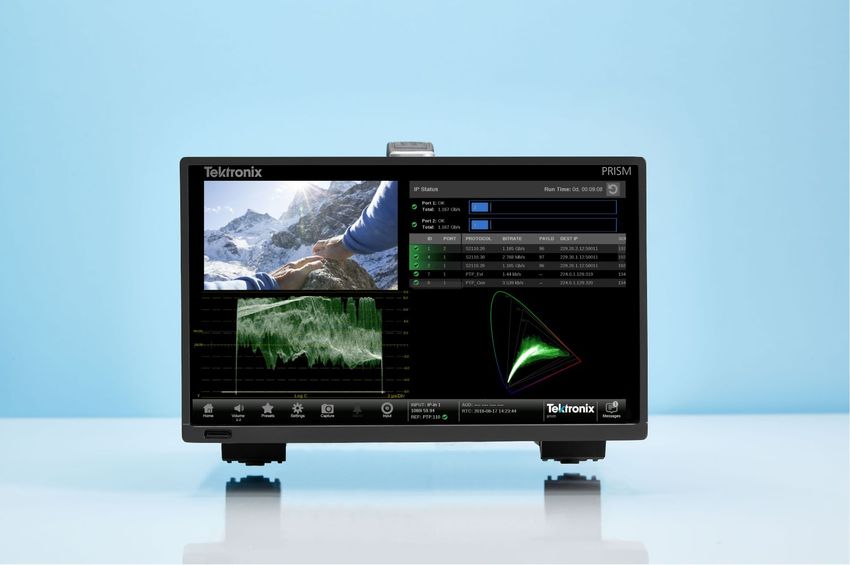
PRISM Datasheet

Monitor redundant paths in the network to ensure that                                      Capture problem streams for offline analysis
the primary and back up are operational
                                                                                           When engineers require detailed analysis with an offline tool, the IP capture
For broadcasters that are committed to their clients, ensuring 24/7 quality                feature in PRISM allows them to quickly access the stream they need to
broadcasting is a minimum requirement. SMPTE 2022-7 was standardized                       analyze. The 2 GB capture capability can create a pcap file of up to
to build and operate a redundant IP system for broadcasters. PRISM                         1.6 seconds at 10 Gbps.
provides broadcast engineers a monitoring solution to properly setup the
redundant ST2110 system.
When an input configured with SMPTE 2022-7 enabled is selected, the
difference in the receive time of datagrams on path number 1 and 2 is
monitored to help engineers determine the signal path and buffer setting in
the receiver. PRISM also offers packet header interpretation and error
detection for the two paths simultaneously.
The reconstructed output stream is fed to the content layer applications,
such as Picture and Waveform, and to the AUX output.

                                                                                           Capture settings menu.

Path 1 – Path 2 Delay graph. A positive number indicates that Path 2 arrived first and a
negative number indicates that Path 1 arrived first.

Use a known good signal to check the receiver
devices and the signal path
Finding a known good signal in the broadcast facility for a quick test can be
time consuming. PRISM provides ST2110-20/-30 with ST2022-7 and 12G-
SDI test signals that can be used to quickly check the receiver device and
the signal path in complex IP/SDI facilities.

IP Generator and SDI Generator application displays.

10 www.tek.com
PRISM Datasheet
Familiar feature set for Broadcast
Engineering
Picture, Waveform, Vector, Audio bar, Video Session
Timing measurement
Eye / Jitter measurement
Monitor the quality of content with familiar feature sets
In any broadcasting system, ensuring the quality of Video and Audio is the
most important task for broadcast engineers. The Picture, Waveform, Audio
and Video Session applications are available for engineers who need the
familiar feature sets to instantly check the quality of content.
12G-SDI Jitter display
Integrated SDI signal generator
Picture, Waveform, Audio, and Video Session applications provide content conformance
monitoring tools.
Ensure the SDI is in-sync and aligned
Measure the integrity of the SDI infrastructure up to Audio/Video synchronization is an important challenge in the processing of
12G video signals. The Tektronix-patented SMPTE RP168 compliant Timing
display makes facility timing easy through a simple graphical representation
In an SDI video system, checking SDI signal quality and integrity is one of which shows the relative timing of the input SDI signal and the reference
the most important tasks before starting to shoot a show. PRISM has signal (or a saved offset reference) on an X-Y axis.
unique capabilities such as providing various jitter filters from 10 Hz to
100 kHz for SD/HD/3G/12G-SDI signals. With quad link connection for 4K format transmission, it is important to
ensure that four SDI links are time aligned at reception. The timing display
In addition, PRISM can also perform automated eye amplitude, automated provides Quad interlink timing measurement to ensure the time alignment
rise/fall time, and automated overshoot/undershoot measurements. These difference between links is compliant to the standard and no quality
capabilities, along with the integrated SDI signal generation feature, help degradation in picture presentation.
broadcasters and network operators detect and diagnose signal quality
problems quickly and efficiently.
12G-SDI Eye pattern display with Automatic measurements
www.tek.com 11PRISM Datasheet
Easy integration into a wide range of
environments
Web control
API
NMOS/SDP
Dual display module
AUX output
Operate PRISM remotely to provide immediate facility
assistance
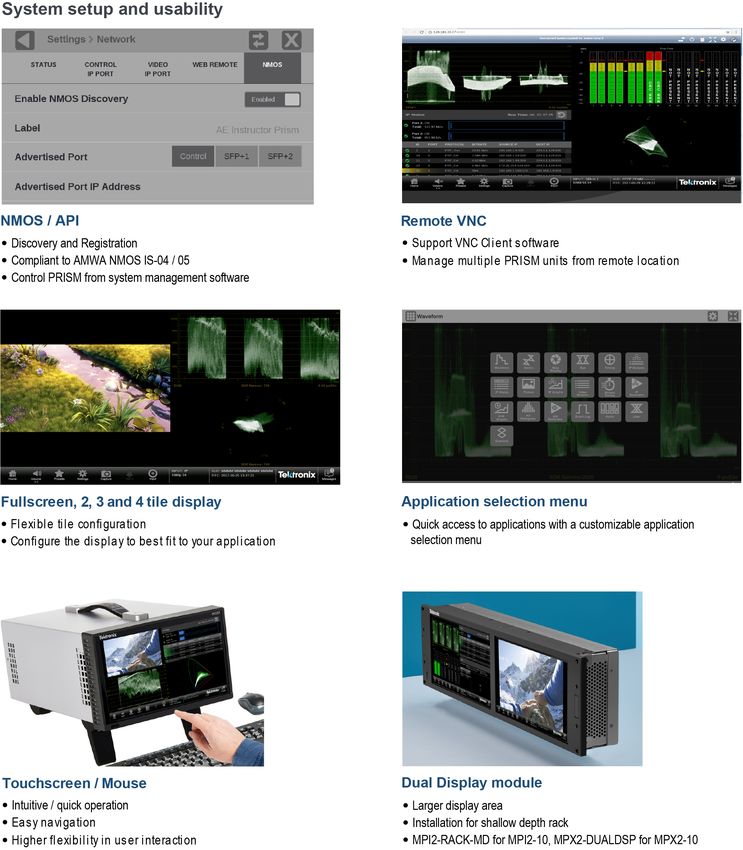
NMOS setup menu and Registration Server/SDP Reader display.
Within a hybrid IP/SDI facility, there are a wide variety of tasks an engineer
needs to perform to troubleshoot issues and to quickly provide assistance Example API commands
to operators to ensure deadlines are met and facilities remain on air. The
remote-control feature in PRISM allows the engineer to remotely access Function Mode
the unit with a Web browser application running on a PC or tablet /api/configureInput GET
computer. This allows the engineer to immediately provide assistance by /api/configureInput POST
starting to diagnose the problem from their desk, minimizing down time,
and helping to isolate the cause of the problem. /api/activeInput GET
/api/activeInput POST
/api/help GET
Remote monitoring using a Web browser.
Control PRISM from system management software
using NMOS/SDP and API
Operators in SDI facilities have used SDI router control panels to select the
SDI source to monitor on a waveform monitor. In an SDI/IP hybrid facility,
the system integrators need to provide similar capability for the operators.
This requires system management software to discover and register the
endpoint equipment and send commands, so they can subscribe to
streams through IGMP V3.
The NMOS/SDP and API allows system integrators to build an IP system
with PRISM being managed by system management software. The
software discovers, registers, configures inputs, and selects the active input
for monitoring.
12 www.tek.comPRISM Datasheet
Configure PRISM for desktop, rackmount, or console Build an audio/video monitoring set in 4RU
to suit every use case
The MPX2 can be fitted with high quality integrated speakers and quick
PRISM offers two platform options: 3RU half-rack width (MPI2) and 1RU audio channel selection to provide audio monitoring and waveform
full rack width (MPX2) to allow the instrument to be easily integrated into monitoring in a single instrument. Combining with extended display,
different environments. Use with touchscreen or KVM depending on customers can create fully integrated audio/video monitoring suit in 4RU.
application or operator's preference.
MPX2-10 and MPX2-DUALDSP
Use AUX SDI Output as gateway for local reference
picture monitor
Extend PRISM display to maximize screen area in a
confined space In a IP broadcast system, PRISM can be used as a gateway to drive SDI
reference picture monitor. AUX output follows a selected input signal
PRISM provides innovative and unique accessories to save space and regardless of IP or SDI and includes embedded audio. It simplifies the
cost. Dual display accessories can be used to save space and remove the control system and minimize the number of cables and IP ports.
need for a second instrument in shader/video engineer positions.
MPI2-10 and MPI2-RACK-MD
www.tek.com 13PRISM Datasheet 14 www.tek.com
PRISM Datasheet

  www.tek.com 15
PRISM Datasheet

16 www.tek.com
PRISM Datasheet

  www.tek.com 17
PRISM Datasheet

18 www.tek.com
PRISM Datasheet

  www.tek.com 19
PRISM Datasheet

20 www.tek.com
PRISM Datasheet

Supported formats

Supported SDI formats

    Link                                              Format           Sample Structure    Bits   Frame/field rate        Option
    SD-SDI                                            525i             4:2:2       YCbCr   10b    59.94                   Base instrument
                                                      625i             4:2:2       YCbCr   10b    50                      Base instrument
    HD-SDI                                            1920x1080        4:2:2       YCbCr   10b    50/59.94/60i            Base instrument
                                                      1280x720         4:2:2       YCbCr   10b    50/59.94/60p            Base instrument
    3G-SDI Level A                                    1920x1080        4:2:2       YCbCr   10b    50/59.94/60p            Base instrument
    3G-SDI Level B                                    1920x1080        4:2:2       YCbCr   10b    50/59.94/60p            Base instrument
    Quad Link 3G-SDI Level A,                         3840x2160        4:2:2       YCbCr   10b    50/59.94/60p            MP2-FMT-4K
    Square Division
    Quad Link 3G-SDI Level B,                         3840x2160        4:2:2       YCbCr   10b    50/59.94/60p            MP2-FMT-4K
    Square Division
    Quad Link 3G-SDI Level A,                         3840x2160        4:2:2       YCbCr   10b    50/59.94/60p            MP2-FMT-4K
    Two Sample Interleave
    Quad Link 3G-SDI Level B,                         3840x2160        4:2:2       YCbCr   10b    50/59.94/60p            MP2-FMT-4K
    Two Sample Interleave
    6G-SDI 1                                          3840x2160        4:2:2       YCbCr   10b    23.98/24/25/29.97/30p   MP2-FMT-4K
    12G-SDI 1                                         3840x2160        4:2:2       YCbCr   10b    50/59.94/60p            MP2-FMT-4K

Supported video formats in SMPTE 2022-6 streams

    Link                                              Format           Sample Structure    Bits   Frame/field rate        Option
    SD-SDI                                            525i             4:2:2       YCbCr   10b    59.94                   Base instrument
                                                      625i             4:2:2       YCbCr   10b    50                      Base instrument
    HD-SDI                                            1920x1080        4:2:2       YCbCr   10b    50/59.94/60i            Base instrument
                                                      1280x720         4:2:2       YCbCr   10b    50/59.94/60p            Base instrument
    3G-SDI Level A                                    1920x1080        4:2:2       YCbCr   10b    50/59.94/60p            Base instrument
    3G-SDI Level B                                    1920x1080        4:2:2       YCbCr   10b    50/59.94/60p            Base instrument

Supported video formats in SMPTE 2110-20 streams

    Link                                              Format           Sample Structure    Bits   Frame/field rate        Option
    ST2110-20                                         1920x1080        4:2:2       YCbCr   10b    50/59.94/60i            Base instrument
                                                      1280x720         4:2:2       YCbCr   10b    50/59.94/60p            Base instrument
                                                      1920x1080        4:2:2       YCbCr   10b    50/59.94/60p            Base instrument
                                                      525i             4:2:2       YCbCr   10b    59.94i                  Base instrument
                                                      625i             4:2:2       YCbCr   10b    50i                     Base instrument

1     6G-SDI/12G-SDI support is available in SDI 1 and SDI 3 inputs.

                                                                                                                                   www.tek.com 21
PRISM Datasheet
Receiver conformance level in SMPTE 2110-30 streams
Conformance level Description
Conformance level B 2
Reception of 48 KHz streams with 1 to 8 channels at packet times of 1 ms or 1 to
8 channels at packet times of 125 μs
Specifications
All specifications are guaranteed unless noted otherwise. All specifications apply to all models unless noted otherwise.
MPI2-10 power characteristics
Power consumption
Typical 100 W
Maximum 200 W
Voltage range 100 to 240 VAC ±10%, 50/60 Hz
MPI2-10 physical characteristics
Dimensions
Height (at bezel) 13.34 cm (5.25 in.)
Width (at bezel) 21.91 cm (8.625 in.)
Depth 30.48 cm (12.00 in.)
Weight (net) 3.4 kg (7.45 lbs.)
MPX2-10 power characteristics
Power consumption
Typical 100 W
Maximum 200 W
Voltage range 100 to 240 VAC ±10%, 50/60 Hz
MPX2-10 physical characteristics
Dimensions
Height 4.45 cm (1.75 in.)
Width 48.26 cm (19.00 in.)
Depth 45.72 cm (18.00 in.)
Weight (net) 3.9 kg (8.7 lbs.)
2 Also supports reception of 48 KHz with 1 to 16 channels at packet times of 125 μs.
22 www.tek.comPRISM Datasheet
Ordering information
Models
MPI2-10 PRISM Media platform, MPI2-10; 3RU half rack with integrated 9 inch HD display and touch panel; 4 SDI BNC Inputs with SD/HD/
3G formats; 2 SFP+ sockets for ST2022-6/7, ST2110, PTP in 10GE
MPX2-10 PRISM Media platform, MPX2-10; 1RU full rack; 4 SDI BNC Inputs with SD/HD/3G formats; 2 SFP+ sockets for ST2022-6/7,
ST2110, PTP in 10GE
Options
Hardware options
PHY Add SDI Physical Layer Measurement Package (includes automated measurement of 12G/6G/3G/HD/SDI Eye pattern parameters
and jitter parameters; jitter waveform display). MP2-FMT-4K license required for 12G/6G-SDI support
MPX2 RACK Add rackmount slides and rails kit for MPX2
MPX2 SPKR Add integrated stereo speaker set, No field upgrade kit is available
Software options
MP2-IP-MEAS Add node locked license for IP Measurement feature sets: includes IP/PTP Graph, IP/PTP Session, PIT Histogram, Timing,
Stream Timing and Stream capture applications; Node Locked
MP2-FMT-4K Add node locked license for 4K formats, enable 6G/12G-SDI; Node Locked
MP2-PROD Add node locked license for Production feature sets: includes Stop, HDR/WCG Conversion, and CIE applications/feature sets;
Node Locked
MP2-GEN Add node locked license for SDI/IP signal generator; includes IP/SDI Generator application; Node Locked
MP2-EXTNDSP Add node locked license for enabling extended desk top; Node Locked
PowerPlugOptions
Opt. A0 North America power plug (115 V, 60 Hz)
Opt. A1 Universal Euro power plug (220 V, 50 Hz)
Opt. A2 United Kingdom power plug (240 V, 50 Hz)
Opt. A3 Australia power plug (240 V, 50 Hz)
Opt. A4 North America power plug (240 V, 50 Hz)
Opt. A5 Switzerland power plug (220 V, 50 Hz)
Opt. A6 Japan power plug (100 V, 50/60 Hz)
Opt. A10 China power plug (50 Hz)
Opt. A11 India power plug (50 Hz)
Opt. A12 Brazil power plug (60 Hz)
Opt. A99 No power cord
www.tek.com 23PRISM Datasheet
Service Options
Opt. C3 Calibration Service 3 Years
Opt. C5 Calibration Service 5 Years
Opt. D1 Calibration Data Report
Opt. D3 Calibration Data Report 3 Years (with Opt. C3)
Opt. D5 Calibration Data Report 5 Years (with Opt. C5)
Opt. G3 Complete Care 3 Years (includes loaner, scheduled calibration, and more)
Opt. G5 Complete Care 5 Years (includes loaner, scheduled calibration, and more)
Opt. R3 Repair Service 3 Years (including warranty)
Opt. R5 Repair Service 5 Years (including warranty)
Post purchase upgrades
MPI2-10-UP
Opt. PHY Add SDI Physical Layer Measurement Package (incl. automated measurement of 12G/6G/3G/HD/SDI Eye pattern parameters and
jitter parameters; jitter waveform display). MP2-FMT-4K license required for 12G/6G-SDI support
Opt. 25GE 25GE module field upgrade kit, includes MP2-25GE License 3
Opt. 25GE-PHY Physical measurement package for 25GE module field upgrade kit (requires MPI2-10-UP 25GE) 3
MPX2-10-UP
Opt. PHY Add SDI Physical Layer Measurement Package (incl. automated measurement of 12G/6G/3G/HD/SDI Eye pattern parameters and
jitter parameters; jitter waveform display). MP2-FMT-4K license required for 12G/6G-SDI support
Opt. 25GE 25GE module field upgrade kit, includes MP2-25GE License 3
Opt. 25GE-PHY SDI Physical measurement package for 25GE module field upgrade kit (requires MPX2-10-UP 25GE) 3
MPI2 rear panel with 25GE module installed 3
Warranty
Standard product warranty: 1 year; Long-term product support: 5 years
3 25GE upgrade kit will be available in the future release
24 www.tek.comPRISM Datasheet
Recommended accessories
MPI2-PTBL Portable cabinet with handle, feet, Tile bail and protective front cover
MPI-RACK-MM 19 inch, 3RU dual rack cabinet for one MPI unit or two MPI units in a side-by-side installation, includes front panel USB/headphone
connectors for each MPI unit
MPI-RACK-MW 19 inch, 3RU dual rack cabinet for one MPI unit or one MPI unit in a side-by-side installation with a WFM52x0, WFM7200,
WFM8x00 instrument, includes front panel USB/headphone connectors for one MPI unit
MPI2-RACK-MD 19 inch, 3RU Rack Cabinet with display and touch panel, USB/Headphone connector on rack ear
MPX2-DUALDSP 19 inch, 3RU Dual display unit with touch panel, USB/Headphone connector on rack ear
MP-SFP
Opt. 3GTO SD/HD/3G Optical (1310 nm) SDI SFP transmitter module (to be installed into SDI SFP+ cage for optical SDI loop through output)
Opt. 3GTD SD/HD/3G DIN SDI SFP transmitter module (to be installed into SDI SFP+ cage for SDI loop through output with DIN coaxial
connector)
Opt. 3GTH SD/HD/3G HDBNC SDI SFP transmitter module (to be installed into SDI SFP+ cage for SDI loop through output with HDBNC
coaxial connector)
Opt. 10GESR 10G Ethernet short range (850 nm) transceiver module (to be installed into 10GbE SFP+ cage); requires Option MPI-IP-STD
Opt. 10GELR 10G Ethernet long range (1310 nm) transceiver module (to be installed into 10GbE SFP+ cage); requires Option MPI-IP-STD
MP-CBL
Opt. RACK-MD PRISM A cable kit for MPI2-RACK-MD, 0.5 M DisplayPort male to DisplayPort male cable and 0.5 M USB 3.0 A male to B male
cable
Opt. DUALDSP PRISM A cable kit for MPX2-DUALDSP, Two sets of 2 M DisplayPort male to DisplayPort male cable and 2 M USB 3.0 A male to
B male cable
Opt. HDBNC-BNC PRISM Coaxial adapter cables from high-density male BNC connector to standard female BNC connector (a set of 3 cables, 75 Ω,
0.5 M long)
www.tek.com 25PRISM Datasheet
Post purchase upgrade for MPI and MPX
MPI-UP
Opt. PHY Add SDI Physical Layer Measurement Package (incl. automated measurement of 12G/6G/3G/HD/SDI Eye pattern parameters and
jitter parameters; jitter waveform display). MP-FMT-4K license required for 12G/6G-SDI support
Opt. 25GE 25GE module field upgrade kit, includes MP2-25GE License 4
Opt. 25GE-PHY SDI Physical measurement package for 25GE module field upgrade kit (requires MPI-UP 25GE) 4
MPX-UP
Opt. PHY Add SDI Physical Layer Measurement Package (incl. automated measurement of 12G/6G/3G/HD/SDI Eye pattern parameters and
jitter parameters; jitter waveform display). MP2-FMT-4K license required for 12G/6G-SDI support
Opt. 25GE 25GE module field upgrade kit, includes MP2-25GE License 4
Opt. 25GE-PHY SDI Physical measurement package for 25GE module field upgrade kit (requires MPX-UP 25GE) 4
MPI2-10 with MPI2-PTBL front and rear panels
MPX2-10 front and rear panels
4 25GE upgrade kit will be available in the future release.
26 www.tek.comPRISM Datasheet
MPI2-RACK-MD (MPI2-10 in left slot)
MPX2-DUALDSP
Tektronix is registered to ISO 9001 and ISO 14001 by SRI Quality System Registrar.
www.tek.com 27PRISM Datasheet
ASEAN / Australasia (65) 6356 3900 Austria 00800 2255 4835* Balkans, Israel, South Africa and other ISE Countries +41 52 675 3777
Belgium 00800 2255 4835* Brazil +55 (11) 3759 7627 Canada 1 800 833 9200
Central East Europe and the Baltics +41 52 675 3777 Central Europe & Greece +41 52 675 3777 Denmark +45 80 88 1401
Finland +41 52 675 3777 France 00800 2255 4835* Germany 00800 2255 4835*
Hong Kong 400 820 5835 India 000 800 650 1835 Italy 00800 2255 4835*
Japan 81 (3) 6714 3086 Luxembourg +41 52 675 3777 Mexico, Central/South America & Caribbean 52 (55) 56 04 50 90
Middle East, Asia, and North Africa +41 52 675 3777 The Netherlands 00800 2255 4835* Norway 800 16098
People's Republic of China 400 820 5835 Poland +41 52 675 3777 Portugal 80 08 12370
Republic of Korea +822 6917 5084, 822 6917 5080 Russia & CIS +7 (495) 6647564 South Africa +41 52 675 3777
Spain 00800 2255 4835* Sweden 00800 2255 4835* Switzerland 00800 2255 4835*
Taiwan 886 (2) 2656 6688 United Kingdom & Ireland 00800 2255 4835* USA 1 800 833 9200
* European toll-free number. If not accessible, call: +41 52 675 3777
For Further Information. Tektronix maintains a comprehensive, constantly expanding collection of application notes, technical briefs and other resources to help engineers working on the cutting edge of technology. Please visit www.tek.com.
Copyright © Tektronix, Inc. All rights reserved. Tektronix products are covered by U.S. and foreign patents, issued and pending. Information in this publication supersedes that in all previously published material. Specification and
price change privileges reserved. TEKTRONIX and TEK are registered trademarks of Tektronix, Inc. All other trade names referenced are the service marks, trademarks, or registered trademarks of their respective companies.
06 Sep 2018 2MW-61462-0
www.tek.comYou can also read


