Secure Remote Working - April 2020 - Capgemini
←
→
Page content transcription
If your browser does not render page correctly, please read the page content below

Secure Remote Working

April│2020

Microsoft 365
Productivity Cloud

Hans van der Meer
Microsoft 365 Business Group Lead
hansv@Microsoft.com

The Modern Workplace Vision

Disruption happening in every industry:
• Rising customer expectations,
• New digital business models,
• Need for differentiation
Expand your enterprise in ways you never thought possible by integrating
technology into every aspect of your business. By creating an ecosystem that
revolutionizes how you operate and compete, digital transformation brings
limitless potential to empower your employees and boost customer
engagement.

The workplace and the way people work are changing
•   Become agile and innovative to speed delivery of services
•   Attract and retain the right talent
•   Provide friction-free collaboration and communication to drive creativity
•   AI-powered services to find and analyze information

Teamwork trends

       Diverse
       5 generations work together

       Team-based and collaborative
       80% of employee time is spent collaborating

       Global
       72% of workers will be working remotely in 2020
       This has changed due to Covid-19
A complete, intelligent, secure solution to empower employees
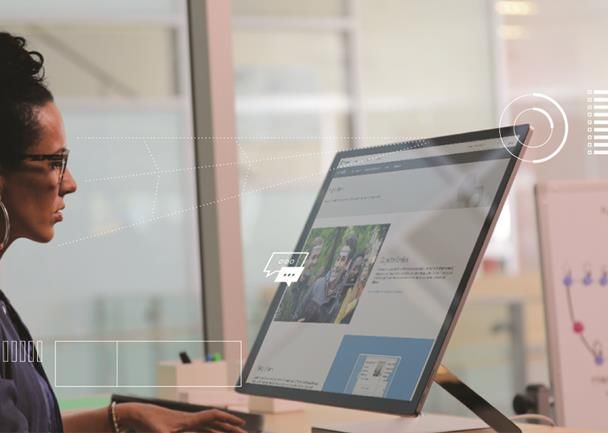
Trends impacting the modern workplace

       Team-based and                      Overwhelming                         Growing
         collaborative                    amounts of data                    security threats

         80% of time is spent           59% of knowledge workers            Twice as many security
   collaborating, people work on            struggle to find the          breaches and 3x increase in
        twice as many teams               information they need              identity-based attacks

                AI augmentation is projected to generate $2.9 trillion in business
               value and recover 6.2 billion hours of worker productivity by 2021.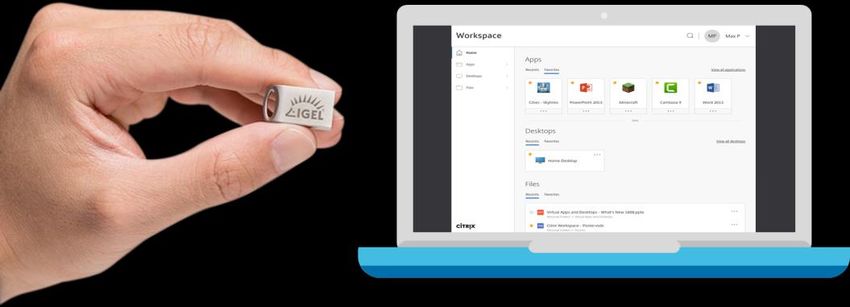
WHY   CLOUD   |   01

A modern workplace unlocks creativity
to drive innovation
Staying on-premises prevents organizations from
taking advantage of new solutions that help spur
innovation and drive cultural change.
                                                   Advocate Healthcare
                                                   is achieving a ROI of
Microsoft 365 helps empower employees to           63%, saving $53.8 million
express their ideas more effectively and create    from information worker
content that stands out. Spark innovation by       productivity gains alone.
helping people focus on what matters, find
what they need, and turn data into insights.         Source: Improving patient health
                                                   through collaboration and efficiency
                                                          with Office 365, blog
WHY   CLOUD   |   02

A modern workplace promotes
teamwork and productivity
Staying on-premises restricts real-time
collaboration and workplace productivity.

Microsoft 365 offers a universal toolkit of           21%
the most complete, integrated productivity      Higher profits when
solution, empowering every kind of             employees are highly
teamwork in the modern workplace.                    engaged

                                                Source: Gallup, “State of the
                                              American Workplace Report,” 2017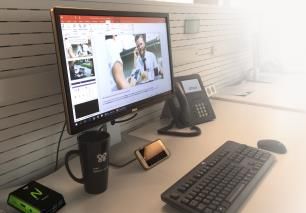
WHY   CLOUD   |   03

A modern workplace helps simplify IT,
helps keep you current, promotes agility
Staying on-premises preserves the headaches of
managing hardware, upgrades, and other time-
intensive tasks.                                 Forrester estimates that
                                                 moving to that Microsoft
                                                 365 provides a 40%
Microsoft 365 helps you streamline IT
                                                 administration cost savings
management across users, devices, apps,          and 30-50% deployment
and services, integrating with existing          cost savings vs. upgrading
infrastructure and enabling IT to consolidate    on-premises servers.
and simplify without losing control of your
environment. Redeploy your most valuable         Source: Forrester Total Economic Impact
                                                 of Microsoft Office 365
IT resources to higher value activities.
WHY   CLOUD   |   04

A modern workplace delivers intelligent
security and promotes compliance
Staying on-premises could put you at a higher risk
for security breaches and non-compliance.
                                                     It quickly became clear
                                                     that our data would be
                                                     safer in the Microsoft
Microsoft 365 delivers end-to-end
                                                     cloud than in our own
protection with insights into global                 datacenters. After all,
cyberthreats and capabilities that you               Microsoft is an expert in
can’t provide yourself on-premises.                  enterprise security.”

                                                     Jeff Heyde,
                                                     Director of Global Systems,
                                                     Dana Holding Corporation
Seamless experience for users
Connected, integrated applications streamline
sharing and discovery, and simplifies adoption
Universal toolkit Simplify IT
Unified management, security and compliance
makes deployment easier and reduces TCO
Insights and analytics
Integration of people, content & activity
enables AI & analytics to inform & accelerate
decision makingCapgemini’s Secure Remote Working Services
The Challenges of Remote Working

                             “Our users have to                                          “We have critical              “How do we keep
                                find a way to                                            business apps not              our corporate data
                              communicate or                                             available outside              secure if users are
                              collaborate from                                              our secure                    working from
                                   home.”                                                    network.”                       home?”

                                                            “Our users cannot                            “Our home users
                                                            come to the office                              do not have
                                                               to get their                              corporate devices
                                                            workplace repaired                               at home.”
                                                              or renewed”

Secure remote working and collaboration services | March 2020   © 2020 Capgemini. All rights reserved.                                        15
How Capgemini helps?
1 SaaS on own
▪ Workstyle Analyse ▪ Ecosystem of device
Assessment - assess (within 72 hrs) partners
importance of ▪ Governance
business activities ▪ Provide gap analysis ▪ Project and Support
and organize them on current
into tiers for environment
teams
2 Virtual Apps &
response or ▪ Leverage existing Desktop
recovery technologies and
license agreements
Assess Mobilise
(within 24hrs) 3 Zero-touch
Corporate Laptop
ONE Week
Digital adoption
Service Desk and Field Services Hypercare
2nd/3rd Line Support
Cybersecurity – End Point Protection | Identity and Access Management | SOC
Service Management – Asset management | Project Management | Change Management
Enabling Transformation: Capgemini provides specific/full support on strategy, execution, from planning and shaping to operational implementation
Secure remote working and collaboration services | March 2020 © 2020 Capgemini. All rights reserved. 16Remote and Collaborative Services: 1) SaaS on Own Device
1 Use own device Access
Split tunnel
VPN
▪ This solution gives users access to SaaS
Micro-VPN applications, including Office365, delivered to
tunnel their own device
Direct
1. Users uses own device to access Office productivity
Access ▪ Assumes users have their own Windows, macOS, iOS
suite
or Android device.
Full VPN
▪ Optionally use iGel UD Pocket (for more secure access
on x86 device)
▪ Optionally use mobile management solution
▪ Users can either logon to O365 via web apps or can
install full apps from the app store (e.g. Outlook,
Teams, Skype for Business, Word, Excel, PowerPoint).
▪ Users can also use other SaaS apps (e.g. G-Suite,
Google Hangouts, Zoom, Concur)
▪ Capgemini Digital Adoption to drive usage and
enablement.
Secure remote working and collaboration services | March 2020 © 2020 Capgemini. All rights reserved.Remote and Collaborative Services: 2) Virtual Apps & Desktops
2 Virtual Apps & Desktops Access
Split tunnel
Secure VPN ▪ This solution would give access to
endpoint
connection Micro-VPN critical business apps inside customer secure
Browser only
tunnel network. These apps would either be part of a
Direct Access VDI image or made available as published apps.
Full VPN
1. Browser only access with Citrix secure config
2. Users given IGEL UD Pocket; USB turns almost any device to a
▪ Assumes users have their own Windows, MacOS,
WVD ready iGel managed device iOS or Android device:
• Device accesses via HTML5 / VDI app (e.g. Citrix receiver,
Windows Desktop client)
• Optionally use iGel UD Pocket to provide a secure endpoint
• Optionally use mobile device management solution
▪ O365 productivity apps available in VDI image or as
published apps (e.g. Outlook, Teams, Skype for
Business, Word, Excel, PowerPoint)
▪ Users can also use other SaaS apps (e.g. G-
Suite, Google Hangouts, Zoom, Concur)
▪ Capgemini Digital Adoption to drive usage and
enablement.
Secure remote working and collaboration services | March 2020 © 2020 Capgemini. All rights reserved.Remote and Collaborative Services: 3) Zero-touch Corporate Laptop
3 Corporate Laptop Access
Split tunnel
VPN
▪ This solution allows users to self-service deploy a
Micro-VPN
tunnel
corporate laptop shipped directly to them from
Direct Access
the vendor
Full VPN ▪ Users receives a laptop from vendor with standard
1.Provision of corporate laptop Windows 10 build. They logon with corporate
credentials which initiates the Autopilot automated
deployment (via Intune).
▪ Access to O365 productivity apps (e.g. Outlook, Teams,
Skype for Business, Word, Excel, PowerPoint)
▪ Access to business apps in secure network via VPN /
DirectAccess
▪ Access to SaaS apps (e.g. G Suite, Google Hangouts,
Zoom, Salesforce, Concur)
▪ Capgemini Digital Adoption to drive usage and
enablement.
Secure remote working and collaboration services | March 2020 © 2020 Capgemini. All rights reserved.Getting the best of Home Office experience
▪ Any Device: Transfom any laptop/desktop (BYO, legacy) with USB port into ▪ Headsets, collaborative smart
secure corporate environement that can leverage virtual apps and desktops devices, bluetooth speakers,
(including cloud workspaces). external cameras deliver great
audio/video experience at home
improving collaboration and
productivity.
▪ Integration and compatibility with all
leading Unified Communication (MS
Teams, Skype for Business, Cisco
WebEx, Zoom)
▪ Any Screen: Equip your employees with cost effective “take home” solution ▪ Remote access points extend the
that transforms any screen at home into fully operational corporate corporate network to users working
environment giving them access to web apps (O365), virtual desktops or work from home, or at temporary work
as unified wireless docking station for laptops. sites. This means users can access
the same SSID, Intranet, and other
services.
Secure remote working and collaboration services | March 2020 © 2020 Capgemini. All rights reserved. 20And we don’t forget Cybersecurity The new way of working The sudden, large scale, need to work remotely provides both security challenges and opportunities for your organization Risks Opportunities • Home networks are on average less secure than corporate • Employees are getting more comfortable in working remote networks • With the quick transition to remote working gaps may have • This presents a unique opportunity to asses remote working formed in perimeter security and BYOD policies Threat landscape changes • There has been a surge in Phishing and social engineering attacks using COVID-19 as the lure. • Both in Email and watering hole attacks • Payloads consist primarily of spyware, trojans and credential theft. Ransomware has also been spotted. What to focus on today What to focus on tomorrow • Security Hygiene • Second stage cyber attacks • Consistent incident handling • More compromised devices • Clear communication • More advanced attacks
Client Name

  •    Alfa-college                                 Alfa-college: Enabling Remote Learning

           Our relationship with Alfa-college                                        Additional Measures irt COVID-19                            Results

 Capgemini has been Alfa College's IT services partner for                  Due to a high degree of cloud adoption in the recent years,    •    Adoption of Teams has got a significant boost since
 over 10 years and, together with them, has accomplished                                                                                        COVID. More than 12,000 students are now taught
 the transformation to a cloud-based workplace solution                     the impact of COVID-19 on the infrastructure was quite              remotely through more than 1,200 Microsoft Teams.
 based on the Connected Workspace portfolio.                                limited:
                                                                                                                                           •    It is not required anymore to use a VPN connection to
 At the beginning of 2018, we started with the                              • Together with the employees of Alfa-college, we have              use the standard (cloud-based) functionality due to
 transformation of the ICT services to public Cloud, which                                                                                      the split VPN configuration.
 we expect to be fully completed by the end of 2020. The                      provided a Microsoft Team for every course and class.
 result of this is that Alfa-college can now respond better                 • All employees of the service points have now become a        •    The students are able to use their private IT
 to changes, the continuity of services has improved and                      service desk employee.                                            equipment to connect to the learning environment
 costs have been greatly reduced.                                           • 300 laptops normally used in classrooms have been                 which is called ‘Alfa-connect’.
                                                                              redeployed through Autopilot and handed out to
 In addition, the new services have had a huge impact on
 the way in which employees and students can work                             students on a budget.
 together (remotely).                                                       • Alfa-college has appointed e-coaches to support users
                                                                              in the use of MS Teams from a functional perspective

           What is Alfa-college?

 The Alfa College is a Christian ROC for the Northern and Eastern Netherlands. It provides secondary vocational training and educational programs in Groningen, Hardenberg, Hoogeveen, Assen and Leek. About
 12,000 young people and adults follow a training or course, provided by about 1,200 employees.

Cloud Infrastructure Services – Internal Book of Stories | May 2019   © 2019 Capgemini – Internal use only. All rights reserved.                                                                               22
Client Name
• Eneco
Eneco: Secure Remote Working
Our relationship with Eneco Additional Measures irt COVID-19 Results
Capgemini has been the partner for the IT services of • Implementation of MFA access for both internal and ▪ The number of users that simultaneously can use the
Eneco for more than 12 years and, together with Eneco, external call center users over the internet VPN service has been scaled up from 750 to 4000
has realized the transformation to a cloud-based • Expansion of SBC environment for internal call center concurrent users
workplace solution. At the time, Eneco was also one of users (Eneco and Oxxio) based on Azure resources
the first Dutch Capgemini customers that was migrated to • Deployment of virtual infrastructure to expand the VPN ▪ The traffic generated by using VPN runs separately
Windows 10 and Office 365. and firewall capacity from other production traffic, so that they cannot
interfere with each other
• Separated client traffic (VPN users) from business
In 2016, Capgemini implemented an datacenter-based application traffic with dedicated infrastructure for both
SBC solution based on Citrix XenApp to support the Call ▪ Scaling up the necessary infrastructure has been
of them applied to virtual infrastructure, which makes it easy to
Center users who in many cases work remotely. • Intensified security measures has been set up through scale back in the future.
monitoring and 24 * 7 response to SIEM, Firewalls, anti-
At the same time, a VDI solution has been implemented malware ▪ All call center users now work from home based on SBC
for software developers by which they can simultaneously • Implementation of solution to allow legitimate internet or VPN. Azure-based SBC as a backup.
work remotely on the Eneco environment on their own traffic (such as Office 365) and block non-legitimate
devices. traffic (such as Netflix) ▪ Developers from Eneco Netherlands and Belgium were
• Internet connection scaling to support increased use of already working on a Citrix Cloud VDI and have
In 2019, we converted both environments into a Citrix Teams and Skype experienced virtually no technical nuisance when
cloud solution based on a hybrid infrastructure model. switching to working from home.
What is Eneco?
Eneco Group N.V. is a Dutch energy company with approximately 4000 employees.
Cloud Infrastructure Services – Internal Book of Stories | May 2019 © 2019 Capgemini – Internal use only. All rights reserved. 23Key Take-aways
• Make the most of online services (such as Microsoft Teams or
GotoMeeting) to encourage remote collaboration.
• Improve the self-reliance of the end users and promote the
use of the available tools through adoption programs. Inform
them of the sharp increase in social engineering and phishing
attacks.
• Increase ‘dike’ monitoring on your vital infrastructure and
prevent single-point-of-failures when expanding the
(workplace) infrastructure.
• Use scalable infrastructure (such as Microsoft Azure) as much
as possible because of the immediate availability, to cover the
temporary capacity expansion or as a possible alternative if
the primary infrastructure does not function.
Secure remote working and collaboration services | March 2020 © 2020 Capgemini. All rights reserved. 24Veilig werken op afstand
Let’s talk
about your
business.
Leon Caffa Frank van Ierland
Solution Specialist End User Services Chapter Lead End User Services
Cloud Infrastructure Services Cloud Infrastructure Services
leon.caffa@capgemini.com frank.van.ierland@capgemini.com
+31 (6) 45 706 620 +31 (6) 21 391 053
Meer informatie kunt u vinden op onze solutions webpagina:
Veilig werken op afstand
Secure remote working and collaboration services | March 2020 © 2020 Capgemini. All rights reserved. 25About Capgemini
A global leader in consulting, technology services and digital transformation, Capgemini is
at the forefront of innovation to address the entire breadth of clients’ opportunities in the
evolving world of cloud, digital and platforms. Building on its strong 50-year heritage and
deep industry-specific expertise, Capgemini enables organizations to realize their business
ambitions through an array of services from strategy to operations. Capgemini is driven
by the conviction that the business value of technology comes from and through people.
It is a multicultural company of almost 220,000 team members in more than 40 countries.
The Group reported 2019 global revenues of EUR 14.1 billion.
Learn more about us at
www.capgemini.com
This message contains information that may be privileged or confidential and is
This message is intended only for the person to whom it is addressed. If you are not the intended recipient, you are not authorized to
the property of the Capgemini Group. read, print, retain, copy, disseminate, distribute, or use this message or any part thereof. If you receive this message in error, please
Copyright © 2020 Capgemini. All rights reserved. notify the sender immediately and delete all copies of this message.You can also read


