Securing the Data Center in Just Four Steps - VMware
←
→
Page content transcription
If your browser does not render page correctly, please read the page content below
W H I T E PA P E R– M A R C H 2 0 2 1

Securing the Data Center
in Just Four Steps
Securing the Data Center in Just Four Steps

 ABOUT INTEL AND VMWARE NSX                 Introduction
 SERVICE-DEFINED FIREWALL
                                            In the never-ending fight against cyberattacks, enterprises have long relied on traditional
 Optimized on Intel® Architecture, the
                                            perimeter firewalls to prevent cybercriminals from reaching their targets within the data
 VMware Service-Defined Firewall can
                                            center. As the evidence mounts that today’s perimeter is permeable and likely to be
 reduce Capex and Opex expenses
                                            breached, companies have begun to heed the call for improving security postures inside
 compared with custom firewall
                                            corporate networks.
 appliances that use proprietary
 hardware and can be costly to maintain.    However, in the context of modern, distributed applications and increasingly dynamic
 From its position inside the hypervisor,   workloads, securing all or even most east-west (internal) traffic has long been viewed as
 the VMware Service-Defined Firewall        too complex, expensive, and time-consuming for brownfield—and even greenfield—data
 provides visibility into both network      centers. This perception is certainly accurate for those organizations that attempt to
 traffic and application behavior to        secure east-west traffic by employing traditional, appliance-based perimeter firewalls as
 provide workload protection as             internal firewalls.
 it detects and mitigates threats
 on east-west traffic within the            But there is, in fact, a simple, fast, and cost-effective alternative. A distributed, scale-out
 datacenter perimeter. With advanced        internal firewall specifically designed to monitor and protect east-west traffic is the best
 microsegmentation and software-based       solution for securing data centers and protecting today’s workloads precisely because it
                                            eliminates the complexity, expense, and limitations on scalability and flexibility of
 Intrusion Detection Services/Intrusion
                                            traditional perimeter firewalls.
 Prevention Services (IDS/IPS), the
 Service-Defined Firewall minimizes         A distributed internal firewall like VMware’s NSX Service-defined Firewall improves
 attack surfaces and reduces false          the security of today’s modern workloads by preventing lateral movement. Because it
 positives by attaching curated             is distributed, application-aware, and simple to operate, the Service-defined Firewall
 signatures to applications that move       streamlines and automates much of the planning, deployment, configuration, and
 as applications migrate with vMotion
                                            management of internal firewalls and the granular policies and capabilities that
 across networks.
                                            support them.
 Intel® QuickAssist Technology (Intel®
 QAT) Support for VPN Bulk Encryption       Nonetheless, every new solution deployment requires time and effort on the part of
 is now supported within the VMware         security teams to learn how to use the technology effectively and how best to implement
 NSX-T framework to offload VPN bulk        it within an organization’s current environment. In this white paper, we introduce a four-
 encryption onto the Bare Metal Edge        step approach that helps organizations to quickly realize benefits from deploying the
 for greater protection and better user     Service-defined Firewall, and to expand usage over time to secure the entire data center.
 experience.
                                            Security That Overcomes Today’s Challenges
                                            CISOs and their security teams face a growing number of challenges in trying to protect
                                            the business against successful cyberattacks:
                                            • The new battleground for cyberthreats is inside the data center
                                            • Teams have little to no visibility into east-west traffic
                                            • Threats that make it past the perimeter can move laterally over allowed data center
                                              traffic with little to block them
                                            • Work-from-home models and virtual desktop infrastructure (VDI) allow traffic straight
                                              into the data center, exposing the workloads running within to threats

                                            Traditional appliance-based security solutions are ineffective at providing visibility into all
                                            east-west traffic, protecting that traffic, and preventing the lateral movement of threats.
                                            That’s why enterprises are turning to VMware’s Service-defined Firewall, a distributed
                                            internal firewall that protects all east-west traffic with security that’s intrinsic to the
                                            infrastructure, thereby radically simplifying the deployment model. (To learn more about
                                            the challenges of traditional network security controls for protecting modern workloads,
                                            read the white paper Five Critical Requirements for Internal Firewalling in the Data Center.)

                                            With the Service-defined Firewall, security teams can protect the brand from internal
                                            threats and minimize the damage from cyberattacks that make it past the traditional
                                            network perimeter. The solution includes a distributed firewall, an intrusion detection and
                                            prevention system (IDS/IPS), and analytics through NSX Intelligence (see Figure 1).

                                                                                                                         W H I T E PA P E R | 2
Securing the Data Center in Just Four Steps
Security
Intelligence
Service-defined Firewall
NSX Intelligence for Firewall
Distributed Firewall Distributed IDS/IPS
DISTRIBUTED SERVICE OPERATIONALLY
ARCHITECTURE AWARE SIMPLE
Bare AWS
On-prem VM ESX KVM Kubernetes Azure
Metal Outpost
FIGURE 1: VMware NSX Service-defined Firewall Architecture
Four Steps to Securing the Data Center
Implementing any new security approach or solution requires time and commitment from
a security team already stretched thin. For that reason, although implementing east-west
security is easier and faster with a distributed internal firewall, most organizations will still
prefer to take an iterative, phased approach to improving data center security.
In addition to not overwhelming the team with a major initiative, breaking the deployment
of an internal firewall into smaller projects delivers other benefits as well: It lets security
teams prove success early and demonstrate the value of the approach to internal
stakeholders. They can then choose to build on their experience to expand the use of
distributed internal firewalling, gaining organizational maturity, speed, and confidence as
they progress.
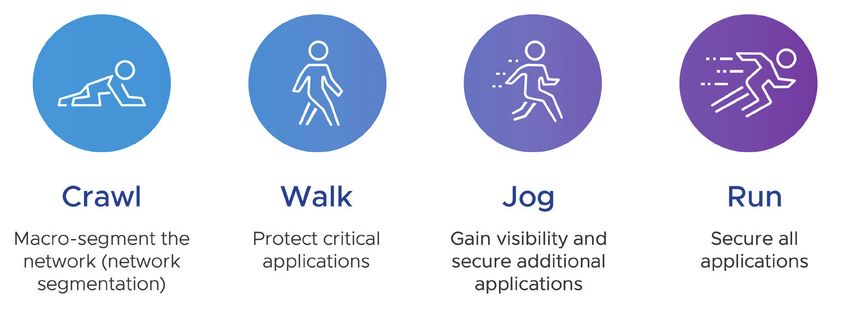
While there are different approaches, the following four steps (Figure 2) have been used
by VMware customers to start small and then continually strengthen their data center
defenses over time:
1. Crawl: Macro-segment the network
2. Walk: Protect critical applications
3. Jog: Gain visibility and secure additional applications
4. Run: Secure all applications
FIGURE 2: A Four-Step Approach to Secure the Data Center
W H I T E PA P E R | 3Securing the Data Center in Just Four Steps
To learn more about securing the Crawl: Macro-Segment the Network
VDI environment, read the solution
For many organizations, the first step in protecting east-west traffic is the most difficult.
overview Service-defined Firewall
That’s because attempting to macro-segment the network using traditional, appliance-
for Virtual Desktops.
based firewalls has proven to be time-consuming, complex, and inflexible—as well as
expensive.
However, using a distributed internal firewall simplifies security architecture and
accelerates time-to-value, making it easier to deploy macro-segmentation to improve the
security of east-west traffic. It’s also more flexible, adapting easily to changing network
and security requirements as the business evolves.
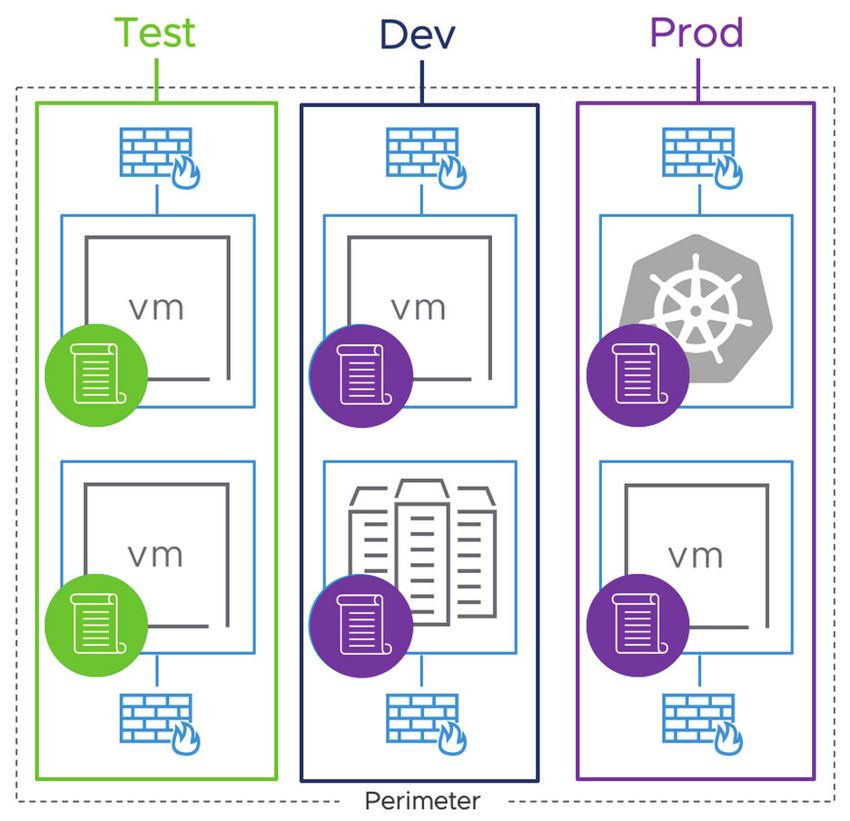
With the Service-defined Firewall, your security team can start using network
segmentation to isolate and secure specific environments, such as development and
production, from each other. This immediately prevents attackers and malicious insiders
from moving laterally between these environments.
Goal
Deploy the Service-defined Firewall to protect segments of the network by creating virtual
security zones. By macro-segmenting these environments, the security team can improve
the overall security stance for the data center by preventing lateral movement between
zones.
Typical use case
Depending on their business structure and use cases, a security team would typically
choose to segment environments that should not be able to directly communicate with
each other. Examples include different
business units, partner environments,
and development and production
environments.
Benefits
• Show proof of success to internal
company stakeholders for using a
proper internal firewall approach
• Prevent attackers from moving
between zones to limit the damage
from a successful attack in one zone
• Provide a more flexible solution
compared to a traditional, appliance-
based firewall, enabling organizations
to easily expand the number of zones
as needed FIGURE 3: Network Segmentation
Walk: Protect Critical Applications
Typically, the next step to securing the data center is to start moving from macro-
segmentation to micro-segmentation, which enables the security team to define and
enforce more granular controls, right down to the workload level.
The security team chooses a small number of well-understood applications that are critical
to the business and should be isolated and protected with additional security controls to
prevent unauthorized access, data breaches, and other forms of attack.
For these applications, the granular security controls can be further enhanced with
IDS/IPS capabilities to detect traffic patterns that can indicate an attack. While isolating
applications may be possible with some solutions that are expressly designed for micro-
segmentation, those solutions don’t provide IDS/IPS capabilities, which are required for
W H I T E PA P E R | 4Securing the Data Center in Just Four Steps
Learn more about visibility in the white compliance with regulations such as the Health Insurance Portability and Accountability
paper Easily Operationalize Micro- Act (HIPAA) and the Payment Card Industry Data Security Standard (PCI DSS).
segmentation with NSX Intelligence.
Goal
Use micro-segmentation to isolate and protect one or more critical applications, applying
layered security controls specific to the application and preventing lateral movement by
attackers either into or out of the segment where the application runs.
Typical use case
When considering a critical application with which to begin micro-segmentation,
organizations often choose to start with their virtual desktop infrastructure (VDI)
environment or other critical applications such as shared services like Active Directory
or DNS servers. The VDI environment—while improving manageability, costs, and data
protection for user desktops—exposes data center infrastructure to threats stemming from
end-user security violations. However, using the Service-defined Firewall, the security
team can isolate desktop zones from sensitive data center assets. VMware NSX
Distributed IDS/IPS functionality adds additional traffic inspection capabilities to the
Service-defined Firewall to provide threat control in addition to access control, for a
layered security approach.
Benefits
• Reduce the attack surface by isolating critical applications from other data center assets
• Mitigate lateral movement from outside of the segment
• Enable user- and application-specific access controls for sensitive applications
• Detect advanced threats using IDS/IPS capabilities
Protecting VDI Infrastructure Protecting Desktop Pools User-based Access Control
Horizon Management Components Internal Developer Pools
WEB APP DB
External Developer Pools
FIGURE 4: Protecting VDI Environments
Jog: Gain Visibility and Secure Additional Applications
As the security team gains more experience in operating a distributed internal firewall,
it can continue expanding its monitoring and protection of east-west traffic to additional
critical or important workloads within the data center.
For applications that are not well-understood, the Service-defined Firewall gives the
security team data center-wide visibility and applies built-in machine learning to help the
team understand applications and traffic flows. Automated application discovery gives the
security team a comprehensive map of application topography as well as automatically-
generated recommendations for security policies based on observed traffic flows.
Goal
Build on the knowledge and skills your team gained in the first two steps and use the
built-in visibility and automation in the Service-defined Firewall to isolate and secure more
workloads, which further reduces the attack surface and strengthens data center security.
W H I T E PA P E R | 5Securing the Data Center in Just Four Steps
For an example of an organization that Typical use case
deployed the Service-defined Firewall Security teams typically focus this step on securing important applications where
to support compliance, read the white disruption or theft would impact business outcomes. This includes applications such as
paper Internal Firewall: The Best Way
those that drive revenue, handle sensitive customer or company information, deliver
to Protect East-West Traffic.
important digital customer experiences, and others that are critical to the core business.
ABOUT INTEL AND VMWARE SOLUTIONS
FOR VIRTUAL CLOUD NETWORKING Benefits
VMware and Intel transform networking • Provide visibility into application topology with an automatically-generated visual map
and security with the Virtual Cloud showing applications and traffic flows, eliminating the need to rely on guesswork
Network, a networking vision for the • Automate the process of discovering and applying security policies and accelerate the
digital era. The Virtual Cloud Network, creation of policies with automatically-generated recommendations
built on VMware NSX technology • Reduce security blind spots by inspecting more east-west traffic to detect and block
running on Intel® Architecture featuring lateral movement early and limit any damage
Intel® QuickAssist Technology (Intel®
QAT), provides a ubiquitous software
Run: Secure All Applications
layer across data center, cloud, edge,
and other hardware infrastructure, At this point in the journey, security teams are ready to secure all the applications in the
delivering pervasive connectivity data center using the Service-defined Firewall to further mitigate security risk, while easily
and security for applications and scaling to protect new workloads and increased traffic. They can also enable compliance
data wherever they reside. Intel QAT with regulatory requirements using the Service-Defined Firewall’s IDS/IPS capabilities.
accelerates Open SSL and network Organizations that previously used appliance-based perimeter firewalls as internal
edge applications for high performance firewalls will reduce costs as they displace them with the Service-defined Firewall.
results when deploying VMware Service-
Defined Firewalls. Goal
Extend the deployment of the Service-defined Firewall to inspect and protect all east-
west traffic in the data center and provide additional layers of protection for sensitive
workloads using the firewall’s IDS/IPS capabilities.
Typical use case
While all east-west traffic is now monitored by the Service-defined Firewall, security
teams can deploy advanced threat detection and prevention using IDS/IPS to achieve
regulatory compliance for sensitive applications, such as those where HIPAA, PCI DSS,
or other mandates apply.
Benefits
• Improve protection of all workloads in the data center from cyberattack
• Reduce cost and complexity by eliminating the need for physical firewall and IDS/IPS
appliances
• Simplify the deployment and management of IDS/IPS functionality at each workload
• Achieve regulatory compliance by turning on IDS/IPS inspection for sensitive
applications
Conclusion
As enterprises take steps to protect traffic and workloads inside the data center from
cyberattacks, they need a proper internal firewall approach that protects the brand from
internal threats and minimizes damage from cyberattacks that make it past traditional
perimeter security.
Taking a multi-step approach, security teams can use the VMware Service-defined
Firewall to continually improve security over time, starting from virtual security zones and
expanding to all the workloads in the data center. The Service-defined Firewall protects
all east-west traffic with security that’s intrinsic to the infrastructure, radically simplifying
the deployment model and enabling security teams to accelerate security operations.
W H I T E PA P E R | 6VMware, Inc. 3401 Hillview Avenue Palo Alto CA 94304 USA Tel 877-486-9273 Fax 650-427-5001 www.vmware.com Copyright © 2021 VMware, Inc. All rights reserved. This product is protected by U.S. and international copyright and intellectual property laws. VMware products are covered by one or more patents listed at http://www.vmware.com/go/patents. VMware is a registered trademark or trademark of VMware, Inc. and its subsidiaries in the United States and other jurisdictions. Intel, the Intel logo, and other Intel marks are trademarks of Intel Corporation in the U.S. and other countries. All other marks and names mentioned herein may be trademarks of their respective companies. Item No: Securing the Data Center_Mesh_Intel 03/21
You can also read


