Spring 2022 Information Session - Dual Enrollment Michelle Arthur Brian Hayden - El Camino College
←
→
Page content transcription
If your browser does not render page correctly, please read the page content below

Spring 2022
Information Session
     Dual Enrollment
       Michelle Arthur
        Brian Hayden
Overview

• El Camino College Website   • Adding Classes
• Spring 2022 Semester        • Canvas (Online Classes)
• Class Schedule              • First Day of Semester
• Application for Admission   • During the Semester
• Dual Enrollment Form        • End of Semester
• Register for Classes

El Camino College Website

          www.elcamino.edu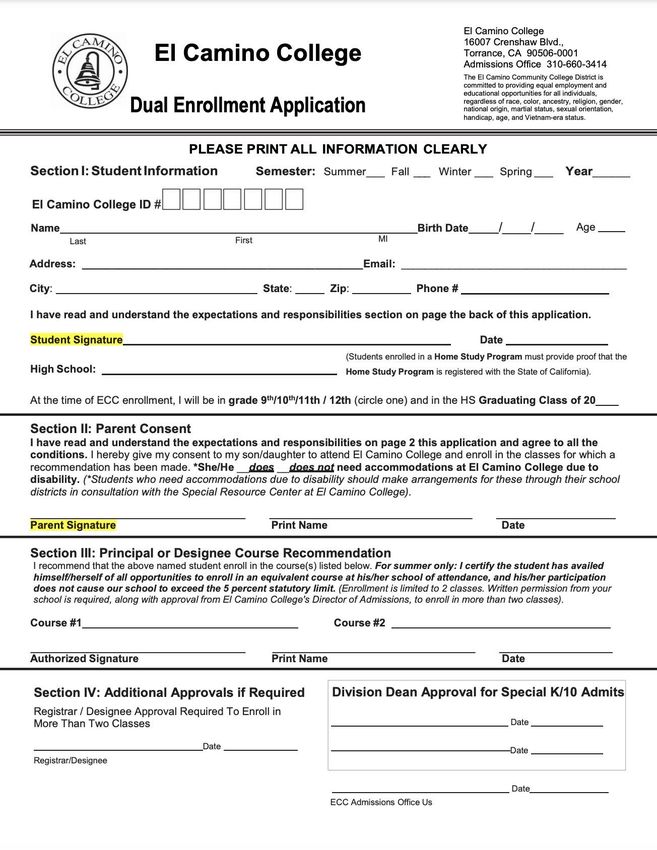
Spring 2022 Semester

• 16 weeks long – Saturday, February 12, to Friday, June 10, 2022
  • Weekday classes begin Monday, February 14
• Some 8-week (short-term) courses
  • Begin either February 12 or April 16
  • Same course content, twice as much per week

Looking for Important Dates and Deadlines?
• Academic Calendar

Class Schedule

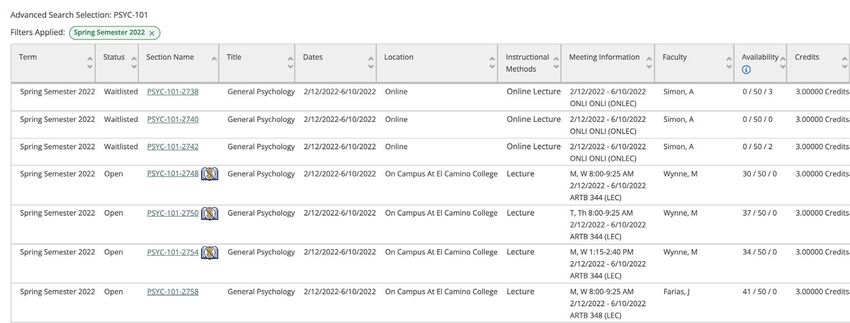
• A list of classes offered by El Camino College during the
  Spring 2022 semester
• Each Class Section shows a Class Type
  • On Campus at El Camino College
  • Online (no meeting days/times)
  • Live Online (online meeting days/times)
  • Hybrid (online and on-campus)
  ✕ Dual Enrollment – course offered at local high school,
    should not appear in Class Schedule
• PDF or Online Searchable Schedule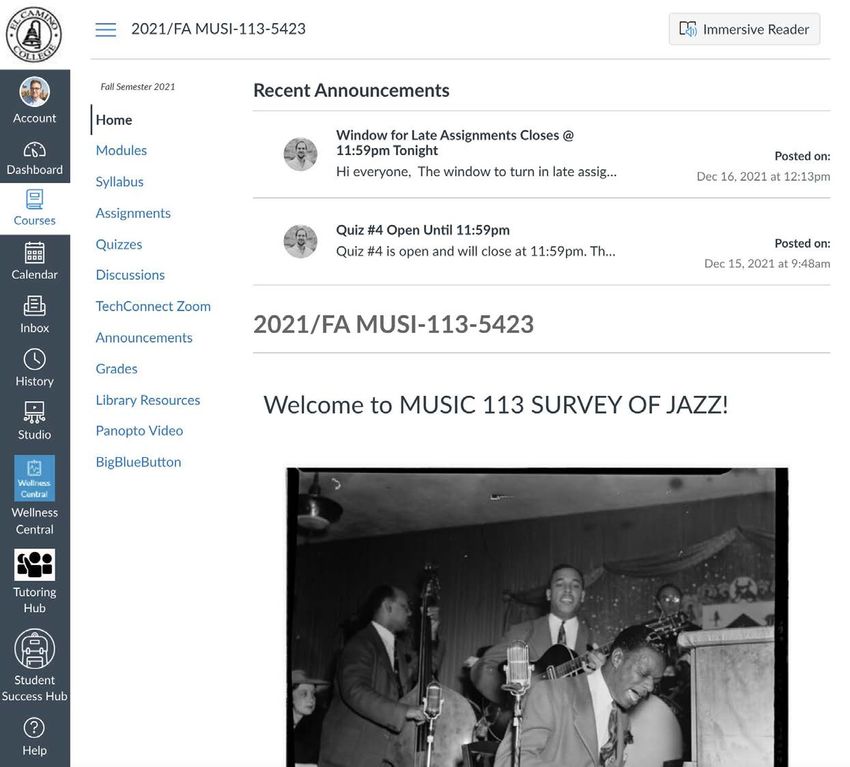
Class Schedule
Class Schedule

• Search Classes Online
• Select a Term
• Select a Subject
• Optional:
  •   Course Number
  •   Section Number
  •   Days of Week
  •   Class Type
  •   Time of Day
  •   Zero Textbook Cost
Class Schedule
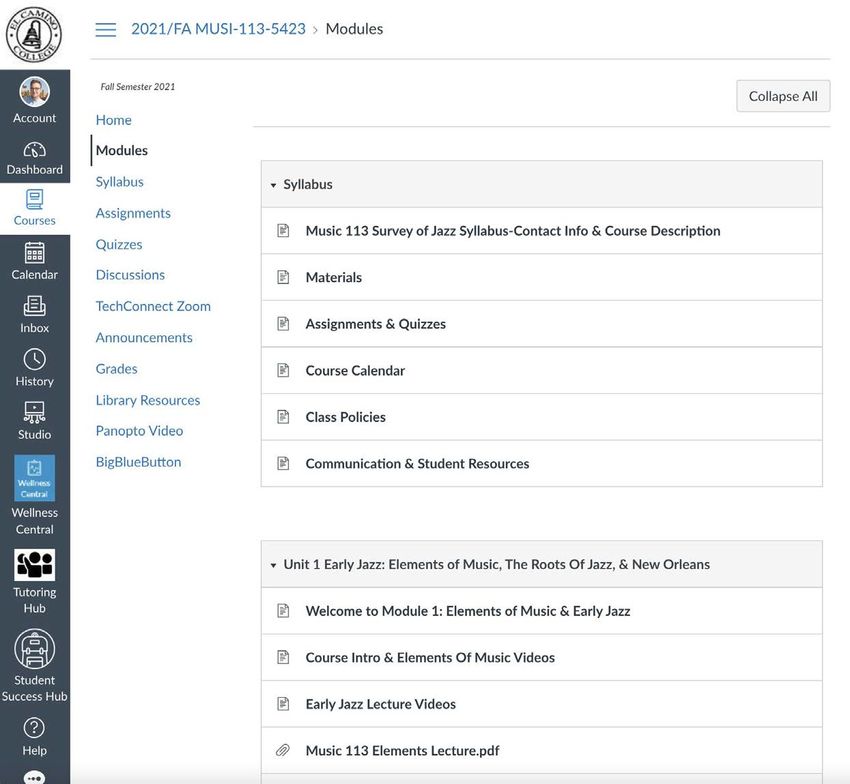
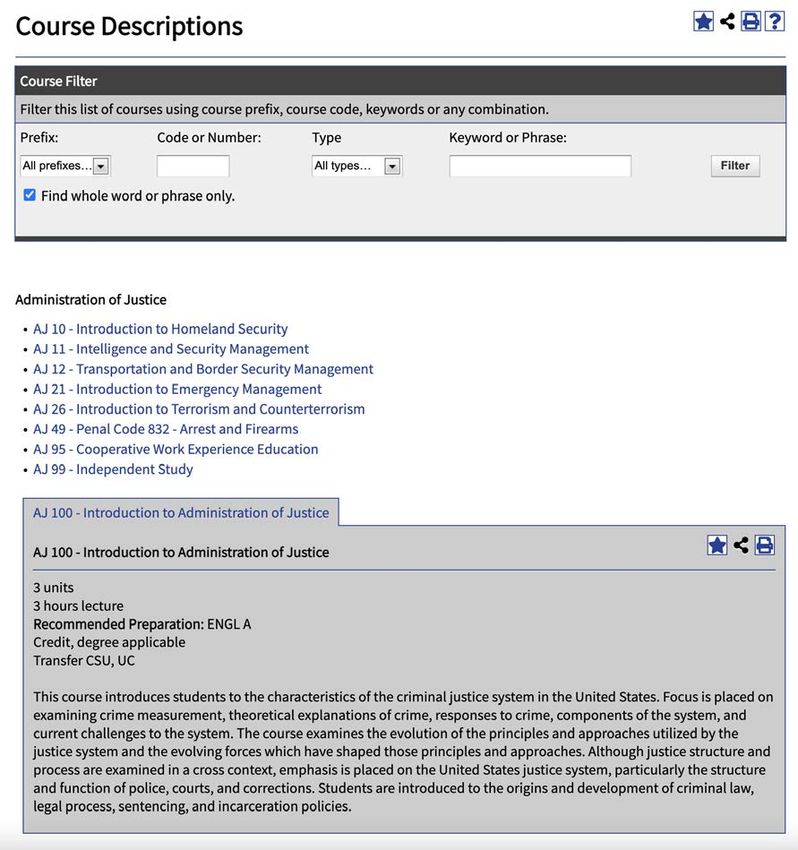
Catalog

Want to learn more about El
Camino College courses?
• View Course Descriptions
  in Catalog
  • Number of Units
  • CSU/UC Transferability
  • Prerequisite or
    Recommended Preparation
    (if any)
  • Lecture/Lab
  • Course Description text
  • Comparable classes (if any)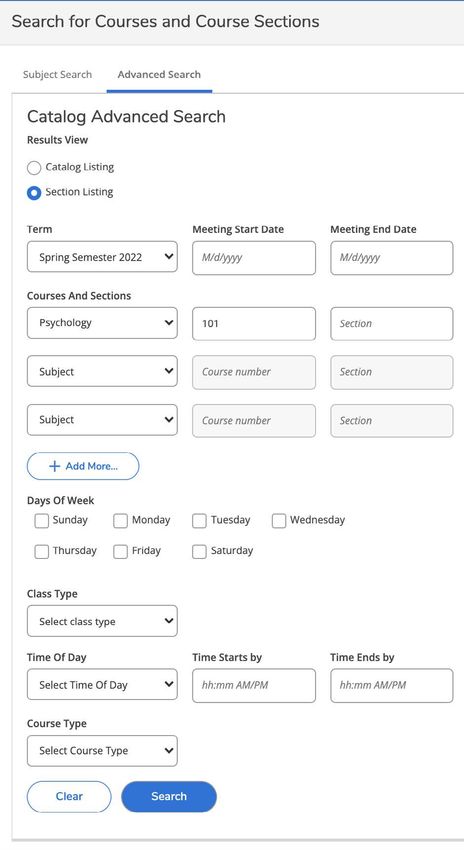
Bookstore

Use the Online Bookstore to
look up required
textbooks/instructional
materials for any section.
Purchase through the El
Camino College Bookstore or
a third-party vendor.
•   New or Used
•   Print or Digital
•   Rentals (return by end of term)
•   Shipping or pick-up in store
Apply for Admission
Apply for Admission
Apply for Admission

1. Create your OpenCCC Account
  •   Provide accurate personal identifying information
  •   Legal Name
  •   Personal Email Address (not a school email address!)
  •   Social Security Number (if you have one)
  •   Create a Username and Password for OpenCCC (not El Camino!)

2. Start a New Application
  • Select the Term Applying For (Spring 2022)
  • Select your Educational Goal and Intended Major
  • Answer all questions as best as you can at this time
Apply for Admission

Important for K-12 Students!
Apply for Admission

Right after you complete and submit your application for
admission…
• Email #1 with your CCCID (for OpenCCC)
• Email #2 with your Confirmation Number

After 1-3 Business Days…
• Creates your El Camino Student Account
• Email #3 your Welcome Email with El Camino Student ID
  Number, @elcamino.edu email address, and MyECC Username
  and Default Password
Apply for Admission

Need to apply again?
• Students need to submit another application for admission if
  they do not register for consecutive fall and spring terms
  (account becomes inactive)
  • Applying will re-activate same student account

• Students also need to apply again in order to attend El
  Camino as a First-Time College Student after high school
  • Will update admit status for same student account
Apply for Admission

Do not create another OpenCCC Account!
• Can result in multiple El Camino student accounts
• Will result in a hold across all accounts, can take weeks to
  merge accounts

Did not receive your Welcome Email?
• Email dualenrollment@elcamino.edu
Student Account

• Is created using the information you provided the first time
  you submitted an application for admission

Need to change information on your student account?
• Complete an Admissions Form
  • Change of Address/Phone Number Request (also Personal Email
    Address!)
  • Name/Gender/Pronoun/Date of Birth Change or Correction
  • Residency Reclassification Questionnaire
  • Social Security Number Correction
  • Please provide verification documents for requested changes
MyECC El Camino College’s Secure Student Portal • Register for Classes • Add or Drop Classes • Pay fees (waived for K-12 students who complete Steps for Dual Enrollment!) • View Registered & Waitlisted Classes • View Grades or Unofficial Transcripts Same MyECC Username and Password also used for Canvas, Office 365, and more!
MyECC
MyECC

Signing in for first time
• Enter your Username
  (@elcamino.edu email address)
  • firstname_lastname@elcamino.edu or
    firstname_lastname####@elcamino.edu
• Enter your Default Password
  • Last 4 digits of social security number or a
    random 4 digits if no social provided
• You will be prompted to create a new
  secure password
• Forgot Password? Use Forgot My
  Password tool to reset to Default
  Password
MyECC Signing in for first time • Enter Username again • Enter Default Password again • Enter New Password and confirm New Password Password Complexity Requirements • At least 10 characters long • No previously used password • At least one Capital letter • No consecutive characters • At least one number (but not at (123,ABC) or repeated the beginning or end of the characters (111,ccc) password) • First name or last name can’t be • No special characters part of the new password
Email and Office 365

• El Camino students (including K-12 students) have access
  to Microsoft Office 365 apps!
  • Including Word, Excel, PowerPoint, Outlook, OneDrive, and more
• Can go directly to:
  • outlook.com/elcamino.edu – access @elcamino.edu email address
    using Outlook in your web browser
  • office.com – sign in using your @elcamino.edu email address to
    access Office 365
  • Use apps in web browser or select “Install Office” to download apps
• Can add your El Camino email address to your smart phone
  or mobile device (Office 365 account type).
Dual Enrollment Form • Available on Dual Enrollment in El Camino College Classes webpage • New form submitted each term (Spring 2022, Summer 2022, etc.) • Forms must include: • Term and Year (Spring, 2022) • Drawn Student Signature • Drawn Parent Signature • Drawn Authorized Signature from principal or counselor • Your Grade Level at the start of the term • Course #1 and Course #2 you would like to register for • Additional Signatures for K-10 Students or more than 2 classes
Dual Enrollment Form
Dual Enrollment Form

• Current method to submit? Email to
  dualenrollment@elcamino.edu or bring in-person to
  Admissions & Records Office during open hours*
• Takes 1-3 Business Days to process (manual)
• Once processed, can register for any class section of your
  approved courses
  • Only register for courses listed on your form!
  • Want to change course number (only)? Email us
  • Want to change course subject and number? Submit new form
Register for Classes

• Search for Classes and Register for Classes using tools in
  MyECC
• Register anytime on or after your Registration Appointment
  (already past for Spring 2022!)
• K-12 students need to meet/clear any Prerequisites before
  they can register for a course with a Prerequisite.
  •   All Mathematics courses
  •   Computer Science courses
  •   Most English courses
  •   Sociology 101
  •   Chemistry & Physics courses
  •   Language courses higher than the first
Register for Classes
Register for Classes

• Search for Classes
  • Same as Online Searchable
    Schedule
  • Use to add sections to your
    “Schedule” (not yet registered!)
  • Can add many sections to visualize
    meeting days/times
• Register for Classes
  • Use buttons to Register or
    Waitlist the sections added to
    your Schedule
Register for Classes Important! COVID-19 Vaccine Requirement • New Requirement for Winter/Spring 2022 • All students (including K-12 students) required to upload proof of COVID-19 Vaccination before they can register for On Campus/Hybrid classes or access on-campus buildings or services • Not required for online classes/services • Already registered for on-campus class? Make sure proof is uploaded – there will be a drop date in February • More info: COVID-19 Vaccine Requirement
Register for Classes

Common Errors
• “As a high school student, you do not have a permission to take this
  course” = Dual Enrollment Form not processed yet or this course was
  not listed on your form
• “Registration not allowed for UG courses without academic program” =
  Error on your student account, email us!
• “The following required prerequisite for course _____ is not started” =
  Prerequisite not met/cleared
• “Vax/exemption required to be eligible” = Vaccination requirement not
  on your account yet, email ecc@worldbacktowork.com with your ECC
  ID Number
Register for Classes

• Last Day to Register?
  • Friday, February 11, for classes that begin Saturday, February 12, or the
    week of February 14
  • NOTE: Friday, February 11, is a holiday (campus closed)
  • Can still register for 8-week classes that begin in April
• Last Day to Add (Full Semester Classes)?
  • Sunday, February 27
  • Requires Add Code from the instructor of the class – this is the only way to
    enroll after Last Day to Register
• Last Day to Drop (Full Semester Classes)?
  • Sunday, February 27 (without notation on Permanent Record)
  • Friday, May 13 (with a "W” notation)
Adding Classes
• On-Campus at El Camino College? Show up to first class meeting
to ask for an Add Code
• Online or Hybrid? Email instructor to ask for an Add Code
• Find email addresses using Faculty & Staff Directory or Search for
Classes tool in MyECC
• Make sure to include the Section Number of the class you are wanting to
add
• Identify if you are on the waitlist (priority for adds!)
• Add Codes are provided at the instructor’s discretion
• Students must use Add Code in MyECC before the Last Day to
Add. K-12 students must have a Dual Enrollment Form on file and
have met all PrerequisitesCanvas • El Camino’s Learning Management System (LMS) for Online/Hybrid teaching and learning
Canvas

• First Online Class? Canvas accounts only created after
  registering for first online class
  • Usually created within 24 hours (overnight)
• Sign in using El Camino’s Canvas Login Page link only!
  • Some high schools also use Canvas, your El Camino classes will only
    appear if you sign in using our link
• Canvas Login Page will direct you to sign in using MyECC
  Username and Password
• Make sure you can sign into Canvas prior to start of
  semester
Canvas • Signing in takes you to Dashboard • Important and recent announcements will appear at top
Canvas

• Online/Hybrid registered classes
  will appear under Courses on or
  near the start of the semester
  • Online classes appear in Canvas
    only after the instructor has
    published the class
  • Some instructors may do this up to
    a week before the semester begins
  • Others publish on first date of the
    semester
Canvas
Canvas
First Day of Semester

• Online/Hybrid Classes
  • Classes available in Canvas
  • Explore Syllabus and learn class expectations, calendar, deadlines, etc.
  • Need to access class content by certain date or you may be dropped by
    instructor for non-participation
• On-Campus Classes
  • Attend first class meeting or may be dropped by instructor for non-
    participation
  • Explore Syllabus and learn class expectations, calendar, deadlines, etc.
  • Unless it’s a Saturday class, you will not be coming to campus on Saturday,
    February 12!
  • Class Meeting Days, Times, and Room Numbers available in Class
    Schedule and MyECC
First Day of Semester
During the Semester

• Keep up with assignments, discussion, quizzes, etc. as
  outlined in Syllabus
• Need to miss a class? Make sure instructor knows
• Need to Drop?
  • Students need to perform this action in MyECC!
  • Last Day to Drop without Notation on Permanent Record is
    Sunday, February 27
  • Last Day to Drop with a “W” is Friday, May 13
  • Instructor must submit a grade for every student on roster after
    this date
Drop a Class
• Drop Classes
• Same screen as Register for
Classes
• Find class section you wish to
drop and click Drop button
• This action cannot be undone in
MyECC!
• Students looking to be reinstated
need to email their instructor.
• Only with instructor consent will
Admissions & Records add student
back to rosterEnd of Semester • Final grades submitted by instructor within 1 week after last class meeting • For online classes, this is within 1 week after End of Semester on Friday, June 10, 2022 • Final grades visible in both MyECC and Canvas
End of Semester

• Self-Service Menu
  • Academic Profile > Grades
• Web Services A
  • Unofficial Student Transcript
  • Unofficial Transcript same as
    Official Transcript
  • Sometimes enough to show
    high school in order to receive
    any high school credit
     • High school credit given at
       determination of high school
End of Semester
Need Official Transcripts?
• Must be ordered through Admissions & Records Office
webpage: Order Official Transcripts Online
• Uses Credentials, Inc. vendor to send secure transcripts
directly to desired institution(s)
• Can send to high school or universities/colleges
• If your high school requires Official Transcripts, please confirm with
them PDF vs. hard copy and the email or physical address where
transcripts need to be sent
• First two transcript copies are free, $6 per transcript after thatSummer 2022
• Current 10th Grade students considered 11th Grade students
starting this summer
• Few Course Restrictions! No more Division Dean Approval!
• Class Schedule for Summer 2022 not yet available
• Usually available late-March or early-April
• Can use Summer 2021 Class Schedule as a rough guide
• Registration for Summer 2022 begins mid-May
• K-12 students looking to register for summer classes as early as
possible can complete Steps 1-3 of the Steps for Dual Enrollment
NOW!Dual Enrollment Website
All Steps for Dual Enrollment, Popular Classes for Dual
Enrollment, Instructions to help K-12 Students apply and
register, the Dual Enrollment form, Frequently Asked
Questions, and more available 24/7 at…
www.elcamino.edu/highschoolDual Enrollment Office
Michelle Arthur, Coordinator
Brian Hayden, Student Services Specialist
dualenrollment@elcamino.edu
Drop-In Help via Zoom
Every Tuesday, Wednesday, and Thursday
from 4:00-5:00 p.m.
Online Help & EventsYou can also read


