Supporting the Represent component of ERA using iPads - Session will start at 4pm. While we wait, use the pencil tool to draw a picture. Everyone ...
←
→
Page content transcription
If your browser does not render page correctly, please read the page content below
8/12/20

              Session will start at 4pm.
While we wait, use the pencil tool to draw a picture.
Everyone else, use the text tool to type your guesses.

 Supporting the
 Represent component
 of ERA using iPads
 Platypus’s - 2020
                                              App 2:
                                    Patterns and Relationships

                                                                      1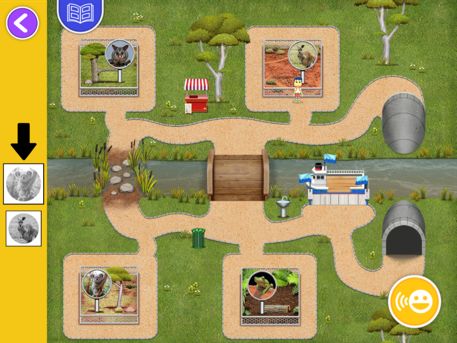
8/12/20

                What is your favorite STEM practice?

                                        Little helpers
                   App Activities
  Represent spatial language by moving objects to
         match the picture and the words
                 Support App Play
                   Using manipulatives
  During app play, ask child to match the position word
                       on the app by:
• selecting the same position card
• creating the same word using objects in the centre
• Using their hands to gesture the spatial relation
 Challenge the children after app play, by asking them to
   recall the words they saw in their app session in the
     same ways (picking position cards, creating using
            objects, gesturing with their hands)

                                                                 2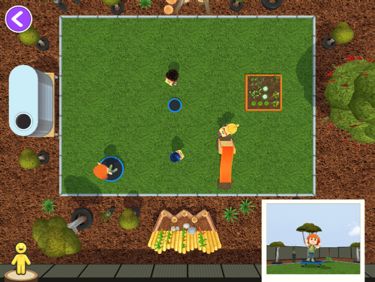
8/12/20

                                           Little helpers
                     App Activities
 Represent spatial language by moving objects to
        match the picture and the words
                  Support App Play
                   Using manipulatives
            Saying position words out loud
 Children can verbalise each action as they complete it
 (I am moving the purple block off the shelf. Now I am
         moving the red block off the shelf etc)
Children can also recall their moves at the end or every
  few cards (e.g., I moved all the objects off the shelf).
  Challenge the child after app play by asking them to
 make up a story using the spatial words shown on the
          app (use the position cards to help).

                                          Hide and Seek
                    App Activities
Educator/Children hide the animal card and describe
  to their friends where they have hidden it using
          spatial and descriptive language.
                 Support App Play
Use the position cards to help describe where the animal
                      card is hidden
 Encourage children to gesture to show what they mean
  Children can make up stories about where the animal
                       went to hide
Describe a path/route the children must follow to find the
   animal card using the position cards and pictures of
 objects in your playground/centre (go past the sandpit,
                  between the logs etc)

                                                                  3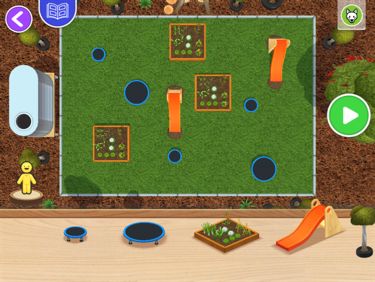
8/12/20

                                           Hide and Seek
                   App Activities
   Educator/Children hide the animal card and
describe to their friends where they have hidden it
      using spatial and descriptive language
                 Support App Play
  When the animal card animates, have the children
describe the features and attributes of the animal. E.g.,
 How many toes does it have? What can you tell about
                 where the animal lives?
The children can also describe the position and location
of the animals (e.g., the crocodile is between the rocks
 and in front of the river. The koala is on the tree trunk
               and under the tree leaves.)

                                               Playground
                   App Activities
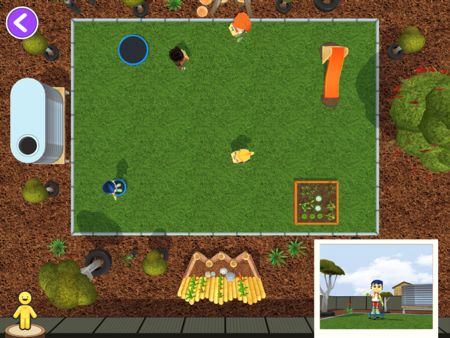
   Place objects on playground (bird’s eye view)
                Describes location
           Takes Photo (person’s view)
    Figure out who took the photo (bird’s eye)

                Support App Play
          Start with 1 object, then 2, 3,…
Children describe aloud (to themselves or a friend)
     where the budsies are using spatial words
    Children use hands to represent the photo
                    on the map

                                                                  4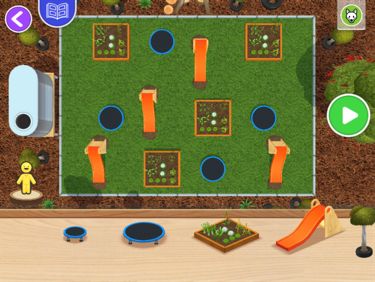
8/12/20

                 Playground
Developing Generalised Skills – Perspective-taking

                          Imagine and describe the views of each Budsie

                              Guess which Budsie took the photo
                         Explain why using observations & spatial words
                                  Click to see if you are right

               Playground
Developing Generalised Skills – Map Reading
   Educators make your own playground, screen shot, and print
 Ask children to copy your playground map before guessing photos

           Extension: modify playground -> modify map

                                                                               5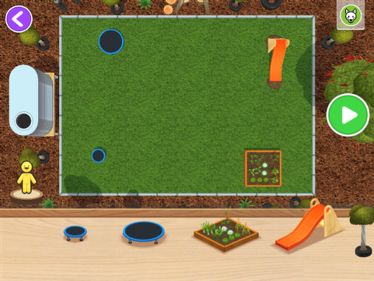
8/12/20

                     Playground
      Developing Generalised Skills – Map Reading

                         Numeracy                  Patterns

2

2

3

3

                                      Directions
              App Activities
            Remi on map of zoo
    Use finger to tell Remi where to go
App challenge to visit animals in given order
 App says spatial words where appropriate
  Children reflect on animals they visited
            Support App Play
Imagine complete route before moving Remi
   Describe pathway using spatial words

                                                                   6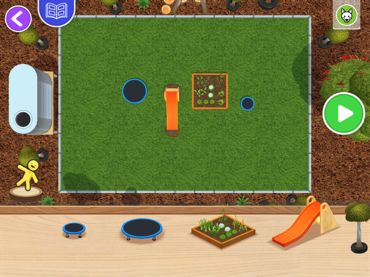
8/12/20

                                Direction
                       Developing Generalised Skills

              Perspective-taking
 If standing at the kangaroo, could you see the
     possum? Why not, what is in your way?
                 Map-Reading
Draw map, recreate scene using toys, use map to
       physically move through space
                 Spatial Words
Challenge students to visit animal by taking a
 path that goes “over,” “under,” or “across”
                 something

      Next Steps
      • Download ELSA apps and register and set kids up in ELSA Educator
        app
      • Suggested approach: each week focus on one ELSA skills using ERA
      • Week 9 and 10 – SPLAT App
Week 1        Week 2   Week 3       Week 4        Week 5   Week 6   Week 7   Week 8   Weeks 9-10

                                                                                        SPLAT
                                                                                         App

  Webinar                           Webinar
focusing on                       focusing on
   App 1                             App 2

                                                                                                        7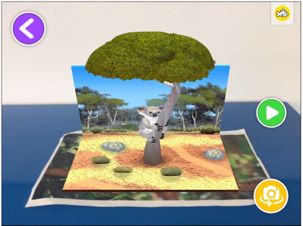
8/12/20

                                                                Questions or
                                                                Comments?

Game Ideas – Little Helpers
• Let’s Play in Pairs
   • Child one plays Little Helpers on the iPad, and instructs their partner to move an object in the
     same way as they do on app. Child two will need a few objects (ball, teddy etc) and a table or
     chair to place object above and under as Child one instructs.

• Can you find my partner?
   • In the educator App for Little Helpers, there is link to download the spatial term cards.
     Children can use these cards to play with a partner.
   • Child one listens to Piper give an instruction of where to move the red ball but does not show
     their partner. Child two has to find the matching card that represents the same proposition.
     Then move the objects in the app.

                                                                                                             8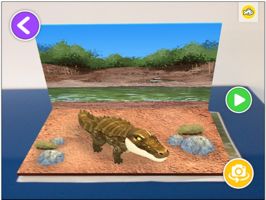
8/12/20

Game Ideas – Hide and Seek
• Where do I live?
   • An extension to the Hide and Seek game is for children to consider the animal
     they have selected, and what their actual habitat and environment would
     look like. You can provide different materials or props for children to use (e.g.,
     a blue rug to represent water). Children can then create a scene in which to
     hide an animal. For example, if they selected a Possum, the child should try to
     hide the card in or near a tree. Then, they can give clues like – you will find
     me somewhere leafy, but only during the night. This way children are
     connecting the attributes and characteristics of the actual animal to their real
     life habitat.

Game Ideas – Directions
• Incorporating Child Generated UCG
   • A picture of the route the children took in the game will be saved to the
     tablet. Ensure children take the opportunity to narrate the path they took
     using the microphone tool, to record their descriptions.

   • Using the saved route, ask the child to narrate the path to a friend if they
     were travelling in the opposite direction. That is, the first animal they visited
     now becomes the last; what was on their left is now to their right and so on.
   • This is quite a challenge so the use of gesture and even re-enacting their path
     using classroom objects to model the different animals will be useful.

                                                                                               9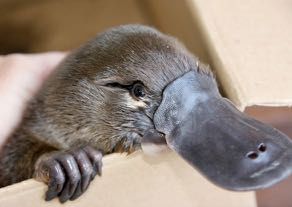
You can also read


