TECHNOLOGY GUIDE REALCOMP 2020
←
→
Page content transcription
If your browser does not render page correctly, please read the page content below

2020 REALCOMP TECHNOLOGY GUIDE

                                          2020
                                        REALCOMP

                        TECHNOLOGY
                                            GUIDE

  REALCOMP’S STATEMENT OF SERVICES
        FOR MLS SUBSCRIBERS

 Main Office: Phone: 866.553.3003 | Customer Care Support: 866.553.3430 | Support Email: support@realcomp.com
                           Realcomp.MoveInMichigan.com | www.MoveInMichigan.com
                           www.facebook.com/realcompiimls |    twitter.com/realcompmls
Realcomp II Ltd. 2020
                    ©
                                                                                                   Page i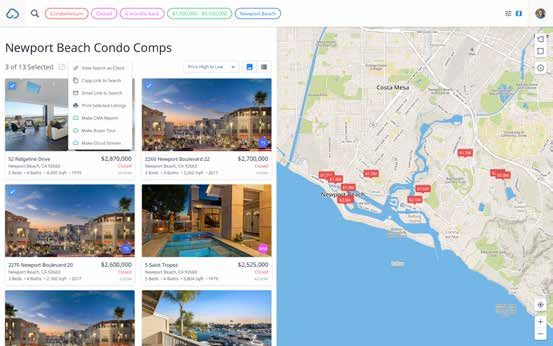
2020 REALCOMP TECHNOLOGY GUIDE

Table of Contents
From the Desk of Karen S. Kage, CEO....................................................................1

Apps & Widgets......................................................................................................2
Homesnap............................................................................................................................................. 2-3
RealcompMLS.......................................................................................................................................... 4
Additional................................................................................................................................................. 5

Comparative Market Analysis (CMA).......................................................................6
Cloud CMA by W+R Studios..................................................................................................................... 6

Conferences...........................................................................................................7
Realcomp’s Tools of the Trade REALTOR Expo.......................................................................................... 7

Customer Relationship Management (CRM)............................................................8
LionDesk.................................................................................................................................................. 8

Data Sharing Services.............................................................................................9
Data Co-Op by CoreLogic.......................................................................................................................... 9
Great Lakes Repository (GLR)................................................................................................................. 10

Data Syndication Services....................................................................................11
Listing Distribution for Designated REALTORS®/Broker Owners............................................................. 11

Data Syndication Metrics.....................................................................................12
ListTrac.................................................................................................................................................. 12

Document and Transaction Management..............................................................13
TransactionDesk by LoneWolf................................................................................................................. 13

Down Payment Assistance....................................................................................14
Down Payment Resource.........................................................................................................................14

Educational Resources.........................................................................................15
RE Technology.........................................................................................................................................15

Lead Management................................................................................................16
Homes Connect Marketing Suite..............................................................................................................16

Market Analytics..................................................................................................17
MarketStats............................................................................................................................................17
MarketView MLS.....................................................................................................................................18

Realcomp II Ltd. 2020©                                                                                                                             Page i

2020 REALCOMP TECHNOLOGY GUIDE
Table of Contents - Continued
MLS System Tools................................................................................................19
RCO3® (MatrixTM).....................................................................................................................................19
Cloud MLX..............................................................................................................................................20
Cloud Streams........................................................................................................................................21

Office Product Discounts......................................................................................22
Office Depot/Office Max..........................................................................................................................22

Public Record Data & More...................................................................................23
Remine Pro..............................................................................................................................................23
Realist®...................................................................................................................................................24

Rating Software................................................................................. 25
RateMyAgent...........................................................................................................................................25

Security............................................................................................ 26
SentriLock Electronic Lockbox System................................................................................................26-27

Showing Services............................................................................... 28
ShowingTime for the MLS........................................................................................................................28
ShowingTime Front Desk.........................................................................................................................29

Virtual Tours (Matterport).................................................................. 30
Virtual Tours by Next Door Photos...........................................................................................................30

Realcomp II Ltd. 2020©                                                                                                                             Page ii

2020 REALCOMP TECHNOLOGY GUIDE

From the Desk of Karen S. Kage, CEO
Realcomp is privileged to provide more than 16,400 REALTORS® in over 2,600 real estate offices
with premier real property data-related solutions for their businesses. This is a
responsibility that we do not take lightly. At Realcomp, we take great pride in offering
cutting-edge, real-time MLS data services, support, & training to the real estate industry. Our staff
is trained to support you in your use of these offerings and to ensure you have the best possible ex-
perience with them.

Our Mission Statement:
Driven by integrity, Realcomp
delivers great data to empower
REALTORS® to achieve results.

Our Core Values:
• Respect: We do what we do with
   RESPECT for our customers,
   shareholders, and each other.
• Empower: We EMPOWER our
   customers with the necessary
   tools to succeed in today’s market.
• Authority: Every member of our
   staff has the AUTHORITY to make
   certain each customer’s experience
   with us is positive.
• Learning: We are dedicated to
   providing continual LEARNING
   opportunities for our customers, and life-long learning ourselves.
• Caring: We are committed to delivering CARING customer service to our REALTOR® Subscribers.
• Open Communication: We encourage our customers and employees to OPENLY SHARE their
   questions, opinions, and views as this helps us to continually improve.
• Make Technology Easy: We MAKE TECHNOLOGY EASY so our customers can focus on buying
   and selling-related activities to better serve their customers.
• Priority: As Michigan’s largest MLS, we make REALTORS® our number one (1) PRIORITY.

Our Shareholders:
Realcomp II Ltd. was created in 1994 by several Boards & Associations of REALTOR®
and is owned today by these eight forward-thinking REALTOR® organizations:
     •   Dearborn Area Board of REALTORS®
     •   Detroit Association of REALTORS®
     •   Eastern Thumb Association of REALTORS®
     •   Greater Metropolitan Association of REALTORS®
     •   Grosse Pointe Board of REALTORS®
     •   Lapeer and Upper Thumb Association of REALTORS®
     •   Livingston County Association of REALTORS®
     •   North Oakland County Board of REALTORS®

I encourage you to review this guide, familiarize yourself with the wide-array of business solutions
provided by Realcomp, and use them as you seek out technology & tools that will help you to serve
your clients well! -- Karen

Realcomp II Ltd. 2020©                                                                      Page 1
2020 REALCOMP TECHNOLOGY GUIDE
Homesnap App                                                       Apps & Widgets

Product Description:
Homesnap is the industry’s preferred search platform,
featuring accurate and real-time property information,
straight from the MLS.

Homesnap Pro is a real-estate platform that provides agents
a suite of productivity and marketing tools that empower
agents to manage, run, and grow their business—all while
on-the-go. This industry-backed platform is like no other
portal, app, or technology in the industry because its mis-
sion is to always put the agent first.
                                                                   Training Links & Info:
By creating a safe-haven to work with clients, providing leads     • Homesnap University
for free to the listing agent, offering marketing solutions that   • Upcoming Webinars by
                                                                   Realcomp
get in front of consumers first, and partnering directly with
                                                                   • Onsite Training Classes at
MLSs to offer real-time and accurate market data, Homesnap
                                                                   Realcomp (See the Class
Pro ensures agents remain at the center of the transaction.        Scheduler icon on Realcomp’s
                                                                   Login Dashboard)

                                                                   Device Compatibility:
                                                                   PC, Apple/Mac, iOS,
                                                                   Android, iPad

                                                                   How to Access:
                                                                   Search for “Homesnap” in
                                                                   the Apple App® or Google
                                                                   PlayTM Stores. After down-
                                                                   loading the app, be sure to
                                                                   register as an Agent.

                                                                   Cost Information:
                                                                   This service is included in
                                                                   your Realcomp MLS
                                                                   Subscription and is available
                                                                   to you at no additional cost.

Realcomp II Ltd. 2020©                                                                Page 2
2020 REALCOMP TECHNOLOGY GUIDE
Homesnap App - Cont’d                                              Apps & Widgets

Product Description:
• With Homesnap Pro Ads social media advertising is easy.
   You can advertise your listings on the highest-traffic so-
   cial media networks (Google, Facebook, Instagram, and
   Waze) all from within the Homesnap app (additional cost).
• With Homesnap Pro+, Homesnap automatically updates
   your Google Business Profile with photos of your listings
   and blog posts, optimizes it, and tracks its traffic. You
   also get lead pages for all your listings, and we’ll remind
   you to get a client review on Google every time you close a
   deal (Pro+ comes at an additional cost).
                                                                   Training Links & Info:
Benefits:                                                          • Homesnap University
With the Homesnap Pro mobile app, you can...                       • Upcoming Webinars by
                                                                   Realcomp
                                                                   • Onsite Training Classes at
•   See real-time MLS information on the go, like agent-only
                                                                   Realcomp (See the Class
    confidential remarks, see other agents’ activity, stats, and   Scheduler icon on Realcomp’s
    dealflow, and showing instructions—all on your mobile          Login Dashboard)
    phone.
•   Access instant info like price changes on properties,
    school zone boundaries, listing price changes and
    contracts, and sales comps.
•   Free leads from consumers who see your listings on             Device Compatibility:
    Homesnap.com or in the Homesnap app.                           PC, Apple/Mac, iOS,
•   Create a Homesnap Story (like an Instagram story!)             Android, iPad
    showcasing the best aspects of your listing to other
    agents and the public.
•   Invite your clients and receive a 1:1 branded relationship
                                                                   How to Access:
    with them.
                                                                   Search for “Homesnap” in
•   Snap a photo of any home to instantly get listing or
                                                                   the Apple App® or Google
    property record data on it.
                                                                   PlayTM Stores. After down-
•   Schedule a showing with ShowingTime right in
                                                                   loading the app, be sure to
    Homesnap Pro.
                                                                   register as an Agent.

                                                                   Cost Information:
                                                                   This service is included in
                                                                   your Realcomp MLS
                                                                   Subscription and is available
                                                                   to you at no additional cost.

Realcomp II Ltd. 2020©                                                                Page 3
2020 REALCOMP TECHNOLOGY GUIDE

RealcompMLS App (to be retired by December 2020)                  Apps & Widgets

Product Description:
Realcomp’s MLS app provides on-the-go access to your mul-
tiple listing platform with client collaboration tools allowing
agents to trade messages, view favorites, and act on client
needs in the moment.

Benefits:
Stay organized and productive on the go. Access listings,
land and tax data, RCO3® saved searches, maps, photos,
contacts, and more—right on your tablet or mobile phone.
Easily share a personally branded app with clients and ex-
change messages, share listings, and view favorites in real
time.

The RealcompMLS app is the perfect way to access
up-to-date MLS listing information in real-time and
stay organized while being on the go!

How to Access:                                                    Cost Information:
Search for “RealcompMLS” (no spaces between Realcomp              This service is included in
and MLS) in the Apple App® or Google PlayTM Stores.               your Realcomp MLS
                                                                  Subscription and is available
Once the app has been downloaded to your device, consum-          to you at no additional cost.
ers login through the “Consumer Login” tab. Realcomp MLS
subscribers login through the “Agent Login” tab.

Realcomp II Ltd. 2020©                                                               Page 4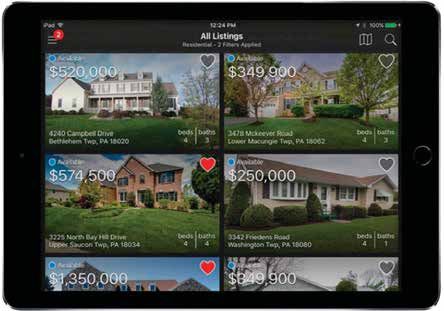
2020 REALCOMP TECHNOLOGY GUIDE

Additional Apps                                             Apps & Widgets

Product Descriptions:

                Easily manage clients and invite                        SentriConnect is a managed access
                them to join the Homesnap app. Pro-                     system that allows a SentriLock lock-
                fessional and public (client) version                   box owner to grant specific access to
                allows clients to search and interact                   their lockbox.
                with you. Snap a photo of any home
                to reveal home value estimates, in-
                terior photos, beds, baths, taxes, lot
                boundaries, school ratings and much
                more!                                                   The world’s first property intelligence
                                                                        tool, integrated with Realcomp’s MLS
                LionDesk is the perfect CRM and                         System. Remine gives Agents and
                Transaction Management platform                         teams access to agent only MLS data
                for agents who want to stay top of                      and public record data via a single
                mind with their database, ensure                        platform.
                leads don’t fall through the cracks,
                be reminded of important tasks and
                integrate all their tech tools. It’s time               RPR Mobile is a property app
                to ROAR!                                                exclusively for REALTORS. Easily
                                                                        search properties, create and send
                ShowingTime provides residential                        branded reports and view local mar-
                real estate agents and offices with                     ket statistics. Operated by the Na-
                tools to manage showings and feed-                      tional Association of REALTORS.
                back as well as analytics and report-                   Access MLS and public record data,
                ing. View upcoming appointments,                        mortgage history, school attendance
                access details, and showing instruc-                    zones, and more.
                tions. View Showings on your listings
                by past or upcoming appointments.
                Connect with your clients from one                      REALTOR.com is a national real
                easy place. Choose showing times                        estate property app. Find for sale list-
                that fit your schedule.                                 ings nationwide. Search for homes by
                                                                        school. Find Open Houses.

                Open and manage SentriLock Blue-
                tooth Lockboxes. Access showing
                notifications, one day codes, access
                logs and more!

How to Access:                                              Cost Information:
Search for these apps in the                                These services are either included in your
Apple App® or Google PlayTM                                 Realcomp MLS Subscription or are
Stores.                                                     available to you as a REALTOR® at no
                                                            additional cost.

Realcomp II Ltd. 2020©                                                                               Page 5
2020 REALCOMP TECHNOLOGY GUIDE
Cloud CMA by W+R Studios                                       Comparative Market
                                                               Analysis (CMA) & Flyers
Description:
With Cloud CMA you can easily create beautiful CMA Re-
ports, Buyer Tours, Property Reports, and Flyers that are
branded to you and come chock full of data straight from the
MLS and top websites.

Benefits:
Start writing more offers and winning more listings with
Cloud CMA! In minutes you can create a professional report
that places your branding front-and-center, includes a home
value range, and important information about the home          Training Links & Info:
selling process. Plus, you can showcase your reports on your   • Cloud Agent Suite Classes
iPad, tablet, laptop, and even on Apple TV!                    • Upcoming Webinars by
                                                               Realcomp
                                                               • Onsite Training Classes at
                                                               Realcomp (See the Class
                                                               Scheduler icon on Realcomp’s
                                                               Login Dashboard)

                                                               Device Compatibility:
                                                               Cloud CMA is web-saved so
                                                               it works on any device!

                                                               How to Access:
                                                               Login to Realcomp’s Dash-
                                                               board and choose the Cloud
                                                               CMA icon or access the icon
                                                               from within a listing.

                                                               Cost Information:
                                                               The basic version of this
                                                               service is included in your
                                                               Realcomp MLS Subscription
                                                               and is available to you at
                                                               no additional cost.

Realcomp II Ltd. 2020©                                                             Page 6
2020 REALCOMP TECHNOLOGY GUIDE

Realcomp’s Tools of the Trade REALTOR® Expo                       Conference

Description:
Realcomp holds its annual Tools of the Trade REALTOR®
Expo each Spring. Typically, this event includes educational
presentations and demonstrations that highlight industry
thought-leaders, real estate technologies, and more ...
designed to help REALTORS® be more productive, effective,
and successful in the real estate business.

Last year, the event included 10 different powerful presen-
tations, over 60 exhibitors, prizes, food, and fun! This year’s
event is expected to hold much of the same.

                                                                  Cost Information:
                                                                  This event is usually free
                                                                  of charge to Michigan
                                                                  REALTOR® attendees.

                                                                  Vendors: Contact Real-
                                                                  comp’s Marketing Depart-
About Realcomp’s 2020 Event:                                      ment at marketing@real-
Realcomp’s 2020 event has been scheduled for Thursday,            comp.com for an Exhibitor
April 16, 2020 at the Suburban Collection Showplace in            Kit and to learn about
Novi.                                                             sponsorship opportunities.

Visit Realcomp’s corporate website at Realcomp.MoveInMich-
igan.com and click on “News & Events” and “Tools Expo” for
more information about the event.

Realcomp II Ltd. 2020©                                                                Page 7
2020 REALCOMP TECHNOLOGY GUIDE
LionDesk Customer Relationship
Management (CRM)
Description:
LionDesk is an easy to use and affordable CRM and Trans-
action Management platform that is designed to help agents
increase productivity, save time and turn all their contacts
into lifelong clients.
Training Links & Info:
Highlights of Agents’ Favorite LionDesk Features • Webinars by LionDesk
Include: • Fast-Start to Results by
• Sending bulk Texts and Emails to select groups of con- LionDesk
tacts all at one time • YouTube HOW TO Playlist
• Recording and sending Videos directly within a Text or • YouTube Live Q&A
Email Playlist
• Upcoming Webinars by
• Accessing 100’s of shared Email Content and Drip Cam-
Realcomp
paign flows • Onsite Training Classes at
• Using Text2Sell short codes for easy lead generation from Realcomp (See the Class
sign riders, flyers and more Scheduler icon on Realcomp’s
• Activating “Gabby”, an AI Lead Assistant that follows up Login Dashboard)
and qualifies leads via text
• Creating Multiple Transaction
Pipelines for ease and com-
plete customization
• Saving Custom Audience lists
for quick analysis and easy
communication
• Integrating tech tools like
website, facebook leads, mojo
dialer and more to maximize
productivity, save time and
limit multiple dashboard
logins
LionDesk is the perfect CRM and
Transaction Management plat-
form for agents who want to stay
top of mind with their database,
ensure leads don’t fall through the cracks, be reminded of
important tasks and integrate all their tech tools. Cost Information:
It’s time to ROAR! The basic version of this
service is included in your
How to Access: Realcomp MLS Subscription
Login to Realcomp’s Dashboard and choose the LionDesk and is available to you at
icon. no additional cost.
Realcomp II Ltd. 2020© Page 82020 REALCOMP TECHNOLOGY GUIDE
Data Co-Op by CoreLogic Data Sharing Services
Description: Device Compatibility:
Data Co-op™ from CoreLogic® connects brokers and agents The Data Co-Op works on
to other multiple listing organizations across the country. Apple/Mac, iPad and PC
Quickly access agent-to-agent data not available on pub- platforms and all popular
lic-facing web sites from associations located in different browsers.
regions of the country. Simplified multiple listing access
makes it easy to market properties across the nation and
help clients find properties to buy in distant locations.
How to Access:
Login to Realcomp’s Dash-
board and choose RCO3®.
Then choose “Additional
Data” and “CoreLogic MLS
Data Co-Op”.
Cost Information:
This service is included in
your Realcomp MLS
Subscription and is
available to you at no
additional cost.
Benefits:
• Access listings from across the nation
• Market your properties across the country
• Access RealAVM™ property values
• Access the most accurate and complete property
information available
• Help clients find properties to buy outside of your local
market
Realcomp II Ltd. 2020© Page 92020 REALCOMP TECHNOLOGY GUIDE
Great Lakes Repository (GLR) Data Sharing Services
Description: How to Access:
Realcomp shares MLS data with several other MLS organi- You automatically have
zations located throughout Michigan via the Great Lakes access to the MLS data that
Repository (GLR). is shared through the GLR
when you access Realcomp’s
The GLR is comprised of a group of MLSs and REALTOR® products and services.
Associations in Michigan that have agreed to share listing
data using via a repository method of sharing. Under this
Cost Information:
method, all data sharing participants run their own MLSs,
This service is included in
enforce their own set of rules, manage their own member-
your Realcomp MLS
ship/subscriber information, and offer unique products and
Subscription and is
services, but cooperate with each other by sharing listing
available to you at no
data through the repository.
additional cost.
Data sharing between MLSs eliminates the need for a
REALTOR® to subscribe to more than one of those MLS
organizations in order to access the combined MLS data.
Additionally, Realcomp performs duplicate listing checks and
other data quality-related routines to improve linking the
listings to Realcomp’s statewide public record database.
Benefits:
• Access to more MLS data
• More cooperatation/compensation opportunities
• Cost savings (no longer need to subscribe to more than
one MLS)
• More efficiency (less databases/systems to access)
• and more
Realcomp II Ltd. 2020© Page 102020 REALCOMP TECHNOLOGY GUIDE
Listing Distribution for Designated REALTORS®/ Data Syndication Services
Broker Owners
Description: How to Access:
Realcomp’s Listing Distribution service enables the Login to Realcomp’s Corpo-
Designated REALTOR® or Responsible Broker of each rate Website and choose
participating company or office to easily control and “Links”, “DR/Broker
efficiently facilitate the syndication of their listings beyond Links”, and “Listing
Realcomp’s MLS computer system. Distribution”. Then click
the “Modify” drop-down ar-
Realcomp will syndicate your listings to any or all of the row next to each synidcation
following real estate websites and portals upon your choice to change it to “yes”
authorization: or “no”.
• Homes.com—a public-facing website
• REALTOR.com—a public-facing website
• Zillow.com/Trulia.com—public-facing websites
• MoveInMichigan.com—the public-facing website
maintained by Realcomp
• Internet Data Exchange (IDX)—MLS data feed service
for populating public-facing websites of other IDX
participating Realcomp REALTORS®
• REALTOR Property Resource (RPR)—an MLS data tool
for REALTORS® provided by the National Association
of REALTORS®
• CoreLogic Data Co-Op—an MLS data tool and data
sharing platform for REALTORS® provided by Realcomp
and CoreLogic
• Homesnap/Broker Public Portal—an MLS tool and data
sharing platform for REALTORS® and a public-facing
website provided by Realcomp and the Broker Public
Portal
Cost Information:
This service is included in
your Realcomp MLS
Subscription and is
available to you at no
additional cost.
Realcomp II Ltd. 2020© Page 112020 REALCOMP TECHNOLOGY GUIDE
ListTrac Data Syndication Metrics
Description: How to Access:
ListTrac is an online platform that helps real estate profes- Login to Realcomp’s Dash-
sionals gain enhanced insight into their listing activity and board and choose RCO3®.
ROI regarding advertising efforts. Then choose “ListTrac”.
ListTrac provides real estate brokers and agents with user
engagement metrics pertaining to their listings on the Inter-
net. This includes listing traffic, views, inquiries, and more,
enabling real estate professionals to make future marketing
decisions based on tangible information and action-based
results.
The new ListTrac functionality helps connect MLS subscrib-
ers with the information and insight they need to build their
business strategically and allocate resources to the initia-
tives that provide the greatest return.
ListTrac allows Realcomp Subscribers to review the following
information:
• Views: Shows the number of times a listing has been
viewed through various websites
• Markets: Displays the physical location of those who
have viewed the listing
• Visitors: Shows the number of daily views listings have
captured through various websites, including third party
sites
• Inquiries: Displays how often potential buyers have re-
quested moreinformation on particular listings
• Saved Listings: Shows the number of listings that have
been saved as ‘favorites’ through various websites
• Shares: Shows the sites from which listing “shares” (to
social media) are being generated
• Inventory: Demonstrates Realcomp’s current inventory
by location
• Active Reports: Shows which Realcomp reports are most
used by other Realcomp REALTORS® in combination with
your listings Cost Information:
This service is included in
your Realcomp MLS
Subscription and is
available to you at no
additional cost.
Realcomp II Ltd. 2020© Page 122020 REALCOMP TECHNOLOGY GUIDE
TransactionDesk by LoneWolf Document and
Transaction Management
Description:
Lone Wolf Technologies is the leader in real estate technology.
From back office, to accounting, commissions, and transaction
management, our technology provides brokerages with one
platform to save time, boost revenue, and support the entire
brokerage from contract to close. With 30 years in the industry,
our technology is designed to work for all makes and models of
brokerages; it can be found in over 20,000 offices across
Canada and the U.S., and is used by over 700,000 real estate
professionals.
Benefits:
Unrivalled transac- Training Links & Info:
tion management • Live Webinars by LoneWolf
from start to finish. • Upcoming Webinars by
Our industry-lead- Realcomp
ing online transac- • Onsite Training Classes
tion management at Realcomp (See the Class
platform, Transac- Scheduler icon on Realcomp’s
tionDesk, gives RE- Login Dashboard)
ALTORS® everything
they need to manage
an entire transac-
Device Compatibility:
tion—from contract
PC, Apple/MAC, mobile
to close—in a sin-
(iOS, Android)
gle solution. With
features like MLS
integration, built-in
forms, document storage, checklists and templates, fax How to Access:
integration, broker file review, back office integration, and Login to Realcomp’s Dash-
more, it’s the only transaction management solution optimized board and choose the
for every end user in the real estate industry—clients, agents, TransactionDesk icon or
staff, and brokers alike. choose “TransactionDesk
and Forms” from “External
Plus, with its built-in eSignature tool Authentisign, Links”.
REALTORS® can create transactions and securely send them
for signing at the push of a button for easier, faster deals and
happier clients. So whether you want to manage your listings Cost Information:
in one platform, get transactions and signatures done faster, or This service is included in
simply spend less time correcting errors, TransactionDesk your Realcomp MLS
is the only solution in the real estate industry that does it all. Subscription and is available
to you at no additional cost.
Realcomp II Ltd. 2020© Page 132020 REALCOMP TECHNOLOGY GUIDE
Down Payment Resource Down Payment Assistance
Description:
Down Payment Resource (DPR) is an award winning, national
database of more than 2,500 homeownership programs.
Integrated into MLS property listing data, DPR flags eligible
for-sale properties and identifies specific programs for eligible
properties. Plus, MLS subscribers have access to marketing
and business-building tools that pinpoint down payment help Training Links & Info:
for their buyers. • Live and On-Demand
Webinars
• Down Payment Connect
Benefits: Marketing Resources
• Property data that sets you apart. Eligible listings are • Upcoming Webinars by
flagged with a special icon. Click to discover all the Realcomp
programs the property qualifies for. • Onsite Training Classes
at Realcomp (See the Class
Scheduler icon on Realcomp’s
Login Dashboard)
Device Compatibility:
PC, Apple/MAC, mobile
(iOS, Android), and mobile
responsive.
• Actionable reports
for sidelined buy-
ers. Share up-to-date How to Access:
program information Login to Realcomp’s Dash-
with buyers to help board and choose the Down
motivate them Payment Resource (DPR)
to start the buying icon.
process.
• Attract more leads.
Down Payment Connect is your own personalized lead gen-
eration landing page where buyers can complete a search for
down payment programs in your Cost Information:
market. You can add your link to your website, social This service is included in
media, marketing campaigns and more. your Realcomp MLS
• Marketing tools. Access a suite of a marketing resources, Subscription and is
including customizable marketing flyers and social media available to you at no
images. additional cost.
Realcomp II Ltd. 2020© Page 142020 REALCOMP TECHNOLOGY GUIDE
RE Technology Educational Resources
How to Access:
• Click the RE Technology
“gadget” on the Realcomp
Login Dashboard (under
the “Realcomp Applica-
tions” section; -or-
• Click the RE Technology
link (under the “Real-
comp Links” section of
Description: the RCO3® home page
This year work smarter, not harder! With RE Technology’s • Then complete the one
guidance you will learn to comfortably leverage technolo- time registration process.
gy tools that impress clients and differentiate you from the It’s that simple!
competition.
Check out RE Technology today, a Realcomp subscriber
benefit!
RE Technology is the go-to resource designed to help real
estate agents and brokers learn how to use and evaluate Quick-Reference Links:
technology that will truly “wow” your clients and increase “How to Get Started” Slide
your profits. Deck
Your subscription (available through Realcomp at no
additional cost) gives you access to:
● Daily educational articles and product reviews
● Comprehensive product and company directories
● The latest technology and industry news
● Live educational webinars
● ...and more! Cost Information:
This service is included in
This service, normally $149.95/year, is offered to Realcomp your Realcomp MLS
Subscribers at no additional cost. The goal is to help you Subscription and is
find easy-to-use technology that works for YOU and your available to you at no
business--not technology you need to work at using. additional cost.
Realcomp II Ltd. 2020© Page 152020 REALCOMP TECHNOLOGY GUIDE
Homes Connect Marketing Suite Lead Management
Product Description:
Homes.com attracts millions of people searching for homes
each month. Updating your Homes.com profile is your key to
reaching this active real estate audience. Your Homes.com Training Links & Info:
Profile prominently advertises your photo, logo, and business • Homes.com MLS Webinar
biography, along with links to your website and social me- • Homes.com MLS Training
dia accounts. Take full advantage of this online exposure by • Upcoming Webinars by
updating this information and verifying the accuracy of your Realcomp
contact information. • Onsite Training Classes at
Realcomp (See the Class
As the listing agent, you are never left out of the loop when Scheduler icon on Realcomp’s
buyers request more information about your listings on Login Dashboard)
Homes.com. Turn those leads into active clients with the
Homes.com Lead Management System, included for free as Device Compatibility:
part of our partnership with Realcomp. The best part is this PC, Apple/MAC, mobile
is all linked through the Realcomp (iOS, Android)
Dashboard. - Homes.com
Connect is a
Benefits: cloud based ap-
• FREE Listing Leads: Advertise plication and is
yourself and your listings on accessed on any
Homes.com with all consumer device or inter-
inquiries coming back to you, net browser. It
the listing agent! You will be is also mobile
clearly branded on your proper- responsive so
ties. it looks great
• Manage All Your Leads: Turn on desktop and
those leads into active mobile.
customers with the free Homes.
com Lead Management System.
• Manage Your Customers: Take advantage of the inte- How to Access:
grated, pre-packaged email marketing campaigns and free Login to Realcomp’s Dash-
monthly newsletter for your contacts with fresh content board and choose the
written by Homes.com each month. Homes Connect icon.
• Market Your Business: Your Homes.com profile
prominently advertises your photo, logo, and business Cost Information:
biography along with links to your website and social This service is included in
media accounts. your Realcomp MLS
Subscription and is available
to you at no additional cost.
Realcomp II Ltd. 2020© Page 162020 REALCOMP TECHNOLOGY GUIDE
MarketStats Market Analytics
Product Description:
We know statistics matter to REALTORS® and how important
they can be in providing market-related facts to consumers
for what may be their largest financial transaction ever. That Training Links & Info:
is why Realcomp provides the MarketStats application by • InfoSparks Video
ShowingTime for Realcomp REALTORS®. MarketStats fea- • FastStats Video
tures a bevy of market research tools including: • Upcoming Webinars by
Realcomp
• InfoSparks–A mobile ready, simple-to-use interactive • Onsite Training Classes at
stats product that allows you to combine local geogra- Realcomp (See the Class
phies (up to 4) with customizable housing variables, time- Scheduler icon on Realcomp’s
frames, and market metrics in order to generate charts Login Dashboard)
that support your recommendations at listing
presentations
• FastStats–a tidy, map-
based interface that dis-
plays local market updates,
monthly indicators, lender
mediated reports, market-
watch reports, and regional
data sheets. Simply select
from a drop-down menu or
from a map of the local re-
gion and there a report will
be waiting for you!
Benefits:
• Access a clean, concise,
and easy-to-use statistical
interface that helps to provide a broader understanding of
prevailing trends in local housing markets. How to Access:
• Make speedy assessments with the right data and the Login to Realcomp’s Dash-
right tools. board and choose the
• Get your statistical needs met without having to spend ShowingTime MarketStats
hours creating your own data tables and charts. icon.
• Manage client expectations by answering the emotional
point of price. Cost Information:
• Emphasize your expertise and knowledge by “sharing” This service is included in
stats on your website, in blog and social media posts, and your Realcomp MLS
through e-mail marketing campaigns. Subscription and is available
to you at no additional cost.
Realcomp II Ltd. 2020© Page 172020 REALCOMP TECHNOLOGY GUIDE
MarketView MLS Market Analytics
Product Description:
Realcomp now offers MarketView MLS, which equips
agents, offices, and firms with the ability to generate perfor-
mance-based statistics in report and chart form using trust- Training Links & Info:
ed MLS data. MarketView MLS Features Include: • MarketView MLS Video
• Upcoming Webinars by
• Ranking-Rank agents, offices, and firms by units or dollar Realcomp
volume for list side, sale side, or total sides. • Onsite Training Classes at
• The top 100 will be displayed based on the selections Realcomp (See the Class
made. Choose “Select an Agent to Highlight” to search the Scheduler icon on Realcomp’s
complete list. Login Dashboard)
• By default, rankings are sorted by Total and Volume of
closed transactions. Selecting a different column header
sorts the rankings based on that column.
• Report Type options include Agent Report, Office Report, How to Access:
and Firm Report. Login to Realcomp’s Dash-
• Report measures include volume in units and dollars or board and choose the
as a percent of market share. ShowingTime MarketStats
• Time calculations include Previous Month, Rolling 12 icon.
Months, and Year to Date.
• Highlighting-Highlight an agent, office, or firm to compare
performance to a ranked list. Cost Information:
• Compare local numbers to regional numbers and num- The basic level of this
bers for yourself and/or your company to the market at service is included in your
large. Realcomp MLS Subscription
• Use MarketView MLS to supplement your listing presen- and is available to you at no
tation data. additional cost.
Realcomp II Ltd. 2020© Page 182020 REALCOMP TECHNOLOGY GUIDE
RCO3® (MatrixTM) MLS System Tools
Description:
Used by more than half of all real estate agents in North Amer-
ica, RCO3® (Matrix™) is lightning fast, providing the instant
results top producing agents demand. And RCO3® is mobile,
tablet, and computer-friendly, making it easy to access when
and where you want. It’s easy to see why North America’s most
prominent real estate organizations choose RCO3® above all Training Links & Info:
others. • Upcoming Webinars by
Realcomp
Benefits: • Onsite Training Classes
Powerful Insights at Realcomp (See the Class
The property display includes current listing data, tax/assess- Scheduler icon on Realcomp’s
ment data, transaction/document history, area schools, flood Login Dashboard)
data, and more. The interactive map lets you “Walk
the block” to see brief tax and listing information on
the parcels where data is available. The maps also
include comprehensive overlays, including flood, lot
dimensions, valuations, sales activity, foreclosure ac-
tivity, and more.
Work Smarter
Matrix offers shortcuts, a speed search bar, listing
carts, multitasking, automatically saves all recent
searches for quick access from any page, and more
for maximum efficiency. Leverage tax data without
launching a separate program, which means learning
one system, not two.
Speed Device Compatibility:
RCO3® is fast. See for yourself. It displays the elapsed time for The HTML interface lets you
every search in hundredths of a second. access both listing and prop-
erty data from virtually any
Clients Will Love It Too device—no plugins required.
RCO3® provides newly designed, fully responsive, real estate
portals for clients, fostering improved customer service and How to Access:
communication. RCO3® also offers a variety of options when it Login to Realcomp’s
comes to automatically emailing listings to clients. Dashboard and choose the
RCO3® icon.
The RealcompMLS App (Go MLS)
The RealcompMLS app (Go MLS/Matrix Mobile) offers a quick Cost Information:
and easy way to access the multiple listing platform while on This service is included in
the go. Built for simplicity and speed, the app directly accesses your Realcomp MLS Sub-
the MLS system to provide a host of functionality. scription and is available to
you at no additional cost.
Realcomp II Ltd. 2020© Page 192020 REALCOMP TECHNOLOGY GUIDE
Cloud MLX by W+R Studios MLS System Tools
Description:
Cloud MLX is the industry’s only smart MLS interface. Just
start typing into the search bar and instantly bring up
listings directly from the MLS. With Cloud MLX, work
smarter with your clients by creating saved searches, areas,
and specific Collections of listings.
Benefits:
Cloud MLX is designed to work great on any device - phone, Training Links & Info:
tablet, or computer- so you’ll always have the same expe- • Cloud Agent Suite Classes
rience no matter where you are searching the MLS. Also, • Upcoming Webinars by
Cloud MLX automatically connects with your Cloud CMA Realcomp
and Cloud Streams accounts, so you can create reports or • Onsite Training Classes at
listing alerts faster than ever. Realcomp (See the Class
Scheduler icon on Re-
alcomp’s Login Dash-
board)
Device Compatibility:
Cloud MLX is web-
saved so it works on
any device!
How to Access:
Login to Realcomp’s
Dashboard and
choose the Cloud
MLX icon.
Cost Information:
The basic version of this
service is included in your
Realcomp MLS Subscrip-
tion and is available to you
at no additional cost.
Realcomp II Ltd. 2020© Page 202020 REALCOMP TECHNOLOGY GUIDE
Cloud Streams by W+R Studios MLS System Tools
Description:
Cloud Streams gives your buyers real-time listing alerts the
moment a property hits the market. Alerts sent from Cloud
Streams are the fastest on the market—that’s faster than
Zillow, Trulia, and even Redfin! Plus, with Cloud Streams
you can uniquely set your clients up to receive text alerts.
Benefits:
With Cloud Streams new Activity Stream, you can easily
keep track of all your clients’ activity in one place. See which
homes they’ve liked, disliked, or commented in a stream Training Links & Info:
similar to that of Instagram. • Cloud Agent Suite Classes
• Upcoming Webinars by
Realcomp
• Onsite Training Classes at
Realcomp (See the Class
Scheduler icon on Realcomp’s
Login Dashboard)
Device Compatibility:
Cloud Streams is web-saved
so it works on any device!
How to Access:
Login to Realcomp’s Dash-
board and choose the Cloud
Streams icon.
Cost Information:
The basic version of this
service is included in your
Realcomp MLS Subscription
and is available to you at
no additional cost.
Realcomp II Ltd. 2020© Page 212020 REALCOMP TECHNOLOGY GUIDE
Office Depot/Office Max Office Product Discounts
Description & Benefits:
With an Office Depot Business Account, the benefits you will
receive include the following:
• Online login to our user friendly, subscriber exclusive Office
Depot Business Solutions Division website where you can
place orders online for your choice of store pick up or next
day delivery
• NO yearly or monthly fee How to Access:
• No delivery charge for orders of over $50 Login to Realcomp’s
• Dedicated account manager who can assist with all sales, Corporate website and ac-
product, ordering or service needs cess the Office Depot/Office
• Discounts on over 20,000 items…including ink/toner. Dis- Max Business Discount
counts range from 5-15%. Program product page.
• Deep discounts on copy/print services.
• Copy and print special prices for Business Account Custom- For IN-STORE purchasing
ers discounts, print your new
• B&W copies - 2.5 cent per copy Office Depot Store Purchas-
• Color Copies – 22 cents per copy ing Card, and present it to
• Finish work: 40% off regular price. an Office Depot representa-
• Store Purchasing Card: Identifies you as business customer tive during your visit. They
in stores and gives you better price between business or
will laminate it for you for
retail. If your account has the Account Billing Payment
free.
Term, you can also invoice your purchases at the store.
For ONLINE purchasing
discounts, please either
access or register for an
account through Realcomp’s
online Office Depot
Business Portal.
If you have general ques-
tions about this program,
please contact Realcomp’s
Customer Care Department
at (866) 553-3430.
Cost Information:
Purchases can be made by
MLS Subscribers through
the Office Depot/Office Max
discount program page.
Realcomp II Ltd. 2020© Page 222020 REALCOMP TECHNOLOGY GUIDE
Remine Pro Public Record Data &
More
Description:
Remine provides the REALTOR® with a modern operating
system that includes map-based search, reporting, CRM,
marketing, listing input, offer management, and client
engagement. It is fully compatible between desktop and mobile
(iOS and Android). It is designed to let the REALTOR® easily
upload their contacts, invite them onto the MLS client portal,
and receive real time feedback. The goal of Remine is to keep Training Links & Info:
the REALTOR® at the center of the transaction. • Remine YouTube Videos
• Remine Training Webinars
• Upcoming Webinars by
Benefits: Realcomp
Remine is your modern MLS platform which allows you to • Onsite Training Classes
conduct all your daily rituals inside of one platform. It provides at Realcomp (See the Class
the best client engagement experience so that REALTORS® can Scheduler icon on Realcomp’s
better serve their buyers and sellers and prospect for new Login Dashboard)
clients. Remine is modern, intuitive, and fully mobile so you
are always prepared for listing appointments, working with
buyers, or prospecting a neighborhood. With Remine set up,
you can focus more time on your business, and less time on Device Compatibility:
learning new technology. PC, Apple/MAC, mobile and
tablet (iOS, Android)
Browser Compatibility:
Chrome, Firefox, Safari, and
Edge—be sure to use the
most current version
available
How to Access:
Login to Realcomp’s
Dashboard and choose the
Remine Pro Includes: Remine icon.
• Quick and Easy Map Filter Data for Narrowing Properties,
including: Property Value, Home Equity, Ownership Time,
Sell Score, Absentee Information, Flood Zone, Mortgage In-
terest Rates, Distressed Properties, and more Cost Information:
• Comparable Market Analysis (CMA) Module This service is included in
• Equifax Credit Score for Your Clients your Realcomp MLS
• Access to Client Analytics Subscription and is
• Electronic Signatures available to you at no
• and more! additional cost.
Realcomp II Ltd. 2020© Page 232020 REALCOMP TECHNOLOGY GUIDE
Realist® Public Record Data &
More
Description:
Realist® is a public-record database that enhances your
multiple listing platform, making it easy to research properties,
assess market conditions and trends, find comparable sales,
market to buyers and sellers, and create custom exports.
Training Links & Info:
Realist gives you the insight to understand the market, identify • Upcoming Webinars by
opportunities, and take decisive action. Look out for an all new Realcomp
interface coming in 2020, redesigned with user experience in • Onsite Training Classes
mind. at Realcomp (See the Class
Scheduler icon on Realcomp’s
Benefits: Login Dashboard)
• Incredible view into market or specific property
• Improve marketing & farming efforts
• Create great looking reports & presentations
Device Compatibility:
• Faster lead qualification
• Comprehensive comparable & pricing analysis
PC, Apple/MAC, mobile
(iOS, Android); and
Top Features: Coming in 2020: Realist®
• Advanced searching, mapping, analysis, reporting has been re-imagined from
• Professional reports (property detail, comparables, the ground up. Built on the
neighborhood profile, market statistics, flood maps, latest Angular web technol-
and more) ogy, Realist® 2020 will pro-
• RealAVM® Live Automated Valuation Model (AVM) refreshed vide a consistent experience
weekly for users across desktop,
• Conduct map-based search for properties by drawing tablet, and mobile – there for
custom boundaries you wherever you need it.
• Print mailing labels directly from search
• Export opportunities data for mail merge and statistical
analysis How to Access:
Login to Realcomp’s
Dashboard and choose the
RCO3® icon. Then choose
“Realist Tax” from the menu.
Cost Information:
This service is included in
your Realcomp MLS
Subscription and is
available to you at no
additional cost.
Realcomp II Ltd. 2020© Page 242020 REALCOMP TECHNOLOGY GUIDE
RateMyAgent Rating Software
Description:
RateMyAgent is a REALTOR® review platform that allows you to
generate, share, promote and syndicate client reviews on sold
properties.
RateMyAgent technology offers:
• Comprehensive, visually appealing and personalized Training Links & Info:
REALTOR® profile dashboards • RateMyAgent Featured
• Client review request functionality, by agent invitation Videos
• Listing review pages – each with unique web page/URLs for • Onsite Training Classes
maximum searchability at Realcomp (See the Class
• A Social Media Manager to efficiently share reviews to all Scheduler icon on Realcomp’s
social mediums Login Dashboard)
• The ability to aggregate positive reviews from other social and
online platforms
• A Widget Review that allows for sharing review “code” to a
REALTOR®’s website
Statistics clearly demonstrate the significance of online reviews.
According to BrightLocal, 97% of consumers looked online for
local businesses in 2017, and 85% of consumers now trust
online reviews as much as a personal recommendation.
With RateMyAgent, Realcomp REALTORS® can benefit in the
following ways:
• Capture positive ratings from past clients and promote them to
future clients through your websites and social media (Face-
book, Twitter, and LinkedIn) accounts.
• Invite sellers and/or buyers to rate you and post a review
through RateMyAgent’s user-friendly interface. How to Access:
• Your branding automatically appears on the rating and review, Login to Realcomp’s
along with the sold date, sold price (if disclosing), and sold ad-
Dashboard and choose the
dress of the property.
• Consumers, when posting a review, can choose to syndicate
RateMyAgent icon.
the review to Google.
• Copy reviews from other online rating sites (i.e. Yelp, Google,
etc.) and paste them into your RateMyAgent account.
• Use the Setup Widget to automatically post reviews to your
website.
Cost Information:
• Improved Google rankings and Search Engine Optimization
The basic service is included
(SEO) based on the ratings and reviews you generate.
• Turn ratings and reviews into Google ads (an optional, charge- in your Realcomp MLS
able service). Subscription and is
• Decide how much to spend and the duration of an ad based on available to you at no
your chosen market (up to 10 zip codes) and metrics that will additional cost.
be delivered.
Realcomp II Ltd. 2020© Page 252020 REALCOMP TECHNOLOGY GUIDE
SentriLock Electronic Lockbox System Security
Description:
Founded in 2003, SentriLock is the official lockbox solution
for the National Association of REALTORS® (NAR). As the pre-
mier electronic lockbox manufacturer and provider of prop-
erty access management solutions, SentriLock operates in Training Links & Info:
support of REALTORS® and the real estate industry, offering • Vimeo Videos by SentriLock
an easy-to-use, reliable and secure solution. Fundamental • Upcoming Webinars by
core values guide SentriLock’s every action, and the compa- Realcomp
ny is committed to providing the best service and superior • Onsite Training Classes
experience for the benefit at Realcomp (See the Class
of real estate agents and Scheduler icon on Realcomp’s
Login Dashboard)
their clients.
The SentriLock Bluetooth® Additional Product Info:
REALTOR® Lockbox is www.Sentrilock.com
the most secure, dura-
ble, and versatile in the
industry. SentriLock’s
reliable mobile app helps How to Access:
to efficiently manage Login to Realcomp’s Dash-
property access to get the board and choose the
home sold quickly for the SentriLock icon.
homeowner. When you
choose SentriLock, you Device Compatibility:
get much more than just Desktop (Apple/Mac, PC);
a great lockbox—you get Mobile (iOS and Android);
the SentriLock advantage. App Downloads (App Store,
America’s premier lock- Google Play)
box, the most powerful app in the industry, easy and secure
temporary access, and award-winner customer service. You
can feel at ease when your customer’s home is being Sen- Browser Compatibility:
triLocked. All standard browsers: Google
Chrome, Internet Explorer,
Benefits: Microsoft Edge, Safari, Firefox
SentriLock was created for REALTORS®, with their needs in
mind. Since the company is 100% owned by the National As-
sociation of REALTORS®—America’s largest trade association Cost Information:
representing over 1 million members—you can be assured This service is included in
of SentriLock’s uncommon level of stability. Our products, your Realcomp MLS
services, and support staff will be here today, tomorrow and Subscription and is available
for many years to come. to you at no additional cost.
Realcomp II Ltd. 2020© Page 262020 REALCOMP TECHNOLOGY GUIDE
SentriLock Electronic Lockbox System—Cont’d Security
Description - Cont’d:
When real estate agents experience the SentriLock advan-
tage, anything else seems … well, lacking. Discover the Sen-
triLock advantage.
Training Links & Info:
Never Miss a Showing • Vimeo Videos by SentriLock
In seconds, you can open the key compartment, release the • Upcoming Webinars by
shackle, assign the lockbox to a listing, view access logs and Realcomp
more with the SentriKeyTM • Onsite Training Classes
Real Estate app. In less at Realcomp (See the Class
time than it would take to Scheduler icon on Realcomp’s
unlock the door and start Login Dashboard)
your vehicle, you could
open the door to new sales
Additional Product Info:
with SentriLock.
www.Sentrilock.com
Enjoy Secure Controlled
Access
You can use the app to How to Access:
generate One Day Codes, or Login to Realcomp’s Dash-
grant SentriConnect access board and choose the
to out-of-the-area agents, SentriLock icon.
contractors, appraisers and
others who may need se-
Device Compatibility:
cure temporary access. You
Desktop (Apple/Mac, PC);
will always know who en-
Mobile (iOS and Android);
tered the home, and when,
App Downloads (App Store,
through instant notifications and access logs.
Google Play)
Keep it Secure
The SentriLock lockbox is built with the highest quality ma- Browser Compatibility:
terials and is engineered to protect your homeowner’s most All standard browsers: Google
valuable investment. It also features Bluetooth® connectivity, Chrome, Internet Explorer,
which gives you access to a home even when you’re out of Microsoft Edge, Safari, Firefox
cell service range.
Keep Yourself Safe Cost Information:
The app has an Agent Safety feature that automatically and This service is included in
discreetly alerts your designated emergency contact(s) when your Realcomp MLS
you do not feel safe or cannot confirm you’re safe. Subscription and is available
to you at no additional cost.
Realcomp II Ltd. 2020© Page 27You can also read


