Virtual 3MT Handbook 2020 - Participating Universities - Graduate School - University ...
←
→
Page content transcription
If your browser does not render page correctly, please read the page content below
Virtual 3MT
Handbook 2020
Participating Universities

                 Graduate School
Contents

Virtual Event Overview
              Overview
About 3MT			                                              3       Video Editing			                           9
History			                                                3       Uploading to Vimeo – Computer			           9
Why Participate?			                                       3       Uploading to Vimeo – Smart Phone			        9
Prizes			                                                 3       Updating Vimeo			                          9
Competitor Guide			                                       3
                                                                  Event Management
                                                                        Management
3MT Virtual Competition			                                4
                                                                  Resources			                               10
Virtual 3MT Process - Video Submission                    4
Virtual Wildcard Competition			                           4
                                                                  Further Information
                                                                          Information			                     10
Progression 			                                           4
Virtual Asia-Pacific 3MT Competition			                   4

Virtual Competition Guidelines
                    Guidelines
Eligibility			                                            5
Rules and Recording			                                    5
Judging Criteria			                                       5
Judging Panel			                                          5
Virtual 3MT Preparation - Competitors		                   6
3MT Writing			                                            6
3MT PowerPoint Slide			                                   6
3MT Presentation			                                       7
3MT Recording – Device Options			                         7
3MT Recording – Filming at Home			                        7
3MT Recording – Setup			                                  8

  THE UNIVERSITY OF QUEENSLAND CRICOS PROVIDER NUMBER 00025B   VIRTUAL 3MT HANDBOOK 2020 - PARTICIPATING UNIVERSITIES 2
Virtual Event Overview

About 3MT                                                        Why participate?
The Three Minute Thesis (3MT ®) competition celebrates           Skills development for research candidates
the exciting research conducted by Doctor of Philosophy          Participating in 3MT develops academic, presentation and
(PhD) students. Developed by The University of                   research communication skills, while developing research
Queensland (UQ), 3MT cultivates students’ academic,              candidates’ ability to effectively explain their research in
presentation, and research communication skills.                 language appropriate to a non-specialist audience.
The competition supports their capacity to effectively explain   Building research culture in schools and institutes
their research in three minutes, in a language appropriate to    3MT provides a valuable opportunity for HDR candidates to
a non-specialist audience.                                       come together, get to know one another and talk about their
                                                                 research. It also provides a supportive environment in which
                                                                 schools, institutes and universities can provide presentation
History                                                          skills training.
The idea for 3MT came about at a time when the state of
Queensland was suffering severe drought. To conserve             Building external relations for the university
water, residents were encouraged to time their showers,          3MT winners may go on to represent their university at
and many people had a three minute egg timer fixed to            national and international 3MT competitions which provides
the wall in their bathroom. The then Dean of the Graduate        an excellent networking and professional development
School, Emeritus Professor Alan Lawson, put two and two          opportunity. Previous 3MT finalists have benefited from
together and the idea for the 3MT competition was born.          invitations to a variety of other networking events following
                                                                 their participation in the competition.
Timeline
2008: The first 3MT competition was held at UQ with 160
Higher Degree by Research (HDR) candidates competing.            Prizes
                                                                 Prizes are an important incentive for candidates entering
2009: The 3MT competition was promoted to other
                                                                 the competition. Prizes can vary at the discretion of
Australian and New Zealand universities and enthusiasm for
                                                                 each institution. Each institution may also wish to seek
the concept grew.
                                                                 sponsorship from external providers to fund the competition
2010: A multi-national event was developed, and the              prizes.
Inaugural Trans-Tasman 3MT competition was held at UQ.
                                                                 For example, UQ awards winners with the following prizes:
2013: The first Universitas21 (U21) Virtual 3MT competition
                                                                 – First Prize: $5000 research travel grant
was held with several universities from around the world
                                                                 – Runner-Up: $2000 research travel grant
competing.
                                                                 – People’s Choice: $1000 research travel grant
2016: The Trans-Tasman 3MT competition expanded to
include universities from South-East and North Asia regions
and was renamed the Asia-Pacific 3MT competition and is          Competitor Guide
hosted annually by UQ.                                           Even the world’s best public speakers prepare before
                                                                 important presentations. To assist your competitors in
2020: 3MT moves to a temporary virtual format due to
                                                                 preparing their 3MT, please review the 3MT website for
COVID-19.
                                                                 suggestions that will help your competitors in writing
Now: 3MT is held in over 900 universities across more than       their presentation, creating their slide and practising their
80 countries worldwide.

VIRTUAL 3MT HANDBOOK 2020 - PARTICIPATING UNIVERSITIES 3
Virtual Event Overview

Virtual 3MT Competition                                           Progression
In order to take part in a virtual 3MT competition each           The following chart outlines the progression of competitors
participating institution will hold its own internal 3MT          throughout the 3MT competition.
competition to select a winner. The key requirement will
be that students must pre-record their presentation for
consideration by the judges. This will ensure participants                    Virtual National Final
are not disadvantaged due to technical issues during a
presentation. The winner can then be entered into a national
                                                                              Virtual University Final
3MT competition (if available). Institutions are free to decide
the format of their local competition, within the rules set by                                                     Virtual Wildcard
The University of Queensland.
                                                                       Virtual Faculty     Virtual Faculty
A virtual 3MT competition will continue to allow HDR
candidates to participate in 3MT, hone their communication
skills, receive peer review, and gain skills surrounding the
presentation of their research to a wider audience.                 Virtual      Virtual    Virtual      Virtual
                                                                    School       School     School       School

Virtual 3MT Process - Video Submission                            The winner of each heat or final is expected to represent
– Competitors record and edit their 3MT presentations             their school/faculty/university at the next stage of the
   (using any available recording or mobile device) and           competition. If the winner does not wish to proceed with
   upload to a Vimeo account (competitors to set up a             submitting a video, the runner-up video will proceed to the
   personal Vimeo account) and provide the presentation           next round of the competition in their place.
   link to their university 3MT Event Corodinator for
   consideration in their university 3MT competition (School/
   Faculty/University).                                           Virtual Asia-Pacific 3MT Competition
– Universities to upload competitors 3MT video to their           The 2020 Virtual Asia-Pacific 3MT competition will be
   univeristy website (or similar) for audience viewing.          hosted virtually by UQ and is open to Universities in
– Universities to email 3MT video links and 3MT                   Australia, New Zealand, South-East and North-East Asia.
   PowerPoint presentations to judging panel.
– Judging panel review all videos (mark using 3MT scoring         Participating universities agree to
   sheets) and conduct a Zoom meeting to discuss judging          – Register online via the 3MT website;
   and final placement of winners – Winner / Runner-up.           – Ensure competitors meet the eligibility criteria and adhere
 – Please note: Ensure you instruct the judging panel               to the 3MT rules;
   that they must not judge the presentation based on the         – Provide UQ with competitors recorded 3MT presentation
   video/recording quality or editing capabilities (optional        link, PowerPoint slide and contact details.
   inclusions). Judging should focus on the presentation,         The 2020 Virtual Asia-Pacific 3MT competition is proudly
   ability to communicate research to a non-specialist            sponsored by our Platinum Sponsor, Springer Nature, a
   audience, and 3MT PowerPoint slide.                            global publisher dedicated to providing the best possible
– People’s Choice element - number of likes received (e.g.        service to the whole research community.
   via Vimeo or Facebook).
– Winners announced online and via newsletter/social
   media.

Virtual Wildcard Competition
The Wildcard Competition is an optional level, where the
People’s Choice winner (audience voted) from each Faculty
Final is given the chance to compete for a place in the
University 3MT Final (If the faculty winner was also the
people’s choice, the runner-up proceeds to the Wildcard
competition).

                                                                        VIRTUAL 3MT HANDBOOK 2020 - PARTICIPATING UNIVERSITIES 4
Virtual Competition Guidelines
Eligibility                                                       Please note: competitors *will not* be judged on video/
                                                                  recording quality or editing capabilities (optional
Active PhD and Professional Doctorate Research (program
                                                                  inclusions). Judging will focus on the presentation, ability
composed of at least 2/3 research and eligible for RTP)
                                                                  to communicate research to a non-specialist audience, and
candidates who have successfully passed their confirmation
                                                                  3MT PowerPoint slide.
milestone (including candidates whose thesis is under
                                                                  Please note: After each competition round competitors have
submission) by the date of their first virtual presentation
                                                                  the option to either submit their current presentation or re-
are eligible to participate in 3MT competitions at all levels,
                                                                  record and submit a new presentation for entry into the next
including the Asia-Pacific 3MT competition. Graduates are
                                                                  round.
not eligible.
Please note: Students enrolled in any of the following
programs are not eligible to enter the Virtual Asia-Pacific
                                                                  Judging Criteria
3MT Competition:                                                  At every level of the competition each competitor will be
                                                                  assessed on the judging criteria listed below. Each criterion
– Masters (MPhil and coursework); and                             is equally weighted and has an emphasis on audience
– Professional Doctorate (coursework).
                                                                  Comprehension and Content
                                                                  – Did the presentation provide an understanding of the
Rules and Recording                                                 background and significance to the research question
– Presentations are limited to 3 minutes and competitors            being addressed while explaining terminology and
  exceeding 3 minutes are disqualified.                             avoiding jargon?
– Presentations are considered to have commenced                  – Did the presentation clearly describe the impact and/
  when a presenter starts their presentation through                or results of the research, including conclusions and
  speech (timing does not include the 3MT title slide and           outcomes?
  commences from when the competitor starts speaking,             – Did the presentation follow a clear and logical sequence?
  not the start of the video).                                    – Was the thesis topic, research significance, results/impact
– Videos must meet the following criteria:                          and outcomes communicated in language appropriate to
  – Filmed on the horizontal;                                       a non-specialist audience?
  – Filmed on a plain background;                                 – Did the presenter spend adequate time on each element
  – Filmed from a static position;                                  of their presentation - or did they elaborate for too long on
  – Filmed from one camera angle;                                   one aspect or was the presentation rushed?
  – Contain a 3MT title slide (at beginning);
                                                                  Engagement and Communication
  – Contain a 3MT PowerPoint slide (top right corner/right
                                                                  – Did the oration make the audience want to know more?
    side/cut to)
                                                                  – Was the presenter careful not to trivialise or generalise
– A single static slide is permitted in the presentation
                                                                    their research?
  (no slide transitions, animations or ‘movement’ of any
                                                                  – Did the presenter convey enthusiasm for their research?
  description). This can be visible continuously, or ‘cut to’
                                                                  – Did the presenter capture and maintain their audience’s
  (as many times as you like) for a maximum of 1 minute.
                                                                    attention?
– The 3 minute audio must be continuous – no sound edits
                                                                  – Did the speaker have sufficient stage presence, eye
  or breaks.
                                                                    contact and vocal range; maintain a steady pace, and
– No additional props (e.g. costumes, musical instruments,
                                                                    have a confident stance?
  laboratory equipment and animated backgrounds) are
                                                                  – Did the PowerPoint slide enhance the presentation - was
  permitted within the recording.
                                                                    it clear, legible, and concise?
– Presentations are to be spoken word (e.g. no poems,
  raps or songs).
– No additional electronic media (e.g. sound and video files)     Judging Panel
  are permitted within the video recording.                       To provide every entrant with a similar experience, it is
– The decision of the adjudicating panel is final.                recommended that the following be taken into consideration
– Submissions via video format (only video link provided to       when composing the judging panel.
  Event Coordinators). Files sent in other formats will not be
  accepted.                                                       – Include three to five judges on your virtual panel;
– Entries submitted for final adjudication to Wildcard or         – Balance your judging panel by age, gender, academic/
  University Final are to be submitted from the School/             professional positions, and discipline;
  Faculty/Institute 3MT Event Coordinator. Competitors            – Consider including a marketing/communications member;
  should not submit their videos directly to 3MT.                   and
                                                                  – While judges should declare any conflict of interest, they
                                                                    should still vote on each 3MT presenter’s oration, even if
                                                                    the presenter is from their discipline.

                                                                 VIRTUAL 3MT HANDBOOK 2020 - PARTICIPATING UNIVERSITIES 5
Virtual Competition Guidelines

Virtual 3MT Preparation - Competitors                             3MT PowerPoint Slide
Even the world’s best presenters prepare before important         Before you start work on your slide, you should take the
presentations. To assist your competitors with their              following rules into account:
preparations, please find below suggestions that will
                                                                  – a single static PowerPoint slide is permitted;
help them in writing their presentation, creating their
                                                                  – no slide transitions, animations or ‘movement’ of any
slide, as well as practising, recording and submitting their
                                                                    description are permitted; and
presentation.
                                                                  – no additional electronic media (e.g. sound and video files)
                                                                    are permitted.
3MT Writing                                                       An engaging visual presentation can make or break any
Write for your audience                                           oration, so you want your slide to be legible, clear and
One of the judging criteria looks for evidence that you can       concise. You may like to consider some of the following
explain your research to a non-specialist audience. To do         suggestions.
this you may like to:
– Avoid jargon and academic language;                               Less is more
– Explain concepts and people important to your research            Text and complicated graphics
  (you may know all about Professor Smith’s theories but            can distract your audience – you
  your audience may not);                                           don’t want them to read your slide
– Highlight the outcomes of your research, and the impact it        rather than listen to your 3MT.
  will have;                                                        Suspects, Science and CSI
– Imagine that you are explaining your research to a close          Slide: Matthew Thompson, 2011
  friend or fellow student from another field; and
– Do not devalue your research, what you are doing is               Personal touches
  exciting and you should convey enthusiasm for your                Personal touches can allow
  subject.                                                          your audience to understand the
                                                                    impact of your research.
Tell a story                                                        Ocker or Oriental? Asian Australians
You may like to present your 3MT like a story, with a               and the Denial of National Identity
beginning, middle and an end. It’s not easy to condense             Slide: Michael Thai, 2013
your research into three minutes, so you may find it easier
to break your presentation down into smaller sections. Try          Creativity drives interest
writing an opener to catch their attention, then highlight your     Do not rely on your slide to
different points, and finally have a summary to restate the         convey your message – it should
importance of your work.                                            simply complement your spoken
                                                                    oration.
Have a clear outcome in mind
                                                                    The Fourth Man
Know what you want your audience to take away from
                                                                    Slide: Ryan Stafford, 2011
your presentation. Ideally, you would like the audience to
leave with an understanding of what you’re doing, why it is
important and what you hope to achieve.                             Work your message
                                                                    Think about how your slide might
What not to do                                                      be able to assist with the format
Do not write your presentation like an academic paper.              and delivery of your presentation
Try to use shorter words, shorter sentences and shorter             – is there a metaphor that helps
paragraphs. You can use humour, however be careful not to           explain your research?
devalue your presentation.
                                                                    Brain Waves that Predict the Future
Revise                                                              Slide: Tim Paris, 2012
Proof your 3MT presentation by reading it aloud, to yourself
and to an audience of friends and family. This allows you
to not only check your style, but it will allow you to receive
critical feedback. Ask your audience if your presentation
clearly highlights what your research is and why it is
important.

                                                                  VIRTUAL 3MT HANDBOOK 2020 - PARTICIPATING UNIVERSITIES 6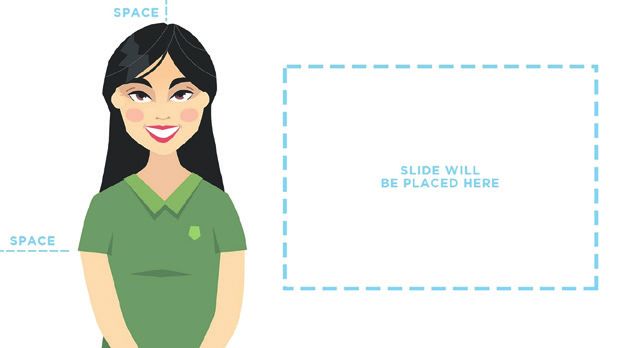
Virtual Competition Guidelines

3MT Presentation                                                3MT Recording - Filming at Home
Practice, practice, practice                                    There are three factors to consider when selecting your
Before you record your presentation is it important to          location to ensure you are producing the best video
practice so you can present with confidence and clarity.        possible: light, sound and background.
Vocal range                                                     Light
– Speak clearly and use variety in your voice (fast/slow,       Dark environments impact the overall quality of your video
  loud/soft).                                                   because cameras do not perform well in dim lighting.
– Do not rush – find your rhythm.                               Ensuring you are well lit guarantees the camera and
– Remember to pause at key points as it gives the audience      therefore, your audience, can see you clearly. Look for a
  time to think about what you are saying.                      room in your home that has lots of natural light. If you are
                                                                using light from a window, ensure you are facing towards
Body language
                                                                the window so light falls on you directly.
– Stand straight and confidently.
– Hold your head up and make eye contact.
– Never turn your back to the audience.                         Any additional lighting you can introduce will further improve
– Practise how you will use your hands and ensure your          the quality of your video. Look around your home for desk
  presentation is recorded/delivered from a single position.    lamps, torches etc. Watch this tutorial for more information.
– Do not make the common mistakes of rolling back and
  forth on your heels, pacing for no reason or playing with
  your hair as these habits are distracting for the audience.
Dress
– While there is no dress code, if you are unsure of how
  to dress you may like to dress for a job interview or an
  important meeting.
– Do not wear a costume of any kind as this is against the
  rules (as are any props).

                                                                Facing away from window         Facing window
3MT Recording - Device Options
                                                                Sound
Recording your presentation can be done using a camera
                                                                When filming video at home, ensure you choose a very
and or handheld video recorder however most phones
                                                                quiet environment where you have as much control over
allow you to record through the camera function and most
                                                                the sound as possible. For example, choose a small room
computers have recording ability (via camera or webcam)
                                                                where you have the ability to close all doors and windows.
using inbuilt programs such as:
                                                                Make sure any noisy electronics in the room such as fans,
Windows                                                         air conditioners, computers, phones and possibly even your
– Camera App                                                    fridge are temporarily turned off. These are much louder in
– Windows Movie Maker                                           video than you may think and are very distracting to your
                                                                audience!
Macintosh
– QuickTime                                                     Be aware of any audible interruptions you don’t have
– iMovie                                                        control over such as aeroplanes, lawns mowers and cars.
                                                                Consider filming during a quiet time of day such as early in
Online programs which you might like to consider include:
                                                                the morning when there are likely to be less interruptions. If
– Zoom
                                                                there are audio interruptions during your recording, do not
                                                                continue. Wait it out and try again at a later point!
                                                                Background
                                                                Aim for a clean, plain wall as your background, completely
                                                                free of visual distractions from the waist up where you will
                                                                be framing your shot.

                                                                VIRTUAL 3MT HANDBOOK 2020 - PARTICIPATING UNIVERSITIES 7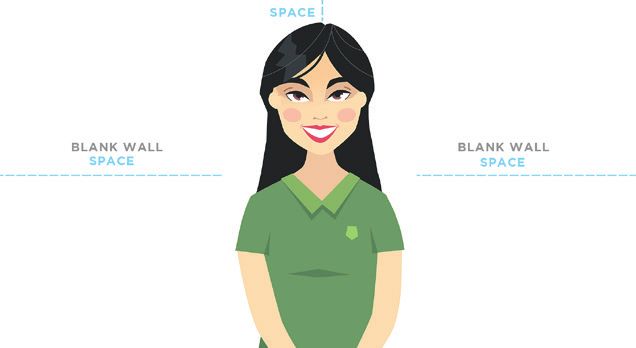
Virtual Competition Guidelines
3MT Recording - Setup                                                 Focus
                                                                      Before you start recording, ensure your device is able
Whether you’re filming on a phone, tablet or web cam, there
                                                                      to auto focus on you and isn’t focusing on anything else
are further factors to consider when actually setting up to
                                                                      around you instead. Be sure to watch your recording back
film your video:
                                                                      and ensure you remain in the focus the entire duration.
Support
                                                                      Proximity
Ensure phones and tablets have enough storage available,
                                                                      Ensure your recording device isn’t too far away from you.
are in aeroplane mode, fully charged and either connected
                                                                      The microphone on the device should be as close to you as
to a tripod or, placed on a stable surface (think creatively -
                                                                      possible to achieve both the desired framing and to ensure
Blu Tack to wall). Your friend cannot offer to be a tripod by
                                                                      the audio is as clear as possible.
holding your phone or iPad for you: Your video needs to be
completely stable as movement is very distracting.                    Test recording
                                                                      Complete a short recording of a portion of your talk. Ensure
Camera orientation
                                                                      you are speaking at the volume you intend to use for your
Ensure phones and tablets are turned onto their side so the
                                                                      presentation. Review the test recording to ensure all of the
video is filmed horizontally not vertically. This is to ensure
                                                                      above elements are complete and working.
the finished video is the correct shape and size when
uploaded to Vimeo.                                                    Presentation tip
                                                                      Be aware of your eye movement. Maintain eye contact
Eyeline
                                                                      with the camera lens as though they were a person in the
To ensure your eye line is correct, the tripod or surface
                                                                      audience watching you present live.
where your recording device is placed, should be high
enough so that the camera lens is in line with your eye level.
Try to avoid the camera lens having to either point up or
down towards you.

Framing - Two Options
1. Set up your shot so you are in the centre of the frame,
    not being cut off at the top and so you can be seen
    from the waist up. Ensure there is equal space and just
    the blank wall background on either side of you.

2.   Set up your shot so you are to the left of the centre of
     the frame without being cut off at the top and so you
     can be seen from the waist up. The right side of the
     video frame should be just the blank wall background,
     as this is where your slide will be edited in.

                                                                 VIRTUAL 3MT HANDBOOK 2020 - PARTICIPATING UNIVERSITIES 8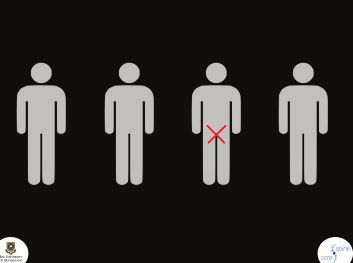
Virtual Competition Guidelines
Video Editing                                                       Uploading to Vimeo - Smart Phone
– Go to website - https://www.kapwing.com (or any video             – Download and install the Vimeo app.
  editing platform you are familiar with, Kapwing is a              – Create your own personal Vimeo account and log in via
  suggestion only)                                                    the blue log in button. If you already have an account,
– Create an account by signing in with Google or Facebook             click the blue log in button and enter your existing details.
– Go to My Workspace - click new project - click start with         – Click on the ‘upload’ button in the bottom right-hand
  studio                                                              corner and select your video from the camera roll.
– Click start with blank canvas                                     – Trim the length of your video, or choose ‘skip’.
– Rename Studio Draft (top of page) - Name - 3MT Title              – Ensure the privacy setting is set to ‘Anyone can see this
– Click add scene - left hand side to show 2 blank scenes             video’.
– Adjust output size (16:9 - widescreen) - right hand side          – Ensure the setting ‘People can add to collections’ is
                                                                      switched on.
Scene 1                                                             – Give your video a title: Name_3MT Title
– Highlight scene - click upload - insert 3MT Identifying           – In your video description please place the following:
  Details as a JEPG                                                   – 2020 3MT Competition
– Fill in the PowerPoint with your details and save a copy            – Name:
  as a JPEG for uploading - does not upload PowerPoint.               – 3MT Title:
                                                                    – The Vimeo link to your video is the link you will submit
Scene 2                                                               to your 3MT Event Coordinator along with your 3MT
– Highlight scene - click upload - insert 3MT Video file or           title slide and 3MT PowerPoint slide so the judging
  URL link                                                            panel can view and assess your presentation.
– Highlight scene - click upload image - insert 3MT
  PowerPoint slide - highlight 3MT PowerPoint slide - click
  lock ratio - adjust size and place in top right hand corner /     Updating Video
  or on right hand side
                                                                    Vimeo allows you to replace a video with an updated file so
– Save a copy of your 3MT PowerPoint slide as a JPEG for
                                                                    the original link remains the same.
  uploading - does not upload PowerPoint
– Save draft and review                                             If you need to update your submission, update your video
– Publish                                                           at the existing Vimeo link. Do not upload a new video from
– Copy link and upload your final presentation to Vimeo -           scratch, as this will create a new link and will be difficult for
  The Vimeo link to your video is the link you will submit          organisers to track.
  to your 3MT Event Coordinator along with your 3MT
                                                                    Please note: only done using a computer or tablet.
  PowerPoint slide so the judging panel can view and
                                                                    – Log in to your Vimeo account on an internet browser (do
  assess your presentation.
                                                                      not use the app).
                                                                    – Navigate to the video by selecting “videos” on the left
                                                                      hand side menu.
Uploading to Vimeo - Computer
                                                                    – Click on the video to open the video’s settings.
– Ensure your completed video has been copied to your               – Scroll to the bottom of the settings options on the left-
  desktop or laptop device from your phone or tablet                  hand side of the screen.
– Create your own personal Vimeo account and log in at              – At the bottom of the scroll bar, click the blue button
  vimeo.com. Click ‘log in’ on the left of the top toolbar            “replace video”.
– Hover over the blue ‘New Video’ button in the top right           – Navigate to and select the new video file on your device.
  and select ‘upload’ from the drop down menu.                      – Watch the progress of the new upload at the bottom left-
– Either drag and drop your file for upload or manually               hand side corner of your screen. Do not close the browser
  select your file by clicking ‘or choose files’. The upload          window until this is complete.
  should begin automatically.                                       – Watch the updated video through to ensure the new video
– Ensure the privacy setting is set to ‘Anyone can see this           has replaced the old version. This can sometimes take
  video’.                                                             time to process.
– Ensure the setting ‘People can add to collections’ is
  switched on.
– Give your video a title: Name_3MT Title
– In your video description please place the following:
  – 2020 3MT Competition
  – Name:
  – 3MT Title:
– The Vimeo link to your video is the link you will submit
  to your 3MT Event Coordinator along with your 3MT title
  slide and 3MT PowerPoint slide so the judging panel can
  view and assess your presentation.
                                                                  VIRTUAL 3MT HANDBOOK 2020 - PARTICIPATING UNIVERSITIES 9
Event Management
Resources Further Information
The Three Minute Thesis brand and logo is a registered If you have any queries about 3MT please visit the 3MT
trademark of The University of Queensland (UQ). Website or contact the Graduate School.
UQ has developed a number of resources (listed below) Email 3MT@uq.edu.au
which will assit in developing a virtual 3MT competition. Phone +61 7 3346 0510
All 3MT information, resources and marketing materials are www.threeminutethesis.org
free to use; however you must obtain the 3MT Materials
THE UNIVERSITY OF QUEENSLAND CRICOS PROVIDER NUMBER 00025B
Permission and ensure you adhere to the Brand Guidelines.
Event Management Resources
– Judging Sheets
– Award Certificates
– Order of Proceedings
– People’s Choice Ballot (UQ uses Survey Monkey)
– PowerPoint Presentation
– Judging Panel Information
– Participant Contact Details Spreadsheet
Event Management Resources - Virtual Competition
– PowerPoint Title Slide
Promotional Resources
– 3MT Logos (Jpeg, EPS)
– 3MT Branding Guidelines
– Promotional PowerPoint Slide
Graduate SchoolYou can also read


