An Audio-Based 3D Spatial Guidance AR System for Blind Users
←
→
Page content transcription
If your browser does not render page correctly, please read the page content below

An Audio-Based 3D Spatial Guidance AR
                                                        System for Blind Users

                                           James M. Coughlan1[0000−0003−2775−4083] , Brandon Biggs1[0000−0001−7380−1077] ,
                                                     Marc-Aurèle Rivière2[0000−0002−5108−3382] , and Huiying
Preprint – to be published in ICCHP 2020

                                                                   Shen1[0000−0002−2195−7085]
                                                    1
                                                        The Smith-Kettlewell Eye Research Institute, San Francisco, CA
                                                               {coughlan, brandon.biggs, hshen}@ski.org
                                                             2
                                                                LITIS, University of Rouen, Normandy, France
                                                                   marc-aurele.riviere@univ-rouen.fr

                                                 Abstract. Augmented reality (AR) has great potential for blind users
                                                 because it enables a range of applications that provide audio informa-
                                                 tion about specific locations or directions in the user’s environment. For
                                                 instance, the CamIO (“Camera Input-Output”) AR app makes physical
                                                 objects (such as documents, maps, devices and 3D models) accessible to
                                                 blind and visually impaired persons by providing real-time audio feed-
                                                 back in response to the location on an object that the user is touching
                                                 (using an inexpensive stylus). An important feature needed by blind
                                                 users of AR apps such as CamIO is a 3D spatial guidance feature that
                                                 provides real-time audio feedback to help the user find a desired location
                                                 on an object. We have devised a simple audio interface to provide verbal
                                                 guidance towards a target of interest in 3D. The experiment we report
                                                 with blind participants using this guidance interface demonstrates the
                                                 feasibility of the approach and its benefit for helping users find locations
                                                 of interest.

                                                 Keywords: Assistive Devices · Accessibility · Augmented Reality · Au-
                                                 ditory Substitution · Visual Impairment · Blindness · Low Vision

                                           1   State of the Art and Related Technology

                                           Many people who are blind or visually impaired have difficulties accessing a range
                                           of everyday objects, including printed documents, maps, infographics, appliances
                                           and 3D models used in STEM education, needed for daily activities in schools,
                                           the home and the workplace. This limits their participation in many cultural,
                                           professional and educational activities. While braille labeling is often a useful
                                           means of providing access to such objects, there is only limited space for braille,
                                           and this method is only accessible to those who can read braille.
                                               Audio labels are a powerful supplement or alternative to braille labels. Stan-
                                           dard methods of implementing audio labels require the use of special hardware
                                           and materials, which is costly and limits their adoption. For instance, tactile
                                           graphics may be overlaid on a touch-sensitive tablet [1]. Documents or other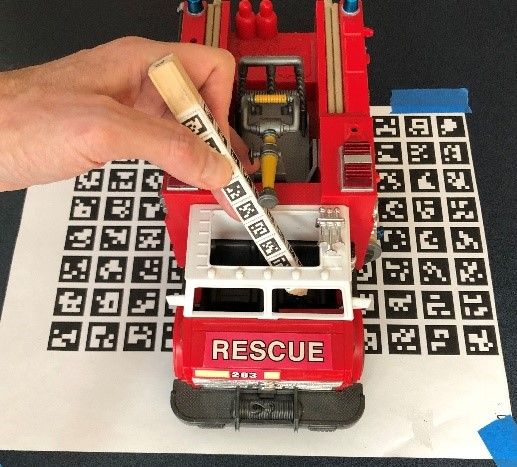
2       J. M. Coughlan et al.

                                           surfaces can be covered with a special form of paper readable by a “smart pen”
                                           [10]. The PenFriend [8] stylus uses small barcodes affixed to an object to define
                                           audio labels.
                                               There is growing interest in using computer vision-based approaches for audio
                                           labeling. In these approaches a camera tracks the user’s fingers or handheld
                                           pointer as they explore an object, enabling audio labeling for existing objects
Preprint – to be published in ICCHP 2020

                                           with minimal or no customization. Past computer vision approaches to audio
                                           labeling include [12], which focuses on 3D printed objects, [13], which uses a
                                           depth camera to access flat documents, and [6], which provides access to tactile
                                           graphics to students in educational settings.
                                               We build on our past work on CamIO [11,4,3], which is short for “Camera
                                           Input-Output.” We have implemented CamIO as a stand-alone iPhone app that
                                           tracks an inexpensive wooden stylus held by the user to point at locations of
                                           interest on an object (called hotspots). When the user points at a hotspot with
                                           the stylus tip, relevant audio information, such as text-to-speech or other sounds,
                                           is announced.
                                               Experiments with blind participants have demonstrated the feasibility of us-
                                           ing CamIO to access existing audio labels. Moreover, our approach allows a
                                           visually impaired user to create audio labels independently [3]. However, an
                                           ability that CamIO still lacks is the ability to provide real-time guidance to a
                                           hotspot. Without such guidance, the user must search the entire surface of an
                                           object with the stylus tip until they hear the hotspot they are seeking. This need
                                           is particularly acute in cases where the surface is lacking in tactile cues, such as
                                           the touch screen buttons on a microwave oven [3].
                                               Guidance not only saves the user time in exploring large or intricate ob-
                                           jects, or objects lacking in tactile features, but can enable entirely new ways
                                           of interacting with objects. For instance, a geography learning app could ask a
                                           student to point to a specific city on a world globe, and if the student has trouble
                                           finding it, the app could guide them to it in an intuitive way. Other examples
                                           could include guiding a user to a specific button on an appliance (such as a
                                           microwave oven) to perform a desired function, guiding a student to a specific
                                           element on the periodic table, or even guiding a repair-person to find a part of a
                                           machine with limited visibility. Our guidance system is inspired by recent work
                                           on auditory and haptic displays for 3D spatial guidance [9,7,5], which provide
                                           real-time audio/haptic feedback to guide a user towards a target in a virtual
                                           environment. We initially developed an interface similar to [9] for CamIO, but
                                           after preliminary testing we devised a simpler and more effective interface for
                                           our application, which we evaluated experimentally with four blind participants.

                                           2   Overview of the CamIO System

                                           CamIO is an augmented reality (AR) iPhone app that uses computer vision to
                                           provide audio labels for rigid 3D objects. The rigid object of interest is mounted
                                           on a board, which is a flat printed barcode pattern (Fig. 1) that allows CamIO
                                           to estimate the object’s pose (3D translation and 3D orientation) relative to the
Audio-Based 3D Spatial Guidance 3
camera. The iPhone is typically mounted on a tripod or a gooseneck cellphone
holder (Fig. 1(left)) to obtain a clear view of the board and object, but in
some cases [3] users may hold the iPhone by hand. The user points the tip of a
passive wooden stylus (Fig. 1), covered with another barcode pattern, to different
locations on an object. CamIO estimates the stylus tip’s 3D location relative to
the camera and uses the pose estimate of the board to determine the stylus tip’s
Preprint – to be published in ICCHP 2020
3D location relative to the object. (In other words, hotspot locations are defined
relative to the board, which is mounted rigidly to the object.) Whenever the tip
is close enough to a pre-defined hotspot, it triggers audio information about the
hotspot.
A second stylus (not shown, identical in form but distinct from the one shown
in Fig. 1) is used to create new hotspots, and allows the user to make an audio
recording to associate with each new hotspot. Our recent work [3] demonstrates
the accessibility of this authoring process, which allows blind users to create their
own annotations (hotspots and associated audio labels) independently. However,
in the study presented in this paper, the experimenter was the only one who
created hotspots, since the emphasis here is on providing guidance to pre-existing
hotspots.
3 3D Spatial Guidance Interface
We build on the auditory display described in [9], which is intended for audio-
based 3D targeting of locations in a large virtual workspace (such as a kitchen).
Accordingly, the first incarnation of our guidance approach used a repeating
monaural sound, whose tempo indicated how far the stylus tip is from the target,
and with a pitch (low, medium or high) that indicated whether the tip needed
to move up or down (or else was aligned properly in the vertical direction).
Informal tests with two blind participants (one female of age 42, who is also
participant P1 in the experiment described in the next section, and one male of
age 73) showed that this guidance worked satisfactorily in some cases. However,
we found that the feedback was too indirect: the participants didn’t always
know how to move the stylus to increase the tempo. As a result, the resulting
guidance process was unacceptably slow. Thus we devised a second, more direct
guidance approach: verbal directions telling the user to move the stylus along the
cardinal directions (up, down, left, right, forward or back). While the optimal
direction to move the stylus tip towards the hotspot might entail a combination
of these directions (e.g., simultaneously move left and up), for simplicity we issue
directions along only one cardinal direction at a time – the direction that will
most improve the alignment to the target.
We define the guidance interface as follows. The board (barcode pattern
beneath the truck, see Fig. 1) defines an xyz coordinate frame, with +x = right,
−x = left, +y = forward (away from the user), −y = back (towards the user),
+z = up and −z = down. Let the desired target hotspot location be denoted
(x∗ , y ∗ , z ∗ ), and the current location of the stylus tip be (x, y, z). Define the error
vector e = (x − x∗ , y − y ∗ , z − z ∗ ), and let index a = argmaxi |ei |, i.e., a is the4 J. M. Coughlan et al.
index (1, 2 or 3, corresponding to x, y or z, respectively) of the entry in e with
the highest absolute value. In other words, a indicates which coordinate (x, y or
z) is most discrepant from the target coordinate location (x∗ , y ∗ , z ∗ ). Then the
appropriate direction is issued, e.g., “left” if a = 1 and x > x∗ , “right” if a = 1
and x < x∗ , “up” if a = 3 and z < z ∗ , etc. Directions are announced roughly
twice per second whenever the stylus is visible. The target hotspot is announced
Preprint – to be published in ICCHP 2020
when the stylus gets to within approximately 1 cm from the hotspot. No audio
feedback is issued when the stylus is not visible.
4 Methods
We conducted an experiment to assess the feasibility of the spatial guidance
feedback and to determine whether the feedback speeds up the target search.
The experiment (see setup in Fig. 1 (left)) compared how much time a blind
participant needed to find hotspots (points of interest) on a 3D object with
spatial guidance vs. without it. The object was a large toy fire truck (27 cm x
12 cm x 14 cm), with K=10 distinct hotspot locations defined in advance. The
hotspots were tactilely salient features such as lights, hooks or other features
that protruded from the truck. Some hotspots were in recessed locations on the
truck, such as the shift stick and steering wheel (Fig. 1 (right)) in the front cabin,
or on the side of the truck facing away from the participant; these hotspots were
difficult to find and access, whether by fingertip or by stylus. In fact, the difficulty
of accessing such locations highlights an advantage of the CamIO stylus, whose
tip need not be visible to the camera. This allows the user to explore recessed
areas or areas that are otherwise invisible to the camera.
Each of the 10 hotspots was searched for under both feedback conditions: G
(guidance provided) and NG (no guidance). In order to minimize the influence
of any possible learning effects, which could make it easier to find a hotspot the
second time it was searched for, we randomized the sequence of hotspots, and
alternated between NG and G trials. With 10 trials in both guidance conditions
(G and NG), this resulted in a within-subject factorial design with an identical
sequence of 2K = 20 trials per participant. The participant was given up to 120
sec. to find each hotspot, after which a time-out was declared.
We had a total of N=4 blind participants in our experiment (2 males/2
females, ages from 26-42). Participants P1, P3 and P4 were already familiar with
the CamIO system (P4 is a co-author of this paper) while P2 was unfamiliar with
it. None of the participants was told the study design before their trials, and we
didn’t tell them whether or not any locations would be repeated in the 20 trials.
After obtaining IRB consent, we reviewed how CamIO works if necessary and
demonstrated the audio guidance feature. The experimenter launched CamIO
on an iPhone 8 and positioned it on a gooseneck cellphone holder so that the
camera captured the entire truck and board. Each participant spent a short time
practicing with the guidance feature (on different hotspots than the one used for
the evaluation), with help provided by the experimenter as needed.Audio-Based 3D Spatial Guidance 5
Preprint – to be published in ICCHP 2020
Fig. 1. (left) Blind participant uses CamIO to explore a toy fire truck. The participant
holds the CamIO stylus (a barcode pattern printed on a square wooden dowel with a
pointy tip) to point to possible hotspots on the truck. The truck is glued to the board
(a piece of paper with a separate barcode pattern), which is taped to the table. An
iPhone 8 running CamIO is held by a gooseneck cellphone holder to capture a view of
the truck, board and stylus. (right) Stylus points to steering wheel in the truck cabin.
Though the steering wheel is in a recessed location that is not visible to CamIO, the
stylus tip location can still be estimated.
In the practice phase, the experimenter explained that barriers sometimes
block the user from moving in the suggested guidance direction. For instance, if
in Fig. 1(right) the system directs the participant to move “forward” towards the
left side mirror, the stylus will soon hit the cabin roof/wall as it moves towards
the mirror; the participant must find ways around such obstacles to find the
target hotspot.
Next each participant performed the formal experimental trials, which con-
sisted of the 20-trial sequence described above. We placed a visual barrier be-
tween the participant and the object while the experimenter defined the hotspot
in each trial to prevent participants from using any residual vision to see the
location of the hotspot. After completing the 20 search trials, we administered
a System Usability Scale (SUS) [2] to estimate the usability of the guidance sys-
tem. Finally, we conducted a semi-structured interview asking what participants
liked and disliked about the system, what needed to be improved, and how they
might envision an ideal guidance system. Since P4 is a co-author on this paper,
we did not administer the SUS or semi-structured interview to him.
5 Results and Discussion
Fig.’s 2-4 plot the times needed to find the hotspot in both guidance conditions,
and Fig. 4 shows the raw times of each participant for each condition and hotspot.
All times are in seconds; times reported as 120 secs. correspond to participants
failing to find the target in the allotted time.
These plots show how the time to find the hotspot depends on factors such
as the guidance condition (G vs. NG), the participant and which hotspot is the6 J. M. Coughlan et al.
Preprint – to be published in ICCHP 2020
Fig. 2. Histogram of the times to find the hotspots for each guidance condition,
aggregated over participants and hotspots. The vertical dashed lines represent the
median scores.
Fig. 3. Line plot showing the average time to find the hotspot (±SE) per subject and
per guidance condition.Audio-Based 3D Spatial Guidance 7
Preprint – to be published in ICCHP 2020
Fig. 4. Time to find target hotspot location for each participant, colored by guidance
condition. This plot displays all the raw experimental data.
target. Note that G resulted in a successful target search in all cases, and in all
but two cases (both for P4), target search took less time with G than with NG
(visible in Fig. 4).
We used a Wilcoxon signed-rank test to compare the differences between
G and NG times (see Fig. 5), paired by hotspot for each participant. The re-
sult indicated that participants performed significantly better under condition
G (median = 14.5 sec.) than in condition NG (median = 120 sec.), with V = 5,
Z = 5.45, p = 5.18 × 10⁻⁸ , and an effect size of r = 0.86.
It should be noted that, despite our low number of participants, we had
10 pairs of measurements per participant, and a large effect-size (according to
Cohen’s guidelines), which should theoretically compensate for the increased
type-I error rate risk inherent to running inferential statistics on a small sample.
The following System Usability Scale (SUS) scores were calculated: P1=65,
P2=75, P3=77.5, for an average of 72.5. An SUS score of 68 is considered “av-
erage” while scores in the mid- to high 70s are considered “good”3 . Overall, the
SUS scores suggest that the guidance system is usable but needs improvement.
Next we summarize the qualitative feedback we obtained in the semi-structured
interviews. All participants who provided qualitative feedback (P1, P2 and P3)
acknowledged the benefit of the audio guidance that was provided, which they
found intuitive and clearly superior to finding hotspots without guidance, or to
more indirect ways of providing guidance (such as the early version we imple-
mented that used tempo to signal the distance from the target and pitch to
3
https://measuringu.com/interpret-sus-score/8 J. M. Coughlan et al.
Preprint – to be published in ICCHP 2020
Fig. 5. Histogram of the differences (paired by hotspot & condition) in the time to
find hotspots, aggregated over participants. Positive time differences indicate that the
time under NG was longer than the time under G.
direct the stylus up or down). P3 specifically favored the “specific” instructions
that the verbal feedback provided to direct the user to a hotspot, which was
especially useful when the hotspot was hard to find using tactile cues alone.
However, P1 and P2 felt that the limited spatial accuracy of the CamIO
system was the biggest problem that needed to be addressed; for instance, in
some cases the system announced the target had been reached even though
the stylus tip was hovering about 1 cm above the truck surface. (This spatial
inaccuracy results from noise in the board pose and stylus tip location estimates.)
P3 expressed frustration with time lag, i.e., the voice feedback tended to lag
behind the current location of the stylus, even when she was moving the stylus
slowly; she also felt that the speed of the repetitive speech feedback made her
feel rushed.
When asked what improvements the participants wanted, P1 suggested equip-
ping the stylus with a button that turns on the guidance feedback, and the
addition of multiple vibrators on the stylus that could provide haptic feedback
indicating which way the stylus should be moved. P2 suggested adding audio in-
formation similar to the earlier guidance system that the authors experimented
with (Sec. 3), which would use a combination of tempo, pitch and volume changes
to signal when the stylus gets closer to the target location. P3 expressed the de-
sire that CamIO work with any ordinary pen or pencil, rather than requiring
the special stylus we used.Audio-Based 3D Spatial Guidance 9
6 Conclusion
We have devised a 3D spatial guidance system that helps a blind user find a
specific location of interest on an object using CamIO, an audio-based AR sys-
tem. The guidance system uses simple verbal commands (“left”, “right”, “up”,
etc.) to tell the user which direction to move the stylus tip. Experiments with
Preprint – to be published in ICCHP 2020
four blind participants show that the guidance system significantly speeds up
the search for target hotspots compared with an exhaustive search. A secondary
contribution of this study is to demonstrate the ability of the CamIO stylus
to access recessed or otherwise obscured locations on an object that are not
themselves visible to the camera.
While we applied this guidance approach specifically to CamIO, it could be
useful in any AR system, whether the system tracks the user’s hands, handheld
stylus or other pointing tool. Such audio-based guidance is not only helpful for
blind users but is also useful in applications where visibility is limited (either
by environmental conditions or because of a visual impairment), or for sighted
users who prefer a cross-sensory display (e.g., audio and visual combined).
Future work will focus on refining and improving the audio interface. One
possible way to speed up the guidance process is to add more specific directional
feedback, e.g., “far left” would tell the user to move the stylus farther to the left
than the “left” instruction. The verbal directions could be augmented with 3D
spatialized sound as in [9], which could make the guidance more intuitive. Finally,
we will continue to test and improve the CamIO system, with an emphasis
on refining the spatial accuracy of the tip location estimates using improved
computer vision algorithms.
7 Acknowledgments
JMC, BB and HS were supported by NIH grant 5R01EY025332 and NIDILRR
grant 90RE5024-01-00. We thank Dr. Roberto Manduchi, Dr. Natela Shanidze,
Dr. Santani Teng and Dr. Ali Cheraghi for helpful suggestions about the exper-
iments.
References
1. Talking Tactile Tablet 2 (TTT) — Touch Graphics Inc
2. Brooke, J., et al.: Sus-a quick and dirty usability scale. Usability evaluation in
industry 189(194), 4–7 (1996)
3. Coughlan, J., Shen, H., Biggs, B.: Towards accessible audio labeling of 3d objects.
Journal on Technology and Persons with Disabilities 8 (04/2020 2020)
4. Coughlan, J.M., Miele, J.: Evaluating Author and User Experience for
an Audio-Haptic System for Annotation of Physical Models. In: Proceed-
ings of the 19th International ACM SIGACCESS Conference on Computers
and Accessibility. pp. 369–370. ACM, Baltimore Maryland USA (oct 2017).
https://doi.org/10.1145/3132525.313481110 J. M. Coughlan et al.
5. Ferrand, S., Alouges, F., Aussal, M.: An Augmented Reality Audio Device Help-
ing Blind People Navigation. In: Miesenberger, K., Kouroupetroglou, G. (eds.)
Computers Helping People with Special Needs, vol. 10897, pp. 28–35. Springer In-
ternational Publishing, Cham (2018), http://link.springer.com/10.1007/978-
3-319-94274-2_5
6. Fusco, G., Morash, V.S.: The Tactile Graphics Helper: Providing Audio Clar-
Preprint – to be published in ICCHP 2020
ification for Tactile Graphics Using Machine Vision. In: Proceedings of the
17th International ACM SIGACCESS Conference on Computers & Acces-
sibility - ASSETS ’15. pp. 97–106. ACM Press, Lisbon, Portugal (2015).
https://doi.org/10.1145/2700648.2809868
7. Guezou-Philippe, A., Huet, S., Pellerin, D., Graff, C.: Prototyping and Eval-
uating Sensory Substitution Devices by Spatial Immersion in Virtual Environ-
ments:. In: Proceedings of the 13th International Joint Conference on Computer
Vision, Imaging and Computer Graphics Theory and Applications. pp. 596–602.
SCITEPRESS - Science and Technology Publications, Funchal, Madeira, Portugal
(2018). https://doi.org/10.5220/0006637705960602
8. Kendrick, D.: PenFriend and Touch Memo: A Comparison of Label-
ing Tools — AccessWorld — American Foundation for the Blind.
https://www.afb.org/aw/12/9/15900 (2011)
9. May, K.R., Sobel, B., Wilson, J., Walker, B.N.: Auditory Displays to Facilitate
Object Targeting in 3D Space. In: Proceedings of the 25th International Conference
on Auditory Display (ICAD 2019). pp. 155–162. Department of Computer and
Information Sciences, Northumbria University, Newcastle upon Tyne (jun 2019).
https://doi.org/10.21785/icad2019.008
10. Miele, J.: Talking Tactile Apps for the Pulse Pen: STEM Binder. In: 25th Annual
Int’l Technology & Persons with Disabilities Conference (CSUN) (2010)
11. Shen, H., Edwards, O., Miele, J., Coughlan, J.M.: CamIO: A 3D computer vision
system enabling audio/haptic interaction with physical objects by blind users. In:
Proceedings of the 15th International ACM SIGACCESS Conference on Computers
and Accessibility - ASSETS ’13. pp. 1–2. ACM Press, Bellevue, Washington (2013).
https://doi.org/10.1145/2513383.2513423
12. Shi, L., Zhao, Y., Azenkot, S.: Markit and Talkit: A Low-Barrier Toolkit
to Augment 3D Printed Models with Audio Annotations. In: Proceed-
ings of the 30th Annual ACM Symposium on User Interface Software
and Technology. pp. 493–506. ACM, Quebec City QC Canada (oct 2017).
https://doi.org/10.1145/3126594.3126650
13. Thevin, L., Brock, A.M.: Augmented Reality for People with Visual Impairments:
Designing and Creating Audio-Tactile Content from Existing Objects. In: Miesen-
berger, K., Kouroupetroglou, G. (eds.) Computers Helping People with Special
Needs, vol. 10897, pp. 193–200. Springer International Publishing, Cham (2018).
https://doi.org/10.1007/978-3-319-94274-2You can also read


