APC NEWS Year 70th Anniversary
←
→
Page content transcription
If your browser does not render page correctly, please read the page content below
APC NEWS
                                                   th
                                              70 Anniversary
                                                  Year

APC NEWS Number 255   January February 2018   www.mdrc.org.au   Page 1 of 8
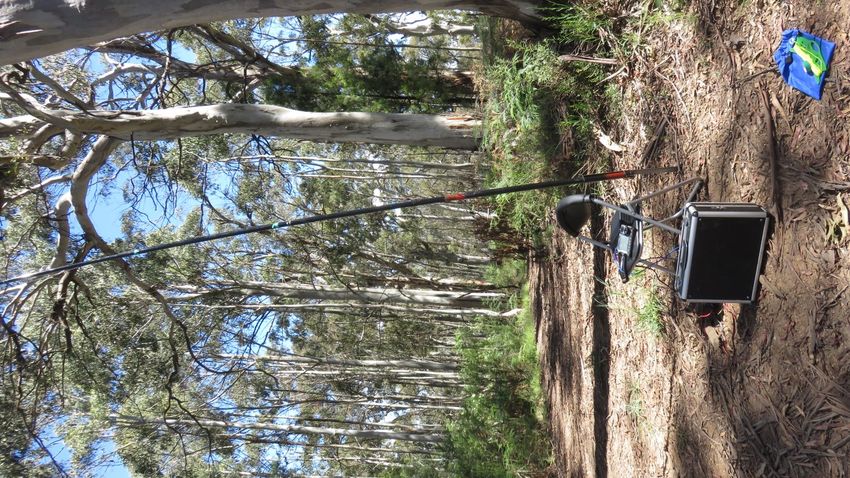
VK3AFW’s equipment set-up on New
                                                             Years day 2018 ready to operate SOTA
                                                             on Mt Bald Hill near lake Eildon. It
                                                             might have been a bald hill 100 years
                                                             ago but the amount of mature timber
                                                             suggests that the name is no longer
                                                             appropriate.

                                                             Access to the clearing at the top is via
                                                             an unsealed track. Turn off the Eildon–
                                                             Jamieson Road 10 km before the Ja-
                                                             mieson-Mansfield road junction. Trav-
                                                             el North 1.1 km and turn right. Dry
                                                             weather access is fairly easy except
                                                             for a couple of large spoon drains.

 © All material in this magazine is subject to Australian Copyright Laws. Contact the editor if you wish to reproduce
 any of the contents.

APC NEWS Number 255              January February 2018               www.mdrc.org.au                         Page 2 of 8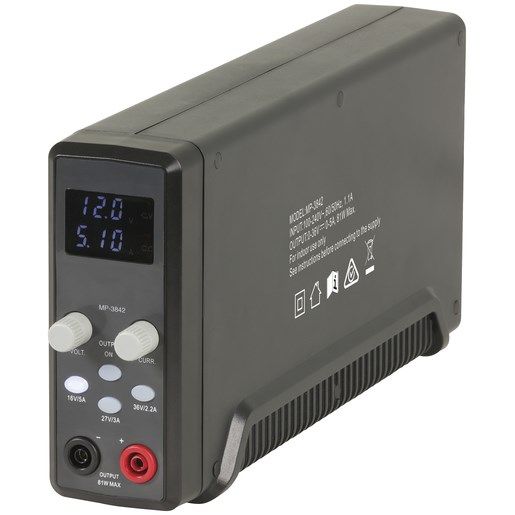
QTC
Happy New Year and welcome to the New Look APC News. The layout is simplified.
Gone are the pages of information that changed once per year if at all. They have been con-
signed to the Web Page.

While I shall always print members contributions, if I don’t receive them I can’t print them. Obvi-
ous but it needs to be said. Some members maintain their own blogs and again these may be
accessed via our web page.

PHOTOGRAPHS.
A picture tells a story so those of you with a mobile phone can contribute, please.

The New Look APC News will be able to be done monthly with a break at the New Year so it will
be a more timely publication. If there is important breaking news we could even print a special
issue.

The format has been made simpler. Austerity is good.

73
Ron
VK3AFW,
APC News Editor.
APC NEWS Number 255        January February 2018        www.mdrc.org.au                  Page 3 of 8
COMING UP
9th January 2018, Tuesday meetings re-
sumed
9th February, Friday 8PM. About some An-
                                                   10th February Saturday, Arduino Group meets
tennas, Ian VK3XI.
                                                   17th February, Saturday 9:30 AM. Annual
                                                   VK3 SOTA Conference
9th March, Friday PM, ICOM rep on ICOM
                                                   10th March, Saturday, Arduino Group meets
rigs.
13th April, Friday PM. DXpeditioning, Lee
VK3GK
11th May, Friday PM No Meeting                     12th May, Saturday, Hamfest
8th June, Friday PM TBA                            9th June, Saturday, Arduino Group meets
                                                   16th June, Saturday, International Museum
                                                   Day Open Day at Club
13th July, Friday PM TBA                           14th July, Saturday, Arduino Group meets
10th August, Friday PM TBA                         11th August, Saturday, Arduino Group meets
                                                   18th, 19th August , Saturday, Sunday, ILLWE
APC NEWS Number 255        January February 2018         www.mdrc.org.au                Page 4 of 8
EQUIPMENT REVIEW
The Powertech Plus Lab Power Supply
Reviewed by Ian VK3SV
The item under review is the 0-36V DC 0 – 5A Slim-
line 80W Lab Power Supply sold by Jaycar.
APC NEWS Number 255 January February 2018 www.mdrc.org.au Page 5 of 8EQUIPMENT REVIEW cont’d Often in a workbench environment you don’t need massive amounts of power, and your huge unit is under-utilized. This slim line power supply provides up to 80W of power, still plenty of grunt for many tasks. It provides constant current and constant voltage options. Simply select your power range, then adjust the controls to obtain your desired outputs. Ranges available are 0-16V @ 0-5A, 0-27VDC @ 0-3A, and 0-36V @ 0-2.2A. Output is provided via banana sockets which will accept insulated banana plugs. A powerful, compact unit for your work- bench or mobile toolkit. Includes banana to alligator clamp leads. Features: - Constant current / constant voltage options - Up to 5A current - Compact design Specifications: Input Voltage: 100-240VAC @ 50/60Hz Output Voltage: 0-16VDC 0-5A (Max), 0-27VDC @ 0-3A (Max), 0-36VDC @ 0-2.2A (Max Output Power: 80W Max. Weight: 886g Dimensions: 53(W) x 300(D) x 138(H)mm APC NEWS Number 255 January February 2018 www.mdrc.org.au Page 6 of 8
EQUIPMENT REVIEW cont’d
Operation
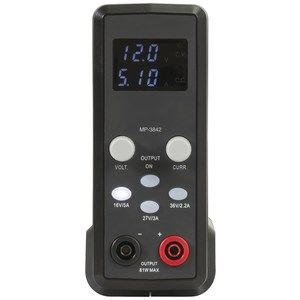
The unit is simple to operate. There are 4 push buttons and 2 knobs.
To operate the LPS first turn it on. There is no output at this point. The Voltage range is indi-
cated by one of the 3 Push buttons being illuminated. The LCD screen shows Voltage (Top)
and Current (Bottom). The Voltage is set by rotating the Voltage Control to read the required
voltage. Likewise the Current limit is set by rotating the Current Control. The Voltage and
Current are now set to the maximum limit the unit can deliver.

You can now connect the load to the LPS.

By pushing the “Output On” push button the unit now supplies current to the load. This shows
Red to indicate power is connected to the load.

On the right hand side of the LCD screen there is a Green LED marked CV (Constant Voltage)
Underneath is a Red LED marked CC (Constant Current) These indicate the unit is controlling
the Output voltage or Limiting the Current to what you set the unit too. These LEDs simply in-
dicate the unit is operating in Constant Voltage or Constant Current mode.

By adjusting the size of the Load the unit will switch between CV and CC modes.

Currently on Special for $119.00

APC NEWS Number 255        January February 2018        www.mdrc.org.au                   Page 7 of 8
TRADE DISCOUNTS
                FOR CLUB MEMBERS at ALTRONICS and JAYCAR.
Moorabbin and District Radio Club Inc. members can now buy over the counter at Trade prices
from both Altronics and Jaycar. When making a purchase ask for Trade Discount and for
Altronics quote the Club's Trade account number 32323 and your call sign or for Jaycar quote
Customer Number 45400209. This is NOT a charge account so you use your money.
Note: Minimum purchase of $20 may apply.
Check out these companies at their websites.

http://www.altronics.com.au
                                                  Get your Club photo ID
                                                   discount card NOW
                                                   http://www.jaycar.com.au

APC NEWS Number 255       January February 2018         www.mdrc.org.au            Page 8 of 8
You can also read


