CHEMISTRY LAB JOURNAL - education.minecraft.net - Minecraft: Education Edition
←
→
Page content transcription
If your browser does not render page correctly, please read the page content below

1

CHEMISTRY LAB JOURNAL
    education.minecraft.net
CHEMISTRY LAB JOURNAL                                                                                  2

The Chemistry Update for Minecraft: Education Edition offers exciting new tools to
explore the world of chemistry in Minecraft. The Chemistry Resource Pack allows you and
your students to conduct experiments within Minecraft that simulate real world science.

This guide explains the different crafting stations, new items in the Chemistry Resource
Pack and how to craft products by combining compounds with Minecraft items to make
helium balloons, glowsticks, bleach, super fertilizer, underwater torches and more.

         Image                         Name                    Usage

                                      Element                  Build elements by choosing the number
                                    Constructor                of protons, electrons, and neutrons.

                                    Compound                   Create over thirty compounds by
                                      Creator                  combining elements.

                                                               Design your own experiments by
                                        Lab
                                                               combining substances and observing
                                       Table
                                                               the results.

                                                               Learn about the natural world by
                                      Material
                                                               reducing Minecraft blocks to their
                                      Reducer
                                                               component elements.
ELEMENT CONSTRUCTOR                                                    3

              Use the Element Constructor by right clicking on it,
              just like a regular crafting table. Create elements by
              moving the sliders to choose the desired number of
              protons, electrons, and neutrons or type the numbers
              into the fields at the top. By using the Element
              Constructor, you can create 118 elements and over
              400 isotopes.

              Want to check the subatomic particles of a particular
              element? Drop an element from your inventory into
              the output box of the Element Constructor to see the
              number of protons, electrons, and neutrons.

              For a complete list of craftable elements and isotopes
              please visit the link below:
              https://aka.ms/elementconstructor

COMPOUND CREATOR
              Use the Compound Creator by right clicking on it, just
              like a regular crafting table. Create compounds by
              adding the appropriate type and number of elements
              to the grid. The compound you have created will
              appear in the output box on the righthand side. The
              location of the elements on the grid does not affect
              the result. By using the Compound Creator, you can
              create over 30 different compounds.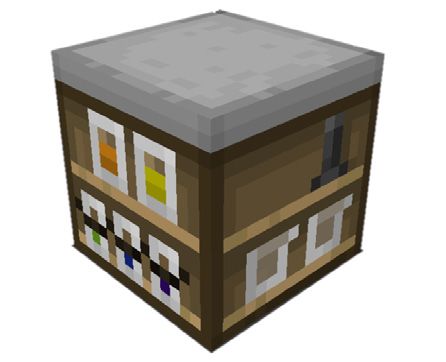
CRAFTABLE COMPOUNDS                                                                                   4

Here are the compounds you can create using the Compound Creator in Minecraft.

                    Compound          Chemical                              Compound       Chemical
     Image                                                  Image
                       Name            Formula                                   Name      Formula

                     Aluminum                                                    Glue
                                        Al2O3                                              C5H5NO2
                       Oxide                                             (Cyanoacrylate)

                                                                            Hydrogen
                     Ammonia             NH3                                                 H2O2
                                                                             Peroxide

                   Barium Sulfate       BaSO4                                     Ink       FeSO4

                      Benzene            C6H6                              Iron Sulfide      FeS

                   Boron Trioxide        B2O3                                    Latex       C5H8

                      Calcium                                                Lithium
                                         CaBr2                                               LiH
                      Bromide                                                Hydride

                      Charcoal          C7H4O                                Luminol       C8H7N3O2

                     Crude Oil          C9H20                                    Lye        NaOH
COMPOUNDS (CONT.)                                                         5

           Compound        Chemical              Compound      Chemical
 Image                                  Image
              Name          Formula                Name        Formula

           Magnesium                              Sodium
                           Mg(NO3)2                              NaH
             Nitrate                              Hydride

         Magnesium Oxide     MgO                  Sodium
                                                                NaClO
                                                Hypochlorite

           Polyethylene     (C2H4)5             Sodium Oxide    Na2O

            Potassium
                               KI                  Sugar       C6H12O6
              Iodide

               Salt          NaCl                  Sulfate       SO4

              Soap         C18H35NaO2              Water         H2O

             Sodium
                           C2H3NaO2
             Acetate

             Sodium
                              NaF
             Fluoride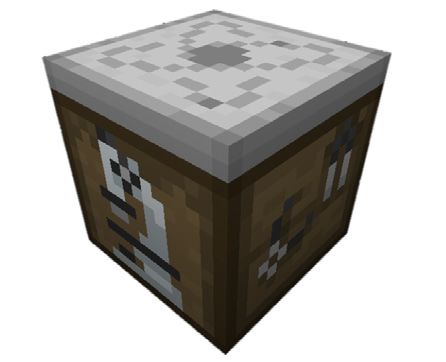
COMPOUNDS (CONT.) CHLORIDES             6

            Compound         Chemical
 Image
              Name           Formula

         Calcium Chloride     CaCl2

         Cerium Chloride      CeCl3

         Mercuric Chloride    HgCl2

            Potassium
                               KCl
             Chloride

             Tungsten
                              WCl6
             Chloride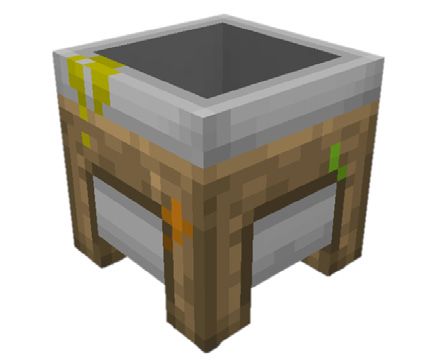
LAB TABLE                                                                                                           7

Use the Lab Table by right clicking on it, just like a regular crafting table. Create products by adding the
appropriate type and number of elements and/or compounds to the grid. When ready to conduct the
experiment, click the ‘Combine’ button. If you have created a viable product, you will notice that the images at
the top will animate to indicate that you have produced a liquid, gas, or solid. The location of the materials on
the grid does not affect the result. The product you have created will appear after clicking combine.

If the materials you have combined did not create a viable product, the process will result in a ‘garbage’ item.
LAB TABLE PRODUCTS                                                                                               8

Here are the products you can create using the Lab Table in Minecraft.

       Image           Name              Recipe                          Usage

                                                                         When used at the crafting table will
                                     Water x3 + Sodium
                        Bleach                                           turn colored wool, carpets, beds, and
                                     Hypochlorite x3
                                                                         banners white.

                      Heat Block     Iron + Water + Charcoal +Salt       Melts snow and ice just like a torch.

                       Ice Bomb      Sodium Acetate x4                   Transforms water blocks to ice blocks.

                        Super        Ammonia + Phosphorus                Grows plants to maturity in a single
                       Fertilizer                                        use.
CRAFTING TABLE PRODUCTS 9
Some products require a combination of chemical compounds and Minecraft blocks. These products are created
using a traditional Minecraft crafting table.
Image Name Recipe Usage
Colored torches:
Blue = Cerium Chloride
Combining various chlorides with a
Red = Mercuric Chloride
torch will change the color.
Purple = Potassium Chloride
Green = Tungsten Chloride
Combine colored dye + polyethylene
Glow Stick x6 + luminol + hydrogen peroxide.
Glows when shaken
Aluminum Oxide x3 + Stained Glass
Pane/Block x3 + Boron Trioxide x3
Hardened Glass Panes
will produce hardened glass which
and Blocks
takes much longer to break than
normal.
Latex x6 + colored dye + helium + a
lead will produce a helium balloon.
Balloon Balloons can be attached to fences,
shot with arrows, and lift mobs into
the air.
Sparklers:
Orange = Calcium Chloride Combing one of the compounds
Blue = Cerium Chloride mentioned with magnesium and a
Red = Mercuric Chloride stick will create sparklers.
Purple = Potassium Chloride Sparklers can be used as an
Green = Tungsten Chloride offhand item.
Sodium + TNT, will create an alternate
Underwater
version of TNT which will damage
TNT
blocks even when underwater.
Combine magnesium with a torch to
Underwater
create an Underwater Torch. This kind
Torches
of torch can be used underwater.BREWING STAND PRODUCTS 10
Here are the products you can make using the Brewing Stand in Minecraft.
Image Name Recipe Usage
Used as a base for brewing
potions in Minecraft.
Awkward
Potion
Nether wart + blaze powder
+ water bottle
Cures poison.
Antidote
Silver + blaze powder +
awkward potion
Cures weakness.
Elixir
Cobalt + blaze powder +
awkward potion
Cures blindness.
Eye drops
Calcium + blaze powder +
awkward potion
Cures nausea.
Tonic
Bismuth + blaze powder +
awkward potionMATERIAL REDUCER 11 Use the Material Reducer by right clicking on it, just like a regular crafting table. When a block is placed in the box at the top of the Material Reducer, it is reduced to its component elements by percentage. Note: Some Minecraft blocks such as soul sand and netherrack contain mysterious elements yet to be discovered in our world and as such will be represented by a question mark block ?
GET STARTED!                                                                                    12

The following lessons will help you to quickly get started teaching with the
new chemistry features of Minecraft: Education Edition.

WHAT IS THE WORLD MADE OF?
Ages 10 and up

Learning Objectives:
•   Understand objects are all made of elements.
•   Discover the elemental composition of Minecraft blocks.
•   Understand that some elements are more common than others

Classroom Activities:
•   Collect and analyze materials from their Minecraft world to find elemental compositions
    using the material reducer tool that breaks Minecraft blocks into elements and compounds.
•   Discuss what types of materials have similar elemental compositions and why

Full lesson: https://aka.ms/whatistheworldmadeof

ATOMIC STRUCTURE AND ISOTOPES
Ages 10 and up

Learning Objectives:
•   Understand that atoms are composed of neutrons, protons and electrons.
•   Understand that elements are defined by the number of protons in their nucleus.

Classroom activities:
•   Discuss how atoms are composed of electrons, protons and neutrons, how the atomic
    number of an element is the same as the number of protons it has, and that the number of
    neutrons in an atom can vary, which creates isotopes.
•   Students use the element constructor to produce a 3-5 elements and their isotopes.
•   Notice how the atomic number correlates with the number of protons in the atom.
•   Use the compound creator to make molecules using different isotopes.

Full lesson: https://aka.ms/atomicstructures

ADDITIONAL RESOURCES:
Visit us on the web at https://education.minecraft.net/ to discover new lesson plans
and ways to use the chemistry update to its fullest potential in your classroom.
NEED HELP? 13 Visit our knowledge base https://education.minecraft.net/support/knowledgebase/ to find articles and how-to manuals to help you master Minecraft: Education Edition. Can’t find what you’re looking for? Contact us via the ‘Support’ tab and we’ll follow up with you personally to address your issue.
You can also read


