Comparing Cursor Orientations for Mouse, Pointer, and Pen Interaction
←
→
Page content transcription
If your browser does not render page correctly, please read the page content below

Comparing Cursor Orientations for
                                Mouse, Pointer, and Pen Interaction
                                   Barry A. Po, Brian D. Fisher, and Kellogg S. Booth
                              Department of Computer Science, University of British Columbia
                                 201-2366 Main Mall, Vancouver, B. C., Canada V6T 1Z4
                                             {po, fisher, ksbooth}@cs.ubc.ca
ABSTRACT
Most graphical user interfaces provide visual cursors to
facilitate interaction with input devices such as mice,
pointers, and pens. These cursors often include directional
cues that could influence the stimulus-response
compatibility of user input. We conducted a controlled
evaluation of four cursor orientations and an orientation-
neutral cursor in a circular menu selection task. Mouse
interaction on a desktop, pointer (i.e. wand) interaction on a
large screen, and pen interaction on a Tablet PC were
evaluated. Our results suggest that choosing appropriate
cursors is especially important for pointer interaction, but
may be less important for mice or pens. Cursors oriented                             Figure 1. Some common pointing cursors used in GUIs
toward the lower-right corner of a display yielded the                               (top row) and the cursors tested in our controlled
poorest performance overall while orientation-neutral                                evaluation (bottom row).
cursors were generally the best. Advantages were found for
orientations aligned with the direction of movement. We                              (“trackers”). In this latter role, cursors are frequently
discuss these results and suggest guidelines for the                                 represented as arrows pointing toward a particular direction
appropriate use of cursors in various input and display                              on the display. Figure 1 presents some of the more
configurations.                                                                      common pointing cursors seen in today’s desktop GUIs.

Categories & Subject Descriptors: H.1.2. [Models                                     The most popular pointing cursor is an arrow oriented
and Principles]: User/Machine Systems – Human factors;                               toward the upper-left corner of a display. This cursor is
H.5.2. [Information Interfaces and Presentation (e.g.,                               seen with little variation in all of the most popular GUIs
HCI)]: User Interfaces – Input devices and strategies (e.g.,                         and has a history that dates at least as far back as the first
mouse, touchscreen)                                                                  Bravo editor prototypes at Xerox PARC in September of
                                                                                     1974. Although the development of the mouse itself is well
General Terms: Human Factors, Measurement, Theory                                    documented, virtually no published information exists
                                                                                     regarding the design and selection of the upper-left arrow
Keywords: Cursors, mice, styli, wands, pens, pointing,
                                                                                     cursor used for mouse pointing. According to Butler
desktops, large screens, small screens.
                                                                                     Lampson, who was one of the primary developers on the
                                                                                     Bravo project, the upper-left cursor was chosen both
INTRODUCTION
                                                                                     because it matched the Bravo developers’ intuition that up
Visual cursors are an integral part of many graphical user
                                                                                     and to the left seemed most natural given the orientation of
interfaces (GUIs). On a typical desktop, cursors are used
                                                                                     mouse and screen, and because it was one of the few cursor
both as an indicator of system state (“iconic cursors”) and
                                                                                     orientations that looked acceptable on the graphics
as a means of providing visual feedback for user input
                                                                                     hardware available at the time (personal communication,
                                                                                     August 2, 2004). We contacted several other Bravo
Permission to make digital or hard copies of all or part of this work for
personal or classroom use is granted without fee provided that copies are not        developers, and none recalled formal user testing of
made or distributed for profit or commercial advantage and that copies bear          different cursor orientations.
this notice and the full citation on the first page. To copy otherwise, or
republish, to post on servers or to redistribute to lists, requires prior specific   It is interesting then that many GUIs continue to adopt this
permission and/or a fee.                                                             particular interface convention without substantial
CHI 2005, April 2–7, 2005, Portland, Oregon, USA.                                    evaluation. Different cursor orientations could influence
Copyright 2005 ACM 1-58113-998-5/05/0004…$5.00.
                                                                                     the stimulus-response compatibility of user input and could
                                                                                     have a considerable impact on user performance. It remains
                                                                                     unclear how different cursors might affect performance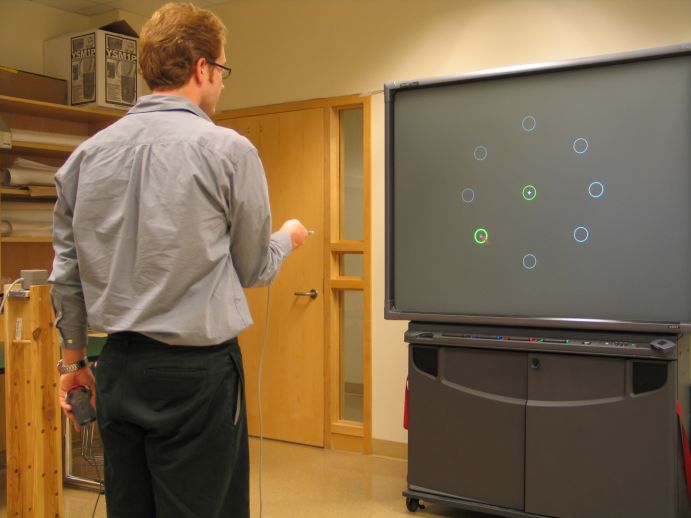
across a variety of input devices. We were interested in          Kantowitz, Triggs, and Barnes also found that visual arrows
characterizing these performance differences and what they        can influence directional compatibility [15].
could mean for GUI design.
                                                                  S-R compatibility is especially important in GUI design
We present a controlled evaluation of four different arrow        because the mapping of visual stimulus to motor response is
cursor orientations (toward the upper-left, upper-right,          central to “direct manipulation” metaphors for interaction.
lower-left, and lower-right of a display), and one                Experimental evidence suggests that the effects of S-R
orientation-neutral cursor (a circle) in a menu selection task    compatibility can never be fully “trained away,” meaning
across three different kinds of input devices: mice for           that even expert GUI users still benefit from compatible
desktop interaction, pointers for freehand interaction with       mappings between visual stimulus and motor response [29].
large screens (i.e. wand or laser pointer interaction [21]),      Other evidence suggests that it is difficult to judge what the
and pens for interaction with smaller displays. We begin by       most compatible S-R configurations will be among several
reviewing existing work related to cursor orientations in the     possible design alternatives, so it could be easy for
HCI and psychological literature, followed by a description       designers to make mistakes about what mappings constitute
of our hypotheses, experimental methodology and results.          the most S-R compatible configuration in a user interface
We discuss the implications of our results for user interface     [27, 29].
design and suggest some guidelines for the use of graphical
                                                                  Very little work has been done to assess the impact of
cursors with different kinds of input devices on various
                                                                  varying cursor orientations, although an experiment by
displays.
                                                                  Phillips, Meehan, and Triggs has directly evaluated the
                                                                  impact of cursor orientation on mouse positioning
BACKGROUND AND RELATED WORK
                                                                  movements for desktop displays [22]. They found that the
Different cursor orientations may affect user performance
because of stimulus-response (S-R) compatibility, a               directional cues provided by a mouse cursor could induce
phenomenon that has been widely studied in cognitive              performance differences. However, they found that arrow
psychology and ergonomics [1, 9, 15, 17, 30]. With respect        cursors compatible with the direction of motion led to
to visual user interfaces, S-R compatibility can be defined       slower movements and less efficient cursor trajectories,
as the degree to which the mapping between the position           which is an interesting result because it is at odds with the
and orientation of a visual stimulus (such as the arrow           previous experimental literature.
direction on a cursor) matches that of the motor movement         The evaluation we present here is related to Phillips,
(such as the location of a target and intended direction of       Meehan, and Triggs’s work, but our goals are substantially
cursor movement). Compatible mappings are believed to             different and our approach differs from theirs in many key
facilitate performance while incompatible mappings are            respects. In addition to examining pointing conditions not
believed to interfere with performance.                           reported in their work, we studied compatibility effects with
In HCI, John and Newell have used a GOMS theory of S-R            input devices other than mice. These differences are fully
compatibility to model cognitive user performance in              described in the sections that follow.
recalling computer command abbreviations [14]. Their
                                                                  Mice, Pointers, and Pens
subsequent work extended this S-R compatibility model to
                                                                  Mice are the predominant pointing devices for conventional
the domain of expert transcription typing [13]. S-R
                                                                  desktop GUIs. Their performance characteristics have been
compatibility is also acknowledged as a factor influencing
                                                                  studied extensively in HCI [3, 19, 20]. However, as large
user stress and cognitive load [26].
                                                                  screens and handheld devices become more common,
There is substantial empirical evidence that directional cues     understanding other pointing devices such as pointers and
can influence S-R compatibility. Broadbent and Gregory            pens is becoming more important.
found that when participants were asked to respond to a left
                                                                  Comparing the performance of other input devices to mice
or right visual stimulus by pressing a left or right key, left
                                                                  has been the subject of several studies. Card, Mackinlay,
responses were faster to left stimuli than to right stimuli
                                                                  and Robertson have proposed a unified framework for
while right responses were faster to right stimuli than to left
                                                                  designing and analyzing different input devices [4]. Sears
stimuli [1]. Several experiments by Worringham and
                                                                  and Shneiderman have suggested design strategies for using
Beringer have found that physical controls with implicit
                                                                  touchscreens instead of mice [25]. Myers et al. compared
directional cues, such as levers, joysticks, and rotary knobs,
                                                                  relative performance differences between several input
have effects on responses toward particular directions [30,
                                                                  devices, including laser pointers, touchscreens, handhelds,
31]. A subsequent experiment by Chua, Weeks, Ricker,
                                                                  and mice [20]. Po, Fisher, and Booth conducted a
and Poon found similar effects and demonstrated that
                                                                  comparative study of mouse and touchscreen performance
spatial compatibility could be affected by global spatial
                                                                  across the upper and lower visual fields of users [23].
relationships, such as participant orientation [7].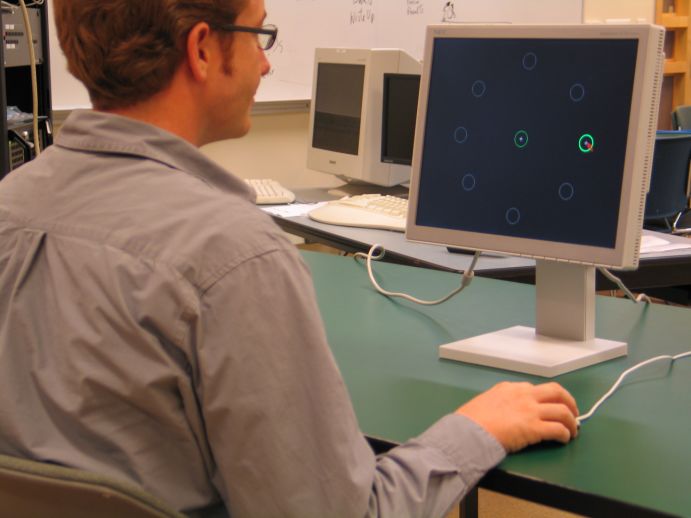
Figure 2. The three input devices compared in our controlled evaluation. From the left: (a) mouse on a desktop, (b)
pointer on a large screen, and (c) pen on a Tablet PC.
In our current study, we chose to evaluate cursor orientation    investigated the validity of three specific experimental
effects as they relate to three different kinds of input         hypotheses:
devices: mice, pointers, and pens. Although it is well
                                                                 1.   Graphical cursors indicating direction will show
established that each of these input devices has different
                                                                      performance differences consistent with those
performance characteristics, little work has been done in
                                                                      predicted by theories of S-R compatibility, regardless
HCI to compare the impact of S-R compatibility across
                                                                      of input method. Specifically, pointing movements
different input devices. There is evidence to suggest that
                                                                      with directional cursors aligned with specific axes of
the compatibility of a particular S-R mapping can be
                                                                      movement should yield improved movement times and
influenced by hand posture and orientation, which could be
                                                                      positioning performance. When directional cursors are
important in comparing interaction performance across
                                                                      not aligned with the direction of movement, user
different input devices because mice, pointers, and pens are
                                                                      performance will be negatively affected.
each held in substantially different ways [6, 17].
                                                                 2.   Orientation-neutral cursors will yield the best
For the purposes of this study, we define a pointer to be an
                                                                      performance overall, regardless of input method.
ungrounded (but not necessarily wireless) input device that
                                                                      While these cursors should not confer any advantages
allows users to directly point at a display from a distance
                                                                      for movement toward any particular directions, they
(see Figure 2b). The tip of the pointer casts a straight-line
                                                                      also should not suffer from any performance penalties
ray (like a laser pointer would) onto the display and the
                                                                      associated with incompatible mappings.            When
intersection of this ray with the display is where the user is
                                                                      performance is considered across a variety of
pointing and where a visual cursor is rendered. In
                                                                      movement directions, averaged performance should be
immersive virtual environments, such pointers are often
                                                                      better relative to cursors that cue for movement in one
implemented with a 3D tracking wand or stylus [12]. With
                                                                      specific direction.
recent interest in camera-tracked laser pointer interaction,
pointer input is making its way into mainstream interaction      3.   The degree to which varying cursor orientations will
as an alternative for interaction with shared displays and            affect movement and positioning performance is
other large screen environments [16, 20, 28].                         dependent on the input method. This is partially
                                                                      because different hand postures are believed to affect
The wider availability of tablet displays and handheld
                                                                      S-R compatibility but also because different input
devices has made pen input an important area of study.
                                                                      devices are known to have unique performance
Citrin et al. have investigated the potentials and limitations
                                                                      characteristics. Based on previous work, we predict
of pen-based input for personal workstations [8]. Two
                                                                      that pointer input will yield the largest effects, mouse
experiments by Ren and Moriya have characterized the
                                                                      input will yield intermediate effects, and pen input will
relationship between pen-based input and item selection
                                                                      yield the smallest effects from cursors of different
[24]. Another study by Hancock and Booth has looked at
                                                                      orientations.
pen-based menu selection across horizontally- and
vertically-oriented displays [11].
                                                                 METHODS
                                                                 To test our hypotheses, we conducted a controlled user
HYPOTHESES
                                                                 study consisting of a circular menu selection task with
Based on previous experimental work, it appears plausible
                                                                 different cursor orientations and input devices. The circular
that graphical elements with implicit directional cues could
                                                                 menu task shares similarities to a menu evaluation task
affect the S-R compatibility of user input. This suggests
                                                                 conducted by Callahan, Hopkins, Weiser, and Shneiderman
that the directional (oriented) cursors used in many GUIs
                                                                 [2]. The task also resembles several previous experiments
could have a substantial effect on user movement and
                                                                 that examined various aspects of S-R compatibility in
positioning within a display. In our current study, we
                                                                 cognitive psychology [5, 6, 10, 17].
We used a fully counterbalanced, completely within-
subjects experimental design. Subjects were instructed to
complete three blocks of 120 menu selection trials. Each
block used a different input device to complete a set of
trials. Figure 3 presents a visual description of a typical
trial. The order in which blocks were presented to subjects
was fully counterbalanced. Within each block, trials were
fully randomized in a manner consistent with other
experiments of this kind, meaning that every block of trials
had a unique order of presentation and that every ordering
was visibly different from all other orderings given to all
subjects.
Subjects
Twelve subjects participated in the study. Three were male
and nine were female. Their ages ranged from 18 to 34
years. To minimize experimental bias due to handedness,
we ensured that all of our subjects were right-handed via
self-report. We also ensured that all subjects had normal or
corrected-to-normal vision via self-report.
Apparatus
Figure 2 presents the apparatus used in the study. Each
block of experimental trials used a different input and
display device for menu item selection. A PC workstation
was used to render trials in the mouse and pointer trial
blocks. A Compaq TC1000 Tablet PC was used to render
trials in the pen block. Both machines ran platform-
appropriate versions of Microsoft Windows XP and used
the native mouse pointing drivers provided by the operating
system. Movement times were collected using platform-
native calls to a high-resolution system timer with a
sampling resolution of approximately 1 ms. In all
conditions, a constant level of room illumination was
maintained.
In the mouse condition, a 17” LCD flat panel display with a
resolution of 1024x768 pixels was used (Figure 2a). A
Logitech optical mouse was used as the input device.
Mouse gain was set to a hand-display movement ratio of
1:1 so that the mouse moved the same distance in hand
space as it did in display space. This was done intentionally
to allow for a fair comparison of compatibility effects
across the different input devices tested.
In the pointer condition, a 66” rear-projection SMART
Board 3000i with a resolution of 1024x768 pixels was used
Figure 3. A typical trial in our controlled user study.
(Figure 2b). The SMART Board was only used as a
The dashed arrows indicate direction of movement and
display; its touch functionality was not used in this
were not actually present on the display. Subjects
experiment. The 3D pointer of an electromagnetic
started a trial by selecting a circle located at the center
Polhemus Fastrak was held in the right hand of subjects
of the display using the orientation-neutral circle cursor.
while a push-button mouse was held in their left hand. The
The cursor would change to one of the five cursor
Fastrak transmitter and 3D pointer were set up in a space
representations and one of the eight circular menu
free of metallic interference and the 3D pointer was
positions would change color, indicating where subjects
calibrated and registered before each experiment session.
were expected to point. Subjects were instructed to
select the center of the highlighted item and to In the pen condition, a Compaq TC1000 Tablet PC with a
emphasize speed and accuracy equally. resolution of 1024x768 pixels was used (Figure 2c). The
Tablet PC was configured to operate in landscape (wide)format and the display was inclined at an angle of 45 Mouse Condition
degrees. The Tablet PC pen used for input was calibrated In the block of mouse input trials, subjects were provided
before each experiment session. with a Logitech optical Wheel Mouse. The mouse was
placed on the desktop directly in front of subjects. Subjects
Procedure pointed at onscreen items by moving the presented visual
Each subject participated in a single session lasting forty cursor to graphical elements and then left-clicking the
minutes. During a session, an experimenter was present at mouse.
all times. In the mouse condition, subjects were seated at a
distance of 50 cm from the LCD display. In the pointer Pointer Condition
condition, subjects stood upright at a distance of 200 cm In the block of pointer trials, subjects were instructed to
from the SMART Board display. In the pen condition, hold a Polhemus Fastrak 3D pointer in their right hand
subjects were seated at a distance of 30 cm from the Tablet while holding a push button mouse in their left hand.
PC. Trials in each block consisted of a single pointing Subjects pointed at onscreen items by aiming the 3D
movement from the center of a display to one of eight pointer directly at graphical elements and clicking a button
equally distant menu positions with one of five different on the mouse held in their left hand. This two-handed
cursor representations: arrows pointing to the upper-left, pointer-and-mouse approach allowed us to capture subject
upper-right, lower-left, and lower-right of a display, or an data without the errors associated with the “pen-drop”
orientation-neutral circle (Figure 3). The arrow cursors phenomenon common to pointer interaction [20].
used in this experiment were oriented at 45-degree angles
(Figure 1). Subjects were given five-minute breaks Pen Condition
between successive blocks of trials. In the block of pen input trials, subjects were provided with
a tablet-sensitive pen for interaction with the Tablet PC.
All of the visual elements in this study were rendered to Although the Tablet PC was situated on a table, subjects
subtend the same visual angle across each of the different were asked to hold the Tablet PC with their left hand for
display and subject viewing distances. All cursors, extra stability. The pen was held in the right hand and
including the circle cursor, subtended a visual angle of subjects pointed at onscreen items by directly tapping at
approximately two degrees in all display configurations. graphical elements to indicate selection.
Target menu items were eight circles, four degrees of visual
angle in size and ten degrees distant from the center of the Training
display. These targets were equally spaced in a circular Every subject received a minimum of twenty practice trials
fashion around the center of the display to form a circular prior to each block of experimental trials. Practice trials
menu. Each combination of trial parameters was repeated consisted of trials presented in the same fashion as
three times, yielding a total of 5 cursor orientations × 8 experimental trials, with randomized cursor orientations
menu positions × 3 input devices × 3 repetitions = 360 and items for selection. Practice trials were presented until
trials per subject. Each trial block consisted of the both subject and experimenter were satisfied with the
complete set of 120 trials using one input device. subject’s ability to complete the task as instructed.
All visual elements were rendered against a black RESULTS
background. Individual trials within blocks were initiated To determine whether quantitative evidence supported our
by having subjects point and select a four-degree circular experimental hypotheses, we looked at primary measures of
item at the center of a given display using the orientation- total movement time and movement precision. Total
neutral circle cursor. This cursor was used to begin all movement time was defined as the period of time from trial
trials because we wanted to avoid any possible interference initiation to the point at which a highlighted item was
between arrow cursors used to initiate trials and the cursors selected, measured in milliseconds (ms). Movement
used for the pointing movement within a trial. Once the precision was measured in two ways. First, a standard root-
center circle was selected, one of the eight surrounding mean-square (RMS) index from the center of each menu
menu items would be highlighted, indicating where subjects position was calculated for each pointing movement made
were expected to point. The orientation-neutral cursor in a trial. Second, effective target width was calculated for
would either change into one of the four arrow cursors or each menu position and cursor orientation using the
remain the same (for trials with an orientation-neutral standard deviation method, which is often computed when
cursor). Subjects were instructed to point at the center of analyzing 2D movement performance using Fitts Law [18].
highlighted items and to emphasize speed and accuracy
equally. The display would reset to the beginning of a new We used a factorial analysis of variance with repeated
trial upon completion of the pointing movement and item measures (ANOVA-RM) over three independent factors of
selection. input device, menu position, and cursor type to analyze
movement time, RMS index, and effective target width.
We conducted an assessment of sphericity for the ANOVA
by applying Mauchly’s test and by visually observingFigure 4. Bar graphs of movement time averaged across the eight menu positions tested in our evaluation. Each bar
graph represents the movement times for one input device and each graph is broken down into movement times for
each of the cursor types tested. Error bars represent standard errors of the mean. We found that the orientation-
neutral circle cursor provided the best overall performance while the cursor oriented toward the lower-right was
worst overall across all devices. The relative performance differences between cursor types were seen to differ across
input devices. Pointer input showed the largest differences while mice and pen input had relatively smaller effects.
collected data. Based on these, we decided it would be effect size difference between compatible mappings and
prudent to be conservative in our analysis, so we applied a “expected” movement performance. In all of the
Greenhouse-Geisser correction to all of the relevant compatible situations, movement times yielded consistent
statistical analyses. average improvements of approximately 35 ms for mouse
input (about 3.3% faster than average), 65 ms for pointer
If cursor orientation had an impact on movement
input (about 5.5% faster), and 17 ms for pen input (about
performance, this would be observed in the ANOVA as
1.5% faster).
statistically significant (p ≤ .05) two-way interaction effects
between menu position and cursor orientation for all three The same comparison was done to measure the effect size
dependent measures. To assess the overall performance of differences between incompatible mappings (i.e. when an
different cursors along all directions of movement, which is upper-left cursor was used to point at the menu item in the
important when considering general visual feedback lower-right direction and so on). In these incompatible
solutions for GUI design, we looked for a corresponding situations, movement times again yielded consistent, but
main effect for cursor type and we also calculated averaged relatively smaller, performance penalties. With the
movement times, RMS indices, and effective target widths incompatible mappings, mouse input was observed to be
across all eight menu positions. These averaged movement about 18 ms slower (1.7% slower), pointer input was 43 ms
times were subjected to an additional two-way ANOVA slower (3.7% slower), and pen input was about 9 ms slower
across input device and cursor type. (0.8% slower) on average.
The ANOVA also revealed a secondary main effect of
Movement Time
Our primary repeated measures ANOVA found a cursor type, which suggests that simply varying the cursor
statistically significant two-way interaction between menu that was used for movement was enough to cause some
position and cursor type [F(2.46, 27.11) = 3.88, p = .033]. change in movement time performance [F(2.28, 25.07) =
This suggests that particular cursor orientations do have an 5.55, p = .008]. No other main effects were observed for
impact on movement time performance toward particular either input device [F(1.71, 18.81) = 2.10, p = .155] or
directions of movement. A corresponding two-way menu position [F(3.06, 33.67) = 2.54, p = .072].
interaction between input device and cursor type was also Figure 4 presents bar graphs of averaged movement time
statistically significant [F(2.75, 30.26) = 3.58, p = .028]. across all tested movement directions, broken down by
This supports our hypothesis that the impact of different cursor orientation for each input device. Our accompanying
cursor types on movement time can differ across input two-way ANOVA for input device and cursor type for these
devices. averaged times yielded an interaction effect between both
We compared performance for those trial situations where independent factors [F(2.75, 30.26) = 3.58, p = .028]. This
cursor type and menu position were compatible (i.e. an indicated that some cursor types performed better than
upper-left cursor was used to point at the menu item in the others overall and the degree to which these cursors
upper-left direction and so on) against the averaged differed also depended on input type. The orientation-
movement time for that particular menu position, regardless neutral cursor we tested had the best averaged performance
of cursor type. This comparison was done to measure the for all input devices. The cursor oriented toward the lower
right of the display had the worst averaged performanceoverall for all input devices. This difference was most target size was nearly eight times smaller. Because subjects
apparent with pointer input, where movement times differed were instructed to emphasize speed and accuracy equally
by 157 ms between the orientation-neutral cursor and the and no speed-accuracy tradeoff was observed in the subject
lower-right cursor. These differences were smaller with movement data, it is possible that subjects had more
mouse and pen input, which demonstrated movement time difficulty maintaining precise movement with a freehand
differences of 59 ms and 27 ms respectively. pointer.
The orientation-neutral cursor consistently outperformed The primary repeated measures ANOVA also found a
the upper-left arrow cursor that represents the orientation corresponding significant main effect for cursor type on
used in many popular GUI systems. The differences measured RMS and effective target width [F(2.59, 28.44) =
between performance with the upper-left cursor and 3.18, p = .045 for both measures]. Since no other
orientation-neutral cursor was again most apparent with statistically significant interactions or main effects were
pointer input, where movement times differed by 127 ms. observed, we were unable to find any potential S-R
With mouse input, movement times differed between these compatibility effects for positioning and particular
two cursors by approximately 37 ms. Pen input movement mappings of cursor type and movement direction.
times differed by 17 ms. These differences appear to However, the main effect of cursor type indicates that
constitute noticeable improvements in movement time choice of cursor representation could at least have a small
performance, suggesting that there may be practical impact on movement precision.
situations where a neutral-orientation cursor would be
The effect size of cursor type on movement precision is
beneficial over the standard upper-left cursor usually
comparatively smaller than the differences across input
employed.
devices. Effective target widths were computed to be
As a final analysis of movement time, we averaged subject somewhat larger in visual angle when using the orientation-
trials across all eight tested menu positions and all five neutral circle cursor and upper-right arrow cursor.
cursor orientations. This was done to give us another However, these improvements were relatively small,
perspective on the performance differences between mouse, yielding effective width increases of only 0.3 degrees for
pointer, and pen input independent of S-R compatibility the orientation-neutral cursor and 0.15 degrees for the
effects. We performed a one-way ANOVA across all three upper-right arrow cursor. All of the other cursor
input devices and found that movement time performance representations yielded size differences of less than 0.1
was significantly different between mice, pointers, and pens degrees, which could conceivably be considered not to be
[F(1.68, 18.50) = 62.98, p < .001]. Average mouse large enough to be practical or meaningful. We found
movement times were 1075 ms in duration, pointer similar results with the calculated RMS indices for
movement times were 1193 ms, and pen movement times movement precision, which yielded very small, but
were 1081 ms. Thus, we found that the pointer was the consistent differences in favor of the orientation-neutral
most difficult to use, while mice and pen input were circle cursor compared to all of the other cursor
relatively similar in performance. These are findings that representations.
are consistent with previous research reported in the HCI
literature. Cursor Preferences
Several study participants reported at the end of their
Movement Precision sessions a subjective preference for the orientation-neutral
With respect to movement precision, our primary repeated circle cursor compared to all of the others tested, although
measures ANOVA determined that there was a statistically none of them could give a good clear explanation as to why
significant main effect for input device on measured RMS this was the case. Most of these subjects claimed that the
and effective target width, consistent with findings from orientation-neutral cursor felt “easier” to use, and some
other research that has compared the relative performance were surprised that this particular cursor was not more
differences between input devices [F(1.20, 13.16) = common in desktop GUI environments. This particular
1841.00, p < .001 for both measures since effective target preference is well supported by the empirical data we
width is derived from RMS]. Both mouse and pen collected during the study.
interaction were observed to have roughly comparable
movement precision performance, but pointer input was DISCUSSION
substantially worse. This could be attributed to the fact that Our results have demonstrated that S-R compatibility is
both mouse and pen interaction took place on stable influenced by choice of cursor representation and that these
surfaces, while pen input was susceptible to movement compatibility effects can have a substantial impact on user
effects such as hand jitter. performance when interacting with GUIs using various
input and display configurations.
When compared to the actual target widths of
approximately four degrees of visual angle in size, effective We had considered an alternative experimental design that
target widths remained roughly the same for mouse and pen blocked trials by cursor orientation instead of input device,
interaction. However, for pointer interaction, the effective which would have yielded five blocks of trials instead ofthree (one block for each cursor). Such a design would representation, hand posture, and user orientation, is an
have minimized the possibility of “contextual interference” incremental step along the way toward understanding the
effects as cited in the literature [32]. We decided against elements that constitute effective GUI designs.
this design because we believed it would be too demanding
Based on our findings, we present the following guidelines
on subjects to move between different input devices across
for effective use of visual elements and cursors in GUIs
trials within a block. As our results demonstrate, our
with respect to maintaining S-R compatibility:
chosen blocking scheme did not appear to influence subject
performance. 1. Where appropriate, consider the use of orientation-
neutral visual cursors and be careful with the use of
The fact that a circular cursor was always used to initiate
visual cursors that include directional cues.
trials and that no cursor change occurred during orientation-
neutral trials might explain why the circular cursor was By using a cursor representation free of directional bias,
observed to have superior performance. However, this also pointing performance could be made more consistent. Our
suggests that cursor changes would interfere with trials results show that such cursors are likely to improve average
where cursors were compatible with movement direction. movement time performance. This could be most useful in
Despite the change in cursor representation in these trials, GUIs that employ layouts where interactive elements are
our results indicate that movement performance in these located all over the display. It seems reasonable for
specific instances still yielded an advantage relative to designers to carefully consider the relative benefits of
postulated incompatible cursors. Thus, there is little assuming the use of a directional cursor for general
evidence that a cursor change in directional cursor trials interaction when evidence exists that orientation-neutral
was a major confound. cursors might better facilitate user performance.
Our experimental design differs substantially from the 2. In situations where many interactive elements might be
protocol used in the Phillips, Meehan and Triggs study, clustered in one particular area of a display (i.e.
although our study could be considered to be an extension palettes or toolbars), choosing a cursor tailored to the
of their work [22]. Their study focused on determining the direction of movement could be helpful.
presence or absence of S-R compatibility effects with
Our user study found that cursor orientations compatible
different cursor orientations. We were more interested in
with the direction of movement facilitated movement
characterizing possible compatibility effects for various
performance. Thus, in situations where many interactive
GUI scenarios, including large screen and handheld
elements might be clustered in one particular area of the
displays, and in comparing their relative impact. We were
also interested in developing practical guidelines that could display (i.e. a palette or toolbar), choosing a cursor tailored
be helpful for GUI designers. Thus, pointing movements to one specific direction might aid users who will be
pointing along a particular direction of movement quite
were restricted to a single dimension in their experiment
frequently. This could be especially relevant for systems
while our study considered 2D (bivariate) pointing
where movement time is a critical factor.
movements. They focused exclusively on mouse
positioning while we considered a wider variety of input 3. Where movement precision and positioning is
devices (mice, pointers, and pens). In addition, their important, consider using an input device that rests on
experiment only considered three cursor orientations a stable surface or use a touch-based input method,
(upper-left, upper-right, and a crosshair cursor) while we such as pen input.
tested two other orientations (lower-left and lower-right)
and a different orientation-neutral cursor (a circle instead of From our user study, we found that ungrounded pointer
a crosshair). input was relatively more difficult to use compared to
mouse or pen input, which is a result often reported in the
The differences in their results and the ones observed in our literature. Pen input showed the least susceptibility to S-R
study could be due to the implicit differences in compatibility effects from different cursor representations,
experimental designs. It is possible that SR-compatibility which could be important under certain circumstances. In
manifests itself differently in 1D versus 2D pointing tasks, some cases, it may be impossible to use other methods of
or that differences in studied cursor representations were input or it may be preferable to use a pointer (i.e. in a
important. It is also conceivable that button pressing, as classroom or shared display setting), in which case it is
done in our study but not in theirs, could have altered the important to ensure that GUI elements provide the most S-
experimental task enough to influence compatibility effects. R compatible situation possible to users.
S-R compatibility and the kinds of visual cues that affect 4. Do not assume that it is easy to design a user interface
movement responses are important for existing systems and that has S-R compatible mappings and be aware of
will increase in importance as designers create new visual elements that could inadvertently affect
graphical interface designs and input devices with unique compatibility mappings.
form factors. Being aware that many elements can
influence S-R compatibility, including cursor Although this particular guideline was not explicitly tested
in our user study, we have already noted that there isevidence indicating how difficult it is for people to judge performance for each unique user. It may also be possible
the S-R compatibility of a design [27, 29]. Our user study to incorporate a dynamic, predictive cursor based on the
and results should demonstrate to designers that they need current direction of movement so that appropriate
to be willing to look beyond their own intuition when directional cues are always given to users at all times during
building a good user interface. Even a visual element that interaction. Though such a scheme for pointing cursors has
is as familiar and simple as a pointing cursor can have a yet to be developed and extensively studied, such dynamic
perceivable impact on how well an interface actually works. cursors are already commonplace to indicate changes in
system state. A practical implementation would have to
The user study and results presented here merit future study
overcome problems such as predicting changes in
and additional research. Although we did not find any
movement direction and achieving a sufficiently high
specific S-R compatibility effects for movement precision,
update rate to be useful. Based on the data collected in this
it remains unclear whether different directional cursors can
experiment, a “perfectly dynamic” cursor could
influence movement precision. Future experiments will
theoretically improve pointing performance by as much as
look at this particular aspect of S-R compatibility more
five percent, although choice of input device, effective
carefully. In addition, because we believed it was
index of difficulty, and other considerations like attentional
important to minimize bias due to handedness, we chose to
focus could influence this performance gain in practice.
use a subject pool consisting only of right-handed
participants. It would be interesting to see if any S-R
CONCLUSION
compatibility effects are “mirrored” in an opposite fashion We conducted a controlled evaluation of different cursor
with left-handed users. These kinds of effects are
orientations to look for possible stimulus-response
especially important since there is relatively less research
compatibility effects on movement performance. Our
on left-handed users and there appears to be interest in results indicate that cursors cued for movement in specific
looking at how the individual differences between users can directions can influence performance and that orientation-
influence performance. neutral cursors may be preferable in situations where
Another study could consider evaluating different kinds of avoidance of directional bias is preferred. Choice of
orientation-neutral cursor representations. In this study, we appropriate cursor representations could be especially
chose a circle representation, but crosshairs are frequently important for input devices that are more difficult to use,
considered to be equally “neutral.” It would be valuable to such as freehand pointers.
know if all supposedly orientation-neutral cursors yielded
the same user pointing performance, or if other implicit ACKNOWLEDGMENTS
visual cues in these cursors could influence the S-R This research was funded by the Natural Sciences and
compatibility of user input. Engineering Research Council of Canada (NSERC). We
thank the reviewers for their comments and suggestions,
The circular cursor used in this study had no visible hotspot which have been valuable in the revision of this paper.
though subjects in our study appeared to understand that it
was located at the center of the circle. In practice, REFERENCES
designers might consider augmenting circular cursors with 1. Broadbent, D. E., and Gregory, M. Donders’ b- and c-
a dot in the center to visibly indicate the location of the reactions and S-R compatibility. Journal of
hotspot. Cursor size was not studied in the current Experimental Psychology 63, APA (1962), 575-578.
experiment, though future work could investigate the
impact of overall cursor size on SR-compatibility effects 2. Callahan, J., Hopkins, D., Weiser, M., and Shneiderman,
and direction of movement. B. An empirical comparison of pie vs. linear menus.
Proc. CHI 1988, ACM Press (1988), 95-100.
With respect to pen input, we saw that S-R compatibility
3. Card, S. K., English, W. K., and Burr, B. J. Evaluation
effects were less pronounced compared to the other
of mouse, rate-controlled isometric joystick, step keys,
evaluated input methods. One possible explanation for this
and text keys for text selection on a CRT. Ergonomics
could be that while devices such as the Tablet PC provide
21, Taylor & Francis (1978), 601-613.
visual cursors, the seen hand provides more compelling
visual (and proprioceptive) cues than the cursor does. A 4. Card, S. K., Mackinlay, J. D., and Robertson, G. G. The
future experiment could look specifically at pen input and design space of input devices. Multimedia Interface
the S-R compatibility implications of using different kinds Design, ACM Press (1992), 217-232.
of cursor representations versus no cursor feedback at all. 5. Cho, Y. S., and Proctor, R. W. Effect of an initiating
Our results also open up the possibility of some interesting action on the up-right/down-left advantage for vertically
modifications to existing forms of visual feedback for arrayed stimuli and horizontally arrayed responses.
pointing interactions in GUIs. In the future, GUIs may also Journal of Experimental Psychology: HPP 27(2), APA
be able to take into account the S-R compatibility (2002), 472-484.
characteristics for individual users, adaptively tailoring 6. Cho, Y. S., and Proctor, R. W. Influences of hand
cursor representations and other visual elements to facilitate posture and hand position on compatibility effects forup-down stimuli mapped to left-right responses: 20. Myers, B. A., Bhatnagar, R., Nichols, J., Peck, C. H.,
Evidence for a hand referent hypothesis. Perception Kong, D., Miller, R., and Long, A. C. Interacting at a
and Psychophysics 64(8), Psychonomic Society (2002), distance: Measuring the effects of laser pointers and
1301-1315. other devices. Proc. CHI 2002, ACM Press (2002), 33-
7. Chua, R., Weeks, D. J., Ricker, K. L., and Poon, P. 40.
Influence of operator orientation on relative 21. Olsen, D. R., and Nielsen, T. Laser pointer interaction.
organizational mapping and spatial compatibility. Proc. CHI 2001, ACM Press (2001), 17-22.
Ergonomics 44(8), Taylor & Francis (2001), 751-765. 22. Phillips, J. G., Meehan, J. W., and Triggs, T. J. Effects
8. Citrin, W., Halbert, D., Hewitt, C., Meyrowitz, N., and of cursor orientation and required precision on
Shneiderman, B. Potentials and limitations of pen-based positioning movements on computer screens.
computers. Proc. CSC 1993, ACM Press (1993), 536- International Journal of HCI 15(3), Lawrence Erlbaum
539. (2003), 379-389.
9. Fitts, P. M., and Seeger, C. M. S-R compatibility: 23. Po, B. A., Fisher, B. D., and Booth, K. S. Mouse and
Spatial characteristics of stimulus and response codes. touchscreen selection in the upper and lower visual
Journal of Experimental Psychology 46, APA (1954), fields. Proc. CHI 2004, ACM Press (2004), 359-366.
pp. 199-210. 24. Ren, X. and Moriya, S. Improving selection
10. Friesen, C., Ristic, J., and Kingstone, A. Attentional performance on pen-based systems: A study of pen-
effects of counterpredictive gaze and arrow cues. based interaction for selection tasks. ACM TOCHI 7(3),
Journal of Experimental Psychology: HPP 30(2), APA (2000), 384-416.
(2004), 319-329. 25. Sears, A. and Shneiderman, B. High precision
11. Hancock, M. S., and Booth, K. S. Improving menu touchscreens: Design strategies and comparisons with a
placement strategies for pen input. Proceedings of mouse. International Journal of Man-Machine Studies
Graphics Interface, 2004, pp. 221-230. 34(4), (1991), 593-613.
12. Hinckley, K., Pausch, R., Goble, J. C., and Kassell, N. 26. Shneiderman, B. Designing the User Interface:
F. A survey of design issues in spatial input. Proc. Strategies for Effective Human-Computer Interaction,
UIST 1994, ACM Press (1994), 213-222. Boston: Addison-Wesley (1992).
13. John, B. E., and Newell, A. Cumulating the science of 27. Tlauka, M. Display-control compatibility: The
HCI: From S-R compatibility to transcription typing. relationship between performance and judgments of
Proc. CHI 1989, ACM Press (1989), 109-114. performance. Ergonomics 47(3), Taylor & Francis
14. John, B. E., Rosenbloom, P. S., and Newell, A. A (2004), 281-295.
theory of stimulus-response compatibility applied to 28. Vogt, F., Wong, J., Po, B. A., Argue, R., Fels, S. S., and
human-computer interaction. Proc. CHI 1985, ACM Booth, K. S. Exploring collaboration with group pointer
Press (1985), 213-219. interaction. Proc. Computer Graphics International,
15. Kantowitz, B.H., Triggs, T. J., and Barnes, V. Stimulus- (2004), 636-639.
response compatibility and human factors. In R.W. 29. Vu, K-P. L., and Proctor, R. W. Naïve and experienced
Proctor and T. Reeves (Eds.), Stimulus-Response judgments of stimulus-response compatibility:
Compatibility, Amsterdam: North Holland, 365-388. Implications for interface design. Ergonomics 46(1),
16. Kirstein, C. and Mueller, H. Interaction with a Taylor & Francis (2003), 169-187.
projection screen using a camera-tracked laser pointer. 30. Worringham, C. J., and Beringer, D. B. Directional
Proc. Multimedia Modeling, (1998), 191-192. stimulus-response compatibility: A test of three
17. Lippa, Y., and Adam, J. J. An explanation of alternative principles. Ergonomics 41(6), Taylor &
orthogonal S-R compatibility effects that vary with hand Francis (1998), 864-880.
or response position: The end-state comfort hypothesis. 31. Worringham, C. J., and Beringer, D. B. Operator
Perception and Psychophysics 63(1), Psychonomic orientation and compatibility in visual-motor task
Society (2001), 156-174. performance. Ergonomics 32(1), Taylor & Francis
18. MacKenzie, I. S. Fitts’ law as a research and design (1989), 387-399.
tool in human-computer interaction. Human-Computer 32. Wulf, G. and Lee, T. D. Contextual interference effects
Interaction 7, (1992), 91-139. in movements of the same class: Differential effects on
19. MacKenzie, I. S., Sellen, A., and Buxton, W. A program and parameter learning. Journal of Motor
comparison of input devices in elemental pointing and Behavior 25, (1993), 254-263.
dragging tasks. Proc. CHI 1991, ACM Press (1991),
161-166.You can also read


