Data Visualization for Oracle Business Intelligence 11g Oracle OpenWorld 2014 - Tim Vlamis Dan Vlamis Vlamis Software Solutions 816-781-2880 ...
←
→
Page content transcription
If your browser does not render page correctly, please read the page content below

Data Visualization for Oracle Business
           Intelligence 11g

       Oracle OpenWorld 2014

          Tim Vlamis
          Dan Vlamis
          Vlamis Software Solutions
          816-781-2880
          http://www.vlamis.com
          Session #UGF9227
Vlamis Software Solutions

            •   Vlamis Software founded in 1992 in Kansas City, Missouri
            •   Oracle Gold Partner, Oracle University Partner
            •   Developed more than 200 Oracle BI systems
            •   Specializes in ORACLE-based:
                  •   Business Intelligence
                  •   Data Warehousing
                  •   Data Mining and Predictive Analytics
                  •   Data Visualization
            •   Expert presenter at major Oracle conferences
            •   Authors of 2014 book “Data Visualization for Oracle BI 11g”
            •   Co-author of book “Oracle Essbase & Oracle OLAP”
            •   www.vlamis.com (blog, papers, newsletters, services)
            •   Beta tester for OBIEE 11g
            •   Conference chair for BIWA Summit 2014, 2015

Copyright © 2014, Vlamis Software Solutions, Inc.
Tim and Dan Vlamis

•   Tim (business analyst and academic guy)
•   25+ years in business modeling, valuation, and scenario analysis
•   Professional Certified Marketer (PCM) from AMA
•   Active Member of NICO (Northwestern Institute on Complex Systems)
•   Adjunct Professor of Business, Benedictine College
•   MBA Kellogg School of Management (Northwestern University)
•   BA Economics Yale University

•   Dan (OLAP expert and career IT guy)
•   25+ Years in business intelligence/executive information systems
•   Led development team at IRI
•   Founded Vlamis Software Solutions 20 years ago in 1993
•   Author, speaker, Oracle ACE
•   BS Computer Science Brown University

Presentation Agenda

            • Human cognition insights
            • OBIEE demo
            • Table design
                  • Best practices
                  • When and when not to use
            • Graph design
                  • Best practices
                  • Use cases for different graph types
            • Questions from audience at all times

Copyright © 2014, Vlamis Software Solutions, Inc.
Many BI Systems Can Create
 Many   BI  Systems
Beautiful Results
                     Can   Create
 Beautiful Results
OBI Operates
OBI Operates  at a   at a Different Scale
Different Scale

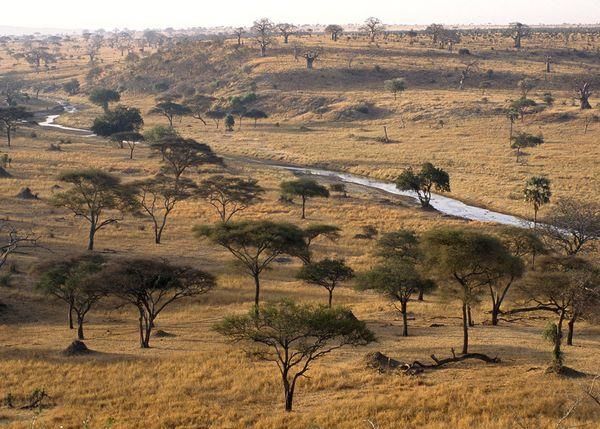
Ingredients Data Quality & Variety Copyright © 2014, Vlamis Software Solutions, Inc.
Technique Data Processing & Prep Copyright © 2014, Vlamis Software Solutions, Inc.
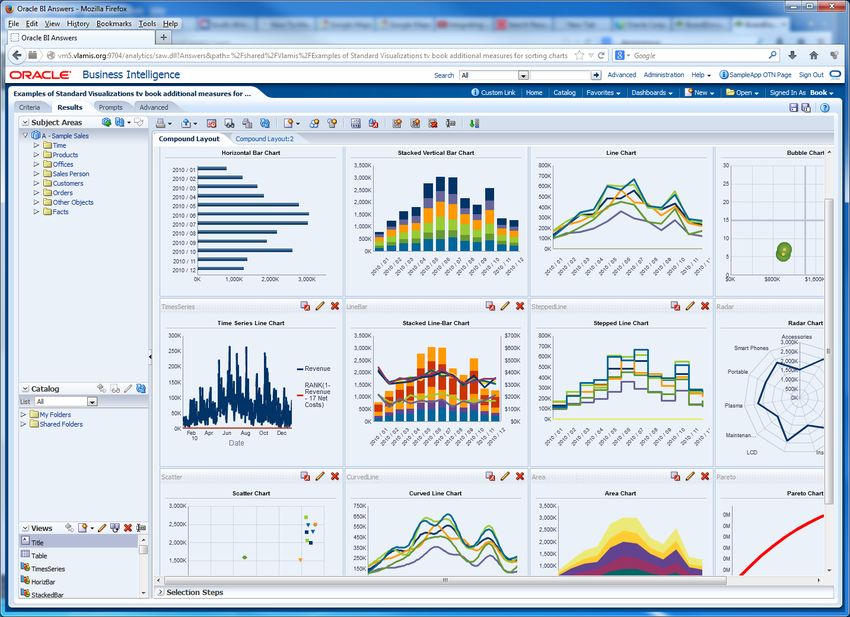
Presentation Data Visualization Copyright © 2014, Vlamis Software Solutions, Inc.

OBIEE Demo of Changes

Copyright © 2014, Vlamis Software Solutions, Inc.
Best Practice Focus

  • Best practices are objective guides to what is likely to
    work best.
  • Many times visualizations are seen as being “design”
    and subject to “taste”.
  • Visualizations should be guided by:
       • Human cognition
       • Accurate representations of data
       • Preferred message (consciously designed by visualization
         developer)

Copyright © 2014, Vlamis Software Solutions, Inc.
The Principles of Human Cognition Should Guide BI Dashboard Design Copyright © 2014, Vlamis Software Solutions, Inc.
Classic Optical Illusions

Copyright © 2014, Vlamis Software Solutions, Inc.
The Spirals are the Same Color

Copyright © 2010, Vlamis Software Solutions, Inc.
Graphs and Tables
   • Graphs and Charts depict visual representations and relationships

                                        New Product Market Penetration
                     100

                      80

                      60

                      40

                      20

                       0
                           0.1              6              12            18
                                                    Month Number

   • Tables show data organized for lookup of specific, precise values or
     items.

Copyright © 2014, Vlamis Software Solutions, Inc.
Tables
• Tables can present data from at drastically different
scales.
• Tables can present very different data types
simultaneously.
• Tables can repeat and include multiple sets of the
same data values.
• Tables are extraordinarily dense and include numerous
data relationships without direct distortion of the data
itself.
Copyright © 2014, Vlamis Software Solutions, Inc.Keys to Effective Tables
• Eliminate unnecessary gridlines
• Prefer smaller tables
• Organize with white space, grouping, and alignment
• Enable column and row sorting
• Avoid scrolling (if possible)
• Display significant figures
• Judiciously use conditional formatting
• Avoid putting text in color
• Left justify text cells and Right justify numerical cells
• Align the decimal point for numerical cells
• Write informative titles for tables and column head
descriptions
• Be transparent about data selection
• Enable roll overs for meta data for commonly used tables
Copyright © 2014, Vlamis Software Solutions, Inc.Keys to Effective Graphs • Do not use 3-D effects. • Avoid “stop light” color palette. • Prefer pastel color palettes. • Avoid bright colors. • Do not use round gauges or dials. • Eliminate gridlines, drop shadows, and other graphics. • Enable interaction for “exploration” graphs • Prioritize a single message for “explanation” graphs • Alignment, proximity, contrast. Copyright © 2014, Vlamis Software Solutions, Inc.
Bar Charts
                                   6

                                   5

                                   4

                                   3

                                   2

                                   1

                                   0
                                           Prod 1   Prod 2   Prod 3   Prod 4

                • Show nominal data values in comparison to one
                  another.
                • Start with zero.
                • If use a logarithmic scale, clearly notate.

Copyright © 2014, Vlamis Software Solutions, Inc.
Stacked Bar Chart
25
20
15
10
5
0
Prod A Prod B Prod C Prod D
• Somewhat confusing, not great for representing change.
• Total is most clearly represented number.
• Typically stack with largest values on the bottom.
• Single scale can make for interesting intra-bar
comparisons.
Copyright © 2014, Vlamis Software Solutions, Inc.Pie Charts
Prod A
Prod B
Prod C
Prod D
• Typically used for showing parts of whole by percentage.
• Not great for piece to piece comparisons.
• Limit number of pieces.
• Can be interesting to show lots of pies together if
significant differences exist.
• Stephen Few hates them.
• Do not use 3-D.
CLine Chart
6
5
4
3
2
1
0
Qtr 1 Qtr 2 Qtr 3 Qtr 4
• Show a pattern or progression over a continuous range or
period.
• Can be valued within a range to highlight a particular
pattern (careful!).
• Maintain a rectangular shape close to golden proportion.
Copyright © 2014, Vlamis Software Solutions, Inc.Scatter Plot
4
3
2
1
0
0 1 2 3
• Shows single data points at the intersection of two values.
• Often depict a large number of discrete data points
(hundreds or thousands).
• Useful comparisons of two variables.
• Trend lines are often added.
• Clearly notate if use logarithmic scale(s).
Copyright © 2014, Vlamis Software Solutions, Inc.Bubble Chart
4
3
2
1
0
0 1 2 3 4
• Special type of scatter plot.
• Size of bubble is related to a third variable.
• Color is related to a fourth variable.
• Reduces number of points that can be depicted.
• Best for depicting approximate values and comparisons.
Copyright © 2014, Vlamis Software Solutions, Inc.Dashboard Definition
A Dashboard is a visual presentation
of current summary information
needed to manage and guide an
organization or activity.
Copyright © 2014, Vlamis Software Solutions, Inc.BI Dashboards are Different
• No mechanical systems needed to move
indicators.
• Decisions are not typically made on a second-
to-second basis.
• BI dashboards are not primarily single situation
or single person devices.
Copyright © 2014, Vlamis Software Solutions, Inc.BI Dashboards
• Role-based.
• Data selection and filtering are extremely important.
• Dashboards support evidenced-based decision
making.
• Shared understanding of business situation is a key
benefit.
• Content may be individualized.
• Design should be standardized.
Copyright © 2014, Vlamis Software Solutions, Inc.OBIEE Dashboard Overview
• Designed with columns and sections (containers).
• Presentation server is often separate from BI server.
• Dashboards are web-based and are viewed with
browsers.
• HTML, XML, and Java coding skills are useful, but not
required.
Copyright © 2014, Vlamis Software Solutions, Inc.Dashboard Principles
• Promote user interactivity
• Prompts
• View and column selectors
• Hierarchical column drills
• Column sorts
• Guided navigation and action links
• Promote data transparency
• Prompts
• Filter views
• Narrative views
• Master detail linking
• Establish design guidelines for consistency
Copyright © 2014, Vlamis Software Solutions, Inc.Maps • Humans think spatially • Types of maps • Map best practices • Making meaningful maps • Built-in data sets • HERE (NAVTEQ) data sets and POI data • Sources for additional data sets
Why Maps are Powerful

Maps convey dense, multi-
dimensional relationships in data
faster and more intuitively than any
other graphical display methodology.

 Copyright © 2014, Vlamis Software Solutions, Inc.
When Are Map Views Useful?

       • Visualizing data related to geographic locations.
       • Showing or detecting spatial relationships and patterns.
       • Showing lots of data in a relatively small area.
       • Drilling down from a (map) overview to a detailed report,
         chart, or graph.
       • When is location important? Can the dimension be
         plotted on a map?

Copyright © 2014, Vlamis Software Solutions, Inc.
Map View Tips
• Think about what scale to use. Different map scales will
reveal different patterns and insights.
• Use Variable marker to display two measures on a map
at a point – size and color.
• Avoid overlapping shapes too much.
• Be aware of spatial distortions E.g. Texas is larger than
Connecticut.
• Look at color palette. www.colorbrewer2.org
Copyright © 2014, Vlamis Software Solutions, Inc.Map Definitions
• FEATURE
• Provide a spatial context: cities, highways, rivers, etc…
• Features of Interest: store location, postal boundaries, pipelines, etc…
• STYLE
• Define rendering properties for features
• Can control fill color, border color, line thickness, line style and more
• THEME
• Collection of features
• Typically associated with a spatial geometry layer
• County/state boundaries, major highways, etc…
• BASEMAP
• A grouping of themes to create a map
• Maps can share themes
• When associating a theme with a map, can specify min scale and max
scale (sometimes known as zoom control)
• MAP
• Basemap with additional themes overlain
Copyright © 2014, Vlamis Software Solutions, Inc.Map Interactivity in OBIEE 11g
• Display BI data on top of maps
• Color fill
• FOI point display
• Interact with other Dashboard Elements
• Drive map content with dashboard prompts
• Drive map content through drilling and navigation
• Drive other dashboard elements through map
interactions
• Reveal additional information on maps through
mouseovers
• Drill to map detail
Copyright © 2014, Vlamis Software Solutions, Inc.Map View Formats
• Color Fill (choropleth) • Variable Shape
• Percentile, Value, • Circle, Triangle, Diamond
Continuous binning • Customizable
• Dashboard user run-time • Image
slider
• Imported via MapViewer
• Graphs – Bar, Pie • More can be added from
• Adjustable graph size MapBuilder
• Series by second dimension • Custom Point Layer
• Bubble (variable sized) • Uses Lat / Long
• Min-Max size specification • Does not require a Layer Def
• Color specification
Copyright © 2014, Vlamis Software Solutions, Inc.Trellis Charts
• Trellis Layout of Smaller Charts in a grid with
Consistent Scales
• Great for finding structures / patterns in complex data
• Use 2D Layout to View Multidimensional
Data (like a timeline
–mental animation)
Copyright © 2014, Vlamis Software Solutions, Inc.Trellis View - Simple
• Single type of inner visualization
• Common synchronized scale across all graphs
• Has scale showing by default (can turn off)
• Lots of graph types
• Vertical Bar
• Horizontal Bar
• Line
• Area
• Line-Bar
• Pie
• Scatter
• Bubble
Copyright © 2014, Vlamis Software Solutions, Inc.Trellis View - Advanced
• Pivot table with numbers or graphs in cells
• Each microchart has its own scale and not shown
• Most often used to see trend lines
• No axis description, so across should be time
• Can have different visualizations for different measures
•Spark bar
•Spark line
•Spark area
•numbers
Copyright © 2014, Vlamis Software Solutions, Inc.New Trellis Views
• Does not require Exalytics but need fast Pres Server
• Can display LOTS of data in compact form
• Capable of dense visualizations
• Great for snapshot of trending
• Great for comparing patterns across dimension values
• Two types
• Simple (shows full graphs per cell)
• Advanced (sparklines – no scales per cell, separate scales)
• Need to think what you’re trying to show on a trellis
Copyright © 2014, Vlamis Software Solutions, Inc.OBI Scorecard & Strategy Management
• Integrated toolset in OBIEE
• Follows “Balanced Scorecard” methodology
• Enables corporate goals and objectives to be
monitored and managed
• Includes strategy maps, strategy trees, KPI watch lists,
and cause and effect maps
Copyright © 2014, Vlamis Software Solutions, Inc.New Contribution Wheel Visualization Copyright © 2013, Vlamis Software Solutions, Inc.
Strategy Tree View

Copyright © 2014, Vlamis Software Solutions, Inc.
Strategy Map View

Copyright © 2014, Vlamis Software Solutions, Inc.
General Advice

• Dealing with executives who have seen flashy demos
  and purchased systems because of them
• The need for continual development
• The need for continual training
• The long road
• The perfect is the enemy of the good
• If it's worth doing, it's worth doing right
• Don't settle, the lesson of Steve Jobs and Goldilocks
Copyright © 2014, Vlamis Software Solutions, Inc.
Copyright © 2014, Vlamis Software Solutions, Inc.
Copyright © 2014, Vlamis Software Solutions, Inc.
Copyright © 2014, Vlamis Software Solutions, Inc.
Copyright © 2014, Vlamis Software Solutions, Inc.
Copyright © 2014, Vlamis Software Solutions, Inc.
Copyright © 2014, Vlamis Software Solutions, Inc.
Copyright © 2014, Vlamis Software Solutions, Inc.
BIWA Summit 2015, Jan 27-29
   Oracle HQ Conference Center
Accepting Abstracts and Registration Open NOW!

        Business Intelligence, Warehousing and Analytics
                            and Spatial
                   IOUG Special Interest Group
                     www.biwasummit.com
Oracle Test Drive
• Free to try out Oracle BI, Advanced Analytics and Big
Data
• Go to www.vlamis.com/td
• Runs off of Amazon AWS
• Step-by-step exercises
• Test Drives for:
• Oracle BI
• Oracle Advanced Analytics
• Big Data
• Once signed up, you have private instance for 3 hours
• Available now
Copyright © 2014, Vlamis Software Solutions, Inc.Oracle OpenWorld 2014:
Unauthorized BI Scoop Session
Thursday, October 16, noon CST
IOUG BIWA SIG TechCast
Dan Vlamis and Tim Vlamis
Vlamis Software Solutions
816-781-2880
http://www.vlamis.com
http://tinyurl.com/oow14biscoopAvailable December 22, 2014 Copyright © 2014, Vlamis Software Solutions, Inc.
Thank You!

                           Thank You for Attending Session UGF9227
                               Data Visualization for OBI 11g

            Presenter Information:
            Dan Vlamis, President
            Tim Vlamis, Consultant
            Vlamis Software Solutions, Inc.
            816-781-2880
            tvlamis@vlamis.com
            dvlamis@vlamis.com
            For more information go to www.vlamis.com

Copyright © 2014, Vlamis Software Solutions, Inc.
You can also read


