Distance Learning Plan Template for Charter Schools
←
→
Page content transcription
If your browser does not render page correctly, please read the page content below
Distance Learning Plan Template for Charter Schools
On June 24, 2020, Governor Ducey issued Executive Order 2020-41 Prioritizing Kids and Schools During COVID-19 regarding the reopening of
schools for school year 2020-2021. As part of the Executive Order, all public schools may submit a Distance Learning Plan (DLP) to receive the
flexibility to offer distance learning options for students without an approved Arizona Online Instruction (AOI) program for the 2020-2021 school
year. Charter schools are required to submit a DLP to the Arizona State Board for Charter Schools (ASBCS) prior to implementing distance
learning. Charter schools may begin operating their DLP upon submission of the plan to ASBCS.

Charters may make revisions to improve their DLP at any time, but must submit those changes to the ASBCS within 10 business days of any
substantive revision. Charters should contact their assigned Education Program Manager at the ASBCS to revise their DLP.

Instructions
A charter holder that wishes to provide distance learning under Executive Order 2020-41 must create a DLP using this template, provided by the
ASBCS. Charter holders not utilizing the appropriate template will be required to revise and resubmit their plans. The template is a Word
document that must be completed in its entirety and uploaded to a Google Drive, as specified in communications from ASBCS and each charter
holder’s assigned Education Program Manager.

In the sections found on pages 3-5, a charter holder will populate background information regarding charter holder and school information,
including basic information about each charter holder’s overall plan and intended number of instructional days.

Most areas of the DLP will be completed by breaking processes into discreet, sequential action steps that answer the questions of what, who,
when, and how. The action steps require the charter holder to name the action, indicate who is responsible for the action, provide the frequency
and/or timing of the action, and identify what evidence will exist to show that the step has been/is being completed. Areas should include
multiple action steps in order to demonstrate that the charter holder has a “detailed plan” to “provide substantive distance learning”, as
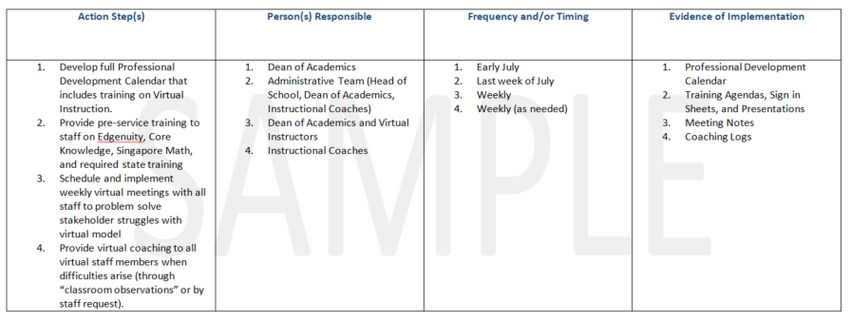
required by the Executive Order. An example of a set of action steps for an area is below:

                                                                                                                                                1
Distance Learning Plan Template 2020-2021
The example above is not intended to demonstrate that these are specific action steps a charter should use, nor that this is the best or most
appropriate number of action steps. Rather, it is provided as guidance to show the manner in which the template is to be completed.
Other areas of the template will require the charter holder to check boxes to indicate specific tasks, strategies, or resources to be used for
different stakeholders included in the distance learning process.
2Distance Learning Plan Template 2020-2021
Charter Holder Information
78783
Charter Holder Name Fit Kids, Inc. dba Champion Schools Charter Holder Entity ID
Representative authorized to submit the plan (This is the individual that will be Carolyn Sawyer
contacted with questions about the plan)
District Office 480-659-0044
Representative Telephone Number
Cell: 602-885-2938
csawyer@championschools.org
Representative E-Mail Address
School Information
*In the chart, list the schools this plan applies to. Add rows as needed to account for all schools.
School Name Entity ID CTDS
Champion Schools (7900 S. Jesse Owens Parkway, Phoenix, Az 85042) 78820 078785101
Champion Chandler (250 S. McQueen Road, Chandler, AZ 85225) 92501 078785103
Champion San Tan (1846 East Bella Vista Road, San Tan Valley, AZ 85143) 460111 078785104
Distance Learning Background Information
a. Number of Instructional Days (3.b)
Each charter school shall operate for the required 180 days of instruction pursuant to Executive Order 2020-41 (3.b). An exception to this
requirement may be granted by the ASBCS, if the school intended to switch to a different schedule for the 2020-2021 school year. If ASBCS
previously approved the school to operate on a calendar that was not 180 days, but met the number of hours equal to 180 days of instruction,
this provision is still met, and no action is required.
3Distance Learning Plan Template 2020-2021
If the school intended to switch to a different schedule for the 2020-2021 school year, but has not yet been approved by the ASBCS, please
contact your Education Program Manager.
Please note, pursuant to Executive Order 2020-44 the Arizona Department of Education (ADE) shall conduct an analysis of the need to waive the
number of school days that schools are required to provide schooling and the impact of such a waiver by August 31, 2020.
How many instructional days will the charter school operate for School Year 2020-2021? 180
How many instructional days did the charter school operate for School Year 2019-2020? 180
b. Distance Learning Option (3.b)
Estimated Enrollment for FY 2021 1442 Start Date for Distance Learning August 17, 2020
Estimated Number of Students
Estimated Number of Students Participating Participating in Distance
300 700
in Distance Learning for the Full Year Learning for a Portion of the
Year
☐1. We intend to operate distance learning for the full year for all students.
☐2. We intend to operate distance learning until ________________ for all students.
☐3. We intend to operate distance learning only until the Governor allows schools to fully
Please choose the option that indicates reopen.
your proposed duration/plan for distance
learning: ☒4. We intend to operate distance learning and use a hybrid approach once the Governor
allows schools to fully reopen. Hybrid includes distance learning with students learning in the
classroom on some days, and from home on other days (i.e. half of the students attend
Mon/Wed and half of the students Tues/Thurs, half of the students come each week, etc.).
☐5. Other (Please explain below)
If you chose option 4 or 5 above, please provide a brief narrative explaining the details of the plan you will use:
4Distance Learning Plan Template 2020-2021
We plan to operate Monday -Friday, providing CORE Academic Instruction a blended learning model with attendance options for fulltime
in-person, combination of in-person and virtual or fulltime virtual every day.
1. Students will receive the full number of instructional hours recommended per year
2. We will be providing 180 school days.
3. In-person instruction will be available at each Campus, Monday-Thursday from 8am-3:30pm
4. CORE Academic Instruction will occur for both In-person and Virtual Learners in a live stream Monday-Thursday, with
5. Virtual Learning for all students on Fridays.
6. Teachers will be able to view the computer screens using Go Guardian whether the student is in class or attending virtually. They will
be able to chat in-person or virtually during these class sessions.
7. Students will be able to see each other and converse as appropriate per Teacher instructions.
8. Teachers will have Office Hours in the afternoons and on Friday mornings to meet with students individually or in groups, students
with parents to discuss progress and assist students with any challenges they may have in fully participating in the In-person or Virtual
Learning.
9. Special Education and Intervention Services will be provided In-person or virtually depending per the platform students are choosing
for participation.
10. Upon approval of the school administration, students will be able to switch their instruction from in-person to virtual or virtual to in-
person.
Is the charter requiring students to do distance learning? Yes
If students are required to do distance learning, is the charter school providing a physical location for students to go Yes
during the same hours of the day AND the same days throughout the week as it did in the FY2020 school year prior to
the school closure?
*In the case of a statewide closure or delay of in-person instruction, the requirement to provide a physical location available for students is waived under the
Executive Order 2020-41 until the State permits in-person instruction. If due to a COVID-19 outbreak and pursuant to A.R.S. § 36-787, the Arizona Department of
Health Services directs a school to close temporarily in order to appropriately sanitize the facility, the requirement to provide a physical location available for
students is waived.
Attendance Tracking (1.a.i, 1.i)
a. Describe how the charter school will track attendance for students attending remotely, whether full time or intermittently.
5Distance Learning Plan Template 2020-2021
The description must include the specific measures that will be used to determine whether a student participating in DL will be reported
as present or absent on days when instruction does not take place in person. Attendance tracking may include methods such as:
§ Communication with their teachers via telephone, ZOOM, MS Teams, or other digital meeting software.
§ Student participation in a virtual meeting or classroom session (ZOOM, MS TEAMS, Google Meets, etc.)
§ Daily assignments competed and submitted by the student.
§ A parent attestation of documentation of time spent on educational activities.
The charter holder is advised that the ADE will continue to issue guidance on the topic of attendance, and should closely monitor updated
information related to these expectations. Current guidance can be found here: https://www.azed.gov/finance/school-finance-guidance-for-
covid-19/
If the Charter Holder currently operates an approved AOI, it must follow the AOI attendance requirements outlined by ADE and A.R.S. §15-808 for
students enrolled in the AOI.
Action Step(s) Person(s) Responsible Frequency and/or Timing Evidence of Implementation
1. Student Attendance will be 1. Classroom Teachers 1. Daily 1. Attendance data will be in our
taken using our Student Data Schoolmaster Student Management
Management System System and tracked by out Data
(Schoolmaster) Manager
2. Teaches will see when 2. District Data Manager 2. Daily
students are participating
virtually and mark their
attendance accordingly
b. Describe the efforts the charter school will make to ensure all enrolled students are contacted and in communication on a regular basis.
Action Step(s) Person(s) Responsible Frequency and/or Timing Evidence of Implementation
1. In-person student will 1. Classroom Teachers 1. Daily 1. Evidence of Go Guardian use will be tracked by Academic
be tracked in the Director doing virtual drop in classroom observations
traditional procedures 2. Teachers’ Aides https://www.youtube.com/watch?v=mxTTexxNskI
2. Virtual attendance will
be tracked by seeing the
student visibly
participating in Go
6Distance Learning Plan Template 2020-2021
Guardian. Students will
be seen virtually on
Google Meets and their
computer screen can be
seen on the Teacher’s
computer screen
3. At times, while one
teacher is instructing, a
second
teacher/teachers aid
will be chatting with
students virtually if they
are having difficulty
“getting started”
Teacher and Staff Expectations and Support (1.a.ii)
a. Describe expectations of teachers and other staff working virtually.
Action Step(s) Person(s) Responsible Frequency and/or Timing Evidence of Implementation
1. Teachers and Interventionists
will become google level 1 1. Classroom teachers 1. Completed by August 17th, 1. Certification provided by
certified. 2020 google
2. Instructional
2. All normal-operating coach/Administration 2. Lesson plans will be turned in 2. Google Drive folder will be
instructional requirements weekly checked every Friday by 3 pm
remain (lesson planning and
submission, delivery of lessons, 3. Google classrooms will be 3. Administration will be added
grading, and recording of created July 17th, 2020 as co teachers to check for
data). completion
4. Teachers will post video
3. Lesson plans will be turned in recordings daily to the google 4. Instructional Coach will check
no later than 3:00 pm on classroom google classrooms daily for
Fridays updated information
5. Teachers will update google
4. Teachers will create and 5. Updated gradebook with
site weekly
maintain a google classroom to google forms exit ticket
communicate with students. included
7Distance Learning Plan Template 2020-2021
6. Google forms will be utilized
5. Teachers will be required to daily for exit tickets
add administration as co
teachers to the google
classrooms.
6. Teachers will post video
recorded lessons to their
google classroom weekly.
7. Teachers will monitor
assignment submissions, and
communicate/remind students
of submissions, and
communicate/remind students
of missed or upcoming
assignment due dates.
8. Teachers will be posting a daily
class schedule to the google
classroom so students are
aware at what times they need
to be in what class.
9. Teachers will be providing
feedback to student questions
and/or assignments within a
timely manner.
10. Not only will the teachers be
providing feedback, but it will
be meaningful feedback on
student work using clear and
concise language.
11. Teachers will be posting rubrics
and grading scales for
assignments to assist with any
questions that may arise.
12. Teachers will be utilizing google
suite applications for certain
8Distance Learning Plan Template 2020-2021
projects or google forms for
exit tickets.
b. Describe commitments on delivery of employee support services including but not limited to:
o Human resource policies and support for employees; and
o Regular communication from the administration.
Action Step(s) Person(s) Responsible Frequency and/or Timing Evidence of Implementation
1. Overview of Employee 1. School Principal 1.Pre-service in July 1.Pre-Service Schedule/Calendar
Handbook, Staff weekly
Communication (DOJO, email, 2. Staff Sign-in Sheets
GroupMe, Google Classroom)
2. COVID procedures and
protocols. Split into groups of
“task teams” to develop on
campus procedures for the
listed needs (give staff
list). Staff will review as a
whole and make changes as
needed.
3. Wellness and Nutrition 2. School Nutritionist
Program
c. Describe how professional development will be provided to employees.
Action Step(s) Person(s) Responsible Frequency and/or Timing Evidence of Implementation
Google Educator Certification 1. Superintendent
All teachers required to pass test for
Scope of Work for Google Educator 1. .July 2020 Google Educator Certification
Certification Training
9Distance Learning Plan Template 2020-2021
Get Ready to use Technology in the
Classroom
§ How technology can benefit
teaching and learning
§ Why and how technology can
support the work you currently do
§ How you can use technology to
prepare for the future
§ What tools are available in the G
Suite for Education
§ How to pick the right tool for your
objective
§ How you can help your students
behave responsibly online.
Expand your Access to Help & Learning
§ What online resources are
available for you to search for
answers
§ How to participate in online help
forums to both find answers AND
help others
§ How to create a network of peers
who you can reach out to when
you need help
§ How to contribute to a network of
other Google for Education users
§ How to join a Google Educator
Group for networking, support,
and fun
§ How to find local experts when you
need that extra bit of support
Have a (Mostly) Paperless Classroom
§ How Google Drive can be used for
your own cloud storage
§ How to upload documents to
Google Drive
§ How to create documents within
Google Drive
§ Tips for organizing your Google
Drive
10Distance Learning Plan Template 2020-2021
§ How to collaborate using Google
Docs
§ Tips for using the Google Docs
suite in your classroom
§ How Classroom works with Docs
and Drive
Save time Communicating
§ Apply the organizational benefits
of Gmail in your classroom
11Distance Learning Plan Template 2020-2021
§ Explain how to use the Translation
feature in Gmail to communicate
with a diverse audience
§ Identify the benefits of real-time
communication with students
§ Explain how to use instant
messaging in Google Chat from any
device
§ Identify how Google Groups can be
used in your classroom
§ Identify the value of having a class
website
§ Create a customized Google Site
for your classroom
Organize Activities for yourself & Others
§ To create and share Google
Calendars
§ To set reminders and notifications
for events in your calendar
§ How to manage multiple calendars
§ To manage to do lists in Google
Tasks and Google Keep
§ To integrate Google Tasks with
Google Calendar
§ To add media and share notes in
Google Keep
Bringing Meetings Online
§ Why it’s important to plan your
meetings for maximum efficiency
§ How to hold more productive and
efficient meetings
§ How to schedule a meeting, add
participants and book resources
§ How to keep track of who will be
attending your meeting
§ Why you should use a shared
Google Doc for meeting agendas,
minutes and follow-up
§ Which tools from the G Suite for
Education can help you run more
productive meetings
12Distance Learning Plan Template 2020-2021
§ How you can use Google Meet to
conduct productive online
meetings
§ How to invite others to a Meet
§ How to share your screen with
others during a Meet
Bringing Student Work Online
§ Why creating rosters will help you
organize your assignment
workflow
§ How to use different Google tools
for creating rosters
§ How to assign work to your
students
§ What strategies are available for
managing assignments
§ The importance of providing
feedback to students
§ Different strategies for giving
student feedback
13Distance Learning Plan Template 2020-2021
Measure Understanding and Share Student
Growth
§ Determine the correct type of data
to collect as an educator
§ Develop effective methods of
collecting the data required
§ Organize and configure
information to accurately
represent the results
§ Determine what lessons are
needed to help students keep their
information secure
§ Pick the right tool for the learning
objective you are trying to reach
§ Determine what process to use to
discover various methods of data
analysis
Teach Students Online Skills
§ The essential digital literacy skill of
searching online
§ Simple steps to evaluate sources
§ Easy processes for filtering search
results and an understanding of
why this is important
§ How to avoid plagiarism in the
context of Web research
§ How to customize your online
experience using Google Chrome
§ The potential for creativity and
curiosity to be fostered using
Chrome Apps and Extensions
Build Interactive Lessons
§ How to make your presentations
look better and more effectively
communicate your point
§ How graphic design can help with
your messaging
§ How to add dynamic and engaging
content into your presentations
14Distance Learning Plan Template 2020-2021
§ Where to find resources for class
that other teachers have tried and
recommend
§ How apps can help engage your
students
§ How to enrich your STEM class
with digital tools
§ How to make science learning
more interactive
Captivate Your Class with Video
§ Search and find content creators
and videos using YouTube
§ Identify best practices for using
YouTube in the classroom
§ Harness the YouTube subscription
feature to develop a stream of top
quality educational content
§ Curate educational videos based
on topic, genre, or standard in
playlists
§ Share videos through playlists,
forms, and slides
§ Create the optimal viewing
experience for students by
adjusting YouTube controls
Facilitate Group Work
§ How to create meaningful and
effective collaboration in the
classroom
§ How to support collaborative
learning with Google Docs and
Drive
§ How to assign and collect
assignments using Classroom
15Distance Learning Plan Template 2020-2021
§ The ins-and-outs of using Google
Docs to review group contributions
§ How Google Docs can support the
writing and revision process
§ Best practices for driving
discussion inside and outside of
the classroom
§ How to choose the best tool to
support synchronous and
asynchronous discussion
§ To facilitate group work with a
range of Google Tools.
Promote Digital Citizenship and Positive
Online Behavior
§ How to protect yourself with good,
strong passwords
§ How to recognize hoaxes
§ What makes up your digital
footprint
16Distance Learning Plan Template 2020-2021
§ How to manage your online
identity
§ The importance of privacy settings
§ How to build resilience to be able
to handle challenges
Pre-Service SY21
1. How to set up Jump Start
1. 1.School Principal July 22-August 13, 2020 Teachers required to document
Orientation Sessions for Students
and their Families. Expectations attendance on Sign in Sheets
Discussion
2. District IT Coordinator
2. Gradebook Set up in Schoolmaster
for Attendance Procedures
3. Questions About Technology 3. District IT Coordinator
4. Overview of the teacher’s guides, 4. Math Teacher Cadre
updated pacing and how this was
created with AzM2 blueprint -
priority standards
5. ELA/Social Studies Cadre: Unit 5. ELA/Social Studies Teacher Cadre
planning documents, review with
school calendar, look over new
social studies standards
6. Intervention Planning: How we
6. Intervention Team
plan to serve the bottom 25% in-
person and virtually
7. Open Court K-3 - Ensure all 7. K-3 Teacher Cadre
teachers have accounts set up with
access to materials. Add students
to a virtual class and access online
‘assessments’ that can be
uploaded into Google
Classroom. Discuss the difference
in green, red, and blue bands.
8. Science - Make sure that all 8. Science Teacher Cadre
teachers understand the new
science standards, the progression
of standards in
17Distance Learning Plan Template 2020-2021
K-8 and crosswalk activities
9. Review what project-based 9. Science Teacher Cadre
learning can look like in-person
and in Virtual projects for Distance
Learning
10. NWEA MAPS Training Overview of
the testing platform, what data we
10. Instructional Coach
collect and how it is used. Plan a Academic Director
schedule to get baseline and
benchmark testing completed.
11. Edulastic.com Platform Training
3rd- 8th Grade CFA I and CFA II
Overview Ensure that all teachers 11. Instructional Coach
have an account created in Academic Director
Edulastic.com
12. Open Court Diagnostic K-3
Mammoth Math Baseline
Creating online versions for
Distance Learning
Creating access for 12. Instructional Coach
parents/students to take the Academic Director
13. How we provided Special 13. Special Education Director
Education Services in-person and
virtually, including Student Study
Team process, Direct Services, and
Related Services ie:
Speech/Language, Occupational
Therapy
On-Going Training
Teachers required to document
Google Infusion: attendance on Sign in Sheets
Scope of Work: Teachers will use the various
platforms utilized on the Blended Learning
Platform "Classroom 2.0" to develop and
present in a meaningful way to parents,
enabling them to better support Students'
Virtual Learning at home. These platforms
include: Clever, Go Guardian, the Google
Suites (Google Classroom, Google Sites,
Google Maps, Google Meets, Google
18Distance Learning Plan Template 2020-2021
Expeditions, Google Slides) Lessons will be
recorded and made accessible to other
teachers, parents, and students. Other Google
Infusions that students will be using are:
Socrative, Canva, Seesaw, Book Creator, We
Video and Adobe Spark. These training will
cover these programs
List Specific Professional Development Topics That Will Be Covered
1. Our priority for this year is to have all teachers participate in the Google Certified Educator Program. They were all excited to gain this deeper
understanding of how to use the tools in Google Suites to implement instruction. These skills will carryover, to instruction post COVID.
2. Specific Training on our Curriculum serves to orient new teachers, but also allows returning teachers a chance to take a deeper dive into their curriculum
before beginning the new school year.
3. Training on NWEA MAPS testing protocols and how to analyze data from the numerous reports available is essential for teachers to utilize this data to the
fullest.
4. Edulastic.com is the evaluation tool we use to prepare students for the AzM2. This is given as a Cumulative Formative Assessment at the end of Term 1
and Term 2. The format of this assessment tool is the same as AzM2 and gives students an opportunity to practice for our annual state wide testing as
well as students’ mastery of the content of the Term. It is considered a Term Final.
5. OPEN COURT is the McGraw Hill Program that we use for our K-3 graders. The curriculum meets the requirements of Move on When Reading and now has
lessons adapted for use online. K-3 teachers will be trained to fully implement these on these resources.
6. How we plan to provide Special Education in-person and virtually this year including related serves of Speech & Language Therapy and Occupational
Therapy requires training for classroom teachers.
7. In addition, to direct Special Education Services, teachers will learn how to implement the Special Education Identification process virtually and how the
Met and IEP Process will be managed.
19Distance Learning Plan Template 2020-2021
Connectivity (1.a.iii)
Check the boxes below to indicate which was/will be used to ensure each student, teacher, and staff member has access to a device and internet
connectivity if the plan relies on online learning.
Students Teachers Staff
What was Used to Establish Need?
Questionnaire YES YES YES
Personal Contact and Discussion YES YES YES
Needs Assessment-Available data YES YES YES
Other: SURVEY YES YES YES
What will be Used to Respond to Need?
Loaner Device (laptop/tablet) YES YES YES
WIFI Hot Spot NA NA NA
Supplemental Utility Support (Internet) YES YES YES
Other: COX COMMUNICATION STUDENT SERVICES YES YES YES
When will stakeholders have access to IT Support Availability?
Traditional School Hours YES YES YES
Extended Weekday Hours NA NA NA
24/7 Support NA NA NA
Other:
Instructional Methods and Monitoring Learning (1.a.iii)
a. In the tables below, list the methods that will be used to deliver instruction (i.e. Direct Instruction via Zoom, Independent Study, Project
Based Learning via a menu of options), the content provider or program to be used (i.e. Edgenuity, Journeys, Saxon Math), and the
Formative and Summative Assessment Strategies to be used, as well as the frequency of those assessments.
Instructional Methods, Content Delivery, and Monitoring Student Learning (Math)
Educational Delivery Methodologies Content Provider/Program Used Formative Assessment Strategies and Summative Assessment Strategies and
Frequency Frequency
Kindergarten 1. Clever for easy logon 1. EUREKA Math Program Mammoth Math Skill Baseline EUREKA Mid & End of Modules
Assessment: First 2 weeks of school during School Year (on-going)
1. Google folder of diagnostics
20Distance Learning Plan Template 2020-2021
2. Go Guardian for Virtual 2. Google Folder of 2. Baseline Assessment Scoring 1. Google folder of curriculum
Classroom Curriculum resources Sheets resources (grade level pdf
(grade level pdf modules, modules, teacher & student
3. Google Suites including: editions, exit tickets, pacing
teacher & student
4. Google Calendar guides)
editions, exit tickets, Term 1- Benchmark 1
5. Google Hangouts 2. Greatminds.org
pacing guides) 1. End of Module 1 Assessment
6. Google Meets 3. Eureka Math - Acing the
2. End of Module 2 Assessment
7. Google Classroom Pacing Training Video
3. Modules and Concepts:
8. Google Slides
4. Mod 1: Numbers 10-43
9. Google Sites NWEA MAPS Diagnostic and 2 times
instructional days
10. Google Docs per year
5. Mod 2: 2-D and 3-D Shapes –
12 instructional days
11. YouTube videos from the
6. Mod 3: Comparison of
EUREKA Math Program
Length, Weight, Capacity and
Curriculum
Numbers to 10 - Topic A only
3 days of instruction
12. Teacher created Videos using
We-Video
Term 2- Benchmark
1. Module 3 Assessment
13. Google Infusions: Padlet,
2. Modules and Concepts
Canva, Book Creator and
Covered:
Adobe -Spark
3. Mod 3: Comparison of
Length, Weight, Capacity and
14. Live Streaming using
Numbers to 10 - 35 days of
document camera
instruction
4. Mod 4: Number Pairs,
15. Recording the lesson in real
Addition and Subtraction to
time with the in-person
10 - 35 instructional days
students on campus.
Term 3 – Benchmark 3
16. Students at home will see
1. Module 4 Assessment
their teacher and classmates
2. Module 5 Assessment
in real time. They will be able
3. Module 6 Assessment
to communicate and sing
4. Modules and Concepts
songs together.
covered:
5. Mod 4: Number Pairs,
Addition and Subtraction to
10 - 12 instructional days
6. Mod 5: Numbers 10 -20 and
counting to 100 - 30
instructional days
7. Mod 6: Analyzing,
Comparing, and Composing
Shapes - 10 instructional days
1-3 1. Clever for easy logon EUREKA Math Program Mammoth Math Skill Baseline
Assessment: First 2 weeks of school
21Distance Learning Plan Template 2020-2021
2. Go Guardian for Virtual
Classroom FIRST GRADE NWEA MAPS Diagnostic and 2 times
Term 1-Benchmark per year
3. Google Suites including: 1. Module 1 Assessment
4. Google Calendar 2. Modules and Concepts
5. Google Hangouts Covered:
6. Google Meets 3. Mod 1: Sums and Differences
7. Google Classroom to 10 - 45 instructional days
8. Google Slides 4. Mod 2: Intro to place value
9. Google Sites through addition and
10. Google Docs subtraction within 20 - 15
days of instruction
11. YouTube videos from the
EUREKA Math Program Term 2-Benchmark
Curriculum 1. Module 2 Assessment
2. Module 3 Assessment
12. Teacher created Videos using 3. Modules and Concepts
We-Video Covered:
4. Mod 2: Intro to place value
13. Google Infusions: Padlet, through addition and
Canva, Book Creator and subtraction within 20 - 20
Adobe -Spark, and Socrative days of instruction
5. Mod 3: Ordering and
14. Teacher created videos using Comparing Length
We-Video measurements as numbers -
15 days of instruction
15. Live Streaming using 6. Mod 4: Place Value,
document camera Comparison, Addition and
Subtraction to 40 - 25 days of
16. Recording the lesson in real instruction
time with the in-person
students on campus. Term3-Benchmark
1. Module 4 Assessment
17. Students at home will see 2. Module 5 Assessment
their teacher and classmates 3. Module 6 Assessment
in real time. 4. Modules and Concepts
Covered:
5. Mod 4: Place Value,
Comparison, Addition and
Subtraction to 40 - 10 days of
instruction
6. Mod 5: Identifying,
Composing, and Partitioning
Shapes - 15 instructional
days
7. Mod 6: Place Value,
Comparison, Addition and
22Distance Learning Plan Template 2020-2021
Subtraction to 100 - 35 days
of instruction
NWEA MAPS Diagnostic and 2 times
SECOND GRADE
Term 1-Benchmarks per year
1. Module 1 Assessment
2. Module 2 Assessment
3. Module 3 Assessment
4. Modules and Concepts
Covered:
5. Mod 1: Sums and Differences
to 100 - 10 instructional days
6. Mod 2: Addition and
Subtraction of Length Units -
12 Instructional days
7. Mod 3: Place value, counting,
and Comparison of numbers
to 1,000 - 25 instructional
days
8. Mod 4: Addition and
Subtraction within 200 and
word problems within 100 -
13 instructional days
Term 2-Benchmarks
1. Module 4 Assessment
2. Module 5 Assessment
3. Modules and Concepts
Covered:
4. Mod 4: Addition and
Subtraction within 200 and
word problems within 100 -
22 instructional days
5. Mod 5: Addition and
Subtraction within 1,000 with
word problems to 100 - 24
instructional days
6. Mod 6: Foundations of
Multiplication and Division -
Term 3- Benchmarks
9. Module 6 Assessment
10. Module 7 Assessment
11. Module 8 Assessment
12. Modules and Concepts
Covered:
23Distance Learning Plan Template 2020-2021
13. Mod 6: Foundations of
Multiplication and Division -
10 instructional days
14. Mod 7: Problem solving with
length, money and data - 30
instructional days
15. Mod 8: Time, shapes, and
fractions as equal parts of
shapes - 20 instructional days
THIRD GRADE NWEA MAPS Diagnostic and 2 times
Term 1- Benchmarks per year
Assessment CFA
1. Module 1 Assessment
2. Module 3 Assessment
3. Modules and Concepts
Covered:
4. Mod 1: Properties of
Multiplication and Division
and Solving Problems with
Units of 2-5 and 10 - 25 Days
of Instruction
5. Mod 3: Multiplication and
Division with Units of 0, 1, 6-9
and Multiples of 10 - 25 days
of instruction
6. Mod 2: Place Value and
Problem Solving with Units of
Measure - 10 days of
instruction
Term 2-Benchmarks
Assessment CFA II
1. Module 2 Assessment
2. Module 4 Assessment
3. Module 6 Assessment
4. Modules and Concepts
Covered:
5. Mod 2: Place Value and
Problem Solving with Units of
Measure - 15 days of
instruction
6. Mod 4: Multiplication of Area
- 20 days of Instruction
7. Mod 6: Collecting and
Displaying Data - 10 days of
instruction
24Distance Learning Plan Template 2020-2021
8. Mod 7: Geometry and
Measurement Word
Problems
Term 3-Benchmarks AzM2/NWEA
MAPS
1. Module 7 Assessment
2. Mod 7: 35 days of instruction
3. Mod 5: Fractions as Numbers
on the Number Line - 35 days
of instruction
4-6 1. Clever for easy logon EUREKA Math Program FOURTH GRADE NWEA MAPS Diagnostic and 2 times
Diagnostic: NWEA MAPS per year
2. Go Guardian for Virtual First two weeks of school
Classroom
Term 1- Benchmarks
3. Google Suites including: Assessment CFA I
4. Google Calendar 1. Module 1 Assessment
5. Google Hangouts 2. Modules and Concepts
6. Google Meets Covered:
7. Google Classroom 3. Mod 1: Place Value,
8. Google Slides Rounding, and Algorithms for
9. Google Sites Addition and Subtraction - 25
10. Google Docs days of instruction
4. Mod 3: Multi-Digit
11. YouTube videos from the Multiplication & Division - 35
EUREKA Math Program days of instruction
Curriculum
Term 2-Benchmarks
12. Teacher created Videos using Assessment CFA II
We-Video 5. Module 3 Assessment
6. Module 5 Assessment
13. Google Infusions: Padlet, 7. Modules and Concepts
Canva, Book Creator and Covered:
Adobe -Spark, and Socrative 8. Mod 3: Multi-Digit
Multiplication & Division - 8
14. Teacher created videos using days of instruction
We-Video 9. Mod 5: Fraction Equivalence,
Ordering, and Operations - 45
15. Live Streaming using days of instruction
document camera 10. Mod 6: Decimal Fractions
16. Recording the lesson in real
time with the in-person Term 3- Benchmarks
students on campus. AzM2/ NWEA MAPS
1. Module 6 Assessment
2. Module 7 Assessment
25Distance Learning Plan Template 2020-2021
17. Students at home will see 3. Module 4 Assessment
their teacher and classmates 4. Modules and Concepts
in real time. Covered:
5. Mod 6: Decimal Fractions - 13
days of instruction
6. Mod 7: Exploring
Measurement and
Multiplication - 20 days of
instruction
7. Mod 4: Angle Measure and
Plane Figures
FIFTH GRADE
Diagnostic: NWEA MAPS NWEA MAPS Diagnostic and 2 times
First two weeks of school per year
Term 1- Benchmarks
Assessment CFA I
1. Module 1 Assessment
2. Module 2 Assessment
3. Modules and Concepts
covered:
4. Mod1: Place Value and
Decimal Fraction - 20 days
5. Mod2: Multi-Digit Whole
Number and Decimal Fraction
Operations - 35 days of
instruction
6. Mod 3: Addition and
Subtraction of Fractions - 5
days of instruction
Term 2- Benchmarks
Assessment CFA II
1. Module 3 Assessment
2. Module 4 Assessment
3. Mod3: Addition and
Subtraction of Fractions - 17
days of instruction
4. Mod4: Multiplication and
Division of Fractions and
Decimal Fractions - 38 days of
instruction
5. Mod 5: Addition and
Multiplication with Volume
and Area - 5 days of
instruction
26Distance Learning Plan Template 2020-2021
Term 3- Benchmarks
AzM2/NWEA MAPS
1. Module 5 Assessment
2. Module 6 Assessment
3. Modules and Concepts
covered:
4. Mod 5: Addition and
Multiplication with Volume
and Area - 20 days of
instruction
5. Mod 6: Problem Solving with
the Coordinate Plane - 40
days of instruction
SIXTH GRADE
NWEA MAPS Diagnostic and 2 times
Diagnostic: NWEA MAPS per year
First two weeks of school
Term 1- Benchmarks
Assessment CFA I
1. Module 2 Assessment
2. Module 3 Assessment
3. Modules and Concepts
covered:
4. Mod 2: Arithmetic
Operations including Division
of Fractions - 25 days of
instruction
5. Mod 3: Rational Numbers -
25 days of instruction
6. Mod 4: Expressions and
Equations - 10 days of
instruction
Term 2-Benchmarks
Assessment CFA II
1. Module 4 Assessment
2. Modules and Concepts
covered:
3. Mod 4: Expressions and
Equations - 35 days of
instruction
4. Mod 1: Ratios and Unit Rates
- 25 days of instruction
27Distance Learning Plan Template 2020-2021
Term 3-Benchmark
AzM2/ NWEA MAPS
1. Module 1 Assessment
2. Module 5 Assessment
3. Module 6 Assessment
4. Modules and Concepts
covered:
5. Mod 1: Ratios and Unit Rates
- 10 days of instruction
6. Mod 5: Area, Surface, Area,
and Volume Problems - 25
days of instruction
7. Mod 6: Statistics - 25 days of
instruction
7-8 1. 1.Clever for easy logon
SEVENTH GRADE
NWEA MAPS Diagnostic and 2 times
2. Go Guardian for Virtual Diagnostic: NWEA MAP
Classroom First two weeks of school
per year
3. Google Suites including: Term 1-Benchmarks
4. Google Calendar Assessment CFA I
5. Google Hangouts 1. Module 5 Assessment
6. Google Meets 2. Module 6 Assessment
7. Google Classroom 3. Modules and Concepts
8. Google Slides covered:
9. Google Sites 4. Mod 5: Statistics and
10. Google Docs Probability - 25 days of
instruction
11. YouTube videos from the 5. Mod 6: Geometry - 35 days of
EUREKA Math Program instruction
Curriculum
Term 2-Benchmarks
12. Teacher created Videos using Assessment CFA II
We-Video 1. Module 3 Assessment
2. Modules and Concepts
13. Google Infusions: Padlet, covered:
Canva, Book Creator and 3. Mod 3: Expressions and
Adobe -Spark, and Socrative Equations - 35 days of
instruction
14. Teacher created videos using 4. Mod 1: Ratios and
We-Video Proportional Relationships -
25 days of instruction
15. Live Streaming using
document camera Term 3- Benchmarks
28Distance Learning Plan Template 2020-2021
Assessment CFA II
16. Recording the lesson in real AzM2 / NWEA MAPS
time with the in-person
students on campus.
1. Module 1 Assessment
17. Students at home will see 2. Module 2 Assessment
their teacher and classmates 3. Module 3 Assessment
in real time 4. Modules and Concepts
covered:
5. Mod 1: Ratios and
Proportional Relationships
6. -5 days of instruction
7. Mod 2: Rational Numbers -
30 days of instruction - 30
days of instruction
8. Mod 4: Percent and
Proportional Relationships
EIGHTH GRADE NWEA MAPS Diagnostic and 2 times
Diagnostic: NWEA MAPS per year
First two weeks of school
Term 1-Benchmarks
Assessment CFA I
1. Module 1 Assessment
2. Module 4 Assessment
3. Modules and Concepts
covered:
4. Mod 1: Integer Exponents
and Scientific Notation - 20
days of instruction
5. Mod 4: Linear Equations - 40
days of instruction
Term 2-Benchmarks
Assessment CFA II
1. Module 5 Assessment
2. Module 6 Assessment
3. Modules and Concepts
covered:
4. Mod 5: Examples of
Functions from Geometry -
15 days of instruction
5. Mod 6: Linear Functions - 20
days of instruction
6. Mod 7: Introduction to
irrational Numbers using
29Distance Learning Plan Template 2020-2021
Geometry - 25 days of
instruction
TERM 3-Benchmarks
AzM2 / NWEA MAPS
1. Module 7 Assessment
2. Modules and Concepts
covered:
3. Mod 7: Introduction to
irrational Numbers Using
Geometry - 10 days of
instruction
4. Mod 2: The concept of
congruence - 25 days of
instruction
5. Mod 3: Similarity - 25 days of
instruction
9-12 NA NA NA NA
Instructional Methods, Content Delivery, and Monitoring Student Learning (ELA)
Educational Delivery Content Provider/Program Formative Assessment Summative Assessment
Methodologies Used Strategies and Frequency Strategies and Frequency
Kindergarten Google Classroom OPEN COURT CURRICULUM Diagnostic Assessment
First 2 weeks of School OPEN COURT
NWEA MAPS Diagnostic and 2 times
KINDERGARTEN per year
Term 1- Benchmarks
1. After 6 weeks of Instruction -
Unit 2: Lesson 3
2. (35 instructional days)
3. End of Unit Assessments
every 3 weeks
4. Off to school (15 instructional
days)
5. Let’s be Kind (15 instructional
days)
6. What’s the Weather (15
instructional days)
7. Pushes and Pulls (10
instructional days)
30Distance Learning Plan Template 2020-2021
Term 2-Benchmarks
1. After 6 weeks of Instruction -
Unit 6: Lesson 3
2. (35 instructional days)
3. End of Unit Assessments
every 3 weeks
4. Pushes and Pulls (5
instructional days)
5. Home, Sweet Home (15
instructional days)
6. Our Country, Our Cultures
(15 instructional days)
7. Ready, Set, Grow (15
instructional days)
8. Animal Homes (10
Instructional days)
Term3-Benchmarks
1. After 12 Weeks of Instruction
- Unit 12: Lesson 3
2. (90 instructional days)
3. End of Unit Assessments
every 3 weeks
4. Animal Homes (5
instructional days)
5. Rules We Follow (15
instructional days)
6. Great Americans (15
instructional days)
7. Color Your World (15
instructional days)
8. Stripes, Spots and Dots (15
instructional days)
1-3 1. 1.Clever for easy logon OPEN COURT CURRICULUM Diagnostic Assessment OPEN COURT
First 2 weeks of school NWEA MAPS Diagnostic and 2 times
2. Go Guardian for Virtual per year
Classroom FIRST GRADE
Term 1-Benchmarks
3. Google Suites including: 1. After 6 weeks of instruction -
4. Google Calendar Unit 2: Lesson 3
5. Google Hangouts 2. (35 days of instruction)
6. Google Meets 3. End of Unit Assessments
7. Google Classroom every 3 weeks
8. Google Slides 4. Back to School (15
9. Google Sites instructional days)
31Distance Learning Plan Template 2020-2021
10. Google Docs 5. Be My Friend (15
instructional days)
11. YouTube videos from the 6. Science Cycles (15 days of
EUREKA Math Program instruction)
Curriculum 7. Light and Sound (10 days of
instruction)
12. Teacher created Videos using
We-Video Term 2-Benchmarks
1. After 6 weeks of instruction -
13. Google Infusions: Padlet, Unit 6: Lesson 3
Canva, Book Creator and 2. (35 days of instruction)
Adobe -Spark, and Socrative 3. End of Unit Assessments
every 3 weeks
14. Teacher created videos using 4. Light and Sound (5 days of
We-Video instruction - extends through
term 2)
15. Live Streaming using 5. Around Our Town (15 days of
document camera instruction)
6. Around our World (15 days of
instruction)
16. Recording the lesson in real 7. Roots and Seeds (15 days of
time with the in-person instruction)
students on campus. 8. Animals From Head to Toe
(10 days of instruction)
17. Students at home will see
their teacher and classmates Term 3-Benchmarks
in real time 1. After 12 weeks of instruction
- Unit 12: Lesson 2
2. (60 days of instruction)
3. End of Unit Assessments
every 3 weeks
4. Animals from Head to Toe (5
days of instruction - extends
through term 2)
5. Red, White, and Blue (15
days of instruction)
6. Red, White, and Blue (15
days of instruction)
7. Art for All (15 days of
instruction)
8. Art in Motion (15 days of
instruction)
SECOND GRADE OPEN COURT
Term 1-Benchmarks NWEA MAPS Diagnostic and 2 times
1. After 6 weeks of instruction - per year
Unit 1: Lesson 6
32Distance Learning Plan Template 2020-2021
2. End of Unit Assessments
every 6 weeks
3. Teamwork (35 days of
instruction)
4. Earth in Action (35 days of
instruction)
Term 2-Benchmarks
1. After 7 weeks of instruction -
Unit 3: Lesson 6
2. End of Unit Assessments
every 6 weeks
3. Earth in Action (5 days of
instruction)
4. My Community At Work (35
days of instruction)
5. Plants and Animals (30 days
of instruction)
Term3-Benchmarks
1. After 12 weeks of instruction
- Unit 6: Lesson 5
2. End of Unit Assessments
every 6 weeks
3. Plants and Animals (5 days of
instruction)
4. Citizenship (35 days of
instruction)
5. Story Time (35 days of
instruction)
THIRD GRADE OPEN COURT
Term 1-Benchmarks NWEA MAPS Diagnostic and 2 times
Diagnostic -NWEA MAP per year
First Two Weeks of School
CFA Term 1
End of Unit Assessment
Term 2 -Benchmarks
CFA Term II
End if Unit Assessment
Term 3-Benchmarks
AzM2 / NWEA MAPS
33Distance Learning Plan Template 2020-2021
4-6 1. Clever for easy logon Teacher Created Unit Plans
Aligned & Integrated with new FOURTH GRADE
NWEA MAPS Diagnostic and 2 times
2. Go Guardian for Virtual Social Studies Standards
Classroom Term 1-Benchmarks per year
ELA/SS Implementation Plan AZM2
Diagnostic -NWEA MAP
3. Google Suites including: Completed in SY20 First Two Weeks of School
4. Google Calendar CFA Term 1
5. Google Hangouts End of Unit Assessment
6. Google Meets
7. Google Classroom Term 2 -Benchmarks
8. Google Slides CFA Term II
9. Google Sites End if Unit Assessment
10. Google Docs
Term 3-Benchmarks
11. YouTube videos from the AzM2 / NWEA MAPS
EUREKA Math Program
Curriculum
FIFTH GRADE
12. Teacher created Videos using NWEA MAPS Diagnostic and 2 times
We-Video Term 1-Benchmarks
Diagnostic -NWEA MAP
per year
First Two Weeks of School AZM2
13. Google Infusions: Padlet,
Canva, Book Creator and CFA Term 1
Adobe -Spark, and Socrative End of Unit Assessment
14. Teacher created videos using Term 2 -Benchmarks
We-Video CFA Term II
End if Unit Assessment
15. Live Streaming using
document camera Term 3-Benchmarks
AzM2 / NWEA MAPS
16. Recording the lesson in real
time with the in-person SIXTH GRADE
students on campus.
Term 1-Benchmarks
17. Students at home will see Diagnostic -NWEA MAP NWEA MAPS Diagnostic and 2 times
their teacher and classmates First Two Weeks of School per year
in real time CFA Term 1 AZM2
End of Unit Assessment
Term 2 -Benchmarks
CFA Term II
End if Unit Assessment
Term 3-Benchmarks
AzM2 / NWEA MAPS
34Distance Learning Plan Template 2020-2021
7-8 1. Clever for easy logon Teacher Created Unit Plans SEVENTH GRADE NWEA MAPS
Aligned & Integrated with new Social Diagnostic and 2 times per year
2. Go Guardian for Virtual Studies Standards Term 1-Benchmarks AZM2
Classroom ELA/SS Implementation Plan Diagnostic -NWEA MAP
Completed in SY20 First Two Weeks of School
3. Google Suites including: CFA Term 1
4. Google Calendar End of Unit Assessment
5. Google Hangouts
6. Google Meets Term 2 -Benchmarks
7. Google Classroom CFA Term II
8. Google Slides End if Unit Assessment
9. Google Sites
10. Google Docs Term 3-Benchmarks
AzM2 / NWEA MAPS
11. YouTube videos from the
EUREKA Math Program
Curriculum EIGHTH GRADE
12. Teacher created Videos using Term 1-Benchmarks NWEA MAPS Diagnostic and 2 times
We-Video Diagnostic -NWEA MAP per year AZM2
First Two Weeks of School
13. Google Infusions: Padlet, CFA Term 1
Canva, Book Creator and End of Unit Assessment
Adobe -Spark, and Socrative
Term 2 -Benchmarks
14. Teacher created videos using CFA Term II
We-Video End if Unit Assessment
15. Live Streaming using Term 3-Benchmarks
document camera AzM2 / NWEA MAPS
16. Recording the lesson in real
time with the in-person
students on campus.
17. Students at home will see
their teacher and
classmates in real time
9-12 NA NA NA NA
35Distance Learning Plan Template 2020-2021
Instructional Methods, Content Delivery, and Monitoring Student Learning (Science)
Educational Delivery Content Provider/Program Formative Assessment Summative Assessment
Methodologies Used Strategies and Frequency Strategies and Frequency
Kindergarten Project based OPEN COURT CURRICULUM Integrated in OPEN COURT OPEN COURT
See ELA Benchmarks for End of Unit NWEA MAPS Diagnostic and 2 times
Assessments per year
1-3 1. Clever for easy logon OPEN COURT CURRICULUM
FIRST GRADE OPEN COURT
2. Go Guardian for Virtual Integrated in OPEN COURT NWEA MAPS Diagnostic and 2 times
Classroom See ELA Benchmarks for End of Unit per year
Assessments
3. Google Suites including:
4. Google Calendar
5. Google Hangouts
6. Google Meets SECOND GRADE
7. Google Classroom OPEN COURT
Integrated in OPEN COURT
8. Google Slides NWEA MAPS Diagnostic and 2 times
See ELA Benchmarks for End of Unit
9. Google Sites Assessments per year
10. Google Docs
11. YouTube videos from the
EUREKA Math Program THIRD GRADE
Curriculum
Term 1-Benchmarks OPEN COURT
12. Teacher created Videos using Diagnostic -NWEA MAP NWEA MAPS Diagnostic and 2 times
We-Video First Two Weeks of School per year
CFA Term 1 AZM2
13. Google Infusions: Padlet, End of Unit Assessment
Canva, Book Creator and
Adobe -Spark, and Socrative Term 2 -Benchmarks
CFA Term II
14. Teacher created videos using End if Unit Assessment
We-Video
Term 3-Benchmarks
15. Live Streaming using AzM2 / NWEA MAPS
document camera
16. Recording the lesson in real
time with the in-person
students on campus.
17. Students at home will see
their teacher and classmates
in real time
36Distance Learning Plan Template 2020-2021
4-6 1. Clever for easy logon Teacher Created Unit Plans with FOURTH GRADE NWEA MAPS Diagnostic and 2 times
New Standards per year
2. Go Guardian for Virtual Science Teacher Cadre Term 1-Benchmarks AZM2
Classroom Diagnostic -NWEA MAP
First Two Weeks of School
https://www.azed.gov/standards-
3. Google Suites including: CFA Term 1
practices/k-12standards/standards-
4. Google Calendar End of Unit Assessment
science/
5. Google Hangouts
Science Planning SY 20-21
6. Google Meets Term 2 -Benchmarks
7. Google Classroom CFA Term II
8. Google Slides End if Unit Assessment
9. Google Sites
10. Google Docs Term 3-Benchmarks
AzM2 / NWEA MAPS
11. YouTube videos from the
EUREKA Math Program
Curriculum FIFTH GRADE
NWEA MAPS Diagnostic and 2 times
12. Teacher created Videos using Term 1-Benchmarks per year
We-Video Diagnostic -NWEA MAP AZM2
First Two Weeks of School
13. Google Infusions: Padlet, CFA Term 1
Canva, Book Creator and End of Unit Assessment
Adobe -Spark, and Socrative
Term 2 -Benchmarks
14. Teacher created videos using CFA Term II
We-Video End if Unit Assessment
15. Live Streaming using Term 3-Benchmarks
document camera AzM2 / NWEA MAPS
16. Recording the lesson in real SIXTH GRADE
NWEA MAPS Diagnostic and 2 times
time with the in-person
Term 1-Benchmarks per year
students on campus. AZM2
Diagnostic -NWEA MAP
First Two Weeks of School
17. Students at home will see CFA Term 1
their teacher and End of Unit Assessment
classmates in real time
Term 2 -Benchmarks
CFA Term II
End if Unit Assessment
Term 3-Benchmarks
AzM2 / NWEA MAPS
37Distance Learning Plan Template 2020-2021
7-8 1. Clever for easy logon
Teacher Created Unit Plans with NWEA MAPS Diagnostic and 2 times
2. Go Guardian for Virtual New Standards SEVENTH GRADE
Classroom per year
Science Teacher Cadre AZM2
Term 1-Benchmarks
3. Google Suites including: https://www.azed.gov/standards- Diagnostic -NWEA MAP
4. Google Calendar practices/k-12standards/standards- First Two Weeks of School
5. Google Hangouts science/ CFA Term 1
6. Google Meets Science Planning SY 20-21 End of Unit Assessment
7. Google Classroom
8. Google Slides Term 2 -Benchmarks
9. Google Sites CFA Term II
10. Google Docs End if Unit Assessment
11. YouTube videos from the Term 3-Benchmarks
EUREKA Math Program AzM2 / NWEA MAPS
Curriculum
12. Teacher created Videos using
We-Video EIGHTH GRADE
NWEA MAPS Diagnostic and 2 times
13. Google Infusions: Padlet, Term 1-Benchmarks per year
Canva, Book Creator and Diagnostic -NWEA MAP AZM2
Adobe -Spark, and Socrative First Two Weeks of School
CFA Term 1
14. Teacher created videos using End of Unit Assessment
We-Video
Term 2 -Benchmarks
15. Live Streaming using CFA Term II
document camera End if Unit Assessment
Term 3-Benchmarks
16. Recording the lesson in real AzM2 / NWEA MAPS
time with the in-person
students on campus.
17. Students at home will see
their teacher and classmates
in real time
9-12 NA NA NA NA
38Distance Learning Plan Template 2020-2021
Instructional Methods, Content Delivery, and Monitoring Student Learning (Other Content Areas) Social Studies
Educational Delivery Content Provider/Program Formative Assessment Summative Assessment
Methodologies Used Strategies and Frequency Strategies and Frequency
Kindergarten Google Classroom OPEN COURT CURRICULUM Integrated in OPEN COURT OPEN COURT
See ELA Benchmarks for End of Unit NWEA MAPS Diagnostic and 2 times
Assessments per year
1-3 1. Clever for easy logon OPEN COURT CURRICULUM FIRST GRADE OPEN COURT
NWEA MAPS Diagnostic and 2 times
2. Go Guardian for Virtual Integrated in OPEN COURT per year
Classroom See ELA Benchmarks for End of Unit
Assessments
3. Google Suites including:
4. Google Calendar
5. Google Hangouts
6. Google Meets SECOND GRADE OPEN COURT
7. Google Classroom NWEA MAPS Diagnostic and 2 times
8. Google Slides Integrated in OPEN COURT
per year
9. Google Sites See ELA Benchmarks for End of Unit
10. Google Docs Assessments
11. YouTube videos from the
EUREKA Math Program
Curriculum THIRD GRADE
OPEN COURT
Term 1-Benchmarks NWEA MAPS Diagnostic and 2 times
12. Teacher created Videos using
We-Video
Diagnostic -NWEA MAP per year
First Two Weeks of School AzM2
CFA Term 1
13. Google Infusions: Padlet,
End of Unit Assessment
Canva, Book Creator and
Adobe -Spark, and Socrative
Term 2 -Benchmarks
CFA Term II
14. Teacher created videos using
End if Unit Assessment
We-Video
Term 3-Benchmarks
15. Live Streaming using
AzM2 / NWEA MAPS
document camera
16. Recording the lesson in real
time with the in-person
students on campus.
17. Students at home will see
their teacher and classmates
in real time
39Distance Learning Plan Template 2020-2021
4-6 1. Clever for easy logon Teacher Created Unit Plans FOURTH GRADE NWEA MAPS Diagnostic and 2 times
Aligned & Integrated with new per year
2. Go Guardian for Virtual Social Studies Standards Term 1-Benchmarks AzM2
Classroom Diagnostic -NWEA MAP
ELA/SS Implementation Plan
First Two Weeks of School
3. Google Suites including: Completed in SY20 CFA Term 1
4. Google Calendar End of Unit Assessment
5. Google Hangouts
6. Google Meets Term 2 -Benchmarks
7. Google Classroom CFA Term II
8. Google Slides End if Unit Assessment
9. Google Sites
10. Google Docs Term 3-Benchmarks
AzM2 / NWEA MAPS
11. YouTube videos from the
EUREKA Math Program
Curriculum FIFTH GRADE
12. Teacher created Videos using Term 1-Benchmarks NWEA MAPS Diagnostic and 2 times
We-Video Diagnostic -NWEA MAP
per year
First Two Weeks of School
AzM2
13. Google Infusions: Padlet, CFA Term 1
Canva, Book Creator and End of Unit Assessment
Adobe -Spark, and Socrative
Term 2 -Benchmarks
14. Teacher created videos using CFA Term II
We-Video End if Unit Assessment
15. Live Streaming using Term 3-Benchmarks
document camera AzM2 / NWEA MAPS
16. Recording the lesson in real SIXTH GRADE
time with the in-person
students on campus. Term 1-Benchmarks
Diagnostic -NWEA MAP NWEA MAPS Diagnostic and 2 times
First Two Weeks of School per year
17. Students at home will see
CFA Term 1 AzM2
their teacher and classmates
in real time End of Unit Assessment
Term 2 -Benchmarks
CFA Term II
End if Unit Assessment
Term 3-Benchmarks
AzM2 / NWEA MAPS
40Distance Learning Plan Template 2020-2021
7-8 1. Clever for easy logon Teacher Created Unit Plans
Aligned & Integrated with new NWEA MAPS Diagnostic and 2 times
2. Go Guardian for Virtual Social Studies Standards SEVENTH GRADE
Classroom per year
ELA/SS Implementation Plan AzM2
Term 1-Benchmarks
3. Google Suites including:
Completed in SY20 Diagnostic -NWEA MAP
4. Google Calendar First Two Weeks of School
5. Google Hangouts CFA Term 1
6. Google Meets End of Unit Assessment
7. Google Classroom
8. Google Slides Term 2 -Benchmarks
9. Google Sites CFA Term II
10. Google Docs End if Unit Assessment
11. YouTube videos from the Term 3-Benchmarks
EUREKA Math Program AzM2 / NWEA MAPS
Curriculum
12. Teacher created Videos using EIGHTH GRADE
We-Video
Term 1-Benchmarks NWEA MAPS Diagnostic and 2 times
13. Google Infusions: Padlet, Diagnostic -NWEA MAP per year
Canva, Book Creator and First Two Weeks of School AzM2
Adobe -Spark, and Socrative CFA Term 1
End of Unit Assessment
14. Teacher created videos using
We-Video Term 2 -Benchmarks
CFA Term II
15. Live Streaming using End if Unit Assessment
document camera
Term 3-Benchmarks
AzM2 / NWEA MAPS
16. Recording the lesson in real
time with the in-person
students on campus.
17. Students at home will see
their teacher and classmates
in real time
9-12 NA NA
41Distance Learning Plan Template 2020-2021
Optional: Describe how the school will provide substantive distance learning (use if the school wishes to provide information in addition to the tables above)
We provided virtual Summer School for over 300 students K-8 in June 2020. As the school year begins, we are adding the live streaming component to give the students the
‘feel’ of a traditional classroom. Then when students return to school all together in-person, they will all have had the same lessons.
Meeting the Needs of Students with Disabilities and English learners (1.a.iv)
In addition to action steps articulated in this document, all state/federal laws and IDEA assurances provided annually to the Department
remain applicable and in effect.
a. Describe how the charter school will ensure access and meet the needs of students with disabilities.
Action Step Person(s) Responsible Frequency and/or Timing Evidence of Implementation
1. Create schedules that allow for 1. Special Education Staff 1. Schedules will be created prior 1. Schedules
the direct provision of services to the first week of school (Aug
either virtually or in-person. 27)
2. Schedule time to communicate 2. Special Education Staff 2. Weekly 2. Schedule with time built in
with parents to answer
questions
3. Prior to the first week of school 3. Progress data
3. Collect initial progress measure 3. Special Education Staff (Aug17)
on all IEP goals
4. Conduct IEPs virtually 4. Special Education Staff 4. As they are due, throughout 4. IEP Documents
the school year
5. Conduct evaluations virtually 5. Special Education Staff 5. As they are due, throughout 5. MET Documents
the school year
6. Meet with general education 6. Special Education Staff 6. Prior to the first week of school 6. Signed IEP info sheets
staff to review and discuss (Aug 17)
instructional adaptations in
IEPs
7. Special Education Staff
42You can also read


