Cuisinart Instruction Booklet.
←
→
Page content transcription
If your browser does not render page correctly, please read the page content below
INSTRUCTION BOOKLET

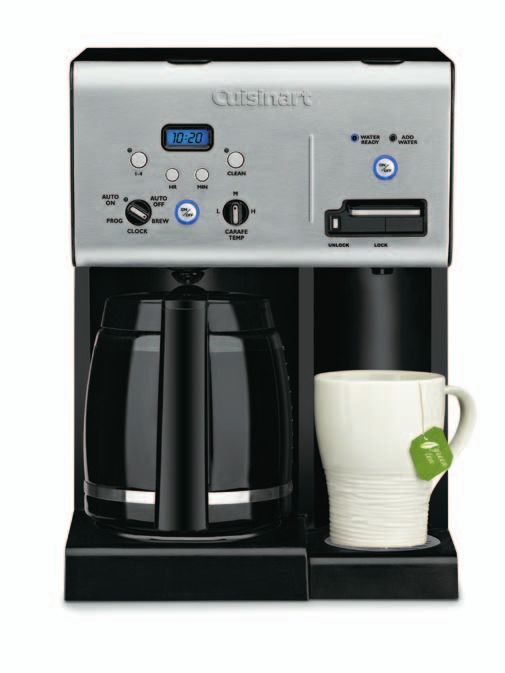
Coffee PLUS® 12-Cup Programmable Coffeemaker & Hot Water System                                   CHW-12
 For your safety and continued enjoyment of this product, always read the instruction book carefully before using.
Important                                                     19. WARNING: TO REDUCE THE
                                                                   RISK OF FIRE OR ELECTRIC SHOCK, DO

Safeguards
                                                                   NOT REMOVE THE BASE PANEL. NO USER-
                                                                   SERVICEABLE PARTS ARE INSIDE. REPAIR
                                                                   SHOULD BE DONE ONLY BY AUTHORIZED
When using electrical appliances, basic safety                     PERSONNEL.
precautions should always be followed to
reduce the risk of fire, electric shock and/or                20. Do not place cloth or otherwise restrict
injury to persons, including the following:                       airflow beneath Coffeemaker.
  1. READ ALL INSTRUCTIONS.                                   21. Use only the Cuisinart® Gold Tone Commercial
                                                                  Style Filter or standard basket paper filter with
 2. Do not touch hot surfaces. Use handles                       this unit. OTHER GOLD TONE PERMANENT
     and knobs.                                                   FILTERS MAY CAUSE THE COFFEEMAKER
 3. To protect against electric shock, do not                    TO OVERFLOW.
     place cord, plug, or base unit in water or
     other liquids.
 4. This appliance should not be used by or near
                                                              SAVE THESE
     children or individuals with certain disabilities.
 5. Always unplug from outlet when not in use and
                                                              INSTRUCTIONS
     before cleaning. Allow to cool before putting on
     or taking off parts and before cleaning the
     appliance.
 6. Do not operate any appliance with a
     damaged cord or plug or after the appliance              FOR HOUSEHOLD
     malfunctions or has been dropped or damaged
     in any manner. Return appliance to the nearest
     Cuisinart Repair Center for examination, repair,
                                                              USE ONLY
     and electrical or mechanical adjustment.
 7. The use of accessory attachments
     not recommended by Cuisinart may
     cause injuries.
 8. Do not use outdoors.
 9. Do not let cord hang over edge of table or
     counter, or touch hot surfaces.
10. Do not place on or near a hot gas or
     electric burner, or in a heated oven.
11. Always fill water reservoir first, then plug cord
     into the wall outlet. To disconnect, push the Off
     button, then remove plug from wall outlet.
12. Do not use appliance for other than
     intended use.
13. Snap lid securely onto carafe before
    serving any beverages.
14. Scalding may occur if the lid is removed
     during the brewing cycle.
15. The glass carafe is designed for use with this
     appliance only. It must never be used on the
     range top.
16. Do not set a hot carafe on a wet or
    cold surface.
17. Do not use a cracked carafe or a carafe
    having a loose or weakened handle.
18. Do not clean carafe or heating plate
     with cleansers, steel wool pads, or other
     abrasive materials.

                                                          2
WARNING: RISK Of FIRE NOTICE
OR ELECTRIC SHOCK This appliance has a polarized plug (one
blade is wider than the other). To reduce
The lightning flash with arrowhead the risk of electric shock, this plug will fit into
symbol within an equilateral triangle a polarized outlet only one way. If the plug
is intended to alert the user to the does not fit fully into the outlet, reverse the
presence of uninsulated dangerous plug. If it still does not fit, contact a qualified
electrician. Do not modify the plug in any way.
voltage within the product’s
enclosure that may be of sufficient
magnitude to constitute a risk of fire
or electric shock to persons. OPERATING NOTICE
Clogging and backing up of water and/or
coffee in the filter basket can occur under
The exclamation point within an any or a combination of any of the following
equilateral triangle is intended to conditions: The use of too finely ground
alert the user to the presence of coffee, using two or more paper filters, using
the gold tone filter in conjunction with a paper
important operating and filter, not properly cleaning coffee grounds
maintenance (servicing) instructions from the gold tone filter, or allowing coffee
in the literature accompanying the grounds to spill over the filter.
appliance. Caution: Never open the filter basket during
the brewing cycle, even if no water is draining
from the filter basket, since extremely hot
SPECIAL CORD SET water/coffee can spill out from the filter basket
INSTRUCTIONS and cause injury. If water/coffee is not draining
from the filter basket during the brewing cycle,
A short power-supply cord is provided to
reduce the risks resulting from becoming unplug the unit and wait 10 minutes before
entangled in or tripping over a longer cord. opening and checking the filter basket.
Longer extension cords may be used
if care is exercised.
If a long extension cord is used, the marked
electrical rating of the extension cord must be
at least as great as the electrical rating of the
appliance, and the longer cord should be
arranged so that it will not drape over the
countertop or tabletop, where it can be pulled
on by children or tripped over.
WARNING
RISK OF FIRE OR ELECTRIC SHOCK
DO NOT OPEN
WARNING: TO REDUCE THE RISK OF FIRE OR ELECTRIC SHOCK,
DO NOT REMOVE COVER (OR BACK)
NO USER-SERVICEABLE PARTS INSIDE
REPAIR SHOULD BE DONE BY AUTHORIZED SERVICE PERSONNEL ONLY
3CONTENTS
Important Safeguards . . . . . . . . . . . . . . . . . . . 2
THE QUEST
Unpacking Instructions . . . . . . . . . . . . . . . . . . 4
FOR THE PERFECT
CUP OF COFFEE
The Quest for the Perfect Cup of Coffee . . . . 4
Features and Benefits . . . . . . . . . . . . . . . . . . . 5 Element 1: Water
Control Panel . . . . . . . . . . . . . . . . . . . . . . . . . . 6 Coffee is 98% water. The quality of that
water is as important as the quality of your
Before First Use . . . . . . . . . . . . . . . . . . . . . . . 7 coffee. If water doesn’t taste good from
Programming Your Coffeemaker . . . . . . . . . . . 7 the tap, it won’t taste good in your coffee.
Cuisinart includes a charcoal water filter to
Charcoal Water Filter . . . . . . . . . . . . . . . . . . . . 7
remove chlorine, bad tastes and odors, for
Brewing Coffee . . . . . . . . . . . . . . . . . . . . . . . . 8 the purest coffee flavor, every time you
Brew Pause™ Feature . . . . . . . . . . . . . . . . . . . 8 brew.
Using Hot Water System . . . . . . . . . . . . . . . . . 8
Element 2: Coffee
Cleaning and Maintenance . . . . . . . . . . . . . . . 9
While coffee is 98% water, all of the flavor
Warranty . . . . . . . . . . . . . . . . . . . . . . . . . . . . 10 comes from the beans. To achieve the
same great taste you enjoy at a coffee bar,
you need to use the same quality of
UNPACKING coffee. If you choose to grind your own
INSTRUCTIONS beans, buy them fresh and whole. Buy
only about a two-week supply at a time,
1. Place the box on a large, sturdy, flat surface. because once the bean is broken, its
2. Remove the instruction book and any other flavor degrades quickly.
literature.
3. Turn the box so that the back side of the Element 3: Grind
Coffeemaker is down and slide the
Coffeemaker from the box. The grind is critical for proper
flavor extraction. If the grind is too fine,
4. After the Coffeemaker has been removed,
place the box out of the way and lift off the over-extraction and bitterness will result.
packing material. Too fine a grind may also clog the filter. If
5. Grasp the carafe by its handle, remove it from grind is too coarse, the water will pass
the heating plate, and remove the polybag. through too quickly and the maximum
6. Remove the polybag covering the Coffeemaker. flavor will not be extracted. When grinding
your own beans, we recommend a
Save all packing materials in case you have to
medium-fine grind.
ship the machine in the future.
KEEP ALL PLASTIC BAGS AWAY FROM
CHILDREN. Element 4: Proportion
Coffee that is too strong or too weak is
always a disappointment. Follow the
recommended portions of ground coffee
in the instructions under Brewing Coffee,
and later adjust the amount to suit your
taste.
4Coffeemaker FEATURES AND BENEFITS
1. Coffeemaker Reservoir Cover 9. Cord Storage (not shown)
Flips back for easy filling. 10. Brew Pause™
2. Coffeemaker Water Stops flow of coffee from basket when
Reservoir (not shown) carafe is removed from the heater plate,
With water level indicator window. so a cup can be poured in mid-brew.
3. Showerhead (not shown) 11. Carafe
Distributes water evenly over coffee, The easy-pour, no-drip 12-cup carafe
reducing temperature loss as water has an ergonomic handle and brewed
passes through grounds. coffee markings.
4. Coffeemaker Charcoal 12. Adjustable Heater Plate
Water Filter Holder Keeps brewed coffee at desired temperature.
Holds filter firmly in place. Scratch-resistant with nonstick coating.
5. Charcoal Water Filter 13. Ready Tone (not shown)
Eliminates chlorine, calcium and bad tastes Signals the end of the brew cycle with five
and odors from tap water. beeps.
6. Filter Basket (not shown) 14. Power Loss Back-up System
Holds a #4 paper filter or a permanent filter. (not shown)
7. Filter Basket Holder (not shown) One-minute protection if a breaker trips, unit
is unplugged, or power fails. Holds all
8. Coffeemaker Control Panel programmed information, including time of
See detailed illustration, page 6. day, Auto On time and Auto Off time.
HOT WATER system FEATURES AND BENEFITS
15.
Hot Water Reservoir Cover 19. Dispensing Lever
Flips back for easy filling. For dispensing hot water.
16. Hot Water Charcoal 20. Safety Lock
Water Filter Holder Prevents hot water from being
Holds filter firmly in place. dispensed when in the locked position.
17. Charcoal Water Filter 21. Drip Tray
Eliminates chlorine, calcium and bad tastes Removable tray with grate.
and odors from tap water. 22. Hot Water Release Tab (not shown)
18. Hot Water Reservoir (not shown) Located underneath the unit.
With Max fill line
1 15
8
19
20
10
4 11
16
12
21
5 17
*All materials that come in contact with coffee or water are BPA free.
5Getting to know your Control Panel
Detailed programming and use instructions are on pages 7 and 8.
Coffeemaker Controls
1. On/Off Button 7. Function Knob
Use to turn your Coffeemaker on and off.
a. PROG
Works in tandem with the Function knob.
Select to program Auto On time.
2. Clock Display Coffeemaker can be programmed to
Displays time of day, Auto On, and Auto Off automatically start brewing up to 24 hours
times. in advance.
3. Hour and Minute Buttons b. AUTO ON
Use to set hours and minutes for time Select to automatically start brewing coffee
of day, Auto On, and Auto Off times. at the time you’ve programmed.
4. 1–4 Cup Setting with Indicator c. AUTO OFF
Improves extraction, flavor and temperature Select to program your Coffeemaker to
when brewing fewer than 5 cups. automatically shut off up to 4 hours after
brewing.
5. Clean Indicator
Indicates time to clean Coffeemaker d. BREW
to remove calcium buildup. Select to begin brew cycle when On button
is pressed.
6. Carafe Temperature Knob
Set the heater plate to Low (L), Medium (M), e. CLOCK
or High (H) to keep coffee in the carafe at Select to program time of day.
the temperature you prefer.
4 3 2 5 8 9 10
7 1 6 11
HOT WATER System Controls
8. On/Off Button 10. Add Water Indicator
Use to turn your Hot Water System on and off. Indicates when water should be added.
9. Water Ready Indicator 11. Safety Feature
Indicates when water is heated. (Shown in the locked position)
6Enjoy the 2-in-1 coffee PLUS® Both lights will turn off when the Keep Warm
cycle ends.
Your Coffee PLUS® system is designed to
let you use the Coffeemaker and Hot Water OTE: To start brew time at the same time
N
System separately, or at the same time. the next day, simply make sure the Function
Perfect for every occasion. knob is on AUTO ON and press and release
On/Off button once more. The blue Auto On
light will turn on.
BEFORE FIRST use
We recommend flushing out both the SETTING THE AUTO OFF TIME
Coffeemaker and Hot Water System before urn the Function knob to AUTO OFF
T
first use. Use the Hour and Minute buttons as above to
Coffeemaker: Fill the reservoir with cold program your Coffeemaker to shut off from 0 to
water and follow the directions for Brewing 4 hours after brew cycle is finished.
Coffee. Do not add coffee!
Hot Water System: Fill the reservoir to the
Max fill line and follow directions for Using
the Hot Water System. CHARCOAL WATER FILTER
Once the system flush is complete, your Your Coffeemaker comes with two charcoal
Coffee PLUS® system is ready to brew and water filters that eliminates chlorine, bad tastes
and odors from tap water.
heat water so you can enjoy Cuisinart at
its best! Inserting the Water Filter
• Remove the filters from the polybag and
PROGRAMMING YOUR soak them, fully immersed, in cold tap water
for 15 minutes.
CoffeeMaker • Lift the water filter holder out of the water
reservoirs from both the Coffeemaker side and
Setting the Clock Hot Water System side (see diagram, page 5).
When the Coffeemaker is plugged in, • Press down on the filter compartment and pull
12:00 will appear. toward you to open.
• Place filter into the holder and snap
Turn the Function knob to CLOCK it closed. Be careful – improper placement can
Hold down the Hour or Minute button until the tear the filter skin.
clock begins flashing. Press either button to
select the desired time. Hold buttons down to • Flush filter by running cold tap water through
holes in bottom of compartment for 10
scroll through the digits, or press and release to seconds.
advance one digit at a time. When scrolling, the
numbers will advance slowly and then speed • Allow the filter to drain completely.
up. When the number displayed approaches • Slide the water filter holder back into the
the desired time, press and release to advance channel in the water reservoir, pushing it
one digit at a time. Be sure the PM indicator is down to the base of the unit.
on if a PM time is desired. NOTE: We recommend changing the water filter
every 60 days or after 60 uses, and more
To finish setting the clock, turn the Function often if you have hard water.
knob to any other setting or simply wait until
the numbers stop blinking. Replacement filters can be purchased
in stores, by calling Cuisinart
Customer Service, or at www.
SETTING THE AUTO ON TIME cuisinart.com.
When you turn the Function knob to PROG,
it displays a previously selected Auto On time,
or the default time (12:00pm).
1. Turn the Function knob to PROG
Use the Hour and Minute buttons as above
to program your start-brew time.
2. Turn the Function knob to AUTO ON
LCD will display the current time.
3. Press and release On/Off button
A blue light indicates that the Coffeemaker is
in AUTO ON mode. The blue light around On/ Hot Water Charcoal Coffeemaker Charcoal
Off will come on when brew cycle begins. Water Filter Water Filter
7Brewing COFFEE
Follow instructions in Before First Use Brew Pause™ Feature
on previous page. This feature interrupts the flow of coffee
1. Insert charcoal water filter from the basket to let you pour that first
Follow directions for the preparation and cup mid-brew. Because the flavor profile of
insertion of the filter on page 7. coffee brewed at the start of a cycle differs
from that brewed towards the end, be
2. Fill the water reservoir
Open the Coffeemaker reservoir cover by lifting aware that using this feature will weaken
it up. Pour in the desired amount of water using the flavor strength of the finished pot.
the water level indicator located at the side of
the coffeemaker. NOTE: Removing carafe for more than 20
seconds may cause filter basket to
3. Set preferences
overflow.
a. Push the 1–4 cup button if you are brewing
fewer than 5 cups.
b. Turn the Carafe Temperature dial to Low (L),
Medium (M), or High (H) and heater plate will using the hot
keep coffee at the temperature you select. water system
4. Add the ground coffee Follow instructions in Before First Use
Remove the filter basket by grasping the handle on previous page.
and lifting straight up. Insert a #4 paper filter or 1. Insert charcoal water filter
permanent filter. Be sure that a paper filter is Follow directions for the preparation and
completely open and fully inserted in the insertion of the filter on page 7.
basket. It may help to fold and flatten the seams
of a paper filter beforehand. Add 1 level scoop 2. Fill the water reservoir
of ground coffee per cup. Adjust the amount Open the Hot Water reservoir cover by lifting
according to taste. it up. Fill the reservoir with water, making sure
not to fill above the Max fill line.
NOTE: The maximum capacity for ground
coffee is 15 tablespoons for this 3. Heating
coffeemaker. Exceeding this amount may Press the On/Off button on the Hot Water side
cause overflow if the coffee is too finely of your unit. The blue On indicator around the
ground. On/Off button will light. The Water Ready
indicator will flash while the unit is heating.
Replace the filter basket in the filter basket
Once the unit has heated, the Water Ready
holder and press firmly on cover to be sure it
indicator will become solid.
closes securely.
4. Dispensing water
5. Before brewing coffee To dispense water, be sure the safety switch,
Make sure the glass carafe is in position on the which is located below the lever, is in the
heater plate and the top cover is closed. Plug unlocked position. Simply slide the safety
the cord into an electrical outlet. switch to the left to unlock. Then place a cup
6. Power unit on the drip tray and press the lever down –
Turn the Function knob to brew, press the the unit dispenses up to 13 ounces of hot
On/Off button, and the blue indicator light will water at a time. If desired, return the safety
turn on. Or, set the Auto On function (see lock to the locked position (to the right) after
page 7) and the Auto On indicator will light. dispensing water.
7. After brewing NOTE: You can remove the drip tray to
When the brewing cycle has been completed, accommodate tall mugs.
five beeps will sound. Coffee will continue to 5. After dispensing
stream from the filter for several seconds. The heater will immediately begin heating more
Note: Reservoir cover may be hot during water. The Water Ready indicator will again flash
and directly after brewing. Wait at least 10 until water reaches serving temperature.
minutes before opening. NOTE: The red Add Water indicator will
light if more water is needed.
6. Turning off Hot Water System
To turn off your Hot Water System at any time,
press the On/Off button. The On indicator will
turn off, but the Water Ready indicator will
remain lit until water has cooled below serving
temperature.
8CLEANING AND If the Clean light begins to flash when the
Coffeemaker is turned on, it is telling you that
MAINTENANCE the calcium buildup is interfering with the
Always turn unit off and remove the plug functioning of your Coffeemaker and the flavor
from the electrical outlet before cleaning. of your coffee. To clean, fill the water reservoir
to capacity with a mixture of ¹⁄³ white vinegar
Lift up the Coffeemaker reservoir cover.
and ²⁄³ water. Press the Clean button. When the
Remove and discard the paper filter and
Clean light glows, turn the Coffeemaker on by
ground coffee. The filter basket can be washed
pressing the On/Off button. The Clean light will
in warm, soapy water and rinsed thoroughly, or
shine steadily. The Coffeemaker is now in
cleaned in the upper rack of the dishwasher.
clean mode. One cycle should be sufficient
Dry all parts after use.
to adequately clean the Coffeemaker. When the
Do not put any water in the unit once the filter cycle is completed and the five beeps sound,
basket has been removed. Wipe the area under the Coffeemaker will shut off. Turn the
the filter basket with a damp cloth. Coffeemaker on to see if the Clean light
Remove the carafe from the heating plate. continues to flash. If it does, turn it off and
Discard any remaining coffee. The carafe and then repeat the cleaning procedure with a
lid can be washed in warm, soapy water and fresh solution of vinegar and water.
rinsed thoroughly, or placed in a dishwasher. If the Clean light no longer flashes, turn the
The carafe and carafe lid should be placed on Coffeemaker off and then run one cycle of fresh
the upper rack only. cold water through the unit before using the
Do not use any scouring agents or harsh unit again to brew coffee.
cleansers on any part of the Coffeemaker. Notes on the Clean Function
Never immerse base unit in water or other Pressing the Clean button cancels all other
liquids. To clean base, simply wipe with a clean, settings. If it is pressed accidentally, press it
damp cloth and dry before storing. Fingerprints again to return the Coffeemaker to all its
and other blemishes on the housing can be previous settings. Pressing On/Off will also exit
washed off with soap and water or a the clean mode and turn the Coffeemaker off.
nonabrasive cleaning solution. Wipe heater
plate with a clean, damp cloth. Never use To Decalcify Your Hot Water System
rough, abrasive materials or cleansers to clean We recommend you clean your Hot Water
the heater plate. Do not dry the inside of the System twice a year to remove any calcium
water reservoir with a cloth, as lint may remain. scale residue from the heating element.
Any other servicing should be performed by an 1. Dispense and dispose of any water in the
authorizedservice representative. reservoir until the Add Water light flashes.
2. Add 32 oz. of white vinegar to the Hot Water
EMPTYING THE HOT reservoir. Turn the unit on to heat the vinegar.
WATER RESERVOIR 3. Dispense 16 oz. of vinegar and dispose. This
If your Hot Water System has not been used for will fill the inner tank.
more than one week, or if you plan to store
4. Let the vinegar solution sit in the unit for 20
your Coffee PLUS® unit, we suggest emptying
minutes. Do not dispense during this time.
the reservoir completely. Place it over the sink,
and pull the water release tab from the bottom 5. After 20 minutes, turn the unit off and allow hot
of the unit to drain the Hot Water System vinegar to cool. Then drain the internal reservoir
reservoir. Once empty, replace the release tab. over a sink by removing the water release tab
NOTE: Hot water reservoir should be from the bottom of unit.
emptied only when the unit is cool. To 6. When vinegar has completely drained,
avoid injury, do not empty the reservoir replace tab.
when there is hot water in the unit.
7. Refill reservoir with water and drain the internal
reservoir again (by removing tab at the bottom
decalcification of the unit) to flush thoroughly. Replace tab.
Decalcification refers to the removal of calcium
deposits that form over time on the metal parts NOTE: If water has a vinegar taste or smell,
of the coffeemaker. continue to dispense water until taste or smell is
gone.
To Decalcify Your Coffeemaker
For best performance from your Coffeemaker,
decalcify the unit from time to time. The
frequency depends upon the hardness of your
tap water and how often you use the
Coffeemaker. The flashing Clean light will
indicate when unit should be cleaned.
9LIMITED THREE-YEAR CALIFORNIA RESIDENTS ONLY:
WARRANTY California law provides that for In-Warranty Service,
California residents have the option of returning a
We warrant that your Cuisinart® Coffee PLUS® nonconforming product (A) to the store where it
12-Cup Programmable Coffeemaker and Hot Water was purchased or (B) to another retail store that
System will be free of defects in materials and sells Cuisinart products of the same type.
workmanship under normal home use for 3 years
The retail store shall then, at its discretion, either
from the date of original purchase.
repair the product, refer the consumer to an
We recommend that you visit our website, www. independent repair facility, replace the product, or
cuisinart.com for the fastest, most efficient way to refund the purchase price less the amount directly
complete your product registration. However, attributable to the consumer’s prior usage of the
product registration online does not eliminate the product. If the above two options do not result in
need for the consumer to maintain the original the appropriate relief to the consumer, the
proof of purchase in order to obtain the warranty consumer may then take the product to an
benefits. In the event that you do not have proof of independent repair facility, if service or repair can
purchase date, the purchase date for purposes of be economically accomplished. Cuisinart and not
this warranty will be the date of manufacture. the consumer will be responsible for the
If your Cuisinart® Coffee PLUS® unit should prove reasonable cost of such service, repair,
to be defective within the warranty period, we will replacement, or refund for nonconforming products
repair it, or if we think necessary, replace it. To under warranty.
obtain warranty service, simply call our toll-free California residents may also, according to their
number, 1-800-726-0190, for additional information preference, return nonconforming products directly
from our Customer Service Representatives, or to Cuisinart for repair, or if necessary, replacement,
send the defective product to Customer Service at by calling our Customer Service Center toll-free at
Cuisinart, 7811 North Glend Harbor Blvd., 1-800-726-0190.
Glendale, AZ 58307.
Cuisinart will be responsible for the cost of the
To facilitate the speed and accuracy of your return, repair, replacement, and shipping and handling for
please enclose $10.00 for shipping and handling of such products under warranty.
the product.
BEFORE RETURNING YOUR CUISINART
Please pay by check or money order (California PRODUCT
residents need only supply proof of purchase and
If you are experiencing problems with your
should call 1-800-726-0190 for shipping
Cuisinart product, we suggest that you call our
instructions).
Cuisinart Customer Service Center at 1-800-726-
NOTE: For added protection and secure handling 0190 before returning the product to be serviced. If
of any Cuisinart product that is being returned, we servicing is needed, a representative can confirm
recommend you use a traceable, insured delivery whether the product is under warranty and direct
service. Cuisinart cannot be held responsible for you to the nearest service location.
in-transit damage or for packages that are not
Important: If the nonconforming product is to be
delivered to us. Lost and/or damaged products are
serviced by someone other than Cuisinart’s
not covered under warranty. Please be sure to
Authorized Service Center, please remind the
include your return address, daytime phone
servicer to call our Customer Service Center at
number, description of the product defect, product
1-800-726-0190 to ensure that the problem is
model number (located on bottom of product),
properly diagnosed, the product serviced with
original date of purchase, and any other
the correct parts, and the product is still under
information pertinent to the product’s return.
warranty.
This Cuisinart® Coffee PLUS® unit has been
manufactured to the strictest specifications and
has been designed for use with the authorized
accessories and replacement parts.
This warranty expressly excludes any defects or
damages caused by accessories, replacement
parts, or repair service other than those that have
been authorized by Cuisinart.
This warranty does not cover any damage caused
by accident, misuse, shipment or other than
ordinary household use.
This warranty excludes all incidental or
consequential damages. Some states do not allow
the exclusion or limitation of these damages, so
these exclusions may not apply to you.
10NOTES
11Coffeemakers Food Rotisserie Blenders Cookware Slow
Processors Cookers
Cuisinart offers an extensive assortment of top quality products to make life in the
kitchen easier than ever. Try some of our other countertop appliances and
cookware, and Savor the Good Life .®
www.cuisinart.com
©2011 Cuisinart
150 Milford Road
East Windsor, NJ 08520
Printed in China
11CE111916
A IB-9496A-ESP-AMANUAL DE INSTRUCCIONES
Coffee PLUS® Cafetera programable de 12 tazas
& dispensador de agua caliente CHW-12
Para su seguridad y para disfrutar plenamente de este producto, siempre lea las
instrucciones cuidadosamente antes de usarlo.MEDIDAS DE 18. No limpie la jarra o la placa calentadora con
limpiadores abrasivos, lana de acero u otros
SEGURIDAD
materiales abrasivos.
19. ADVERTENCIA: PARA REDUCIR EL RIESGO
IMPORTANTES DE INCENDIO O ELECTROCUCIÓN, NO
DESARME EL CUERPO DEL APARATO.
ESTE APARATO NO CONTIENE PIEZAS QUE
Siempre que use aparatos eléctricos, debe PUEDAN SER REPARADAS POR EL
tomar precauciones básicas de seguridad para USUARIO. LAS REPARACIONES DEBEN
reducir el riesgo de incendio, electrocución o SER REALIZADAS POR UN TÉCNICO
heridas, entre las cuales las siguientes: AUTORIZADO.
1. LEA TODAS LAS INSTRUCCIONES.
20. No coloque la cafetera encima de un paño/
2. No toque las superficies calientes. Utilice el trapo ni obstruya el flujo de aire debajo de ésta.
mango y los botones o perillas.
21. Solamente use un filtro dorado permanente
3. Para reducir el riesgo de electrocución, no Cuisinart® o filtros de papel no. 4 con este
sumerja el cordón, la clavija o el cuerpo del aparato. OTROS FILTROS PERMANENTES
aparato en el agua u otro líquido. PODRÍAN PROVOCAR UN DERRAME.
4. Este aparato no debería ser usado por o cerca
de niños o personas con alguna discapacidad.
GUARDE ESTAS
INSTRUCCIONES
5. Siempre desconecte el aparato cuando no esté
en uso y antes de limpiarlo. Permita que enfríe
antes de instalar o remover piezas y antes de
limpiarlo.
6. No opere este aparato si el cordón o la clavija
estuviesen dañados, después de que hubiese
funcionado mal o que se hubiese caído o si
estuviese dañado. Regrese el aparato a un PARA USO
DOMÉSTICO
centro de servicio autorizado para su revisión,
reparación o ajuste.
7. El uso de accesorios no recomendados o
vendidos por el fabricante para uso con este
modelo puede provocar heridas.
SOLAMENTE
8. No lo utilice en exteriores.
9. No permita que el cordón cuelgue del borde de
la encimera o de la mesa, ni que haga contacto
con superficies calientes.
10. No coloque el aparato sobre o cerca de un
quemador a gas o una hornilla eléctrica
caliente, ni en un horno caliente.
11. Siempre llene el depósito de agua antes de
conectar el aparato al tomacorriente. Siempre
apague el aparato antes de desconectarlo.
12. No utilice el aparato para ningún otro fin que
no sea el indicado.
13. Asegúrese que la tapa de la jarra esté
debidamente cerrada antes de servir café.
14. Para evitar las quemaduras, no retire la tapa
durante la preparación.
15. La jarra proveída con esta cafetera ha sido
diseñada para ser usada con ésta únicamente.
No la ponga sobre una hornilla caliente.
16. No ponga la jarra caliente sobre una superficie
húmeda o fría.
17. No utilice la jarra si el cristal estuviese rajado o
si el asa estuviese floja.
2ADVERTENCIA: RIESGO AVISO
DE INCENDIO O El cable de este aparato está dotado de una
clavija polarizada (una pata es más ancha que
ELECTROCUCIÓN otra). Como medida de seguridad, se podrá
El símbolo representado por un enchufar de una sola manera en el
tomacorriente polarizado. Si no entrara en el
relámpago con punta de flecha
tomacorriente, inviértela. Si aún no entrara
dentro de un triángulo equilátero completamente, comuníquese con un
tiene como fin alertar al usuario de la electricista. No intente modificarla.
presencia de voltajes peligrosos no
aislados en el interior del aparato, los
cuales pueden ser de suficiente
magnitud para constituir un riesgo IMPORTANTE
Ciertas condiciones pueden producir un
de incendio o electrocución. atascamiento del agua y/o del café en el
portafiltros y provocar un derrame. Para evitar
que esto ocurra, no muela el café demasiado
El signo de exclamación dentro de fino, no utilice más de un filtro de papel, o un
un triángulo equilátero tiene como fin filtro permanente al mismo tiempo que un filtro
alertar al usuario de la presencia de de papel, o bien un filtro permanente sucio, y
instrucciones importantes de no sobrellene el filtro.
operación y mantenimiento (servicio) Precaución: Nunca abra la tapa durante la
en la documentación que acompaña preparación, aunque líquido no esté bajando.
Agua o café muy caliente podría salir del pico
al equipo. y causar quemaduras. Si el café no escurriera
debidamente durante la preparación,
INSTRUCCIONES desenchufe el aparato y espere 10 minutos
antes de abrir la tapa y examinar el
ESPECIALES RELATIVAS portafiltros.
AL USO DE EXTENSIONES
El cable proveído con este aparato es corto,
para reducir el peligro de que alguien se
enganche o tropiece con un cable más largo.
Se podrá usar una extensión eléctrica,
siempre que respete las precauciones
siguientes.
La clasificación nominal de la extensión debe
ser por lo menos igual a la del aparato. Es
importante colocar la extensión sobre la
encimera o la mesa de tal forma que niños no
puedan jalarla o tropezar con ella.
ADVERTENCIA
RIESGO DE INCENDIO O ELECTROCUCIÓN
NO LO ABRA
ADVERTENCIA: PARA REDUCIR EL RIESGO DE INCENDIO O
ELECTROCUCIÓN, NO DESARME EL CUERPO DEL APARATO. ESTE
APARATO NO CONTIENE PIEZAS QUE PUEDAN SER REPARADAS POR
EL USUARIO. LAS REPARACIONES DEBEN SER EFECTUADAS POR
TÉCNICOS AUTORIZADOS SOLAMENTE.
3ÍNDICE
Medidas de seguridad importantes . . . . . . . . 2 SUGERENCIAS PARA
Instrucciones de desempacado . . . . . . . . . . . 4 LA PREPARACIÓN DE
Sugerencias para las UN BUEN CAFÉ
preparación de un buen café . . . . . . . . . . . . . 4
Elemento 1: EL AGUA
Piezas y características . . . . . . . . . . . . . . . . . . 5 El café está constituido por un 98% de
Panel de control . . . . . . . . . . . . . . . . . . . . . . . 6 agua. Por lo tanto, la calidad del agua es
tan importante como la del café. Si el
Antes del primer uso . . . . . . . . . . . . . . . . . . . . 7
agua tiene mal sabor, el café tendrá mal
Programación . . . . . . . . . . . . . . . . . . . . . . . . . 7 sabor. Por eso Cuisinart equipó su
Filtro de carbón . . . . . . . . . . . . . . . . . . . . . . . . 7 cafetera con un filtro de carbón que
remueve el cloro y el mal sabor y olor,
Preparación . . . . . . . . . . . . . . . . . . . . . . . . . . . 8 para preparar café puro, taza tras taza.
Función Brew Pause™ . . . . . . . . . . . . . . . . . . . 8
Operación del dispensador Elemento 2: EL CAFÉ
de agua caliente . . . . . . . . . . . . . . . . . . . . . . . 8 Aunque la mayor parte del brebaje es
agua, el sabor proviene del café. Para
Limpieza y mantenimiento . . . . . . . . . . . . . . . 9
preparar un brebaje de calidad, debe usar
Garantía . . . . . . . . . . . . . . . . . . . . . . . . . . . . . 10 ingredientes de calidad. Elija café fresco,
en granos enteros. Compre café
DESEMPACADO aproximadamente dos veces por mes.
Una vez que se rompen los granos, el
1. Ponga la caja sobre una superficie espaciosa, sabor intenso y rico del café comienza a
llana y segura. deteriorarse.
2. Retire el manual de instrucciones y otros
folletos de la caja. Elemento 3: EL GRADO
3. Voltee la caja para que repose en su lado y DE MOLIENDA
retire la cafetera.
La molienda es primordial para preservar
4. Aleje la caja y alce el material de embalaje. el sabor del café. Café molido muy fino
5. Agarre la jarra por el asa, y retírela de la placa y producirá un café amargo. Esto también
de la bolsa protectora. puede trabar el filtro. Café molido muy
6. Remueva la bolsa protectora que envuelve grueso dejará pasar el agua demasiado
la cafetera. rápidamente, lo cual producirá un café
Le aconsejamos que guarde el material de acuoso. Le aconsejamos que utilice un
embalaje. grado de molienda medio-fino.
MANTENGA LAS BOLSAS DE PLÁSTICO
FUERA DEL ALCANCE DE LOS NIÑOS. Elemento 4: LAS
PROPORCIONES
Para que el café sea perfecto, ni muy
débil ni muy fuerte, se debe usar la
proporción apropiada de café y agua. Siga
las pautas en la sección “Preparación” y
ajuste las proporciones al gusto.
4PIEZAS CARACTERÍSTICAS DE LA CAFETERA
1. Tapa del depósito de agua 10. Función Brew Pause™
Articulada, para facilitar el llenado. Detiene el flujo de café al retirar la jarra de la
2. Depósito de agua de la placa, lo cual permite servir una taza de café
cafetera (no enseñado) antes del final de la preparación.
Con indicador del nivel de agua. 11. Jarra
3. Rociador de agua (no enseñado) Jarra de 12 tazas, con cómoda asa
Distribuye el agua uniformemente sobre el ergonómica, pico a prueba de goteo
café, reduciendo la pérdida de temperatura y marcaciones.
durante la infusión. 12. Placa calentadora con
4. Soporte del filtro de la cafetera temperatura variable
Sujeta firmemente el filtro. Mantiene el café a la temperatura deseada.
Antiadherente y a prueba de rayas.
5. Filtro de carbón
Elimina el cloro, el mal olor y sabor 13. Señal de listo (no enseñado)
del agua corriente. Indica el final de la preparación con 5
pitidos.
6. Portafiltros (no enseñado)
Para filtro permanente o filtro de papel no. 4. 14. Sistema de protección contra falla
7. Compartimiento del portafiltros eléctrica (no enseñado)
Provee una protección de un minuto en caso
(no enseñado)
de interrupción del suministro eléctrico.
8. Panel de control de la cafetera guardando la información programada,
Detalles en la página 6. incluso la hora del día y la hora de
9. Espacio para guardar el cordón encendido/apagado automático.
(no enseñado)
PIEZAS Y CARACTERÍSTICAS DEL
DISPENSADOR DE AGUA CALIENTE
15.
Tapa del depósito de agua 19. Botón de agua caliente
Articulada, para facilitar el llenado. Para servir agua caliente.
16. Soporte del filtro del dispensador 20. Sistema de bloqueo
de agua caliente Evita servir agua caliente accidentalmente.
Sujeta firmemente el filtro. 21. Bandeja de goteo
17. Filtro de carbón Bandeja amovible con rejilla.
Elimina el cloro, el mal olor y sabor 22. Tapón del depósito de agua
del agua corriente. (no enseñado)
18. Depósito de agua (no enseñado) Ubicado debajo de la unidad.
con línea de llenado máximo “MAX”
1 15
8
19
20
10
4 11
16
12 21
5 17
*Las partes que tienen contacto con el café o el agua no contienen bisfenol A (BPA).
5PANEL DE CONTROL
Véase las instrucciones detalladas de programación en las páginas siguientes.
CONTROLES DE LA CAFETERA
1. Botón de encendido/apagado 6. Control de temperatura
Permite encender y apagar el aparato. Trabaja Permite ajustar la temperatura de la placa
junto con el selector de función. calentadora para que su café siempre esté a la
temperatura perfecta. Elija entre L (baja),
2. Pantalla digital
M (media) o H (alta).
Indica la hora del día y la hora de encendido/
apagado automático. 7. Selector de función
3. Botones de las horas (HR) a. PROG
y de los minutos (MIN) Permite programar el encendido automático,
Permiten fijar la hora y la hora de encendido/ hasta 24 horas por adelantado.
apagado automático.
b. AUTO ON
4. Botón 1–4 (preparación 1–4 tazas) Activa el encendido automático.
Optimiza el sabor y la temperatura del café
c. AUTO OFF
cuando se prepara menos de 5 tazas.
Permite programar el apagado automático,
5. Indicador de limpieza hasta 4 horas después de la preparación.
Indica cuando es necesario eliminar los
d. BREW
depósitos de sarro.
Empieza la preparación al oprimir el botón
de encendido.
e. CLOCK
Permite programar la hora.
4 3 2 5 8 9 10
7 1 6 11
CONTROLES DEL DISPENSADOR DE
AGUA CALIENTE
8. B otón de encendido/apagado 10. Luz de nivel bajo
Permite encender y apagar el aparato. Indica cuando es necesario añadir agua.
9. Luz de listo 11. Botón de bloqueo
Indica cuando el agua está caliente. (mostrado en la posición bloqueada)
6DISFRUTE DE SU SISTEMA 3. Oprima el botón de encendido/apagado
2-EN-1 COFFEE PLUS® El indicador luminoso azul se encenderá para
indicar que el encendido automático está
Su sistema Coffee PLUS® ha sido diseñado
activado. La luz azul alrededor del botón de
para preparar café y servir agua caliente, por
encendido/apagado se encenderá cuando
separado o al mismo tiempo. Es perfecto para
empiece el ciclo de preparación. Ambas luces
cada ocasión.
se apagarán cuando se apague la cafetera.
OTA: Si desea que la cafetera se ponga en
N
ANTES DEL PRIMER USO marcha automáticamente a la misma hora al
Le recomendamos que limpie el sistema día siguiente, deje el selector de función en
interno de la cafetera y del dispensador de AUTO ON y oprima el botón de encendido/
agua caliente antes del primer uso. apagado. El indicador luminoso azul se
Cafetera: Llene el depósito de agua con encenderá.
agua fría y siga las instrucciones de la
sección “Cómo preparar café”, pero CÓMO FIJAR LA HORA DE
omitiendo el café. APAGADO AUTOMÁTICO
Dispensador de agua caliente: Llene el onga el selector de función en AUTO OFF
P
depósito de agua hasta la línea “MAX” y siga Utilice los botones “HR” y “MIN” para
las instrucciones de la sección “Cómo programar la hora de apagado automático,
conseguir agua caliente”. desde 0 hasta 4 horas después del final del
¡Ahora, puede disfrutar de una sabrosa taza ciclo de preparación.
de café, té o chocolate 100% Cuisinart!
FILTRO DE CARBÓN
PROGRAMACIÓN Su cafetera está equipada con dos filtros de
carbón que eliminan el cloro y el mal olor y
CÓMO FIJAR LA HORA sabor del agua corriente.
12:00 aparecerá en la pantalla al Instalación del filtro:
enchufar la cafetera.
• Retire los filtros de su envoltorio y remójelos
Ponga el selector de función en CLOCK en agua fría durante 15 minutos.
Mantenga el botón “HR” o “MIN” oprimido • Retire los soportes de filtro ubicados en los
hasta que la hora empiece a parpadear. Oprima depósito de agua de la cafetera y del
el botón “HR” para fijar la hora y el botón dispensador de agua caliente (véase el
“MIN” para fijar los minutos. Mantenga el botón diagrama en la página 5).
oprimido para incrementar las horas o los • Abra el soporte.
minutos más rápidamente u oprima el botón • Instale el filtro en el soporte y ciérrelo. Haga
repetidamente para avanzar en incremento de esto con mucho con cuidado. Si no instalara
una hora o un minuto. La hora avanzará muy el filtro de manera correcta, la membrana del
rápidamente al mantener el botón oprimido. filtro podría romperse.
Cuando llegue cerca del número deseado, • Enjuague el filtro en agua fría durante 10
afloje el botón y avance un número a la vez. segundos para limpiarlo, las aberturas
NOTA: Cuando la hora pase 12:00 del día, el directamente bajo el flujo de agua.
indicador PM aparecerá en la pantalla. • Permita que el filtro seque completamente.
• Regrese el soporte del filtro en el depósito,
Para confirmar la hora programada, ponga el empujándolo hasta el fondo.
selector de función en otra posición o
simplemente espere hasta que los números NOTA: Le aconsejamos que cambie el filtro de
agua cada 60 días o 60 usos, o más
dejen de parpadear. frecuentemente si el agua es dura.
Los filtros están disponibles en las
CÓMO FIJAR LA HORA DE tiendas especializadas, en nuestro
ENCENDIDO AUTOMÁTICO sitio Web www.cuisinart.com, o
llamando a nuestro servicio
12:00 o la hora de encendido automático postventa al 1-800-726-0190.
previamente fijada aparecerá en la pantalla al
poner el selector de función en la posición
PROG.
1. Ponga el selector de función en PROG
Utilice los botones “HR” y “MIN” para
programar la hora de encendido automático.
2. Ponga el selector de función en AUTO ON Filtro de carbón para Filtro de carbón para
La pantalla mostrará la hora actual. el dispensador de la cafetera
agua caliente
7PREPARACIÓN
Siga las instrucciones detalladas en la Función Brew Pause™
sección “Antes del primer uso” en la página La función Brew Pause™ (pausa al servir)
anterior. permite retirar la jarra de la placa antes del
fin del ciclo de preparación. Aunque
1. Instale el filtro de carbón ofrecemos esta opción, le recomendamos
Siga las instrucciones de preparación e que espere hasta el final de la preparación
instalación en la página 7. para servir el café, porque el sabor del café
2. Llene el depósito de agua cambia durante el ciclo.
Abra la tapa del depósito. Agregue agua hasta
el nivel deseado. NOTA: La función Brew Pause™ detiene el
flujo de café durante solamente 20
3. Establezca sus preferencias segundos. No deje la jarra fuera de la placa
a. Si desea preparar menos de 5 tazas de café, durante más tiempo.
oprima el botón “1-4”.
b. Ponga el control de temperatura de la placa
calentadora en el nivel deseado: L (bajo), M
(medio) o H (alto). OPERACIÓN DEL
4. Agregue café molido DISPENSADOR DE AGUA
Agarre el portafiltros por el asa y álcelo. Instale CALIENTE
un filtro de papel no. 4 o un filtro permanente. Siga las instrucciones detalladas en la
Asegúrese que el filtro esté completamente sección “Antes del primer uso” en la página
abierto y debidamente instalado. Puede ayudar anterior.
doblar y aplanar las costuras del filtro de papel
de antemano. Agregue 1 cucharada de café 1. Instale el filtro de carbón
molido por taza. Ajuste la cantidad de café al Siga las instrucciones de preparación e
gusto. instalación en la página 7.
IMPORTANTE: Esta cafetera tiene una
2. Llene el depósito de agua
capacidad máxima de 15 cucharadas de Abra la tapa del depósito. Agregue agua hasta
café molido. No exceda esta cantidad. Esto el nivel deseado, sin pasar la línea “MAX”.
podría provocar un derrame, especial- 3. Caliente el agua
mente si el café ha sido molido muy fino. Oprima el botón de encendido/apagado del
Regrese el portafiltros en su lugar y presione dispensador de agua. La luz azul alrededor del
firmemente la tapa para asegurarse que esté botón ON/OFF se encenderá. La luz de listo
debidamente cerrada. (WATER READY) empezará a parpadear. Una
vez el agua caliente, permanecerá encendida.
5. Antes de preparar café
Asegúrese que la jarra esté debidamente 4. Sirva agua
posicionada y que tenga puesta la tapa. Para servir agua, asegúrese que el botón de
Enchufe el cable en un tomacorriente bloqueo esté en la posición UNLOCK. Si no es
así, deslícelo hacia la izquierda. Ponga una
6. Encienda el aparato taza debajo del pico y baje la palanca – la
Ponga el selector de función en BREW, y luego unidad sirve hasta 13 onzas de agua caliente a
oprima el botón ON/OFF. El indicador luminoso la vez. Si desea, deslice el botón de bloqueo
azul se encenderá. O: programe la hora de hacia la derecha.
encendido automático, según se indicó en la
página 7. El indicador luminoso azul al lado NOTA: La rejilla de la bandeja de goteo
AUTO ON se encenderá. puede removerse para acomodar tazas
grandes.
7. Después del ciclo de preparación
El aparato emitirá 5 pitidos al final del ciclo de 5. Después de servir agua
preparación. El café seguirá bajando durante La resistencia empezará inmediatamente a
varios segundos. calentar más agua. La luz de listo (WATER
READY) empezará a parpadear y permanecerá
Nota: La tapa del depósito de agua puede encendida una vez caliente el agua caliente.
estar caliente. Permita que enfríe durante 10
minutos antes de abrirla. NOTA: Si la luz de nivel bajo (ADD WATER)
se enciende, agregue más agua.
6. C
ómo apagar el dispensador
de agua caliente
Simplemente oprima el botón ON/OFF. La luz
alrededor del botón ON/OFF se apagará, pero
el indicador WATER READY permanecerá
encendida hasta que el agua se hay enfriado.
8LIMPIEZA Y cal.
MANTENIMIENTO El sarro afecta el desempeño de la cafetera y el
sabor del café. Para limpiar la cafetera, llene el
Siempre apague y desconecte el aparato depósito de agua hasta la capacidad máxima
antes de limpiarlo. con ⅔ de agua y ⅓ de vinagre. Oprima el botón
Abra el depósito de agua. Retire y tire el filtro CLEAN. Cuando el indicador luminoso se
de papel. El portafiltros puede lavarse a mano, encienda, oprima el botón ON/OFF. El indicador
con detergente y agua tibia, o en la bandeja luminoso permanecerá encendido hasta el final
superior del lavavajillas. Permite que todas las del ciclo de limpieza. Un ciclo debería ser
piezas sequen. suficiente para eliminar la cal. Al final del ciclo
de limpieza (indicado por 5 pitidos), la cafetera
No ponga agua en la unidad después de retirar
se apagará. Encienda la cafetera. Si el
el portafiltros. Limpie el área bajo el
indicador luminoso sigue parpadeando, haga
portafiltros con un paño húmedo.
un segundo ciclo de limpieza con una nueva
Retire la jarra de la placa calentadora. Bote el solución de agua con vinagre.
café remanente. Lave la jarra y la tapa de la
Si está apagado, repita estos pasos con un
jarra a mano, con agua tibia y detergente, o en
tanque de agua fresca para eliminar el olor a
la bandeja superior del lavavajillas.
vinagre.
No utilice productos o materiales abrasivos
Nota:
para limpiar el aparato.
Oprimir el botón de limpieza automática
No sumerja el aparato en agua u otro líquido. cancelará la programación de la cafetera. Si lo
Limpie el cuerpo del aparato con un paño oprima accidentalmente, oprímalo otra vez o
húmedo y séquela antes de guardar el aparato. bien apague la cafetera.
Las huellas de dedos y otras manchas podrán
eliminarse con agua y detergente, o con una Eliminación del sarro en el
solución limpiadora no abrasiva. Limpie la dispensador de agua caliente
placa calentadora con un paño húmedo. Nunca Le recomendamos que limpie su dispensador
utilice materiales ásperos o limpiadores de agua caliente dos veces por año.
abrasivos para limpiar la placa. No seque el
1. Vacíe el depósito de agua o sirva agua hasta
interior del depósito con un paño, porque
que el indicador ADD WATER empiece a
pelusas pueden quedarse adentro del mismo.
parpadear.
Cualquier otro servicio debe ser realizado por
un técnico autorizado. 2. Vierta 32 onzas de vinagre blanco en el
depósito de agua. Encienda la unidad.
CÓMO VACIAR EL DEPÓSITO 3. Sirva 16 onzas de vinagre en un vaso. Esto
DE AGUA CALIENTE llenará el depósito interno.
Le aconsejamos que vacíe el depósito de agua 4. Deje el vinagre actuar durante 20 minutos. No
caliente antes de guardar la unidad o si el sirva durante este tiempo.
dispensador de agua caliente no ha sido usado 5. Después de 20 minutos, apague el aparato y
durante más de una semana. Coloque el permita que enfríe. Vacíe entonces el depósito,
aparato encima del fregadero y abra el tapón quitando el tapón ubicado debajo de la unidad.
del depósito de agua caliente ubicado debajo
de la unidad. Una vez vacío el depósito, cierre 6. Una vez vacío el depósito, cierre el tapón.
el tapón. 7. Llene el depósito con agua, y luego vacíelo otra
NOTA: Permita que el aparato enfríe antes vez, quitando el tapón ubicado debajo de la
de vaciar el depósito de agua caliente. unidad. Vuelva a cerrar el tapón.
Para evitar quemaduras, no vacíe el NOTA: Si el agua tiene olor o sabor a vinagre,
depósito cuando hay agua caliente en la sirva agua hasta que el olor o el sabor haya
unidad. desaparecido.
ELIMINACIÓN DEL SARRO
Decalcification refers to the removal of calcium
deposits that form over time on the metal parts
of the coffeemaker.
Eliminación del sarro en la cafetera
Para lograr un desempeño óptimo, deberá
limpiar el sarro regularmente. La frecuencia de
la limpieza dependerá de la dureza del agua y
de la frecuencia de uso de la cafetera. Si la luz
al lado del botón de limpieza CLEAN empieza a
parpadear, esto significa que hay que limpiar la
9GARANTÍA LIMITADA estado de California pueden (A) regresar el
producto defectuoso a la tienda donde lo
DE TRES AÑOS compraron o (B) a otra tienda que venda productos
Cuisinart garantiza este aparato contra todo Cuisinart® de este tipo.
defecto de materiales o fabricación durante 3 años La tienda, a su opción, reparará el producto,
después de la fecha de compra original, siempre referirá el consumidor a un centro de servicio
en cuando el aparato haya sido utilizado para uso independiente, cambiará el producto o
doméstico y según las instrucciones. reembolsará el consumidor por el precio original
Le aconsejamos que llene el formulario de registro del producto, menos la cantidad imputable al uso
disponible en www.cuisinart.com a fin de facilitar del producto por el consumidor hasta que éste se
la verificación de la fecha de compra original. Sin dañe. Si estas dos opciones no satisfacen al
embargo, registrar el producto no es necesario consumidor, podrá llevar el producto a un centro
para recibir servicio bajo esta garantía. En ausencia de servicio independiente, siempre en cuando se
del recibo de compra, el período de garantía será pueda ajustar o reparar el producto de manera
de 36 meses a partir de la fecha de fabricación. económica. Cuisinart será responsable por los
gastos de servicio, reparación, reemplazo o
Si este aparato presentara algún defecto de reembolso de los aparatos defectuosos durante el
materiales o fabricación durante el período de período de garantía.
garantía, la reparemos o reemplazaremos (a
nuestra opción). Para obtener servicio bajo esta Los residentes de California también pueden, si lo
garantía, llame a nuestra línea directa gratuita al desean, mandar el producto defectuoso
1-800-726-0190 o regrese el aparato defectuoso directamente a Cuisinart para que lo reparen o lo
a: Cuisinart, Service Department, 7475 North Glen cambien. Para esto, se debe llamar a nuestro
Harbor Blvd. servicio posventa al 1-800-726-0190.
Regrese el aparato defectuoso, junto con su recibo Cuisinart será responsable por los gastos de
de compra y un cheque o giro postal de US$10.00 reparación, reemplazo, manejo y envío de los
por gastos de manejo y envío. productos defectuosos durante el período de
garantía.
Los residentes de California sólo necesitan dar una
prueba de compra y deben llamar al 1-800-726- ANTES DE HACER REPARAR SU APARATO
0190 para recibir instrucciones de envío. Si su aparato tiene algún problema, le
NOTA: Para mayor seguridad, le aconsejamos que recomendamos que llame a nuestro servicio
mande su paquete por un método de entrega con posventa al 1-800-726-0190 antes de regresar el
seguro y seguimiento. Cuisinart no será aparato a Cuisinart. Un representante le confirmará
responsable por los daños ocurridos durante el si su aparato sigue bajo garantía y le indicará la
transporte o por los paquetes mandados a una dirección del centro de servicio más cercano.
dirección equivocada. Los aparatos perdidos y/o Importante: Si debe llevar el aparato defectuoso a
lastimados durante el envío no serán cubiertos un centro de servicio no autorizado, por favor
bajo esta garantía. Recuerde incluir su nombre, informe al personal del centro de servicio que
dirección y teléfono, la descripción del problema, deberían llamar al servicio posventa de Cuisinart al
así como cualquier información pertinente. 1-800-726-0190 a fin de diagnosticar el problema
Este aparato satisface las más altas exigencias de correctamente, usar las partes correctas para
fabricación y ha sido diseñado para uso con repararlo y asegurarse que el producto esté bajo
accesorios y partes de repuesto autorizados garantía.
solamente.
Esta garantía excluye expresamente los daños
causados por accesorios, partes o reparaciones no
autorizados por Cuisinart.
Esta garantía no cubre el uso institucional o
comercial del producto, y no es válida en caso de
daños causados por mal uso, negligencia o
accidente.
Esta garantía excluye expresamente todos los
daños incidentales o consecuentes. Algunos
Estados no permiten la exclusión o limitación de
daños incidentales o consecuentes, de modo que
las limitaciones mencionadas pueden no regir para
usted.
RESIDENTES DE CALIFORNIA SOLAMENTE
La ley del estado de California ofrece dos opciones
bajo el período de garantía. Los residentes del
10You can also read


