GENERAL INFORMATION FOR NEW PARENTS - Information for New Parents | 2021 - Stratford College
←
→
Page content transcription
If your browser does not render page correctly, please read the page content below
Information for New Parents | 2021

        GENERAL INFORMATION FOR NEW
                   PARENTS

This information sheet can be read in conjunction with all School Policies & Procedures available on
https://www.stratfordcollege.ie/about-us/policies-reports-publications                        1 | Page
Information for New Parents | 2021

Welcome to Stratford College ................................................................................................................ 3
School Opening Hours:............................................................................................................................ 4
Our Mission ............................................................................................................................................. 5
This is Us.................................................................................................................................................. 5
Strategic Plan 2019-2020 ........................................................................................................................ 6
Current Members of the Board of Management.................................................................................... 7
Current Management and Administrative Details .................................................................................. 7
School Calendar ...................................................................................................................................... 8
Programmes ............................................................................................................................................ 8
Subject Specifications ............................................................................................................................. 8
Teaching Staff.......................................................................................................................................... 8
School Policies and Procedures ............................................................................................................ 10
Student Wellbeing ................................................................................................................................ 10
Communication with Parents ............................................................................................................... 11
Class Tutors ........................................................................................................................................... 11
VSware .................................................................................................................................................. 11
Logging into your account..................................................................................................................... 11
Forgotten password and locked account .............................................................................................. 14
Timetable .............................................................................................................................................. 14
Personal ................................................................................................................................................ 15
Term reports ......................................................................................................................................... 15
Attendance ............................................................................................................................................ 16
Behaviour .............................................................................................................................................. 16
Schoolwise ............................................................................................................................................ 17
Microsoft Teams for Education - A_QuickGuide .................................................................................. 18
Online Payments ................................................................................................................................... 19
Co-Curricular Activities 2019-2020 ....................................................................................................... 20
OneNote Class Notebook Student & Parent/Guardian Access Guide .................................................. 23
Office 365-Mail ..................................................................................................................................... 24
Office 365-OneNote .............................................................................................................................. 25
How to Install OneNote ........................................................................................................................ 27
How to open class notebooks for the first time ................................................................................... 27

This information sheet can be read in conjunction with all School Policies & Procedures available on
https://www.stratfordcollege.ie/about-us/policies-reports-publications                        2 | Page
Information for New Parents | 2021

                             Welcome to Stratford College

The information in this booklet varies slightly
during Covid-19 as education and learning is
taking place remotely.

Information for CURRENT PARENTS @
https://www.stratfordcollege.ie/current-parents

Information for PROSPECTIVE PARENTS @
https://www.stratfordcollege.ie/admissions
Hard copies of all information / forms / policies and procedures are
available from the School Office upon request.

This information sheet can be read in conjunction with all School Policies & Procedures available on
https://www.stratfordcollege.ie/about-us/policies-reports-publications                        3 | Page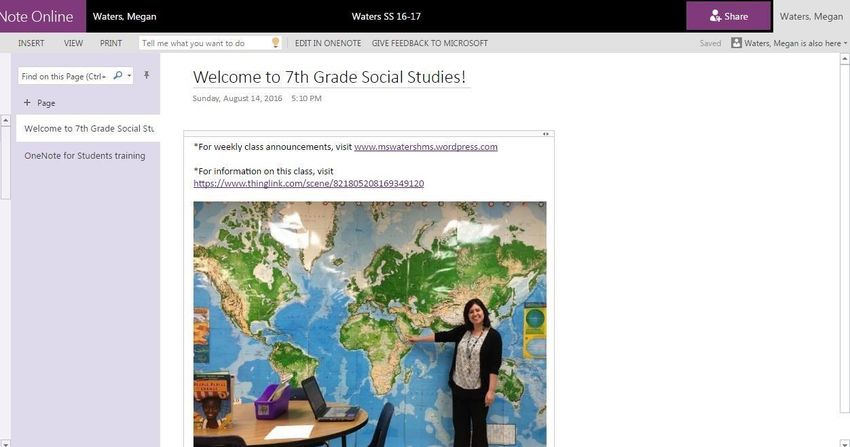
Information for New Parents | 2021

School Opening Hours:

School Day:                             Monday – Thursday                8.55 am – 3.45pm

                                        Class Tutor Time                 10.51am – 11.00am

                                        Break                            11.00am – 11.15am

                                        Lunch                            1.11pm – 2.47pm

                                        Friday                           8.55 am – 1.10 pm

                                        Class Tutor Time                 10.55am – 11.00am

                                        Break                            11.00am – 11.10am

School Building Opening Hours           Monday – Thursday                8.00 am – 6.00 pm

                                                                         (excluding co-curricular
                                                                         activities)

                                        Friday                           8.00 am – 3.30pm
                                                                         (excluding co-curricular
                                                                         activities)

School office opening hours:            Monday – Thursday                8.30am – 5.00pm
(September 2019)

                                        Friday                           8.30am – 4pm

Class structures:                       One group of 25 students approx. in each year. Six one-hour
                                        class periods Monday – Thursday, Four one-hour class
                                        periods on Fridays.

Lunch:                                  Students must bring their own lunch. A microwave is
                                        available for use. There are no canteen facilities.

School building morning access:         Open at 8 a.m. Students enter the building through the
                                        double-doors to the extreme right of front of the school.
                                        Students can remain in the Hall where supervision is
                                        provided until just before first class.

Lockers:                                Each student is assigned a locker for the academic year. This
                                        locker must remain locked at all times. It is the student’s
                                        responsibility to provide the lock

This information sheet can be read in conjunction with all School Policies & Procedures available on
https://www.stratfordcollege.ie/about-us/policies-reports-publications                        4 | Page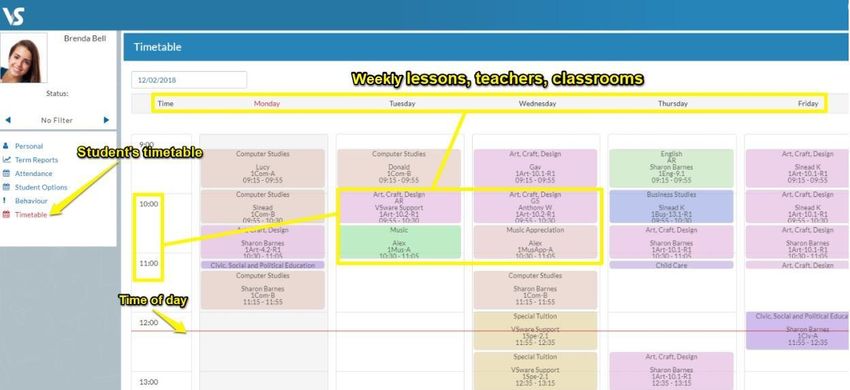
Information for New Parents | 2021

Our Mission

Our mission is to provide a teaching and learning community committed to quality and excellence in
education. We educate our students in an inclusive academic environment which fosters a sense of
personal and academic achievement, respect for diversity and service to the community

This is Us

Stratford College’s richness of heritage and our multi-denominational enrolment makes our school
truly unique.

In a spirit of inclusiveness and collaboration we provide a vibrant and academically challenging
learning environment. Committed teachers, progressive student centred learning and strong home-
school relationships are the corner stones of our school.

Staff and students undertook some work on what Stratford College means to them and how they
define their experience of being in school here.

We have animated this in a short video 'This is Us' which can be viewed here
https://www.stratfordcollege.ie/news/post/this-is-us

This information sheet can be read in conjunction with all School Policies & Procedures available on
https://www.stratfordcollege.ie/about-us/policies-reports-publications                        5 | Page
Information for New Parents | 2021

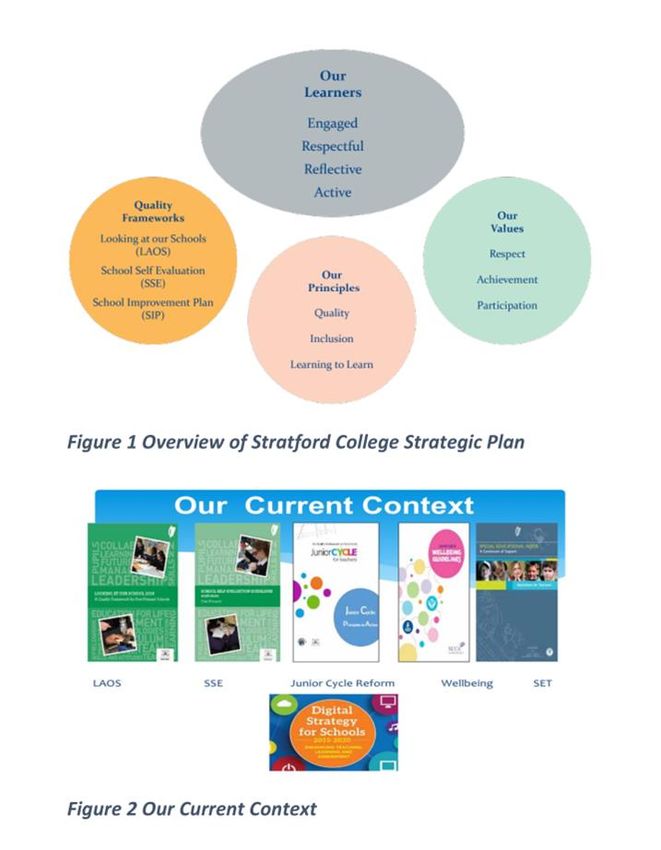
Strategic Plan 2019-2020

Stratford College is committed to providing a challenging and rigorous curriculum that helps each
student progress and provide a safe environment for all students. As you will see, each year aims to
provide important transitions and the acquisition of new skills that will enhance each student’s
ability to apply learning in many ways. At Stratford College we honour the past, value the present
and commit to the future.

The full Strategic Plan 2019-2022 can be viewed by clicking here: Stratford College Strategic Plan
2019-2022

Self Evaluation Report and Improvement Plan (Parents Version) 2019 – 2020

Our Self-Evaluation Report and Improvement Plan (Parents Version) 2019-2020 can be viewed here:

This information sheet can be read in conjunction with all School Policies & Procedures available on
https://www.stratfordcollege.ie/about-us/policies-reports-publications                        6 | Page
Information for New Parents | 2021

https://www.stratfordcollege.ie/content/images/School-Improvement-Plan-2019-2020-Parents-
Version.pdf

Current Members of the Board of Management

Mr. Cormac Murphy, Chairperson

Rabbi Zalman Lent, Trustee Nominee

Mr. Harold Eppel, Trustee Nominee

Ms. Roberta Luntley, Parents Nominee

Mr. Sean Smith, Parents Nominee

Mr. Edmund O'Neill, Trustee Nominee

Ms. Venita Kenny, Teacher Nominee

Ms. Catherine Conlon, Teacher Nominee

Ms. Patricia Gordon, Secretary to the Board

Cf: https://www.stratfordcollege.ie/about-us/board-of-management

Current Management and Administrative Details

Chairman of the Trustees: Mr. Alan Green

Chair of the Board of Management: Mr. Cormac Murphy

Principal: Ms Patricia Gordon

Deputy Principal: Ms Siobhan Reynolds

Office Administrator/Bursar: Ms Janice O’Byrne

Office Administrator: Ms Trish Connolly

School Secretary: Ms. Laura Reid

School Caretaker: Mr Brendan Meehan

Parents Association

This information sheet can be read in conjunction with all School Policies & Procedures available on
https://www.stratfordcollege.ie/about-us/policies-reports-publications                        7 | Page
Information for New Parents | 2021

The aspiration of the Parents’ Association is to make parent and guardians a valued partner in the
educational journey of their child. A journey that will enable their child to learn and develop socially,
emotionally and academically. The Parents’ Association works with the principal, staff and board of
management to build effective co-operation and partnership between home and school. The PA
Committee helps to ensure that all parents and guardians feel part of our school community through
the organisation of formal and informal events throughout the academic year. All parents and
guardians are automatically members of the Parents’ Association and are encouraged to become
actively involved in the PA Committee, which represents the interests of students.

Email    StratfordCollegePA@stratfordcollege.ie

Chairperson: Ms Eithne Kelly              Secretary: Ms Naomi Taylor

School Calendar

All planned school closures are published to the school calendar. Any change to this will be
circulated by email and posted on the school website.

All school exams, Parent Teacher Meetings and Information Meetings are published to the School
Calendar.

Programmes

Our Junior Cycle Student Award (JCSA), Transition Year and Leaving Certificate
Programmes are published at https://www.stratfordcollege.ie/student-life/academic

Subject Specifications

All Subject specifications are available alphabetically at www.curriculumonline.ie

Teaching Staff
 Mr. Sean Brilly                             Business Studies and Accounting

 Ms. Catherine Conlon                        Maths, Music, SET team
                                             House Examinations Coordinator
                                             CConlon@stratfordcollege.ie
 Dr Sarah Brusey                             Maths, Science, Chemistry
                                             SBrusey@stratfordcollege.ie
 Mr. Michael Culliney                        Guidance Counsellor (Tuesdays, Wednesdays and
                                             Thursdays)
                                             MCulliney@stratfordcollege.ie

This information sheet can be read in conjunction with all School Policies & Procedures available on
https://www.stratfordcollege.ie/about-us/policies-reports-publications                        8 | Page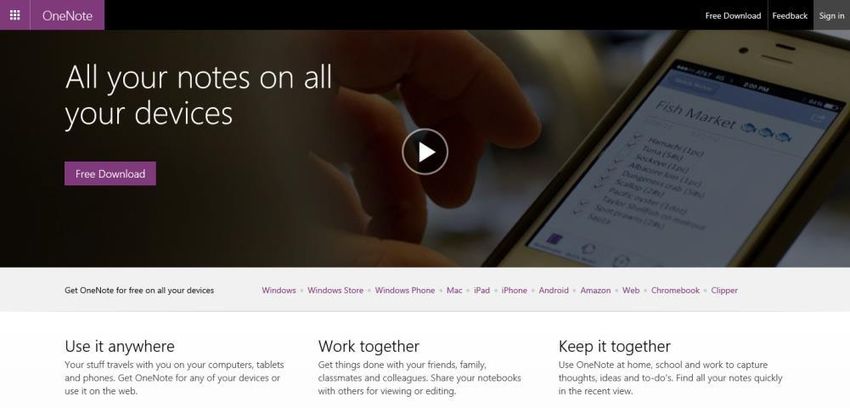
Information for New Parents | 2021

 Ms. Delia Donohoe                          Classics, and CSPE short course
                                            SENCO (Point of contact for Class profiles and SEN
                                            information)
                                            DDonohoe@stratfordcollege.ie

 Ms. Grainne Fanning                        English as an Additional Language (Fridays)
                                            GFanning@stratfordcollege.ie
 Ms. Linda Finnegan                         PE, SPHE, and Wellbeing
                                            Assistant Principal
                                            TY Coordinator
                                            LFinnegan@stratfordcollege.ie

 Ms. Venita Kenny                           History, Irish, and CSPE short course
                                            Assistant Principal
                                            VKenny@stratfordcollege.ie

 Rabbi Zalman Lent                          Hebrew Studies and Religious Education
                                            ZLent@stratfordcollege.ie

 Ms. Susanne Mahon                          Art
                                            SMahon@stratfordcollege.ie

 Ms Sheenagh Maxwell                        Irish and French
                                            SMaxwell@stratfordcollege.ie

 Ms. Lynne McGuckin                         Geography and Maths
                                            LMcGuckin@stratfordcollege.ie

 Ms. Helen O’Kelly                          Computer Science and Computer Applications
                                            Librarian
                                            ICT Coordinator
                                            HOKelly@stratfordcollege.ie

 Ms. Roisin Cahill                          Biology, Maths and Science

 Ms. Coleen O’Reilly                        French
 Ms. Claudia De Santos
 Ms. Siobhán Reynolds                       Deputy Principal
                                            Head of English Dept
                                            SReynolds@stratfordcollege.ie

 Mr. David Fennell                          Physics, Maths and Chemistry
                                            DFennell@stratfordcollege.ie

 Ms. Einat Caspi                            Special Needs Assistant
                                            ECaspi@stratfordcollege.ie

 Ms. Emma Beamish                           English

This information sheet can be read in conjunction with all School Policies & Procedures available on
https://www.stratfordcollege.ie/about-us/policies-reports-publications                        9 | Page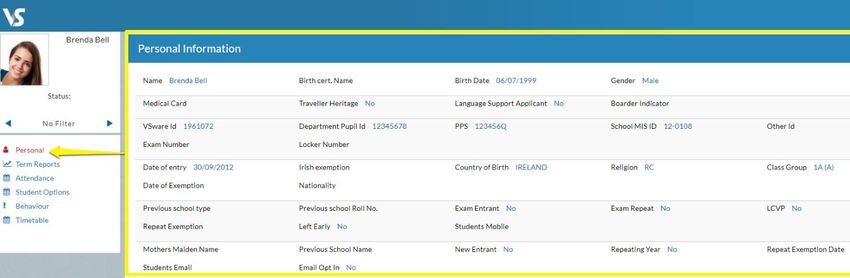
Information for New Parents | 2021

 Ms. Karen Walsh                            Hebrew Studies
                                            KWalsh@stratfordcollege.ie

School Policies and Procedures

Copies of policies are available for download on the website at:
https://www.stratfordcollege.ie/about-us/policies-reports-publications or upon request from the
School Office.

School Exams * exam timetables will be posted to Information for Current Parents

Exam Regulations
   1. Full uniform must be worn
   2. No sport for the duration of the exams
   3. Students should take their places five minutes before the start of the exam
   4. Students are not allowed to leave the exam hall before the time allotted
   5. No food, drink, sweets, toys or bags allowed in the exam hall for the duration for the
      exams. Water will be allowed.
   6. If toilet is absolutely necessary then hall toilets are to be used
   7. Students should be fully equipped for each exam. Students will not be allowed
      borrow from other students
   8. Any communication between students during exams will result in cancellation of
      exam attempt.

Student Wellbeing
Stratford College is committed to the nurturing of the whole person so that they may be
guided with respect and care to respond to the demands of modern life with resilience,
optimism and a sense of ownership. The practice of wellbeing has been introduced to
promote the wellbeing and health of the school community which is important to the
emotional, social, cognitive and academic development of young people. We recognise that
promoting the wellbeing of our students is a shared responsibility and requires a whole-
school approach.

This information sheet can be read in conjunction with all School Policies & Procedures available on
https://www.stratfordcollege.ie/about-us/policies-reports-publications                      10 | Page
Information for New Parents | 2021
Communication with Parents
Every student has a copy of the School Journal. The journal is primarily used for noting all
homework instructions from teachers. It contains important material such as the discipline code,
calendar, notes to explain absences etc. It also plays a substantial role in communication and
tracking.
Class Tutors
Your son/daughter’s Class Tutors are the first point of contact. However, please bear in mind that all
our teachers have busy schedules and may not be able to return a call to your immediately.
School Website
The School website gives you an insight into the spirit of our school through the many activities and
learning opportunities that take place. Please take some time to look at it and keep in touch with
life in Stratford.
General announcements will be posted on the school website and/or by text message.
www.stratfordcollege.ie
VSware
Parent's guide to VSware
Logging into your account
To access your VSware account, your school will have sent you a unique username and a
VSware URL (website address) that is specific to your school. The URL will look something
like this: schoolname.vsware.ie. These details are usually sent to you in via SMS. VSware is
best accessed through Google Chrome. You can access the site on the internet browser on
your mobile device also.
• To log into your new account, go to the login screen in your browser and click 'Reset
Password'
This information sheet can be read in conjunction with all School Policies & Procedures available on
https://www.stratfordcollege.ie/about-us/policies-reports-publications 11 | PageInformation for New Parents | 2021
• This brings you to the 'Reset Password' screen
• Type in your username
• Type the last 4 digits of your phone number
• Click 'Validate'
• You will then receive a text message containing the verification code. This SMS
might take a minute or two to be sent.
• Enter the code, type your new password into the 'New password' and 'Confirm
password' fields. Make sure that your password follows the criteria listed.
• Click 'Change password'
This information sheet can be read in conjunction with all School Policies & Procedures available on
https://www.stratfordcollege.ie/about-us/policies-reports-publications 12 | PageInformation for New Parents | 2021
• You will see a message confirming that your password has been successfully
updated. Once you see this click ' Go To Login'
• This brings you back to the main Login screen. Type your username, your new
password and click 'Sign In'. This is your new password going forward.
This information sheet can be read in conjunction with all School Policies & Procedures available on
https://www.stratfordcollege.ie/about-us/policies-reports-publications 13 | PageInformation for New Parents | 2021 Forgotten password and locked account If you forget your password, you can reset your own account without contacting the school. Simply click the 'Reset Password' button as in the steps above. If you have requested more than three security codes when resetting your password, your account will be locked until midnight. At one minute past midnight, your account will automatically be unlocked, and you can request another security code. Siblings If you have more than one child in the school, click the blue arrow under the photograph to toggle to the next student. You will only ever need one VSware login, regardless of how many students you have in the school. Timetable First, take a look at the timetable which is found in the left panel. Here you will be able view the student’s lessons, teachers and classrooms throughout the week. The red line indicates the current time of day, so it's very easy to see at a glance where the student is. This information sheet can be read in conjunction with all School Policies & Procedures available on https://www.stratfordcollege.ie/about-us/policies-reports-publications 14 | Page
Information for New Parents | 2021

Personal
Next, click into the personal tab which includes the personal details of the student. If
anything in this screen needs to be updated, you should contact the school to request the
change.

Term reports
The term reports tab is a straightforward screen. At the top of the page, you first select
an exam and it then displays the student's mark, grade and teacher comment for each
subject. Some schools provide the option to print off an official school term report. To do
this, click 'actions' (on the top right) and 'print'. A word document will then download onto
your computer or device and you will be able to view, save and print it. Otherwise you can
just right click anywhere on the main term report page and press 'print'. This will print the
screen exactly as it is.

This information sheet can be read in conjunction with all School Policies & Procedures available on
https://www.stratfordcollege.ie/about-us/policies-reports-publications                      15 | Page
Information for New Parents | 2021

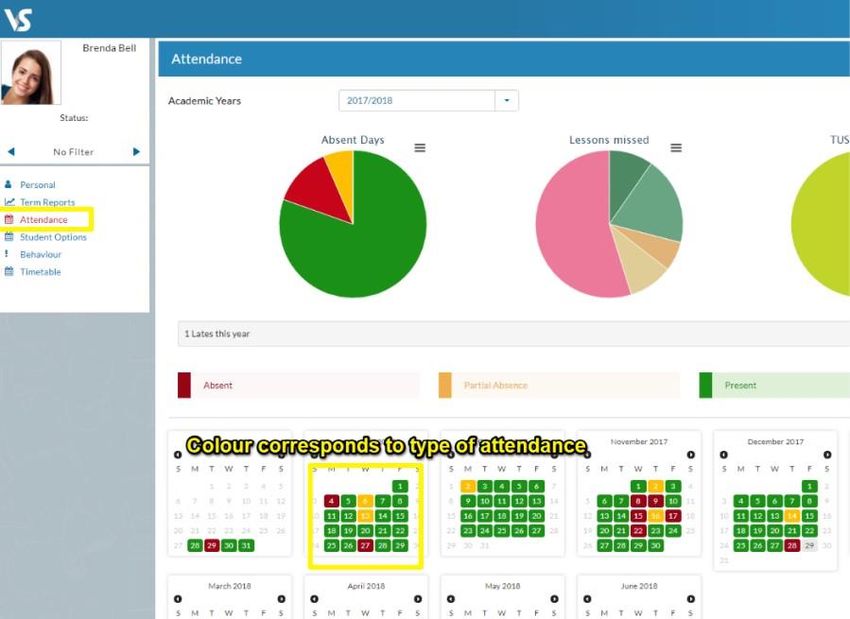
Attendance
In the attendance tab you will see the yearly calendar which gives you an overview of
your child's attendance. Each date will be colour coded according to the attendance of the
student on that day. The pie charts above the calendar shows at a glance the percentage of
present and absent days.

Red = Absent
Yellow = Partial Absence (even if the student has just missed one class on that day) Green =
Present
Blue = Unexplained Absence

Behaviour
The behaviour tab will show any incidents that have been recorded by school staff for your
child. The behaviour may be positive or negative, and the school can decide to allocate
points to each behaviour.

This information sheet can be read in conjunction with all School Policies & Procedures available on
https://www.stratfordcollege.ie/about-us/policies-reports-publications                      16 | Page
Information for New Parents | 2021

 Student Options
If your school decides to allow parents to enter in student options through their VSware
account, it's simply a case of selecting 'student options' in the left panel and then entering
in each subject in order of preference using the drop-down menu.

Schoolwise

Stratford College is using Schoolwise, an education platform that brings the management of
learning and teaching together in one place.

An introduction to Schoolwise can be viewed by clicking on this link:

http://support.schoolwiselearning.com/en/articles/3528728-introduction-video-for-
learners

This information sheet can be read in conjunction with all School Policies & Procedures available on
https://www.stratfordcollege.ie/about-us/policies-reports-publications                      17 | Page
Information for New Parents | 2021

Microsoft Teams for Education - A_QuickGuide

For the Full Guide – click here:
The full document Guide is available for download by clicking here:

     MicrosoftTeamsforEducation_QuickGuide_EN-US.pdf

This information sheet can be read in conjunction with all School Policies & Procedures available on
https://www.stratfordcollege.ie/about-us/policies-reports-publications                      18 | Page
Information for New Parents | 2021
Online Payments
PAYMENT OF SCHOOL FEES
• 2 payments – September & January. You must use your Unique School Account Code (see
invoice) and your surname as a narrative
• 8 equal payments commencing 2nd September and ending 6th April at no extra charge.
Please set up a standing order with your bank and use your Unique School Account Code
(see invoice) and your surname as a narrative
• A one-off payment at the beginning of the school year – August/September. You must use
your Unique School Account Code (see invoice) and your surname as a narrative
For school trips, or other payments during the year:
• details will be sent to you by the organising teacher regarding the amount to be paid, deadline
etc. Again, you must use your Unique School Account Code (see invoice) and your surname
as a narrative
• Bank Details: Allied Irish Bank
• Account Name: Board of Management Stratford College
IBAN: IE46 AIBK 9310 7115 7040 59
• BIC: AIBKIE2D
• (Please insert your Unique School A/C Code and Surname on any online transactions
so that your payments can be identified as yours)
This information sheet can be read in conjunction with all School Policies & Procedures available on
https://www.stratfordcollege.ie/about-us/policies-reports-publications 19 | PageInformation for New Parents | 2021
•
Co-Curricular Activities 2020-2021
Payable
Day Activity Time Cost * classes subject to
demand and cost is
based on minimum
numbers.
Monday Supervised Study After school 4-6pm €450 per annum
See Mobile Music for
Mobile Music: One to one details
Music Lessons * by
arrangement
Tuesday Supervised Study After school 4-6pm
Mobile Music: One to one
Music Lessons * by
arrangement
Wednesday Supervised Study After school 4-6pm
Mobile Music: One to one
Music Lessons * by
arrangement
Thursday Supervised Study After school 4-6pm Tennis: €200 per annum
Mobile Music: One to one
Music Lessons * by
arrangement
Tennis Lessons in next
door Rathgar Tennis Club
Friday Supervised Study After school 1.30 –
3.30pm
English as an Additional €1100 per annum (price
Language (EAL) based on minimum of 3
students)
This information sheet can be read in conjunction with all School Policies & Procedures available on
https://www.stratfordcollege.ie/about-us/policies-reports-publications 20 | PageInformation for New Parents | 2021
Free of Charge (FOC)
Day Activity Time Location
Monday Library Lunchtime
Student Council
Meetings
Basketball Stratford and
Basketball After school 4-5pm National Basketball Arena
Film Club Tallaght
Tuesday Ciorcal Comhra Lunchtime
Coderdojo
Library
Football (Boys and After school 4-5pm
Girls/Jr/Senior)
Football: Herzog Multi Use
Games Area (MUGA)
Wednesday Green Schools Lunchtime
Science Club
Sports History
Society
Science Club
Library
Music Club
Swing Dancing After school 4-5pm
Thursday Gaming Club Lunchtime
Writers’ Group
Library
Maths Club tbc After school 4-5pm
Friday Supervised Study After school 1.30 - 3.30pm
EAL Language
Classes
Drama
This information sheet can be read in conjunction with all School Policies & Procedures available on
https://www.stratfordcollege.ie/about-us/policies-reports-publications 21 | PageInformation for New Parents | 2021
FAQs
Who do I direct questions to about extra-curricular courses?
Please see https://www.stratfordcollege.ie/current-parents/school-forms-extra-curricular-
classes-etc for details on School Organised payable classes.
• The Mobile Music School – Questions about MUSIC courses should be directed at
the Mobile Music School, either by email admin@mobilemusicschool.ie or by calling 087
4221422.
• School Organised: to the school office at 01-4922315 or admin@stratfordcollege.ie
How do I register for an afterschool activity?
• The Mobile Music School – Register for MUSIC courses by using an afterschool music
lesson application form, this form can be obtained from the School Office. Drop the
completed application form to Janice in the School Office or email a copy of it to
admin@mobilemusicschool.ie.
• School Organised Options – Register for school courses by using the application
form, this form can be obtained from the School Office. Drop the completed application
form to Janice in the School Office
How do I pay for an afterschool activity?
• The Mobile Music School – Payment should be made either by cheque, payable to
“Mobile Music School Ltd”, attached to the application form or by
Electronic Funds Transfer to “Mobile Music School Ltd”. (Payment details can be found
on the reverse of the application form)
• Fees for school options should be transferred on line to the school bank account using
your unique identifier
Availability of places?
• Places will be filled on a first come, first served basis and classes are subject to demand.
This information sheet can be read in conjunction with all School Policies & Procedures available on
https://www.stratfordcollege.ie/about-us/policies-reports-publications 22 | PageInformation for New Parents | 2021
OneNote Class Notebook Student & Parent/Guardian Access Guide
Parent/Guardian OneNote Access
Parents and guardians may access their student’s OneNote class notebooks with two teacher
provided links.
1. To view a class calendar, syllabus, class handouts/assignments, and study resources, parents and
guardians should use the Content Library Link.
Using a Content Library Link: A student’s teacher can provide a link to view a class
notebook’s library of resources. Parents/guardians can simply click on the link to view this
information. There is no login required.
2. To view the work an individual student completes in OneNote, such as classwork, homework,
projects, and quizzes, parents and guardians should use the Individual Student Notebook Section
Link.
Using an Individual Student Notebook Section Link: A student’s teacher can provide a link
to view an individual student’s class notebook section. This is a great way to keep up with
This information sheet can be read in conjunction with all School Policies & Procedures available on
https://www.stratfordcollege.ie/about-us/policies-reports-publications 23 | PageInformation for New Parents | 2021
the work students complete in OneNote. Parents/guardians can simply click on the link to
view this information. There is no login required.
Student OneNote Access
Once a teacher has shared a Class Notebook, students can access it in several ways.
Office 365-Mail
Students will automatically be notified by email when OneNote Class Notebooks are shared with
them.
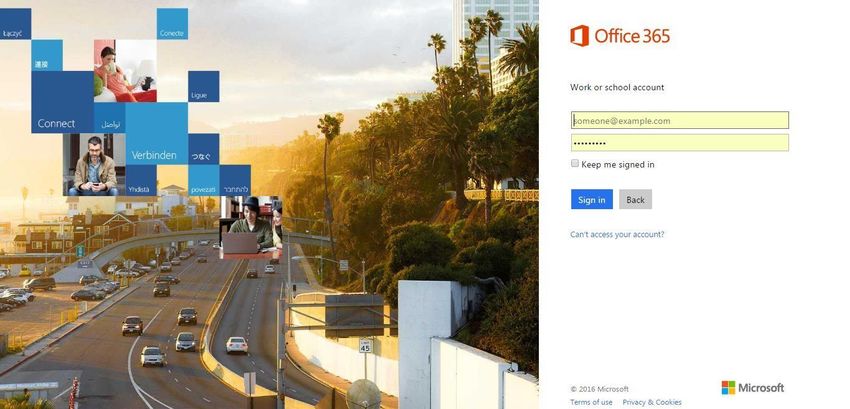
To access their email, students should complete the following steps. 1.
Go to portal.office.com
2. Sign in with the following credentials:
Username: & Password
This information sheet can be read in conjunction with all School Policies & Procedures available on
https://www.stratfordcollege.ie/about-us/policies-reports-publications 24 | PageInformation for New Parents | 2021
3. Once a student is signed in, he or she should left-click on the Mail app on the Office 365
homepage.
Office 365-OneNote
Students can also open any Class Notebook that has been shared with them by going to OneNote
Online.
To access OneNote Online, students should complete the following steps. 1.
Go to portal.office.com
2. Sign in with the following credentials:
Username: Stratford College usnername and password.
Once a student is signed in, he or she should left-click on the OneNote app on the Office 365
homepage.
This information sheet can be read in conjunction with all School Policies & Procedures available on
https://www.stratfordcollege.ie/about-us/policies-reports-publications 25 | PageInformation for New Parents | 2021
3. Once in OneNote, the student should left-click on the Shared with Me tab.
A list of every notebook that has been shared with the student will appear.
5. The student should left-click on the notebook he or she would like to open. This will open the
Class Notebook.
Please see this link for an overview. https://onenoteineducation.com/en-US/students/.
Student guide to accessing OneNote at
home.
This guide is direct students and parents in how to access King’s School OneNote material from
home.
What is OneNote?
This information sheet can be read in conjunction with all School Policies & Procedures available on
https://www.stratfordcollege.ie/about-us/policies-reports-publications 26 | PageInformation for New Parents | 2021
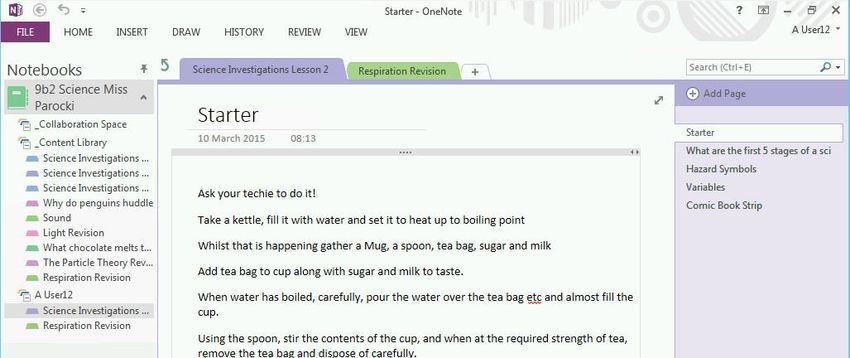
OneNote is a free Microsoft application for taking notes, drawings and screen clips as well
embedding other documents.
OneNote is available for on a wide range of devices but best productivity can be seen in using
OneNote Windows 10 for the PC or Mac.
How to Install OneNote
OneNote can be downloaded free for your platform of choice from www.onenote.com
Once on the site click on either Windows or Mac and follow the download and installation steps.
Figure 1: OneNote.com website
Figure 2: Downloading the windows application
Figure 3: What you'll see during installation
How to open class notebooks for the first time
With OneNote installed click on the “class notebooks”.
Students should then sign in with their username and password. The password should be the same
to log onto the school computers.
Once logged in select the notebook you wish to use.
Figure 5: View of class notebooks
This information sheet can be read in conjunction with all School Policies & Procedures available on
https://www.stratfordcollege.ie/about-us/policies-reports-publications 27 | PageInformation for New Parents | 2021
Then select Edit Notebook > “edit in Microsoft OneNote” to use the application on your computer.
Figure 6: Opening Notebook in Microsoft OneNote
Say yes / trust to any prompts you receive:
Figure 7: Examples of prompts
You can open and pin the left side pane and click on your username to get started with the activities.
Figure 8: Pinning side menu to see all notebooks clearly
Figure 9: Selecting items under your username to start editing the pages contained
You have now got OneNote set up on you home computer to permanently sync with what you are
doing in school.
This information sheet can be read in conjunction with all School Policies & Procedures available on
https://www.stratfordcollege.ie/about-us/policies-reports-publications 28 | PageInformation for New Parents | 2021
To add new notebooks you simply need to open them from the “class notebooks” section of the
school website.
If at any point you are asked for a username and password simply enter in your
Stratford College username and network password.
***
This information sheet can be read in conjunction with all School Policies & Procedures available on
https://www.stratfordcollege.ie/about-us/policies-reports-publications 29 | PageYou can also read


