Practical Guide to Cloud Computing Version 2.0
←
→
Page content transcription
If your browser does not render page correctly, please read the page content below
Practical Guide to Cloud Computing
                        Version 2.0

                             April, 2014
Contents
Acknowledgements....................................................................................................................................... 3
Revisions ....................................................................................................................................................... 3
Executive Overview ....................................................................................................................................... 4
Rationale for Cloud Computing..................................................................................................................... 5
   Essential Characteristics of Cloud Computing .......................................................................................... 5
   The Benefits of Cloud Computing ............................................................................................................. 5
   What is the Importance of Standards-Based Cloud Computing? ............................................................. 6
Roadmap for Cloud Computing .................................................................................................................... 7
   Step 1: Assemble your Team..................................................................................................................... 7
   Step 2: Develop Business Case and an Enterprise Cloud Strategy............................................................ 9
   Step 3: Select Cloud Deployment Model(s) ............................................................................................ 13
   Step 4: Select Cloud Service Model(s) .................................................................................................... 15
   Step 5: Determine Who Will Develop, Test and Deploy the Cloud Services .......................................... 23
   Step 6: Develop Governance Policies and Service Agreements ............................................................. 25
   Step 7: Assess and Resolve Security and Privacy Issues ......................................................................... 27
   Step 8: Integrate with Existing Enterprise Systems ................................................................................ 29
   Step 9: Develop a Proof-of-Concept before Moving to Production ....................................................... 31
   Step 10: Manage the Cloud Environment ............................................................................................... 32
Summary of Keys to Success ....................................................................................................................... 33
Works Cited ................................................................................................................................................. 36
Additional References ................................................................................................................................. 36

Copyright © 2011 Cloud Standards Customer Council                                                                                                       Page 2
© 2014 Cloud Standards Customer Council.
All rights reserved. You may download, store, display on your computer, view, print, and link to the
Practical Guide to Cloud Computing at the Cloud Standards Customer Council Web site subject to the
following: (a) the Guidance may be used solely for your personal, informational, non-commercial use; (b)
the Guidance may not be modified or altered in any way; (c) the Guidance may not be redistributed; and
(d) the trademark, copyright or other notices may not be removed. You may quote portions of the
Guidance as permitted by the Fair Use provisions of the United States Copyright Act, provided that you
attribute the portions to the Cloud Standards Customer Council Practical Guide to Cloud Computing
Version 2.0 (2014).
Acknowledgements
The Practical Guide to Cloud Computing is a collaborative effort that brings together diverse customer-
focused experiences and perspectives into a single guide for IT and business leaders who are considering
cloud adoption. The following participants have provided their expertise and time to this effort: Claude
Baudoin (cébé IT & Knowledge Management), Jeff Boleman (IBM), Asher Bond (Elastic Provisioner),
Mike Edwards (IBM), Melvin Greer (Lockheed Martin), Larry Hofer (Cloud and Security Services), Yves Le
Roux (CA Technologies), John McDonald (CloudOne Corporation), John Meegan (IBM), Jem Pagan (JNK
Securities), Sujatha Perepa (IBM), Keith Prabhu (Confidis), Ram Ravashankar (IBM), Gurpreet Singh
(Ekartha), Joe Talik (AT&T), Amy Wohl (Wohl Associates), Elizabeth Woodward (IBM), Steven Woodward
(Cloud Perspectives).
Revisions
Much has changed in the realm of cloud computing since the original Practical Guide to Cloud
Computing whitepaper was published in October, 2011. Version 2.0 includes the following updates:
A new Executive Overview section has been written.
The Rationale section has been trimmed significantly since it is no longer necessary to explain
the basics of cloud computing.
The service agreements step in the Roadmap has been extended to include governance policies.
A new step has been added to the Roadmap focused on security and privacy.
The integration step in the Roadmap has gone through major revisions.
All other sections have been updated, albeit to a lesser degree, to reflect the evolution and
maturity of both the business and technical aspects of cloud computing.
References have been added to several CSCC whitepapers that have been written since the
original Practical Guide to Cloud Computing.
Copyright © 2011 Cloud Standards Customer Council Page 3Executive Overview The aim of this guide is to provide a practical reference to help enterprise information technology (IT) and business decision makers adopt cloud computing to solve business challenges. The emergence of cloud computing, like any new technology model, has the side effect of flooding the market with information and jargon that adds to the confusion and uncertainty amongst decision makers. The Practical Guide to Cloud Computing aims to remedy this by providing comprehensive and actionable information in a single reference. The cloud computing marketplace has changed in the three years since we first wrote and published this Guide. Cloud computing has moved from an interesting experiment to a proven information technology with multiple vendors, large and small, taking different approaches. Most customers have adopted at least some cloud computing technology; others are using cloud computing as their sole IT infrastructure or are moving in that direction. There is much more interest and support for cloud computing from formal IT, but there continues to be a strong presence of Line of Business (LOB) managers spending their IT budgets on cloud services, often without the knowledge or approval of IT management. Also, large numbers of business customers are choosing their own cloud technologies and expecting IT to support them. This Guide continues to provide a way of evaluating the market from the point of view of your organization’s needs and providing information that is helpful in selecting both a cloud architecture and an implementation approach through the use of in-house staff, cloud vendor(s) or both. From an architectural perspective, we have moved beyond the discussion of private vs. public clouds. Hybrid clouds (including multiple clouds, both private and public temporarily or permanently interconnected) are commonplace. Today, it is expected that an organization may have any or all of these models, depending on its needs for speed of execution, available resources, need for data protection and security, and an array of other reasons. A discussion of how to choose the most effective cloud service and deployment model is included in this Guide. The “Roadmap for Cloud Computing” section is the heart of the guide. It details both strategic and tactical activities for decision makers implementing cloud solutions. It also provides specific guidance to decision makers on the selection of cloud service and deployment models. The activities and recommendations in the roadmap take into account the different sizes and IT maturity of customer organizations, and act as a useful template for both large enterprises and small-and-medium businesses (SMBs). Readers should note that despite the guidelines provided in this white paper, the ultimate selection of cloud solutions and their success depend upon the judgment of IT and business decision makers and their organizational realities. Copyright © 2011 Cloud Standards Customer Council Page 4
Rationale for Cloud Computing
Cloud computing offers a value proposition that is different from traditional enterprise IT environments.
By providing a way to exploit virtualization and aggregate computing resources, cloud computing can
offer economies of scale that would otherwise be unavailable. With minimal upfront investment, cloud
computing enables global reach of services and information through an elastic utility computing
environment that supports on-demand scalability. Cloud computing can also offer pre-built solutions
and services, backed by the skills necessary to run and maintain them, potentially lowering risk and
removing the need for the organization to retain a group of scarce highly skilled staff.
Cloud computing does not exist in a vacuum. Most organizations will have a broad variety of
applications already running in their data center. For most, cloud computing will extend their existing IT
infrastructure. Cloud computing can be dedicated to particular tasks. It can be used mainly for new
projects. Or, an organization may use it for overflow, guaranteeing a certain level of performance for
enterprise computing.
Essential Characteristics of Cloud Computing
On-demand self-service. A customer can provision computing capabilities, such as server time and
network storage, as needed, automatically without requiring human interaction with the service
provider.
Omni-channel access. Capabilities and services are available over the network and accessed through
standard mechanisms that promote use by heterogeneous client platforms (e.g., mobile devices,
laptops, and even other devices such as automobiles, home appliances and point-of-sale kiosks).
Resource pooling. Cloud computing pools a provider’s computing resources to serve multiple
customers using a multi-tenant model, with different physical and virtual resources assigned and
reassigned according to customer demand. Cloud computing provides a sense of location
independence. Customers generally have no control or knowledge of the exact location of the
resources. But, they may be able to specify location at a higher level of abstraction (e.g., country,
state, or data center). Examples of resources include storage, processing, memory, network
bandwidth, and virtual machines.
Rapid elasticity. Resources can be rapidly and elastically provisioned, sometimes automatically, to
scale out quickly, and be rapidly released to scale in quickly. To customers, the resources often
appear to be unlimited and can be purchased in any quantity at any time.
Measured Service. Cloud services automatically control and optimize resource use by leveraging a
metering capability at some level of abstraction suitable to the type of service (e.g., storage,
processing, bandwidth, and active user accounts). Providers and customers can monitor, control,
and report on services with transparency.
Refer to the National Institute for Standards and Technology (NIST) Cloud Computing Reference
Architecture [1] for more details on cloud computing characteristics, roles, deployment models and
service models.
The Benefits of Cloud Computing
In addition to providing access to a shared pool of configurable computing resources (e.g., networks,
servers and storage), cloud computing promotes a loosely-coupled, composable and highly-reusable
services type environment for agile application development and roll-out. Because virtual instances can
Copyright © 2011 Cloud Standards Customer Council Page 5be provisioned and terminated at any time and the customer organization pays only for the computing
resource they are employing, costs can be lower.
Cloud computing enables business agility. Cloud computing provides the ability to make use of
computing resources on an immediate basis, rather than a need to first invest time and skilled resources
in designing and implementing infrastructure (hardware and middleware) and/or applications, and then
deploying and testing it. This leads to faster time to value which may mean enhanced revenue, larger
market share, or other benefits.
In essence, the top five benefits of cloud computing can be summarized as follows:
1. Achieve economies of scale. Increase volume output or productivity with fewer resources
(computing and human).
2. Reduce CapEx by moving to OpEx. The pay as you go model (weekly, quarterly or yearly), based
on demand / utility computing, will help reduce capital expenditure on hardware and software
licenses.
3. Improve access. Information access can be anytime, anywhere and anyhow through omni-
channel access.
4. Implement agile development at low cost. Design, development and rollout of new solutions and
services using agile methodologies on cloud based shared development operations.
5. Leverage global workforce. Follow-the-sun model for defining, developing and rolling out new
solutions and applications. Cloud computing can be rolled out in multiple data centers around
the globe, ensuring that services are close to end users – providing better performance and
appropriate redundancy.
What is the Importance of Standards-Based Cloud Computing?
Standards-based cloud computing ensures that cloud services can readily interoperate, based on open
standard interfaces. Standards allow workloads to be readily moved from one cloud provider to a
different cloud provider. Services created for one cloud computing environment can be employed in
another cloud computing environment, eliminating the need to rewrite or duplicate code.
We are still at a relatively early stage of cloud computing and many different standards have been
proposed. Some permit interoperability and portability, others support limited interoperability and
portability, and others are, in fact, proprietary environments. Once a proprietary environment is
selected, an organization will probably experience vendor lock-in. This means that integrating
applications or services across differing proprietary cloud platforms is likely to require extensive,
expensive, and time-consuming work.
Some of the proposed standards are based on open-source initiatives. This has the advantage of making
all the code transparent, available for inspection, and more readily suited for an interoperable
environment. However, whenever a new technology is attracting a great deal of attention, neither
vendors nor customers are likely to wait for mature standards or rich open source environments. They
Copyright © 2011 Cloud Standards Customer Council Page 6tend to leverage the advantage of early adoption of emerging technology at the price of having to move
to a standard (and perhaps an open source) environment at a later date.
Roadmap for Cloud Computing
This section provides a prescriptive series of
steps that should be taken to ensure a successful
cloud deployment from the perspective of a
cloud service customer. It takes into account
differences that result based on the size of the
organization and its IT maturity level. The
following steps are discussed in detail:
1. Assemble your team
2. Develop a business case and an
enterprise cloud strategy
3. Select cloud deployment model(s)
4. Select cloud service model(s)
5. Determine who will develop, test and
deploy the cloud services
6. Develop governance policies and service
agreements
7. Assess and resolve security and privacy issues
8. Integrate with existing enterprise services
9. Develop a proof-of-concept (POC) before moving to production
10. Manage the cloud environment
Depending on the maturity of the organization and the level of adoption of cloud computing, the entry
point will change for each new service being evaluated.
Step 1: Assemble your Team
It is important that the cloud customer1 establishes a clearly defined team to develop and approve a
cloud business strategy and implementation plan for cloud services that will be part of the total IT
environment. In the past, the recommendations, design, development, deployment and maintenance of
the IT environment was primarily driven by the IT department. Cloud computing is creating an evolution
where the business leaders are getting engaged because they see cloud computing as a tool to get
closer to their customers and increase sales/revenue.
Adoption of cloud computing is viewed as a strategic business decision that allows business not only to
improve IT efficiency but also help in achievement of global business goals like streamlining of the
supply chain and extending the business processes to make them more accessible by third parties.
1
Note that this section focuses on the cloud customer. Points of contact between the cloud customer and cloud
brokers, carriers and providers are covered in the later steps of this section.
Copyright © 2011 Cloud Standards Customer Council Page 7Hence, it is logical that the adoption of cloud computing should be led by senior management including
the CEO and CFO with the CIO and CTO playing the role of key advisors. In essence, resources must be
drawn from IT, business (sales and marketing), finance, legal and the administrative areas of the
organization to build a team that can address the various aspects of adoption. Different skills are
required at the different phases of cloud adoption—strategic, tactical and operational.
Figure 1. Three phases of cloud adoption
Strategic Phase
During the strategic phase of cloud service adoption, CEOs and the senior management team lead the
organization to establish the vision, terms of reference and guidelines.
• Vision. The CEO and senior management team should define the overall vision for cloud adoption. It
is critical that the business leadership, particularly the executive levels, collaborate and buy in to the
vision. The vision should address the future of the business and the acquired differentiation,
competitive advantage and/or value proposition gained through a leveraged cloud strategy.
• Terms of reference. It is important to define the terms of reference early in the cloud adoption
process to ensure that the adoption stays focused on the target business goals. An effective Terms
of Reference at minimum should address in clear and concise language, the purpose, goals, guiding
principles and roles and responsibilities and rules of engagement of the teams involved in forming
the cloud computing vision and strategy.
• Guidelines. Based on the culture of the business, it is important for senior management to provide
broad guidelines for cloud adoption, including security and privacy posture, data maintenance and
location policies, etc. The guidelines will provide a business framework to capture the initial high-
level requirements, and support the alignment of the leadership team.
Tactical Phase
During the tactical phase, typically led by the CIO or CTO, the organization performs both a business and
a technical analysis.
• Business analysis. This phase requires the oversight of senior business managers, IT including the
CIO, CTO and lead architects, and legal representatives to review and communicate regulatory
compliance and legal requirements that must be taken into consideration. The overall goal is to
build a business case and the supporting long-term enterprise strategy for the transition to cloud
Copyright © 2011 Cloud Standards Customer Council Page 8computing that delivers sufficient return on investment or return on value. It is critical that the
opportunities and needs of the business remain the primary focus during this phase. Technology
comparisons and early calls on the technology solution could negatively impact the formation of a
sound business analysis if introduced too early in the process. This phase will begin the process of
categorizing and identify potential business applications/solutions that will be considered as
candidates for implementation by means of cloud services.
• Technical analysis. This phase requires the attention of IT including the CIO, CTO and lead architects,
operations personnel, and senior business managers. The goal of this phase is to develop a technical
strategy for cloud deployment taking into consideration the business analysis results from the
previous step and an examination of the various service and deployment models that are available.
As part of the technical analysis, the business case for application migration, as well as building
versus buying, is developed and presented to the strategic team for their feedback and approval.2
Operational Phase
During the Operational phase, leaders from various operations groups work through procurement and
implementation details, and establish ongoing operations for the cloud deployment.
• Procurement. This phase includes negotiations with potential cloud service providers and requires
the procurement team, finance, legal, senior business managers, and IT including the CIO, CTO and
lead architects to be engaged. Assessment models/instruments should be discussed to provide
consistency during the evaluation and contract negotiation phases. For example, a proof-of-concept
or weighted scoring matrix may be developed to align business and technology requirements.
• Implementation. This phase includes the development, customization and configuration of services
which will be deployed in the cloud environment and requires the attention of IT including lead
architects, developers and testers as well as operations personnel. This phase should begin the
process of identifying potential changes in processes/procedures and provide a high level gap
analysis to identify risk mitigation/management opportunities.
• Operations. This phase addresses ongoing operations and management of the cloud infrastructure
and deployed services. Business owners, operations personnel, customer support, and IT including
developers and testers are required in this phase. During this phase the gap analysis moves from a
high level to a more detailed examination to determine what and how changes to existing
operations will be impacted by the cloud computing initiative.
Step 2: Develop Business Case and an Enterprise Cloud Strategy
To ensure a smooth transition to cloud computing, an organization should develop an overarching cloud
strategy which creates the foundation for project-specific adoptions. Cloud computing presents
interesting business model opportunities to organizations of all sizes. Developing a business case and
2
The CSCC whitepaper Migrating Applications to Public Cloud Services: a Roadmap for Success provides a detailed
roadmap for assessing the business value of migrating existing applications to cloud computing.
Copyright © 2011 Cloud Standards Customer Council Page 9strategy that clearly articulates how cloud computing will transform key business processes like
procurement, marketing, customer acquisition and support, product development, etc. is critical.
Within the context of an enterprise strategy for cloud computing, individual business problems that
cloud computing can potentially address need to be identified, and specific business justification must
show that cloud computing is the right strategic alternative. High level value propositions for cloud
computing, including the shift of capital expenditures (CAPEX) to operational expenses (OPEX), cost
savings, faster speed of deployment, elasticity, etc., are necessary but insufficient unless quantified.
Obtaining executive support for the initiative is critical. Executives from IT, Lines of Business (LOBs),
procurement and executive management must review and approve the business plan before
proceeding. Getting key executives on-board early in the process will help alleviate potential issues
down the line.
When developing an enterprise strategy for cloud computing, the considerations highlighted in the
following table should be taken into account.
Table 1. Key elements of strategic planning
Element of Strategic Planning Strategic Planning Activities
Educate the team All team members (IT, business, operations, legal and executives)
must be educated on what cloud computing is and what it is not.
Establish a common definition of cloud computing (including
terminology) for the entire organization so everyone is in synch.
Using cloud computing is an iterative process in which new
services build on previously implemented services adding value to
existing IT environments.
Establish both short and long term plans Create an organization-wide master blueprint and roadmap for
adoption.
Map cloud computing benefits against existing business problems
to identify potential solution areas.
Anticipate the variety of disruptions that may occur both inside
and especially outside IT (service levels, security, legal, vendor
management, etc.).
Leverage long-term planning to reduce risk of vendor lock in by
considering interoperability, portability and ease of integration up
front.
Copyright © 2011 Cloud Standards Customer Council Page 10Understand required services and Determine business case and potential ROI and/or potential new
functionality revenue opportunities
Leverage enterprise architectures, standards and industry
frameworks to help accelerate the collection of service
information and improve consistency.
Customer facing services require separate categorization and
analysis from internal services.
Execute a thorough cost analysis [6] The overall cost of application migration to cloud computing must
include the following elements:
On-going cloud service costs
Service management
License management
Application re-designs
Application deployment and testing
Application maintenance and administration
Application integration
Cost of developing cloud computing skills
Human resources and talent management implications
Assess the impact to service levels [6] For each application being migrated to cloud computing, consider
the impact on the following application characteristics:
Application availability
Application performance
Application security
Privacy
Regulatory compliance
Identify clear success goals and metrics to The team sponsoring the project must include success factors in
measure progress their proposal.
Metrics need to be agreed to by executives making the final
decision to proceed with the project.
Define benchmarks for the existing service before launching the
new service in order to determine its impact.
Clearly identify trigger points to be measured.
Develop a cloud adoption roadmap.
Copyright © 2011 Cloud Standards Customer Council Page 11Consider the existing IT environment Develop a complementary cloud adoption strategy with a focus
on integrating and leveraging existing technologies and standards.
Develop a strategy to ensure that any existing services to be
migrated to cloud computing will continue to comply with
standards.
Leverage reusable internal services to improve delivery efficiency
of customer facing services
Understand Legal/Regulatory Customers of cloud services must understand the responsibilities
Requirements associated with their respective national and supranational
obligations for compliance with regulatory frameworks and
ensure that any such obligations are appropriately complied with.
Some examples of legal/regulatory constraints upon electronically
stored information are as follows:
Physical location of the data
Data Breach
Personal Data Privacy
Data destruction when the corporation no longer wants
the relevant data available or transfers it to a different
host
Intellectual Property, Information Ownership
Law Enforcement Access
Service Availability
With over 150 countries having ratified the United Nation’s
Convention on the Rights of Persons with Disabilities and an
increasing focus on accessibility regulations, it is important to
establish a plan for ensuring accessibility compliance.
Understand cloud service specific deployment standards and
compliances required by various industries, for example, FISMA &
FedRAMP for US Federal government agencies.
Identify required skills Map required skills against available skills.
Develop a plan to enhance internal skills to address potential
gaps.
Consider external skills as an option for addressing gaps.
Track results for an extended time Reinforce that the objective of implementing the new cloud
service has been achieved
Identify any trends that may need to be addressed to improve the
existing service or contract for a new service to take advantage of
the trend
Copyright © 2011 Cloud Standards Customer Council Page 12Understand the Exit Process [2] [3] An exit clause should be part of every cloud service agreement
Understand the details of the exit process including the
responsibilities of the cloud service provider and cloud service
customer
The exit process should include detailed procedures for ensuring
business continuity - it should specify measurable metrics to
ensure the cloud provider is effectively implementing these
procedures
The most important aspect of any exit plan is the retrieval and
preservation of cloud service customer data
Step 3: Select Cloud Deployment Model(s)
In order to determine the cloud deployment model(s) that best suits your company’s business
requirements you must take into consideration the factors highlighted in Table 23.
Table 2. Considerations for selecting a cloud deployment model
Consideration Private Private Public
(On-site) (Outsourced)
Criticality of Private (On-site) is appropriate Private (Outsourced) is Public clouds are more
cloud services for mission critical, security appropriate for mission appropriate for services that
sensitive services critical, security-sensitive are not mission critical and
services that do not require access to
security sensitive
4
information
Type of Private (On-site) is appropriate The types of workloads Public clouds are suitable for
workload for applications that have very appropriate for Private workloads that require
stringent latency requirements (Outsourced) are similar to access to high volume data
Public clouds (e.g., real time analytics
running against very large
data stores)
3
The information in this section is based on information from the NIST Cloud Computing Synopsis and
Recommendations document, Special Publication 800-146. The Community deployment models are not called out
explicitly in this section since they are similar to the Private deployment options.
4
SMBs and new companies without existing infrastructure may be more inclined to use public cloud services
sooner than larger and more established enterprises but must thoroughly consider security implications. Other
requirements may drive the use of public cloud services including geographical dispersion of end users, extremely
elastic workloads and immediate procurement of resources as a service.
Copyright © 2011 Cloud Standards Customer Council Page 13Migration costs With a Private (On-site) Private (Outsourced) has Public clouds have low
deployment model, installing lower migration costs than upfront costs for the use of
and managing cloud software Private (On site) since cloud services. The
may incur significant cloud resources are provisioned implications are similar to
software costs even if non- by the provider. Main the outsourced private cloud
allocated hardware exists additional startup costs scenario except that
within a consumer organization. relate to negotiating the additional security
Expenses may be mitigated if terms of the SLA and precautions need to be
the organization has adopted a possibly upgrading the taken into account.
service oriented architecture customer's data center
environment and moves to an infrastructure to
expense formula for internal accommodate the
departments. outsourced private cloud.
Elasticity With Private (On-site), finite With Private (Outsourced), Public clouds can generally
resources are available since extensive resources are be considered unrestricted
computing and storage capacity available since a consumer in their size. Additionally,
is fixed and has been sized to can rent resources in any they can generally use multi-
correspond to anticipated quantity offered by the tenancy without being
workloads and cost restrictions. provider. This depends on limited by static security
If an organization is large the SLAs, network, and data perimeters, which allows a
enough, it may be able to center infrastructure. potentially high degree of
provide enough elasticity to flexibility in the movement
clients within the consumer of customer workloads to
organization. available resources.
Security threats With Private (On-site), Private (Outsourced) is With a Public model,
consumers have the option of similar to Private (On- site). customers have limited
implementing appropriately The main difference is that visibility and control over
strong security to protect the techniques need to be data regarding security. The
resources against external applied both to a details of provider system
threats to the same level of customer's perimeter and operation are usually
security as can be achieved for provider's perimeter, and considered proprietary and
non-cloud resources. that the communications not available for
link needs to be protected. examination by customers.
Certification of cloud
services may provide a level
of assurance to customers.
Copyright © 2011 Cloud Standards Customer Council Page 14Multi-tenancy With Private (On-site), risks are The implications for Private With a typical Public model,
mitigated by restricting the (Outsourced) are similar to a single machine may be
number of possible attackers: those for Private (On-site) shared by the workloads of
all of the clients would typically cloud. any combination of
be members of the customer customers. In practice, this
organization or authorized means that a customer’s
guests or partners. workload may be co-resident
with the workloads of
competitors. This introduces
both reliability and security
risk, and a failure or attack
could be perpetrated by any
customer or virtual machine.
Useful hybrid cloud configurations are also possible. For example, "cloud bursting" is a concept in which
a consumer uses on-premise IT resources for routine workloads but optionally accesses one or more
external private or public clouds during periods of high demand.5 Different cloud deployment variants
may also be appropriate for particular organizational functions or roles. For example, an organization
may elect to process sensitive data such as payroll information in an outsourced private cloud but use a
public cloud for new software development and testing activities.
The IT maturity of an organization along with its size will have a significant impact on the service
deployment decisions that are made. Larger organizations with mature IT environments may lean
initially towards Private (On-site) deployments and may transition some workloads to Private
(Outsourced) and Public deployments over time for primarily non-critical workloads.
SMBs and new companies without existing infrastructure may transition more rapidly to public cloud
deployments. SMBs have much to gain in terms of cost savings, IT capacity, lower skill requirements and
improved application functionality that was not available to them previously. Security and reliability
issues with Public deployment must be taken into consideration. As a result, SMBs are advised to initially
consider Hybrid deployments, moving non-critical applications to Public deployment in the early
transition phases. New companies without existing infrastructure have the ability to quickly grow their
workloads without the startup costs of a data center.
Step 4: Select Cloud Service Model(s)
While the business value of cloud computing is compelling, many organizations face the challenge of
staging a gradual adoption of cloud service capabilities, incrementally advancing their IT environment.
There are a variety of ways that organizations today are leveraging the benefits of cloud computing.
Many patterns of implementation start with an infrastructure virtualization project to establish a
5
Note that it is important that mission-critical workloads be transferred to external cloud environments that
provide appropriate security controls.
Copyright © 2011 Cloud Standards Customer Council Page 15foundation that enables future cloud service adoption. Conversely, some companies are simply
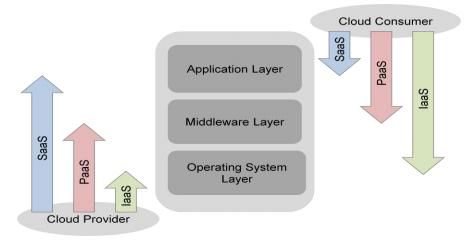
consuming business or IT solutions from a public cloud outside their organization. As depicted in the
figure from the NIST Cloud Computing Reference Architecture [1], the three most common cloud service
models are SaaS, PaaS, and IaaS. In order to determine the service models that best suit your company’s
business requirements, the potential benefits and issues of each model must be given careful
consideration. In addition, the IT maturity of an organization along with its size will significantly impact
the service model decisions that are made.
Software as a Service (SaaS)
SaaS involves the acquisition of a complete application or business service running as a cloud service – it
is the cloud computing equivalent of buying a packaged application – one that typically requires minimal
configuration before it is ready for use. SaaS allows businesses to benefit from the “pay-as-you go”
concept in addition to being highly scalable, offering flexibility to companies to provision and de-
provision based on business needs. This consumption based model for software eliminates many of the
high start-up costs for initial licensing and installation of software delivered in a traditional model.
SaaS gives businesses complete freedom from managing IT infrastructure and the entire software stack
which enables them to concentrate on using the features of the service to achieve their business
objectives. Business solutions implemented as cloud services provide customers the flexibility to choose
the approach that is best for their company by making it possible to consume and execute business
processes, analytics and applications in the cloud.
We can categorize SaaS under two broad headings:
Horizontal SaaS offerings. These are SaaS offerings that are typically applicable to organizations
across a range of business sectors. Some of the common SaaS applications are in the areas of
email, customer relationship
management (CRM), productivity,
collaboration, analytics, etc.
Sector-specific offerings. With the
proven success and maturing of the
horizontal SaaS offerings, sector
specific SaaS offerings are emerging.
These include applications in the
areas of logistics and supply chain
management (SCM), for example.
SaaS has the following key features:
SaaS offerings are accessible over the public Internet which makes it very easy to roll them out
to a large audience within a short period of time.
Copyright © 2011 Cloud Standards Customer Council Page 16 SaaS works on a usage-based pricing model which enable businesses to subscribe to only those
services that it needs and for the required number of users.
SaaS typically offers a standard feature set which allows some level of configuration for
individual customers but typically no customization.
Organizations can reduce their capital expenditures (CAPEX) towards procurement of software
licenses by adopting SaaS offerings on a subscription basis.
Deployment of SaaS offerings is typically much shorter than deployment of traditional packaged
solutions. This enables businesses to capture any short “window of opportunity” that may
present itself.
SaaS upgrades are typically instantaneous and are the burden of the provider. They get tested
prior to deployment and the process is transparent to the users.
SaaS offerings are typically scalable as vendors plan for scalability in their cloud solutions. This
enables businesses to scale up rapidly if the business needs dictate.
Availability of the solution, including the backup of customer data, is usually taken care of by the
service provider, thereby eliminating the need for users to maintain their own disaster recovery
procedure for these solutions.
Approaches for Adoption of SaaS
The approach for adopting SaaS offerings will differ based on the IT maturity of the organization. For
simplicity, two approaches are described below: one for large organizations and one for SMBs. However,
given that each organization is unique with its own challenges, it is recommended that organizations
evaluate both options and come up with a strategy that addresses their unique requirements.
Organizations with mature IT systems already have implemented in-house packaged applications.
Having spent years with these systems and making significant investment in hardware, software and
management of these systems, they are reluctant to let go of these systems which have stood the test
of time. These applications often have the highest costs per unit of functionality to enhance, support
and operate, therefore significant cost reductions can be realized. Unfortunately, migrating this class of
application (legacy or non-virtualized) will incur higher project costs.
Organizations with nascent IT systems, especially SMBs, may not have made significant investments in
their IT systems. The reasons for this could vary from cost concerns to the complexity of managing such
deployments in-house. However with the emergence of subscription based SaaS offerings, such
organizations now have an option to adopt SaaS solutions for business needs which was not possible
earlier.
Copyright © 2011 Cloud Standards Customer Council Page 17Table 3. SaaS Adoption Approaches
SaaS Adoption Approach for Large Organizations SaaS Adoption Approach for SMBs
Large organizations can take the following approach to SMBs can take the following approach to SaaS
SaaS adoption: adoption:
1. Analyze SaaS offerings in terms of TCO/ROI and 1. Analyze SaaS offerings in terms of TCO/ROI and
risks such as vendor lock in, interoperability risks, such as vendor lock in, interoperability,
and existing IT infrastructure—especially and existing IT infrastructure—especially
network and data center infrastructure. network and data center infrastructure.
2. Define a clear SaaS strategy for both private 2. Define a SaaS strategy for both private and
and public implementations before adopting public implementations before adopting
specific SaaS offerings. specific SaaS offerings
3. Consider SaaS for non-critical business 3. Reevaluate business processes and identify
functions that would deliver improved ROI in a those that can be enhanced through use of
cloud environment. applications that can help improve
competitiveness with larger organizations
4. Consider SaaS for rapidly evolving business
environments where new requirements are 4. Identify availability of SaaS offerings for these
likely to emerge, such as social business and specific processes
Web campaigns. 5. Evaluate the various SaaS offerings from a
business and technical perspective
5. Evaluate SaaS offerings when packaged
applications need to be renewed due to a
software or hardware refresh which involves
additional purchases.
6. Adopt new disruptive SaaS solutions (perhaps
sector-specific) to maintain or extend
competitiveness.
Platform as a Service (PaaS)
PaaS provides an integrated development and runtime platform for creating, deploying and managing
custom applications in a cloud service. Based on the standardization and automation of a common set of
topologies and software components, the platform provides elasticity, efficiency and automated
workload management. A PaaS environment dynamically adjusts workload and infrastructure
characteristics to meet existing business priorities and SLAs. The big advantage of a PaaS offering is that
it provides a ready-deployed software stack that caters to the development and deployment of custom
applications in a cloud computing environment, sharply reducing the effort required by developers and
operations staff.
PaaS helps eliminate the need for developers to work at the image-level, enabling developers to
completely focus on application development. It also helps reduce software design steps and enables
faster time-to-market using predefined workload patterns.
Copyright © 2011 Cloud Standards Customer Council Page 18The incentives for an organization to transition to a PaaS environment differ based on the size and IT
maturity of the organization. For large organizations, a key motivation for considering PaaS is the ability
to quickly and inexpensively develop and deploy new applications. Large organizations have additional
incentives for considering a move to PaaS. PaaS provides:
Highly standardized and automated provisioning of predefined workloads
An integrated development and runtime platform for specific workloads
Consistent pattern-based deployments for most common workloads
DevOps capability that facilitates communication, collaboration and integration
between software developers and IT professionals - refer to Step 6 of the Convergence of Social,
Mobile and Cloud: 7 Steps to Ensure Success whitepaper [7]
Integrated workload management for SLA enforcement, dynamic resource management, high
availability and business priorities
Awareness and optimization of workloads based on business priorities and SLAs
Consolidation of workloads under a simplified management system
Smaller organizations can benefit from the ready provision of running instances of major portions of the
software stack required by a custom application, such as databases and messaging infrastructure,
removing the need to have skilled staff to set up, run and maintain what can be complex software.
Approaches for Adoption of PaaS
Organizations with mature IT systems already have significant investments in their development and
runtime platforms along with significant investments in human resources associated with solution
development and testing. As a result, they will initially look to refactor these assets as they transition to
cloud computing. Custom applications which may benefit from the use of a PaaS offering could include
new applications written to support mobile devices or applications which support social computing.
In many cases, SMBs do not possess the resources to invest significantly in development and runtime
platforms and they lack the in-house human resources to develop and test home-grown applications.
Many SMBs are dependent on ISVs to deliver their application functionality. As a result, they are
dependent on an external cloud provider to support a PaaS environment that is consistent with their
ISVs’ applications.
Copyright © 2011 Cloud Standards Customer Council Page 19Table 4. Approaches for Adoption of PaaS
PaaS Adoption Approach for Large Organizations PaaS Adoption Approach for SMBs
The following steps provide a recommended approach The following steps provide a recommended approach
for PaaS adoption by large organizations: for PaaS adoption by SMBs:
1. Analyze PaaS offerings in terms of total cost of 1. Analyze PaaS offerings in terms of TCO/ROI
ownership (TCO) / return on investment (ROI) and risks such as vendor lock in,
and risks such as vendor lock interoperability and existing IT infrastructure.
in/interoperability/existing IT infrastructure.
2. Define a PaaS strategy for both private and
2. Define a clear PaaS strategy for both private public implementations before adopting
and public implementations before adopting specific PaaS offerings.
specific PaaS offerings.
3. Determine if there’s sufficient in-house
3. Identify early offering candidates based on development resource to justify the use of a
specific criteria (for example, low risk to the PaaS environment – if not, SaaS may be the
business). best alternative.
4. Consider starting with either the Private (On-
site) or Private (Outsourced) deployment
model which provides a good initial transition
to PaaS for both mission critical and non-
mission critical workloads with relatively low
risk.
5. For Public deployments, consider moving only
non-critical applications in the early transition
phases.
6. Consider a platform that leverages existing
expertise – i.e., a development team
experienced in Java will likely gravitate to a
Java-based platform.
If sufficient in-house development resources exist, both the Private (Outsourced) and Public deployment
models are viable options. Selection will be dependent upon the mission criticality of the services being
developed and deployed.
Here are a few specific projects that large organizations should consider to get started on the transition
to a PaaS environment:
• Deploy and manage application infrastructure. Virtualize, standardize and automate
provisioning and management of runtime services to reduce operational costs, speed time-to-
value, and better utilize hardware resources.
Copyright © 2011 Cloud Standards Customer Council Page 20• Deliver development and testing environments. Standardize the delivery of development and
test tools that conform to enterprise processes and instantly deliver to a globally-distributed
team.
• Develop and deploy new applications. Create, deploy and manage new applications in a simple,
fast and “low touch” way through a PaaS application pattern – such applications can include
those for mobile device access.
Infrastructure as a Service (IaaS)
The incentives for an organization to transition to an IaaS environment differ based on the size and IT
maturity of the organization. For SMBs, the primary motivation for considering IaaS is capital expense
reduction and access to IT capacity that would otherwise not be available. For large organizations with
potentially several data centers and departmental silos in different geographical locations, there are
additional incentives for considering a move to IaaS. Incentives include addressing low server utilization,
high administrator-to-server ratios, data center sprawl, proliferation of ad-hoc IT solutions, and desire
for improved, more centralized control of IT assets.
While many organizations today are using virtualization to consolidate their IT infrastructures, hardware
consolidation is only one piece of virtualization’s benefit. Organizations that move beyond virtualization
with IaaS capabilities such as integrated service management, automation and rapid provisioning can
realize significant benefits:
• Reduction in IT operating expenses and capital expenses by improving resource utilization and
administrator-to-server ratios
• Faster time to market through increased efficiency and automation of standardized solutions
• Simplified, integrated management, including real-time monitoring and high-scale low-touch
provisioning
• Greater visibility into business processes and system performance to identify redundancies and
bottlenecks
• Scaled operations that can meet market dynamics and business strategy
Approaches for Adoption of IaaS
Organizations with mature IT systems already have significant investments in both infrastructure
hardware and in-house IT management skills. As a result, they will initially look to refactor these assets
as they transition to cloud computing.
Organizations with nascent IT systems, especially SMBs, may not have made significant investments in
their IT systems. As a result, they will be incented to transition more rapidly to infrastructure services
that are delivered and managed by an external cloud service provider.
Copyright © 2011 Cloud Standards Customer Council Page 21Table 5. IaaS Adoption Approaches
IaaS Adoption Approach for Large Organizations IaaS Adoption Approach for SMBs
The following steps provide a recommended approach The following steps provide a recommended approach
for IaaS adoption by large organizations: for IaaS adoption by SMBs:
1. Analyze IaaS offering in terms of total cost of 1. Analyze IaaS offerings in terms of TCO/ROI,
ownership (TCO)/return on investment (ROI) risk (vendor lock in/interoperability/existing
and risks such as vendor lock in, IT infrastructure).
interoperability and existing IT infrastructure.
2. Define an IaaS strategy for both private and
2. Define a clear IaaS strategy for both private public implementations before adopting the
and public implementations before adopting IaaS offerings.
specific IaaS offerings.
3. In many cases, the Private (On-site)
3. Start with an infrastructure virtualization deployment model will not be feasible given
project to establish a foundation that enables insufficient ROI associated with consolidating
future cloud adoption. a relatively small number of existing IT assets.
4. Consider moving to a Private (On-site) 4. Consider the Public deployment model which
deployment model which provides a good provides access to computing and storage
initial transition to IaaS with relatively low risk. capacity at the lowest cost.
5. Consider Private (Outsourced) and Public 5. For Public deployments, consider moving only
deployment models which can potentially non-critical applications in the early transition
deliver added business value. Closely consider phases.
security and reliability issues as well as
integration with existing enterprise services. 6. Consider Private (Outsourced) deployment to
handle spillover of workloads during periods
6. For Public deployments, consider moving only of high demand or as a backup resource for
non-critical applications in the early transition disaster recovery.
stages.
7. Application migration and administration
costs must be taken into account for Public
and Private (Outsourced) options.
Large organizations should consider the following types of projects as good candidates for a transition to
a Private (On-site) cloud-enabled data center include:
1. Consolidate and virtualize your infrastructure. Realizing the benefits of cloud computing begins
with the foundation—efficient and effective consolidation and virtualization across server and
storage platforms—to begin building a cloud infrastructure.
2. Leverage image management. Image management addresses the visibility, control and
automation of virtualized images to reduce operational costs associated with virtualization
proliferation in the data center. Image management allows clients to better utilize virtualization
Copyright © 2011 Cloud Standards Customer Council Page 22as an enabler of standardized high-quality service delivery. When clients implement effective
image management, they are better suited to progress into a cloud computing model.
3. Manage the virtual environment. Organizations can expand beyond infrastructure virtualization
with integrated service management, automation, provisioning and self-service to more quickly
deploy IT services, improve visibility, increase resource utilization and better manage their
cloud environments.
As illustrated in this section, there are numerous considerations that need to be taken into account
when selecting a service model that best meets your company’s business requirements. An effective
initial approach is to identify a contained, non-critical business area where cloud could be impactful,
identify one or more cloud service models that could be effective in addressing the requirement, and
initiate a proof of concept to assess the feasibility and ROI of the alternatives.
Step 5: Determine Who Will Develop, Test and Deploy the Cloud Services
Determining the most effective method to design, develop and deploy new cloud application services
can be a struggle. In many cases, there is no right answer. The direction will be based on the needs and
capabilities of the organization. There are essentially four options for the organization to consider6:
In-house development and deployment
Cloud provider development and deployment
Independent cloud service development provider
Off the shelf purchase of a cloud service
Table 6 examines the pros and cons of the various options for acquiring a new service.
Table 6. Options for acquiring a new cloud application service
Options for Skills Startup Updates to Testing and
acquiring a considerations services deployment
new service
In-house Dependent on Should reduce the The enterprise owns Offers potentially tighter
development internal skills and learning curve on the cloud application controls during the testing
and availability of in- how to link to legacy service and can process. In-house test
deployment house resources to services. incorporate future managers are able to work
develop new updates/maintenance closely with IT and
application based on their business leaders to ensure
services. internal processes thorough testing is done.
and schedule.
6
The design of the cloud application service is omitted since that should originate from the enterprise and will
require the efforts of the IT, business and administrative teams. The new service must have functional capabilities
which meet the requirements of the target users and will have also a positive ROI. Designing a cloud service is an
extended discussion which will not be covered here, other than to state that ensuring that the design process is
followed will be critical to the development and deployment activities.
Copyright © 2011 Cloud Standards Customer Council Page 23You can also read


