Royal Mail Mailmark Interface Specification eManifest Handling System (eMHS) Customer Upload - Royal Mail ...
←
→
Page content transcription
If your browser does not render page correctly, please read the page content below
®        Issue: 31/05/2021
     Royal Mail                  Effective: 24/09/2020

     Royal Mail
     Mailmark®
     eManifest Handling System
     (eMHS) Customer Upload
     Interface Specification

     Issue:
     31st May 2021

     First Issued:
     24th September 2020

     Version
     1.5

Classified: RMG – Public
Issue: 31/05/2021
Royal Mail Mailmark® Effective: 24//09/2020
Update to this document 31st May 2021
Pages 11,13,14,23,27 and 63. Note added referencing that Retail deferred functionality is not currently in use.
Update to this document 11th May 2021
Pages 11,26 and 32. 14 days referenced instead of 28 days re: upload timing options. Changed to 28 days.
Update to this document 1st April 2021
Royal Mail’s HQ address changed
Updates to this document 15th February 2021
1. Page 45 (Format). Additional highlight
Please note: it is a mandatory requirement to select the ‘format’
2. Page 47 (Machineable). Additions
- N = reserved for future use
- Note: ‘E’ must be selected for Mailmark General Large Letters and Parcels.
3. Clarity around the use of Service Type, Format values and machineability for Parcels and General Large Letters.
Service Type (2D barcode) Format Values (4state barcode) Machinability (eMHS)
0 - Mailmark Letter 0 - Null E - Mailmark
1- Mailmark Large Letter 1 - Mailmark Letter N -reserved for future use
2 - reserved for future use 2 - Mailmark Large Letter
3 - reserved for future use 3 - reserved for future use
4 - Parcel 4 - Parcel
Please note GLL and Parcel must both be machinability ‘E’.
a. If posting Access Parcels using a 2D barcode would select Service Type 4 within the barcode. You should also select Service
Type 4, Format 4 and Machineability E for the eManifest.
b. If posting Access Parcels using a 4-state barcode would select Format Value 4 in the barcode. You should also select
Service Type 4, Format 4 and Machineability E for the eManifest.
c. If posting manual Mailmark Large Letters, including existing Mailmark Large Letters, using a 2D barcode would select
Service Type 1 in the barcode. You should also select Service Type 1, Format 2 and Machineability E for the eManifest:
d. If posting manual Mailmark Large Letters using a 4-state barcode would select Format Value 2 in the barcode. You should
also select Service Type 1, Format 2 and Machineability E for the eManifest:
4state barcode would select Format Value 2 and Machineability E.
Note: Access parcels and General Large Letters are machineable when posted under the ’70’ way sort product and may be
machined under the ‘1400’ way sort product. For simplicity, both 70 and 1400 variants have a machineability value of E.
Updates to this document 24th September 2020
1 Page 49. Deleted 3 = ‘Packet (for potential future use)’. Replaced with ‘not in use’.
2 Page 49. Deleted 6 = ‘Air (Retail)’ and 7 = ‘Surface (Retail’ and replaced both with ‘not in use’
3 Page 49. Added ‘E’ = Economy (Network Access)
4 Page 53. Deleted 3 = ‘Packet (for potential future use)’. Replaced with ‘not in use’.
5 Page 53. Replaced ‘Spare’ with – ‘Not in use’
6 Page 53. Deleted 6 = ‘Air (Retail)’ and 7 = ‘Surface (Retail’ and replaced both with ‘not in use’
7 Page 53. Added ‘E’ = Economy (Network Access)
8 Page 53. Response Mail type. Changed from Conditional to ‘Optional’. Reference that this field is referred to as ‘Service Type’
in the Barcode specification document). Descriptions updated
Updates to this document 8th January 2018
1. Changes to eManifest submission deadlines – (Section 3.5)
2. Changes to Description fields to support JIC - (Section 10.3)
3. Changes to Batch upload timings – (Section 3.1)
Disclaimer
Whilst every effort has been made to ensure that the guidelines contained in the document are correct, Royal Mail and any other party
involved in the creation of the document HEREBY STATE that the document is provided without warranty, either expressed or implied, of
accuracy or fitness for purpose, AND HEREBY DISCLAIM any liability, direct or indirect, for damages or loss relating to the use of the
document. The document may be modified, subject to developments in technology, changes to the standards, or new legal requirements.
2
Classified: RMG – PublicIssue: 31/05/2021
Royal Mail Mailmark® Effective: 24//09/2020
Contents
1. Introduction ..................................................................................................................................... 5
1.1.Purpose ............................................................................................................................................................ 5
1.2.Intended Audience ......................................................................................................................................... 5
1.3.Scope ................................................................................................................................................................ 5
1.4.Document Structure ...................................................................................................................................... 5
2. Key Features ................................................................................................................................... 6
2.1. Supply Chain ................................................................................................................................................... 6
2.2. eManifest ......................................................................................................................................................... 8
2.3. Batches ............................................................................................................................................................ 9
3. Process Overview ......................................................................................................................... 10
3.1 Submitting an eManifest to Royal Mail .................................................................................................... 10
3.2 Step 4 - Raising ‘Spoils’ for a Batch ........................................................................................................ 11
3.3 Step 5 - Submitting a Batch of Mailmark items.................................................................................... 11
3.4 Step 6 - Confirming the eManifest........................................................................................................... 11
3.5 Timings .......................................................................................................................................................... 13
3.6 Other Actions ................................................................................................................................................ 14
3.6.1 Cancelling Batches ....................................................................................................................................... 14
3.6.2 Rescheduling Batches ................................................................................................................................. 14
3.7 eManifest Submission Options .................................................................................................................. 15
4. Implementation Guidelines ......................................................................................................... 16
4.1 Mail Producers using intelligent printers/enclosers .............................................................................. 16
4.2 Mail Producers using a production control system ............................................................................... 17
4.3 Mail Producers using sortation software that has been Mailmark barcode enabled ...................... 18
4.4 Mail Producers using sortation software that is not Mailmark barcode enabled ............................ 18
4.5 Mail producers using existing Consolidation Machines ......................................................................... 19
5. Upload Process Description ........................................................................................................ 20
5.1 Upload Process Overview ........................................................................................................................... 20
6. Web Service Method Details ...................................................................................................... 23
6.1 Web-service Versions.................................................................................................................................. 23
6.2 Web-service Login ....................................................................................................................................... 24
6.3 Poster Upload WSDL ................................................................................................................................... 24
6.4 Example XML Request/Response Structures ......................................................................................... 25
7. Web Service Method Definitions ............................................................................................... 27
7.1 CreateManifest() web method ................................................................................................................... 27
7.2 CreateBatch() web method ........................................................................................................................ 29
7.3 AppendToBatch() web method .................................................................................................................. 30
7.4 RemoveItemsFromBatch() web method .................................................................................................. 30
7.5 SubmitBatch() web method ....................................................................................................................... 31
7.6 CancelBatch() web method ........................................................................................................................ 32
7.7 RescheduleBatch() web method ................................................................................................................ 32
3
Classified: RMG – PublicIssue: 31/05/2021
Royal Mail Mailmark® Effective: 24//09/2020
`
7.8
ReviewManifest() web method................................................................................................................... 33
7.9
ConfirmManifest() web method ................................................................................................................. 33
7.10
ReviewUploadActivity() web method......................................................................................................... 34
ReviewAllUploadActivity() web method (only in Poster Upload 2) ................................................. 34
7.11
7.12
RetrieveActiveSupplyChains() web method ............................................................................................. 35
RetrieveAllActiveSupplyChains() web method (only in Poster Upload 2) ...................................... 35
7.13
8. Web Service URL & Connection Strategies ............................................................................. 36
8.1 Web Service URL ......................................................................................................................................... 36
8.2 Compression ................................................................................................................................................. 37
8.3 Disaster recovery ......................................................................................................................................... 38
9. eMHS Interface Testing .............................................................................................................. 39
9.1 eMHS Testing ............................................................................................................................................... 39
9.2 Customer Test Environment...................................................................................................................... 40
9.3 Customer Live Environment ....................................................................................................................... 41
10. Data Structures ........................................................................................................................... 44
10.1 eManifest Data Structure ........................................................................................................................... 44
10.2 The Batch data structure ........................................................................................................................... 44
10.3 The Mailmark Item data structure............................................................................................................ 45
10.4 The Supply Chain item structure .............................................................................................................. 52
11. OPTIONAL Fields in eMHS for Mailmark Reporting .............................................................. 53
11.1 Optional Fields - Mailmark Reporting ...................................................................................................... 53
12. Web Method Error codes and messages ................................................................................ 54
12.1 Web Method Error codes and messages................................................................................................. 54
13. Frequently Asked Questions ..................................................................................................... 58
13.1 Error Handling .............................................................................................................................................. 58
13.2 Supply Chain Q&A ........................................................................................................................................ 59
13.3 Upload Process Q&A .................................................................................................................................... 60
13.4 eManifest Q&A .............................................................................................................................................. 60
14. Appendices ................................................................................................................................... 61
14.1 Appendix A ..................................................................................................................................................... 61
14.2 Appendix B .................................................................................................................................................... 62
Royal Mail, the cruciform, Royal Mail Advertising Mail, Sustainable, Royal Mail Publishing Mail, Royal Mail Business Mail, Royal Mail
Mailmark and Mailmark are trade marks of Royal Mail Group Ltd. © Copyright Royal Mail Group Ltd 2015. All rights reserved.
Royal Mail Group Limited, registered in England and Wales, number 4138203, registered office: 185 Farringdon Road, London,
EC1A 1AA
4
Classified: RMG – PublicIssue: 31/05/2021
Royal Mail Mailmark® Effective: 24//09/2020
1.0 Introduction
1.1. Purpose
The purpose of this document is to provide implementation guidelines for customers wanting to submit
eManifests to Royal Mail which are required when using the Royal Mail Mailmark® barcode option. It is designed
to provide visibility of the eManifest Handling System (eMHS) customer upload interface to aid customers plan
their development of Mailmark® barcode related systems.
1.2. Intended Audience
This document is intended for Mail Producers intending to integrate their production control systems with
Royal Mail for the purposes of handling Royal Mail Mailmark barcode mailings, and for third party suppliers
interested in updating their software to support the upload of item level data to the eManifest interface.
1.3. Scope
This document describes the high level implementation of the Mailmark barcode eManifest interface which is
provided through a web service. It does not describe the Mailmark barcode format, service requirements or
terms and conditions surrounding engagement with the program that is delivering the Mailmark barcode option
or the terms and conditions relating to the Mailmark barcode enabled services.
This document does not cover bag or vehicle manifests for Network Access Carriers.
1.4. Document Structure
This document is divided into the following areas:-
Process Overview An overview of the process for uploading eManifests
Implementation Guidelines Description of the implementation approach
Upload Process Detail Detailed description of the upload process
Test Facilities and Approach Overview of the eManifest submission test facilities
eManifest Definition A definition of the fields that constitute an eManifest
Web Service Specification The eManifest upload web service specification
Common Questions Answers and clarifications to frequently asked questions
Appendices eManifest submission timelines and new added functionality
5
Classified: RMG – PublicIssue: 31/05/2021
Royal Mail Mailmark® Effective: 24//09/2020
2.0 Key Features
`
Royal Mail has introduced services that use a Royal Mail Mailmark barcode. This requires the Mail Producer to
apply a Mailmark barcode to each mail piece, and provide an eManifest to accompany the mailing.
Each item of mail carries a unique item number within the Mailmark barcode, so that when Royal Mail receives
the mail piece, it can be read when it is processed and checked against the eManifest, in order that Royal Mail
can provide additional information regarding the successful processing of the item.
2.1. Supply Chain
Each Mailmark barcode enabled mailing is recorded against a Supply Chain, which consists of the Participants
involved in the preparation and handling of that mail, including the Mail Originator of the mailing, the Mail
Producer (responsible for printing and enclosing the mail pieces), the Bill Payer (the account holder responsible
for paying Royal Mail), and the Carrier (responsible for collecting and conveying the mailing from the Mail
Producer, whether Royal Mail or a DSA Carrier).
Supply Chains are identified by a Supply Chain ID, which is requested online from Royal Mail, and will need to
be quoted within the eManifest and barcode. Details on how new Supply Chains are setup and maintained will
be provided by the Royal Mail Mailmark team.
The Supply Chain ID is a numeric value of varying length:
• 2D barcodes: 7 digits
• 4-state barcode L: 6 digits
• 4-state barcode C (for Consolidators): 2 digits
Mailmark mailings cannot be prepared without knowing the Supply Chain ID that the mailing
belongs to, so it is important that these are requested in advance.
When for instance a Mailing House takes on a new client, it is important that a new Supply Chain ID
is requested from Royal Mail at least 24 hours before the first mailing for that client is due to be
prepared.
It is assumed that the Mail Producer will usually be responsible for providing Royal Mail with the eManifest, as
it needs to reflect the mail produced. The Mail Producer will be a member of the Supply Chain that is printing
and enclosing the mail. However the eManifest can be uploaded by any Participant within the Supply Chain.
Note: For clarity subsequent sections of this implementation guide assume the Mail Producer will be
uploading the item eManifest, but other members of the Supply Chain can upload the eManifest provided
they have registered to do so. If there is more than one Participant in the Supply Chain registered to upload
eManifests, there should be careful agreement about who is performing activity against a particular Supply
Chain on a particular day.
6
Classified: RMG – PublicIssue: 31/05/2021
Royal Mail Mailmark® Effective: 24//09/2020
As the Supply Chain defines the Mail Producer that is preparing the mail, it is non-transferable between Mail
Producers. If a mailing is transferred from one Mail Producer to another, it is effectively a new mailing against
a different Supply Chain ID.
It is essential that the correct Supply Chain ID is used. Failure to do so may lead to the wrong
Participants being able to review reports or the wrong Bill Payer being invoiced.
The Supply Chain is made up of the following Participants:
Participant Role
Mail Originator This is the Participant in a Supply Chain on whose behalf the
Mailmark barcode items are produced and delivered.
This is commonly the customer that commissioned the mailing.
Mail Producer (Mailing Agent) This is the Participant in a Supply Chain responsible for producing
(including printing and enclosing) the Mailmark barcode items.
This is commonly known as the Mailing House, fulfilment house or
print site that is physically printing the mail.
Carrier This is the Participant in a Supply Chain responsible for carrying
the Mailmark barcode items to Royal Mail's Mail Centres.
This is either:
- Royal Mail, where Royal Mail is performing the collection
and delivery of the mail; or
- A Network Access (DSA) Carrier, where the mail is being
handed over to Royal Mail for final mile delivery.
Bill Payer / Poster This is the Participant in a Supply Chain responsible for paying
Royal Mail, and against whose account the mailing will be billed.
7
Classified: RMG – PublicIssue: 31/05/2021
Royal Mail Mailmark® Effective: 24//09/2020
`
A Participant may be fulfilling one or more of these roles in any particular mailing, so for instance the
following are examples of common scenarios:
Scenario Mail Mail Carrier Bill Payer
Originator Producer
A poster (‘Acme Inc.’) performing a mailing that they Acme Inc. Acme Inc. Royal Mail Acme Inc.
print themselves, collected by Royal Mail, against
their own account
A mailing house (‘Print & Co’) performing a mailing Print & Co Print & Co Royal Mail Print & Co
on their own account via Royal Mail.
A mailing house (Print & Co’) performing a mailing Acme Inc. Print & Co Royal Mail Acme Inc.
on a client’s account (‘Acme Inc.’) via Royal Mail.
A mailing house (Print & Co), performing a mailing Acme Inc. Print & Co Logistics Acme Inc
on a client account (Acme Inc.), collected by a DSA Ltd
carrier (Logistics Ltd) prior to final delivery by Royal
Mail
A mailing house (Print & Co), performing a mailing Acme Inc. Print & Co Logistics Logistics
on a DSA carrier account (Logistics Ltd.), collected Ltd Ltd
by a DSA carrier (Logistics Ltd) prior to final delivery
by Royal Mail
A carrier (Logistics Ltd.) consolidating and sorting Logistics Logistics Logistics Logistics
mail on behalf of a number of clients and mailing Ltd Ltd Ltd Ltd
houses prior to final delivery by Royal Mail
2.2. eManifest
A separate eManifest will be generated for each day Mailmark items are being despatched, encompassing all
items within all mailings performed against that Supply Chain from that Mail Producer that day.
Each eManifest can be uploaded to include one or more Batches of mail, in order to reflect production activity.
This is to enable a poster to manage the generation of the eManifest in a manner that best suites the nature
of their production process and capabilities of their production control system.
8
Classified: RMG – PublicIssue: 31/05/2021
Royal Mail Mailmark® Effective: 24//09/2020
`
2.3. Batches
The Mail Producer/uploader can choose to upload all the mail for a Supply Chain for a particular day within a
single ‘Batch’, or can upload the eManifest as multiple Batches of mail, that can reflect individual jobs for that
client, cells within the same mailing, or work being produced on different enclosing machines.
Each batch can contain mail for a single Supply Chain only, and all Batches for the same Supply Chain on the
same date must be included within a single daily eManifest for that Supply Chain.
For each job that a Mail Producer may handle, it can be uploaded to the eManifest Handling Service (eMHS)
as one or more Batches of Mailmark barcode items, where each batch contains mail for a single class, product
and format of mail for a single Supply Chain, via either the Non-Regulated (Retail) or Network Access
(Wholesale) channel.
Batches can be uploaded in various ways. Likely scenarios include:-
Approach Description
Single mailing per day If the Mail Producer has all of the items for a particular Supply Chain in
a single address file, then the Mail Producer may decide to upload the
file as a single Batch.
Multiple jobs per day If there are multiple jobs being despatched on the same day, then it is
possible to upload each job as its own Batch, as each job is enclosed.
Multi-cell mailings If a mailing consists of multiple cells that are being despatched on the
same day, then each cell can be uploaded as a separate Batch.
Separate print jobs If the Mail Producer is using intelligent mail enclosers, or a production
control system, then a mailing may be distributed across multiple
enclosers as separate print jobs, in which case each individual print job
can be loaded as a separate Batch in order to reflect production activity.
Whether a Mail Producer wishes to upload the eManifest to include one or many Batches will have no impact
on the processing of mail by Royal Mail, or any subsequent reporting or management information that may
be available to the Mail Producer or other Participants in the Supply Chain. The process to upload in Batches
is provided to make it easier for a Mail Producer to ensure that the uploading of eManifests for Mailmark
barcode mailings can fit seamlessly into the normal production process.
Note: Each Batch can only contain a single class, product and format of mail for a single Supply Chain, via
either the Non-Regulated or Network Access channel.
9
Classified: RMG – PublicIssue: 31/05/2021
Royal Mail Mailmark® Effective: 24//09/2020
3.0 Process Overview
`
3.1 Submitting an eManifest to Royal Mail
The standard process for uploading an eManifest to Royal Mail is as follows:
1 2 3 4 5 6
Create Create Append To Raise Spoils Submit Confirm
Manifest Batch Batch (if required) Batch Manifest
Step Activity Description
1 Create an eManifest Open a new eManifest with Royal Mail for each Supply Chain that the Mail
Producer intends to despatch Mailmark mail for each day.
2 Create a Batch Create a new Batch associated with the eManifest for that Supply Chain.
Note - Multiple Batches can be created on the eManifest.
3 Upload the Mailmark Upload the individual Mailmark barcode item details to Royal Mail for each
items within the Batch Batch within the eManifest.
4 Raise any Spoils Raise any ‘spoils’ if required – i.e. items that were originally uploaded as
part of the Batch, but where the item has not been printed and enclosed
successfully, and therefore will not be posted.
5 Submit the Batch Submit the Batch, indicating that no further changes to the Batch are
expected.
Note - All Batches must be submitted before the eManifest is confirmed.
6 Confirm the eManifest This marks the eManifest for a particular Supply Chain as complete. All
Batches must have been submitted or cancelled and no further changes
to the eManifest are possible.
10
Classified: RMG – PublicIssue: 31/05/2021
Royal Mail Mailmark® Effective: 24//09/2020
`
If the Mail Producer wishes to upload multiple Batches within the same eManifest, then steps 2 to 5 may be
repeated as often as necessary, provided step 6 has not yet been performed.
Batches can be uploaded up to 28 days in advance of the handover date.
A Deferred Retail Mailing will require its own unique deferred mailing SCID.
[Note: Deferred Retail functionality is not currently in use]
3.2 Step 4 - Raising ‘Spoils’ for a Batch
It is possible that during the printing or enclosing process, items that are part of the mailing may be misprinted
or damaged, and therefore will not be posted. In this instance the item may originally have been included in
an eManifest, but now needs to be removed.
To support this, as each item of Mailmark barcode mail is uniquely identified, it is possible for the ‘spoilt’ items
within the Batch to be advised to Royal Mail via the ‘spoils’ web service method, in which case the items will
be marked on the eManifest as not being posted. This ensures that these items do not appear as ‘not machine
processed’ on the report subsequently generated.
Where a customer is using an intelligent encloser or production control system, then the recording of spoils
may be automated, depending on the equipment used.
Spoils can be recorded against the mailing prior to the point at which the eManifest is confirmed.
3.3 Step 5 - Submitting a Batch of Mailmark items
Once the Mail Producer has established that the Batch has been uploaded correctly, and has recorded any
spoils, then the Batch should be submitted. This identifies that there is no further change expected to this
Batch of Mailmark items. It is essential that all items are uploaded correctly to the Batch. If items are not
loaded up they will still be read during processing and Royal Mail may invoice the Bill Payer for them.
Submitting a Batch establishes that the Batch is complete and no further change is expected. Each Batch must
be submitted (or cancelled) before the eManifest can be confirmed.
3.4 Step 6 - Confirming the eManifest
Once all the Batches for a Supply Chain have been uploaded to Royal Mail and submitted, then the overall
eManifest can be confirmed for that Supply Chain for that date.
It is not possible to confirm an eManifest until all Batches associated with that eManifest have been submitted.
Once an eManifest is confirmed, it is marked as complete and no further changes can be made.
The actions that result from submitting the eManifest depend on the Carrier that will be collecting the mail.
11
Classified: RMG – PublicIssue: 31/05/2021
Royal Mail Mailmark® Effective: 24//09/2020
`
The Mail Producer should continue to complete the appropriate collection documentation for Royal Mail or
the Carrier involved.
It is important that the eManifest is confirmed otherwise the handling of Mailmark barcode items passed to
Royal Mail may be affected.
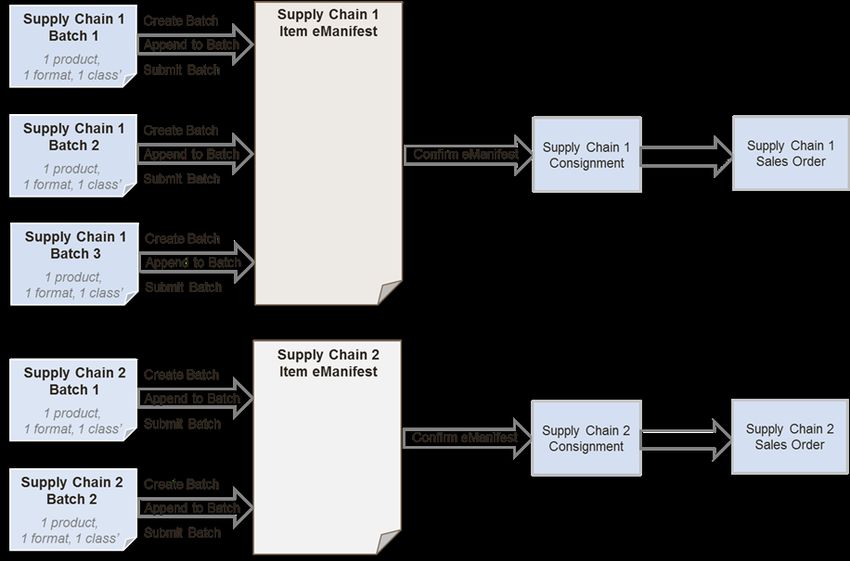
Confirming the eManifest creates that day’s Consignment for the Supply Chain in question.
A manual OBA Sales Order will be required for each Mailmark mailing (unless customers are setup and
using ASOG).
A Sales Order is then created for all the items within that manifest (if setup). The status of this Sales Order
generation can be monitored by calling the ReviewUploadActivity() web method.
eManifest batch submission (involving two separate Supply Chains)
12
Classified: RMG – PublicIssue: 31/05/2021
Royal Mail Mailmark® Effective: 24//09/2020
`
3.5 Timings
Royal Mail Retail Supply Chains
eManifests for Royal Mail Retail Supply Chains can be submitted (confirmed) on the same day as the mailing
is handed over. The deadline for confirming Royal Mail Retail eManifests is configured to 9.30pm on the
submission date specified in the eManifest. At this time, any remaining open eManifests will be automatically
confirmed and closed to further Batch submissions.
Wholesale (Network Access) Supply Chains
eManifests for Wholesale (Network Access) Supply Chains using Standard Mail must be confirmed the day
before the mail is handed over to Royal Mail. The deadline for confirming these eManifests is configured to
11.30pm on the submission date specified in the eManifest
Network Access Supply Chains using Premium Mail can confirm the eManifest on the same day as the mailing
is handed over to Royal Mail. These eManifests must be confirmed by 11.30pm on the submission date
specified in the eManifest. At this time, any remaining open eManifests will be automatically confirmed and
closed to further Batch submissions.
Consolidator Supply Chains
eManifests for Consolidator Supply Chains which are specifically defined as Consolidator eManifests, and can
be submitted (confirmed) on the same day as the mailing is handed over to Royal Mail. The deadline for
confirming Consolidator eManifests will be configured to 5am on the submission date specified in the
eManifest. At this time, any remaining open eManifests will be automatically confirmed and closed to further
Batch submissions.
Royal Mail Deferred Supply Chains [Note: Deferred Retail functionality is not currently in use]
A different type of Supply Chain has now been introduced specifically for Royal Mail Deferred Mailings. A
Deferred Mail eManifest and a non-deferred mail eManifest can be submitted on the same day as they will
have separate Supply Chains. Deferred Mail eManifests must contain both a deferred batch collection date (the
day the mail is passed to Royal Mail) and a handover date (the day the mail is released into the Royal Mail
network). There must be no more than 28 days and no less than 7 days between these two dates specified in
the eManifest.
Descriptor in Retail User Guide Descriptor in eMHS Technical Guide Example
Handover Date Deferred Batch Collection Date Mail collected from Mail Producer on
Wednesday 10 September
Delivery Start Date Handover Date Delivery commences on Monday 21
September
13
Classified: RMG – PublicIssue: 31/05/2021
Royal Mail Mailmark® Effective: 24//09/2020
`
Note: to clarify, confirming an eManifest irrevocably submits it to Royal Mail. The submission date declared in
the eManifest is the date the eManifest will be confirmed and submitted to Royal Mail.
An empty eManifest (with no data) will also automatically confirm at the appropriate time.
3.6 Other Actions
Whilst the above describes the primary actions that a Mail Producer needs to undertake to upload an eManifest,
there are additional actions that may be taken to ensure that the eManifest for a Supply Chain accurately
reflects the physical mail being collected.
3.6.1 Cancelling Batches
In the event that a Batch of Mailmark barcode items have been uploaded to Royal Mail, but are not
subsequently going to be collected, then it is now possible to cancel the Batch, even if the Batch has been
submitted (as long as the eManifest has not been confirmed). In this case the Mailmark barcode items uploaded
as part of that Batch are removed from the eManifest.
Note that if the mailing is subsequently going to be regenerated and handed over, once cancelled from an
eManifest it will have to be uploaded as a new Batch.
3.6.2 Rescheduling Batches
In the event that a Batch of Mailmark barcode items have been uploaded to Royal Mail, but are not
subsequently going to be collected that day, then it is possible to reschedule the collection to a later date (as
long as the eManifest has not been confirmed).
If a mailing is rescheduled to a later date, then it is removed from the current eManifest, and associated with
the eManifest for the subsequent date. By rescheduling the mailing the need to re-upload the Batch is avoided.
The Batch can be deferred for a maximum of two days from the current date.
Batches can be rescheduled more than once but the handover date must not exceed ten days from the original
upload. The new eManifest must be associated with the same Supply Chain.
Deferred Mail Batch Rescheduling [Note: Deferred Retail functionality is not currently in use]
The Deferred Batch Collection Date is validated when the eManifest is created. However, a batch can be
rescheduled onto a different eManifest which will be handed over up to 10 days after the original eManifest.
Therefore, when a Deferred Batch is rescheduled, it’s Deferred Batch Collection Date will be validated against
the new eManifest’s handover date and rejected if it is within 7 days of (or more than 28 days of), the new
eManifest’s handover date.
Example: eManifest 1 is created with a Handover Date of the 8th March, Batch 1 is created on eManifest 1,
with a Deferred Batch Collection Date 1st March. Then, Batch 1 is rescheduled onto eManifest 2, which has a
Handover Date of the 3rd March: this would be rejected as the Deferred Batch Collection Date is now only 2
days before the eManifest Handover date.
14
Classified: RMG – PublicIssue: 31/05/2021
Royal Mail Mailmark® Effective: 24//09/2020
`
3.7 eManifest Submission Options
Please see Appendix A for the options available for the timescales of eManifest submission.
Important Note:-
Unique ITEM IDs
Please note that an Item ID must remain unique for at least 90 days after the
handover date against which it was previously used.
You must not re-use an Item ID within a Supply Chain (during this period) as
this will interfere with your Mailmark reporting.
15
Classified: RMG – PublicIssue: 31/05/2021
Royal Mail Mailmark® Effective: 24//09/2020
4.0 Implementation Guidelines
`The approach taken to generating eManifests may depend on the nature of the Mail Producer’s production
process, equipment used and production equipment used. The eManifest upload facilities have been designed to
support a variety of upload approaches.
4.1 Mail Producers using intelligent printers/enclosers
Where a Mail Producer has invested in intelligent printers/enclosers, then depending on the manufacturer and
capabilities of the device, the manufacturer may choose to support direct upload of eManifests directly from
the printer/encloser itself.
With this approach, the address list will be passed to the intelligent printer/encloser, which will be responsible
for applying the Mailmark barcode to the mail piece, and generating the eManifest. In this scenario the
intelligent printer/encloser may either generate an output item file, for uploading to Royal Mail using a third
party upload tool, or the manufacturer may choose to incorporate the upload of the item details directly to
Royal Mail from the printer/encloser, either as the items are printed, or at the end of the print run.
If a Mail Producer has production equipment capable of following this approach, then it is likely that the best
implementation approach is to upload item level data to Royal Mail in Batches that reflect the print jobs
assigned to each printer/encloser. For instance, if a large mailing is split across 4 printer/enclosers then each
printer/encloser will generate its own Batch of items for upload to Royal Mail.
Intelligent enclosers are more likely to have the capabilities to detect spoiled items. Depending on the
manufacturer, the registering of those spoils against the Batch may be managed by the printer/encloser, or
generated as an output spoils file that will need to be uploaded to Royal Mail using a third party upload tool.
Intelligent Printers/Enclosers
Intelligent enclosers upload batch to EIB at the end of each print job.
16
Classified: RMG – PublicIssue: 31/05/2021
Royal
` Mail Mailmark® Effective: 24//09/2020
4.2 Mail Producers using a production control system
Where a Mail Producer has implemented a production control system to manage multiple enclosers, depending
on the supplier of the production control system software, job workflow and automated spoils re- queuing
may be facilities supported by the production control system. In this instance the creation of Batches of items
and identification of any resulting spoils may be facilities that production control system software suppliers
incorporate within their production control system Software.
Under this approach, the production control system software may generate Batches of items that reflect the
allocation of print jobs to printers/enclosers, or it may generate Batches of items based on the mailings being
managed by the production control system software,
Production control system software may also interrogate the production enclosers, detect spoils and
automatically re-queue items for re-print. In this case the production control system software should be able
to generate the appropriate spoils information for upload to Royal Mail.
It is likely that production control system software will be updated to support the automatic uploading of items
to Royal Mail at the appropriate time, as part of the job workflow management within the production control
system.
Production Control System
Customer Production Control System manages mailings, uploads batches to EIB
EMHS system
Order
Batch per mailing
17
Classified: RMG – PublicIssue: 31/05/2021
Royal Mail Mailmark® Effective: 24//09/2020
4.3 Mail Producers using sortation software that has been Mailmark barcode enabled
Where a Mail Producer has third party sortation software to manage address sortation, it is possible that the
sortation software supplier will incorporate the creation of the eManifest as an output of the address sortation
process, and embed the required information for the Mailmark barcode item in the sorted address file.
This approach lends itself to Mail Producers with traditional enclosers with limited communication capability.
In this scenario the Batch is likely to represent the job that has been mail sorted in its entirety.
Given that the mailing data sorting process may well be performed several days before the mailing is printed
and enclosed, the Mail Producer will need to hold onto the eManifest until at least it is within 2 days of the
handover date, as eManifests cannot be uploaded prior to this point.
Because of the potential delay between data sorting an address file, and enclosing/dispatching of the mailing,
it is likely that the upload of the Mailmark Batch will be performed using a separate upload application, which
may be provided by the sortation software supplier or be available from third-party software suppliers.
4.4 Mail Producers using sortation software that is not Mailmark barcode enabled
Where a Mail Producer is using existing sortation software that has not been made ‘Mailmark-barcode
enabled’, then the address list may have been through a traditional sorting process, but it has not been
augmented with information to facilitate generation of the Mailmark barcode item, or the generation of an
eManifest.
In this scenario, which is likely to occur in the early stages of the introduction of Mailmark, then the Mail
Producer may need to use a third party application to ‘Mailmark-barcode enable’ a mail sorted address list
and generate the required Mailmark barcode outputs. It is likely that any such third party application will also
provide facilities to upload the subsequent Mailmark barcode mailing to Royal Mail when the mailing is due to
be despatched.
18
Classified: RMG – PublicIssue: 31/05/2021
Royal Mail Mailmark® Effective: 24//09/2020
`
4.5 Mail producers using existing Consolidation Machines
Where a Mail Producer is utilising mail sortation and consolidation equipment to prepare unsorted mail for
handover to Royal Mail or a DSA carrier, then the output of this consolidation machine will need to be Mailmark
enabled,and uploaded to Royal Mail.
As consolidated mail will need to carry a Mailmark to identify it when it is processed through the machine, the
mail consolidation manufacturer is likely to have engaged with Royal Mail during the Mailmark Programme to
‘Mailmark barcode enable’ their equipment.
It is likely that when using a consolidation machine, eManifests are likely to be generated in Batches that
represent each clear down of the machine.
Given that the consolidation process is likely to take place close to the time of despatch, it is possible that the
consolidator equipment will also provide the facility to automatically upload item level data to the eManifest.
If this is not the case, or where consolidation equipment that has not been ‘Mailmark barcode enabled, then
provided that the consolidator can provide an item level output file that incorporates the unique item identifier
applied to the mail piece. Then a third party tool may be available to take this item level output and generate
and upload the item level data to the eManifest.
19
Classified: RMG – PublicIssue: 31/05/2021
Royal Mail Mailmark® Effective: 24//09/2020
5.0 Upload Process Description
`
The steps outlined below will be undertaken via a series of web service calls. This section describes these
processes in further detail, to aid software suppliers and equipment manufacturers to implement the upload
of eManifests to Royal Mail. The details of the web-service methods and the structure of the eManifest itself
are described in later sections of this document.
5.1 Upload Process Overview
For each job that a Mail Producer may handle, it can be uploaded to the eMHS as one or more Batches of
Mailmark barcode items, where each Batch containing mail for a single class, product, format and (in Poster
Upload 2 only) container type of mail for a single Supply Chain, via either the Non-Regulated or Network
Access channel.
20
Classified: RMG – PublicIssue: 31/05/2021
Royal Mail Mailmark® Effective: 24//09/2020
Mailing Agent eManifest submission
Mailing Agent Royal Mail EMHS System
Start
Call CreateManifest() Allocate
webservice method ManifestID
ManifestID
Call
CreateBatch() Allocate
ManifestID, BatchName BatchID
webservice method
BatchID
Items Validated
Call AppendToBatch() and added to
webservice method BatchID, Items
Batch
More Items to
Yes
Process?
No
Spoils to Raise?
No
Yes
Call Spoils
BatchID, Items to Spoil Recorded
RemoveItemsFromBatch
against Batch
Yes
More Spoils To
Raise?
No
5 Call SubmitBatch()
webservice method Is Item Count
BatchID correct?
with item count
Call No
ReviewManifest() and Yes
reconcile blocks
Yes
Batch
More Batches to Submitted onto
Process?
Manifest
No
Call ConfirmManifest() webservice Manifest
ManifestID
method Confirmed
Stop
21
Classified: RMG – PublicIssue: 31/05/2021
Royal Mail Mailmark® Effective: 24//09/2020
`
Step 1 - eManifest creation
The Mail Producer will initially call the CreateManifest() web service method to receive an eManifest ID for the
specified Supply Chain ID and handover date.
Steps 2 & 3 - Batch upload
The Mail Producer will then call the CreateBatch() web service method to receive a unique BatchID for that
Batch within a specified eManifest ID, and then repeatedly call the AppendToBatch() web service method to
add additional blocks of 1,000 items to the Batch. The ID of the block will be returned.
Step 5 - Batch submission
Once a Batch has been uploaded to the eMHS, it can be submitted onto that day’s eManifest by calling the
SubmitBatch() web service method.
The number of items in the Batch must be specified by the poster and this will be checked against the
number of items received.
Alternatively if the Mail Producer subsequently chooses to cancel the mailing because it is no longer going to
be dispatched, then the Batch can be cancelled with the CancelBatch() web service method.
If the Batch has been delayed and is not going to form part of today’s handover, then the Batch can be
rescheduled to the next Working Day using the RescheduleBatch() method.
Step 4 (optional) - Recording of spoils
Prior to the eManifest being confirmed, if a Mail Producer wishes to amend a Batch, as a result of the items
originally advised on the Batch not being posted, (e.g. the item has not been printed successfully) then it can
be advised as a spoil against that Batch by calling the RemoveItemsFromBatch() web method.
Each call returns a BlockID, this can be used to determine which blocks need to be re-uploaded in case of a
discrepancy in item count when submitting the Batch.
Step 6 - eManifest confirmation
All Batches uploaded against a Supply Chain for a specific date are collated by the eMHS onto a single
eManifest, and when complete the uploaded Batches can then be submitted. Once submitted the eManifest
can be confirmed by calling the ConfirmManifest() web method. This freezes all Batches present on the
eManifest, and prevents any further Batches being uploaded or amended against that Supply Chain for that
date. Any subsequent Batches must by uploaded against the next day’s eManifest.
22
Classified: RMG – PublicIssue: 31/05/2021
Royal Mail Mailmark® Effective: 24//09/2020
6.0 Web Service Method Details
`
6.1 Web-service Versions
The original web services (known as Poster Upload) restricted the eManifest upload functionality to the Mail
Producer of the Supply Chain. This has now been amended so that any Participant in a Supply Chain can
upload the eManifest. Also, the SAP account number which is a mandatory field for Royal Mail (Retail) mailings
is now ‘optional’ for Network Access Supply Chains.
As a result, an additional version of the web services (known as Poster Upload 2) has been created.
This latest version of the web services supports additional features including Container Based Pricing, Deferred
Mailing and Automated Sales Order Generation. [Note: Deferred Retail functionality is not currently in use]
To enable this, a ‘Container Type’ field has been added as well as other optional fields which are relevant for
the new added functionality.
This version also has two additional web service calls relating to any Participant in the Supply Chain uploading
the eManifest:
• RetrieveAllActiveSupplyChains() enables a Participant to retrieve all active Supply Chains which they
are a participant within.
• ReviewAllUploadActivity() to return details of eManifest uploads against all Supply Chains that the
Participant is either the Mail Producer or Carrier for, regardless of which participant in the Supply
Chain performed the eManifest upload.
Existing customers may continue to upload using the original web service, however we suggest customers
transition to the new web service to access the additional features available.
All new Mailmark customers should develop against the Poster Upload 2 version and use the new
web services associated with this endpoint.
Please note: if you have already developed your system based on the previous documentation but would now like to
move to the enhanced web services (poster upload 2), you may need to create additional attributes for ContainerType,
Deferred Mailing and Auto Sales Order Generation (see section 10.3. Item data structure).
23
Classified: RMG – PublicIssue: 31/05/2021
Royal Mail Mailmark® Effective: 24//09/2020
`
6.2 Web-service Login
The mailing upload web services exposed by eMHS are accessed by HTTPS. In order to access the web service,
the primary contact at the Mail Producer (or alternative participant uploader) will be provided with a web-
service login username and password on registration (see section 9). This username and password will need
to be specified in all web-service calls.
Any software application or production equipment looking to upload item level data to eManifests will need to
retain this username and password, and it needs to be quoted in all web-service method calls.
The web service username and password is specific to that Participant, and must not be passed onto any other
mailer or third party. These login details are intentionally different to those for the eMHS web portal (User
Interface), as well as any OBA or royalmail.com user logins, and are designed to support inter-system
communication only between the Mail Producer systems and Royal Mail’s eMHS platform.
The Mail Producer will also be allocated a Participant ID and an initial Supply Chain ID to enable setup on the
system and can be requested from the Mailmark Mailmark team.
Royal Mail Security Standard for Web Services
The version of .NET supported by the Mailmark eMHS Poster Upload Interface is .NET version 3.5 and
above. The eMHS system complies with Royal Mail’s security standards for web services. Customers using
legacy client web services (including .Net 2) will need to update to the latest web services in order to connect
to the eMHS.
6.3 Poster Upload WSDL
The WSDL below describes the latest (current) version of the eMHS Poster Upload web service (Poster
Upload 2):
< Embedded File - Double Click to Open
24
Classified: RMG – PublicIssue: 31/05/2021
Royal Mail Mailmark® Effective: 24//09/2020
`
6.4 Example XML Request/Response Structures
For customers using the latest Poster Upload - End Point 2
Web service Method Example Request Example Response
RetrieveActiveSupplyChains() RetrieveActiveSupplyChainsRequest.xml RetrieveActiveSupplyChainsResponse.xm
CreateManifest()
CreateManifestRequest.xml CreateManifestResponse.xml
CreateBatch() CreateBatchRequest
CreateBatchResponse.xml
.xml
AppendToBatch()
AppendToBatchRequest.xml AppendToBatchResponse.xml
RemoveItemsFromBatch() RemoveItemsFromBatchRequest.xml RemoveItemsFromBatchResponse.
SubmitBatch()
SubmitBatchRequest.xml SubmitBatchResponse.xml
CancelBatch()
CancelBatchRequest.xml CancelBatchResponse.xml
RescheduleBatch() RescheduleBatchResponse.xml
RescheduleBatchRequest.xml
ReviewManifest()
ReviewManifestRequest.xml ReviewManifestResponse.xml
25
Classified: RMG – PublicIssue: 31/05/2021
Royal Mail Mailmark® Effective: 24//09/2020
`
Web service Method Example Request Example Response
ConfirmManifest() ConfirmManifestRequest.xml ConfirmManifestResponse.xml
ReviewUploadActivity() ReviewUploadActivityRequest.xml ReviewUploadActivityResponse.xml
ReviewAllUploadActivity() ReviewAllUploadActivityRequest.xml ReviewAllUploadActivityResponse.xm
RetrieveAllActiveSupplyChains() RetrieveAllActiveSupplyChainsRequest.x RetrieveAllActiveSupplyChainsRespo
For convenience, The WSDL and example XML files are attached to this PDF (See paperclip icon in the menu bar)
26
Classified: RMG – PublicIssue: 31/05/2021
Royal Mail Mailmark® Effective: 24//09/2020
7.0 Web Service Method Definitions
`
7.1 CreateManifest() web method
In order to upload eManifests, the first action that any upload application needs to do is create an eManifest
for a specified mailing date for a specified Supply Chain.
Request Parameters
Name Format Example Description
ParticipantID Integer (8) 12345678 The Participant ID for the participant creating the
eManifest, typically this is the Mailing Agent
SupplyChainID string(7) 1234567 The assigned Supply Chain ID
SubmissionDate date 22/01/2015 The intended date of submission of the eManifest
(DD/MM/YYYY)
HandoverDate date 24/01/2015 The declared date the mail will be handed to Royal Mail
(DD/MM/YYYY)
SapAccountNo string(10) 987654321 The Royal Mail Account No that belongs to the Payer for
the Supply Chain, for which the mailing will be billed to (this
may be blank for Network Access Supply Chains).
PostingLocation string(10) 9000123456 The posting location
YourDescription varchar (40) HSD Mailing OPTIONAL (New Field) - Free text field for Auto Sales
Order Generation (ASOG) to enable customer to assign a
description to eManifest submitted via eMHS
CustomerReference varchar (35) "e12345 OPTIONAL (New Field) - Field for Auto Sales Order
Seasonal Generation (ASOG) consisting of eManifest ID and Your
Customer Promo" reference. Data in this field is passed through to OBA to tie
eManifest ID to a Sales Order. Format -
(“e”)
DeferredBatchCollectionDate date 30/01/2015 Deferred Mail Supply Chain ONLY (New Field) - Represents
the date that deferred mail should be collected
(DD/MM/YYYY) [Note: Deferred Retail functionality is not
currently in use]
27
Classified: RMG – PublicYou can also read


