SIMULATOR SPECIFICATIONS AND PRICING - SIM Safe Drive Training Pty Ltd - SAFE DRIVE ...
←
→
Page content transcription
If your browser does not render page correctly, please read the page content below
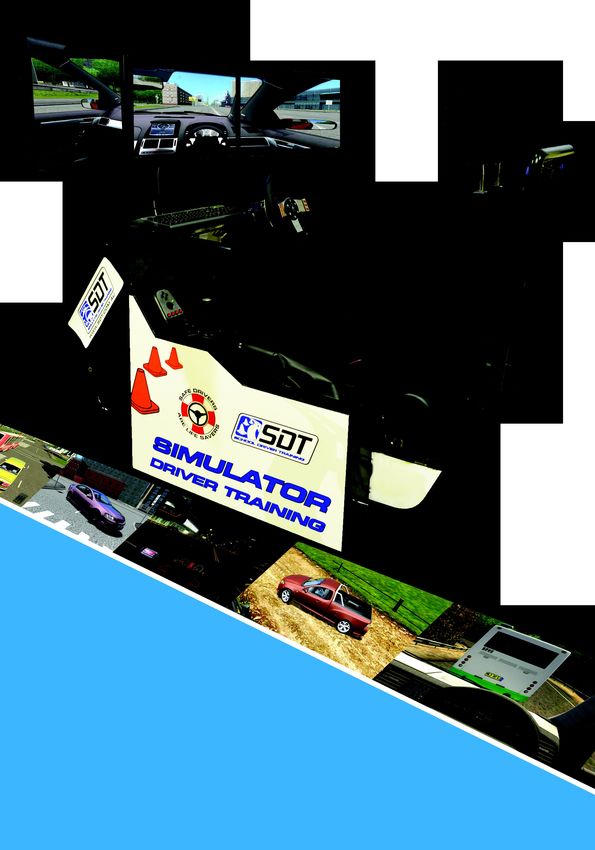
SIMULATOR SPECIFICATIONS
                                          AND PRICING

SIM
      UL
          AT
             O   R
                          SA
                            LE
                               S
                                   RE
                                     NT
                                       AL
                                            SO
Safe Drive Training Pty Ltd                   FT
Phone: +617 3299 7723                            WA
Email: info@sdt.com.au                              RE
Website: www.sdt.com.au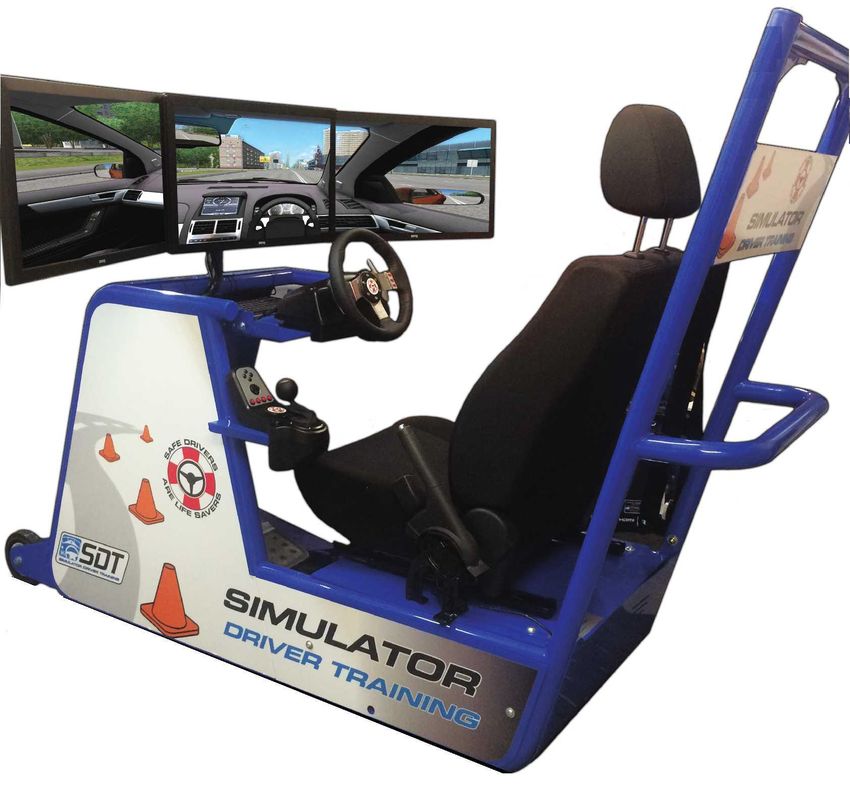
2021 SIMULATOR RANGE PROMOTIONAL VIDEO          https://youtu.be/MU5dQqQnr1M

WHAT UNIQUE THINGS CAN A SIMULATOR TRAIN FOR?       https://youtu.be/4i_jCJhb-j4

WHAT RESOURCES COME WITH A SIMULATOR?            https://youtu.be/Wtx4bVaH8e4

HOW DO I? FREQUENTLY ASKED QUESTIONS             https://youtu.be/NxjeHq6HEOs

CAN THE HOME EDITION BE USED FOR BUSINESS        https://youtu.be/NcxbMbuuIcs

SDT COMPANY PROFILE VIDEO                         https://youtu.be/Yh5OSrToclY
This budget driving simulator system is
                                                                     designed for schools and colleges that already
                                                                     have their own IT Department with skilled
                                                                     personnel, plus their own computer systems,
                                                                     monitors and/or VR goggles. The simulator
                                                                     consists of the steering wheel, pedals and gear
                                                                     lever mounted to a metal frame and an
                                                                     authorized copy of City Car Driving with the
                                                                     additional software, videos and driver training
                                                                     resources outlined is supplied via USB for
                                                                     installation on a Windows 10 O/S computer.

Simulator Frame:              Powder coated collapsible metal frame with telescopic construction
                              Can be setup (or swapped) from Right Hand Drive to Left Hand Drive
                              Office chair is needed for driver to sit in
Hardware:                     Logitech G29 or G920 Force Feedback Steering Wheel, Pedals and Gearlever
Software:                     Supplied with authorised multi-user licenced Enterprise version of City Car Driving
                              Software training and induction is via user training videos
NOT SUPPLIED:                 Requires a computer with Intel i5 7400 Quad Core i5 3.0 GHz CPU or similar
                              8GB RAM (DDR4), Windows 10 operating system,
                              Graphics Card Inno3D GeForce GTX 8GB or similar
                              Requires suitable monitors (75Hz or better)
Training Resources: Supplied with 1 x Fatal Vision Alcohol impairment goggle, 1 x Eye Sight Chart, 2 x
                    Alco-cup standard drinks glass, 10 x Defensive driving handbooks, Driver assessment
                    form + the additional driver training software and videos outlined in this document.

Payment Terms:                We can supply an official quotation once the delivery location is known.

 FOR AUSTRALIAN ORDERS:                               FOR ALL INTERNATIONAL ORDERS:
 •    Purchase Order must be received
                                                      •   Full payment required to confirm order (this is not negotiable)
 •    50% deposit required to confirm order
                                                      •   Credit card payments will not be accepted
 •    Full payment due within 7 days of delivery

©Safe Drive Training (Aust) Pty Ltd                                                                  Current as at May 14, 2021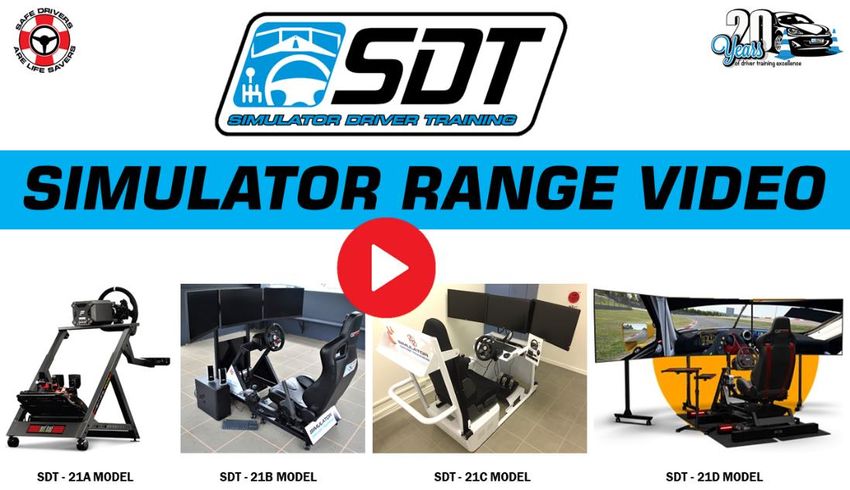
This new sled-style simulator operates on premium
                                                                City Car Driving software. It is supplied with triple
                                                                27inch screens and comes ready to drive with a
                                                                steering wheel, gearlever, pedals, driver’s seat and
                                                                a real road car seatbelt and handbrake are fitted and
                                                                electronically linked to the simulator software. The
                                                                simulator frame has castor wheels for relocating.
                                                                An optional Motion Platform can be added to this frame.

Simulator Frame:              Next Level Racing GT Track powder coated frame with telescopic construction
                              Frame can be changed from Right Hand Drive to Left Hand Drive
                              Castor wheels allow easy movement of the simulator
                              Triple screen mounting system attached to the simulator frame
                              Sports seat with real road car seatbelt + handbrake linked to the driving software
                              Branding panels for sponsors/company logo’s
Hardware:                     Computer has AMD Ryzen 5 3600 6 Core AM4 3.6 GHz CPU, 8GB RAM (DDR4),
                              120GB SSD Hard Drive, Windows 10 operating system,
                              Graphics Card Inno3D GeForce GTX 8GB
                              3 x 27 inch gaming monitors
                              Wireless keyboard with in-built mouse tracker pad
                              Logitech G29 or G920 Force Feedback Steering Wheel, Pedals and Gearlever
                              All cables + power board with surge protection + external speakers
Software:                     Authorised multi-user licenced Enterprise version of City Car Driving
                              (the motion version uses upgraded simulator software to support this capability)
Training Resources: Supplied with 50 x Defensive Driving Course e-learning log-ins, 1 x Fatal Vision
                    Alcohol impairment goggle, 1 x Distract-A-Match game, 1 x Eye Sight Chart, 2 x Alco-
                    cup standard drinks glass, 2 x Driver Training Posters, 25 x Defensive driving
                    handbooks + the additional training software and videos outlined in this document

©Safe Drive Training (Aust) Pty Ltd                                                               Current as at May 14, 2021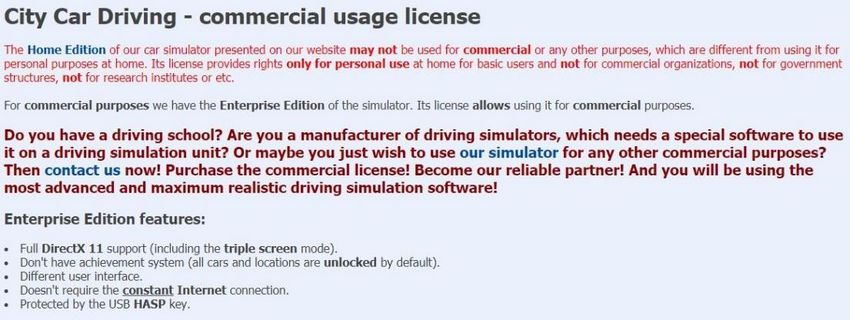
The buyer of the SDT-21B simulator system receives customized branding for their simulator. Your
logo is inserted into the simulator decals which are attached to the frame prior to delivery. This means
your simulator will promote your business and/or sponsors name and look amazing.

 FOR AUSTRALIAN ORDERS:                            FOR ALL INTERNATIONAL ORDERS:
 •    Purchase Order must be received              •   Full payment required to confirm order (this is not negotiable)
 •    50% deposit required to confirm order        •   Credit card payments will not be accepted
 •    Full payment due within 7 days of delivery   •   Supplied fully assembled in wooden crate
©Safe Drive Training (Aust) Pty Ltd                                                               Current as at May 14, 2021
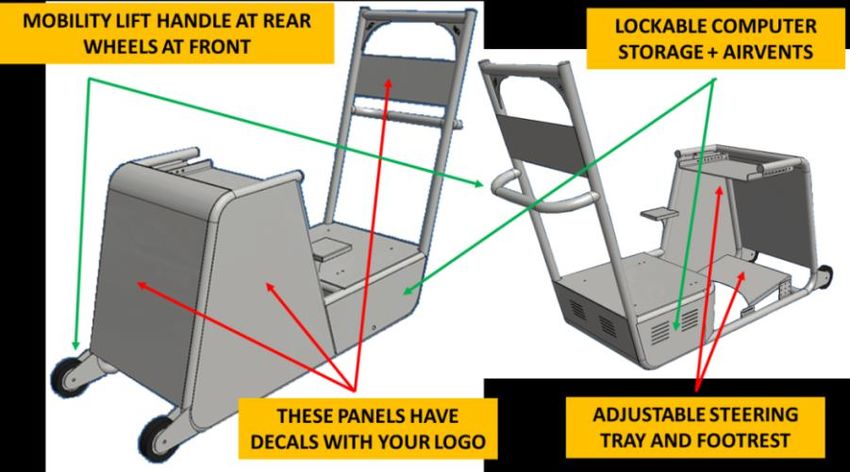
This is a partially enclosed simulator with a custom
                                                          designed frame operating on premium City Car Driving
                                                          software. It has triple 27inch screens, a real road car seat,
                                                          seatbelt and handbrake that are linked to the software.
                                                          This simulator is portable (using a trailer with ramps) and
                                                          is suitable for Driving Schools and High Schools seeking
                                                          a professional simulator for novice training.

Simulator Frame:              Powder coated custom designed frame with triple screen mounting
                              Can be ordered as Right Hand Drive or Left Hand Drive setup
                              Front wheels and rear handle for lifting and movement
                              Road car seat, seatbelt and handbrake mechanism all linked to software
                              Customised full-colour branding (decals) supplied with your company name and logo
                              The buyers chooses the colour for their simulator frame
Hardware:                     Computer has AMD Ryzen 5 3600 6 Core AM4 3.6 GHz CPU, 8GB RAM (DDR4),
                              120GB SSD Hard Drive, Windows 10 operating system,
                              Graphics Card Inno3D GeForce GTX 8GB
                              3 x 27 inch LED gaming monitors with thin bezel (edge)
                              Wireless keyboard with in-built mouse tracker pad, External speakers
                              Thrustmaster GT300 GT Edition Steering Wheel, Pedals and Gearlever
                              All cables + powerboard with surge protection + external speakers
Software:                     Authorised multi-user licenced Enterprise version of City Car Driving
Training Resources: Supplied with 50 x Defensive Driving Course e-learning log-ins, 2 x Fatal Vision
                    Alcohol impairment goggle, 1 x Distract-A-Match game, 1 x Eye Sight Chart, 5 x Alco-
                    cup standard drinks glass, 2 x Driver Training Posters, 25 x Defensive driving
                    handbooks + the additional training software and videos outlined in this document

Payment Terms:                We can supply an official quotation once the delivery location is known.
                              This will add delivery, setup and on-site training (as required)
 FOR AUSTRALIAN ORDERS:                               FOR ALL INTERNATIONAL ORDERS:
 •    Purchase Order must be received                 •   Full payment required to confirm order (this is not negotiable)
 •    50% deposit required to confirm order           •   Credit card payments will not be accepted
 •    Full payment due within 7 days of delivery      •   Supplied fully assembled in wooden crate

©Safe Drive Training (Aust) Pty Ltd                                                                  Current as at May 14, 2021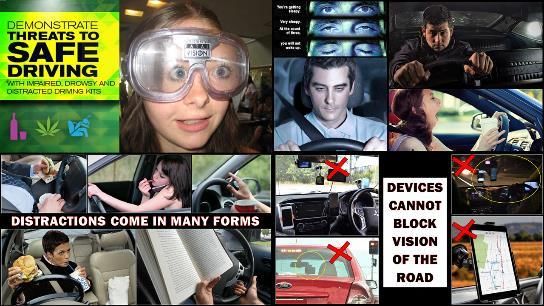
***INCLUDED***
                                        SDT-21C CUSTOMISED BRANDING
The buyer of the SDT-21C simulator system can choose the colour of the frame to match their
corporate colours and we provide customized branding for the buyer. Your logo is inserted into the
simulator decals which are attached to the frame prior to delivery. This means your simulator will
promote your business and/or sponsors name and look amazing.

                                      YOUR LOGO INSERTED

Below are examples of the simulator colours and branding we have created for clients:

©Safe Drive Training (Aust) Pty Ltd                                            Current as at May 14, 2021
***OPTIONAL EXTRA***
                                       TRAILER FOR SIMULATOR TRANSPORT
We can also supply a fully enclosed custom designed trailer to move your simulator to events.
Trailers have supplied to:
               •    DRIV4LYF Katherine
               •    South Australian Police for high school driver safety programs
               •    Queensland Police (2 units) for high school driver safety programs (in Cairns and Townsville)
               •    Tasmania PCYC (Bridgewater) for youth driver safety programs
               •    Investing in our Youth (Bunbury) for youth driver safety programs
               •    Drive Wise Program (Mittagong) for youth driver safety programs

   OPTION 1: Enclosed Pantech trailer for                    OPTION 2: Enclosed Pantech trailer with opening
   transporting the simulator to a location and then         sides for transporting the simulator to a location
   unloading the simulator for use                           and then leaving simulator on-board

   Size: 2100mm x 1200mm x 1500mm high                       Size: 2100mm x 1200mm x 1500mm high
   Structural Capacity: 900kg                                Structural Capacity: 900kg
   Sides & Roof: 3mm composite aluminium sheeting            Sides & Roof: 3mm composite aluminium sheeting
   Floor: 2.1mm Chequer Plate                                Floor: 2.1mm Chequer Plate Flooring
   Tie Downs: 4 Recessed Tiedown rings in floor              Tie Downs: 4 Recessed Tiedown rings in floor
   Ramp: Spring Assisted single person lift                  All Doors: Lift up with Gas Struts + 2 locking T-handles
   Rims: New 14" Ford stud Sunraysia White                   Ramps: Loading ramps stored under the rear
   Tyres: 3 x new 185R14 Light Truck (includes spare)        Rims: New 14" Ford stud Sunraysia White
   Suspension: 7 leaf slipper spring suspension              Tyres: 3 x new 185R14 Light Truck (includes spare)
   Lights: LED's A.D.R. Approved                             Suspension: 7 leaf slipper spring suspension
   Features: Spare Wheel, Jockey Wheel, Plug Holder,         Lights: LED's A.D.R. Approved
   Mud Flaps (optional stabilizer legs)                      Features: Spare Wheel, Jockey Wheel, Plug Holder,
   Finish: Zinc rich Primed + two coats of Industrial        Mud Flaps, 2 rear stabilizer legs
   Enamel. Your choice of colours.                           Finish: Zinc rich Primed + two coats of Industrial
   Options: Sign writing can be arranged, generator fitted   Enamel. Your choice of colours.
   for running simulator without access to mains power       Options: Sign writing can be arranged, generator fitted
                                                             for running simulator without access to mains power

   Estimate: AUD$6,750 inc GST                               Estimate: AUD$7,950 inc GST
   Registration and delivery at additional cost              Registration and delivery at additional cost
©Safe Drive Training (Aust) Pty Ltd                                                              Current as at May 14, 2021
CLICK HERE TO WATCH PROMOTIONAL VIDEO                            https://youtu.be/K_DiuyCg9h4
The Traction Plus system combined with the Next Level Racing® Motion Platform V3 provides incredible
levels of vehicle feedback to the driver to feel exactly what the vehicle is doing by precisely delivering
sway, surge, roll, pitch, understeer and front traction loss (critical feature usually only experience in
6DOF motion platforms), oversteer and rear traction loss, power slides and drifting, partial heave, vehicle
and road effects such as road surface, bumps, wheel lock/spin, gear changes etc and shunting effects
(to feel side impact contact from opponents/wall).
The Traction Plus system moves the whole cockpit and delivers both understeer and oversteer in the
most realistic and precise way possible. Based on feedback from professional drivers during product
development the understeer component of a motion platform which is usually only found in 6DOF
systems is absolutely critical in accurately and precisely simulating the vehi cle.
                                            Feeling both understeer and oversteer the platform can be used
                                            effectively for driver training particularly for cornering, allowing feel of
                                            what is happening with both rear and front of the vehicle. Even the
                                            differences between rear wheel drive, front wheel drive and all-wheel
                                            drive vehicles can be felt with the precise feedback delivered through
                                            the Traction Plus platform. The Motion Platform V3 and Traction Plus
                                            combine to provide accurate vehicle feedback for front wheel lock up
                                            meaning you will feel vibration as well as front of the vehicle sliding
                                            out of the corner when too much brake pressure is applied. (also
                                            applicable for rear wheel lock up depending on vehicle)

Simulator Frame:              Next Level Racing GT Track powder coated frame with telescopic construction
                              Frame can be changed from Right Hand Drive to Left Hand Drive
                              Sports seat with seatbelt + road car handbrake linked to the driving software
Hardware:                     Computer has AMD Ryzen 5 3600 6 Core AM4 3.6 GHz CPU, 8GB RAM (DDR4),
                              120GB SSD Hard Drive, Microsoft Windows 10 operating system,
                              Graphics Card Inno3D GeForce GTX 8GB
                              3 x 32 inch LED monitors with thin bezel (edge)
                              External free standing screen mounts
                              Wireless keyboard with in-built mouse tracker pad, External speakers
                              Thrustmaster GT300 GT Edition Steering Wheel, Pedals and Gearlever
                              All cables + powerboard with surge protection + external speakers
Software:                     Authorised multi-user licenced Enterprise version of City Car Driving with the extra
                              telemetry and motion support add-ons required.
Training Resources: The same training resources are included as per the SDT-21C simulator

©Safe Drive Training (Aust) Pty Ltd                                                               Current as at May 14, 2021
The multi-user licensed “enterprise version” of City
                                                                Car Driving (version 1.5.9) software can be
                                                                purchased as a stand-alone option. Buyers can
                                                                install this software into their own PC-based driving
                                                                simulator. Use of the Home version in commercial
                                                                driving simulators is prohibited.

City Car Driving is a driving simulator program, using advanced car physics to achieve a realistic car feeling
and a high-quality render engine for graphical realism. Cars, roads, traffic and pedestrians are created as to
make users feel they're driving a real car in a real city. Watch our promotional video below:

             WHAT UNIQUE THINGS CAN A SIMULATOR TRAIN FOR?                              https://youtu.be/4i_jCJhb-j4

     •    There is now a ride-sharing passenger transportation feature – complete with customer reviews.
          The more passengers are satisfied, the more fuel you'll get available on your fuel card!
     •    You can fit a trailer and practice in the learner driving centre (parking, slalom etc) and also use the
          trailer in the free driving mode around the virtual city in different weather and traffic conditions.
     •    Freight delivery with a trailer, allows you to make deliveries while towing a large trailer
     •    Added vehicle problems that can be engaged to cause mechanical problems like engine
          overheating, brake failure, steering problems, tyre puncture and run out of fuel.
     •    Added drunk driving mode, which then simulates the blurred vision and lack of coordination that
          comes from high range drunk driving. In this mode it is very difficult not to crash.
     •    Added support of head-mounted HTC Vive, Oculus Rift and Track IR Headgear
     •    New defensive driving exercises at a special training complex, this includes emergency lane
          change, emergency braking, fast slalom, reversing tests, high speed cornering and random lane
          change (like the elk or kangaroo swerving test)
     •    Added a new function of record/playback. It makes it possible to record a driving session in a file
          that can be played back for review. During the playback the instructor can switch the camera view
          angles to review the situation. This feature is useful for better analysis with the student.
     •    A 4WD vehicle is added (left hand drive) with the ability to engage 4H or 4L for off-road simulation
     •    Added a new dangerous situation - sudden pedestrians! If this function is activated pedestrians
          can suddenly cross the road in random places. Tests the drivers hazard perception and reactions.
     •    Added a new dangerous situation – traffic accident! Resulting in hazardous situations with a traffic
          crash suddenly occurring in the traffic ahead.
     •    Improved winter mode with not only falling snow and snow textures, but also physically with
          reduced co-efficient of friction (slippery/less grip)
Recommended system configuration:
     •    Operating System: Windows 10
     •    CPU: Intel Core i# 3.2 GHz / AMD FX 4xxx 3.6 GHz
     •    Video: AMD Radeon R7 250X / nVidia GeForce GTX 750
     •    RAM: 8 Gb DDR3 RAM; HDD: 10 Gb of free space;
     •    Screen: 1920x1080, 32 bit; Sound: compatible with DirectX 9.0;
     •    Other: keyboard, mouse, Logitech G29 or G920 steering wheel

                    * Upgrade requires a previous “enterprise” version of City Car Driving with the security HASP key

©Safe Drive Training (Aust) Pty Ltd                                                                 Current as at May 14, 2021
CITY CAR DRIVING SOFTWARE
SDT is the exclusive distributor for City Car Driving Software in many Asia-Pacific countries.
Our simulators are loaded with an authorized multi-user licenced “enterprise version” of the
software. This ensures your investment is protected by not using illegal home-user licensed
software when using the simulator for commercial driver training.
The software has the following features:
LANGUAGES: The software can be set into the following languages: English, German, French,
Italian, Spanish, Portuguese, Japanese, Turkish, Czech, Chinese, Danish, Finnish, Polish, Russian,
Ukrainian and Kazakh.
INTERNATIONAL OPTIMISATION: When a driver starts they can choose which international
mode they wish to attempt for that session, this allows practice with Left-hand drive or Right-hand
drive traffic and experience with the road signage of that region.
• AUSTRALIAN MODE: If Australia is chosen the software includes Australian road signage
and Australian-made Holden Commodore (VE model) and Ford Falcon (BF Utility) with
realistic simulation of the in-cabin layout of both vehicles. Police and Ambulance vehicles
show the 000 emergency phone number and vehicles have Australian style number plates.
• USA MODE: In addition to the traffic rules changed: road signs, markings, traffic lights, as
well as virtual speedometer (shows speed in MPH).
• CANADA MODE: local road signs and markings, road rules, turn on red traffic lights
• EUROPEAN MODE: EU style road signs, markings, design of traffic lights.
Please note: All driving is done in the same virtual city and environment (same road networks,
buildings, trees, signs) just the road rules, road markings and vehicles change to suit which countries
mode is selected. Therefore you are not driving in any specific country (USA or Australia) but if
someone is planning to travel to another country they can get driving experience with local road
signage and experience of driving on the other side of the road.
SETTINGS MODE: The instructor can alter the graphics specifications (shadows, rendering,
reflections, brightness and contrast), sounds can be turned on or off and the volume adjusted.
The Simulator comes with a wireless keyboard and the gear lever and steering wheel have buttons
which can be programmed to perform vehicle control tasks like indicators, headlights, high beam,
windscreen wipers and horn. Using the settings mode every control feature can be programmed to
different buttons and keyboard keys. The calibration and sensitivity of the steering wheel, accelerator,
brake and clutch pedal can also be adjusted.
The Simulator frame has a road car seat that can be adjusted for height, recline angle and reach
(moved in and out). On the SDT-183 frame the pedals and steering wheel tray can be moved in or
out to provide a better position for the short or tall driver.
©Safe Drive Training (Aust) Pty Ltd Current as at May 14, 2021STUDENT RECORDS: Each user of the simulator can have their own profile with the simulator controls set to their preferences and records kept of all driving sessions including infringements. This can be used to record progress, measure improvements but also to monitor if students are deliberately driving badly when not being watched by the instructor. VEHICLES: The student can choose from a range of passenger, SUV and light commercial vehicles. They can also choose the vehicle colour. Each vehicle has an authentic dashboard layout, acceleration, braking capability, handling dynamics and engine sound. The chosen vehicle can be driven as an automatic, clutch-less manual, manual gearbox with paddle shift or manual gearbox with H-pattern gearbox. ABS can be switched on or off. Unlike many driving simulators, City Car Driving has an advanced physics engine providing a high realism of driving. Maximum speed corresponds to the real vehicle and a mathematical model of each engine simulates: friction force, inertia and the realistic work of the starter and many other parameters. Brake lockup, understeer skids, oversteer slides, spins and handbrake slides are all possible. OPTIONAL EXTRA: We can create additional vehicles (specific to your country) and install them into the software. This can include semi-trailers for truck training and allow authentic looking police vehicles, taxi’s and local makes or models that people in your country are used to seeing or driving. ©Safe Drive Training (Aust) Pty Ltd Current as at May 14, 2021
DRIVING WORLD: The software has a large virtual city that provides a huge driving area and
includes roads, crossings and junctions of various types and complexity, that help get confidence on
the road in any situation. It gives users the opportunity to drive from one district of the city to other
without extra loading screens.
     •    Learn-to-Drive Test Track: with slalom, parking, u-turn, steering and cornering drills
     •    Old District: narrow streets, unsupervised crossings
     •    Modern District: wide streets, many multilane roads, signalled and unsupervised crossings
     •    Superhighway: with freeway on-ramps, off-ramps, higher travel speeds
     •    Country Road: with merging of 2 lanes into 1 and narrow roads
     •    Gravel Road: with bumps, obstacles and reduced traction (grass can be driven on)
     •    Southern District: wide streets with tramways, signalled and unsupervised crosswalks,
          narrow tangled courtyards with many parked cars
     •    Mountainous Area: narrow roads with steep hills and elevation changes, includes 4WD
          track across steep and slippery terrain
     •    NEW Defensive Driving: emergency driving scenarios (braking, lane change, slalom)

An interactive detailed city map will help you to not get lost in a big virtual world. There are also
navigator tips while drive along each route.

Support for both right-handed and left-handed driving modes allows you drive not only under
the usual traffic rules, adopted in most countries of the world - on the right side of the road, but also
under the rules used for the driving on the left side of the road, as it is in Australia, Japan, UK and
some other countries. This feature makes this driving simulator a versatile tool, regardless of the
country which the user resides in. This also allows users to practice their driving before travelling to
a location with different traffic orientation.
Smart traffic “AI” ensures that cars are physical, they're able to collide with the user’s car or with
each other. Traffic density and its "aggression" can be adjusted in the game settings.

©Safe Drive Training (Aust) Pty Ltd                                                  Current as at May 14, 2021
MAIN TASKS: There is a range of driving tasks or
missions for the student driver to accomplish, each testing
specific skills (time management, fuel efficiency etc).
Students need to complete a task before the next one is
accessible:
Car Starting Reverse Parallel Parking
Zig-Zag Test Driving on Hilly Terrain
City Driving Yard Driving
Obeying Road Signs Non-Stalling
Country Driving Moving Fragile Cargo
Fuel Efficient Driving A Driving Test
Delivering an order Hard working day
ADDITIONAL TASKS: (DEFENSIVE DRIVING)
There is a selection of defensive driving tasks to test
reactions and vehicle control skills at the driver training area.
This includes emergency lane change, emergency braking, fast slalom, reversing tests, high speed
cornering, standard lane change and random “left or right” lane change (ie. elk/kangaroo test)
ENVIRONMENT: The driving environment is fully controllable with adjustments possible for
Day/Night/Sun/Rain/Fog/Snow, Traffic Density, Traffic Behaviour (Calm or Aggressive). The
instructor can make the roads full of traffic like peak-hour or adjust down to light traffic volumes.
The new winter mode has not only falling snow and snow textures, but also physical changes with
a reduced co-efficient of friction (slippery/less grip)
©Safe Drive Training (Aust) Pty Ltd Current as at May 14, 2021EMERGENCY SCENARIOS: The software can generate sudden emergency events such as:
• a car cuts into the lane just in front of your car or the car in front brakes suddenly
• a vehicle drives across the centre lines into your lane (head-on crash scenario)
• pedestrians cross the road in wrong places
• a road accident happens randomly between other vehicles
VEHICLE PROBLEMS: The software can now generate problems with the vehicle.
✓ Lighting Problem ✓ Steering Malfunction
✓ Brake System Failure ✓ Coolant Overheating
✓ Fuel Leakage ✓ Tyre Puncture
These hazards can be set to happen occasionally or very frequently. This can be used to test a
driver’s alertness and reactions to mechanical problems.
OTHER FEATURES:
• Record/playback function makes it possible to record a driving session in a file that can be played
back for review. During the playback the instructor can switch the camera view angles to review the
situation. This feature is useful for better analysis with the student.
• Accurate traffic rules helps students to examine each road situation. And the virtual instructor
provides on-screen feedback while driving.
• Pedestrians look alive and behave accordingly, sometimes crossing the road in the wrong places.
The virtual city has lots of supervised and unsupervised crosswalks used by pedestrians.
• High-quality graphics is confirmed by the screenshots. Cars have shadows, highlights, reflections.
Roads become wet and greasy after rain. Dust comes off wheels. The road surface is very realistic.
• Sound effects are realistic and improve immersing in the driving process. There are such effects as
the sound of police sirens, slipping wheels in skids and horn blasts from impatient drivers.
• Damage. All cars get visible damage, when impacts occur. However there is no graphic content to
discourage students from trying to cause spectacular impacts (for example pedestrians are run over,
but no graphic detail is shown)
©Safe Drive Training (Aust) Pty Ltd Current as at May 14, 2021➤ Ride-share Training: There is now a ride-sharing passenger transportation feature – complete with customer reviews. The more passengers are satisfied, the more fuel you'll get on your fuel card! ➤ Trailer Towing: You can fit a trailer and practice in the learner driving centre (parking, slalom etc) and also use the trailer in the free driving mode around the virtual city in different weather and traffic conditions. There is a new exercise for a passenger car with a trailer. Using an app on the game phone (VR tablet), you can choose to start completing goods transportation orders. A loader will be waiting for you at the freight depot to give you the goods, and the route will guide you to the unloading point. Your progress depends on how well you transport goods. As you successfully complete deliveries, you will be entrusted with fragile goods, or even with unloading one batch in two different locations across the city. ➤ Fuel Consumption: In the free driving mode, service stations are now usable. Fuel consumption level depends on the style of driving. The navigator automatically routes you to the nearest refueling station when you have low fuel. And of course the fuel usage mode can be turned off if not required. ©Safe Drive Training (Aust) Pty Ltd Current as at May 14, 2021
STEERING WHEEL, GEAR LEVER
                                            AND PEDAL SYSTEM
                                          SDT simulators use either the Logitech G920 or
                                          Thrustmaster GT steering wheel, pedals and gear lever.
                                          These systems have been chosen to keep the costs down
                                          and allow for easy replacement if something goes wrong
                                          after years of simulator use. The steering wheel diameter
                                          is smaller than a real car but this ensures students develop
                                          good steering techniques. The instrument panel of the
                                          vehicle being driven is shown on-screen.
                                          CLICK TO WATCH VIDEO ABOUT STEERING WHEEL

                                          Leather steering wheel
                                          The steering is covered in high-quality, hand-stitched leather, with the
                                          look and feel of a high-performance car steering wheel and it gives a
                                          comfortable but durable experience. Powerful dual-motor force
                                          feedback realistically simulates force effects for precision response.
                                          Solid steel ball bearings in the wheel shaft and stainless-steel paddle
                                          shifters and pedals make the G920 very robust and hard wearing.

                                          900° Steering
                                          The 900-degree lock-to-lock rotation of the G920 Driving Force means
                                          you can turn the wheel around two and a half times. It’s the same
                                          degree of motion as a steering wheel inside a car. The steering wheel
                                          top stripe is a visual indicator of which direction the wheel is pointing.

                                          Responsive Pedal Unit
                                          Maintain a more realistic driving body position with the separate floor
                                          pedal unit with integrated throttle, brake, and clutch pedals. G920
                                          Driving Force lets you comfortably accelerate, brake and change gears
                                          with the feel of an actual car. The nonlinear brake pedal mimics the
                                          performance of a pressure-sensitive brake system for a more
                                          responsive, accurate braking feel.

                                      ***OPTIONAL EXTRAS***
                                      CUSTOMISING THE CONTROLS
If the simulator is being used for truck driving, the following modifications are possible
          A larger (30 cm) diameter steering wheel
          A truck style gear lever can be added
          A button box with ignition key and buttons to control vehicle systems can be added
If the simulator is being used with disabled drivers, the following modifications are possible
          A hand controller steering knob can be attached to the steering wheel
          A lever can be added to control acceleration by hand

©Safe Drive Training (Aust) Pty Ltd                                                          Current as at May 14, 2021
WHAT DRIVER EDUCATION
RESOURCES ARE INCLUDED?
Since SDT is a driver training company, we support the end users of our simulators with a range of
additional driver education resources and training aids. The following video outlines what is included:
WHAT RESOURCES COME WITH A SIMULATOR https://youtu.be/Wtx4bVaH8e4
21A 21B 21C
ITEM DESCRIPTION
MODEL MODEL MODEL
Defensive Driving Handbook
This 24-page full colour booklet on Defensive Driving
summarizes the essential concepts of Safe and Defensive
Driving. Use the booklet as a handout to your course 10 25 25
participants or keep in your driver education resource books books books
library. supplied supplied supplied
Driver Assessment Sheet
We have developed a comprehensive driver assessment
sheet to allow simulator operators to assess drivers and
give feedback on their driving techniques such as seating
position, steering, use of vehicle controls, general driving YES YES YES
and defensive driving to avoid risky situations. (supplied on supplied supplied supplied
USB as PDF file)
Alco-cup Standard Drink Cup
Alco-cups demonstrate the quantity of alcohol that makes
a standard drink for different types of beer, wine and spirits.
These are useful tools for educating drivers about 2 cups 2 cups 5 cups
responsible drinking strategies. supplied supplied supplied
Eye Sight Chart
With transport departments no longer conducting eye-sight
testing for licence renewal and with increasing numbers of
Diabetics (suffering impaired vision), it is important to test 1 chart 1 chart 1 chart
driver’s eyesight. Therefore this eyesight chart is a useful supplied supplied supplied
tool to accompany driver training with the simulator.
Distract-A-Match Game CAN BE
This unique shape matching game helps demonstrate in a ADDED
fun and engaging way the impact of distractions on our TO
reaction time and judgment. This provides a clear and easy YOUR 1 game 1 game
to understand lesson about the impact of distractions on a ORDER supplied supplied
person’s ability to drive safely.
Fatal Vision Alcohol Goggles
These unique goggles demonstrate the impairment of
alcohol on a person’s vision and co-ordination. The goggles
can be used for a walk-the-line sobriety test or used with a
driving simulator for a unique anti-drunk driving 1 1 2
demonstration. The goggles are available in different BAC goggle goggle goggles
levels which allow a person to experience different levels of supplied supplied supplied
alcohol impairment (eg. the effect of being at the legal limit
compared to several times over the limit).
Driver Safety Posters CAN BE
These 2 x A2 laminated posters have been developed by ADDED
SDT to provide informative driving tips to the audience TO
YOUR
2 2
around and using the driving simulator. The posters cover posters posters
ORDER
the topics of carjacking/security and driving vision. supplied supplied
©Safe Drive Training (Aust) Pty Ltd Current as at May 14, 2021***OPTIONAL EXTRAS***
DRIVER EDUCATION RESOURCES
The following driver education resources are available to add to your order:
Marijuana Simulation Experience:
This training kit includes a goggle and other educational games to simulate the
impairment of Marijuana. The kit also includes a USB containing a range of
drug education resources and an Australian-made interactive hazard
perception video that is watched while wearing the Marijuana Goggle.
Drowsy and Distracted Driving Goggles:
NEW These unique “blinking” goggles simulate the experience of drowsy
driving (like micro sleeps) and also distracted driving. Using the App the
instructor controls the blinking rate of the goggles. These are a perfect
accompaniment to our driving simulators and any driver education program
that targets fatigue or distracted driving.
< CLICK TO WATCH TRAINING VIDEO ON THIS PRODUCT >
D.I.E.S. Danger in Every Step Floor mat:
This double sided floor mat is used in conjunction with the Fatal Vision
Goggles to provide an interactive demonstration of the dangers of alcohol and
drug impairment (walking down stairs, tripping over objects etc)
Alcohol Education PowerPoint:
This is a comprehensive PowerPoint covering the impact of alcohol on human
reactions, driving performance and drunk driving prevention strategies. The
content is made in Australia with Australian content and terminology.
Redline Disposable Alcohol Testers:
REDLINE is a simple to use alcohol breathalyser, which detects the presence
of alcohol in the body and gives an accurate indication of whether the blood
alcohol content has exceeded a specific limit. Use this for testing students
suspected of consuming alcohol or as a unique course give-away.
Concussion Training Kit:
The full training kit is a hands-on awareness program allowing participants to
experience the simulated TBI (Traumatic Brain Injury) symptoms of dizziness,
visual disconnect, disorientation, hesitation and confusion. The kit includes
information for the trainer to run a session, games for participants,
assessments and hand-out materials.
Skid Control Posters & Training Video
The City Car Driving simulation software has a realistic physics engine,
allowing for slides and spins to occur (especially in rain, ice or snow
conditions). These 3 x A2 laminated colour posters allow driving instructors to
discuss understeer, oversteer and spins. A comprehensive driver training
video on Skid Awareness is also included.
Defensive Driving PowerPoint:
This comprehensive PowerPoint presentation (300+ slides) addresses the
dangers of driving and risk management strategies for safe driving. The
presentation contains numerous images and video clips to reinforce the
principles being explained.
(supplied on USB as PowerPoint file)
©Safe Drive Training (Aust) Pty Ltd Current as at May 14, 2021ADDITIONAL SOFTWARE & VIDEOS
THE FOLLOWING IS ALL INCLUDED
When you purchase any SDT driving simulator you will also receive the following additional driver
training resources to assist with your road safety programs:
• ROAD RULE TEST: There is a 20 question road rule test for students to complete. Once they
complete the test, the correct answers are shown and additional explanations provided.
• 3 x DRIVING KNOWLEDGE TESTS: There are 3 x 20 question general knowledge tests about the
basics of safe driving. Once they complete the test, the correct answers are shown.
• SOFTWARE MANUAL: There is an electronic version of the City Car Driving user’s manual
• REACTION TIME TESTER: This is designed to measure the Reaction Time of a driver (perception
time plus foot from accelerator to brake pedal time). The driver is prompted to apply the brake to a
random hazard; they must perceive the hazard and then react. The program will show the reaction
time and a chart of how far the vehicle would travel during this time period at various speeds. A
distraction or impairment can then be introduced to measure the effect on reaction time.
• LIVE FOR SPEED: This is free trial version of this popular motorsport simulator. This version has
several vehicles and tracks available, including some driver training tests (braking, slalom etc)
• SAFE DRIVING VIDEOS: There are 22 exclusive driver training videos that provide almost 1 hour of
additional safe driving content for novice drivers to view. This can be watched by the simulator user
or shown to a larger group via the monitor screens. Topics covered are:
✓ Seating Positions Changing Gears in a Manual
✓ Safe Following Distance Mirror Adjustment
✓ Share the Road with Bicycles Fuel Economy Tips
✓ Speed vs Mass when Braking Lane Position
✓ Seatbelts Night Driving
✓ Steering Techniques Steering Techniques
✓ Share the Road with Trucks Suspension Testing a vehicle
✓ City Driving Tips Crash Testing
✓ Roundabouts Traffic Light Tips
✓ Carjacking Safety Tyre Maintenance
✓ Road Lines Speeding “gets you nowhere faster”
©Safe Drive Training (Aust) Pty Ltd Current as at May 14, 2021***OPTIONAL***
ON-SITE INDUCTION/HAND-OVER
If SDT is delivering the simulator to your venue we will unpack, setup and our instructor can conduct
on-site induction training for your personnel. The induction training covers:
Setup of simulator (fitting and removing screens, adjusting frame, troubleshooting)
Review of simulator features
Operation of simulator software
Maintenance procedures
Practice delivering a simulator training session
Training on the additional software and training resources
The induction training usually takes 3 hours and is done on the same day as the simulator is delivered
and hand-over occurs. Ideally this session is limited to a maximum of 6 participants.
Some overseas buyers have elected to have the simulator freighted directly to them and not receive
any on-site training. In this case, SDT will provide comprehensive instructions and telephone and
video support to assist the buyer to unpack and setup the simulator. The following are some of our
“how to” and help videos for our simulator owners:
HOW DO I? FREQUENTLY ASKED QUESTIONS https://youtu.be/NxjeHq6HEOs
ADJUSTING THE SOUND IN YOUR SIMULATOR https://youtu.be/IJj9CXDRUIY
HOW TO SET THE CONTROLS IN THE SIMULATOR https://youtu.be/cNmJ-QPpu-g
HOW TO MOVE YOUR SIMULATOR https://youtu.be/DQ52RnQF-Eg
HOW DOES THE PARK BRAKE AND SEATBELT WORK https://youtu.be/DVR-RtNWq7Y
FIXING THE STEERING WHEEL AND PEDALS https://youtu.be/kUi5wvQq078
©Safe Drive Training (Aust) Pty Ltd Current as at May 14, 2021DEFENSIVE DRIVING E-LEARNING SDT has developed a comprehensive e-learning Defensive Driving course with amazing content we have filmed to better educate all drivers. User’s login and they create their own password allowing them to log in and out as often as required to complete all modules. They watch the training video and answer the questionnaire to assess their knowledge and understanding before moving onto the next topic. When completed a certificate is generated. There are 26 modules covering: ©Safe Drive Training (Aust) Pty Ltd Current as at May 14, 2021
WHY SIMULATORS?

The following promotional video demonstrates the unique things a simulator can train for:

             WHAT UNIQUE THINGS CAN A SIMULATOR TRAIN FOR?                      https://youtu.be/4i_jCJhb-j4

Simulators are ideal for basic introductory training to the concepts of driving and for demonstrating
the ramifications of risk taking behavior. This simulator is not designed to replace real-world
driving experience. Research shows students get their driver’s licence faster when simulators are
used. (research shows 1 hour in a simulator in the early learner phase is equivalent to 3 hours of on-
road driving). Some scientific studies, performed in the USA, have shown that when a good simulator
is used, accident rates during the two year period after getting the license, is reduced to 34% of the
national average accident rate of novice drivers. The better quality of the simulator and the curriculum
the larger the resulting benefits.
Simulators can teach:
     •    Starting Procedures
     •    Correct use of pedals
     •    Gear Changing (H-pattern gear selector and paddle-shift)
     •    Hillstart Procedure (using the handbrake fitted)
     •    Brake Application (software allows ABS on or off)
     •    Steering Techniques
     •    Procedures for driving (system of car control, lane position, changing lanes, leaving a parking spot,
          merging, roundabouts, dealing with traffic, cornering)
     •    Scanning and Hazard Perception
     •    Vision through corners (especially with a triple screen simulator)

Simulators can demonstrate the consequences of:
     •    Tailgating and aggressive drivers
     •    Not following procedures (like not shoulder checking when changing lanes)
     •    Speeding and inappropriate speed for the conditions (fog, rain, heavy traffic)
     •    Variable Conditions (wet roads, fog, unsealed roads)
     •    Disobeying Road Rules
     •    Distracted Driving (get the student to use mobile phone or other source of distraction)
     •    Divided Attention Failure (ask students to multi-task with mental load whilst driving)
     •    Reaching for an item (ask students to pickup an item from under or behind the seat)
     •    Alcohol Impairment (using the Fatal Vision “Beer” Goggles supplied)
     •    Marijuana Impairment (using the Marijuana Simulation Goggle and software)
     •    Concentration required for safe driving
     •    Fatigue or zoning out (get the student to drive along the motorway for 10 minutes

SDT is a driver training company that sells simulators, as such we can openly advise on the
limitations of simulator training. Some simulator manufacturers will falsely promise that
simulators will replace up to 90% of real-world driving. We don’t believe in this claim.

©Safe Drive Training (Aust) Pty Ltd                                                         Current as at May 14, 2021
Simulators (except the multi-million dollar 3-D hydraulic ram versions) do not realistically mimic the
real physics of driving a car. Therefore they are great training tools for novice driver training but have
an end-point where real-world training must take over.
Simulators might have variable weather conditions, but turning on the rain feature only reduces
vision. It does not accurately demonstrate the change to tyre grip, spray from other vehicles, standing
water and aquaplaning risk. Our simulators are not designed to replicate the real-world physics of
car handling and dynamics.
BUSINESS CASE FOR SIMULATORS
Using simulators, both High Schools and Training Institutes can be involved in the driver education
of novice drivers from pre-learner upwards. This means driver training can be taught at schools from
a younger age (14 years old+) to prepare teenagers for their future driving. This can develop the
skills and attitudes to driving over a longer period, compared with the current rush to get a license
during busy final school years and exam loads.
Schools can impose a simulator usage fee to recoup investment and allow future driver
training investments.
Driving schools using simulators can separate themselves from their competitors and offer
clients unique training courses involving a mixture of simulator and real-world driving
experience
Simulators are attractive to “generation Z” who are the most computer literate generation.
Simulators are real driver training devices, as opposed to “car racing games” that don’t
reflect real life consequences and crash damage.
Students start learning basic vehicle control and road awareness EVEN BEFORE they have
their Leaners Permit.
Training is conducted in a safe environment without the stress of mechanical damage or
crashing, allowing students to focus on the skills being taught and therefore enhancing
learning outcomes.
It makes it possible to teach the student to cope with dangerous situations that do not occur
frequently on the road.
Students can identify and practice driving activities they are struggling with such as
roundabouts, merging or heavy traffic.
The simulator has the ability to be paused and/or participants can make new attempts at a
scenario to enable constructive discussion.
Training is delivered in an interactive environment, where students can make mistakes and
learn from them in total safety.
Head tracking (optional) creates a fully immersive environment that allows for shoulder
checks and creates better spatial awareness.
The triple screen technology on the simulator is so real once students are driving, they often
lean forward to look around objects – this is developing both their observation skills, and
their vehicle control skills.
Fewer hours on the road: reduces fuel consumption which is good for the environment: one
hour in the simulator gives a CO2 emission which is 13x less than one hour in a car.
The SDT simulator requires no mechanical servicing, registration, insurance and there’s no
fuel cost
High quality of training in less time and at lower cost.
©Safe Drive Training (Aust) Pty Ltd Current as at May 14, 2021REVIEW OF OTHER SIMULATORS
Before commencing our simulator business, SDT did a thorough review of the driving simulator
market and this showed us the deficiencies in some simulator systems or software.
Some software has very poor Physics simulation, which does not accurately model a vehicles
handling such as braking and cornering forces. When test driving a simulator we encourage you to
try and spin out the car and see if how the software models and replicates this.
Some simulators are constructed very cheaply and whilst they might have a functioning dashboard
and pedal systems, there are concerns over back-up support and replacement of broken components
which might render your simulator inoperative for long periods.
Some simulators we have encountered promote training videos that are actually the video footage
of the owner’s manual of a foreign car and have little relevance to the simulator user. Also some
simulators we have encountered use colour blindness tests and other “value adding” software
packages that are supplied in breach of copyright from their respective owners.
FREQUENTLY ASKED QUESTIONS
Q. Can I choose the colour of the simulator frame?
A-. Yes for the SDT-21C model you can choose the colour of the frame and sheet metal.
Any powder coating colour is available (see https://www.specifyinterpon.com.au/color/)
Q. Does the simulator software support VR Headgear?
A. Yes the software supports Oculus Rift, HTC Vive and TrackIR
VR headsets can be supplied as an optional extra with the SDT-21B and SDT-21C sims.
©Safe Drive Training (Aust) Pty Ltd Current as at May 14, 2021Q. Can I use other software on this simulator?
A. Yes, the simulator is a PC computer with a Windows 10 Operating System, this means you
can purchase and install other software by internet download or via USB or USB connected
CD drive. This means other simulator programs (for example forklift, crane, tractor and “car
racing” style games) can also be installed giving the simulator other benefits and appeal to
different users. Many of the cars racing simulations have amazing graphics, realistic physics
and some have advanced driving challenges like slalom, braking and lane changing
`
DI RT 3 F1 2 01 6 PR O J E CT CA R S
FO RZ A HO R IZO N 3 AS S E TTO CO R SA rF ACTO R
NE E D FO R S P EE D G RI D AUT O SP O RT EU RO TR UC K 2
Q. What are the simulator dimensions?
SIMULATOR MODEL HEIGHT WIDTH LENGTH WEIGHT
SDT-21A + components collapsed 320 mm 610 mm 980 mm 35 kg
SDT-21B frame only 1180 mm 800 mm 1450 mm 60 kg
SDT-21B with 3 screens 1250 mm 1800 mm 1450 mm 75 kg
Motion SDT-21B with 3 screens 1250 mm 1800 mm 1450 mm 90 kg
SDT-21C frame only 1340 mm 750 mm 2100 mm 85 kg
SDT-21C with 3 screens 1340 mm 1950 mm 2100 mm 95 kg
Q. Where is the computer located?
A. For the SDT-21B a tower case is supplied to sit beside the simulator on the handbrake side.
For the SDT-21C simulator the computer is enclosed under the seat in a secure storage
compartment. This is ventilated and has fans to ensure the computer does not overheat
when being used for lengthy periods.
Q. Are software upgrades available?
A. Yes we work with our simulator owners to act as a cooperative and jointly submit requests
for software upgrades and share the development costs between all parties involved. This
means future software upgrades would cost substantially less and all users share the
upgraded changes, compared to charging one buyer for exclusive customisation.
©Safe Drive Training (Aust) Pty Ltd Current as at May 14, 2021Q. How do I move the simulator around?
A. The SDT-21B simulator has castor wheels to roll around between rooms.
With the screens removed both simulators can go through a standard doorway or hallway.
The SDT-21C simulator has a mobility lift handle at the rear and wheels at the front. It is
easy for 1 person to wheel around once the triple screens have been removed.
The following “how to” video explains how to move the SDT-21C model simulator.
HOW TO MOVE YOUR DRIVING SIMULATOR https://youtu.be/DQ52RnQF-Eg
Q. Can you purchase the Home Edition of the software for commercial usage?
A. No, if the software is being used for commercial purposes (business, research, driving school,
driver training) the Enterprise edition is required. The Enterprise edition is licensed for
commercial use and supports triple screens, is fully unlocked, does not require constant
internet connection and is protected by a USB security HASP key.
This video explains the different software licenses: https://youtu.be/NcxbMbuuIcs
©Safe Drive Training (Aust) Pty Ltd Current as at May 14, 2021Q. Can the simulator be used to address alcohol impaired driving?
A. The latest version of the software has an alcohol impaired driving mode, plus Fatal Vision
alcohol impairment goggles are supplied with all SDT simulators for students to wear to
provide further educational experiences.
Q. Can the simulator demonstrate fatigue or distracted driving?
A. Yes there are many ways an instructor can ask a student driver to distract themselves. With
the optional Drowsy and Distracted Driving Goggles an instructor can also control the
“blinking” rate of the goggles worn by participants to simulate the experience of drowsy driving
(like micro sleeps) and also distracted driving. Some universities are using the simulator for
research into fatigue and they monitor the driving performance of different participants using
the telemetry version of the software. See promotional video at https://youtu.be/hu6zdN1Khzg
Q. Who is using SDT driving simulators?
A. SDT-21B (or older SDT-182) style simulators are currently in use by:
• Port Kembla Hospital (patient rehabilitation trial)
• Afford in Sydney (mental health patients)
• Kalgoorlie YMCA for youth road safety programs
• Optalert Australia in Melbourne for fatigue research and R&D testing
• Department of Youth Justice for high school driver safety programs in Hervey Bay
• R.E.D. Inc in Lismore for youth driver training and mentoring for driver licensing
• Lajamanu (Victoria Daly Council) for driver education in remote community
• Victoria University for paramedic driver evaluations and training
• Migrant Action Trust for driver education in Auckland (NZ)
• Gilroy Catholic College (Castle Hill) for driver education via the Autism department
• Investing in our Youth for driver education around Bunbury (WA)
• Picton High School (2 units) for youth driver education
• Trinidad Automobile Association for youth driver education
• Black Swan International for staff training in Port Moresby (PNG)
• Salvation Army Driver Training (Brisbane)
©Safe Drive Training (Aust) Pty Ltd Current as at May 14, 2021SDT-21C (or SDT-183) style simulators are currently in use by:
• SDT (our company) for high school driver safety programs in South-east Queensland
• DRV4LYF Driving School for novice driver training in Katherine
• South Australian Police for high school driver safety programs
• Warringa College in Melbourne for high school driver safety programs
• Queensland Youth Justice for driver safety programs in Townsville & Cairns (2 units)
• Darwin Prison (for traffic offender programs)
• Northern TAFE (2 units for youth and aboriginal road safety in Karratha and Port Hedland)
• Murrumbidgee Youth Detention Centre in Canberra (for traffic offender programs)
• PCYC Auburn (Sydney) for youth driver safety programs
• PCYC Perth for youth driver safety programs
• PCYC Tasmania (Bridgewater) for youth driver safety programs
• Indian Ocean Group Training (2 units) for driver education on Christmas and Cocos Islands
• Weill Cornell Medical College in Qatar (2 units) for research into driver fatigue
• Lafarge Holcim for fleet safety in Dubai
• Putland ETU, a special education unit of Cobham Juvenile Detention Centre in Sydney
• Disability Services Australia for driver education programs in Bankstown (Sydney)
• AB Paterson College (3 units) for student driver education
• Cairns Simulated Driving for novice driver training in Cairns and Mareeba
• Cooktown PCYC for novice driver training in Cooktown
• BRTC Bangladesh (4 simulators) for driver training of government personnel
• Wingham Rotary for Taree PCYC student driver education
• Drive Wise (Mittagong) for school based driver education
City Car Driving software has been purchased for use in other simulators by:
• iDriveSim (Maleny)
• Hyper Simulators (Auckland)
• Aurora Australis Technology (New Zealand)
• Motum Simulators (Melbourne)
• Curtin University (Perth)
• eLC Pte Ltd (Singapore) – 10 copies
• PCYC Perth
• Queensland Youth Justice (Gold Coast)
• Pegasus Aero Med (South Australia)
©Safe Drive Training (Aust) Pty Ltd Current as at May 14, 2021Q. Can SDT help setup a driver training institute/academy?
A. Yes SDT is Asia-Pacific’s leading driver training company. We have operated across the
Asia-Pacific since 1996, delivering a range of driver training programs.
This is our company profile video:
SDT COMPANY PROFILE VIDEO https://youtu.be/Yh5OSrToclY
Services we offer include:
Supply of driving simulators and driver training resources
Supply of train-the-trainer services to upskill or develop driving instructors
Accreditation, review and mentoring of instructors
Consultation on the design of driver training facilities
Consultation on business operation/marketing/procedures
FOR MORE INFORMATION
CONTACT US
Simulator Driver Training is a division of Safe Drive Training (Aust) Pty Ltd, one of Asia-Pacific’s
leading driver training providers. ABN 52094561213
Email: info@sdt.com.au Internet Site: www.sdt.com.au
Head Office: (Brisbane) Phone: +617 3299 7723 Fax: +617 3299 7528
Postal Address: PO Box 682 Waterford, Queensland 4133, Australia
Physical Address: Unit 18, 33-43 Meakin Road, Meadowbrook, QLD 4131
©Safe Drive Training (Aust) Pty Ltd Current as at May 14, 2021You can also read


