Swiss ISO 20022 Harmonization for Software Vendors Credit Suisse Best Practice Guide
←
→
Page content transcription
If your browser does not render page correctly, please read the page content below
Swiss ISO 20022 Harmonization
for Software Vendors
Credit Suisse Best Practice Guide

CREDIT SUISSE (Switzerland) Ltd.
Software Partner Management
September 2018

Public
Introduction
Top 6 General Swiss Payment Standards ISO 20022 Issues
                                                        The QR-bill will replace ISR/IS due to money laundering regulations. Only native ISO
                                                        20022 can transfer the required data easily, restraining “DTA to pain.001” converters.
There’s no way around ISO 20022...
                                                        Also, QR-bill debit notes will only be available in ISO 20022.
                                                        All other payment types are also being switched to ISO 20022.

                                                        V11 and LSV have intermediate ISO 20022 formats which can be avoided with many
... but don’t feel forced to use intermediate formats   financial institutions.
                                                           See page 8 for details.

                                                        Financial institutions will increase matching of creditor master data.
Master data is as important as formats,                 This data will increasingly be transmitted in a structured form.
it must be up to date and structured                    Therefore your software must be able to provide this data in a structured way.
                                                          See page 30 for details.

                                                        ISO 20022 provides electronic and paper advice steering per payment order.
                                                        Offer this option to your clients, particularly to avoid wrong reporting for salary payments.
Advice steering is more than nice to have
                                                        Implement all 5 combinations with Swiss Business Rules terminology.
                                                          See pages 20-22 for details.

                                                        Don’t use AOS as standard for all financial institutions.
Keep to the standard
                                                         See next page for major format traps.

ISO 20022 is a new complex standard to all market
                                                        Test with all financial institutions important to you.
participants, interpretation mismatches can cause
                                                          See pages 60-77 for Credit Suisse details.
problems

              Best Practice Guide                       (content subject to change)                                        September 2018        2/78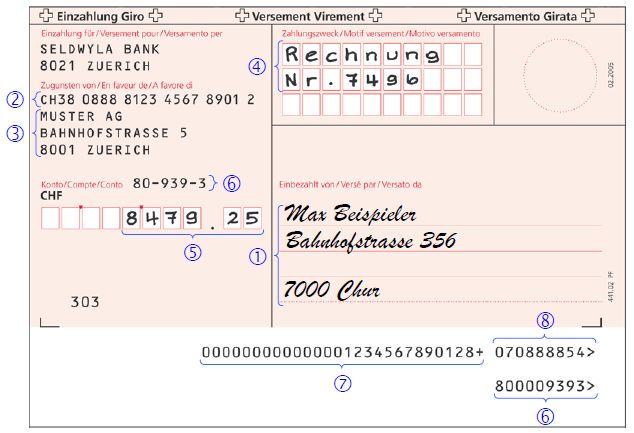
Introduction
Top 5 Format Traps
Issue                                Reference                            Comment

                                                                          Credit Suisse and other banks do not provide this AOS* for collective booking.
                                     Swiss Business Rules
Don’t allow several currencies                                            This AOS will be discontinued in November 2018 anyway. In addition,
                                     Version 2.6.2
per B-Level                                                               Credit Suisse recommends one currency per B-Level for single booking.
                                     Chapter 4.3.1
                                                                            See page 38 for details

SALA is not sufficient for           Swiss Business Rules                 SALA has no effect on the type of processing and advices.
salary payments,                     Version 2.6.2                        Advice steering has to be implemented instead.
implement advice steering            Chapter 4.11 and 4.7                  See pages 20-22 for details.

                                                                          Instruction Priority (HIGH), Service Level (SEPA),
Don’t allow                          Swiss Business Rules
                                                                          Local Instrument (e.g. CH01) and Category Purpose (SALA)
Payment Type Information             Version 2.6.2
                                                                          have to be in the same level (B or C).
on several levels                    Chapter 4.5.2.2
                                                                            See page 37 for details.

                                                                          In pain.001, the B-Level controls the booking method, the C-Level controls the
Avoid payments grouping              Swiss Business Rules
                                                                          transactions (payments). If you choose the grouping version «separate», every
version «separate»,                  Version 2.6.2
                                                                          transaction (C-Level) will be in one B-Level. In practice, this makes collective
use «mixed» instead                  Chapter 4.2
                                                                          bookings impossible. Use «mixed» instead.

                                     Swiss Implementation Guidelines
                                                                          Local Instruments CH01, CH02 and CH03 mark Swiss inpayment slips. CH03
                                     for pain.001
CH03 is not payment type 3                                                is for payment type 2.2, not 3.
                                     Version 1.7.2
                                                                             See pages 28 and 31 for details.
                                     Chapter 2.2.1
                                                                         * Additional Optional Service

               Best Practice Guide                              (content subject to change)                                      September 2018       3/78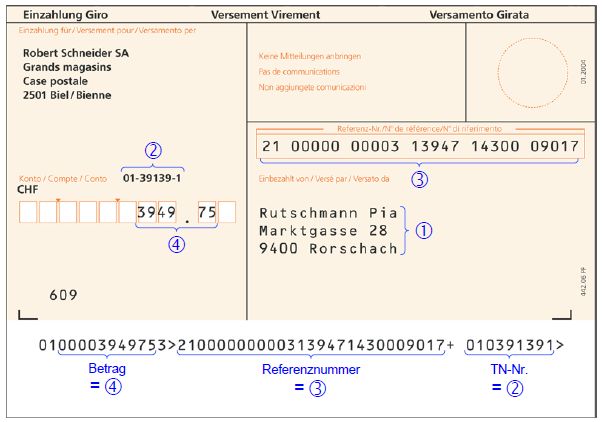
Agenda

Framework                                                              Page 5

Formats                                                               Page 11

Use Cases                                                             Page 23

Test Procedure                                                        Page 59

          Best Practice Guide   (content subject to change)   September 2018    4/78
Agenda

Framework                                                                Page 5

Formats                                                                  Page 11

Use Cases                                                                Page 23

Test Procedure                                                           Page 59

            Best Practice Guide   (content subject to change)   September 2018    5/78
Legend:
Framework: Credit Suisse Client Channel Functionality Advantage
Restriction
Overview of Connectivity Portfolio Neutral attribute
Credit Suisse Direct Direct Link Direct Exchange SWIFT FileAct
GUI DXI
(browser-based) (Service Interface)
HTTPS HTTPS SFTP or FTPS FileAct
Transmission
File transfer method Intersys EBICS
Technology
Installation reusability N/a CS clients Yes Yes No, individual Yes
configuration
Manual/automated Manual Login manual, upload/ Automated
log-in & file transfer download automated
Content offering No pain.002, No pain.002, no CGI, No CGI, Full range
reduced camt no EPC, reduced camt no camt
Characteristics
Additional security SecureSign SecureSign No Electronic Distributed No No
Signature (EDS/VEU)
Channel
Clients Corporate and private Corporate
Private
Operating systems Any Any Microsoft Windows Any Any Any
User System
Technology
Software Internet web browser Dedicated third-party Dedicated third-party Dedicated third-party Any third-party Dedicated third-party
software vendors software vendors software vendors software vendor software vendor
ISO 20022 impact on Platform update at Credit Suisse New platform at Credit Suisse
connectivity
Migration
Migration impact None Silent migration. Silent migration Attended migration, Attended migration, Migrated
on client connectivity Additional log-in method. changing credentials changing credentials
Best Practice Guide (content subject to change) September 2018 6/78Legend:
Framework: Credit Suisse Client Channel Formats Available now
Restriction
Overview of Format Portfolio per Channel Available in the future
Message Market ISO 20022 Credit Suisse Direct Direct Link Direct Exchange SWIFT FileAct
Practice Test Platform
GUI DXI Intersys EBICS SFTP
pain.001 SPS (SIC) Yes Yes Yes Yes Yes Yes
EPC No Yes No No Yes Yes Yes
CGI Yes Yes No No Yes Yes Yes
pain.008 SPS (SIC) Yes No Yes Yes Yes Yes
EPC Yes No No Yes Yes Yes
pain.002 SPS (SIC) Yes No Yes Yes Yes Yes
EPC Yes No No Yes Yes Yes
CGI Yes No No Yes Yes Yes
camt.052 SPS (SIC) Examples No No Yes Yes Yes
CGI No No No Yes Yes Yes
camt.053 SPS (SIC) Examples Yes, without details* No Yes Yes Yes
CGI No Yes, without details* No Yes Yes Yes
camt.054 SPS (SIC) Examples Yes** No Yes Yes Yes
ISR CGI No No No Yes Yes Yes
camt.054 SPS (SIC) Examples No No *** *** ***
Debit/Credit CGI No No No *** *** ***
* activation of full camt.053 details via Electronic Banking Desk 0800 88 11 88
** only corporate clients
*** no go-live date, yet
Best Practice Guide (content subject to change) September 2018 7/78Legend:
Framework: Credit Suisse Client Format Strategy Phase-out format
Target format
Overview of ISO 20022 Format Portfolio Obsolete format**
Message Type Old Format Intermediate Format New Format Target
DTA pain.001
Credit Transfer
MT101
Direct Debit LSV pain.008 CH-TA* Unknown yet, stay currently with LSV
MT940/MT942
camt.053/camt.052
Reporting ISR V11 camt.054 ISR Stay with V11 until ISR is discontinued
camt.054 QR (no go-live date, yet)
camt.054 Debit/Credit (no go-live date, yet)
* not offered by Credit Suisse
** other financial institutions may require these intermediate formats
Best Practice Guide (content subject to change) September 2018 8/78Framework: Migration Timetable (1/2)
Credit Suisse Formats and Connectivity
2018 2019 2020 2021 2022
2Q
1Q
2Q
3Q
4Q
1Q
3Q
4Q
1Q
2Q
3Q
4Q
1Q
2Q
3Q
4Q
1Q
2Q
3Q
4Q
Credit Transfer
Direct Link / Direct Exchange
pain.001 SPS (SIC)
Credit Suisse Direct
pain.001 EPC/CGI Direct Link / Direct Exchange
Credit Suisse Direct (only GUI, not DXI)
pain.002 SPS (SIC)/EPC/CGI Direct Link / Direct Exchange
DTA & DTA Protocol Direct Link / Direct Exchange
Credit Suisse Direct
Direct Debit
pain.008 & pain.002 SDD SPS (SIC)/EPC Direct Link / Direct Exchange
LSV / LSV Protocol (HTML/XML) Direct Link / Direct Exchange
Credit Suisse Direct
pain.002 for LSV Direct Link* / Direct Exchange
Format discontinued by Swiss financial marketplace New formats * EBICS only
Format expected to be discontinued by Swiss financial marketplace Old formats
Best Practice Guide (content subject to change) September 2018 9/78Framework: Migration Timetable (2/2)
Credit Suisse Formats and Connectivity
2018 2019 2020 2021 2022
2Q
1Q
2Q
3Q
4Q
1Q
3Q
4Q
1Q
2Q
3Q
4Q
1Q
2Q
3Q
4Q
1Q
2Q
3Q
4Q
Reports
camt.052 SPS (SIC)/CGI Direct Link / Direct Exchange
MT942 Direct Link / Direct Exchange
camt.053 SPS (SIC)/CGI Direct Link / Direct Exchange
Credit Suisse Direct
MT940 Direct Link / Direct Exchange
Credit Suisse Direct
camt.054 Debit/Credit SPS (SIC)/CGI No go-live date, yet
camt.054 ISR SPS (SIC) Direct Link / Direct Exchange
Credit Suisse Direct
camt.054 ISR CGI Direct Link / Direct Exchange
Direct Link / Direct Exchange
camt.054 QR SPS (SIC)
Credit Suisse Direct
camt.054 QR CGI Direct Link / Direct Exchange
Direct Link / Direct Exchange
V11
Credit Suisse Direct
Best Practice Guide (content subject to change) September 2018 10/78Agenda
Framework Page 5
Formats Page 11
Use Cases Page 23
Test Procedure Page 59
Best Practice Guide (content subject to change) September 2018 11/78pain.001 pain.008 pain.002
camt.054 camt.053 camt.052
Formats: Credit Transfer CS ISO offering
CS ISO offering recommendation
pain.001 Credit Transfer Initiation CS ISO offering alternative
CS Non-ISO alternative
Please consider this
CS legacy offering
Version pain.001.001.03 (SPS/SIC: pain.001.001.03.ch.02)
Market practices Name Market Scheme Payments
SPS (SIC) Switzerland 1.7.2 SPS** All (domestic e.g. ESR & x-border e.g. SEPA)
EPC Euro Currency 7.0 EPC SEPA
CGI (CH) World with Swiss specialties (e.g. ISR) 14.10.2010 All (domestic e.g. ESR & x-border e.g. SEPA)
Channels Direct Link EBICS Direct Link Intersys only SIC Direct Exchange Direct GUI DXI only SIC SWIFT FileAct
Best practice Use market practice SPS (SIC) as it covers all Swiss payments and all CS channels
Alternative practice Clients can use Swiss CGI if you already use CGI in other countries
Alternative formats MT101 for single payments (SWIFT FIN or Fides)
Caution camt control can be done in pain.001, details see page 20-22 (some banks ignore this camt control)
SALA flag in pain.001 without effect, details see page 35/36 (some banks still use the SALA flag as an AOS)
Master data should be sent in a structured way, details see page 38
Timing
Timing 2017 2018 2019 2020 2021
DTA
* pain.001
* Possible data reduction due to data conversion
** Scheme 1.8 planned 4Q18
Best Practice Guide (content subject to change) September 2018 12/78pain.001 pain.008 pain.002
camt.054 camt.053 camt.052
Formats: Direct Debit CS ISO offering
CS ISO offering recommendation
pain.008 Direct Debit CS ISO offering alternative
CS Non-ISO alternative
Please consider this
CS legacy offering
Version pain.008.001.02 (SIC: pain.008.001.02.chsdd.02)
Market practices Name Market Scheme Payments
SPS (SIC) Euro Currency 2.3 SPS SEPA (Core & B2B)
EPC Euro Currency 2017 V1.0 EPC SEPA (Core & B2B)
CHLS Switzerland Upcoming Former LSV+ and BDD
Channels Direct Link EBICS Direct Link Intersys only SIC Direct Exchange Direct GUI/DXI SWIFT FileAct
Best practice Use SPS (SIC) for SEPA Direct Debit (SDD). Use LSV until its future use and timeline is defined.
Alternative practice None, pain.008 CH-TA not part of the Credit Suisse offering
Alternative formats None, eBill planned to have the same format as Direct Debit
Caution No official recommendation on whether to use SPS (SIC) or EPC for SDD
Final future standard LSV yet to be defined
Timing 2017 2018 2019 2020 2021
LSV
pain.008 SDD
Best Practice Guide (content subject to change) September 2018 13/78pain.001 pain.008 pain.002
camt.054 camt.053 camt.052
Formats: Status Report CS ISO offering
CS ISO offering recommendation
pain.002 Status Report CS ISO offering alternative
Benefit
Please consider this
Version pain.002.001.03 (SIC: pain.002.001.03.ch.02)
Market practices Name Market Scheme Payments
SPS (SIC) Switzerland 1.0 SPS All (domestic e.g. ESR & x-border e.g. SEPA)
EPC Euro Currency 7.0 EPC SEPA
CGI (CH) World with Swiss specialties 30.11.2009 All (domestic e.g. ESR & x-border e.g. SEPA)
Channels Direct Link EBICS Direct Link Intersys only SIC Direct Exchange Direct GUI/DXI SWIFT FileAct
Credit Suisse Direct no file download but status indication in the GUI
Best practice Same market practice as the pain.001 or pain.008 triggering the pain.002
Benefit pain.002 for all banks instead of different proprietary protocol formats
Caution Not available via Credit Suisse Direct (status indication in the GUI only)
Partially accepted: only incorrect parts are reported
SPS (SIC) includes positive and negative status reports, EPC only includes negative status reports
Positive status reports are only transmission confirmations, not execution confirmation
Timing same as the pain.001 or pain.008 triggering the pain.002
Best Practice Guide (content subject to change) September 2018 14/78pain.001 pain.008 pain.002
camt.054 camt.053 camt.052
Formats: Reporting CS ISO offering
CS ISO offering recommendation
camt.053 Account Statement (End of Day) CS ISO offering alternative
CS Non-ISO alternative
Please consider this
CS legacy offering
Version camt.053.001.04 (for SPS/SIC) and camt.053.001.02 (for CGI)
Market practices Name Market Scheme Report Types
SPS (SIC) Switzerland 1.5.1 SPS* Account Statement
CGI (CH) World 30.11.2009 Account Statement
Periodicity End of day
Details With details (i.e. with collective booking breakdown)
Without details (i.e. without collective booking breakdown)
Channels Direct Link EBICS Direct Link Intersys Direct Exchange Direct GUI/DXI SWIFT FileAct
Best practice camt.053 SPS (SIC) without details is CS default
Alternative practice Clients can use Swiss CGI if they already use CGI in other countries
Alternative formats MT940
Caution Some banks may use V2 (camt.053.001.02) for SPS/SIC until switching to V4
Oversteering of account default booking by using pain.001 tags
Timing 2017 2018 2019 2020 2021
MT940
Tests camt.053
* Scheme 1.6 planned 4Q18
Best Practice Guide (content subject to change) September 2018 15/78pain.001 pain.008 pain.002
camt.054 camt.053 camt.052
Formats: Reporting CS ISO offering
CS ISO offering recommendation
camt.052 Account Report (Intraday) CS ISO offering alternative
CS Non-ISO alternative
Please consider this
CS legacy offering
Version camt.052.001.04 (for SPS/SIC) and camt.052.001.02 (for CGI)
Market practices Name Market Scheme Report Types
SPS (SIC) Switzerland 1.5.1 SPS* Account Statement
CGI (CH) World 30.11.2009 Account Statement
Periodicity Intraday fixed, hourly or 2-hourly, from 7 a.m. to 6 p.m.
End of day (Balance Report)
Details Account Report – Balance Report Balances
Account Report – Movement Report Balances + Movements Batch booking no details, single booking with details
Channels Direct Link EBICS Direct Link Intersys Direct Exchange Direct GUI/DXI SWIFT FileAct
Best practice camt.052 SPS (SIC) Movement Report 2-hourly is CS default; movements include provisional bookings
Alternative practice Clients can use Swiss CGI if you already use CGI in other countries
Alternative formats MT942
Caution Some financial institutes may use V2 (camt.052.001.02) for SPS (SIC)
Timing 2017 2018 2019 2020 2021
MT942
Tests camt.052
* Scheme 1.6 planned 4Q18
Best Practice Guide (content subject to change) September 2018 16/78pain.001 pain.008 pain.002
camt.054 camt.053 camt.052
Formats: Reporting CS ISO offering
CS ISO offering recommendation
camt.054 Debit/Credit Notification CS ISO offering alternative
CS Non-ISO alternative
Please consider this
CS legacy offering
Version camt.054.001.04 (for SPS/SIC) and camt.054.001.02 (for CGI)
Market practices Name Market Scheme Report Types (also see next page)
SPS (SIC) Switzerland 1.5.1 SPS* Credit/Debit Notification**
CGI (CH) World 30.11.2009 ISR/LSV Credit Notification
QR Credit Notification**
External Collective Booking Notification** (for camt.053)
Periodicity Intraday fixed, hourly or 2-hourly, from 7 a.m. to 6 p.m.
Intraday event-based, if booking took place, from 7 a.m. to 6 p.m.
End of day (ISR/LSV)
Details According to account default
Oversteer account default with pain.001 tags
Channels Direct Link EBICS Direct Link Intersys Direct Exchange Direct GUI/DXI only ISR/LSV SWIFT FileAct
Best practice Select the report types and details you need for your desired notification/matching functionality.
camt.054 SPS (SIC) Debit/Credit Notification event-based & camt.054 SPS (SIC) ISR/LSV are CS default.
Alternative formats E-Documents/MT900 Confirmation of Debit and MT910 Confirmation of Credit in SWIFT
Caution camt.054 Debit Notification is controlled by pain.001 tags, see page 20-22 for details; not supported by all Swiss banks
PostFinance uses additional and different report types
Timing 2017 2018 2019 2020 2021
ZED V11 ISR/LSV
Tests camt.054
* Scheme 1.6 planned 4Q18 ** No go-live date, yet
Best Practice Guide (content subject to change) September 2018 17/78pain.001 pain.008 pain.002
camt.054 camt.053 camt.052
Formats: Reporting
camt.05x Subscriptions Related to Bookings
Date camt.053 camt.052 Bookings camt.054 camt.054 camt.054
e.g. every 2 hrs Credit/Debit ISR/LSV for camt.053
One camt.054 per One camt.054 per One camt.054 per
booking except for collective ISR collective debit (in com-
July 14 collective credits or LSV credit bination with camt.053)
No go-live date, yet No go-live date, yet
July 15 Outgoing Payment 10 With details.
Example page 77:
Single Booking CHF 10 CAMT054-05.
2 hours With details
30 With amounts. Incoming Payment 20
Example page 77:
Examples
page 74. Single Booking CHF 20 CAMT054-07.
2 hours
0 With amounts.
Examples
page 74. Details according to
50 pain.001 advice steering.
Example page 77: With Details**
Outgoing Payments CAMT054-06. 50
2 hours Collective Booking CHF 50
50 With amounts.
Examples
page 74.
18:00 60 With Details.
Incoming ISR Payments Example page 77:
CAMT054-08.
Collective Booking* CHF 60
Details according to account default AcctSvcrRef (camt.053)
AcctSvcrRef (camt.053)
July 16 140 and pain.001 advice steering. Examples pages 75/76.
Ntfctn Id (camt.054)
Ntfctn Id (camt.054)
MsgId (camt.053 C-Level)
see page 55
MsgId (camt.054 A-Level)
see page 49
* One booking per subscriber number and product (ISR/LSV)
** Also issued when camt.053 entry includes details (pain.001 advice steering CWD or empty)
Best Practice Guide (content subject to change) September 2018 18/78pain.001 pain.008 pain.002
camt.054 camt.053 camt.052
Formats: Reporting
camt.054 Manual Import of ZIPped ISR Files Analogously for camt.053
Credit Suisse Direct only provides camt.05x files in ZIP files.
Reason 1: When several camt.05x are ready for download, it is easier to download them in a ZIP file.
Reason 2: When also single camt.05x files are saved in a ZIP file, our common client and your software has only to deal with one import process.
Problem: if the CS client unzips the file and uploads the camt.05x manually, he might miss a file or upload a file twice.
Therefore please make sure to support at least one of the following options:
Credit Suisse Direct Option 1 Import Oct 19, 201x Payment
Download 1 ZIP file… … then the user imports 1 ZIP file Software
camt.054 ISR Oct 19, 201x
Oct 16, 201x User
camt.054 ISR
Oct 17, 201x Option 2
Download 1 ZIP file… Payment
Software
camt.054 ISR
User … and can mark all
Oct 18, 201x
… then the user unzips… files for import
Option 3
… but then
Download 1 ZIP file… Payment
the software needs
Software
User a duplicate and maybe
ZIP File … and has to upload missing file check!
one file after another…
… then the user unzips…
Best Practice Guide (content subject to change) September 2018 19/78pain.001 pain.008 pain.002
camt.054 camt.053 camt.052
Formats: Reporting 1 Noordering of non-subscribed camt.052,
Advice Steering1 with pain.001 Tags: All Cases camt.053 and camt.054 via pain.001 tags.
Payment Information Payment Information Credit Suisse
+Debtor Account +Batch Booking Account Defaults
++Type camt in General
+++Proprietary False True/Empty
In order to receive camt.053/
NOA Single booking Batch booking 052/054, Credit Suisse clients
camt.053 with details camt.053 no details have to subscribe to them for
No camt.054 No camt.054 each of their accounts. It is not
possible to order non-subscribed
SIA Single booking Batch booking
camts via pain.001.
camt.053 with details camt.053 details as account default
camt.054 with details camt.054 with details (CWD) camt.053
Default booking type is always
CND Single booking Batch booking
batch booking, and for the
camt.053 with details camt.053 no details
subscription, the clients have
camt.054 with details (SIA) camt.054 no details
to choose between with details
CWD Single booking Batch booking or no details. Both can be over-
camt.053 with details camt.053 with details ridden with pain.001 tags
camt.054 with details (SIA) camt.054 with details for particular instructions.
Empty Single booking Batch booking camt.052
camt.053 with details camt.053 details as account default Details are the same as for
camt.054 with details camt.054 with details camt.053, unless camt.053
follows account default, then
camt.052 is with details.
Bold: Recommended settings
Out of 15 debit advice combinations, only 5 are recommended camt.054
Your software should be able to control these, e.g. by one dropdown menu Default is always with details!
Red: Recommended settings for salary payments to allow confidentiality This can be overridden with CND
Salary payments should only allow these settings, e.g. by ticking a checkbox or NOA.
Grey: Not recommended (may be rejected by other banks)
Best Practice Guide (content subject to change) September 2018 20/78pain.001 pain.008 pain.002
camt.054 camt.053 camt.052
Formats: Reporting 1 Noordering of non-subscribed
Advice Steering1 with pain.001 Tags: Useful Cases camt.053 and camt.054 via pain.001 tags.
Document pain.001 Document pain.001 Document pain.001 Document pain.001 Document pain.001
B-Level CHF 50 B-Level CHF 50 B-Level CHF 50 B-Level CHF 50 B-Level CHF 50
FALSE NOA FALSE SIA TRUE NOA TRUE CND TRUE CWD
C-Level CHF 20 C-Level CHF 20 C-Level CHF 20 C-Level CHF 20 C-Level CHF 20
C-Level CHF 30 C-Level CHF 30 C-Level CHF 30 C-Level CHF 30 C-Level CHF 30
Document camt.053 Document camt.053 Document camt.053 Document camt.053 Document camt.053
B-Level B-Level B-Level B-Level B-Level
C-Level CHF 20 C-Level CHF 20 C-Level CHF 50 C-Level CHF 50 C-Level CHF 50
D-Level Trx Details D-Level Trx Details D-Level D-Level D-Level Trx Details
CHF 20
C-Level CHF 30 C-Level CHF 30 D-Level Trx Details
D-Level Trx Details D-Level Trx Details CHF 30
Document camt.054 Document camt.054 Document camt.054
B-Level B-Level B-Level
C-Level CHF 20 C-Level CHF 50 C-Level CHF 50
D-Level Trx Details D-Level D-Level Trx Details
CHF 20
Document camt.054
D-Level Trx Details
B-Level CHF 30
C-Level CHF 30
D-Level Trx Details
Best Practice Guide (content subject to change) September 2018 21/78pain.001 pain.008 pain.002
camt.054 camt.053 camt.052
Formats: Reporting
All Formats pain.001
B-Level: Sum
pain.001
B-Level: Sum
pain.001
B-Level: Sum
pain.001
B-Level: Sum
pain.001
B-Level: Sum
pain.001
B-Level: Sum
Batch Booking Batch Booking Batch Booking Batch Booking Batch Booking Batch Booking
Proprietary Proprietary Proprietary Proprietary Proprietary Proprietary
C-Level: Amount C-Level: Amount C-Level: Amount C-Level: Amount C-Level: Amount C-Level: Amount
Input
C-Level: Amount C-Level: Amount C-Level: Amount C-Level: Amount C-Level: Amount C-Level: Amount
C-Level: Amount C-Level: Amount C-Level: Amount C-Level: Amount C-Level: Amount C-Level: Amount
C-Level: Amount C-Level: Amount C-Level: Amount C-Level: Amount C-Level: Amount C-Level: Amount
Output
Web-based Files Paper/E-Documents (PDF)
Credit Suisse Direct MT940 camt.053 camt.054 Paper /E-Document Paper/E-Document
Booking Details Account Statement Account Statement Debit Advice Account Statement Debit Advice
True CWD Sum Sum Amounts Amounts Amounts Amounts
or + Details + Details + Details + Details
in 1 camt.053 in 1 camt.054 in 1 document in 1 document
Empty
CND Sum Sum Sum Sum
NOA Sum No advice Account No advice
Default
Empty As AD*: Sum Amounts Account Account
or A+D** + Details Default Default
in 1 camt.053 in 1 camt.054
False SIA Amounts Amounts Amounts Amounts Amounts Amounts
+ Details + Details + Details + Details + Details + Details
in 1 MT940 in 1 camt.053 in 4 camt.054 in 1 document in 4 documents
NOA Amounts No advice Account No advice
+ Details Default
in 1 camt.053
Empty Amounts Amounts Amounts, Amounts,
+ Details + Details Details as AD* Details as AD*
in 1 camt.053 in 4 camt.054 in 1 camt.053 in 4 documents
Best Practice Guide (content subject to change) * Account Default ** Amounts + Details September 2018 22/78Agenda
Framework Page 5
Formats Page 11
Use Cases Page 23
Test Procedure Page 59
Best Practice Guide (content subject to change) September 2018 23/78Use Cases
Remarks
Payment slips and their replacement pain.001 ISR (10) IS (11) QR (15)
Bank payments pain.001 Domestic (12) SEPA (13) ROW1 (14)
Special payments pain.001 Salary (20) Type 1 Chapter 2.2
Status reports pain.002 ACCP (35) ACWC (37) PART (38) RJCT (39)
Advices camt.054 NOA (46) SIA (47) CND (48) CWD (49)
Statements camt.053/052 Internal (64) External (65) ISR (40/41)
Direct debit pain.008 DD Core (44) DD B2B (45) SDD Core (42) SDD B2B (43)
Payment Type Type 1
Swiss Usage Guide Chapter 2.2
camt.053/MT940 descriptions always include camt.052/MT942
Only bank formats are depicted, not PostFinance formats
1 “Rest of the World”.
Best Practice Guide (content subject to change) September 2018 24/78ISR (10) IS (11) QR (15)
Use Cases: Credit Transfer Domestic (12)
Salary (20)
SEPA (13)
Type
ROW (14)
Chapter
All Format Changes for Credit Transfer ACCP (35)
NOA (46)
ACWC (37)
SIA (47)
PART (38)
CND (48)
RJCT (39)
CWD (49)
Internal (64) External (65) ISR (40/41)
DD Core (44) DD B2B (45) SDD Core (42) SDD B2B (43)
Old formats and lasting formats New formats
Orange/Red Payment Slip New Payment Slip
Debtor
or Invoice Creditor
or Invoice
camt.054
camt.053
MT940
camt.053
DTA
Protocol
pain.001
pain.002
camt.054
MT940
V11
A10 A11 pacs.008 pacs.008
Debtor Bank Clearing Creditor Bank
Best Practice Guide (content subject to change) September 2018 25/78ISR (10) IS (11) QR (15)
Create pain.001 Domestic (12)
Salary (20)
SEPA (13)
Type
ROW (14)
Chapter
Use Cases 10/11/15: Inpayment Slips ACCP (35)
NOA (46)
ACWC (37)
SIA (47)
PART (38)
CND (48)
RJCT (39)
CWD (49)
Internal (64) External (65) ISR (40/41)
DD Core (44) DD B2B (45) SDD Core (42) SDD B2B (43)
Payment Slip Variants
Payment Slip / QR-Bill ISR (German ESR, French BVR, Italian PVR).
Orange inpayment slip with reference number.
Create pain.001 from Payment Slip Currently in use, see page 27 for details.
or QR-Bill
IS (German ES, French BV, Italian PV).
camt.054
camt.053
camt.053
pain.002
camt.054
pain.001
Red inpayment slip.
Currently in use, see page 28 for details.
QR-bill
Will replace ISR and IS, see page 29 for details.
pacs.008 pacs.008
Layout example
To be considered
New file format pain.001 instead of DTA
Booking control needs to be implemented
Notification control needs to be implemented
Best Practice Guide (content subject to change) September 2018 26/78ISR (10) IS (11) QR (15)
Create pain.001 Domestic (12)
Salary (20)
SEPA (13)
Type 1
ROW (14)
Chapter 3.1
Use Case 10: Orange Inpayment Slip ACCP (35)
NOA (46)
ACWC (37)
SIA (47)
PART (38)
CND (48)
RJCT (39)
CWD (49)
Internal (64) External (65) ISR (40/41)
Mandatory
DD Core (44) DD B2B (45) SDD Core (42) SDD B2B (43)
Dependent
Recommended
Optional
2
3
1
4
Real name, no code
4 3 2 TRF or TRA
1
Notes:
Only one currency per B-Level
For Instruction Priority HIGH and/or See Impl. Guidelines for alternatives
Category Purpose SALA,
CH01 has to be in B-Level
ISR participant number must have 9
characters, e.g. 01-2654-0 or
010026540, but not 0126540 (missing
dashes) or 000126540 (additional CH01 (= Type 1)
zeros in front of first number block CHF or EUR
4
instead of in front of the second one)
Please for all pain.001: 2 ISR participant number
Also use +Initiating Party
++Name ISR reference
+++Contact Details 3
Source: Swiss Usage Guide for ISO 20022 Messages, Version 1.2 by SIX Interbank Clearing Ltd
Best Practice Guide (content subject to change) September 2018 27/78ISR (10) IS (11) QR (15)
Create pain.001 Domestic (12)
Salary (20)
SEPA (13)
Type 2.2
ROW (14)
Chapter 3.3
Use Case 11: Red Inpayment Slip ACCP (35)
NOA (46)
ACWC (37)
SIA (47)
PART (38)
CND (48)
RJCT (39)
CWD (49)
Internal (64) External (65) ISR (40/41)
DD Core (44) DD B2B (45) SDD Core (42) SDD B2B (43)
4 Notes:
2 Only one currency per B-Level
3 Manual entry into Mandatory
For Instruction Priority HIGH and/or
your software by Dependent Category Purpose SALA,
6
using these fields Recommended CH03 has to be in B-Level
Optional CH03 requires Creditor Agent
5 1
8
7
6
CH02 (=Type 2.1) or
CH03 (=Type 2.2)
5 CHF or EUR
See Impl. Guidelines
for alternatives
6 Bank’s Postal
Account Number
3
TRA or TRF 3
3
1
3
CHBCC 3
IID
2
4
Source: Swiss Usage Guide for ISO 20022 Messages, Version 1.2 by SIX Interbank Clearing Ltd 7
Best Practice Guide (content subject to change) September 2018 28/78Notes: ISR (10) IS (11) QR (15)
Very new spec, subject to change!
Create pain.001 Only one currency per B-Level
QR Elements Ustrd without Ref:
Domestic (12)
Salary (20)
SEPA (13)
Type 3
ROW (14)
Chapter
Use Case 15: QR-Bill pain.001 tag RmtInf > Ustrd ACCP (35)
NOA (46)
ACWC (37)
SIA (47)
PART (38)
CND (48)
RJCT (39)
CWD (49)
Please for all pain.001:
Also use +Initiating Party Internal (64) External (65) ISR (40/41)
Mandatory
++Name
+++Contact Details DD Core (44) DD B2B (45) SDD Core (42) SDD B2B (43)
Dependent
Recommended
Optional QR Elements QR Elements
CHF or EUR Amt Ccy
Name
StrtNm
BldgNb
PstCd
TwnNm
Ctry
Name
QR-IBAN IBAN
StrtNm
Name
C +Remittance Information QRR
BldgNb ++Structured
+++Creditor Reference Information
++++Type Tp
PstCd +++++Code Or Proprietary
++++++Proprietary
C +Remittance Information
TwnNm ++Structured
+++Creditor Reference Information
QR Reference Ref
++++Reference
C +Remittance Information Additional information for
Source: Swiss Implementation Guidelines, Version 1.7.2 / 1.8 ++Structured
+++Additional Remittance Information
reconciliation. Recommendation:
Use Syntax Definition by SWICO.
Use once Ustrd
by SIX Interbank Clearing Ltd
Best Practice Guide (content subject to change) September 2018 29/78ISR (10) IS (11) QR (15)
Create pain.001 Domestic (12)
Salary (20)
SEPA (13)
Type 3
ROW (14)
Chapter
Use Case 15: QR-Bill vs. ISR ACCP (35)
NOA (46)
ACWC (37)
SIA (47)
PART (38)
CND (48)
RJCT (39)
CWD (49)
Internal (64) External (65) ISR (40/41)
DD Core (44) DD B2B (45) SDD Core (42) SDD B2B (43)
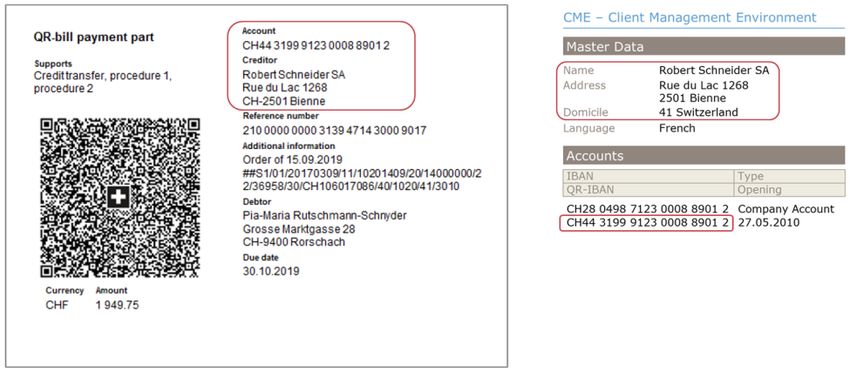
Caution 1: Creditor Data Must Match the Bank’s Master Data Caution 2: Changes for Debtor Grouping
The procedure for the QR-bill is the first to have been aligned with To date, V11 files have been created for each internal ISR subscriber
current Swiss money laundering provisions from the outset. As a number at Credit Suisse. Multiple subscriber numbers could relate to
result, financial institutions will increasingly check whether the names one bank account. In the future, the camt.054 for the QR-bill will be
and addresses of the accounts payable that appear on the QR-bill created for each QR-IBAN. Since each bank account can have only
match the corresponding bank master data. one QR-IBAN, it is not possible to continue the previous setup
For payees, this is easy to see when creating a QR-bill. involving bank accounts with multiple subscriber numbers.
However, for payers, this process becomes problematic if an Clients who still wish to group their accounts receivable when payment
accounts payable module does not draw on the information given on is received must do this with multiple QR-IBANs, and therefore with
the bill but rather on out-of-date master data when the payer comes to multiple bank accounts.
settle the QR-bill. For payments via ISR, this issue has so far been of Alternatively, the accounts receivable software can choose to
no significance due to this data not being transmitted. distinguish between accounts receivable groups using the reference
numbers and can map these groups accordingly. For the latter, as was
already the case at PostFinance, the first six positions are now at your
disposal, thereby making a total of 26 positions in the 27-digit
reference number; old subscriber numbers can therefore continue to
be used.
Best Practice Guide (content subject to change) September 2018 30/78ISR (10) IS (11) QR (15)
Create pain.001 Domestic (12)
Salary (20)
SEPA (13)
Type 3/4/5/6
ROW (14)
Chapter
Use Cases 12/13/14: Bank Payments ACCP (35)
NOA (46)
ACWC (37)
SIA (47)
PART (38)
CND (48)
RJCT (39)
CWD (49)
Internal (64) External (65) ISR (40/41)
DD Core (44) DD B2B (45) SDD Core (42) SDD B2B (43)
Common Mistake: CH03 Is Not Payment Type 3
Invoice or Please note that Payment Type 3 transactions must not contain a
Local Instrument. Local Instrument CH03 is not Payment Type 3
accounting voucher
(domestic credit transfer in CHF or EUR) but Payment Type 2.2 (IS,
Create pain.001 from invoice red two-stage inpayment slip in CHF or EUR):
or accounting voucher
camt.054
camt.053
camt.053
pain.002
camt.054
pain.001
Source: Swiss Implementation Guidelines, Version 1.7.2 / 1.8 by SIX Interbank Clearing Ltd
pacs.008 pacs.008
To be considered
New file format pain.001 instead of DTA
Booking control needs to be implemented
Notification control needs to be implemented
Best Practice Guide (content subject to change) September 2018 31/78ISR (10) IS (11) QR (15)
Create pain.001 Domestic (12)
Salary (20)
SEPA (13)
Type 3/4
ROW (14)
Chapter 3.4
Use Case 12: Domestic Bank Payment ACCP (35)
NOA (46)
ACWC (37)
SIA (47)
PART (38)
CND (48)
RJCT (39)
CWD (49)
Internal (64) External (65) ISR (40/41)
Mandatory
DD Core (44) DD B2B (45) SDD Core (42) SDD B2B (43)
Dependent
Recommended
Optional
Type 3: CHF or EUR
Type 4: not CHF or EUR
Notes: Please for all pain.001:
Only one currency per B-Level Also use +Initiating Party
++Name
+++Contact Details
Source: Swiss Usage Guide for ISO 20022 Messages, Version 1.2 by SIX Interbank Clearing Ltd
Best Practice Guide (content subject to change) September 2018 32/78ISR (10) IS (11) QR (15)
Create pain.001 Domestic (12)
Salary (20)
SEPA (13)
Type 5
ROW (14)
Chapter 3.6
Use Case 13: SEPA X-Border Payment ACCP (35)
NOA (46)
ACWC (37)
SIA (47)
PART (38)
CND (48)
RJCT (39)
CWD (49)
Internal (64) External (65) ISR (40/41)
Mandatory
DD Core (44) DD B2B (45) SDD Core (42) SDD B2B (43)
Dependent
Recommended
Optional
EUR
TRA or TRF Swiss Implemen-
tation Guidelines
SEPA recommend
and
. CS strongly
encourages to
include Postal
Address if possible
the structured way.
Notes: Please for all pain.001:
Only one currency per B-Level Also use +Initiating Party
For Category Purpose SALA, ++Name
SEPA has to be in B-Level +++Contact Details
Source: Swiss Usage Guide for ISO 20022 Messages, Version 1.2 by SIX Interbank Clearing Ltd
Best Practice Guide (content subject to change) September 2018 33/78ISR (10) IS (11) QR (15)
Create pain.001 Domestic (12)
Salary (20)
SEPA (13)
Type 6
ROW (14)
Chapter
Use Case 14: Other X-Border Payment ACCP (35)
NOA (46)
ACWC (37)
SIA (47)
PART (38)
CND (48)
RJCT (39)
CWD (49)
Internal (64) External (65) ISR (40/41)
Mandatory
DD Core (44) DD B2B (45) SDD Core (42) SDD B2B (43)
Dependent
Recommended
Optional
SELDDENN001
1
See below for
alternatives
TRA or TRF Swiss Implemen-
tation Guidelines
recommend
and
. CS strongly
encourages to
include Postal
Bahnhofplatz Address if possible
the structured way.
Notes: Creditor Agent:
Only one currency per B-Level Should be specified with a BIC (payment type 6 version 1).
If the Creditor Agent has no BIC or if it is unknown, the national
98765 clearing number and bank name/address can be used
instead (payment type 6 version 2).
Please for all pain.001:
The national clearing number has to be specified as follows (example values for a US bank in black):
Also use +Initiating Party
USABA026009179
Neustadt
++Name
You can find ClrSysId Codes in the External Code Sets spreadsheet tab 5 at iso20022.org.
+++Contact Details
DE
Source: Swiss Usage Guide for ISO 20022 Messages, Version 1.2 by SIX Interbank Clearing Ltd
Best Practice Guide (content subject to change) September 2018 34/78ISR (10) IS (11) QR (15)
Create pain.001 Domestic (12)
Salary (20)
SEPA (13)
Type 3
ROW (14)
Chapter 3.5
Use Case 20: Salary Payment ACCP (35)
NOA (46)
ACWC (37)
SIA (47)
PART (38)
CND (48)
RJCT (39)
CWD (49)
Internal (64) External (65) ISR (40/41)
DD Core (44) DD B2B (45) SDD Core (42) SDD B2B (43)
Caution:
SALA flag has no effect on booking and advices in Swiss pain.001
Salary payments must have:
Batch Booking TRUE or empty
Create pain.001 for salary payment and
Debtor Account >Type>Proprietary CND or NOA
camt.054
camt.053
camt.053
pain.002
camt.054
pain.001
What happens without TRUE or CND/NOA?
camt.053 default account setting is always batch booking,
so the client will receive batch booking (unless the pain.001 is set to
batch booking FALSE)
pacs.008 pacs.008 camt.054 default account setting is always with details,
so for salary payments details have to be stopped with CND or NOA!
To be considered
New file format pain.001 instead of DTA
Booking steering needs to be implemented
Advice steering needs to be implemented
Best Practice Guide (content subject to change) September 2018 35/78ISR (10) IS (11) QR (15)
Create pain.001 Domestic (12)
Salary (20)
SEPA (13)
Type 3
ROW (14)
Chapter 3.5
Use Case 20: Salary Payment ACCP (35)
NOA (46)
ACWC (37)
SIA (47)
PART (38)
CND (48)
RJCT (39)
CWD (49)
Internal (64) External (65) ISR (40/41)
Mandatory
DD Core (44) DD B2B (45) SDD Core (42) SDD B2B (43)
Dependent
Recommended
Optional
Batch Booking has to be TRUE or empty
SALA has no impact on the salary payment processing
Advice control has to be CND or NOA
Notes: Please for all pain.001:
Only one currency per B-Level Also use +Initiating Party
++Name
+++Contact Details
Source: Swiss Usage Guide for ISO 20022 Messages, Version 1.2 by SIX Interbank Clearing Ltd
Best Practice Guide (content subject to change) September 2018 36/78ISR (10) IS (11) QR (15)
pain.001 in General Domestic (12)
Salary (20)
SEPA (13)
Type 3
ROW (14)
Chapter 3.5
Payment Type Information ACCP (35)
NOA (46)
ACWC (37)
SIA (47)
PART (38)
CND (48)
RJCT (39)
CWD (49)
Internal (64) External (65) ISR (40/41)
DD Core (44) DD B2B (45) SDD Core (42) SDD B2B (43)
Payment Type Information B-Level C-Level
HIGH (Express payment
Instruction Priority
between noon and cut-off time)
SEPA (Payment Type PT 5) SEPA (Payment Type PT 5)
Service Level
CH01 (PT 1), CH02 (PT 2.1), CH01 (PT 1), CH02 (PT 2.1),
Local Instrument
CH03 (PT 2.2) CH03 (PT 2.2)
SALA (Salary payment, has no effect on SALA
Category Purpose ()
advice steering)
Combinations on B-Level and C-Level are accepted by Credit Suisse.
HIGH (on B-Level) cannot be combined with SEPA on B-Level.
SEPA and CH01/CH02/CH03 cannot be combined.
SALA and CH01 currently rejected by Credit Suisse, being fixed.
Best Practice Guide (content subject to change) September 2018 37/78ISR (10) IS (11) QR (15)
pain.001 in General Domestic (12)
Salary (20)
SEPA (13)
Type 3
ROW (14)
Chapter 3.5
Important Issues to Consider ACCP (35)
NOA (46)
ACWC (37)
SIA (47)
PART (38)
CND (48)
RJCT (39)
CWD (49)
Internal (64) External (65) ISR (40/41)
DD Core (44) DD B2B (45) SDD Core (42) SDD B2B (43)
Structured Master Data and Addresses
Master data as source for all pain.001 payment instructions have
to be very structured to avoid rejected files (pain.002 status RJCT).
Credit Suisse encourages to use structured pain.001 tags instead
of unstructured ones whenever possible, also for addresses.
For foreign payments, the Swiss Implementation Guidelines
camt.054
camt.053
recommend the use of unstructured address information, but
camt.053
pain.002
camt.054
pain.001
particularly for payment type 5, recommendation of structured address
information is under investigation. Structuring the customer’s data
before the customer creates pain.001 files is crucial. Therefore Credit
Suisse suggests offering your clients data cleansing before they go
live with pain.001.
This should include consistent use of the IBAN.
pacs.008 pacs.008
Do Not Allow Multiple Currencies in One B-Level
Index 4.3.1 of the Swiss Business Rules include an Additional Optional
Service (AOS) to create more than one B-Level for each currency.
Credit Suisse and other banks do not include this AOS, i.e. one B-
Level for each currency will be mandatory for collective booking
To be considered to avoid reconciliation problems caused by making the same reference
New file format pain.001 instead of DTA appear several times in the resulting camt.05x.
Booking steering needs to be implemented Credit Suisse also states that one B-Level per currency is
Advice steering needs to be implemented recommended for single booking to avoid cutoff time problems.
Structuring data is one major principle of ISO 20022, therefore this
should not be compromised by mixing instructions which have to be
processed differently in the financial markets.
Best Practice Guide (content subject to change) September 2018 38/78ISR (10) IS (11) QR (15)
pain.001 in General Domestic (12)
Salary (20)
SEPA (13)
Type 3
ROW (14)
Chapter 3.5
Other Issues to Consider ACCP (35)
NOA (46)
ACWC (37)
SIA (47)
PART (38)
CND (48)
RJCT (39)
CWD (49)
Internal (64) External (65) ISR (40/41)
DD Core (44) DD B2B (45) SDD Core (42) SDD B2B (43)
Recommendations
Recommendations are not mandatory, but there is always a reason
why they are not only classified as optional
Therefore Credit Suisse strongly encourages to implement not only
mandatory elements, but also recommended ones
camt.054
camt.053
Unique IDs
camt.053
pain.002
camt.054
pain.001
Create unique IDs like MsgId, PmtInfId and InstrId to facilitate file
processing and support
InstrId is only recommended, but as mentioned above strongly
encouraged by Credit Suisse
IDs are used in telephone support, so please avoid complicated and
long combinations of upper and lower case IDs
pacs.008 pacs.008
Initiating Party
Name
The Name of the Initiating Party should be the actual name
of the party sending the payment order to the bank, not a code
Contact Details
To be considered Please use the Initiating Party Contact Detail tags Name and Other
New file format pain.001 instead of DTA to list the name and the version of your software, this will help
Booking steering needs to be implemented to support our mutual customers considerably
Advice steering needs to be implemented
Best Practice Guide (content subject to change) September 2018 39/78ISR (10) IS (11) QR (15)
Match pain.002 with pain.001 Domestic (12)
Salary (20)
SEPA (13)
Type
ROW (14)
Chapter 3.5
Use Cases 35–39: Status Report ACCP (35)
NOA (46)
ACWC (37)
SIA (47)
PART (38)
CND (48)
RJCT (39)
CWD (49)
Internal (64) External (65) ISR (40/41)
DD Core (44) DD B2B (45) SDD Core (42) SDD B2B (43)
Available Status Categories
Accepted (Use Case 35)
ACCP
Syntax/semantics ok across all levels
Match pain.002 with pain.001
camt.054
camt.053
camt.053
pain.002
camt.054
pain.001
ACWC Accepted with Change (Use Case 37)
Not used at Credit Suisse
C ACCP with status code used instead
PART Partially Accepted (Use Case 38)
At least 1 B-level was incorrect (at least 1
pacs.008 pacs.008 correct) or at least 1 C-level in 1 B-level
was incorrect (at least 1 correct)
RJCT Rejected (Use Case 39)
Group Status: whole message rejected.
A-level not correct or all B- or C-levels
are incorrect.
To be considered PmtInf: all transactions in the corresponding
New file format pain.002 instead of bank-proprietary transaction protocol B-level rejected
pain.002 only negative details
No execution information
Status should be indicated in your software
(with Direct Link, Direct Exchange, or SWIFT connectivity only)
Best Practice Guide (content subject to change) September 2018 40/78ISR (10) IS (11) QR (15)
Match pain.002 with pain.001 Domestic (12)
Salary (20)
SEPA (13)
Type
ROW (14)
Chapter 3.1.3
Use Case 35: Status Report ACCP ACCP (35)
NOA (46)
ACWC (37)
SIA (47)
PART (38)
CND (48)
RJCT (39)
CWD (49)
Internal (64) External (65) ISR (40/41)
DD Core (44) DD B2B (45) SDD Core (42) SDD B2B (43)
Source: Swiss Usage Guide for ISO 20022 Messages, Version 1.2 by SIX Interbank Clearing Ltd
Best Practice Guide (content subject to change) September 2018 41/78ISR (10) IS (11) QR (15)
Match pain.002 with pain.001 Domestic (12)
Salary (20)
SEPA (13)
Type
ROW (14)
Appendix B2
Use Case 37: Status Report ACWC ACCP (35)
NOA (46)
ACWC (37)
SIA (47)
PART (38)
CND (48)
RJCT (39)
CWD (49)
Internal (64) External (65) ISR (40/41)
DD Core (44) DD B2B (45) SDD Core (42) SDD B2B (43)
Practice
Not used at Credit Suisse, ACCP is used instead
Execution date modification by the bank is indicated by Status Reason Code DT06
As a difference to the production system, ACWC is used in the ISO 20022 Test Platform
Source: Swiss Usage Guide for ISO 20022 Messages, Version 1.2 by SIX Interbank Clearing Ltd
Best Practice Guide (content subject to change) September 2018 42/78ISR (10) IS (11) QR (15)
Match pain.002 with pain.001 Domestic (12)
Salary (20)
SEPA (13)
Type
ROW (14)
Appendix
Use Case 38: Status Report PART ACCP (35)
NOA (46)
ACWC (37)
SIA (47)
PART (38)
CND (48)
RJCT (39)
CWD (49)
Internal (64) External (65) ISR (40/41)
DD Core (44) DD B2B (45) SDD Core (42) SDD B2B (43)
Examples
The Credit Suisse ISO 20022 Test Platform features several PART
examples
Please find an overview of the best practice examples in this guide
from page 64
The ISO 20022 Test Platform can be accessed via
credit-suisse.com/iso20022test
Best Practice Guide (content subject to change) September 2018 43/78ISR (10) IS (11) QR (15)
Match pain.002 with pain.001 Domestic (12)
Salary (20)
SEPA (13)
Type
ROW (14)
Appendix B3
Use Case 39: Status Report RJCT ACCP (35)
NOA (46)
ACWC (37)
SIA (47)
PART (38)
CND (48)
RJCT (39)
CWD (49)
Internal (64) External (65) ISR (40/41)
DD Core (44) DD B2B (45) SDD Core (42) SDD B2B (43)
Example: Error at A-Level Example: Error at B-Level Example: Error at C-Level
Message submitted twice by the debtor Debtor’s account is blocked ISR reference number check digit incorrect
Source: Swiss Usage Guide for ISO 20022 Messages, Version 1.2 by SIX Interbank Clearing Ltd
Best Practice Guide (content subject to change) September 2018 44/78ISR (10) IS (11) QR (15)
Matching in General Domestic (12)
Salary (20)
SEPA (13)
Type
ROW (14)
Chapter
Debtor Side and Creditor Side ACCP (35)
NOA (46)
ACWC (37)
SIA (47)
PART (38)
CND (48)
RJCT (39)
CWD (49)
Debtor Side CreditorSide Internal (64) External (65) ISR (40/41)
DD Core (44) DD B2B (45) SDD Core (42) SDD B2B (43)
Point-to-Point and End-to-End References
Invoice Point-to-point references are transmitted between the sender and receiver of a payment phase
RmtInf (bank to client, bank to bank, or bank to client).
(EndToEndId) End-to-end-references are transmitted between the debtor and the creditor, e.g. the ISR reference.
However, the following issues have to be considered:
E2E: EndToEndId/RmtInf
Statement/Advice
E2E: EndToEndId/RmtInf
P2P: MsgId/PmtInfId/InstrId
Payment Order
E2E: EndToEndId/RmtInf
P2P: MsgId/PmtInfId/InstrId
Statement/Advice
Creditor Reconciliation
The EndtoEndId is often unknown to the creditor, so the RmtInf is important for his reconciliation.
Debtor Reconciliation (also see pages 50-51)
The EndtoEndId is compulsory and is defined as major reconciliation ID for the debtor side.
But there are at least three exceptions:
When your software allows to enter an EndToEndId created by the creditor, this ID
might not be unique, so you might also use the InstrId for the reconciliation on the debtor side
The EndtoEndId is not included in the camt.05x for collective booking without details,
so for collective bookings the PmtInfId should be used by the debtor as it is also transmitted
in the case of CND or NOA.
For individual booking and NOA, all references are missing in the camt.05x, so use
name/amounts/etc. for reconciliation
pacs.008
EndToEndId/RmtInf
Best Practice Guide (content subject to change) September 2018 45/78ISR (10) IS (11) QR (15)
Match camt.054 with pain.001 Domestic (12)
Salary (20)
SEPA (13)
Type
ROW (14)
Chapter 3.5
Use Cases 46–49 ACCP (35)
NOA (46)
ACWC (37)
SIA (47)
PART (38)
CND (48)
RJCT (39)
CWD (49)
Debtor Side Creditor Side Internal (64) External (65) ISR (40/41)
DD Core (44) DD B2B (45) SDD Core (42) SDD B2B (43)
Available Booking and Advice Categories in pain.001
Payment Information Payment Information
+Batch Booking +Debtor Account
Match camt.054 with pain.001 ++Type
+++Proprietary
camt.054
camt.053
camt.053
pain.002
camt.054
pain.001
No Advice TRUE/FALSE/ NOA
(Use Case 46) empty
Individual Advice FALSE SIA
(Use Case 47)
pacs.008 pacs.008 Collective Advice TRUE/empty CND
without Details
(Use Case 48)
Individual Advice TRUE/empty CWD
(Use Case 49)
To be considered
New file format camt.054.001.04.ch
Preparsing to reveal message type: debit/credit notification, ISR credit notification, LSV credit notification, external batch booking notification
Could be end of day, depending on the report type (e.g. ISR end of day)
Could be intraday, depending on the report type (e.g. ISR every 2 hours)
Best Practice Guide (content subject to change) September 2018 46/78ISR (10) IS (11) QR (15)
Match camt.054 with pain.001 Domestic (12)
Salary (20)
SEPA (13)
Type
ROW (14)
Chapter 3.5
Use Cases 48 for Salary Payments ACCP (35)
NOA (46)
ACWC (37)
SIA (47)
PART (38)
CND (48)
RJCT (39)
CWD (49)
Debtor Side Creditor Side Internal (64) External (65) ISR (40/41)
DD Core (44) DD B2B (45) SDD Core (42) SDD B2B (43)
Available Booking and Statement Categories in pain.001
Payment Information Payment Information
+Batch Booking +Debtor Account
Match camt.054 with pain.001 ++Type
+++Proprietary
camt.054
camt.053
camt.053
pain.002
camt.054
pain.001
No Advice TRUE/FALSE/ NOA
(Use Case 46) empty
Individual Advice FALSE SIA
(Use Case 47)
pacs.008 pacs.008 Collective Advice TRUE/empty CND
without Details
(Use Case 48)
Individual Advice TRUE/empty CWD
(Use Case 49)
To be considered
SALA flag has no effect on booking and advices in Swiss pain.001
Salary payments must have Batch Booking TRUE (or empty)
and Debtor Account > Type > Proprietary CND
Best Practice Guide (content subject to change) September 2018 47/78ISR (10) IS (11) QR (15)
Match camt.053 with pain.001 Domestic (12)
Salary (20)
SEPA (13)
Type
ROW (14)
Chapter 3.5
Use Case 64: Internal Batch Booking ACCP (35)
NOA (46)
ACWC (37)
SIA (47)
PART (38)
CND (48)
RJCT (39)
CWD (49)
Debtor Side Creditor Side Internal (64) External (65) ISR (40/41)
DD Core (44) DD B2B (45) SDD Core (42) SDD B2B (43)
Available Booking and Statement Categories in pain.001
Payment Information Payment Information
+Batch Booking +Debtor Account
Match camt.053 (with details) ++Type
with pain.001 +++Proprietary
camt.054
camt.053
camt.053
pain.002
camt.054
pain.001
Single Booking FALSE NOA
without Details
Single Booking FALSE SIA
with Details
pacs.008 pacs.008 Batch Booking TRUE/empty NOA OR CND
without Details
Batch Booking TRUE/empty CWD
with Details
To be considered
New file format camt.053.001.04 instead of MT940
Best Practice Guide (content subject to change) September 2018 48/78ISR (10) IS (11) QR (15)
Match camt.053 with pain.001 Domestic (12)
Salary (20)
SEPA (13)
Type
ROW (14)
Chapter 3.5
Use Case 65: External Batch Booking ACCP (35)
NOA (46)
ACWC (37)
SIA (47)
PART (38)
CND (48)
RJCT (39)
CWD (49)
Debtor Side Creditor Side Internal (64) External (65) ISR (40/41)
DD Core (44) DD B2B (45) SDD Core (42) SDD B2B (43)
camt.053
One reference per to one camt.054 in
…
Match camt.053 with reference
to camt.054 with pain.001
camt.054
camt.053
camt.053
pain.002
camt.054
pain.001
…
pacs.008 pacs.008
camt.054
One reference per file to one camt.053 in
To be considered
New file format camt.053.001.04 instead of MT940
Details can be “outsourced” to camt.054.001.04
Source: Credit Suisse ISO 20022 Test Platform
Best Practice Guide (content subject to change) September 2018 49/78ISR (10) IS (11) QR (15)
Matching References Domestic (12)
Salary (20)
SEPA (13)
Type
ROW (14)
Chapter
camt.05x ACCP (35)
NOA (46)
ACWC (37)
SIA (47)
PART (38)
CND (48)
RJCT (39)
CWD (49)
Debtor Side Creditor Side Internal (64) External (65) ISR (40/41)
DD Core (44) DD B2B (45) SDD Core (42) SDD B2B (43)
Recommended for reconciliation
Recommended for reconciliation if used
Also included in camt.053
pain.001 camt.052/camt.053/camt.054
Point to point IDs End to end ID
Identify the Identify the Identify the
pain.001’s A-Level pain.001’s B-Level pain.001’s C-Level
Batch CND/ MsgId PmtInfId
booking NOA 3
= true
CWD MsgId PmtInfId InstrId EndToEndId
3
Batch NOA Amount, name…
booking 4
= false
SIA MsgId PmtInfId InstrId EndToEndId
(optional) 2 (mandatory) 1
Best Practice Guide (content subject to change) September 2018 50/78ISR (10) IS (11) QR (15)
Matching References Domestic (12)
Salary (20)
SEPA (13)
Type
ROW (14)
Chapter
X-Format ACCP (35)
NOA (46)
ACWC (37)
SIA (47)
PART (38)
CND (48)
RJCT (39)
CWD (49)
Debtor Side Creditor Side Internal (64) External (65) ISR (40/41)
DD Core (44) DD B2B (45) SDD Core (42) SDD B2B (43)
What Relationship Do References from Different Formats Have to Each Other?
During a transitional period, companies will use both ISO 20022 and old formats.
The assignment of references between the formats takes place as follows:
Type of For (Level) Payment Order Statement/Advice
Reference pain.001 MT101 DTA camt.05x MT940 Paper/PDF
Point-to-Point File (A) MsgId :20: File name MsgId - -
(P2P) Instruction (B) PmtInfId :21R: - PmtInfId :61: subtag 7 or 9* -
Transaction (C) InstrId - Output sequence # InstrId :86: trigger tag ?21 -
End-to-End End-to-End-Info EndToEndId :21: - EndToEndId :86: trigger tag ?22** EndToEndId
(E2E) Remittance-Info RmtInf :70: 70: RmtInf :86: trigger tag ?60 RmtInf
* If ≤ 16 characters, then Subtag 7, otherwise Subtag 9 ** If no InstrId available in payment order, then also in field :61: Subtag 7 or 9
Remarks about MT101 Remarks about MT940 Remarks about Paper/PDF
:20: Sender Reference :61: Details of the Transaction RmtInf/EndToEndId with single booking.
:21R: Customer Specified Reference :86: Info to Account Holder
:21: Transaction Reference ?21 Your Reference
:70: Remittance Information ?22 Client Reference
?60 Reason for payment
PmtInfId with batch booking
InstrId/EndToEndId/RmtInf with single booking
Best Practice Guide (content subject to change) September 2018 51/78ISR (10) IS (11) QR (15)
Match camt.054 with ISR/QR-bill Domestic (12)
Salary (20)
SEPA (13)
Type
ROW (14)
Chapter
Use Cases 40/41 ACCP (35)
NOA (46)
ACWC (37)
SIA (47)
PART (38)
CND (48)
RJCT (39)
CWD (49)
Debtor Side Creditor Side Internal (64) External (65) ISR (40/41)
DD Core (44) DD B2B (45) SDD Core (42) SDD B2B (43)
Reconciliation Data
Payments Slip or QR-bill ISR
12345
12345
Match camt.054 ISR/QR
with Payment Slip / QR-bill
IS Amount, address data etc.
camt.054
camt.053
camt.053
pain.002
camt.054
pain.001
QR-bill
12345
pacs.008 pacs.008 Layout example
To be considered
Solution for collective booking of ISR credits (standard case, recommended)
New file format camt.054 instead of V11
Recommendation: switch from V11 to camt.054 when changing to QR-bill
Best Practice Guide (content subject to change) September 2018 52/78ISR (10) IS (11) QR (15)
Match camt.053 with ISR/QR-bill Domestic (12)
Salary (20)
SEPA (13)
Type
ROW (14)
Chapter
Use Cases 40/41 ACCP (35)
NOA (46)
ACWC (37)
SIA (47)
PART (38)
CND (48)
RJCT (39)
CWD (49)
Debtor Side Creditor Side Internal (64) External (65) ISR (40/41)
DD Core (44) DD B2B (45) SDD Core (42) SDD B2B (43)
Reconciliation Data
Payments Slip or QR-bill ISR
12345
12345
Match camt.053
with Payment Slip / QR-bill
IS Amount, address data etc.
camt.054
camt.053
camt.053
pain.002
camt.054
pain.001
QR-bill
12345
pacs.008 pacs.008 Layout example
To be considered
Solution for single booking of ISR/QR-bill credits
Best Practice Guide (content subject to change) September 2018 53/78You can also read


