VQMPC VIDEOQ, INC. VIDEOQ MULTI-PURPOSE CHART
←
→
Page content transcription
If your browser does not render page correctly, please read the page content below
VideoQ, Inc.

            VQMPC
   VideoQ Multi-Purpose Chart

Static and Dynamic Test Patterns Family

              June 2021

                                                                            www.videoq.com
                      All rights reserved. All trade marks and trade names are properties of their respective owners.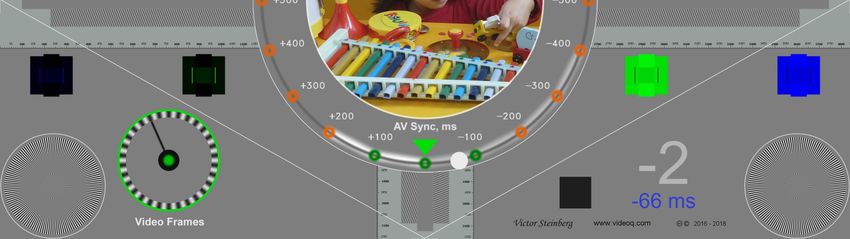
Applications
Picture quality control and calibration tool for general public, video installers, hardware and
software developers, video development labs, production, post-production and content
distribution facilities in the fields of:
Ÿ Broadcast HD & UDH TV
Ÿ Consumer Electronics
Ÿ Video Transcoding
Ÿ Video Data Compression
Ÿ Digital Cinema
Ÿ Mobile TV
Ÿ IPTV, CDN, Cloud video processing and transcoding

MPC test patterns are equally suitable as QA/QC tool for:
Ÿ Direct audio-visual quality estimation by eyes and ears
Ÿ Semi-automatic and fully automated AV levels and AV sync measurement using VideoQ software tools

                             VideoQ, Inc. Presentation. © 2016- present. All rights reserved         2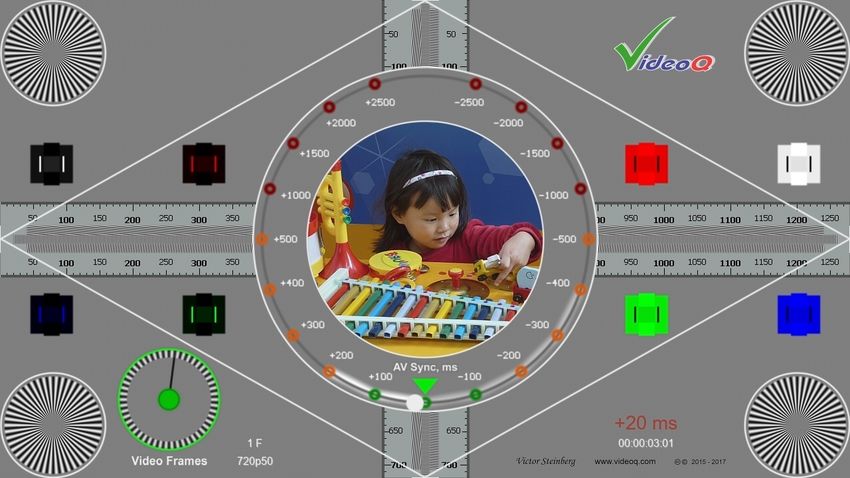
Features
Multi-purpose, multi-resolution, multi-format test pattern to check at glance:
Ÿ   Geometry: Aspect Ratio, Overscan and "Ultra-wide Mode" effects of the display

Ÿ   Scaling Quality or proof of no-scaling, especially in case of DHCP/DRM conflict in STB/OTT

Ÿ   Colors: PLUGEs x8 for display setup and Photo Insert for general quality evaluation

Ÿ   Dynamic Range Modes: SDR, HDR-PQ and HDR-HLG versions
    (see separate Presentation for HDR Test Patterns)

Ÿ   2D Frequency Response and Sharpness Correction settings

Ÿ   Frames Continuity, e.g. codec freeze-skip, 3:2 pull-down, frame rate conversion

Ÿ   De-interlacing Performance: artifacts are especially noticeable on moving white circle component

Ÿ   AV Sync Errors (6000/6006 ms loop): coarse range +/-3000 ms and fine range +/-500 ms

Ÿ   Option of automatic Audio Gain & AV Sync Errors measurement
    via VideoQ software tools
                                VideoQ, Inc. Presentation. © 2016- present. All rights reserved        3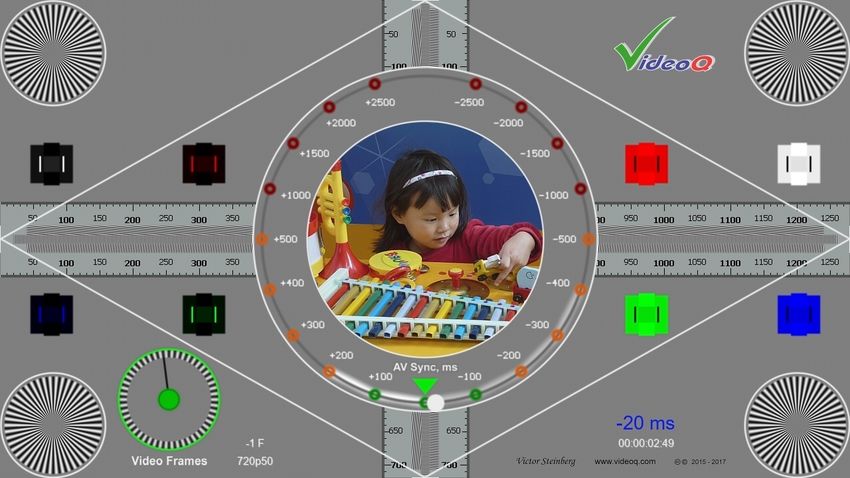
Formats
Set of test pattern video and audio files:
- Raw formats: .YUV, planar 4:4:4, 10 bit, .WAV: 2.0 LR or 5.1 surround sound, 48 kHz, 24 bit
- Encoded format: .MP4, 4:2:2 or 4:2:0, 8, 10 or 12 bit, fixed GOP size = 1s, medium to high bitrate
- 6 frame sizes, various frame rates and interlace formats:
  720x480p (SD 4:3), 23.976, 24.0, 29.97, 30.0, 59.94, and 60.0 fps
  720x480i (SD 4:3), 29.97 fps (i29.97 aka 59.94i)
  720x576p (SD 4:3), 25, 50 fps
  720x576i (SD 4:3), 25 fps (i25 aka 50i)
  1280x720p (Sub-HD 16:9), 50, 59.94 and 60.0 fps
  1920x1080p (HD 16:9), Special “consumer camera” YUVJ levels and fps: 47.952, 48.0 fps
  1920x1080p (HD 16:9), 23.976, 24.0, 25.0, 29.97, 30.0, 50.0, 59.94, and 60.0 fps
  1920x1080i (HD 16:9), 25.0 fps (i25 aka 50i), 29.97 fps (i29.97 aka 59.94i),
  3840x2160p (4K UHD 16:9), 23.976, 24.0, 25.0, 29.97, 30.0, 50.0, 59.94, and 60.0 fps
  7680x4320p (8K UHD 16:9), 23.976, 24.0, 25.0, 29.97, 30.0, 50.0, 59.94, and 60.0 fps

                                  VideoQ, Inc. Presentation. © 2016- present. All rights reserved      4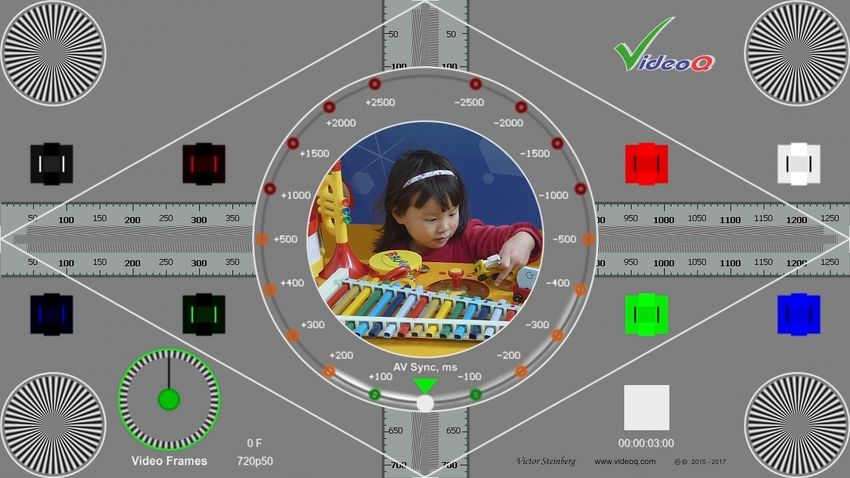
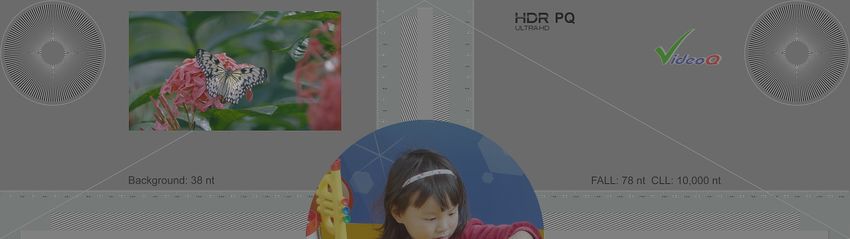
VQMPC-PQ – Static HDR Test, PQ version

      VideoQ, Inc. Presentation. © 2016- present. All rights reserved   5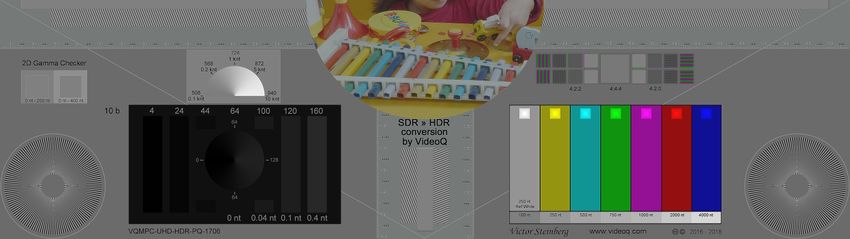
VQMPC-HLG – Static HDR Test, HLG version

        VideoQ, Inc. Presentation. © 2016- present. All rights reserved   6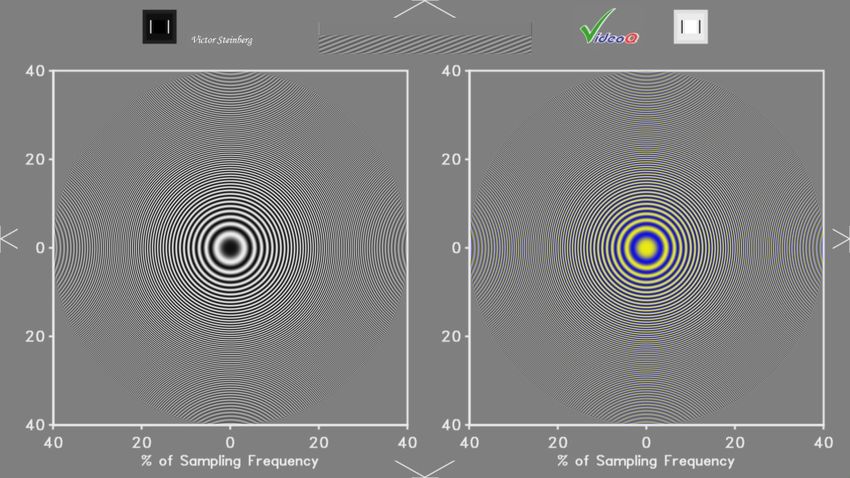
Dynamic SDR Test with AV Sync Components

        VideoQ, Inc. Presentation. © 2016- present. All rights reserved   7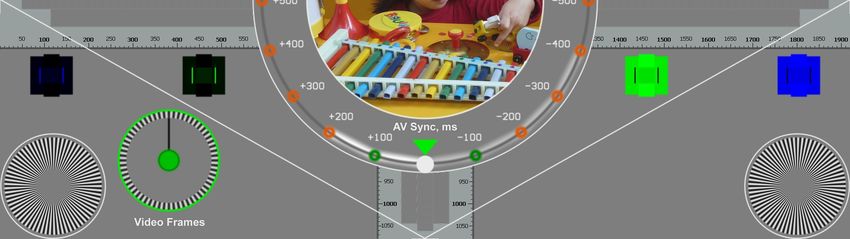
VQMPC-C – Variant with Frames Counter Component

           VideoQ, Inc. Presentation. © 2016- present. All rights reserved   8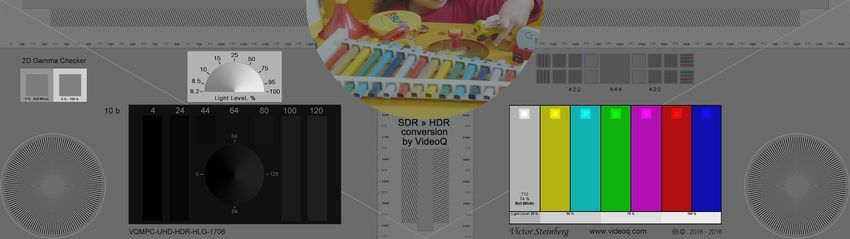
VQMPC-E Variant
Enhanced 8s long dynamic test, more suitable for repetitive lab testing, especially if transcoding is involved. Test
patterns sequence consists of three segments:
 • 1s long VQMA4 matrix test at the beginning, for fully automated video image quality analysis,
  VideoQ VQMA Software Analyzer recommended,
 • then 6s long regular VQMPC-C test, for audio-visual estimation,
 • then 1s long FZP (Large Flashing Zone Plates) test, revealing scaling & compression artifacts,
  VideoQ VQV Software Viewer/Analyzer recommended.

   0s ...1s: VQMA4                          1s … 7s: VQMPC-C                                      7s … 8s: FZP

                                VideoQ, Inc. Presentation. © 2016- present. All rights reserved                  9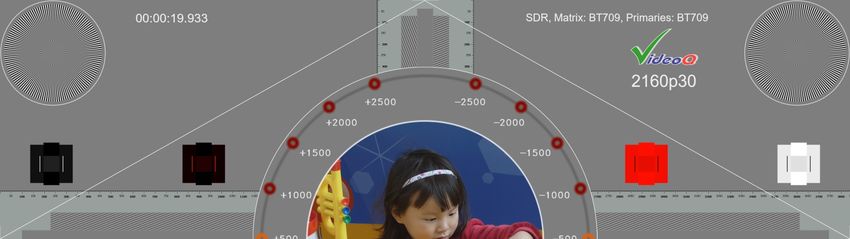
Order Options
Choice of:
      Ÿ   Standard 6s long VQMPC (aka VQMPC-P – P = photo insert)
      Ÿ   Standard 6s long VQMPC-C (C = frame counter)
      Ÿ   Enhanced 8s long VQMPC-E
          with VQMA matrix test pattern during the first second and flashing Zone Plates during the last second

Ÿ   Alternative video formats (e.g. raw planar .YUV, .Y4M with header, wrapped .AVI or .MP4),
    alternative frame sizes and/or frame rates – available on request
Ÿ   Insertion of customer logo and/or special text messages
Ÿ   Central photo insert is customizable, i.e. it can be replaced by:
      Ÿ   Alternative static picture (customer choice)
      Ÿ   Radial plate test component
      Ÿ   Large frame counter digital display

                                    VideoQ, Inc. Presentation. © 2016- present. All rights reserved               10
MPCAVS Test Composition
Four Corner Radial Plates Vertical Ruler,
AV Sync Error Circular Graticule
aimed at testing Vertical Frequency Bursts
Coarse +/-3000 ms scale: “red” range
Geometry & Sharpness
Fine +/- 500 ms scale:
“green-and-brown” range,
Reserved
for customer logo Horizontal Ruler,
and/or Horizontal Frequency Bursts
text message
Four H & V
Edge Markers
line width = 1 pixel
Four Tri-level
Four Tri-level White PLUGE boxes
Black PLUGE boxes aimed at testing
aimed at testing YRGB max levels
YRGB min levels
Frames Counter
Video Continuity Test AV Sync Test:
Orbiting White Ball (2 speeds). Central Photo 0.5*H Insert 0.7*H Circle and Diamond Lines
If “Bop” sound starts with the Ball in the “green” zone aimed at checking Color Rendition aimed at testing picture Geometry
(green marker flashing)
then AVS error is within +/- 100 ms
VideoQ, Inc. Presentation. © 2016- present. All rights reserved 11AV Sync Test Audio Component Time-line
Loop duration: 6,000 ms (6,006 ms for 23.976, 29.97 and 59.94 fps)
AV Sync Reference: “Beep-bop” burst
L
Beep:
-14 dBfs, 1250 Hz, 400 ms
Bop:
-3 dBfs, 1000 Hz, 200 ms
R
AV Sync Reference Position = 3000 ms (3003 ms for 23.976, 29.97 and 59.94 fps)
VideoQ, Inc. Presentation. © 2016- present. All rights reserved 12Optional 5.1 Combination Test (Time-line Parts 1 & 2)
Part 1: 24 s = 4 x 6000 ms (6006 ms for 23.976, 29.97 and 59.94 fps) Part 2: 18 s = 3 x 6000 ms
“Beep-bop” bursts x 4 Channel Names x 5, LFE burst
Lf
Rf
1250 Hz, 400 ms, Cf
1000 Hz, 200 ms
110 Hz, LFE
300 ms
Lr
Rr
AV Sync Ref Position = 3000 ms (3003 ms for 23.976, 29.97 and 59.94 fps). Period = 6000 ms (or 6006 ms)
VideoQ, Inc. Presentation. © 2016- present. All rights reserved 13Video Format and AV Sync Text Messages
Original Original
Time Code Video Format
Timeline distance wrt
AV Sync Error Limits Marker, AV Sync Reference Marker, AV Sync Reference Position,
Flashing Green within +/- 100 ms Flashing White @ 0 ms for 200 ms In video frames & milliseconds
VideoQ, Inc. Presentation. © 2016- present. All rights reserved 14Diamond Pattern and Crop Markers Usage
Example of correct settings (no cropping):
All picture edges are not cropped and single pixel white markers are visible
Example of incorrect settings (with cropping):
Picture edges are cropped
VideoQ, Inc. Presentation. © 2016- present. All rights reserved 15Tri-band Combination Burst Patterns
0.4*FY Almost Horizontal Burst
0.5*FY Vertical Burst
0.4*FY Almost Vertical Burst
0.4*FY Almost Horizontal Burst
0.5*FY Horizontal Burst
0.4*FY Almost Vertical Burst
There are two groups of bursts with frequencies proportional to luma pixels rate FY:
full length horizontal bursts band and full height vertical bursts band.
Maximum luminance frequency burst of exactly 0.5 FY is in the middle of each band.
Two slightly oblique bands of 0.4 FY surrounds the middle burst.
Two central 0.5 FY sub-bands are especially sensitive to any errors in pixel clock, mapping or scaling.
Four other sub-bands allow differentiation between horizontal and vertical distortions thru the whole picture area
– from left picture edge to the right picture edge and from top to bottom.
Within the burst vertical and almost vertical lines test horizontal frequencies,
whilst horizontal and almost horizontal lines test vertical frequencies.
VideoQ, Inc. Presentation. © 2016- present. All rights reserved 16Tri-band Combination Burst Pattern Usage
Example of correct settings (no scaling):
There are no visible beat waves on both
horizontal and vertical Tri-band Patterns
Example of scaling artifacts:
Scaling causes beat waves on both
horizontal and vertical Tri-band Patterns
VideoQ, Inc. Presentation. © 2016- present. All rights reserved 17Radial Plates Usage
Original Size – dot-by-dot: Scaled (Up or Down) Picture:
Full contrast of fine details in all directions Loss and/or distortion of fine details
VideoQ, Inc. Presentation. © 2016- present. All rights reserved 18Black PLUGE & SPLUGE Usage
Fine Tuning (SPLUGE) Brightness (Y Offset) is too low
Coarse Tuning (PLUGE)
optional component
Both central super-black
Clipped sector (with no
vertical band and central
shades of gray) is much
small square are almost the
more than 180 degrees
same brightness as big
black square
Brightness is too high
Both central super-black
Clipped sector (with no
vertical band and central
shades of gray) is much
small square are clearly
less than 180 degrees
visible
Brightness is correct
The super-black vertical band is
Conical grayscale is clipped almost the same brightness as big
exactly half-circle (180 black square
degrees), no shades of gray
on the right half Central small square is clearly
visible
Note that some versions
do not contain fine tuning SPLUGE components
VideoQ, Inc. Presentation. © 2016- present. All rights reserved 19White PLUGE & SPLUGE Usage
Coarse Tuning (PLUGE) Fine Tuning (SPLUGE)
Contrast (Gain) is too low
optional component
Both central super-white Clipped sector (with no
vertical band and central shades of gray) is much
small square are clearly less than 180 degrees
visible
Contrast is too high
Both central super-white
vertical band and central Clipped sector (with no
small square are almost the shades of gray) is much
same brightness as big white more than 180 degrees
square
Contrast is correct
The super-white vertical band is Conical grayscale is clipped
almost the same brightness as exactly half-circle (180
big white square. degrees),
Central small square is clearly no shades of gray on the left
visible half
Note that some versions
do not contain fine tuning SPLUGE components
VideoQ, Inc. Presentation. © 2016- present. All rights reserved 20Frame Counter Features
Green Circle flashes for ~ +/- 100 ms with 1s periodicity:
@ 0 ms, 1000 ms, 2000 ms, etc.
Clock Handle in upward position:
@ 0 ms, 1000 ms, 2000 ms, etc.
One Division = 1 Video Frame
Green “LED” flashes for 2 frames every 4 frames (2/4 periodic pattern)
revealing any video frames cadence discontinuities,
3:2 pull-down and other frame rate conversion cases
VideoQ, Inc. Presentation. © 2016- present. All rights reserved 21AV Sync Test Features 1
AV Sync Error Subjective Estimation “Red” zone:
Wrap-around limit of measurable errors: Error range from 500 ms to 3000 ms
+/- 3000 ms
Orbiting Ball 2 speeds: “Brown” zone:
Error is beyond +/- 100 ms “Green” range
Fast – on fine range graticule (bottom semi-circle),
Slow – on coarse range graticule (top semi-circle) “Green” zone:
Error is within +/- 100 ms range
Triangular Green Marker
flashes for ~ +/- 100 ms
near AV Sync Reference Time Position
Time
Orbiting Ball at AV Sync Reference Time Position (Error = 0)
User can estimate the AV Sync Error value by the ball position at the moment of “bop” sounds start.
Green triangular marker flashes for about +/- 100 ms wrt AV Sync Reference, thus indicating the boundaries of acceptable errors (“green” range).
VideoQ, Inc. Presentation. © 2016- present. All rights reserved 22AV Sync Test Features 2
Numerical Readout and Automated Measurement
Orbiting Ball is at AV Sync Reference Time Position.
If “Bop” sound starts at this moment, then AV Error = 0 F (0 ms).
White Square Marker can be used for auto-measurement.
AV Error = +1 F (+20 ms @ 50 fps)
AV Error = -1 F (-20 ms @ 50 fps)
Time
VideoQ, Inc. Presentation. © 2016- present. All rights reserved 23About VideoQ
Company History
• Founded in 2005
• Formed by an Engineering Awards winning team sharing between them decades of global video technology.
• VideoQ is a renown player in calibration and benchmarking of Video Processors, Transcoders and Displays,
providing tools and technologies instantly revealing artifacts, problems and deficiencies, thus raising the bar in
productivity and video quality experience.
• VideoQ products and services cover all aspects of video processing and quality assurance - from visual picture
quality estimation and quality control to fully automated processing, utilizing advanced VideoQ algorithms and
robotic video quality analyzers, including latest UHD and HDR developments.
Operations
• Headquarters in Sunnyvale, CA, USA
• Software developers in Silicon Valley and worldwide
• Distributors and partners in several countries
• Sales & support offices in USA, UK
VideoQ, Inc. Presentation. © 2016- present. All rights reserved 24You can also read


