1STMILE MIDDLEWARE INTEGRATION GUIDE - VERSION 1.5.21 JUNE 17, 2021 - ONLINE MERCHANT CENTER
←
→
Page content transcription
If your browser does not render page correctly, please read the page content below
1stMILE™ MiddleWare
    Integration Guide
                        Version 1.5.21
                        June 17, 2021

                                    1stMILE, LLC
                     8383 158th Ave NE, Suite 100
                           Redmond, WA 98052

                                 www.1stmile.com

          © 2021 1stMILE, LLC. All rights reserved.
1stMILE™ MiddleWare Integration Guide
Version 1.5.21 – June 17, 2021
Copyright
This document is provided “as-is”. Information and views expressed in this document, including URL and other
Internet Web site references, may change without notice. You bear the risk of using it.
Some examples depicted herein are provided for illustration only and are fictitious. No real association or
connection is intended or should be inferred.
This document does not provide you with any legal rights to any intellectual property in 1stMILE product. You
may use this document for your internal, reference purposes.
© 2021 1stMILE, LLC. All rights reserved.
All trademarks are property of their respective owners.
Copyright © 2021 1stMILE, LLC 8383 158th Ave NE, Suite 100 • Redmond, Washington 98052
Page 1 of 93 www.1stMILE.com • (425) 497-9909
Proprietary and Confidential Information. Unauthorized reproduction or distribution prohibited.1stMILE™ MiddleWare Integration Guide
Version 1.5.21 – June 17, 2021
Contents
Copyright ...................................................................................................................................................................................... 1
Contents........................................................................................................................................................................................ 2
Overview ....................................................................................................................................................................................... 5
Requirements .............................................................................................................................................................................. 5
Installation.................................................................................................................................................................................... 5
Library-Only ............................................................................................................................................................................ 5
ATSSecurePostUICmd ......................................................................................................................................................... 5
Client Application ................................................................................................................................................................. 5
Multi-Merchant Client Application ................................................................................................................................ 5
SecurePost Listener.............................................................................................................................................................. 6
RDP............................................................................................................................................................................................. 6
32-bit/64-bit ................................................................................................................................................................................ 6
ISV Certification.......................................................................................................................................................................... 6
Merchant Configuration ......................................................................................................................................................... 6
Credit Facility............................................................................................................................................................................... 7
Text to Pay.................................................................................................................................................................................... 7
Text to Authorize ....................................................................................................................................................................... 7
Begin Accepting Payments .................................................................................................................................................... 7
1stMILE MiddleWare Reference........................................................................................................................................... 9
Data Elements ........................................................................................................................................................................ 9
TransactionType ......................................................................................................................................................... 9
Isv .................................................................................................................................................................................. 10
Merchant .................................................................................................................................................................... 11
Options ....................................................................................................................................................................... 11
Transaction ................................................................................................................................................................ 11
Contact ....................................................................................................................................................................... 11
Address ....................................................................................................................................................................... 12
Applicant .................................................................................................................................................................... 12
FleetCard .................................................................................................................................................................... 13
Invoice ......................................................................................................................................................................... 13
LineItem...................................................................................................................................................................... 14
Copyright © 2021 1stMILE, LLC 8383 158th Ave NE, Suite 100 • Redmond, Washington 98052
Page 2 of 93 www.1stMILE.com • (425) 497-9909
Proprietary and Confidential Information. Unauthorized reproduction or distribution prohibited.1stMILE™ MiddleWare Integration Guide
Version 1.5.21 – June 17, 2021
PhotoID....................................................................................................................................................................... 16
Recurring.................................................................................................................................................................... 17
Report ......................................................................................................................................................................... 18
ReturnImage ............................................................................................................................................................. 18
Vehicle......................................................................................................................................................................... 20
Transaction Types .............................................................................................................................................................. 20
Configuration ........................................................................................................................................................... 20
Sale/Auth ................................................................................................................................................................... 21
Auth Reversal ........................................................................................................................................................... 26
Post .............................................................................................................................................................................. 27
Refund......................................................................................................................................................................... 29
Credit ........................................................................................................................................................................... 30
Void .............................................................................................................................................................................. 32
Account Lookup ...................................................................................................................................................... 33
Account Payment.................................................................................................................................................... 34
Account Payment Reversal ................................................................................................................................. 35
Check Sale ................................................................................................................................................................. 36
Check Refund ........................................................................................................................................................... 39
Check Void ................................................................................................................................................................ 41
Credit Application................................................................................................................................................... 42
Synchrony Car Care QuickScreen ..................................................................................................................... 43
Synchrony Car Care Credit Decision ............................................................................................................... 44
Synchrony Car Care Accept/Decline QuickScreen ..................................................................................... 45
Token Add ................................................................................................................................................................. 46
Token Lookup .......................................................................................................................................................... 47
Text to Pay ................................................................................................................................................................. 47
Text to Authorize .................................................................................................................................................... 49
Declined Services .................................................................................................................................................... 51
Invoice Upload ......................................................................................................................................................... 53
Gift Card Activation................................................................................................................................................ 54
Gift Card Add Value ............................................................................................................................................... 55
Gift Card Balance Inquiry ..................................................................................................................................... 55
Copyright © 2021 1stMILE, LLC 8383 158th Ave NE, Suite 100 • Redmond, Washington 98052
Page 3 of 93 www.1stMILE.com • (425) 497-9909
Proprietary and Confidential Information. Unauthorized reproduction or distribution prohibited.1stMILE™ MiddleWare Integration Guide
Version 1.5.21 – June 17, 2021
Gift Card Deactivation........................................................................................................................................... 56
Retrieve Merchant Info ......................................................................................................................................... 57
Transaction Search ................................................................................................................................................. 57
End of Day Report .................................................................................................................................................. 58
Credit App Report .................................................................................................................................................. 59
Signature Capture .................................................................................................................................................. 60
Terminal Prompt ..................................................................................................................................................... 61
About........................................................................................................................................................................... 61
Result...................................................................................................................................................................................... 62
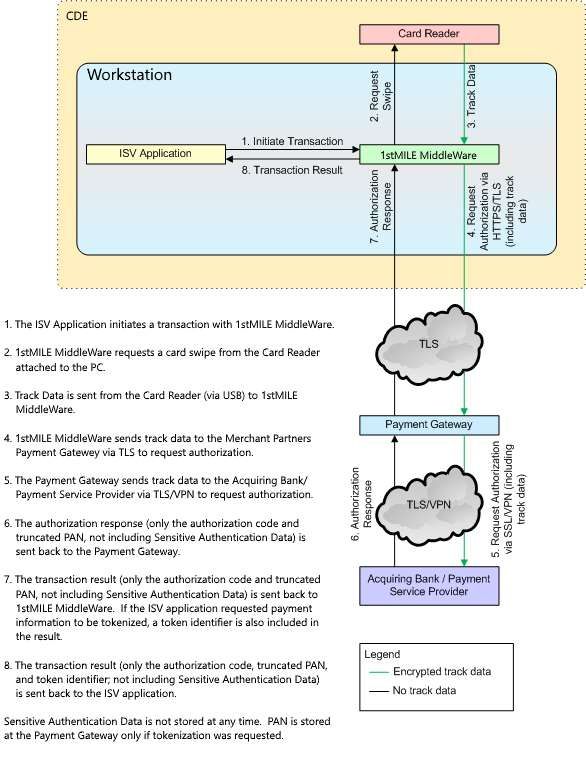
Appendix A: Data Flow Diagram ...................................................................................................................................... 67
Appendix B: Account Types ................................................................................................................................................ 68
Appendix C: EMV Result Elements................................................................................................................................... 69
Appendix D: Line Item Product Codes ........................................................................................................................... 70
Appendix E: Fleet Card Service Codes ............................................................................................................................ 78
Appendix F: Fleet Measurement Codes ......................................................................................................................... 78
Appendix G: Migrate from legacy parameters to JSON API .................................................................................. 79
Create Transaction Objects ............................................................................................................................................ 79
Examples ............................................................................................................................................................................... 80
Result Object ....................................................................................................................................................................... 86
Copyright © 2021 1stMILE, LLC 8383 158th Ave NE, Suite 100 • Redmond, Washington 98052
Page 4 of 93 www.1stMILE.com • (425) 497-9909
Proprietary and Confidential Information. Unauthorized reproduction or distribution prohibited.1stMILE™ MiddleWare Integration Guide
Version 1.5.21 – June 17, 2021
Overview
1stMILE™ MiddeWare is a PA-DSS certified Windows library that provides an easy way to integrate
your custom application with the Merchant Partners Payment Gateway. It offers a powerful plug-in
payment experience for your application, giving your merchants the ability to accept EMV, swipe, and
private label payments. 1stMILE also provides capabilities for tokenized and recurring transactions as
well as check processing. Payment acceptance channels include card present, card not present, and
tokenized.
1stMILE provides hardware integration to several terminals, signature pads, and check scanners,
alleviating the necessary expertise, development, and certification required for communicating with
hardware devices. 1stMILE also relieves PCI requirements pertaining to cardholder data access and
retention.
Requirements
1stMILE MiddleWare is a .NET object (including support for COM interoperability) capable of running
on Windows 8.1 or later versions. 1stMILE MiddleWare requires .NET Framework 4.5.2.
Installation
There are several ways to integrate with 1stMILE MiddleWare.
Library-Only
The library-only installer, ATSSecurePostUILib, will install only the files necessary for integration. This
installer can be bundled in your own software installer or run separately by the customer.
ATSSecurePostUICmd
ATSSecurePostUICmd is a Windows command-line application that provides access to all the features
of the 1stMILE MiddleWare library. It allows users to process transactions and perform all other
capabilities provided by the 1stMILE MiddleWare library.
Client Application
ATSSecurePostUI_NET is a simple Windows application with an interactive graphical use interface. It
allows users to process transactions and perform all other capabilities provided by the 1stMILE
MiddleWare library.
Multi-Merchant Client Application
FirstMileClient is a Windows application that provides access to all the features of the 1stMILE
MiddleWare library. It allows configuring multiple merchants within the UI, switching between the
merchants, and executing transactions for the selected merchant.
Copyright © 2021 1stMILE, LLC 8383 158th Ave NE, Suite 100 • Redmond, Washington 98052
Page 5 of 93 www.1stMILE.com • (425) 497-9909
Proprietary and Confidential Information. Unauthorized reproduction or distribution prohibited.1stMILE™ MiddleWare Integration Guide
Version 1.5.21 – June 17, 2021
SecurePost Listener
The SecurePost Listener application is a light-weight web server intended to run on an intranet. It
accepts HTTP requests on the workstation and launches 1stMILE based on the request. A typical
usage scenario is for a user of a custom application on an intranet server to kick off an action in the
application that sends an HTTP request to the user’s computer on which SecurePost Listener has been
installed. When SecurePost Listener receives the request, it displays the appropriate transaction
processing dialog and upon completion responds to the server request with the transaction results.
RDP
1stMILE RDP provides both Client and Server components to use 1stMILE in an RDP environment. Like
SecurePost Listener, 1stMILE RDP allows a user running an application on an RDP server to trigger a
request on the client PC where the card reader is attached, returning the transaction results back to
the server application.
32-bit/64-bit
Due to hardware manufacturer limitations, 1stMILE 32-bit and 64-bit binaries support different
hardware integrations. For more information and a list of components available on each platform,
please refer to developer.1stmile.com.
ISV Certification
To use 1stMILE MiddleWare, you must certify your integration with Merchant Partners and obtain an
ISV key. Please contact Merchant Partners ISV Integration Services for more information:
Integrator Relationship Management
IRMSupport@MerchantPartners.com
Merchant Configuration
A merchant is uniquely identified in the Merchant Partners Payment Gateway with an Account ID, an
optional Sub ID, and a Merchant PIN. The Configuration API allows the merchant to configure these
settings to be stored locally. By storing the merchant settings locally, your app does not need to send
the merchant information for every transaction. All API calls allow you to override the default merchant
information. See the Configuration API for more information.
Copyright © 2021 1stMILE, LLC 8383 158th Ave NE, Suite 100 • Redmond, Washington 98052
Page 6 of 93 www.1stMILE.com • (425) 497-9909
Proprietary and Confidential Information. Unauthorized reproduction or distribution prohibited.1stMILE™ MiddleWare Integration Guide
Version 1.5.21 – June 17, 2021
Credit Facility
The 1stMILE Credit Facility allows your merchants to convert low value credit card transactions to high
value Automotive Private Label Card Transactions to help customers fund their repairs, offers High
Ticket Financing, and Non-Prime Financing.
Text to Pay
The 1stMILE Text to Pay feature allows a merchant to initiate a sale but instead of requesting a payment
card from the customer, a Pay Link can be sent to the customer via text allowing the customer to pay
the invoice online. In addition to requiring the customer’s mobile phone number, an invoice in PDF
format may be included for the customer to view.
Text to Authorize
The 1stMILE Text to Authorize feature allows a merchant to send a quote to a customer for the
customer’s authorization. An Authorize Link requires the customer’s mobile phone number and a PDF
detailing the work to be performed. The customer provides authorization by reviewing the quote and
signing online.
Begin Accepting Payments
You can begin accepting payments in your application by using FirstMile, a class designed to make
building your application's checkout flow as easy as possible. You can start using 1stMILE MiddleWare
by importing FirstMile into the class where you require the payment form to be shown.
To start a transaction, you need to instantiate an FirstMile object, subscribe to events (optional), then
call a method to show the default payment form (e.g., in a button action handler):
// build the parameters
string requestJson = @"{
'transactionType': 'Sale',
'transaction': {
'amount': 1.23
}
}";
// instantiate the FirstMile object
var firstMile = new FirstMile();
// call the process method
var responseJson = firstMile.Process(requestJson);
// handle the final response
Copyright © 2021 1stMILE, LLC 8383 158th Ave NE, Suite 100 • Redmond, Washington 98052
Page 7 of 93 www.1stMILE.com • (425) 497-9909
Proprietary and Confidential Information. Unauthorized reproduction or distribution prohibited.1stMILE™ MiddleWare Integration Guide
Version 1.5.21 – June 17, 2021
FirstMileResponse response =
JsonConvert.DeserializeObject(responseJson);
Copyright © 2021 1stMILE, LLC 8383 158th Ave NE, Suite 100 • Redmond, Washington 98052
Page 8 of 93 www.1stMILE.com • (425) 497-9909
Proprietary and Confidential Information. Unauthorized reproduction or distribution prohibited.1stMILE™ MiddleWare Integration Guide
Version 1.5.21 – June 17, 2021
1stMILE MiddleWare Reference
The FirstMile class provides a single method:
string Process(string jsonRequest);
The jsonRequest parameter is a JSON string that consists of elements and objects. The
transactionType element tells 1stMILE what you want to do and determines what other elements are
supported in the jsonRequest object.
Data Elements
The following sections define the data elements that comprise the JSON request element for the
process method.
TransactionType
The transactionType element is a string that identifies the operation you are requesting from 1stMILE.
You can perform the following operations with 1stMILE:
• Configuration
• Card Processing
o Sale
o Auth
o Auth Reversal
o Post
o Refund
o Credit
o Void
o Account Lookup
o Account Payment
o Account Payment Reversal
• Check Processing
o Sale
o Refund
o Void
• Credit Application
o Credit App
o Checkout Open Loans
o Additional Synchrony Car Care operations:
▪ QuickScreen
▪ Credit Decision
Copyright © 2021 1stMILE, LLC 8383 158th Ave NE, Suite 100 • Redmond, Washington 98052
Page 9 of 93 www.1stMILE.com • (425) 497-9909
Proprietary and Confidential Information. Unauthorized reproduction or distribution prohibited.1stMILE™ MiddleWare Integration Guide
Version 1.5.21 – June 17, 2021
▪ Accept Quick Screen
▪ Decline Quick Screen
• Gift Card
o Activation
o Add Value
o Balance Inquiry
o Deactivation
• Reporting
o Transaction Search
o End of Day Report
o Credit App Report
• Text to Pay
• Text to Authorize
• Declined Services
• Invoice Upload
• Tokenization
• Signature Capture
• Terminal Prompt
• About
See the Transaction Types section for more information.
Isv
The isv object identifies the ISV integration and allows you to associate user/workstation information
with a transaction. This object should be included in every request.
Name Type Description
isv object Container for ISV information.
key string Alphanumeric value that identifies the ISV. Merchant
Partners provides this value for every ISV integration.
version string This is the version of your software. Useful for
troubleshooting.
user string If your application tracks the user associated with the
session, you can include the name with the transaction.
nameOfStation string If your application tracks the workstation associated
with the session, you can include the name with
transaction.
Copyright © 2021 1stMILE, LLC 8383 158th Ave NE, Suite 100 • Redmond, Washington 98052
Page 10 of 93 www.1stMILE.com • (425) 497-9909
Proprietary and Confidential Information. Unauthorized reproduction or distribution prohibited.1stMILE™ MiddleWare Integration Guide
Version 1.5.21 – June 17, 2021
Merchant
The merchant object defines the Merchant Partners Payment Gateway account to use for the request,
as well as merchant details for printed receipts.
Name Type Description
merchant object Container for merchant information.
acctID string 5-character alphanumeric value, provided by Merchant
Partners, that identifies the merchant.
subID string 5-character alphanumeric value, provided by Merchant
Partners, that identifies the Sub ID for the merchant.
merchantPIN string The Merchant PIN value provided by Merchant
Partners.
merchantName string Specifies the Merchant name to be printed on the first
line of the receipt.
merchantAddress string Specifies the Merchant address to be printed on the
second line of the receipt.
merchantCityStateZip string Specifies the Merchant city, state and zip to be printed
on the third line of the receipt.
merchantPhone string Specifies the Merchant phone number to be printed on
the fourth line of the receipt.
receiptText string Specifies additional text to print on the bottom of the
receipt (up to 1024 characters).
Options
The options object allows you to control the presentation and behavior of 1stMILE for a request. The
elements contained in this object may only apply to some transaction types. Refer to Transaction
Types for more information.
Transaction
The transaction object allows you to specify information for a transaction. Refer to Transaction Types
for more information.
Contact
The contact object allows you to specify contact information for a transaction.
Name Type Description
contact object Container for contact information.
Copyright © 2021 1stMILE, LLC 8383 158th Ave NE, Suite 100 • Redmond, Washington 98052
Page 11 of 93 www.1stMILE.com • (425) 497-9909
Proprietary and Confidential Information. Unauthorized reproduction or distribution prohibited.1stMILE™ MiddleWare Integration Guide
Version 1.5.21 – June 17, 2021
firstName string Customer’s first name.
lastName string Customer’s last name.
email string Customer’s email.
businessPhone string Customer’s business phone number.
mobilePhone string Customer’s mobile phone number.
phone string Customer’s phone number.
dob string Customer’s date of birth.
Address
The address object allows you to specify address information for a transaction.
Name Type Description
address object Container for address information.
address1 string Customer’s street address.
address2 string Customer’s street address second line.
city string Customer’s address city.
state string Customer’s address 2-letter state abbreviation.
zip string Customer’s address zip code.
Applicant
The applicant object allows you to specify details about an applicant.
Name Type Description
applicant object Container for the applicant information.
firstName string First Name
Copyright © 2021 1stMILE, LLC 8383 158th Ave NE, Suite 100 • Redmond, Washington 98052
Page 12 of 93 www.1stMILE.com • (425) 497-9909
Proprietary and Confidential Information. Unauthorized reproduction or distribution prohibited.1stMILE™ MiddleWare Integration Guide
Version 1.5.21 – June 17, 2021
middleName string Middle Name/Initial
lastName string Last Name
suffix string Name Suffix
email string Email
mobilePhone string Mobile Phone Number
phone string Phone Number
address object Container for address information.
FleetCard
The fleetCard object allows you to specify details about a fleet card transaction.
Name Type Description
fleetCard object Container for return image information.
departmentNumber string Department # service prompt (WEX only).
driverID string Driver ID service prompt.
fleetRC string Fleet card restriction code.
idNumber string ID service prompt.
jobNumber string Job # service prompt (WEX only).
miscNumericData string Cust Data service prompt (WEX only).
odometerReading string Odometer service prompt.
purchaseDevSequenceNumber string Purchase Dev. Seq. # service prompt (WEX only).
vehicleID string Vehicle ID service prompt.
Invoice
The invoice object allows you to specify details for a repair order.
Copyright © 2021 1stMILE, LLC 8383 158th Ave NE, Suite 100 • Redmond, Washington 98052
Page 13 of 93 www.1stMILE.com • (425) 497-9909
Proprietary and Confidential Information. Unauthorized reproduction or distribution prohibited.1stMILE™ MiddleWare Integration Guide
Version 1.5.21 – June 17, 2021
Name Type Description
invoice object Container for the invoice information.
invoiceNumber string Invoice Number.
partsAmount decimal Parts Amount.
laborAmount decimal Labor Amount.
miscAmount decimal Miscellaneous Amount.
taxAmount decimal Invoice Tax.
totalAmount decimal Invoice Total.
startDate string Invoice start date.
endDate string Invoice end date.
description string Description of goods and services.
associateID string Associate ID.
invoiceData string Invoice PDF (Base-64 encoded).
invoiceFilename string Local filename of the PDF to include with the invoice.
lineItems array See lineItem.
LineItem
The lineItem object allows you to specify line item information for a transaction.
Name Type Description
lineItems object Container of line item information.
quantity number Item quantity.
unitOfMeasure string Unit of measure. See Appendix F for valid values.
Copyright © 2021 1stMILE, LLC 8383 158th Ave NE, Suite 100 • Redmond, Washington 98052
Page 14 of 93 www.1stMILE.com • (425) 497-9909
Proprietary and Confidential Information. Unauthorized reproduction or distribution prohibited.1stMILE™ MiddleWare Integration Guide
Version 1.5.21 – June 17, 2021
unitPrice decimal Unit price.
lineItemTotal decimal Total line item price. If this element is omitted, it will
be generated from the Unit Price and Quantity if those
elements are provided.
productNumber string Item Part Number or SKU that identifies the item being
sold.
productCode string Product code. See Appendix D for valid values.
description string Item description.
serviceDescription number
Value Description
0 Other
1 Alignment
2 Change Air Filter
3 Change Battery
4 Change Brake Pads/Shoes
5 Change Cabin Filter
6 Change Coolant
7 Change Spark Plugs
8 Change Wipers
9 Emission Check
10 Multi Point Inspection
11 Oil Change
12 Service Battery
13 State Inspection
Copyright © 2021 1stMILE, LLC 8383 158th Ave NE, Suite 100 • Redmond, Washington 98052
Page 15 of 93 www.1stMILE.com • (425) 497-9909
Proprietary and Confidential Information. Unauthorized reproduction or distribution prohibited.1stMILE™ MiddleWare Integration Guide
Version 1.5.21 – June 17, 2021
14 Tire Balance
15 Tire Repair
16 Tire Rotation
17 Transmission Service
mfg string Manufacturer or vendor.
mfgProductNumber string Manufacturer or vendor product number.
labor bool Indicates whether the item is labor.
declinedService bool Indicates the item was a declined service.
registrationType string Indicates the type of registration to which the
registrationNumbers apply. Valid values are
Value Description
D D.O.T.
registrationNumbers [string] Array of registration numbers. This also requires the
registrationType element.
PhotoID
The photoID object allows you to specify the customer’s photo ID information.
Name Type Description
photoID object Container for photo ID information.
expiration string Either “MM/YY”, “MM/YYYY”, or “MM/DD/YYYY” ID
expiration date.
number string ID number.
type string Type of ID. Valid values are
Value Description
D Driver License (default)
Copyright © 2021 1stMILE, LLC 8383 158th Ave NE, Suite 100 • Redmond, Washington 98052
Page 16 of 93 www.1stMILE.com • (425) 497-9909
Proprietary and Confidential Information. Unauthorized reproduction or distribution prohibited.1stMILE™ MiddleWare Integration Guide
Version 1.5.21 – June 17, 2021
G Green Card
M Military ID
P Passport
S State ID Card
state string Two-character state abbreviation.
Recurring
The recurring object allows you to specify details when creating a recurring transaction.
Name Type Description
recurring object Container for the recurring information.
amount decimal Recurring billing amount.
billingCycle number Recurring billing cycle:
Value Description
0 None
1 Weekly
2 Monthly
3 Quarterly
4 Semi-Annual
5 Annual
6 Bi-Weekly
7 Bi-Annual
8 Quad-Weekly (28 days)
9 One-Time
Copyright © 2021 1stMILE, LLC 8383 158th Ave NE, Suite 100 • Redmond, Washington 98052
Page 17 of 93 www.1stMILE.com • (425) 497-9909
Proprietary and Confidential Information. Unauthorized reproduction or distribution prohibited.1stMILE™ MiddleWare Integration Guide
Version 1.5.21 – June 17, 2021
10 Daily
11 Bi-Monthly
billMax number Number of occurrences:
Value Description
-1 Unlimited
0 None
> 0 Value provided
create bool Default the UI option to be checked.
startDate string Start date of the recurring billing (MM/DD/YYYY).
Report
The report object allows you to specify details about a reporting request.
Name Type Description
report object Container for return image information.
actionType string For the Transaction Search report, this value allows
filtering the report:
Value Description
AuthReversal Shows Auth-only transactions.
Refund Shows Sale and Post transactions.
Void Shows Approved transactions.
date string Date for report in format “MM/DD/YYYY”.
endDate string End date for report in format “MM/DD/YYYY”.
ReturnImage
The returnImage object allows you to specify how you want the signature returned (if applicable).
Copyright © 2021 1stMILE, LLC 8383 158th Ave NE, Suite 100 • Redmond, Washington 98052
Page 18 of 93 www.1stMILE.com • (425) 497-9909
Proprietary and Confidential Information. Unauthorized reproduction or distribution prohibited.1stMILE™ MiddleWare Integration Guide
Version 1.5.21 – June 17, 2021
Name Type Description
returnImage object Container for return image information.
encoding string Identifies the encoding in which you would like the
signature image returned:
Value Description
Base64 Radix-64 encoding; the base 64 digits in
ascending order from zero are the
uppercase characters 'A' to 'Z', the
lowercase characters 'a' to 'z', the
numerals '0' to '9', and the symbols '+' and
'/'. The valueless character, '=', is used for
trailing padding.
BinHex Binary to Hexadecimal encoding; each
byte is converted to a hexadecimal string
representation.
If this parameter is not specified, no image is returned.
format string Identifies the image format in which you would like the
signature image returned:
Value Description
Bmp Windows bitmap.
Gif Graphics Interchange Format
Jpeg Joint Photographic Experts Group image
format
Png Portable Network Graphics image format
Tiff Tag Image File Format
resize bool If true, indicates that 1stMILE should resize the
signature image to the height and width specified.
height number Maximum image height (in pixels).
width number Maximum image width (in pixels).
Copyright © 2021 1stMILE, LLC 8383 158th Ave NE, Suite 100 • Redmond, Washington 98052
Page 19 of 93 www.1stMILE.com • (425) 497-9909
Proprietary and Confidential Information. Unauthorized reproduction or distribution prohibited.1stMILE™ MiddleWare Integration Guide
Version 1.5.21 – June 17, 2021
Vehicle
The vehicle object allows you to specify details about a vehicle.
Name Type Description
vehicle object Container for the recurring information.
vin string Vehicle Identification Number
year number Vehicle Year
make string Vehicle Make
model string Vehicle Model
odometerReading number Odometer Reading
licenseNumber string License Plate Number
licenseState string License Plate Two-letter State Abbreviation
Transaction Types
The following sections describe the different transaction types and the data elements that are
applicable for each type.
Configuration
The Configuration transaction type presents the Configuration dialog where the merchant can
change 1stMILE settings.
Name Type Description
transactionType string Configuration
merchant object Container for merchant information. See the merchant
data element.
options object Container for options.
centerScreen bool Show the Configuration dialog centered on the screen.
Example
{
"transactionType": "Configuration"
}
Copyright © 2021 1stMILE, LLC 8383 158th Ave NE, Suite 100 • Redmond, Washington 98052
Page 20 of 93 www.1stMILE.com • (425) 497-9909
Proprietary and Confidential Information. Unauthorized reproduction or distribution prohibited.1stMILE™ MiddleWare Integration Guide
Version 1.5.21 – June 17, 2021
Result
When the user clicks OK on the Configuration dialog, 1stMILE returns the merchant element. Example:
[
{
"status": "accepted",
"merchant": {
"acctID": "TEST01",
"subID": "IOS01",
"merchantPIN": "xurG2kGYLFXPFRqXjFBs",
"merchantName": "iOS Tester",
"merchantAddress": "1000 1st Ave.",
"merchantCityStateZip": "Redmond, WA 98052",
"merchantPhone": "888-555-1212",
"receiptText": ""
}
}
]
If the user clicks Cancel on the Configuration dialog, 1stMILE returns a canceled status:
[
{
"status": "cancelled
}
]
If an error occurs, 1stMILE returns an error status:
[
{
"status": "error",
"error": "Error details."
}
]
Sale/Auth
Use the Sale transaction type to process a payment card sale. Use the Auth transaction type to
authorize a card payment. An Auth requires a follow up Post transaction to charge the card.
Name Type Description
transactionType string Sale or Auth or CheckoutOpenLoans
isv object Container for ISV information. See the isv data element
merchant object Container for merchant information. See the merchant
data element.
options object Container for options.
Copyright © 2021 1stMILE, LLC 8383 158th Ave NE, Suite 100 • Redmond, Washington 98052
Page 21 of 93 www.1stMILE.com • (425) 497-9909
Proprietary and Confidential Information. Unauthorized reproduction or distribution prohibited.1stMILE™ MiddleWare Integration Guide
Version 1.5.21 – June 17, 2021
centerScreen bool Show the dialog centered on the screen.
exitOnCancelledSwipe bool Automatically close the dialog if a card insert/swipe is
canceled.
exitOnDecline bool Automatically close the dialog if the transaction is
declined.
lockParameters bool Lock the following fields so they are read-only if data
was passed into the call: Order Number, Amount, Tax
Amount/Exempt, and Cashback.
requireSignature bool Require a signature regardless of the transaction type.
This overrides signatureOptional.
sigAnnotation1 string Line of text to embed in the signature image.
Annotations appear above the signature and may affect
the height of the image.
sigAnnotation2 string Additional line of text to embed in the signature image.
sigAnnotation3 string Additional line of text to embed in the signature image.
sigAnnotation4 string Additional line of text to embed in the signature image.
signatureOptional bool Make the signature optional for PIN Debit transactions.
signaturePrompt string Specifies the prompt to display on the hardware device
(if supported) for signature capture operations.
tokenize bool Specify true to tokenize the sale. Additionally, if a
credit application popup is successful, the newly created
account will be tokenized. This setting is ignored If
tokenization is not enabled.
transaction object Container for transaction details.
amount decimal Order amount of the transaction.
amountToFinance decimal Value of amount to finance when closing a repair order
as part of the sale.
billingAccountNumber string Account number that the merchant uses to identify the
customer in their system. Applies to PINless debit
transactions.
Copyright © 2021 1stMILE, LLC 8383 158th Ave NE, Suite 100 • Redmond, Washington 98052
Page 22 of 93 www.1stMILE.com • (425) 497-9909
Proprietary and Confidential Information. Unauthorized reproduction or distribution prohibited.1stMILE™ MiddleWare Integration Guide
Version 1.5.21 – June 17, 2021
cardholderRefNum string If P3 transactions are enabled, this parameter may be
used to specify a card holder reference number. (AMEX
Commercial Card only)
cashbackAmount decimal Specifies the cashback amount (e.g., 1.23)
chargeDescriptor string If P3 transactions are enabled, this parameter may be
used to describe the charge. (AMEX Commercial Card
only)
clinicAmount decimal Clinic amount. (FSA transactions only)
dentalAmount decimal Dental amount. (FSA transactions only)
ebtApprovalCode string If Food Stamp Voucher Sale is selected, a Food Stamp
Voucher Sale group is displayed under the Credit Card
group. The required 4-6 alphanumeric Approval Code
field may be pre-populated with this parameter.
ebtTransactionType string The default selection in the Transaction Type group can
be controlled with the following values:
Value Description
EBT Select the EBT
option.
CashBenefitSale EBT Cash Benefits
Purchase
FoodStampSale EBT Food Stamp
Purchase
FoodStampVoucherSale EBT Food Stamp
Voucher Sale
CashBenefitWithdrawal EBT Cash Benefit
Withdrawal
BalanceInquiry EBT Balance
Inquiry
CashBenefitBalanceInquiry EBT Cash
Benefit Balance
Inquiry
FoodStampBalanceInquiry EBT Food
Stamp Balance
Inquiry
Copyright © 2021 1stMILE, LLC 8383 158th Ave NE, Suite 100 • Redmond, Washington 98052
Page 23 of 93 www.1stMILE.com • (425) 497-9909
Proprietary and Confidential Information. Unauthorized reproduction or distribution prohibited.1stMILE™ MiddleWare Integration Guide
Version 1.5.21 – June 17, 2021
last4Digits string The last four digits of the payment card or bank account
number. Required to identify a tokenized account.
memo string Transaction memo; 256 character maximum.
merchantOrderNumber string A merchant or POS value to reference the transaction.
poCustomerRefId string If P3 transactions are enabled, this parameter may be
used to specify a cardholder's customer ID or reference
number for the Purchase Card.
rxAmount decimal RX amount. (FSA transactions only)
supplierRefNum string If P3 transactions are enabled, this parameter may be
used to specify a reference number that helps the
merchant identify the charge in case of an inquiry by the
credit card company. (AMEX Commercial Card only)
taxAmount decimal Amount of tax collected for the transaction.
taxExempt bool Indicates whether the transaction is tax exempt.
token number Numeric token supplied by Merchant Partners.
totalHealthCareAmount decimal Total Health Care Amount. (FSA transactions only)
visionAmount decimal Vision amount. (FSA transactions only)
voiceAuthCode string Voice authorization code. If prompted during a
transaction to contact the customer’s issuing bank, the
bank provides a code that authorizes the transaction.
This code is required to charge the card.
contact object Container for contact information. See the contact
data element.
address object Container for customer address. See the address data
element
declinedServices object Container for declined services. See the invoice data
element.
fleetCard object Container for fleet card information. See the fleetCard
data element.
invoice object Container for invoice data. See the invoice data
element.
Copyright © 2021 1stMILE, LLC 8383 158th Ave NE, Suite 100 • Redmond, Washington 98052
Page 24 of 93 www.1stMILE.com • (425) 497-9909
Proprietary and Confidential Information. Unauthorized reproduction or distribution prohibited.1stMILE™ MiddleWare Integration Guide
Version 1.5.21 – June 17, 2021
lineItems array Array of line items. See the lineItems data element.
photoID object Container for customer photo ID. See the photoID data
element.
recurring object Container for recurring details. See the recurring data
element.
returnImage object Container for return image details. See the
returnImage data element.
vehicle object Container for vehicle information. See the vehicle data
element.
Example 1:
This minimal example will use the locally saved settings for the merchant and options to run a sale for
$12.34:
{
"transactionType": "Sale",
"isv": {
"key": "ISVXXX",
"version": "1.2.0"
},
"transaction": {
"amount": 12.34
}
}
Example 2:
This example will override the locally saved settings to run an authorization:
{
"transactionType": "Auth",
"isv": {
"key": "ISVXXX",
"version": "1.2.0",
"nameOfStation": "PC-XXX-001",
"user": "Lane-001"
},
"merchant": {
"acctID": "MTEST",
"subID": "ISV01",
"merchantPIN": "MPXXXX",
"merchantName": "Tester ",
"merchantAddress": "11121 Willows Road NE",
"merchantCityStateZip": "Redmond, WA 98052",
"merchantPhone": "425-497-9909"
},
"options": {
"lockParameters": true
},
Copyright © 2021 1stMILE, LLC 8383 158th Ave NE, Suite 100 • Redmond, Washington 98052
Page 25 of 93 www.1stMILE.com • (425) 497-9909
Proprietary and Confidential Information. Unauthorized reproduction or distribution prohibited.1stMILE™ MiddleWare Integration Guide
Version 1.5.21 – June 17, 2021
"transaction": {
"amount": 12.34,
"taxAmount": 1.23,
"merchantOrderNumber": "PO-54322"
}
}
Result:
[
{
"status": "accepted",
"receiptGroup1": {
"transactionType": "SALE",
"transactionResult": "APPROVED",
"timestamp": "7/26/2019 4:29:48 PM",
"merchantOrderNumber": "MP170726-1629",
"merchantID": "XXXXXXXXXXX0041",
"termID": "187398",
"amount": 12.34,
"entryMethod": "C",
"accountType": "Visa",
"account": "XXXXXXXXXXXX0119",
"name": "TEST CARD 01 UAT USA",
"orderID": "1057848522",
"transactionID": "1316080868",
"authCode": "54418A"
},
"receiptGroup2": [
"APPLABEL: VISA CREDIT",
"AID: A0000000031010",
"TVR: 8080008000",
"IAD: 06010A03A0A800",
"TSI: 6800",
"ARQC: DF98468C4F4A7527",
"ARC: 00",
"CVM: S"
]
}
]
Auth Reversal
Reverse an outstanding authorization-only transaction.
Name Type Description
transactionType string AuthReversal
isv object Container for ISV information. See the isv data element
Copyright © 2021 1stMILE, LLC 8383 158th Ave NE, Suite 100 • Redmond, Washington 98052
Page 26 of 93 www.1stMILE.com • (425) 497-9909
Proprietary and Confidential Information. Unauthorized reproduction or distribution prohibited.1stMILE™ MiddleWare Integration Guide
Version 1.5.21 – June 17, 2021
merchant object Container for merchant information. See the merchant
data element.
options object Container for options.
centerScreen bool Show the dialog centered on the screen.
exitOnDecline bool Automatically close the Sale dialog if the transaction is
declined.
lockParameters bool Lock the following fields so they are read-only if data
was passed into the call: Order Number, Amount, Tax
Amount/Exempt, and Cashback.
processImmediate bool Attempt to process the transaction instead of showing
the dialog.
transaction object Container for transaction details.
orderID number Order ID of the original transaction.
transactionID number Transaction ID of the original transaction.
Example:
{
"transactionType": "AuthReversal",
"isv": {
"key": "ISVXXX",
"version": "1.2.0",
"nameOfStation": "PC-XXX-001",
"user": "Lane-001"
},
"transaction": {
"amount": 12.34,
"orderID": 222345678,
"transactionID": 333456789
}
}
Post
Capture funds for an auth-only transaction initiated.
Name Type Description
transactionType string Post
isv object Container for ISV information. See the isv data element
Copyright © 2021 1stMILE, LLC 8383 158th Ave NE, Suite 100 • Redmond, Washington 98052
Page 27 of 93 www.1stMILE.com • (425) 497-9909
Proprietary and Confidential Information. Unauthorized reproduction or distribution prohibited.1stMILE™ MiddleWare Integration Guide
Version 1.5.21 – June 17, 2021
merchant object Container for merchant information. See the merchant
data element.
options object Container for options.
centerScreen bool Show the dialog centered on the screen.
exitOnDecline bool Automatically close the Sale dialog if the transaction is
declined.
lockParameters bool Lock the following fields so they are read-only if data
was passed into the call: Order Number, Amount, Tax
Amount/Exempt, and Cashback.
processImmediate bool Attempt to process the transaction instead of showing
the dialog.
transaction object Container for transaction details.
amount decimal Transaction amount.
refCode string RefCode of the original transaction. Not required if you
supply transactionID.
transactionID number Transaction ID of the original transaction. Not required
if you supply refCode.
declinedServices object Container for declined services. See the invoice data
element.
invoice object Container for invoice data. See the invoice data
element.
Example 1:
{
"transactionType": "AuthReversal",
"isv": {
"key": "ISVXXX",
"version": "1.2.0",
"nameOfStation": "PC-XXX-001",
"user": "Lane-001"
},
"transaction": {
"amount": 12.34,
"transactionID": 333456789
}
}
Example 2:
{
"transactionType": "AuthReversal",
"isv": {
Copyright © 2021 1stMILE, LLC 8383 158th Ave NE, Suite 100 • Redmond, Washington 98052
Page 28 of 93 www.1stMILE.com • (425) 497-9909
Proprietary and Confidential Information. Unauthorized reproduction or distribution prohibited.1stMILE™ MiddleWare Integration Guide
Version 1.5.21 – June 17, 2021
"key": "ISVXXX",
"version": "1.2.0",
"nameOfStation": "PC-XXX-001",
"user": "Lane-001"
},
"transaction": {
"amount": 12.34,
"refCode": "333456789-0123456"
}
}
Refund
Refund an existing transaction.
Name Type Description
transactionType string Refund
isv object Container for ISV information. See the isv data element
merchant object Container for merchant information. See the merchant
data element.
options object Container for options.
centerScreen bool Show the dialog centered on the screen.
exitOnDecline bool Automatically close the Sale dialog if the transaction is
declined.
lockParameters bool Lock the following fields so they are read-only if data
was passed into the call: Order Number, Amount, Tax
Amount/Exempt, and Cashback.
processImmediate bool Attempt to process the transaction instead of showing
the dialog.
transaction object Container for transaction details.
amount decimal Transaction amount.
orderID string Order ID of the original transaction.
transactionID number Transaction ID of the original transaction.
Example:
{
"transactionType": "Refund",
Copyright © 2021 1stMILE, LLC 8383 158th Ave NE, Suite 100 • Redmond, Washington 98052
Page 29 of 93 www.1stMILE.com • (425) 497-9909
Proprietary and Confidential Information. Unauthorized reproduction or distribution prohibited.You can also read


