Cisco Webex Control Hub (Management and Analytics)
←
→
Page content transcription
If your browser does not render page correctly, please read the page content below
Data sheet
                                                           Cisco public

                       Cisco Webex Control Hub
                      (Management and Analytics)

© 2020 Cisco and/or its affiliates. All rights reserved.   Page 1 of 16
Contents
Management and Analytics overview                                    3
User, Identity, and Access Management                                3
Devices and Workplaces                                               8
Global Settings                                                      9
Single Pane of Glass Service Management                            10
Additional Capabilities                                            12
Analytics                                                          13
Cisco environmental sustainability                                 16
Cisco Capital                                                      16

© 2020 Cisco and/or its affiliates. All rights reserved.   Page 2 of 16
Management and Analytics overview
Cisco Webex ® Control Hub is a web-based, intuitive, single-pane-of-glass management portal that enables you to provision,
administer, and manage Cisco Webex services and Webex Hybrid Services, such as Hybrid Call Service, Hybrid Calendar Service,
Hybrid Directory Service, and Video Mesh.

Pro Pack for Webex Control Hub is a premium offer for customers that require more advanced capabilities, or even integrations
with their existing security, compliance, and analytics software. Access can be provided specifically to those that need these
more advanced capabilities – for example, information security professionals, compliance officers, or business analysts.

Pro Pack can be purchased on Annuity only as an add-on to A-WX and A-SPK SKUs. In either offer, site linking will be required for
Webex Control Hub analytics to display the Webex sites managed by the site administrator. For sites managed by Webex
Control Hub natively, analytics will be available automatically.

Webex Control Hub also enables customers to configure and enforce security policies to secure users and devices, and prevent
accidental misuse of data. View Data Security and Privacy datasheet for more information.

Webex Control Hub provides the following capabilities:

User, Identity, and Access Management
User Management
The Identity and Access Management service provides one of the key pillars of security protection for the Cisco Webex
platform. The ability to provision, authenticate, and authorize users to the service and the appropriate spaces underpins the
industry-leading security model used by the Webex platform. Only users who successfully authenticate and are authorized to
join a space or meeting are given the unique keys provided by the Key Management Service (KMS) to encrypt or decrypt content
in that space.

Webex Control Hub makes user onboarding simple. Customers and partners have the ability to manage identities during the
creation, updating, and deletion process, either manually via a Comma-Separated Values (CSV) upload, with the Active Directory
synchronization tool,1 or via APIs that follow the industry-standard System for Cross-Domain Identity Management (SCIM).
There is also a Convert Users flow for bringing users who already have a free Cisco Webex Teams account into the paid Webex
organization to be managed by the customer. In today’s security-conscious environment, the ability to deprovision users and
remove access when needed is critical. Each of those mechanisms can be used to delete or remove access for a user or device.

Once users are added, it is very easy to manage all user settings from Webex Control Hub. All service settings for each user
provisioned on the Webex platform can be managed from Control Hub’s user detail pane.

1
    Organizations can synchronize their Microsoft Active Directory on-premises with the Cisco Webex platform. This directory synchronization automatically adds
    and deletes users and securely eliminates the need to manage multiple directory databases for Cisco Webex services.

© 2020 Cisco and/or its affiliates. All rights reserved.                                                                                             Page 3 of 16
Automatic License Assignment
With automatic license assignment, users that are added to Webex Control Hub can automatically start using their assigned
services. An administrator can create a license template to automatically assign licenses to new users in Webex Control Hub
using either the Active Directory synchronization tool, Messenger Sync, manual addition, the People API, a third -party identity
provider via SCIM, Webex site linking, uploads of CSV files, sideboarding, or conversion of a user from consumer to the
enterprise organization. For the administrator’s convenience, an onboarding report is available to view user onboarding histo ry
and trends.
Role-Based Access Control
Cisco Webex Control Hub provides role-based access so that different levels of administrator access can be set up for customers
and partners. Table 1 lists the roles that are currently available in Webex Control Hub:
Table 1. Roles and Permissions
Role Permissions
User and device administrator Manage users, end-user devices, shared devices.
Device administrator Manage end-user devices, shared devices.
Full administrator Manage users, end-user devices, shared devices, bots, spaces, company policy and
templates, analytics and reports, support metrics and noti fications, licenses, and upgrades,
and assign admin roles to users.
Read-only administrator Read-only view of the portal. No changes will be accepted.
Help desk support (for partners only) Allows access to the Help Desk Support Tool.
Compliance administrator Compliance officers can perform searches to extract content to support legal cases and meet
regulatory requirements.
Sales administrator (for partners only) Manage trials, customers and their organization, including overview and reports.
Support administrator Access to platform availability and troubleshooting tools.
Single Sign-On
With Webex Control Hub, customers can turn on Single Sign-On (SSO) for their users to help ensure that they enter their IT-
approved password to access Cisco Webex. SSO integration using Security Assertion Markup Language (SAML) v2 Federation is
supported with Microsoft Active Directory Federation Services (ADFS) or Azure Active Directory (Azure AD), Okta, Ping Identity,
ForgeRock, or other industry-leading identity providers.
Authentication to the Cisco Webex platform is easy once a user has been provisioned on the platform. Depending on a choice
made at the administrator level, a user can either authenticate with a username and password stored in the Webex platform or
authenticate to another identity provider and, through the SAML 2.0 protocol, use federated authentication to gain access.
Federated SSO improves usability and security for customers, as the Webex platform does not store a password for the user.
Federated SSO also reduces the total cost of ownership for enterprises, as it saves administrators time and reduces the number
of calls to help desk related to password reset or lockout events because of forgotten passwords.
© 2020 Cisco and/or its affiliates. All rights reserved. Page 4 of 16Webex also can provide Multifactor Authentication (MFA) by integrating with SAML v2 identity providers that support this
mechanism. This capability is critical, as many organizations deploy MFA mechanisms across their enterprise for all services or
for services that require special additional factors during the authentication: something you know (such as your password) and
something you have (such as a x509 certificate), HMAC-based One-Time Password (HOTP), Time-based One-Time Password
(TOTP), device fingerprinting, or any other mechanism supported by the identity provider.
The Webex platform uses the OAuth 2.0 protocol to provide authorization across services, allowing for longer -lived user
sessions and more specific security when accessing APIs. The OAuth 2.0 implementation provides API security used for devices
and integration of third-party APIs, bots, and integrations. This critical protocol allows the Cisco Webex Depot and Cisco Webex
developers to extend the Webex platform to use additional services such as Box, IFTTT, Salesforce, Github, and many other bots
or integrations.
Table 2 summarizes the Webex Control Hub features available to manage users, authentication, and authorization for the
enterprise.
Table 2. Identity and Access Management Features and Benefits
Feature Standard offer/ Benefits
Pro Pack required
User provisioning Standard offer Users can be provisioned into the Webex platform in several ways. A user can be
created via manual entry or CSV upload into Webex Control Hub. You can also
create a user via Webex Directory Connector, which synchronizes users fr om
your on-premises Active Directory.
SCIM Standard offer User provisioning can also be performed from a number of enterprise identity
providers that support the SCIM v1 protocol. This allows enterprise
administrators to provision users just in time and, more importantly, to
deprovision users so that they no longer have access to the service.
Active Directory (AD) Standard offer Use this software in a virtual machine or on a bare -metal Windows machine to
synchronization with the provision and deprovision users based on a synchronization schedule that meets
Webex Directory Connector your enterprise requirements. You can choose from your AD containers and use
Lightweight Directory Access Protocol (LDAP) filters to select smaller groups of
users to start a proof of concept quickly and expand when ready to roll out to
the entire organization.
AD synchronization Standard offer Organizations that have users in multiple forests or across multiple domains can
use the Webex AD Connector to synchronize users into the cloud.
Multidomain and multiforest
with the Webex Directory
Connector
© 2020 Cisco and/or its affiliates. All rights reserved. Page 5 of 16Feature Standard offer/ Benefits
Pro Pack required
Room synchronization Standard offer Managing devices such as Webex Boards or scheduling a meeting in a room that
contains a Webex room device is much easier when you can use rooms that
already exist in AD. Use the Webex Directory Connector to synchronize rooms to
the cloud.
Profile picture Standard offer Use Webex Directory Connector to synchronize profile pictures to the cloud so
synchronization users can see who they are inviting to Cisco Webex Teams spaces or searching
for from within the directory. All user attributes imported from AD are
unalterable by the end user on the Webex platform.
Basic authentication Standard offer Webex supports authentication via username (email) and password.
Password policy enforcement Standard offer The default password policy requires a user to enter 1 uppercase letter, 1
number, and 1 special character and must be 8 characters long. It also filters out
common names and words that might be used in creating a strong password
with entropy.
SAML 2.0 federated SSO Standard offer Webex supports federated SSO with the SAML 2.0 protocol. After the Webex
platform and the identity provider exchange metadata that creates a circle of
trust between them, all authentication for the users in the Webex tenant will be
redirected to the identity provider for authentication. This gives you the
freedom to define an authentication method that is appropriate for your users
and that meets industry security requirements.
Multifactor Authentication Standard offer Webex supports MFA via SAML 2.0 federated SSO. If you require this feature,
(MFA) you usually require it for more than just one application. Therefore, supporting
this capability through the identity provider enables you to apply the MFA
method across multiple applications, reducing cost and increasing security.
Authorization (OAuth 2.0) Standard offer Webex supports OAuth 2.0 to allow users, after authentication, to receive an
industry-standard OAuth 2.0 token that has the appropriate scopes for the role,
license, and micro-service the user is accessing on the Webex platform. This
capability also allows devices, bots, and integrations to access the appropriate
APIs and microservices to provide the capabilities needed on the Webex
platform.
Role-Based Access Control Standard offer Webex Control Hub uses RBAC to make sure administrators have access to the
(RBAC) right set of features and functions to manage the Webex services their role
requires. Webex supports the following roles: full administrator, user and device
administrator, device administrator, read-only administrator, support
administrator, and compliance officer.
Webex Directory Connector
Provisioning and deprovisioning users in an enterprise environment is critical to managing access, especially in large
organizations. In these cases, Webex Directory Connector can synchronize user information on an hourly, daily, or weekly basi s.
Additionally, an administrator can synchronize attributes such as directory profile image and room objects to manage devices
and improve scheduling of meetings. Lastly, Webex Directory Connector also supports multidomain and multiforest
implementations of Active Directory.
Authentication and Authorization Flow
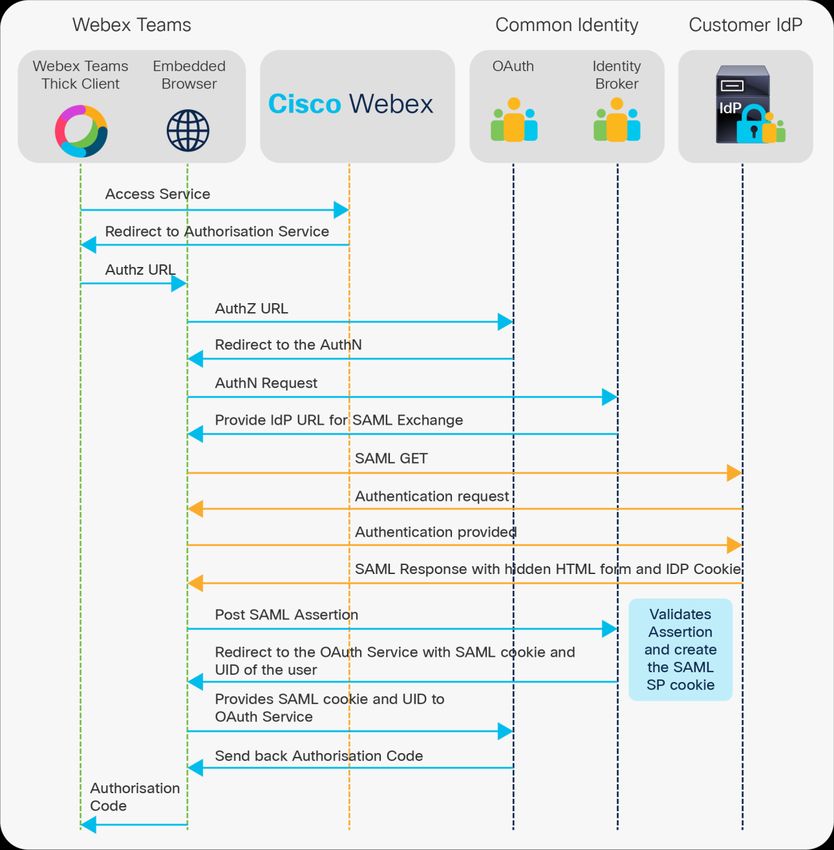
Figure 1 illustrates the flow between the user on a Webex Teams app, the Webex Teams service, and your identity Provider
(IdP) when you configure Webex Teams for authentication and authorization with a SAML identity provider for federated S SO.
This is a typical industry standard for SSO authentication.
© 2020 Cisco and/or its affiliates. All rights reserved. Page 6 of 16Figure 1. Authentication and Authorization Flow Via the Cisco Webex Teams Platform Users gain access to Webex services after successful authentication and authorization, as illustrated in Figure 1. A dministrators must consider employee lifecycle use cases to maintain the overall security of their Webex services. You can use features suc h as the manual delete via Webex Control Hub, Webex Directory Connector, or the SCIM API to help ensure that users ar e deprovisioned and lose access after an HR event. Cisco Webex Identity Management Partners Cisco has worked with the leading identity providers in the market for both on-premises and identity-as-a-service integration for the purpose of SAML v2 federated SSO. We have either created integration guides or confirmed customer integrations for the following partners: © 2020 Cisco and/or its affiliates. All rights reserved. Page 7 of 16
On-Premises Identity Providers

      ●    Microsoft ADFS
      ●    Oracle Access Manager
      ●    Ping Identity
      ●    OpenAM
      ●    IBM Security Access Manager
      ●    CA Siteminder
      ●    F5 – BigIP
      ●    Shibboleth

Identity-as-a-Service Vendors

      ●    Okta
      ●    PingOne
      ●    Salesforce
      ●    Microsoft Azure
      ●    Oracle Identity Cloud Service
      ●    Centrify
      ●    OneLogin

Devices and Workplaces
Device Management
Cisco Webex Control Hub provides a simple interface to onboard and activate Cisco Webex personal and shared devices. Device
onboarding can be done easily using a 16-digit activation code or a QR code generated in Webex Control Hub. Once the devices
are onboarded, an administrator has visibility into the details and states of those devices and is able to update selected
configuration settings from Webex Control Hub, such as turn on a settings lock to prevent end users from changing a room
system configuration using a touch panel. If there are any issues with a device that need attention (such as an unplugged cable
or upgrade requirements), the administrator can see those issues listed in Webex Control Hub on that device’s detail panel.

© 2020 Cisco and/or its affiliates. All rights reserved.                                                              Page 8 of 16
Workplace Optimization
Workspaces in Control Hub is a real-time capability that helps you understand the activity that’s happening in your meeting
rooms, open spaces and even with your Webex Rooms devices at home. You can attribute each space to a “workspace” in
Control Hub. This allows you to filter metrics by the type of workspace – for example by huddle spaces, meeting rooms, focus
rooms, etc.
Workspaces tab gives you rich insight into every type of activity, even during local meetings when Cisco Webex Rooms devices
are not being used. You will find analytics on devices in use, occupancy count, and environmental data including room acoustics,
room air quality, temperature and humidity, and room lighting.
With historical utilization tracking, you can view historical data from each space, or select a wholistic view of the whole
organization. Analyze both room utilization metrics and room environment metrics such as rooms booked but not used, median
occupancy across your spaces, and ambient noise levels. You will be able to view data from the last 24 hours or for a 7, 30, or
90-day period.
The quality of service metrics are being expanded over time.
Global Settings
Table 3 lists global settings that can be edited by an administrator from Webex Control Hub.
Table 3. Global Settings Available from Webex Control Hub
Setting name Administration capabilities
Security Restrict Webex Teams app launch to those mobile devices that are protected with locked
screens
Privacy Set Cisco Support access to your portal in read-only mode, enable automatic crash reports for
devices to be uploaded to Cisco Support
Domains Add and verify SIP domains
Webex SIP address Set SIP address subdomains for Webex services
Directory synchronization Enable or disable directory synchronization
Authentication Enable or disable SSO
Email Control whether Cisco sends invite emails to end users
Support Configure support parameters for the organization
Webex Control Hub also provides an easy interface for an administrator to manage the organization’s subscriptions. The My
Company page provides access to the organization’s current subscriptions and licenses as well as visibility into usage levels for
each. This page provides details on the account (company name, account number, etc.), as well as a detailed order history.
© 2020 Cisco and/or its affiliates. All rights reserved. Page 9 of 16Single Pane of Glass Service Management
Control hub is the strategic management portal for all Cisco Collaboration solutions, not just Webex. Solutions beyond Webex
are being incrementally added to Control Hub over time.
Webex Control Hub provides an interface for management of all Webex services that an organization has signed up for, whether
they are in trial state or purchased. It allows the administrator to set up and manage Cisco Webex Hybrid Services. For examp le,
an administrator can register Hybrid Services connectors and schedule software upgrades for those connectors.
Table 4 lists Webex services that can be managed from Webex Control Hub and the high-level administration capabilities for
each service.
Table 4. Webex Services Available from Control Hub
Service name Administration capabilities
Cisco Webex Calling Set up service, configure settings
Cisco Webex Teams Set up service, configure settings
Cisco Webex Meetings For new orders, set up service and configure settings; for existing sites administer specific
settings via site linking
Cisco Webex Hybrid Call Service Register or deregister connectors, view resources, schedule software upgrades, view service
or resource errors, upload certificates, verify SIP domains, deactivate service
Cisco Webex Hybrid Calendar Service Activate service with Google Calendar or Microsoft Exchange, register or deregister
connectors, view resources, schedule software upgrades, view service or resource errors,
deactivate service
Cisco Webex Video Mesh Onboard or remove Hybrid Media servers, view resources, view service or resource errors,
configure video quality for on-premises meetings, schedule upgrades, deactivate service
Cisco Webex Hybrid Data Security Manage and store keys used for encrypting content and services that operate on generating
search index hashes
Cisco Webex Context Service Register or deregister connectors, view resources, deactivate service
On-premises resources View all resources from a single location, perform cluster-level configuration, such as setting
(Hybrid Services) time zone and defining resource groups
Whereas the services settings apply to specific Webex services only, the administrator can also enable and manage settings th at
affect the entire organization. For example, an administrator may need to modify security and privacy settings, SIP domain, and
branding settings. An administrator can also manage directory synchronization and SSO settings, and enable or disable SSO.
© 2020 Cisco and/or its affiliates. All rights reserved. Page 10 of 16Enterprise Content Management (ECM)
In addition to its native file sharing and storage, Cisco Webex Control Hub also offers IT administrators the flexibility to enable
Microsoft OneDrive, SharePoint Online and Box as an Enterprise Content Management (ECM) solution to their users. So users
can share, edit, and grab the latest OneDrive, SharePoint Online and Box (editing not supported) files right within Webex Teams
work spaces.
The setup is a single toggle in Webex Control Hub and IT administrators have full control to select which SharePoint Online or
OneDrive domains or Microsoft Azure Tenant ID they want to enable without having to change their existing file-sharing
permissions and Data Loss Prevention (DLP) policies. IT administrators can configure settings for their enterprise content
management platform and manage access to Cisco Webex Teams standard storage. This ensures that only IT-approved domains
are available and users cannot use personal OneDrive folders. This not only eliminates data loss risk, but also protects against
malware threats. For the highest level of control, IT administrators can even turn off native file storage in Webex Teams so that
all content is routed through their existing enterprise file storage service. New files and folders can be uploaded to OneDrive,
SharePoint Online or Box right from Webex Teams as well as share, view, and co-edit files within Webex Teams. If everyone in
the space is working on files in a Microsoft OneDrive or SharePoint Online folder, the space can be linked to that folder and files
within the linked folder can directly be accessed from the Webex Teams space.
Cisco Webex Control Hub ECM controls:
● Allow IT administrators to enable Webex Teams’ native file storage or Microsoft OneDrive, SharePoint Online and Box.
● Block personal or shadow IT OneDrive or SharePoint Online folders, and only allow approved instances
● Allow IT administrators to enable or disable ECM entitlement to a subset of users or an entire organization
● Allow IT administrators to Link folders to spaces for OneDrive / Sharepoint Online
● Enable / disable screen capture when native storage is turned off
Webex Teams Messaging Management
Setting name Administration capabilities
File sharing control Set download and preview restrictions for internal users for Webex Teams app and bots
Preview shared links Controls whether link previews are shown in Webex Teams clients
Share animated GIFs Control GIPHY integration, which controls the GIF option in Web ex Teams clients
Webex Meeting Management
Historically Webex Meetings Sites were managed via Site Administration tool. IT administrators can now fully manage new
Webex Meetings Sites via Cisco Webex Control Hub.
Webex Control Hub now provides access to most controls available in the Site Administration Tool such as user license
assignment, session types, tracking codes, site configuration and more. Once transitioned from Site Administration Tool, Webex
Control Hub becomes the main unified administration portals for managing all your Webex Services.
Cloud Connected UC
Webex Cloud-Connected UC offers a centralized, global administrative view of Cisco unified communications applications
deployment such as UCM, UCM Cloud, and Hosted Collaboration Solution (HCS). Cloud-Connected UC centralizes important
administrative operations functions for these systems in the cloud using Webex Control Hub. These operations include system
health checks, analytics, troubleshooting, and service and certificate updates.
© 2020 Cisco and/or its affiliates. All rights reserved. Page 11 of 16Webex Cloud-Connected UC is designed for customers with on-premises UCM deployments that would like to augment their CUCM with some management features from the cloud while keeping their calling workload on the premises. Customers can use dashboards in the Webex Control Hub to review, assess, and manage operations of their deployment. Analytics and cluster software upgrades for CUCM are the first set of features that will be available in Control Hub. Webex Calling Management Webex Calling Analytics in Control Hub provide call quality and engagement details for the organization to track the adoption of Webex Calling. Call information can be tracked by individuals, with filtering by end-points, including Cisco IP Phones, Cisco RoomDevices, and soft clients. Media quality data is available all calls, with threshold tracking based on pocket loss, laten cy, and jitter. Trend analysis available for daily, weekly, and monthly views. Contact Center Management Webex Contact Center is integrated with Webex Control Hub to provide a unified administration experience. Service provisioning is fully automated and integrated into the common on boarding flow of Webex. Once provisioned , all the user, license, security, and feature management operations can be executed by partner and customer administrators from within Control Hub. Additionally all contact center applications provide a single -sign-on experience powered by the Webex Identity platform. For advanced administrative options, users can seamlessly cross launch to the Webex Contact Center Management Portal. Additional Capabilities Help Desk The Help Desk feature allows an IT support person with the help desk administrator role to look up users, devices, and services activated in an organization and see selected settings in read-only mode. Using this information, the IT support person can troubleshoot end users’ problems – for example, whether devices are registered with the Webex platform or if services are properly activated for a specific user. Partners can additionally use the Help Desk feature to provide Tier 1 support to their customers’ user bases. Search results provide relevant details at a glance, along with the ability to view the customer’s Webex Control Hub in read-only mode if the customer has opted in for this feature. Partners can also look up customer orders to see their status and to help with customer inquiries. To use the order lookup tool, a user must be assigned the order administrator role. © 2020 Cisco and/or its affiliates. All rights reserved. Page 12 of 16
Partner Portal (for customer trials and customer management)
With trials for Cisco Webex services, partners can easily demonstrate the business value of Webex by creating 30-, 60-, and 90-
day trials at no cost for potential customers through Webex Control Hub. The full collaboration suite of services offered within
Webex is available for trial, including Webex Meetings, Messaging, and Calling (with public switched telephone network [PSTN]
services).

Partners can view and manage their paying customers and their customer trials in Webex Control Hub. The customer list
provides a simple way for partner administrators to view their customers’ services and account status, and the number of
licenses the customer has purchased. Partner administrators can edit the terms of the trial (for example, changing the length of
the trial or adding services), in addition to managing the customer’s settings, with the Set Up Customer button.

Audit Administrator Activity

The admin audit log provides the data for forensic queries or for archiving. A log of admin actions is a requirement for
compliance in many organizations and industries. Full administrators can view significant actions (such as changes to ORG
settings) done by any administrator via the admin audit log stored in Control Hub. These admin audit logs can be viewed in
Control Hub, where you can search for admin actions during a specific date range or specific action or specific administrator to
narrow search results. You can also download the logs to a Comma Separated Values (CSV) file.

Analytics
Cisco Webex Control Hub Analytics provides usage trends and valuable insights that can be used to help with strategies to
promote and optimize adoption across teams. Advanced analytics capabilities are integrated as part of Webex Control Hub.
Customers are able to understand how different services are being used across the organization and effectively grow adoption
to maximize productivity gains. Administrators are able to monitor capacity and performance to optimize resource utilization as
part of proactive management. Administrators or IT help desk staff can diagnose and shorten case resolution time.

An intuitive graphical interface allows administrators access to usage, adoption, and other important information. Interactiv e
data visualizations explore data as it automatically adapts to parameters specified in real time.

Access to historical data for the last 90 days is standard. Data is aggregated and presented in multiple reports. Administrators
may access these reports at any time within Webex Control Hub.

Pro Pack for Webex Control Hub provides support for up to 13 months of data. Additionally, it provides more in-depth per-
meeting, per-participant detail, which can be leveraged for deeper data exploration and insight, well as the ability to ex port the
detailed data.

© 2020 Cisco and/or its affiliates. All rights reserved.                                                                 Page 13 of 16
Table 5 summarizes the Webex analytics features.

Table 5.          Webex Teams Analytics Features

 Feature                                        Standard offer/     Description
                                                Pro Pack required

 Flexible historical reports                    Standard offer      Daily aggregated metrics up to 90 days are visualized in summary reports for
                                                                    Webex Meetings, Webex Teams, Hybrid Media Service, and devices.
                                                                    Engagement and quality reports are available.

 Drill-down                                     Pro Pack required   Individual session and user-level metrics are available.
                                                                    You can zoom in from a monthly report to an individual meeting record.

 13 months of data                              Pro Pack required   Access up to 13 months of historical data.

 Multidimensional pivots and                    Standard offer      The advanced analytics engine allows users to manipulate data in real time via
 data exploration                                                   the reporting interface.
                                                                    Selection of any data set will update all associated reports.

 Meeting troubleshooting                        Standard offer      Real-time search of the last 21 days of Webex meeting detail s.
                                                                    Locate meetings with participant details by searching for the participant email
                                                                    or meeting ID.

 Workspaces                                     Standard offer      Real-time metrics from meeting rooms or open spaces. Gives you a
                                                                    comprehensive overview of the activity in your office spaces, so you can make
                                                                    informed, data-driven decisions about future adoption.

Historical Analytics Dashboards

Historical reports are standard in Webex Control Hub. They are available in daily, weekly, and monthly format. Up to 90 days of
daily aggregated metrics are accessible by users with full administrator or read-only privileges. Administrators may view
different types of reports for Webex Teams, Webex Meetings, Webex Video Mesh, and Webex devices when applicable to the
deployed configuration.
      ●    Webex Meetings reports include meeting and audio usage, average meeting join time, and media quality.
      ●    Webex Teams reports include space usage, active users, and files shared.
      ●    Webex Video Mesh reports include total calls, resource utilization, and cluster status.
      ●    Webex device utilization reports include usage and most and least used devices.

Identify anomalies with historical trends. Engagement, quality, and diagnostic data are readily available. To help you understand
your system at a glance, top metrics are easily visible. Trending and visualizations make key patterns clear and apparent.

© 2020 Cisco and/or its affiliates. All rights reserved.                                                                                 Page 14 of 16
Drill-Down
With Pro Pack for Webex Control Hub, Webex meeting session and user-level details are available. Administrators can drill down
from monthly total meeting usage to individual call details with one click. This capability allows administrators to filter
unwanted data so that they can focus on the information that matters most to them.
Data Exploration
The advanced analytics data architecture captures information in an internal data model that allows real-time, on-the-fly data
exploration. Any manipulation or selection of a data set will automatically update all associated reports. Multidimensional
pivots change how information is visualized, enabling boundless manipulation of data in real time.
Troubleshooting
Webex Control Hub also offers a Webex meeting troubleshooting capability. Technical staff can quickly resolve support requests
and search for meetings in real time as they occur. Host email address, participant email address, conference ID, device name
and meeting ID are valid search criteria; meetings can be searched and diagnosed up to 21 days. When a meeting is located,
start time, duration, meeting name, number of participants, and status are reported. Control Hub Administrators will be able
see the quality of service, client version information, peripherals information, audio quality, video quality and Join Meeting Time
per participant with near real time (1 minute) latency.
Advanced Diagnostics
Advanced Diagnostics provide access to insights that can help IT administrators pinpoint user experience issues and
troubleshoot them quickly. It provides a drill down to per participant level in the meeting with detailed network information
such as latency, packet loss, jitter for audio, video, sharing quality of the meeting, memory utilization and CPU utilization data of
the device used to join the meeting. Data is updated every minute so problems can be diagnosed as they arise. IT Admins can
also track end of meeting and mute status per participant.
Reports
Webex Control Hub enables IT administrators to generate CSV formatted reports of detailed data that shows Webex services
usage for their organization. With standard license for Webex Control Hub, IT administrators have access to reports going bac k
up to 3 months in the past.
● Webex Meeting Usage Summary Report
● Webex Active Hosts Report
● Webex Inactive Users Report
With ProPack for Webex Control Hub, IT administrator have access to 11 reports with ability to go back up to 13 months in the
past.
● Webex Meeting Usage Summary Report
● Webex Active Hosts Report
● Webex Inactive Users Report
● Webex Meeting Report
● Webex Attendee Report
● Webex Meeting Audio Usage Report
● Teams Bots Activity Report
© 2020 Cisco and/or its affiliates. All rights reserved. Page 15 of 16● Teams User Activity Report
● Teams Summary Report – Bots Activity Report
● Teams Summary Report – User Activity Report
● Teams Client Version Report
Cisco environmental sustainability
Information about Cisco’s environmental sustainability policies and initiatives for our products, solutions, operations, and
extended operations or supply chain is provided in the “Environment Sustainability” section of Cisco’s Corporate Social
Responsibility (CSR) Report.
Reference links to information about key environmental sustainability topics (mentioned in the “Environment Sustainability”
section of the CSR Report) are provided in the following table:
Sustainability topic Reference
Information on product material content laws and regulations Materials
Information on electronic waste laws and regulations, including products, batteries, and packaging WEEE compliance
Cisco makes the packaging data available for informational purposes only. It may not reflect the most current legal
developments, and Cisco does not represent, warrant, or guarantee that it is complete, accurate, or up to date. This information
is subject to change without notice.
Cisco Capital
Flexible payment solutions to help you achieve your objectives
Cisco Capital makes it easier to get the right technology to achieve your objectives, enable business transformation and help
you stay competitive. We can help you reduce the total cost of ownership, conserve capital, and accelerate growth. In more
than 100 countries, our flexible payment solutions can help you acquire hardware, software, services and complementary
third-party equipment in easy, predictable payments. Learn more.
Printed in USA C78-740770-04 10/20
© 2020 Cisco and/or its affiliates. All rights reserved. Page 16 of 16You can also read


