Email id: apecetd.nic.in
←
→
Page content transcription
If your browser does not render page correctly, please read the page content below
APECET-2019 ADMISSIONS
INSTRUCTIONS TO PRINCIPALS OF COLLEGES ON FINAL PHASE POST ALLOTMENT PROCESS
Sir/Madam,
Provisional Allotments of candidates have been released on 22-07-2019.
The candidates have been instructed to give self joining report through candidate login
in the portal https://apecet.nic.in in token of their acceptance or willingness to join the
allotted college / course as per his allotment order and attend the college with
allotment order, receipt of certificates and joining report by 26-07-2019
Candidates with allotment order, receipt of certificates and joining report will report at
the allotted college by 26-07-2019 along with 2 sets of Xerox copies of all his/her
certificates (along with originals ) for verification.
Last date for Updation of joining details of reported candidates by college
managements by 27-07-2019
Class work is already commenced.
This year also online certificate verification has been taken up. Most of the
certificates of candidates have been verified through online and in some of the
cases the certificates have been verified at Help line centers. For those verified
on line, the receipt of certificates bears the HLC code as APSCHE and it is
system generated and bears no sign or seal. For those verified at HLCs, the
receipt of certificates bears the HLC code and it bears sign and seal of verifying
officer. Hence, Principals are requested to verify thoroughly the following
documents of the candidates and report any difference in candidate’s
academic/caste/income credentials to the undersigned immediately for further
action.
Email id: convenerecet2019@gmail.com
1. APECET-2019 Rank Card.
2. APECET-2019 Hall Ticket.
3. Diploma pass certificate and marks memos. Check percentage of marks in
diploma level. Candidates with>=44.5% for OCs and >=39.5% for reserved
categories(BC/SC/ST).
4. Insist for equivalence certificate of Diploma (issued by SBTET) if the
candidate submits a diploma certificate other than from SBTET.
5. Study certificates from Diploma to 7th class (Decide local area as per rules).
Local area is decided based on the places of study of the candidate but not on
the residence of the parents. Certain diploma courses/institutions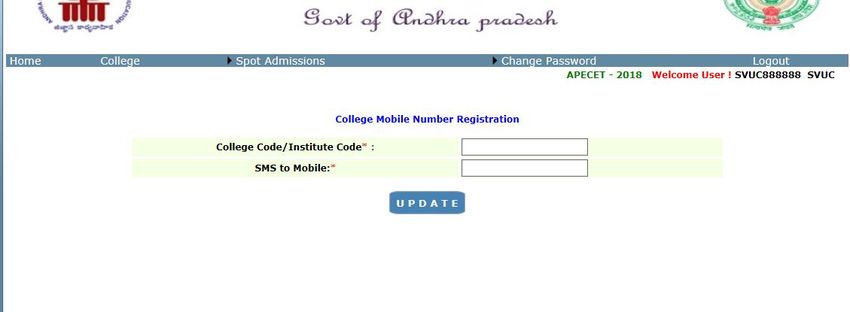
(Ref.G.O.Ms.No.100) are admitting candidates on statewide basis. That period of
study shall not be considered for deciding local area (in such cases observe the
places of study from 10th to 4th).
6. Transfer certificate
7. S.S.C or its equivalent Marks memo
8. Diploma to 7th class Study Certificate
(OR)
Local status certificate if applicable i.e a candidate who migrates to any part of the
state of Andhra Pradesh from the state of relangana within a period of Five years
from the 2nd day of June, 2014 shall be regarded as the local candidate in the state
of Andhra Pradesh
(OR)
Residence Certificate (in case where the candidate has no institutionalized
education) OR Residence Certificate of either of the parents in A.P. for 10 years in
case of non-local candidates or Aadhar Card of candidate with A.P. address
9. Income Certificate issued on or after 01.01.2016 OR Ration card issued by
competent authority of A.P containing candidate and father/mother’s name where
income is in prescribed limits [ below 2 Lakhs for SC/ST and below one lakh for
OC/BC candidates and age of the candidate (max.) 29 years for SC/ST and 24 years
for (OC/BC) candidates as on 02-07-2019 for claiming tuition fee reimbursement.
10. Caste Certificate issued by the competent authority in case of reserved category
candidates (BC/SC/ST).
11. NCC/Sports/CAP/PH certificates wherever and whenever applicable.
Reporting of candidates will be updated in the web portal by the candidate himself
through self-reporting system or at HLC. A joining report will be generated containing
the admission number. This will help in planning for next round of counseling within a
week.
College authorities are requested to admit the allotted candidates with allotment orders
having Joining Report copy only.
Candidate reporting at college directly shall be instructed to report through self-
reporting system or at the nearest HLC for updating his joining details; otherwise,
his/her allotment is cancelled and will be treated as a vacancy.
Colleges are provided with user ID and Password as done in previous Phase to view the
list of allotted candidates and list of candidates reported through self-reporting system
or at HLC.
If a candidate wishes to submit income certificate now, he shall be instructed to
approach nearest helpline center for entry of fee reimbursement eligibility and
download a revised allotment order and Receipt of Certificate.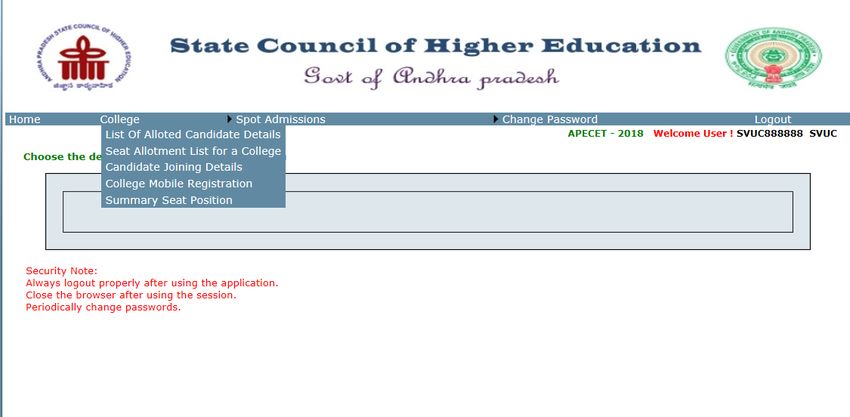
USER MANUAL FOR PERFORMING THE ABOVE ACTIVITY
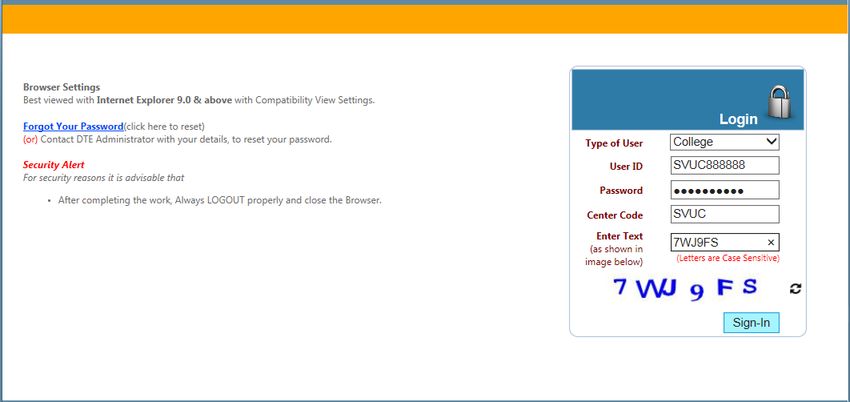
Double click on Internet Explorer version 9.0 and above preferably with Windows 7 Operating
System. The application is not designed to work on other browsers like Mozilla firefox, Google
chrome etc.], Enter the URL https://apecetd.nic.in in address bar.
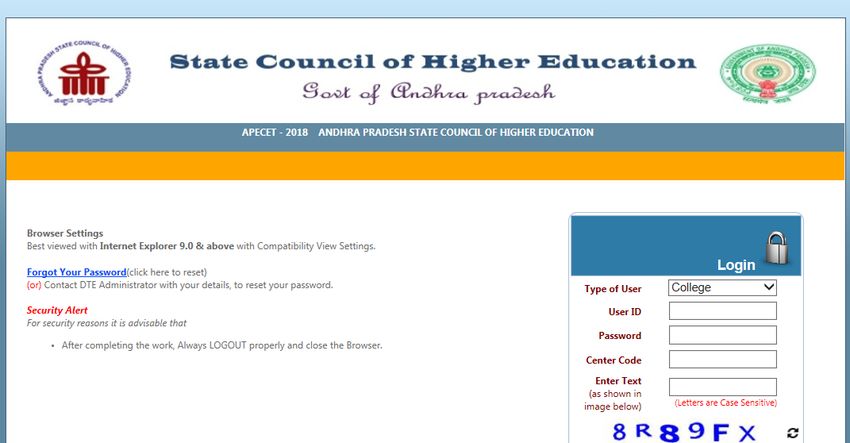
Press Enter. You will get the following screen.
Select the User Type College
Enter the User Id . The user Id string is of 10 character length is communicated your mobile
number available in our records through SMS (your ECET counselling code followed by 888888
OR 88888 OR 8888 depending on length of college code 4 characters or 5 characters or 6
characters as the case may be).
Initially the password is set as that of User Id (10 character length)
e.g.
College code User ID Password
PASSWORD USED IN FIRST
SKHE SKHE888888
PHASE
PASSWORD USED IN FIRST
MITS1 MITS188888
PHASE
PASSWORD USED IN FIRST
ANCUSF ANCUSF8888
PHASE
Enter the college code (ECET counselling code of your college).
Enter the CAPCHA code and Click on SIGN IN.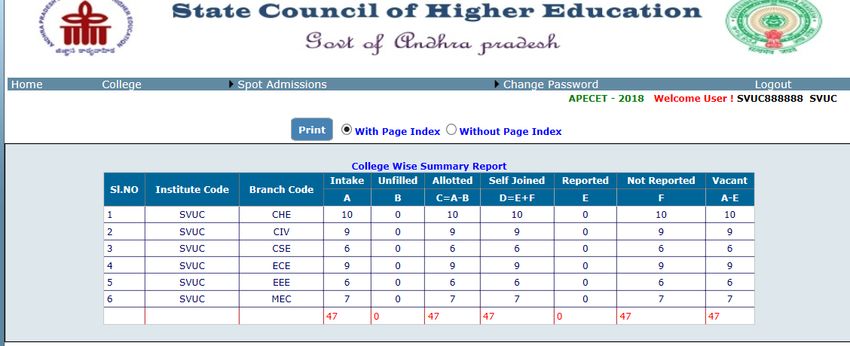
Five activities can be performed from the drop down menu
1. Downloading list of allotted candidates in all branches
2. Seat allotment list for a particular branch
3. Updation of joining details of reported candidates using candidate joining details link
4. Registering a mobile to receive information pertaining to counseling.
5. Summary seat position

   List of allotted candidates details link provides you information for a particular branch.

   Seat allotment list for a particular college link provides you information for all the branches in
   the college.
You can also view the details of candidates reported through self-reporting system
accepting the allotment and willingness to join your college/course using the link
candidates joining details for the given branch code. You are required to update their
joining when the candidate approaches with allotment order and joining report. If
joining report is not available, the candidate shall be instructed to report through self
reporting system and generate the joining report.
If the joining details of reported candidates is not updated, it will be treated as not
reported category and will be treated as a vacancy.
A new provision has been given to colleges to register a mobile number of Principal or a person
looking after the admissions using the link College Mobile Number Registration. All the
messages pertaining to counseling or admissions will be sent to the mobile. You can change your
password with the link in the screen.
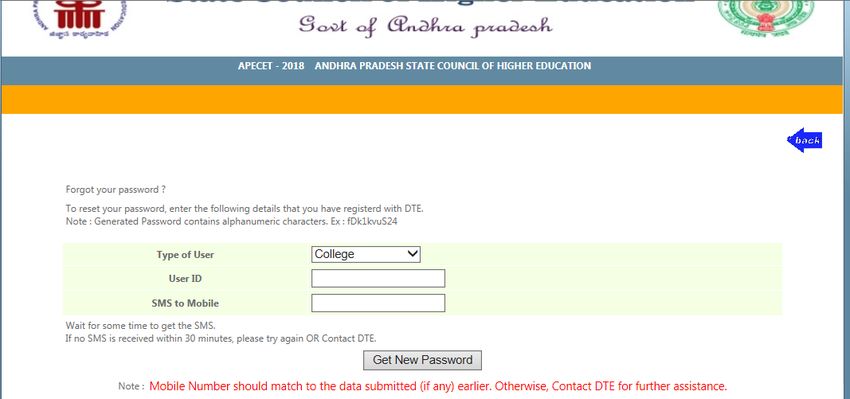
If password is forgotten, the password can be obtained to the registered mobile using the
Forgot Password link on the home page.
Click on
the link
Select type of user as college, Provide the user Id and furnish the mobile number registered
earlier and click on Get New password.
Password shall be maintained confidential to ensure correctness of entries and misuse by
others.
Summary seat position report gives information about all the barnches regarding intake,alloted
,unfilled,self joined, reported at college ,not reported at college and vacant seats .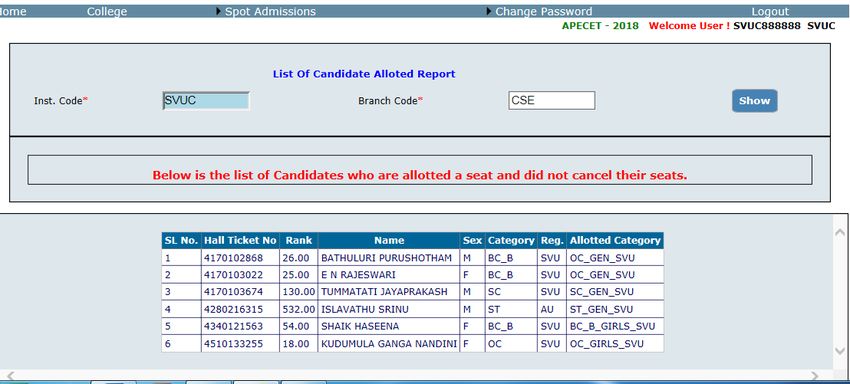
CONTACT DETAILS:

Mobile Numbers: 7995145613, 7995945613
Email id: convenerecet2019@gmail.com

                                          With regards,

                                    CONVENOR-APECET-2019 ADMISSIONS
You can also read


