Intel Performance optimizations for Deep Learning - AI Spektrum
←
→
Page content transcription
If your browser does not render page correctly, please read the page content below

Choose the Best Accelerated Technology

Intel Performance optimizations for
Deep Learning
Shailen Sobhee – Deep Learning Engineer
shailen.sobhee@intel.com
15 June 2021

                                                                  All information provided in this deck is subject to change without notice.
                                          Contact your Intel representative to obtain the latest Intel product specifications and roadmaps.
▪ Quick recap of oneAPI
                                                  ▪ Overview of oneDNN
                                                  ▪ Training:
                                                    • Overview of performance-optimized DL
                                                      frameworks

      Agenda
                                                      • Tensorflow
                                                      • PyTorch

                                                  ▪ Inferencing:
                                                    • Intel® Low Precision Optimization Tool
                                                    • Primer to Intel® Distribution of OpenVINO™
                                                      • (Deeper presentation in next session)

IAGS Intel Architecture, Graphics, and Software                                                    2
Intel’s oneAPI
      Ecosystem
      Built on Intel’s Rich Heritage of
      CPU Tools Expanded to XPUs

                                                                                                                                                                                                     ...
      oneAPI
      A cross-architecture language based on C++
      and SYCL standards

      Powerful libraries designed for acceleration of
      domain-specific functions

      A complete set of advanced compilers, libraries,
      and porting, analysis and debugger tools

      Powered by oneAPI
      Frameworks and middleware that are built
      using one or more of the oneAPI industry
      specification elements, the DPC++ language,
      and libraries listed on oneapi.com.

                                                                                                                                       Available Now

IAGS Intel Architecture, Graphics, and Software          Visit software.intel.com/oneapi for more details
                                                         Some capabilities may differ per architecture and custom-tuning will still be required. Other accelerators to be supported in the future.
                                                                                                                                                                                                           3
A core set of high-performance tools
                                                  for building C++, Data Parallel C++
                                                  applications & oneAPI library-based
                                                  applications

                                                                                                                                        Intel® oneAPI
                                                  Intel® oneAPI                          Intel® oneAPI                                  Rendering
                                                  Tools for HPC                          Tools for IoT                                  Toolkit
                                                  Deliver fast Fortran,                  Build efficient, reliable                      Create performant,
                                                  OpenMP & MPI                           solutions that run at                          high-fidelity visualization
                                                  applications that                      network’s edge                                 applications
                                                  scale

                                                  Intel® AI Analytics                                         Intel® Distribution of
                                                  Toolkit                                                     OpenVINO™ Toolkit
                                                  Accelerate machine learning & data                          Deploy high performance
                                                  science pipelines with optimized DL                         inference & applications from
                                                  frameworks & high-performing             Toolkit            edge to cloud
                                                  Python libraries

          Latest version is 2021.1

IAGS Intel Architecture, Graphics, and Software                                                                                                                       4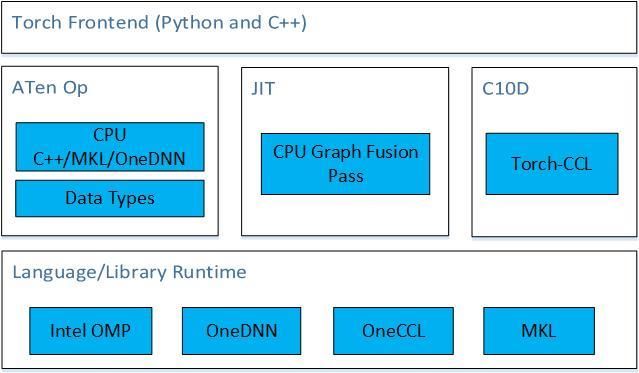
Intel® oneAPI AI Analytics Toolkit
      Accelerate end-to-end AI and data analytics
      pipelines with libraries optimized for Intel®
      architectures

      Data scientists, AI researchers, ML and DL
      developers, AI application developers

      ▪ Deep learning performance for training and
        inference with Intel optimized DL
        frameworks and tools
      ▪ Drop-in acceleration for data analytics and
        machine learning workflows with compute-
        intensive Python packages

     Learn More: software.intel.com/oneapi/ai-kit

IAGS Intel Architecture, Graphics, and Software       55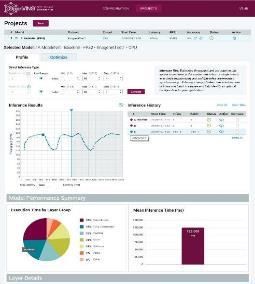
Develop Fast Neural Networks on Intel® CPUs & GPUs
with Performance-optimized Building Blocks

Intel® oneAPI Deep Neural Network Library
(oneDNN)
Intel® oneAPI Deep Neural Network Library (oneDNN)

      An open-source cross-platform performance library for deep learning
      applications
       • Helps developers create high performance deep learning frameworks
       • Abstracts out instruction set and other complexities of performance
         optimizations
       • Same API for both Intel CPUs and GPUs, use the best technology for the
         job
       • Supports Linux, Windows and macOS
       • Open source for community contributions

      More information as well as sources:
      https://github.com/oneapi-src/oneDNN

IAGS Intel Architecture, Graphics, and Software                                   7
8

          Intel® oneAPI Deep Neural Network Library
          Basic Information                                                                                                 Intel® oneDNN

                                                                                    Convolution                             2D/3D Direct Convolution/Deconvolution, Depthwise separable
          ▪ Features                                                                                                        convolution
          • API: C, C++, SYCL                                                                                               2D Winograd convolution
                                                                                    Inner Product                           2D/3D Inner Production
          • Training: float32, bfloat16(1)
                                                                                    Pooling                                 2D/3D Maximum
          • Inference: float32,      bfloat16(1),     float16(1),   and   int8(1)                                           2D/3D Average (include/exclude padding)
                                                                                    Normalization                           2D/3D LRN across/within channel, 2D/3D Batch normalization
          • MLPs, CNNs (1D, 2D and 3D), RNNs (plain, LSTM, GRU)
                                                                                    Eltwise (Loss/activation)               ReLU(bounded/soft), ELU, Tanh;
          ▪ Support Matrix                                                                                                  Softmax, Logistic, linear; square, sqrt, abs, exp, gelu, swish

          • Compilers: Intel, GCC, CLANG, MSVC, DPC++                               Data manipulation                       Reorder, sum, concat, View
                                                                                    RNN cell                                RNN cell, LSTM cell, GRU cell
          • OS: Linux, Windows, macOS
                                                                                    Fused primitive                         Conv+ReLU+sum, BatchNorm+ReLU
          • CPU                                                                     Data type                               f32, bfloat16, s8, u8
               • Hardware: Intel® Atom, Intel® Core™, Intel® Xeon™
               • Runtimes: OpenMP, TBB, DPC++                                        (1)    Low precision data types are supported only for platforms where hardware
                                                                                            acceleration is available
          •    GPU
               •    Hardware: Intel HD Graphics, Intel® Iris® Plus Graphics
               •    Runtimes: OpenCL, DPC++

    IAGS Intel Architecture, Graphics, and Software                                        Iris is a trademark of Intel Corporation or its subsidiaries in the U.S. and/or other countries   .   8
Overview of Intel-optimizations for
TensorFlow*
Intel® TensorFlow* optimizations

      1. Operator optimizations: Replace default (Eigen) kernels by highly-
         optimized kernels (using Intel® oneDNN)
      2. Graph optimizations: Fusion, Layout Propagation
      3. System optimizations: Threading model

IAGS Intel Architecture, Graphics, and Software                               13
                                                                               13
Run TensorFlow* benchmark Department or Event Name Intel Confidential 14
Operator optimizations

                                                  Examples            Weights

                                                             MatMul
      In TensorFlow, computation                                          Bias
      graph is a data-flow graph.
                                                              Add

                                                             ReLU

IAGS Intel Architecture, Graphics, and Software                                  15
                                                                                  15
Operator optimizations
▪ Replace default (Eigen) kernels by Forward Backward
highly-optimized kernels (using Conv2D Conv2DGrad
Intel® oneDNN) Relu, TanH, ELU ReLUGrad,
▪ Intel® oneDNN has optimized a set TanHGrad,
ELUGrad
of TensorFlow operations.
MaxPooling MaxPoolingGrad
▪ Library is open-source AvgPooling AvgPoolingGrad
(https://github.com/oneapi-
BatchNorm BatchNormGrad
src/oneDNN) and downloaded
automatically when building LRN LRNGrad
TensorFlow. MatMul, Concat
IAGS Intel Architecture, Graphics, and Software 16
16Fusing computations
Conv Conv
Sum ReLU
Conv Conv+ReLU+Sum
▪ On Intel processors a high percentation of time ▪ The frameworks are expected to be able to
is typically spent in BW-limited ops detect fusion opportunities
• ~40% of ResNet-50, even higher for inference • IntelCaffe already supports this
▪ The solution is to fuse BW-limited ops with
convolutions or one with another to reduce the
# of memory accesses
• Conv+ReLU+Sum, BatchNorm+ReLU, etc
IAGS Intel Architecture, Graphics, and Software 17Graph optimizations: fusion
Input Filter Input Filter Bias
Conv2D
Bias
Conv2DWithBias
BiasAdd
Before Merge After Merge
IAGS Intel Architecture, Graphics, and Software 18
18Graph optimizations: layout propagation
Input Filter Input Filter Input Filter
Convert Convert Convert Convert
Conv2D
MklConv2D MklConv2D
Convert
ReLU
Convert
MklReLU MklReLU
Convert Convert
Shape
Shape Shape
Initial Graph After Layout Conversions After Layout Propagation
All oneDNN operators use highly-optimized layouts for TensorFlow tensors.
IAGS Intel Architecture, Graphics, and Software 19
19More on memory channels: Memory layouts
▪ Most popular memory layouts for image recognition
are nhwc and nchw
• Challenging for Intel processors either for vectorization or
for memory accesses (cache thrashing) nchw
▪ Intel oneDNN convolutions use blocked layouts
Reorders
• Example: nhwc with channels blocked by 16 – nChw16c
• Convolutions define which layouts are to be used by other
primitives
• Optimized frameworks track memory layouts and
perform reorders only when necessary nChw16c
More details: https://oneapi-src.github.io/oneDNN/understanding_memory_formats.html
IAGS Intel Architecture, Graphics, and Software 20
20Data Layout has a BIG Impact
• Continuous access to avoid gather/scatter
• Have iterations in inner most loop to ensure high vector utilization
• Maximize data reuse; e.g. weights in a convolution layer
• Overhead of layout conversion is sometimes negligible, compared with operating on
unoptimized layout
Channel based
21 18 … 1 .. 8 92 .. (NCHW)
21 18 32 6 3
8 92 37 29 26 44 Pixel based
1 8 0 3 21 8 18 92 .. 1 11 .. (NHWC)
40 11
9 229 22
76 3 81 26
for i= 1 to N # batch size
for j = 1 to C # number of channels, image RGB = 3 channels
23 3
44 47
81 29
32 88 11 1 for k = 1 to H # height
for l = 1 to W # width
5 15
38 16
10 22
11 46 1 12 dot_product( …)
29 9 13 11 1
IAGS Intel Architecture, Graphics, and Software More details: https://oneapi-src.github.io/oneDNN/understanding_memory_formats.html
21
21System optimizations: load balancing
▪ TensorFlow graphs offer opportunities for parallel
execution.
▪ Threading model
1. inter_op_parallelism_threads = max number of
operators that can be executed in parallel
2. intra_op_parallelism_threads = max number of
threads to use for executing an operator
3. OMP_NUM_THREADS = oneDNN equivalent of
intra_op_parallelism_threads
IAGS Intel Architecture, Graphics, and Software 22
22Performance Guide
▪ Maximize TensorFlow* Performance on CPU: Considerations and Recommendations for Inference
Workloads: https://software.intel.com/en-us/articles/maximize-tensorflow-performance-on-cpu-
considerations-and-recommendations-for-inference
Example setting system environment
os.environ["KMP_BLOCKTIME"] = "1"variables with python os.environ :
os.environ["KMP_AFFINITY"] = "granularity=fine,compact,1,0"
os.environ["KMP_SETTINGS"] = "0"
os.environ["OMP_NUM_THREADS"] = “56"
Intel Tensorflow* install guide is
available →
https://software.intel.com/en-
us/articles/intel-optimization-
for-tensorflow-installation-
guide
IAGS Intel Architecture, Graphics, and Software 23
23oneDNN Frameworks interaction
tf_model.py TensorFlow oneDNN
All parameters are specified at creation
load_data
time, so that oneDNN generate the
matmul Graph Op implementations ... most optimized kernel(s).
matmul Optimizer
tanh class matmul {
impl_load_data
print_result matmul(bool tanh_post);
impl_matmul execute(sycl::queue q,
sycl::buffer A,
impl_tanh sycl::buffer B,
impl_tanh
impl_tanh sycl::buffer C);
call impl_load_data };
call onednn_gc_matmul
onednn_glue_code_matmul
onednn_glue_code_...
call onednn_gc_matmul, po=tanh
call impl_print_result
24oneDNN architecture overview
oneDNN (open source)
1 OpenCL API is not available as part
Intel oneDNN (binary) of Intel oneAPI binary distribution
Dispatching between CPU and GPU
DPC++ API 2 is based on the kind of device
Traditional C++ API OpenCL API 1 associated with the DPC++ queue
Dispatcher 2
All GPU kernels are compiled in
CPU implementation DPC++ GPU implementation OpenCL GPU implementation 3 runtime. CM and nGEN support is
not available publicly yet.
Kernels Kernels Kernels Adding/migrating to DPC++ kernels
C++ AOT OpenCL C is under consideration
Xbyak (x86 asm JIT) C for Metal (CM) 3 OpenCL GPU RT is always needed
nGEN (Gen asm JIT) 4 to compile OpenCL C and CM
kernels
Threading layer
In case of DPC++ and L0, binary
5 kernels need to be wrapped to L0
modules to create SYCL kernels
5 binary -> L0 -> SYCL 4 eventually
Eigen OMP TBB interoperability API Under DPC++ API/runtime, users
25
DPC++ runtime 6 can run on GPU via either OpenCL
or L0 GPU runtime: it should be
Level0 (L0) GPU runtime 6 OpenCL GPU runtime specified in compile time, but can
be checked during execution time
CPU GPU
IAGS Intel Architecture, Graphics, and Software 25Intel Optimizations for PyTorch
• Accelerated operators
• Graph optimization
• Accelerated communications
IAGS Intel Architecture, Graphics, and Software 30
30Motivation for Intel Extension for PyTorch (IPEX)
• Provide customers with the up-to-date Intel software/hardware features
• Streamline the work to enable Intel accelerated library
Operator Optimization
➢Auto dispatch the operators optimized by
the extension backend
➢Auto operator fusion via PyTorch graph mode
Mix Precision PyTorch
➢Accelerate PyTorch operator by bfloat16
➢Automatic mixed precision
IAGS Intel Architecture, Graphics, and Software 3131PyTorch-IPEX Demo Department or Event Name Intel Confidential 32
1. oneAPI AI Analytics Toolkit
      How to get IPEX
                                                  2. Install from source

IAGS Intel Architecture, Graphics, and Software                                    33
IPEX from the oneAPI AI Analytics Toolkit
Intel Optimizations for PyTorch
Intel-Optimized Intel Extension
PyTorch for PyTorch Torch-CCL
(IPEX)
• PyTorch back-end optimizations • For distributed learning
• Up-streamed to regular PyTorch • PyTorch bindings for oneCCL
• Same front-end code as regular • Additional optimizations and
PyTorch Mixed Precision support
• Different front-end
IAGS Intel Architecture, Graphics, and Software 34Installing IPEX from source
https://github.com/intel/intel-extension-for-pytorch
License - Apache 2.0
Build and install
1. Install PyTorch from source
2. Download and install Intel PyTorch Extension source
3. Add new backend for Intel Extension for PyTorch
4. Install Intel Extension for PyTorch
IAGS Intel Architecture, Graphics, and Software 35Automatic Mixed Precision Feature (FP32 + BF16)
1. import ipex
2. Enable Auto-Mix-Precision by API
* Subject to change
3. Convert the input tensors to the
extension device
4. Convert the model to the extension
device
IAGS Intel Architecture, Graphics, and Software 3636Data types
https://software.intel.com/sites/default/files/managed/40/8b/bf16-hardware-numerics-definition-white-paper.pdf?source=techstories.org
• Benefit of bfloat16
• Performance 2x up
• Comparable accuracy loss against fp32
• No loss scaling, compared to fp16
* bfloat16 intrinsic support starts from 3rd Generation Intel® Xeon® Scalable Processors
IAGS Intel Architecture, Graphics, and Software 3737Extension Performance comparison
Speedup Ration(Higher is better)
12
10
8
6
4
2
0
ResNet50 ResNeXt-3D BERT
PyTorch Operator Injection Operator Injection + Mix Precision Operator Injection + Mix Precision + JIT
IAGS Intel Architecture, Graphics, and Software 38Inference with IPEX for ResNet50
Inference with ResNet50
25.00
20.42 20.58
20.00
Execution Time (ms)
15.00
10.00
6.50 6.61
5.00 3.43 3.47
1.70
0.00
Default Default+JIT to_mkldnn IPEX IPEX+JIT IPEX+MIX IPEX+MIX+JIT
Scenarios
ResNet50
Worker11 (CPX)
LD_PRELOAD=/root/anaconda3/lib/libiomp5.so OMP_NUM_THREADS=26 KMP_AFFINITY=granularity=fine,compact,1,0 numactl -N 0 -m 0 python resnet50.py
IAGS Intel Architecture, Graphics, and Software 39Intel Low Precision Optimization Tool Tutorial
The motivation for low precision
                                                  Lower
                                                  Power
                                                  Lower memory
                                                  bandwidth
                                                  Lower
                                                  storage
                                                                                Important:
                                                  Higher
                                                  performance                   Acceptable
                                                                                accuracy loss
IAGS Intel Architecture, Graphics, and Software                  Image credits: https://www.flaticon.com/authors/monkikis
                                                                 Licensed by CC BY 3.0
                                                                                                                            41
The key term:
▪Quantization
IAGS Intel Architecture, Graphics, and Software 42Quantization in a nutshell
Floating Point Integer
96.1924 96
32 -bit 8 bit
10110110 10110110
10110110
10110110 10110110
IAGS Intel Architecture, Graphics, and Software 43Challenge & Solution of Low Precision Optimization Tool (for
Inferencing in Deep Learning)
▪ Low Precision Inference can speed up the performance by reducing the computing, memory
and storage of AI model.
▪ Intel provides solution to cover the challenge of it:
Challenge Intel Solution How
Hardware support Intel® Deep Learning Boost VNNI intrinsic. Support INT8
supported by the Second- MulAdd.
Generation Intel® Xeon® Scalable
Processors and later.
Complex to convert the FP32 Intel® Low Precision Optimization Unified quantization API
model to INT8/BF16 model Tool (LPOT)
Accuracy loss in converting to INT8 Intel® Low Precision Optimization Auto tuning
model Tool (LPOT)
IAGS Intel Architecture, Graphics, and Software 44▪ Convert the FP32 model to INT8/BF16 model.
Optimize the model in same time.
Product Definition ▪ Support multiple Intel optimized DL
frameworks (TensorFlow, PyTorch, MXNet) on
both CPU and GPU.
▪ Support automatic accuracy-driven tuning,
along with additional custom objectives like
performance, model size, or memory
footprint
▪ Provide the easy extension capability for new
backends (e.g., PDPD, ONNX RT) and new
tuning strategies/metrics (e.g., HAWQ from
UCB)
IAGS Intel Architecture, Graphics, and Software 45Tuning Zoo
The followings are the models supported by Intel® Low Precision Optimization Tool for auto
tuning.
PyTorch Model Category
TensorFlow Model Category BERT-Large RTE Language Translation
ResNet50 V1 Image Recognition BERT-Large QNLI Language Translation
ResNet50 V1.5 Image Recognition BERT-Large CoLA Language Translation MxNet Model Category
BERT-Base SST-2 Language Translation
ResNet101 Image Recognition
ResNet50 V1 Image Recognition
BERT-Base RTE Language Translation
Inception V1 Image Recognition
BERT-Base STS-B Language Translation MobileNet V1 Image Recognition
Inception V2 Image Recognition
BERT-Base CoLA Language Translation
Inception V3 Image Recognition MobileNet V2 Image Recognition
BERT-Base MRPC Language Translation
Inception V4 Image Recognition DLRM Recommendation SSD-ResNet50 Object Detection
ResNetV2_50 Image Recognition BERT-Large MRPC Language Translation
SqueezeNet V1 Image Recognition
ResNetV2_101 Image Recognition ResNext101_32x8d Image Recognition
ResNetV2_152 Image Recognition BERT-Large SQUAD Language Translation ResNet18 Image Recognition
ResNet50 V1.5 Image Recognition
Inception ResNet V2 Image Recognition Inception V3 Image Recognition
ResNet18 Image Recognition
SSD ResNet50 V1 Object Detection
Inception V3 Image Recognition
Wide & Deep Recommendation
YOLO V3 Object Detection
VGG16 Image Recognition
Peleenet Image Recognition
VGG19 Image Recognition ResNest50 Image Recognition
Style_transfer Style Transfer SE_ResNext50_32x4d Image Recognition
IAGS Intel Architecture, Graphics, and Software ResNet50 V1.5 QAT Image Recognition
46Auto-tuning Flow
Optimal Solution
Next Config
Tunable Configurations
Quantization
Model Inspect
Quantizer
Low-precision Tuning
FP32 Model
Model Strategy
Evaluator
(Accuracy metrics, Performance
etc.)
IAGS Intel Architecture, Graphics, and Software 47▪ Hardware
Intel® Low Precision Optimization Tool supports systems based on Intel 64
architecture or compatible processors.
The quantization model could get acceleration by Intel® Deep Learning Boost if
running on the Second-Generation Intel® Xeon® Scalable Processors and later:
Verified:
- Cascade Lake & Cooper Lake, with Intel DL Boost VNNI
System -
▪ OS: Linux
Skylake, with AVX-512 INT8
Requirements Verified: CentOS 7.3 & Ubuntu 18.04
▪ Software
Intel® Low Precision Optimization Tool requires to install Intel optimized
framework version for TensorFlow, PyTorch, and MXNet.
Verified Release Installation Example
Intel Optimization for TensorFlow: v1.15 pip install intel-tensorflow==2.3.0
(up1), v2.1, v2.2, v2.3
PyTorch: v1.5 pip install torch==1.5.0+cpu******
MXNet: v1.6, v1.7 pip install mxnet-mkl==1.6.0
IAGS Intel Architecture, Graphics, and Software 48▪ Install from Intel AI Analytics Toolkit (Recommended)
source /opt/intel/oneapi/setvars.sh
conda activate tensorflow
cd /opt/intel/oneapi/iLiT/latest
sudo ./install_iLiT.sh
▪ Install from source
Installation git clone https://github.com/intel/lpot.git
cd lpot
python setup.py install
▪ Install from binary
# install from pip
pip install lpot
# install from conda
conda install lpot -c intel -c conda-forge
For more detailed installation info, please refer to https://github.com/intel/lpot
IAGS Intel Architecture, Graphics, and Software 49Usage: Simple Python API + YAML config
LPOT is designed to reduce the workload of the user and keep the flexibility.
Python API YAML
• Simple API is easy to • Common functions are integrated and
integrated in original controlled by parameters;
training/inference • Templates are easy to refer;
script. • Lots of advance parameters provide powerful
tuning capability.
FP32
model Launcher code based on API
INT8
BF16
model
Training/Inference script
Coding-free (80%): template-based configs
YAML file Coding-needed (20%): user providing
(template-based) callback functions
Dataset
IAGS Intel Architecture, Graphics, and Software 50Python API
▪ Core User-facing API:
❑ Quantization()
- Follow a specified
tuning strategy to tune a
low precision model
through QAT or PTQ
which can meet pre-
defined accuracy goal
and objective.
IAGS Intel Architecture, Graphics, and Software 51Intel LPOT YAML Configure
Intel LPOT YAML config consists of 6
building blocks:
❑ model
❑ device
❑ quantization
❑ evaluation
❑ tuning
IAGS Intel Architecture, Graphics, and Software 52Easy: TensorFlow ResNet50
model: evaluation:
name: resnet50_v1_5 YAML config accuracy:
framework: tensorflow metric:
inputs: input_tensor topk: 1
outputs: softmax_tensor dataloader:
batch_size: 32
quantization: dataset:
calibration: Imagenet:
sampling_size: 50, 100 root: /path/to/evaluation/dataset
dataloader: transform:
batch_size: 10 ParseDecodeImagenet:
dataset: ResizeCropImagenet:
Imagenet: height: 224
root: /path/to/calibration/dataset width: 224
transform: mean_value: [123.68, 116.78, 103.94]
ParseDecodeImagenet:
ResizeCropImagenet: tuning:
height: 224 accuracy_criterion:
width: 224 relative: 0.01
mean_value: [123.68, 116.78, 103.94] exit_policy:
timeout: 0
random_seed: 9527
Full example:
Code change https://github.com/intel/lpot/tree/master/examples/tensorflow/image
_recognition
IAGS Intel Architecture, Graphics, and Software 53DEMO IAGS Intel Architecture, Graphics, and Software 57
Demo

      ▪ Intel AI Analytics Toolkit Samples:
      ▪ https://github.com/oneapi-src/oneAPI-samples/tree/master/AI-and-
        Analytics

      ▪ Intel LPOT Sample for Tensorflow:-samples
      ▪ https://github.com/oneapi-src/oneAPI-samples/tree/master/AI-and-
        Analytics/Getting-Started-Samples/LPOT-Sample-for-Tensorflow

IAGS Intel Architecture, Graphics, and Software                            58
59
Infrastructure
                                         User Configurations
                                            Calib/QAT            Quantization        Tuning                            Quantized
                     FP32 Model                                  Configuration     Configuration                        Model
                                           Configuration

      LPOT

                                                                                                    Extension API
                                                                                      Auto-tuning
                                                                                                                                        legend
                                                                                                                    Extensible Tuning
                                                                 Auto-tuner                                             Strategies          Supported

                         Calibrate           Quant-Aware Train     Quantize          Metrics                         Model Inspect           Not Yet

              Framework Adaptation Layer
                                                                            MXNet Adaptation                         OpenVINO or
                       TF Adaptation                  PyTorch
                                                                                 Layer                              ONNX Adaptation
                           Layer                   Adaptation Layer
                                                                                                                        Layer

                             TF                        PyTorch                   MXNet                                OpenVINO or
                                                                                                                        ONNX

IAGS Intel Architecture, Graphics, and Software                                                                                                         61
Working Flow
Tunable Configurations Next Config
Calibration/QAT Quantization
Configuration Configuration
Optimal Solution
(Conf* -> Perf*)
Framework Quantization Flow
Calibraton/QAT Post-Training Quant or QAT
Dataset
Model Inspect
Tuning Config
Tuning Strategy
FP32 Calibrate Quantized
Quantize
Model or QAT Model Stop Criteria Met
Dynamic Quant
Evaluation Dataset Metrics Evaluator Performance
and Accuracy
IAGS Intel Architecture, Graphics, and Software 62Product Overview
Intel® Distribution of OpenVINO™ toolkit
2019 Developer Tool of the Year
Awarded by the Edge AI and Vision AllianceWRITE once, deploy & scale diversely
CPU FPGA
Model
Optimizer
Edge GPU
Inference
Engine
*Other names and brands may be claimed as the property of others.
IAGS Intel Architecture, Graphics, and Software 64From a bird’s eye-view
Advanced capabilities to streamline deep learning deployments
1. Build 2. Optimize 3. Deploy
Trained Model
Read, Load, Infer
CPU Plugin
Model Optimizer
Converts and optimizes trained GPU Plugin
model using a supported Intermediate
framework IR Data Representation GNA Plugin
(.xml, .bin)
Inference Engine Myriad Plugin
Common API that For Intel® NCS2 & NCS
abstracts low-level HDDL Plugin
Post-Training Deep Learning Streamer
Open Model Zoo Optimization Tool programming for each
FGPA Plugin
100+ open sourced and optimized OpenCV OpenCL™ hardware
pre-trained models; Deep Learning Deployment Manager
Workbench Code Samples & Demos
80+ supported public models
(e.g. Benchmark app, Accuracy
Checker, Model Downloader)
IAGS Intel Architecture, Graphics, and Software 65Get Started
Typical workflow from development to deployment
Train a
model Run the Deploy
Intermediate
Model Representation
using the
Find a Optimizer Inference
trained Engine
model .bin, .xml
IAGS Intel Architecture, Graphics, and Software 66Supported Frameworks
Breadth of supported frameworks to enable developers with flexibility
Trained
Model
(and other tools via
ONNX* conversion)
Supported Frameworks and Formats https://docs.openvinotoolkit.org/latest/_docs_IE_DG_Introduction.html#SupportedFW
Configure the Model Optimizer for your Framework https://docs.openvinotoolkit.org/latest/_docs_MO_DG_prepare_model_Config_Model_Optimizer.html
IAGS Intel Architecture, Graphics, and Software 67Core Components
Model optimization to deployment
Model Optimizer
▪ A Python-based tool to import trained models and convert
them to Intermediate Representation
▪ Optimizes for performance or space with conservative
topology transformations
▪ Hardware-agnostic optimizations
Development Guide
https://docs.openvinotoolkit.org/latest/_docs_MO_DG_Deep_Learning_Model_Optimizer_DevGuid
e.html
Inference Engine
▪ High-level, C, C++ and Python, inference runtime API
▪ Interface is implemented as dynamically loaded plugins for
each hardware type
▪ Delivers best performance for each type without requiring
users to implement and maintain multiple code pathways
Development Guide
https://docs.openvinotoolkit.org/latest/_docs_IE_DG_Deep_Learning_Inference_Engine_DevGuide.
html
IAGS Intel Architecture, Graphics, and Software 68Model Optimization
Breadth of supported frameworks to enable developers with flexibility
Model Optimizer loads a model into memory,
reads it, builds the internal representation of
the model, optimizes it, and produces the Read, Load, Infer
Intermediate Representation.
Trained Model Optimizer Intermediate
Model IR Data Representation
Optimization techniques available are: (.xml, .bin)
— Linear operation fusing
— Stride optimizations .xml – describes the network topology
.bin – describes the weights and biases binary data
— Group convolutions fusing
Note: Except for ONNX (.onnx model formats), all models have to be converted
to an IR format to use as input to the Inference Engine
IAGS Intel Architecture, Graphics, and Software 69Inference Engine
Common high-level inference runtime for cross-platform flexibility
Applications
Inference Engine
runtime
Inference Engine (Common API)
Multi-device plugin (optional but recommended - for full system utilization)
mkl-dnn & oneDNN clDNN & Myriad & HDDL
GNA plugin FPGA plugin
plugin oneDNN plugin plugins
Plugin
architecture
Intrinsics OpenCL™ GNA API Movidius API DLA
IAGS Intel Architecture, Graphics, and Software 70Post-Training Optimization Tool
Conversion technique that reduces model size into low-precision without re-training
Trained Model
Model trained
using one of the
supported Dataset and Annotation
framework
Reduces model size while also improving
latency, with little degradation in model
accuracy and without model re-training.
Statistics &
Accuracy and JSON
Different optimization approaches are Model Optimizer
performance check
supported: quantization algorithms, Converts and optimizes
trained model using a IR Post-training Optimization Accuracy
Tool
sparsity, etc. supported framework
Full-Precision IR Conversion technique to quantize
Environment (hardware)
Checker
models to low precision for high
performance specifications
JSON
IR
Optimized IR Inference Engine
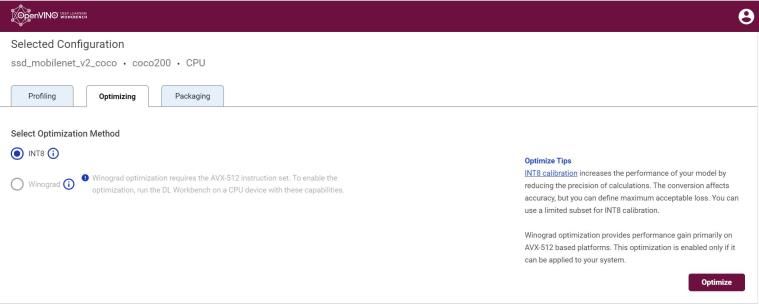
IAGS Intel Architecture, Graphics, and Software 71Deep Learning Workbench
Web-based UI extension tool for model analyses and graphical measurements
▪ Visualizes performance data for topologies and layers to aid in
model analysis
▪ Automates analysis for optimal performance configuration
(streams, batches, latency)
▪ Experiment with INT8 or Winograd calibration for optimal
tuning using the Post Training Optimization Tool
▪ Provide accuracy information through accuracy checker
▪ Direct access to models from public set of Open Model Zoo
▪ Enables remote profiling, allowing the collection of
performance data from multiple different machines without
any additional set-up.
IAGS Intel Architecture, Graphics, and Software 72Additional Tools and Add-ons
Streamlined development experience and ease of use
▪ Generate an optimal, minimized runtime
▪ Provides an easy way of accessing a number
package for deployment
of public models as well as a set of pre-
Model Downloader trained Intel models Deployment
Manager ▪ Deploy with smaller footprint compared to
development package
▪ Measure performance (throughput, latency) of ▪ Check for accuracy of the model (original and
a model after conversion) to IR file using a known data
Accuracy Checker
▪ Get performance metrics per layer and overall set
Benchmark App
basis
Computer Vision Annotation Tool Deep Learning Streamer OpenVINO™ Model Server
This web-based tool helps annotate videos Streaming analytics framework to create and Scalable inference server for serving optimized
and images before training a model deploy complex media analytics pipelines models and applications
Dataset Management Framework Neural Network Compression Framework Training Extensions
Use this add-on to build, transform and Training framework based on PyTorch* for Trainable deep learning models for training
analyze datasets quantization-aware training with custom data
IAGS Intel Architecture, Graphics, and Software 73Write Once, Deploy Anywhere
Common high-level inference runtime for cross-platform flexibility
Write once, deploy across different
platforms with the same API and
framework-independent execution
Consistent accuracy, performance and
functionality across all target devices
with no re-training required
Full environment utilization, or multi-device
plugin, across available hardware for greater
performance results
IAGS Intel Architecture, Graphics, and Software 74Compounding Effect of Hardware and Software
Use Intel® Xe Graphics + CPU combined for maximum inferencing
Tiger Lake + Intel® Distribution of OpenVINO™ toolkit vs Coffee Lake CPU
3.9X
3.6X
2.9X 2.8X 3X
2.2X 2.2X
2X 2.1X 1.9X
1.7X 1.8X 1.7X 1.7X 1.6X
deeplabv3-TF mobilenet-ssd-CF resnet-50-TF ssd300-CF squeezenet1.1-CF
Core i5-1145G7, CPU Core i5-1145G7, GPU Core i5-1145G7, GPU+CPU
11th Gen Intel® Core™ (Tiger Lake) Core i5-1145G7 relative inference FPS compared to Coffee Lake, Core i5-8500
Using the Multi-device plugin
The above is preliminary performance data based on pre-production components. For more complete information about
performance and benchmark results, visit www.intel.com/benchmarks. See backup for configuration details.
IAGS Intel Architecture, Graphics, and Software 75Pre-Trained Models and Public Models
Open-sourced repository of pre-trained models and support for public models
100+ Pre-trained Models 100+ Public Models
Common AI tasks Pre-optimized external models
Use free Pre-trained Models to speed up Object Detection Classification
development and deployment Object Recognition Segmentation
Reidentification Object Detection
Take advantage of the Model Downloader Semantic Segmentation Human Pose Estimation
and other automation tools to quickly get Instance Segmentation Monocular Depth Estimation
started Human Pose Estimation Image Inpainting
Image Processing Style Transfer
Iterate with the Accuracy Checker to Text Detection Action Recognition
validate the accuracy of your models Text Recognition Colorization
Text Spotting
Action Recognition
Image Retrieval
Compressed Models
Question Answering
IAGS Intel Architecture, Graphics, and Software 76DEMO IAGS Intel Architecture, Graphics, and Software 77
Demos and Reference Implementations
      Quickly get started with example demo applications and reference implementations

                                                          Face Access Control - C++        Parking Lot Counter - Go

       Take advantage of pre-built, open-sourced          Intruder Detector - C++          People Counter - C++
       example implementations with step-by-
       step guidance and required components              Machine Operator Monitor - C++   Restricted Zone Notifier - Go
       list
                                                          Machine Operator Monitor - Go    Shopper Gaze Monitor - C++

                                                          Motor Defect Detector - Python   Shopper Mood Monitor - Go

                                                          Object Flaw Detector - C++       Store Aisle Monitor - C++

                                                          Object Size Detector - C++       Store Traffic Monitor - C++

                                                          Object Size Detector - Go        Store Traffic Monitor - Python

                                                          Parking Lot Counter - C++

IAGS Intel Architecture, Graphics, and Software                                                                             78
Case Studies
Use cases and successful implementation across a variety of industries powered by
the Intel® Distribution of OpenVINO™ toolkit
Healthcare Access and Quality Solution Brief Security Against Social and Solution Brief
Digital Attacks
Reduced average inference time on Intel® NUC (with no GPU) from 4.23
seconds to just 2.81 seconds, which helps medical professionals reach Performance improvements of up to 2.3x faster, reducing latency by up to
more people, accelerate screening and help improve quality of care. 50 percent for threat detection and remediation to protect businesses
against targeted social and digital attacks.
Sewer pipe inspection analysis Solution Brief Retail
Business Frictionless retail checkout Solution Brief
Services
Inference time was improved with a reduction of up to 80% using Intel
Xeon processors with the OpenVINO toolkit, while not producing Using existing Intel-based point-of-sale systems, automatic inventory and
significant loss in model precision or accuracy. shopper tracking with cashier-less checkout at a physical retail store was
deployed at Quincy, Massachusetts.
Success Stories https://intel.com/openvino-success-stories
IAGS Intel Architecture, Graphics, and Software 79Resources and Community Support
Vibrant community of developers, enterprises and skills builders
QUALIFY INSTALLATION PREPARE HANDS ON SUPPORT
▪ Use a trained model and ▪ Download the Intel® ▪ Understand sample ▪ Visualize metrics with the ▪ Ask questions and share
check if framework is OpenVINO™ toolkit demos and tools Deep Learning information with others
supported package from Intel® included Workbench through the Community
Developer Zone, or by Forum
YUM or APT repositories
- or – ▪ Understand performance ▪ Utilize prebuilt, Reference
Implementations to ▪ Engage using #OpenVINO
▪ Utilize the Getting Started become familiar with on Stack Overflow
▪ Take advantage of a pre- Guide ▪ Choose hardware option capabilities
trained model from the with Performance
Open Model Zoo Benchmarks ▪ Visit documentation site for
▪ Optimize workloads with guides, how to’s, and
these performance best resources
▪ Build, test and remotely practices
run workloads on the
Intel® DevCloud for the ▪ Attend training and get
Edge before buying ▪ Use the Deployment certified
hardware Manager to minimize
deployment package
▪ Ready to go to market? Tell
us how we can help
IAGS Intel Architecture, Graphics, and Software 80Ready to get started?
Download directly from Intel for free
Intel® Distribution of OpenVINO ™ toolkit
(Recommended)
Also available from
Intel’s Edge Software Hub | Intel® DevCloud for the Edge | PIP |
DockerHub | Dockerfile | Anaconda Cloud | YUM | APT
Build from source
GitHub | Gitee (for China)
Choose & Download
IAGS Intel Architecture, Graphics, and Software 8182
Choose between Distributions
                                                               Intel® Distribution of       OpenVINO™ toolkit
       Tool/Component                                                                                                            Open Source Directory
                                                                OpenVINO™ toolkit             (open source)
       Installer (including necessary drivers)                           P
       Model Optimizer                                                   P                           P              https://github.com/openvinotoolkit/openvino/tree/master/model-
                                                                                                                                               optimizer
       Inference Engine - Core                                           P                           P             https://github.com/openvinotoolkit/openvino/tree/master/inference
                                                                                                                                                -engine

       Intel CPU plug-in                                     P Intel® Math Kernel Library   P BLAS, Intel® MKL1,   https://github.com/openvinotoolkit/openvino/tree/master/inference
                                                                                      1                                                         -engine
                                                                  (Intel® MKL) only            jit (Intel MKL)
       Intel GPU (Intel® Processor Graphics) plug-in                     P                           P             https://github.com/openvinotoolkit/openvino/tree/master/inference
                                                                                                                                                -engine
       Heterogeneous plug-in                                             P                           P             https://github.com/openvinotoolkit/openvino/tree/master/inference
                                                                                                                                                -engine

       Intel GNA plug-in                                                 P                           P             https://github.com/openvinotoolkit/openvino/tree/master/inference
                                                                                                                                               -engine
       Intel® FPGA plug-in                                               P
       Intel® Neural Compute Stick (1 & 2) VPU plug-in                   P                           P             https://github.com/openvinotoolkit/openvino/tree/master/inference
                                                                                                                                                -engine
       Intel® Vision Accelerator based on Movidius plug-in               P
       Multi-device & hetero plug-ins                                    P                           P
       Public and Pretrained Models - incl. Open Model Zoo               P                           P                   https://github.com/openvinotoolkit/open_model_zoo
       (IR models that run in IE + open sources models)
       Samples (APIs)                                                    P                           P             https://github.com/openvinotoolkit/openvino/tree/master/inference
                                                                                                                                                 -engine
       Demos                                                             P                           P                     https://github.com/openvinotoolkit/open_model_zoo
       Traditional Computer Vision
       OpenCV*                                                           P                          P                             https://github.com/opencv/opencv

       Intel® Media SDK                                                  P                          P2                       https://github.com/Intel-Media-SDK/MediaSDK

       OpenCL™ Drivers & Runtimes                                        P                          P2                         https://github.com/intel/compute-runtime

       FPGA Runtime Environment, Deep Learning                           P
       Acceleration & Bitstreams (Linux* only)

IAGS Intel Architecture, Graphics, and Software                                                                                                                                        83
System Requirements
Intel® Platforms Compatible Operating Systems
▪ Ubuntu* 18.04.3 LTS (64 bit)
CPU
▪ Microsoft Windows* 10 (64 bit)
▪ 6th-10th generation Intel® Core™ and Xeon® processors
▪ CentOS* 7.4 (64 bit)
▪ 1st and 2nd generation Intel® Xeon® Scalable processors
▪ macOS* 10.13 & 10.14 (64 bit)
▪ Intel® Pentium® processor N4200/5, N3350/5, N3450/5 with Intel® HD Graphics ▪ Yocto Project* Poky Jethro v2.0.3 (64 bit)
Iris® Pro & Intel® HD Graphics ▪ Ubuntu 18.04.3 LTS (64 bit)
▪ 6th-10th generation Intel® Core™ processor with Intel® Iris™ Pro graphics & Intel® HD Graphics ▪ Windows 10 (64 bit)
Target Solution ▪ Intel® Xeon® processor with Intel® Iris™ Pro Graphics & Intel® HD Graphics (excluding E5 product family, which ▪ CentOS 7.4 (64 bit)
Platforms does not have graphics1)
FPGA
▪ Intel® Arria® FPGA 10 GX development kit ▪ Ubuntu 18.04.2 LTS (64 bit)
▪ Intel® Programmable Acceleration Card with Intel® Arria® 10 GX FPGA operating systems ▪ CentOS 7.4 (64 bit)
▪ OpenCV* & OpenVX* functions must be run against the CPU or Intel® Processor Graphics (GPU)
▪ Ubuntu 18.04.3 LTS (64 bit) CentOS 7.4 (64 bit)
VPU: Intel Movidius™ Neural Compute Stick:, Intel® Neural Compute Stick2
▪ Windows 10 (64 bit) macOS* (64 bit) Raspbian (target only)
Intel® Vision Accelerator Design Products ▪ Ubuntu 18.04.2 LTS (64 bit)
▪ Intel® Vision Accelerator Design with Intel® Arria10 FPGA
▪ Ubuntu 8.04.3 LTS (64 bit)
▪ Intel® Vision Accelerator Design with Intel® Movidius™ VPUs ▪ Windows 10 (64 bit)
▪ Ubuntu* 18.04.3 LTS (64 bit)
Development ▪ 6th-10th generation Intel® Core™ and Intel® Xeon® processors ▪ Windows® 10 (64 bit)
Platforms ▪ 1st and 2nd generation Intel® Xeon® Scalable processors ▪ CentOS* 7.4 (64 bit)
▪ macOS* 10.13 & 10.14 (64 bit)
Linux* build environment required components
▪ OpenCV 3.4 or higher GNU Compiler Collection (GCC) 3.4 or higher
▪ CMake* 2.8 or higher Python* 3.4 or higher
Additional Software
Requirements Microsoft Windows* build environment required components
▪ Intel® HD Graphics Driver (latest version)† OpenCV 3.4 or higher
▪ Intel® C++ Compiler 2017 Update 4 CMake 2.8 or higher
▪ Python 3.4 or higher Microsoft Visual Studio* 2015
External Dependencies/Additional Software View Product Site, detailed System Requirements
IAGS Intel Architecture, Graphics, and Software 84Commonly Asked Questions
Can I use the Intel® Distribution of OpenVINO™ toolkit for commercial usage? Yes, the Intel® Distribution of OpenVINO™ toolkit is licensed
under Intel’s End User License Agreements and the open-sourced OpenVINO™ toolkit is licensed under Apache License 2.0. For information,
review the licensing directory inside the package.
Is the Intel® Distribution of OpenVINO™ toolkit subject to export control? Yes, the ECCN is EAR99.
How often does the software get updated? Standard releases are updated 3-4 times a year, while LTS releases are updated once a year.
What is the difference between Standard and LTS releases? Standard Releases are recommended for new users and users currently
prototyping. It offers new features, tools and support to stay current with deep learning advancements. LTS Releases are recommended for
experienced users that are ready to take their application into production and who do not require new features and capabilities for their
application.
For technical questions, visit the Model Optimizer FAQ and Performance Benchmarks FAQ. If you don’t find an answer, please visit the
following community and support links.
Get Help Get Involved Stay Informed
▪ Ask on the Community Forum ▪ Contribute to the Code Base ▪ Join the Mailing List
▪ Contact Intel Support ▪ Contribute to Documentation ▪ Read the Documentation
▪ File an Issue on GitHub* ▪ Read the Knowledge Base
▪ Get Answers on StackOverflow* ▪ Read the Blog
IAGS Intel Architecture, Graphics, and Software 85Which Toolkit should I use IAGS Intel Architecture, Graphics, and Software 86
Intel® AI Analytics Toolkit                                             OpenVINO™ Toolkit
                         •   Provide performance and easy integration across end-to-end     •   Provide leading performance and efficiency for DL inference
                             data science pipeline for efficient AI model development           solutions to deploy across any Intel HW (cloud to edge).
      Key Value
                         •   Maximum compatibility with opensource FWKs and Libs with       •   Optimized package size for deployment based on memory
      Prop
                             drop-in acceleration that require minimal to no code changes       requirements
                         •   Audience: Data Scientists; AI Researchers; DL/ML Developers    •   Audience: AI Application Developers; Media and Vision Developers

                         •   Data Ingestion, Data pre-processing, ETL operations            •   Inference apps for vision, Speech, Text, NLP
      Use Cases          •   Model training and inference                                   •   Media streaming / encode, decode
                         •   Scaling to multi-core / multi-nodes / clusters                 •   Scale across HW architectures – edge, cloud, datacenter, device

                                                                                            •   CPU - Xeons, Client CPUs and Atom processors
                         •   CPUs - Datacenter and Server segments – Xeons,                 •   GPU - Gen Graphics; DG1 (current), ATS, PVC (in future)
      HW Support             Workstations                                                   •   VPU - NCS & Vision Accelerator Design Products,
                         •   GPU - ATS and PVC (in future)                                  •   FPGA
                                                                                            •   GNA

                         Use Intel® Low Precision Optimization Tool when using                    Use Post Training Optimization Tool when using
                                          AI Analytics Toolkit                                                      OpenVINO
      Low Precision      •   Supports BF16 for training and FP16, Int8 and BF16 for         •   Supports FP16, Int8 and BF16 for inference
      Support                Inference                                                      •   Directly works with Intermediate Representation Format
                         •   Seamlessly integrates with Intel optimized frameworks          •   Available in the Intel Distribution of OpenVINO toolkit
                         •   Available in the AI toolkit and independently                  •   Provides Training extension via NNCF for PyTorch with FP16, Int8

      Exception: If a model is not supported by OpenVINO™ toolkit for Inference deployment, build custom layers for OV or fall back to the AI
      Analytics Toolkit and use optimized DL frameworks for inference.

IAGS Intel Architecture, Graphics, and Software                                                                                                                    87
AI Development Workflow Native Code developers,
Framework Developers
Data Scientists, AI Researchers,
Data Use AI Kit ML/DL Developers
Data ingestion (Modin, Omnisci,
and Pre- AI, Media and Computer Vision
Analytics Pandas, Numpy,
processing Scipy) Application Developers
Classical ML Use AI Kit
Machine (Scikit-
Training and Alternately there are options to directly download
Learning learn+Daal4py,
Prediction XGBoost) any of the Intel optimized FWKs, ML libraries &
Tools independently. Our recommendation is to
Optimize get them through the toolkit for seamless
primitives Use Base Kit
(oneDNN,
interoperability and good out of box experience
for DL oneCCL)
FWKs
Determine
Train DL
Use Case Use AI Kit
model on
(Intel-optimized
Intel (CPU, TF, Pytorch)
dGPU)
Run DL Use AI Kit Pick a pre-
Deep Trained Inference (Intel-optimized LP - trained model
Re-train a Use AI Kit on trained TF, Pytorch) in IR format
Learning Model Trained
model on (Intel-optimized
model (Open Model
custom data TF, Pytorch) Model
Zoo)
Further optimize
Use AI Kit
Pick a Pre- Use AI Kit Convert to (Low precision Opt Use
CPU
trained model (Model Zoo for Low Precision Tool + Intel- OpenVINO™
optimized by IA) and run optimized TF, Toolkit GPU
Intel inference Pytorch) Deploy DL
Models on
(Model Optimizer, VPU
Inference Engine,
Intel® Deployment FPGA
Public models trained with any FWK – TF, Caffe, ONNX, MXNet, etc. platforms Manager, etc.,) GNA
IAGS Intel Architecture, Graphics, and Software 88AI Model Deployment Workflow
Data Scientists, AI Researchers,
ML/DL Developers
AI, Media and Computer Vision
Application Developers
Use AI Kit Use OpenVINO™ Toolkit
0. Plan 1. Build 3. Optimize 4. Test 5. Package 6. integrate 7. deploy
Determine Find a model Fast
Did the Test the Use Integrate Get Intel
model Run Model enough with Deploy App
model Yes
model with IE Yes Deployment Model to HW for
type & Optimizer acceptable & Model
Build a model convert? & Benchmark accuracy hit? Manager Application deployment
framework (ie Train for
needed for accuracy) No
your usage Do you No
3a. Modify the prefer
1a. Train GUI
4a. Advance Model
Model Use Custom
Tuning
Bring a DL Layers
Post -Training Did you
model Use POT to
change quantize
Use DL
attributes of
No
the
Workbench
Is the IR model ?
model Yes
Yes
accurate Did you
enough? Use multi- No use multi-
device plugin
No device?
MO Model Optimizer
Yes/NA OMZ Open Model Zoo
Train/ Can you DL Deep Learning
Re-train model Use Dev IR Intermediate Representation
Cloud to find Yes use IE Inference Engine
the right HW different HW Hardware
HW? POT Post Training Optimization Tool
A comprehensive workflow to optimize your DL model for the Intel Hardware that will be used for running inference
IAGS Intel Architecture, Graphics, and Software 89▪ 1) We run the demo on DC
• TF demo
• PyTorch demo
• future: (ATS demo)
▪ Slide on how to access DevCloud
▪ 2) What’s behind the DC
IAGS Intel Architecture, Graphics, and Software 90Intel DevCloud: Getting started with oneAPI
Objectives of the External DevCloud Strategy
      1. Demonstrate the promise of oneAPI.
      2. Provide developers easy access to oneAPI h/w & s/w environment
      3. Get high value feedback on oneAPI tools, libraries, language.
      4. Seed research, papers, curriculum, lighthouse apps (the metrics output).
      5. Support two tracks with web front end for consistent experience:
           • oneAPI production hardware/software
           • NDA SDP hardware/software

IAGS Intel Architecture, Graphics, and Software                                     92
Network Arch IAGS Intel Architecture, Graphics, and Software 93
One API

  One API DevCloud Architecture                                                                                                                    New Additions for           Under
                                                                                                                                                                                NDA

                        Access : ssh/Jupyter/Browser

      Users                                                             Disk         Disk      Disk           Disk
                                                                                                                               Disk          Storage Disks
                                                                        TB1          TB2                                       TB5
                                                                                               TB3            TB4

                                                                       AI DevCloud: Xeon SKL/CLX Cluster
                               Login                   SKL      SKL      SKL          SKL
                                                                                              CLX/
                                                                                              AEP
                                                                                                            CLX/
                                                                                                            AEP
                                                                                                                           CLX/
                                                                                                                           AEP
                                                                                                                                        FPGA/
                                                                                                                                       Arria 10
                                                                                                                                                   FPGA/
                                                                                                                                                  Arria 10
                                                                                                                                                              FPGA/
                                                                                                                                                             Arria 10
                                                     node11            node13
                               Node
                                                              node12                node14
                                                                                             node21        node22         node23       node31     node32     node33

                                                                                                             DG!              DG1                            PVC
                                                     Gen9     Gen9      Gen9         Gen9    Gen9                                        ATS        ATS
                                                     node1    node2     node3        node4   node5                                      node3      node4
                                                                                                           node1           node2                             node5

                                                                                                           OneAPI Programming
                              Intel Opt Frameworks                                                                                                                            TBD
                                  Available today                      Direct Programming
                                                                                                                                                                        Container 1
                                    TensorFlow
                                                                                DPC++                MKL               TBB            Media SDK
                                                                                                                                                                        Container 2
                                      Caffe                                 OpenVINO
                                                                                                MKL-DNN             Parallel STL        DLDT                            Container 3
                                      MxNet
                                                                                ToolKit1
                                                                                                  DAAL                  *.*             MLSL                            Container 4
                                 Python, PyTorch                                ToolKit2

IAGS Intel Architecture, Graphics, and Software                                                                                                                                         94
95
Notices and Disclaimers
Software and workloads used in performance tests may have been optimized for performance only on Intel microprocessors.
Performance tests, such as SYSmark and MobileMark, are measured using specific computer systems, components, software, operations and
functions. Any change to any of those factors may cause the results to vary. You should consult other information and performance tests to assist you
in fully evaluating your contemplated purchases, including the performance of that product when combined with other products. For more complete
information visit www.intel.com/benchmarks.
Performance results are based on testing as of dates shown in configurations and may not reflect all publicly available updates. See backup for
configuration details. No product or component can be absolutely secure.
Your costs and results may vary.
Intel technologies may require enabled hardware, software or service activation.
© Intel Corporation. Intel, the Intel logo, and other Intel marks are trademarks of Intel Corporation or its subsidiaries. Other names and brands may be
claimed as the property of others.
Optimization Notice
1 Intel's compilers may or may not optimize to the same degree for non-Intel microprocessors for optimizations that are not unique to Intel
microprocessors. These optimizations include SSE2, SSE3, and SSSE3 instruction sets and other optimizations. Intel does not guarantee the availability,
functionality, or effectiveness of any optimization on microprocessors not manufactured by Intel. Microprocessor-dependent optimizations in this
product are intended for use with Intel microprocessors. Certain optimizations not specific to Intel microarchitecture are reserved for Intel
microprocessors. Please refer to the applicable product User and Reference Guides for more information regarding the specific instruction sets covered
by this notice. Notice revision #20110804.
2 Software and workloads used in performance tests may have been optimized for performance only on microprocessors from Intel. Performance tests,
such as SYSmark and MobileMark, are measured using specific computer systems, components, software, operations, and functions. Any change to any
of those factors may cause the results to vary. Consult other information and performance tests while evaluating potential purchases, including
performance when combined with other products. For more information, see Performance Benchmark Test Disclosure. Source: Intel measurements, as
of June 2017.
IAGS Intel Architecture, Graphics, and Software 96Notices and Disclaimers
Slide Reference 1 2 3
System Board Intel® Server S2600 (Dual socket) Supermicro / X11SPL-F Supermicro / X11SPL-F
Product Xeon Silver 4216 Intel(R) Xeon(R) Silver 4112 Intel(R) Xeon(R) Silver 4112
Intel technologies’ features and benefits
depend on system configuration and may CPU sockets 2 - 1
require enabled hardware, software or service Physical cores 2 x 16 4 4
activation. Performance varies depending on
system configuration. Check with your system Processor Base Frequency 2.10 GHz 2.60GHz 2.60GHz
manufacturer or retailer or learn more at HyperThreading enabled - enabled
www.intel.com.
Turbo On - On
Power-Performance Mode Performance Mode - -
Intel, the Intel logo, Xeon™, Arria™ and
Total System Memory size 12 x 64GB 16384 16384
Movidius™ are trademarks of Intel Corporation
or its subsidiaries in the U.S. and/or other Memory speed 2400MHz 2400MHz 2400MHz
countries. Software OS Ubuntu 18.04 Ubuntu 16.04.3 LTS Ubuntu 16.04.6 LTS
Software Kernel 4.15.0-66-generic x86_64 4.13.0-36-generic 4.15.0-29-generic
*Other names and brands may be claimed as Test Date 27 September 2019 25 May 2018 18 April 2019
the property of others.
Int 8
Precision (IntMode) FP32 Int 8 (Throughput Mode)
(Throughput Mode)
© Intel Corporation. Power (TDP) 200W 85W 85W
Price Link on 30 Sep 2019
$2,024 $483 $483
(Prices may vary)
Network Mobilenet SSD Mobilenet SSD Mobilenet SSD
IAGS Intel Architecture, Graphics, and Software 97Notices and Disclaimers
System Board Intel prototype, TGL U DDR4 SODIMM RVP ASUSTeK COMPUTER INC. / PRIME Z370-A
CPU 11th Gen Intel® Core™ -5-1145G7E @ 2.6 GHz. 8th Gen Intel ® Core™ i5-8500T @ 3.0 GHz.
Intel technologies’ features and benefits Sockets / Physical cores 1/4 1/6
depend on system configuration and may
require enabled hardware, software or service HyperThreading / Turbo Setting Enabled / On Na / On
activation. Performance varies depending on
system configuration. Check with your system Memory 2 x 8198 MB 3200 MT/s DDR4 2 x 16384 MB 2667 MT/s DDR4
manufacturer or retailer or learn more at OS Ubuntu* 18.04 LTS Ubuntu* 18.04 LTS
www.intel.com.
Kernel 5.8.0-050800-generic 5.3.0-24-generic
Intel® Distribution of OpenVINO™ toolkit Intel® Distribution of OpenVINO™ toolkit
Intel, the Intel logo, Xeon™, Arria™ and Software
2021.1.075 2021.1.075
Movidius™ are trademarks of Intel Corporation
or its subsidiaries in the U.S. and/or other BIOS Intel TGLIFUI1.R00.3243.A04.2006302148 AMI, version 2401
countries.
BIOS release date Release Date: 06/30/2021 7/12/2019
BIOS Setting Load default settings Load default settings, set XMP to 2667
*Other names and brands may be claimed as
the property of others. Test Date 9/9/2021 9/9/2021
Precision and Batch Size CPU: INT8, GPU: FP16-INT8, batch size: 1 CPU: INT8, GPU: FP16-INT8, batch size: 1
© Intel Corporation.
Number of Inference Requests 4 6
Number of Execution Streams 4 6
Power (TDP Link) 28 W 35W
Price (USD) Link on Sep 22,2021
$309 $192
Prices may vary
1): Memory is installed such that all primary memory slots are populated.
2): Testing by Intel as of September 9, 2021
IAGS Intel Architecture, Graphics, and Software 98You can also read


