CGS CRESCENT GIRLS' SCHOOL - Crescent Girls' School
←
→
Page content transcription
If your browser does not render page correctly, please read the page content below

CGS
CRESCENT GIRLS’ SCHOOL
mLearning 2.0 2020

Outline
 •   Background Information
 •   Proposed Minimum Specifications
 •   Support from School
 •   Timeline
 •   Option Form
mLearning 2.0 @ CGS

                      Opt in
All about      1 st

choices     Choice    Do not
                      opt in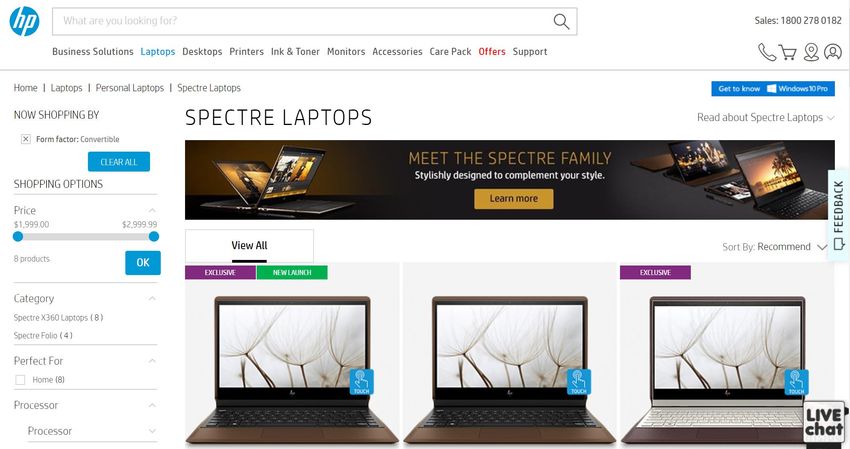
mLearning 2.0 @ CGS
       Opt in             Do not opt in
  Learning anytime,   Subject to availability as
     anywhere           we have a defined
                        number of loan sets
                       To return on the same
                       day as other students
                       may need the device
                            the next day
mLearning 2.0 @ CGS

                      Use existing
                        device
All about    Opt in
choices
                      Purchase a
                      new device
Bring-Your-Own-Device
           (BYOD)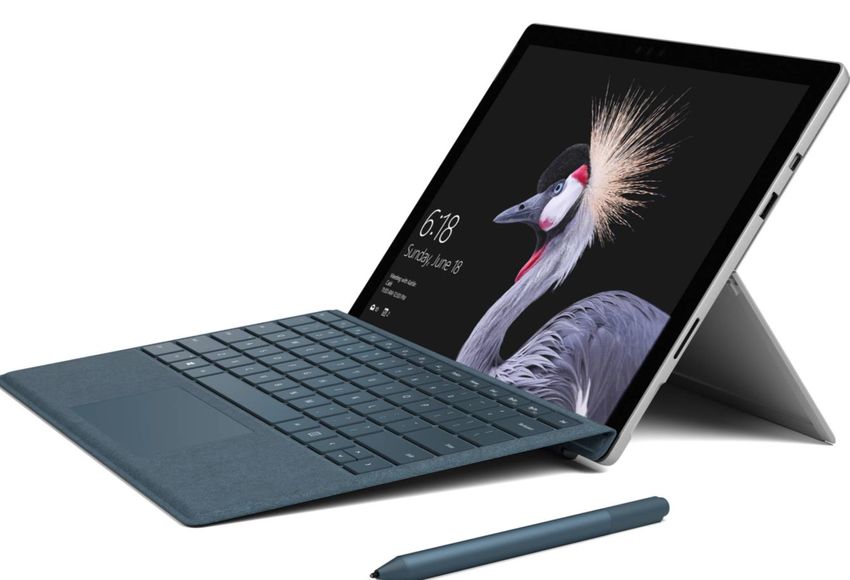
Advantages of BYOD
  • Use existing PLDs

  • Compare prices and package. Decide
    what suits your child best

  • Able to tap on interest free installment
    plan at major stores/ IT fairs
Proposed Minimum
    Specifications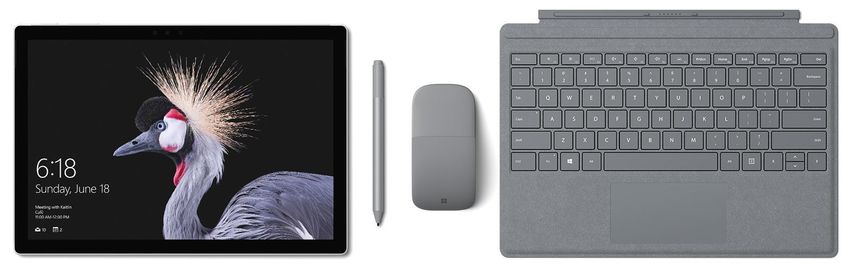
Form Factor

            2-in-1 detachable
 • Inking feature
 • Dual input (type or write)
 • Touch screen
Form Factor
Convertible
• Inking feature
• Dual input (type or write)
• Touch screenWhy Slate PCs / convertible laptops, not iPad? • Need higher processor speed for various learning activities e.g. video production • For creation, not consumption • For learning, not gaming
Annex II (Blue) – Recommended
Specifications
                              Specifications                         Rationale
Appearance       •   A laptop-like device with        • Lighter in weight
                     detachable screen, transforming • Portability, able to bring out the
                     into a portable Slate PC           Slate PC for outdoor learning
                 •   Convertible laptop can transform   activities
                     from laptop to tablet and back
                     again
Physical         •   Weight of device should be less  • To minimize strain on the students
Specifications       than 1.5 kg                          carrying the device around

Hardware         • Intel Core i5 Processor            • Minimum specifications required
Specifications   ( 8th Gen Intel)                       for learning activities such as
                 • 8GB RAM                              creation of multimedia content
                 • Min. 256 GB SSD (recommended)      • To cater to student’s 3-4 years
                 • Intel Graphics HD620                  learning needs
Annex II (Blue) – Recommended
Specifications
Specifications Rationale
Connectivity • WiFi 802.11 Standard • For wireless access
a/b/g/n/ac
• Bluetooth Standard 4.0
Camera • Integrated web camera: Front • To be used in learning
and back preferred activities which involve video
conferencing, filming, photo
taking etc.
• Compatibility for school
Operating System • At least Windows 10 OS, 64bit
applications
• To provide ideal inking
Inking • Active digitizer stylus
experienceAnnex II (Blue) – Recommended Specifications MS Surface Pro Lenovo Miix
Annex II (Blue) – Recommended
Specifications
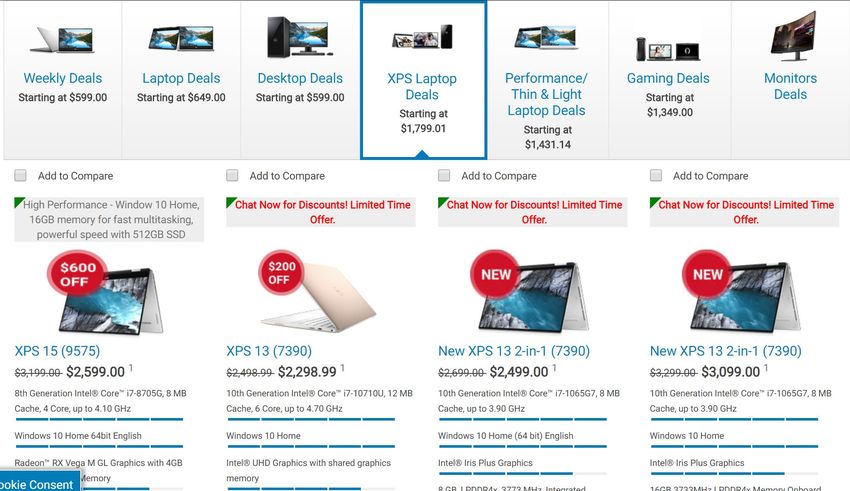
 Lenovo Yoga   Dell XPS   HP Spectre
    Series
Devices that are Unsuitable • IOS and Android Devices ( eg iPad, Galaxy Tab, Galaxy Note) • Above devices are mainly for content consumption • Unable to cater to the learning needs for students
Other Considerations
 • Warranty e.g. no. of years, local/ global

 • Battery life

 • Support services e.g. service center,
   collection from home

 • Accessories e.g slip case, external DVD-
   ROM

 • Insurance e.g. coverage/ Exclusions
MS Surface Pro
Prices and Payment Options Available
  Model          Specs          Availability        Price           Warranty             Payment Options
                                                                     Standard        •Cash
                                                                   warranty: 1       •Credit Card
                                                                       Year          •0% Instalments
                                                Surface Pro –                        Payment Plan from 6-
                                                                 Star Shield Elite
                                                     $1788                           24 mths for DBS, UOB,
                                                                        Plan         OCBC credit card
             10th Gen Intel                    Keyboard – $199
                                Challenger                        15% Product        holders)
                 Core i5                         Stylus – $148
              Windows 10                                         Purchase Price
                                                 Total: $2135
               8GB RAM                                              (Coverage
MS Surface
               256GB SSD                                           Duration: 24
   Pro
              Intel Iris Plus                                         months)
    7           Graphics
             5MP Front / 8                                                           •Cash
                MP Rear                                                              •Credit Card
                                                Surface Pro –
                Camera                                                               •0% Instalments
                                                     $1788          Standard
                                                                                     Payment Plan from 6-
                                Best Denki     Keyboard – $199     warranty: 1
                                                                                     24 mths for DBS, UOB,
                                                 Stylus – $148        Year           OCBC credit card
                                                 Total: $2135                        holders)
Prices and Payment Options Available
Availabili Payment
Model Specs Price Warranty
ty Options
10th Gen
Intel Core i5 Surface Pro –
• Standard warranty:
Windows 10 $1609.20
1 Year
MS Surface 8GB RAM Keyboard –
Microsoft • Top-up $183.2 for
Pro 256GB SSD $199
Online Microsoft Complete • Credit
7 Intel Iris Plus Stylus –
(Student for Surface Pro with card
(Online Graphics $118.40
Price) Accidental
Platform) 5MP Front / Total:
Damage Coverage
8 MP Rear $1926.60
for 2 years*
Camera
*Accidental Damage Coverage (ADC) is limited to damage resulting from
dropping the covered product, spilling liquid onto it or screen/glass breakage of
product. For covered defects and/or ADH damage, there are terms and
conditions for the coverage.Prices and Payment Options Available
Payment
Model Specs Availability Price Warranty
Options
10th Gen Surface Pro • Standard warranty:
- $2200
Intel Core i5 1 Year
Bundled
Windows 10 Top-up $172.27 for 3
Accessories
MS Surface 8GB RAM - MS years hardware
Pro 256GB SSD AsiaPac Surface warranty
7 Intel Iris Plus Online Type Cover Top-up $439.77 for 3 • iBanking
(Online Graphics Portal (Black) years hardware
Platform) 5MP Front / - MS warranty coverage
Surface Pen
8 MP Rear with accidental
- MS
Camera Surface damage coverage
Sleeve Red
*Accidental Damage Coverage (ADC) is limited to damage resulting from
dropping the covered product, spilling liquid onto it or screen/glass breakage of
product. For covered defects and/or ADH damage, there are terms and
conditions for the coverage.Prices and Payment Options Available
Payment
Model Specs Availability Price Warranty
Options
10th Gen
Intel Core i5 Standard warranty: 1
Surface Pro –
Windows 10 Year
MS Surface Edukinect $1609.20
8GB RAM Keyboard – Top-up $183.2 for
Pro Online
256GB SSD $179.10 Microsoft Complete • Credit
7 Store
Intel Iris Plus Stylus – for Surface Pro with card
(Online (Student $118.40
Graphics Accidental Damage
Platform) Price) Total: $1906.7
5MP Front / Coverage for 2 years
8 MP Rear
Camera
*Accidental Damage Coverage (ADC) is limited to damage resulting from
dropping the covered product, spilling liquid onto it or screen/glass breakage of
product. For covered defects and/or ADH damage, there are terms and
conditions for the coverage.Prices and Payment Options Available
Payment
Model Specs Availability Price Warranty
Options
10th Gen
Intel Core i7 Standard warranty: 1
Windows 10 Surface Pro - Year
MS Surface Edukinect $1969.20
8GB RAM Top-up $183.2 for
Pro Online Keyboard -
256GB SSD Microsoft Complete • Credit
7 Store $179.10
Intel Iris Plus for Surface Pro with card
(Online (Student Stylus - $118.4
Graphics Total - $2266.7 Accidental Damage
Platform) Price)
5MP Front / Coverage for 2 years
8 MP Rear
Camera
*Accidental Damage Coverage (ADC) is limited to damage resulting from
dropping the covered product, spilling liquid onto it or screen/glass breakage of
product. For covered defects and/or ADH damage, there are terms and
conditions for the coverage.Lenovo Miix
Prices and Payment Options Available
                               Availabili                                        Payment
  lModel        Specs                           Price         Warranty
                                  ty                                              Options
                                       Miix 520(Core i5) -
               10th Gen                $1497
              Intel Core               Miix 520(Core i7) -
                 i5/i7                 $1808
             Windows 10                Bundled
  Lenovo       8GB RAM                 Accessories
                               AsiaPac - Lenovo USB 3.0      3 Years carry
 Miix 520     512GB SSD
                                Online Ethernet Adapter         onsite       •   iBanking
  (Online    Intel Iris Plus           - Lenovo USB-C to
                                Portal                         warranty
 Platform)     Graphics                VGA Adapter
             5MP Front /               - Lenovo 15.6”
              8 MP Rear                Toploader T1050
               Camera                  - Lenovo USB
                                       Optical Mouse
Lenovo Yoga Series
Prices and Payment Options Available
 Model         Specs        Availability         Price          Warranty   Payment Options
                                              $1799                        Cash
                                            Bundled                        Credit Card
                                           Accessories                     0% Instalments
                                                                2 Years    Payment Plan
                                       - Lenovo Bluetooth
              10th Gen      Challenger                           onsite-   from 6-24 mths for
                                           Active Pen                      DBS, UOB, OCBC
            Intel Core i7                                       warranty
                                            - Lenovo                       credit card
            Windows 10
                                         Backpack Case                     holders)
             16GB RAM
 Lenovo
             512GB SSD
Yoga C640                                         $1799                    Cash
               Intel HD                                                    Credit Card
                                                Bundled
              Graphics                                                     0% Instalments
                                               Accessories
                  620                                           2 Years    Payment Plan
                                           - Lenovo Bluetooth
                              Courts                             onsite-   from 6-24 mths for
                                               Active Pen                  DBS, UOB, OCBC
                                                                warranty
                                                - Lenovo                   credit card
                                             Backpack Case                 holders)
Prices and Payment Options Available
Model Specs Availability Price Warranty Payment Options
$1999 Cash
Bundled Credit Card
Accessories 0% Instalments
2 Years Payment Plan
- Lenovo Bluetooth
10th Gen Challenger onsite- from 6-24 mths for
Active Pen DBS, UOB, OCBC
Intel Core i7 warranty
- Lenovo credit card
Windows 10
Backpack Case holders)
16GB RAM
Lenovo
1TB SSD
Yoga C640 $1999 Cash
Intel HD Credit Card
Bundled
Graphics 0% Instalments
Accessories
620 2 Years Payment Plan
- Lenovo Bluetooth
Courts onsite- from 6-24 mths for
Active Pen DBS, UOB, OCBC
warranty
- Lenovo credit card
Backpack Case holders)Dell XPS
Prices and Payment Options Available
  Model          Specs           Availability          Price           Warranty   Payment Options
                                                        $2499                     Cash
                                                       Bundled                    Credit Card
                                                     Accessories                  0% Instalments
                10th Gen                                                          Payment Plan
                                                - Dell Active Stylus
              Intel Core i7                                                       from 6-24 mths for
                                                         Pen                      DBS, UOB, OCBC
              Windows 10
Dell XPS 13                                      - 1 Year Mcafee       2 Years    credit card
                8GB RAM
  2-in-1                         Best Denki      Internet Security      onsite-   holders)
                 256 SSD
  (7390)                                           - 1 TB Portable     warranty
               Intel Iris Plus
                                                         HDD
                 Graphics
                                                      - Wireless
                                                 Charging Mouse
                                                         Pad
HP Spectre
Prices and Payment Options Available
  Model        Specs       Availability         Price           Warranty   Payment Options
                                                  $1999                    Cash
           8th Gen Intel                                                   Credit Card
                                                 Bundled
               Core i7                                                     0% Instalments
                                               Accessories
           Windows 10                                                      Payment Plan
HP Spectre                                - HP Leather Case     2 Years
             8GB RAM                                                       from 6-24 mths for
 X360 13-                  Best Denki       - 1 Year Internet    onsite-   DBS, UOB, OCBC
            512GB SSD
AP0106TU                                         Security       warranty   credit card
              Intel HD
                                           - USB-C Multiport               holders)
             Graphics
                                                   Hub
                 620
Other Online Purchasing Platforms https://www.lenovo.com/sg/en/deals/laptop-2-in-1-offer/
Other Online Purchasing Platforms

https://store.hp.com/sg-en/default/laptops-tablets/personal-
laptops/spectre-laptops.html?hp_facet_formfactor=Convertible
Other Online Purchasing Platforms

https://www.dell.com/en-sg/shop/deals/performance-deals
mLearning 2.0 @ CGS

                      Use existing
                        device
All about    Opt in
choices
                      Purchase a
                      new device
More Choices
Insurance
Buy
Insurance/ Solutions
ADC*
Don’t buy
*Note:
1)Contact and submit form directly to the company
2)All claims must be submitted directly to the insurance
company, not through CGSAccidental Damage Coverage (ADC) *ADC – Accidental Damage Coverage, including cracked screen from dropping the device • Servicing through official retailer • For e.g. Microsoft Surface through Microsoft • Repair by third party may void warranty • Cost of cracked screen repair will be >S$400 (estimated)
Annex IV (Pink) – Computer Shield
 Cover loss or damage of laptop resulting
 from
Annex IV (Pink) – Computer Shield
 Insurance premium
Annex IV (Pink) – Computer Shield
• Damage / repair / total loss /
  replacement excess

• Different from extended warranty and
   ADC (Accidental Damage Coverage)
   offered by some retailers
  ▪ Limited number for defects from
     accidental damage and subject to
     deductible
IMPORTANT – PLD Preparation •Set up Windows 10 using the user guide in Annex VI (White) •Online form will be sent out to students to sign up for software installation •ICT professionals will be there to assist
Support From School

    • Software & Applications

    • ICT-training & Cyberwellness

    •Supporting Infrastructure
Software and Applications
Software and Applications used in
School
Microsoft Office 365 Pro Plus will be provided
for all students. Students can have up to five
licenses which they can install full version of
Microsoft Office on their tablet, PC and even
Mac.
Microsoft Office
In addition, students are given access to online
web applications like Word, Powerpoint and
Excel which are used pervasively during
learning. Students will be able to use Office 365
in school or at home as long as they have
internet access.Software and Applications used in
School
Adobe Creative Suite will be used pervasively
in Lower Secondary Computer Education
Programme (LSCEP) to develop core ICT skills
e.g. digital drawing and design, webpage
Adobe Creative Suites design, animation. The software will be installed
in students’ personal learning devices at no
extra cost to parents as we will be using a site
license purchased by the school. Students will
be able to use the software as long as they are
students of Crescent Girls’ School.Software and Applications used in
School
Teams is an all-encompassing tool for students
to consolidate learning resources, communicate
with teachers and peers, as well as homework
Teams management. It empowers students to have
better self-management and collaboration with
peers.Future-Readiness
Self-Management
Software and Applications used in
School
            OneNote Class Notebook will be used by
            various subject teachers to disseminate lesson
 OneNote    materials to students. It serves as a powerful tool
   Class    for students to create and curate their own
 Notebook   learning notes.
Class Notebook
Students learn
to organise
and manage
learning
content in
collaboration
with others.Class Notebook There is no longer filing
and messy papers flying
When I study, I can everywhere.
find all my subject's
notes in one place.
When it is used
I love how everything is in Notes that teachers write
online, teachers
one place so i don’t need on the document
can edit our work
to carry a really heavy bag remains in the content
and check on our
to school and it’s easy to library
work while we are
doing it. (when we organise my notes too
sync our notebook)
I know where the notes and
worksheets can be found and
everyone can share and learn
at the same time.Software and Applications used in
School
TrailShuttle is a mobile learning trail application
which enables experiential learning and
provides authenticity in learning for students. It
TrailShuttle allows multiple presentations of students’
understanding towards concepts and just-in-
time feedback to students’ answers.ICT Training & Cyberwellness
Student ICT Development
• Microsoft Office skills

• Google Apps

• Digital Editing Skills

• Digital Animation Skills

• Webpage Design Skills

• Video Production Skills

• Inking Applications

• Web 2.0 Applications

• Coding and application
                             056
Cyberwellness Programme
• Structured Cyberwellness
Programme for students
– Talks and Seminars
– Students as ambassadors
• Structured Cyberwellness
Programme for parents
– Talks and Seminars
– Workshops on Parental
Control featuresAnnex VII Windows Family Safety
(Green)
• Keep child safe online
• Be aware of her online activities
• Block off undesirable websites
▪ Only with Microsoft’s web browsers
(Edge and IE)Windows Family Safety Features The Family Safety Filter ✓ Set up safety filters on your daughter’s Personal Learning Device (PLD) to restrict access to specific websites or applications. The Family Safety Website ✓ Choose and manage all the settings in your daughter’s device and view her activity reports, even when you’re at work.
Windows Family Safety
 • Activity report
Windows Family Safety
 • Screen time limit
Windows Family Safety
 • Web browsing filter
Windows Family Safety-
Recommendations
• Build mutual trust

• Communications and negotiations
  • Annex V Parent-Child Contract and
    Student Undertaking on the Use of
    Personal Learning Device (Yellow)

• Monitoring tools as last resort
Supporting Infrastructure
Free Wireless Network
 • Campus-wide Wireless Network
Safety and Security
 • Electronic
   fingerprints system
   for classroom access

 • Reinforced lockers in
   classrooms
ICT Helpdesk

 Note: ICT Helpdesk will not be able to
 resolve any hardware related issues
Timeline
mLearning Timeline 2020
3 January           3 – 15                  20 January –          17 February
                    January                 14 February

   • mLearning        • Submission of         • Purchase of          • Official
     Briefing for       Option Form             PLD                    Launch
     parents          • Application           • Configuration
                        for Financial           of PLDs &
                        Assistance              Installation of
                        (till 20 January)       software
                                                (starting from
                                                20 January)
Option Form
Option Form (Parents Gateway)

                      Joining
  mLearning 2.0

                    Not Joining

 Submit response through Parents Gateway
 by 15 January 2020 (Wednesday)
Common Questions
FAQ
Any support for financial needy students?

Financial support is available for students
on FAS.     Students who need financial
assistance can apply from 6 – 15 January
2020. Form to be collected from General
Office.
Outline
 Is it compulsory?

 • No, it is not compulsory
 • Take up rate
   • 100% in 2017
   • 99% in 2018 (2 opted out)
   • 100% in 2019
FAQ
I have a laptop / Macbook. Can my
daughter use it instead?

• Yes
• Limitations e.g. inking feature
For Enquiry
 • Please contact

 Mr Foo Wen Yeow
 Subject Head/ICT

 Tel: 6708 7930
 Email: foo_wen_yeow@crescent.edu.sg
Reminders
Parents Gateway
(23 Dec 2019 – 3 January 2020)
•   Platform for receiving
    information an)d sending of
    consent forms
•   Able to respond on the go
    using smartphones
•   Available on both iOS and
    Android phones
Personal Particular Survey Forms • All parents/guardians are required to complete the Personal Particulars Form for communication purposes in 2020 • https://tinyurl.com/s1reg19
THANK YOU FOR
      VIEWING

                TEL: +65 6708 7930
          WWW.CRESCENT.EDU.SG
        357 TANGLIN ROAD 247961
   foo_wen_yeow@crescent.edu.sg
You can also read


